Packaged health checkups are the part of a diagnostic centre’s week that quietly falls apart. A Full-Body Master Checkup needs phlebotomy at 7:00 AM, then imaging, then a physician slot. An Executive Health Package needs the same rooms in a different order. A Pre-Employment Medical needs an X-Ray Room that radiology also wants. Most small centres coordinate all of this in a WhatsApp group or a paper diary, and the failure mode is always the same: two packages arrive for the same room at the same time and somebody waits forty minutes.
The Health Checkup Package Calendar in Google Sheets is a $4.99 answer to that specific problem. It is not clinic software. It is a six-tab Google Sheet that shows which package is booked into which room on which day, in four linked views, with 100 sample bookings already loaded so you can judge it in thirty seconds rather than after an hour of data entry.
This post walks through what is actually in the file — every tab, every count, the two design limitations worth knowing before you buy, and the one privacy property that makes it usable in a clinical setting at all.
Key Features of the Health Checkup Package Calendar in Google Sheets
- Six tabs: Home, Annual View, Monthly View, Daily View, Events, and a hidden List tab that feeds the dropdowns.
- 100 pre-loaded bookings, IDs 1 to 100, dated 03-Jan-2026 to 25-Dec-2026, spread deliberately evenly at 8 or 9 per month across all twelve months.
- 16 checkup package types and 28 named clinic areas in the sample data, both free text so you can replace them with your own.
- 16 time slots from 7:00 AM to 4:00 PM, stored as real time values rather than text.
- 332 formulas across the three view tabs — 196 in Annual View, 80 in Monthly View, 56 in Daily View — and none at all in Events, which is the tab you type into.
- A rolling year list built on
YEAR(TODAY())-5, currently spanning 2021 to 2056. - No macros, no Apps Script, no add-ons. Everything is native Google Sheets, so it opens on a phone, a tablet or any browser.
The Six Tabs, Explained
Home
A navigation menu, nothing more. Four buttons — Annual View, Monthly View, Daily View, Events — and the product name across the top. It exists so that a receptionist who has never used the file can find the screen they need.
Annual View
Twelve month grids on one page, with each booked date shaded. A single Year cell at the top drives all twelve; change it to 2027 and every grid rebuilds with the correct first weekday and month length. Its 196 formulas are date arithmetic, not lookups, so it stays fast.
This is the view for spreading load. In the sample year the shading is even — eight or nine checkups a month — which is what a well-run camp schedule should look like. If your own data shades January solid and August blank, that is worth knowing in December, not in July.
Monthly View
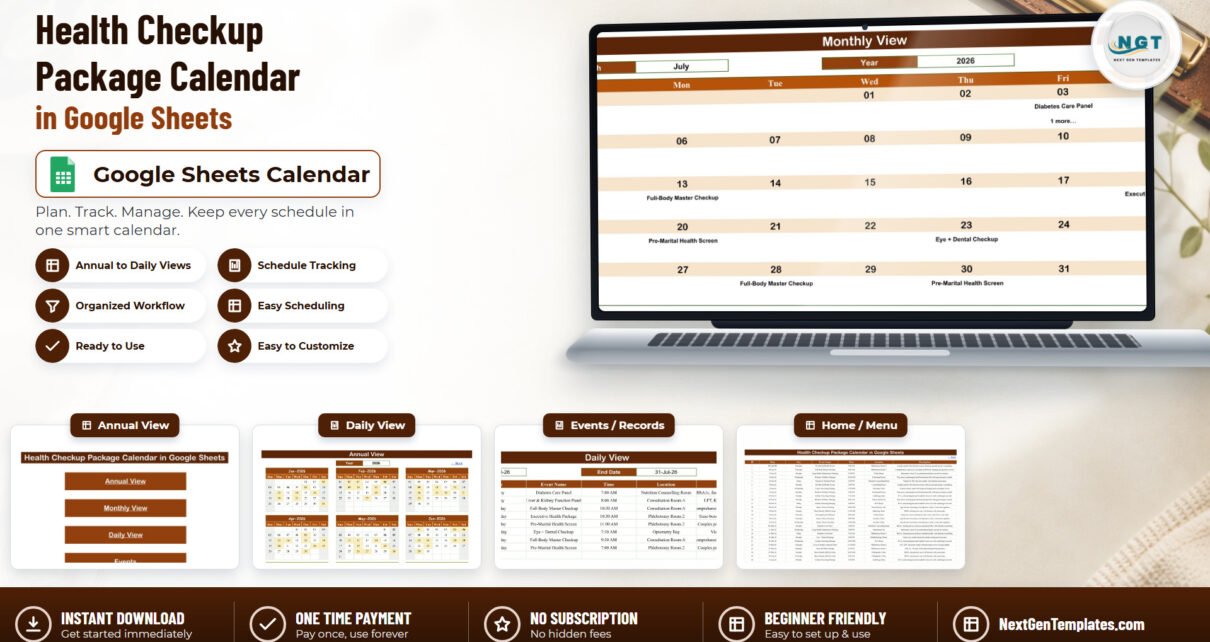
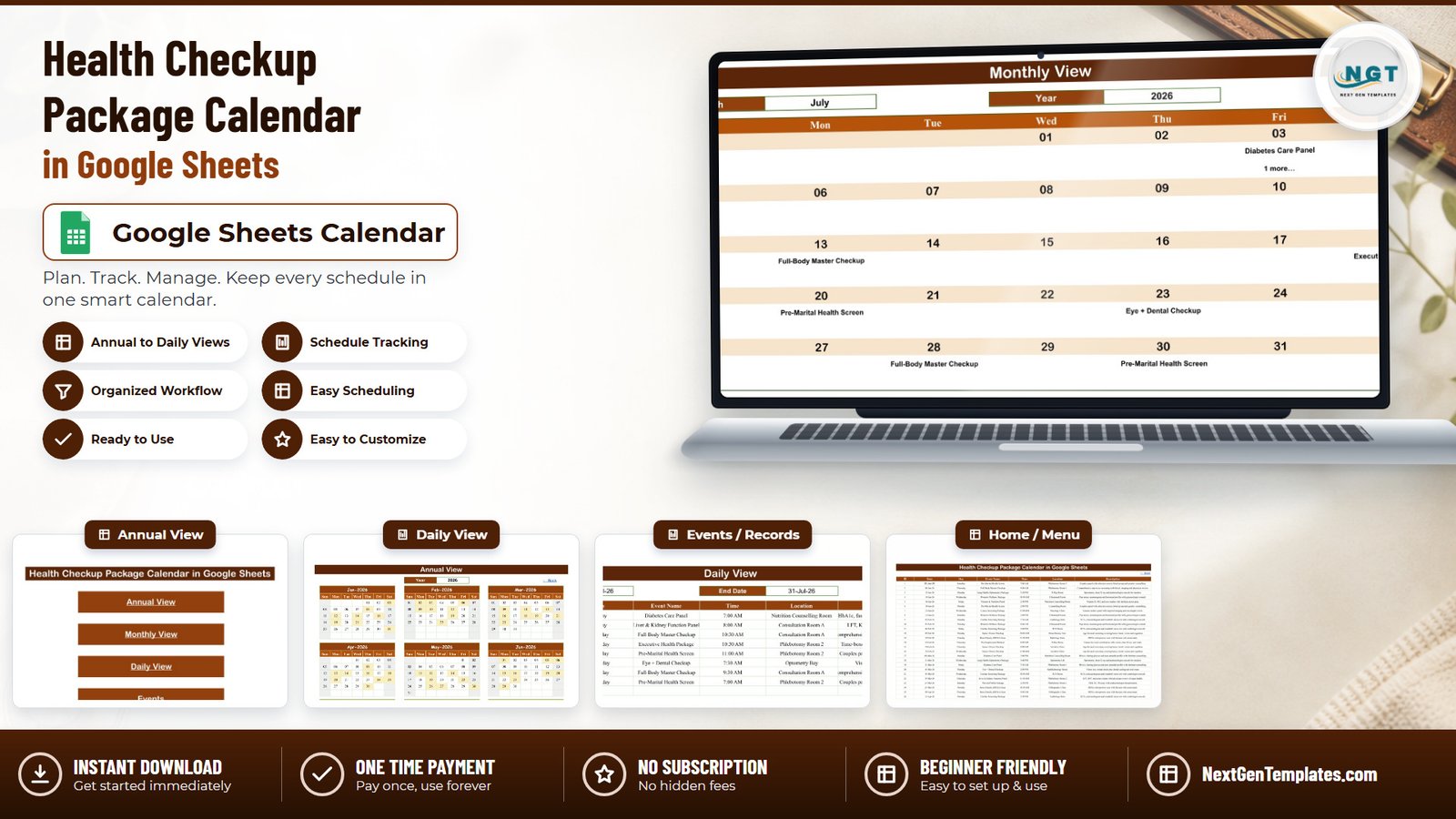
The working screen, and the one on the cover image. Two dropdowns — Month and Year — feed a DATEVALUE formula that rebuilds the grid, and each date cell runs a VLOOKUP against the Events tab to print the package booked that day.
In the sample data, July 2026 shows a Diabetes Care Panel on Friday the 3rd with “1 more…” printed underneath it, a Full-Body Master Checkup on Monday the 13th, an Executive Health Package on Saturday the 18th, a Pre-Marital Health Screen on Monday the 20th, an Eye + Dental Checkup on Thursday the 23rd, a second Full-Body Master Checkup on Tuesday the 28th, and a second Pre-Marital Health Screen on Thursday the 30th.
Daily View
A Start Date, an End Date, and a FILTER formula that returns every booking in the range with its ID, date, weekday, package name, time, room and description. Set both dates to the same day and you have tomorrow’s run sheet; set them a month apart and you have the month’s full list, which is how the July example above resolves to eight rows rather than seven.
Events
The database. Seven columns — ID, Date, Day, Event Name, Time, Location, Description — and 100 rows of sample data with no formulas at all. The view tabs read rows 4 through 999, so there is headroom for roughly 996 bookings before anything needs extending.
List (hidden)
Month names and the rolling year range. You will probably never open it.
What the File Deliberately Does Not Hold
This matters more than any feature, so it gets its own section rather than a footnote.
There is no patient identifier anywhere in this workbook. The Events tab has exactly seven columns, and none of them is a patient name, patient ID, MRN, hospital number, NHS number, date of birth, phone number, email address, insurance or policy number, diagnosis, or test result. We scanned all 100 sample rows including the free-text Description column: zero identifier terms, zero clinical values.
That is a design decision, not an oversight. It means the schedule can be shared with a front desk, a phlebotomy team, or even a corporate client’s HR contact without exposing a single person’s health information — because there is nowhere in the file to put it. Your patient identities stay in your clinical system.
The corollary is equally plain. A Google Sheet is not a validated clinical system and is not appropriate storage for protected health information. This template makes no HIPAA, GDPR, NABH, CQC or Joint Commission claim, connects to no EHR, LIS, RIS or PACS, and has no audit trail, no role-based permissions and no encryption at rest beyond what Google Workspace itself provides. If you add an identifier column yourself, the risk that creates is yours.
Health Checkup Package Calendar vs. Excel vs. Paid Clinic Software
| This template (Google Sheets) | The Excel edition | Paid clinic/EHR software | |
|---|---|---|---|
| Cost | $4.99 once | $4.99 once | $40–$150 per user per month |
| Platform | Any browser, phone, tablet | Microsoft Excel, macro-enabled | Vendor cloud or on-premise |
| Setup time | Under 10 minutes | Under 10 minutes | Weeks, with onboarding |
| Real-time collaboration | Yes, native | Only via OneDrive | Yes |
| Mobile access | Yes | Limited — macros do not run on mobile | Yes |
| Customisable fields | Yes | Yes | Usually locked or chargeable |
| Share with a link | Yes | No | No, seat-based logins |
| Year-1 cost at 5 users | $4.99 | $4.99 | $2,400–$9,000 |
| Stores patient records | No, by design | No, by design | Yes |
| Blocks a double-booked room | No | No | Yes |
| Sends reminders | No | No | Yes |
Who Should Use This Template
It suits a diagnostic centre running a manageable number of packaged checkups a week; a preventive-health clinic whose front desk needs one visible schedule; a corporate health-camp coordinator running Pre-Employment Medicals and Executive Packages against a contract; and a hospital wellness desk that wants Senior Citizen Checkups and DEXA scans spread evenly through the year.
It does not suit a high-volume hospital doing hundreds of bookings a day, a practice that needs recall dates generated automatically, or anyone who needs the system itself to prevent a scheduling conflict. Those are software problems, not spreadsheet problems.
Real-World Use Cases
A 14-room diagnostic centre. The front desk keeps the Events tab open, filters Daily View to today, and prints one sheet each morning listing package, time and room. Phlebotomy Room 1 and Room 2 stop arguing about the 7:00 AM Full-Body Master Checkup.Health Checkup Package Calendar in Google Sheets
A corporate health-camp coordinator. One copy of the file per employer contract. The dates go in, and the Monthly View link is shared with the client’s HR contact — who sees the schedule and no employee names, because the file has nowhere to put them.
A hospital wellness desk. Annual View is used to level the year: Senior Citizen Checkups and Bone Density scans spread across twelve months instead of stacked into January. The “1 more…” marker flags the days already carrying two.Health Checkup Package Calendar in Google Sheets
Advantages of the Health Checkup Package Calendar in Google Sheets
- It is honest about being a calendar. One dataset, four views, nothing pretending to be an analytics engine.
- Nothing to install. No macros to enable, no add-on permission prompt, no desktop dependency.
- Sample data you can actually read. Every one of the 100 rows carries a real package name, a real room and a one-line description of what the package involves — so the file teaches you its own structure.
- Version history for free. Google Sheets tracks every edit; if somebody deletes a week of bookings, File → Version history restores it.Health Checkup Package Calendar in Google Sheets
- It costs less than one coffee and is a one-time payment.
Opportunities for Improvement
Three limitations, stated plainly, because you will meet all three eventually.
1. Monthly View shows only the first booking on a busy day. The grid uses VLOOKUP, which returns one match. On a date with two bookings it prints the first and adds “1 more…” underneath — a useful flag, but you must switch to Daily View to see what the second one is. In the sample year this happens on 03-Jul-2026 and 21-Dec-2026.Health Checkup Package Calendar in Google Sheets
2. Nothing prevents a double booking. Two packages can be entered into the same room at the same time and the file will accept both silently, with no warning and no conflict highlight. If that matters to you, add a conditional-format rule on Date + Time + Location, or accept it as the trade-off for a $4.99 spreadsheet.Health Checkup Package Calendar in Google Sheets
3. The Day column is typed text, not a formula. Column C holds the weekday as literal text. Every one of the 100 sample rows is correct — we recomputed all 100 against the real 2026 calendar and found zero mismatches — but if you edit a date later, the weekday will not follow it. The one-line fix is to replace C4 with =TEXT(B4,"dddd") and fill down, which converts it to a live formula. Google’s own TEXT function documentation covers the format codes if you want a different weekday style.Health Checkup Package Calendar in Google Sheets
Best Practices
- Share with named people, not “anyone with the link.” A room schedule is internal information even when it holds no patient data.
- Keep one file per site. Two branches in one Events tab makes Monthly View unreadable; the file copies in seconds.
- Convert the Day column to a formula before you start editing dates, using the fix above.
- Use the Description column for logistics, not clinical notes. “Fasting required, 12 hours” is fine. Anything about a specific person is not.
- Level the year in Annual View first, then fill in the detail. It is far easier to spread the load before the bookings are confirmed.
- Protect the three view tabs (Data → Protect sheets and ranges) so nobody types over a formula by accident.Health Checkup Package Calendar in Google Sheets
Explore Relevant Templates
Other Google Sheets calendars that sit next to this one in a diagnostic workflow:
- Lab Sample Collection Calendar in Google Sheets
- Medical Appointment Calendar in Google Sheets
- Radiology Slot Booking Calendar in Google Sheets
- Patient Follow-Up Visit Calendar in Google Sheets
- Diet Plan Calendar in Google Sheets
- Clinics Dashboard in Google Sheets — for the numbers a calendar cannot give you
Prefer Microsoft Excel? A separate Health Checkup Package Calendar in Excel edition is built independently rather than converted from this file. If you are new to Google Sheets generally, our Google Sheets section has walkthroughs of the formulas used here.Health Checkup Package Calendar in Google Sheets
Frequently Asked Questions
Does the Health Checkup Package Calendar in Google Sheets store patient records?
No. Seven columns, none of them an identifier. No name, ID, MRN, date of birth, contact detail, diagnosis or result. Verified across all 100 sample rows.Health Checkup Package Calendar in Google Sheets
Is it HIPAA or GDPR compliant?
No, and it makes no such claim. A Google Sheet is not a validated clinical system. Because it holds no identifiers the practical risk is low, but compliance is a property of your organisation’s processes, not of a spreadsheet.
Can it connect to my EHR or lab system?
No. There is no integration, API or import. It is standalone.Health Checkup Package Calendar in Google Sheets
What happens when two checkups fall on the same day?
Monthly View shows the first and prints “1 more…”. Daily View, which uses FILTER, lists all of them.Health Checkup Package Calendar in Google Sheets
Will it warn me about a double-booked room?
No. Nothing validates conflicts.Health Checkup Package Calendar in Google Sheets
Does it need macros or an add-on?
No. Native Google Sheets formulas only — 332 of them across three tabs.Health Checkup Package Calendar in Google Sheets
Can I change the package names and rooms?
Yes. Both are free text in the Events tab. The 16 packages and 28 rooms are sample data.Health Checkup Package Calendar in Google Sheets
How do I get my own copy?
The PDF in your download carries a “Make a copy” link. Click it and an editable copy lands in your own Google Drive; the original stays view-only.Health Checkup Package Calendar in Google Sheets
About the Author
Built by PK – Microsoft Certified Professional with 15+ years of Excel, Google Sheets, and Power BI experience. Founder of NextGenTemplates, reaching 300K+ subscribers across YouTube channels. Every template is hand-built and tested before release.Health Checkup Package Calendar in Google Sheets
Conclusion
The Health Checkup Package Calendar in Google Sheets does one job and says clearly what it will not do. It shows you which of 16 checkup packages is booked into which of 28 rooms on which day, in a year view, a month view and a printable day sheet, with 100 realistic bookings already in place. It will not store a patient record, prevent a double booking, chase a recall date or talk to your EHR — and knowing that before you buy is worth more than a longer feature list.Health Checkup Package Calendar in Google Sheets
If your checkup schedule currently lives on a whiteboard or in a group chat, this replaces it for the price of a coffee.
Get the Health Checkup Package Calendar in Google Sheets — $8.99, currently $4.99, one-time payment and lifetime access. For walkthroughs of this and every other template we build, subscribe at youtube.com/@PKAnExcelExpert.