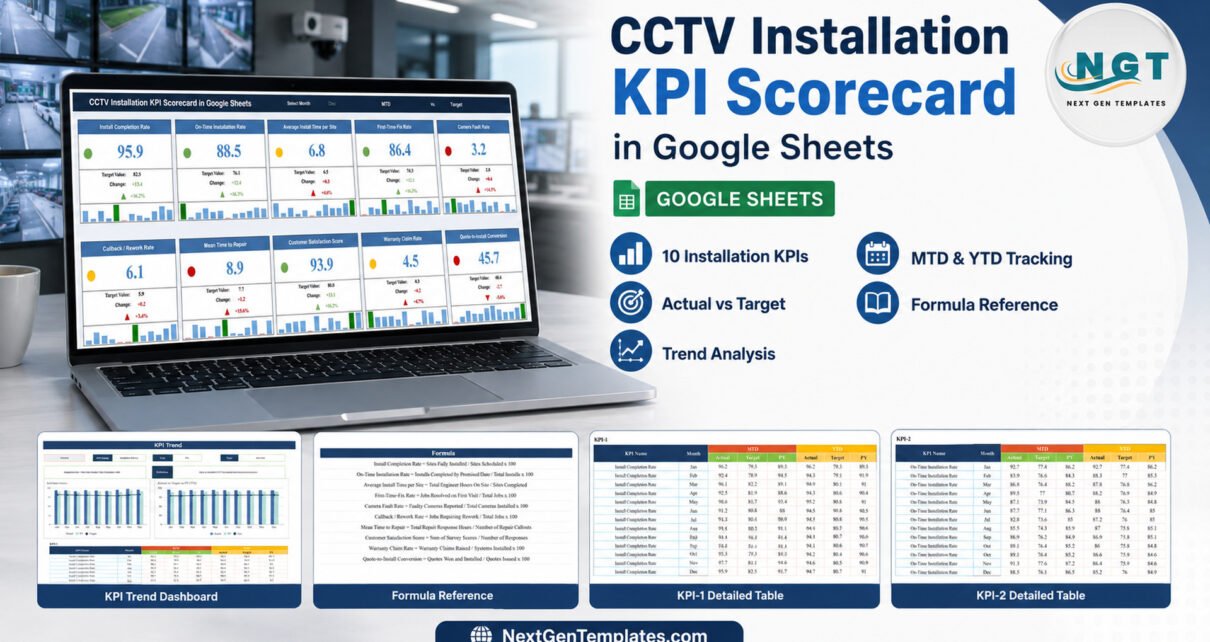
CCTV installation teams can finish a job on time and still face callbacks, faults, warranty claims or slow repair response. The CCTV Installation KPI Scorecard in Google Sheets keeps 10 operational measures in one monthly review: four KPI groups, 12 months of data, MTD and YTD comparisons, and three status colours. It is a reporting template rather than surveillance software, so it measures the figures your team enters; it does not watch cameras or promise security outcomes.
Get the CCTV Installation KPI Scorecard in Google Sheets

Key Features of CCTV Installation KPI Scorecard in Google Sheets
The template is built for a structured monthly conversation. Its scorecard combines actual and target values, absolute and percentage change, and a red-yellow-green signal. Lower-the-better measures such as fault, rework, repair-time and warranty rates are handled differently from upper-the-better measures such as completion, first-time fix, customer satisfaction and conversion.
- 10 CCTV installation and service KPIs
- Monthly MTD and YTD tracking
- Actual, target and previous-year comparisons
- Red, yellow and green status indicators
- 12-month trend charts for the selected KPI
- Definitions, formulas, units, groups and KPI direction
- Editable Google Sheets data and collaboration controls
Scorecard Pages Explanation
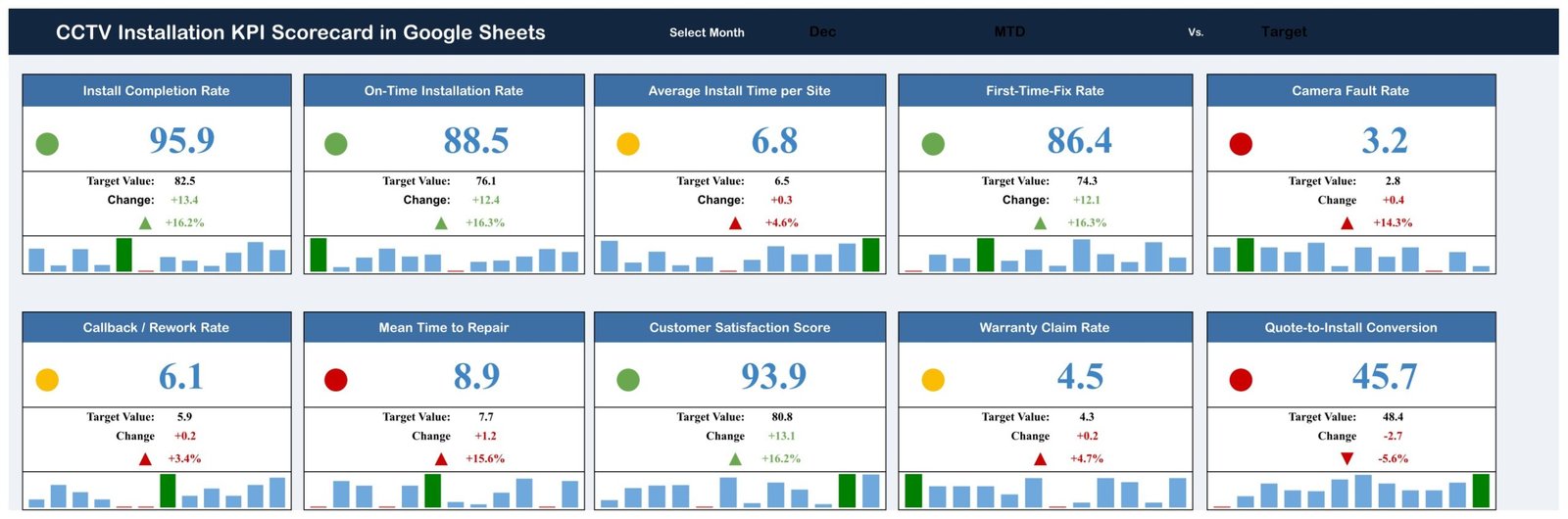
Main KPI scorecard
The main page displays all 10 measures as cards. For December in the sample, each card shows its current value, target, change and status plus a compact 12-month chart. The page makes trade-offs visible: strong completion or satisfaction results do not hide a missed repair-time, fault-rate or conversion target.
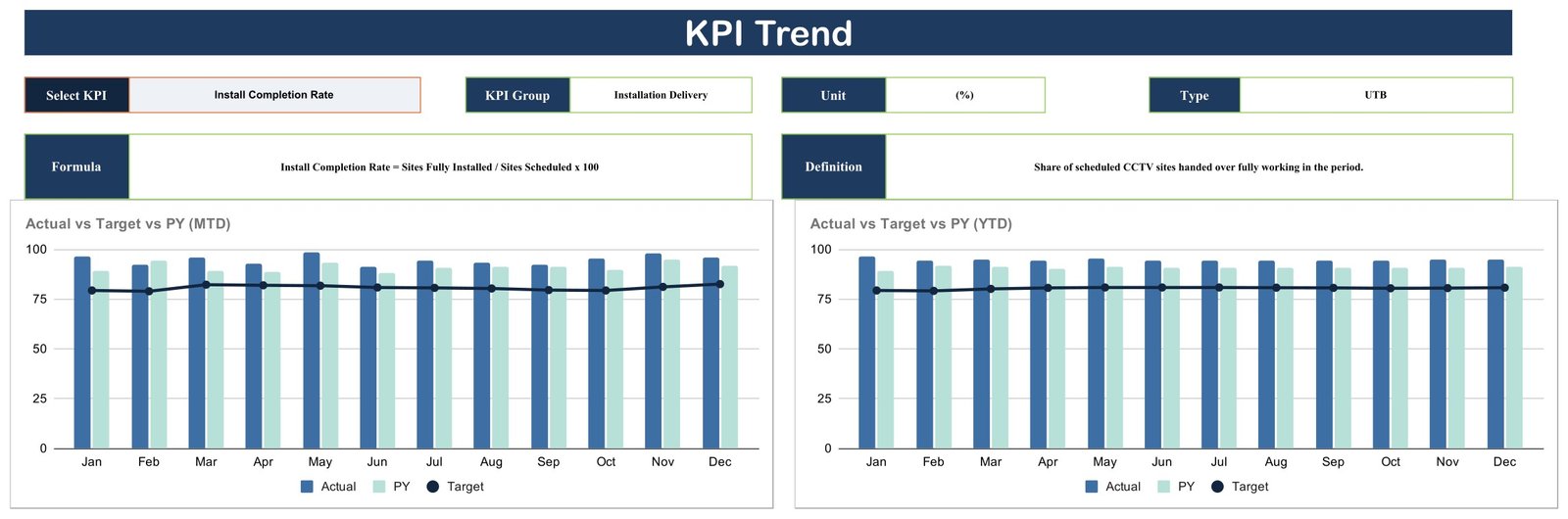
KPI trend analysis
Select one KPI to view its group, unit, direction, formula and definition. Two charts compare Actual, Previous Year and Target month by month for MTD and YTD. This is useful when a single red status needs context: one poor month may be isolated, or it may sit inside a longer pattern.
KPI definition reference
The definition page lists the four groups and 10 measures. Installation Delivery contains Install Completion Rate, On-Time Installation Rate and Average Install Time per Site. Quality & Reliability covers First-Time-Fix Rate, Camera Fault Rate and Callback / Rework Rate. Service & Support includes Mean Time to Repair, Customer Satisfaction Score and Warranty Claim Rate. Sales & Commercial contains Quote-to-Install Conversion.

Monthly KPI data
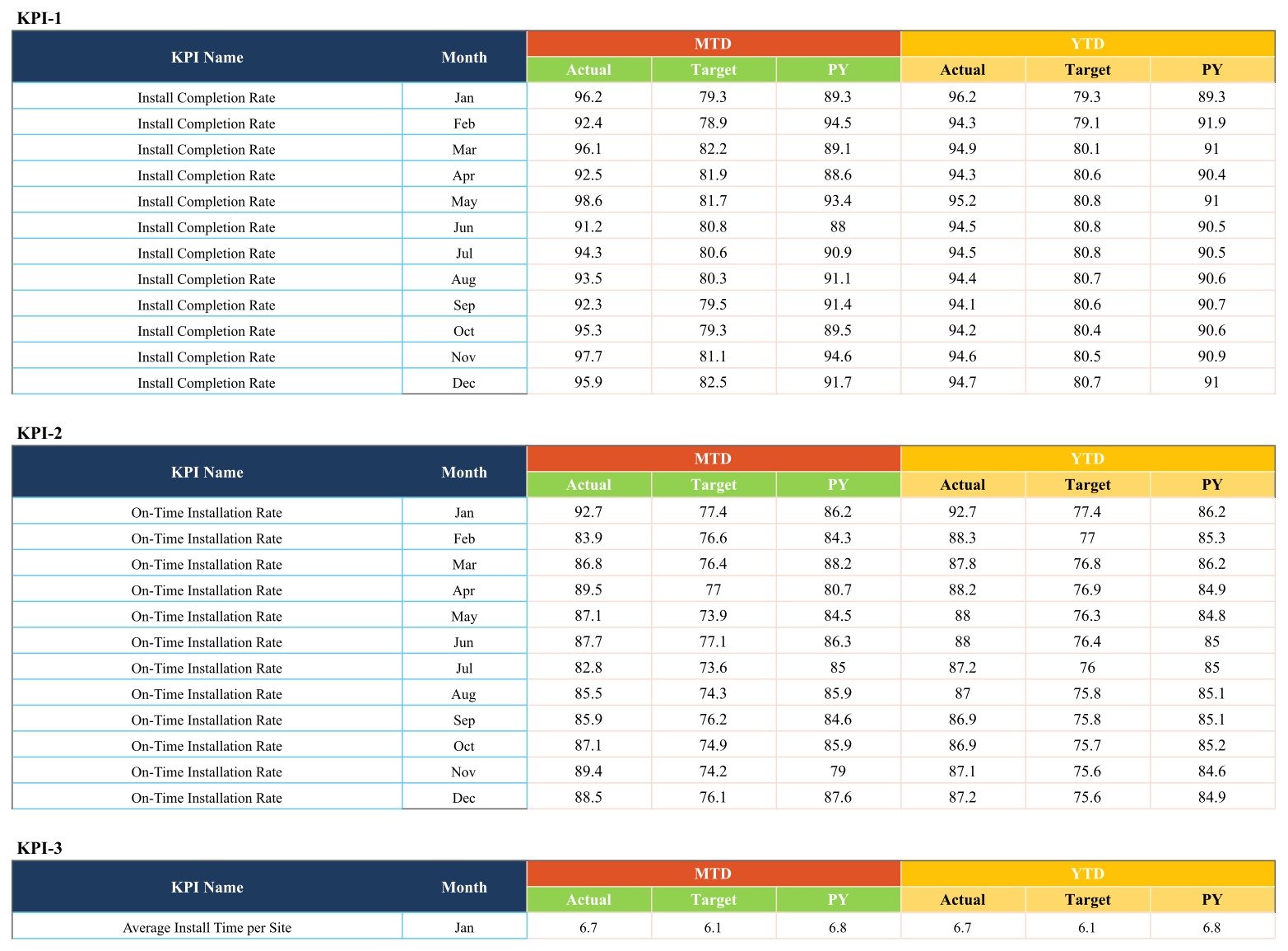
The detailed table stores month-level MTD and YTD actual, target and previous-year figures for every measure. Separating data maintenance from the scorecard reduces presentation clutter and gives reviewers a clear place to check the numbers behind each card.
CCTV Installation KPI Scorecard in Google Sheets vs. Excel vs. Paid Field-Service SaaS – Feature Comparison
| Decision point | Google Sheets scorecard | Excel scorecard | Paid field-service SaaS |
|---|---|---|---|
| Commercial model | One-time template purchase | One-time file purchase | Recurring subscription |
| Access | Browser and Google Drive | Desktop workbook | Vendor account and app |
| Collaboration | Link sharing and simultaneous editing | Typically file-owner workflow | Role-based multi-user workflow |
| Customisation | Editable cells, labels and formulas | Editable workbook | Varies by plan |
| KPI reporting | Included for 10 defined measures | Often similar reporting | Usually configurable dashboards |
| Scheduling and dispatch | Not included | Not included | Often included |
| Camera integration | Not included | Not included | Not implied; depends on specialist systems |
| Year-one cost at 5 users | One template price | One template price plus applicable licences | Usually five recurring user fees |
Who Should Use This Template
The scorecard fits an installation manager who already receives verified monthly job figures, a service supervisor tracking callbacks and repair performance, or an owner who wants one reporting view across delivery, quality and conversion. It can support CCTV, low-voltage and security-system contractors, provided each business reviews and adapts the definitions to its own process.
It is not suitable as a live monitoring console, incident-management system, technician scheduler, asset register, CRM, warranty database or legal-compliance framework. It cannot tell whether a camera is working unless someone enters a valid measure derived from the appropriate source.
Real-World Use Cases
Weekly delivery review
Priya uses completion, on-time installation and average install time to prepare the monthly operating review. She links corrective actions to her separate task-management process rather than treating a traffic light as an action plan.
Quality and rework discussion
Daniel reviews first-time fix, camera faults and callback / rework together. A higher fault result does not automatically identify the cause, but it tells him where to investigate technician notes, supplier batches or site conditions.
Customer and commercial balance
Amina compares customer satisfaction, warranty claims and quote-to-install conversion. This prevents the sales discussion from being separated from delivery and service quality.
Advantages of CCTV Installation KPI Scorecard in Google Sheets
The main advantage is transparency. KPI names, formulas and directions are visible rather than buried inside a black-box application. The monthly detail provides an audit trail for the displayed result, while Google Sheets makes the file accessible to authorised colleagues without emailing multiple workbook versions. Teams can also adapt labels and targets as their service model develops.
Google provides detailed guidance for controlling who can view, comment on or edit a file in Google Drive sharing settings. Use named-person access for operational reports and review link-sharing settings before adding business data.
Opportunities for Improvement
A future edition could add role-specific data-entry forms, source-system imports, an action log, technician or branch filters, and locked input ranges. Those capabilities are not present in this product. Users who require automated work orders, dispatch, asset-level maintenance histories, camera-health telemetry or incident workflows should evaluate a specialist field-service or security platform.
The sample targets and figures are demonstration values, not industry benchmarks. A responsible rollout should define ownership, data sources, reporting cut-off dates and validation rules for every KPI.
Best Practices
- Define each KPI before entering data. Confirm the numerator, denominator, scope and reporting period.
- Assign one owner per source. Avoid mixing unverified figures from separate spreadsheets.
- Set targets deliberately. Do not copy the demonstration values as policy.
- Respect metric direction. A lower repair time or fault rate is favourable; a higher completion rate is favourable.
- Investigate, do not diagnose from colour alone. Traffic lights indicate variance, not root cause.
- Protect operational information. Restrict sharing and avoid entering camera credentials, live feed URLs, sensitive site diagrams or personal data.
- Keep a separate action log. Record decisions, owners and due dates outside the scorecard if your workflow requires them.
Explore Relevant Templates
For a closely related installation view, see the Security System Installation KPI Scorecard. You can also compare the Window and Door Installation KPI Scorecard, Solar Panel Installation KPI Scorecard, and Elevator Maintenance KPI Scorecard. The CCTV-specific template is available from NextGenTemplates.
Building scorecards is a learnable skill, and the Excel Pivot Tables & Dashboards course on NextGenTemplates Academy covers the reporting side with downloadable practice files.
Get the CCTV Installation KPI Scorecard in Google Sheets
Frequently Asked Questions
What does the CCTV Installation KPI Scorecard track?
It tracks 10 monthly delivery, quality, service and commercial KPIs, including completion, timeliness, faults, callbacks, repair time, satisfaction, warranty claims and conversion.
Does it connect to CCTV cameras or NVR systems?
No. It is a Google Sheets reporting template and does not connect to cameras, recorders, video feeds or alarm systems.
Are the figures industry benchmarks?
No. They are demonstration data. Replace them with your organisation’s verified values and approved targets.
Can the KPI names and formulas be changed?
Yes, but structural or formula changes should be tested on a copy before the scorecard is used for management reporting.
Can a team edit the scorecard together?
Yes. Google Sheets supports simultaneous editing, provided the owner grants appropriate permissions.
Does this prove security or regulatory compliance?
No. The template provides no security guarantee, certification, statutory reporting or legal advice.
How is the template delivered?
The downloadable PDF contains the Google Sheets copy link. Use it to create your own editable Drive copy.
About the Author
Built by PK – Microsoft Certified Professional with 15+ years of Excel, Google Sheets, and Power BI experience. Founder of NextGenTemplates, reaching 300K+ subscribers across YouTube channels. Every template is hand-built and tested before release.
Conclusion
The CCTV Installation KPI Scorecard in Google Sheets gives installation and service leaders a visible, editable monthly measurement layer without pretending to replace their operational systems. Use the 10 included KPIs as a starting framework, verify every data source, tailor the definitions and keep sharing controlled. Review the product draft on NextGenTemplates.
Last updated: September 10, 2026.