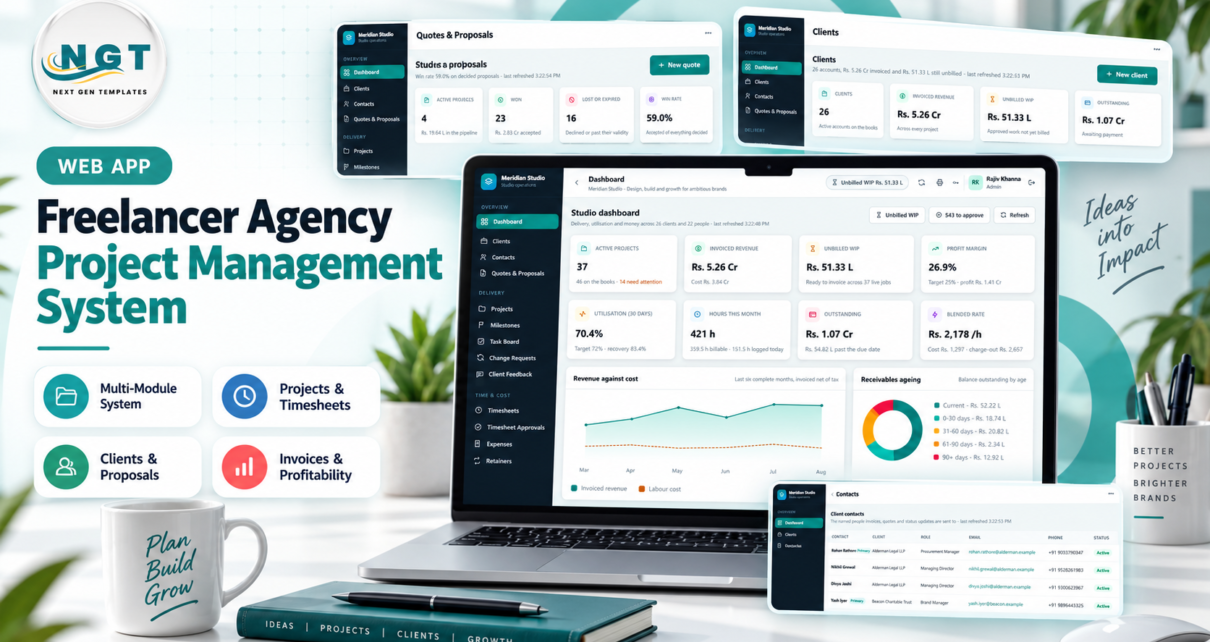
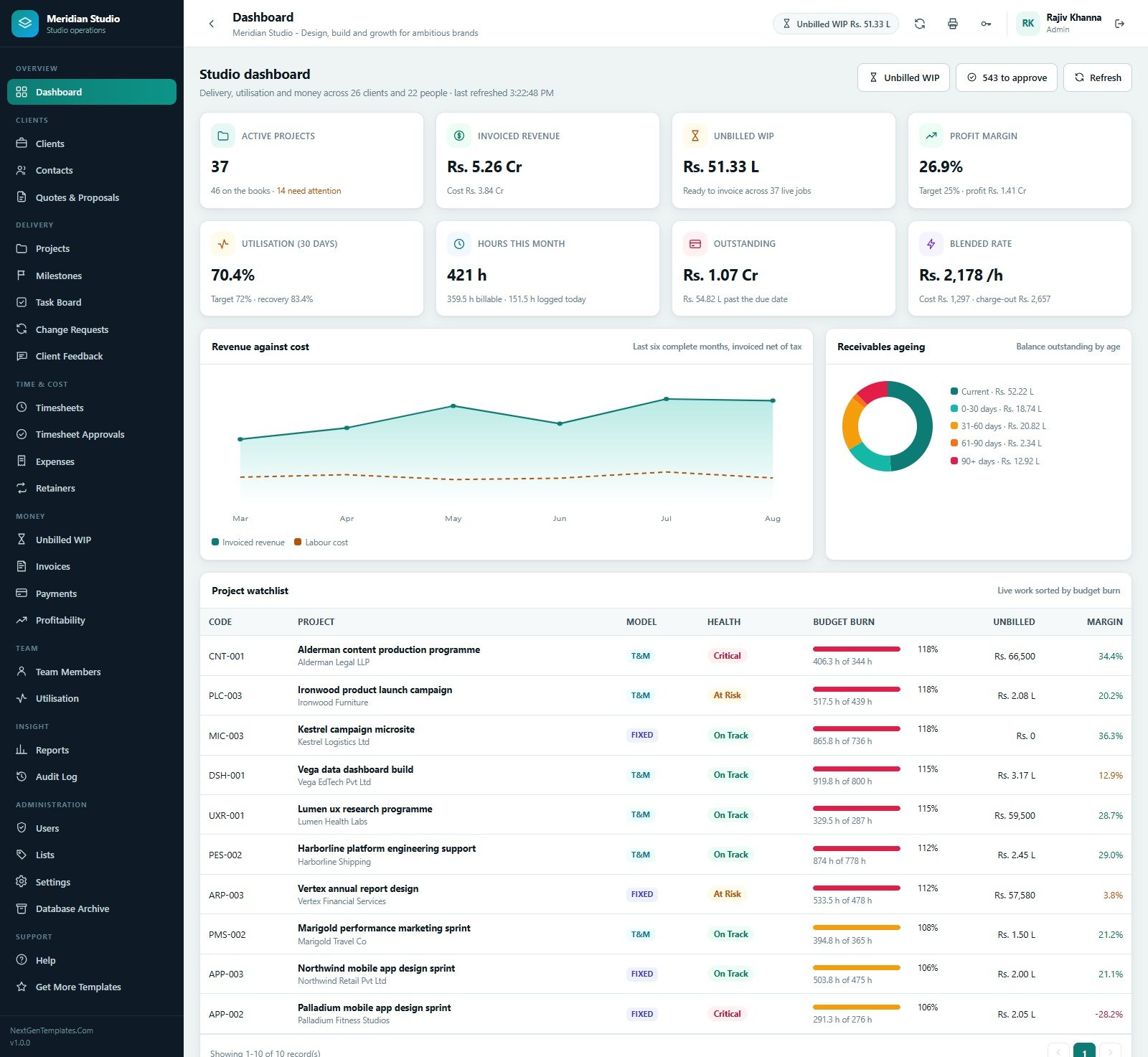
Most studios lose money in the gap between the work being done and the invoice being raised. Hours sit in someone’s notebook, a milestone is delivered but never signed off, a retainer quietly runs 14% over its allowance, and by the time anybody looks the month is closed. The Freelancer & Agency Project Management System Web App is an agency project management system built in Google Apps Script that closes that gap: 27 screens, 12 operational reports, 6 roles and one chain running from quote to project to approved time to invoice to profit. The seeded demonstration studio carries 26 clients, 66 contacts, 46 projects, 44 quotes, 170 milestones, 462 tasks, 8,400 timesheet rows, 380 expenses, 10 retainers, 217 invoices and 186 payments, and its dashboard reports Rs 5.26 Cr invoiced, Rs 51.33 L of unbilled WIP, a 26.9% profit margin and 70.4% utilisation. Those are sample figures used to exercise every calculation, not a promise about your studio.
Get the Freelancer & Agency Project Management System Web App
Try the Live Demo
Open the shared demonstration system and sign in as each role in turn. A Team Member sees a task board and their own time; an Accountant sees the money and no delivery editing. The difference is the point of the product.
Demo login details
| Role | Username | Password |
|---|---|---|
| Admin | admin | Admin@2025 |
| Director | director | Director@2025 |
| Project Manager | pm | Manager@2025 |
| Account Manager | account | Account@2025 |
| Team Member | team | Member@2025 |
| Accountant | accounts | Finance@2025 |
These credentials belong to a shared seeded demo that is reset from time to time. They are not the credentials of a customer deployment – your own copy is created with its own accounts when you run setup.
Key Features of the Freelancer & Agency Project Management System Web App
One chain from quote to profit
A quote is priced by line and converted into a project, carrying its value across as the project budget and stamping the quote with the project it produced. The project carries milestones and tasks. Team members log time against a task. An approver releases it. Only approved billable time that has not already been invoiced counts as unbilled WIP, and only WIP can be pulled onto an invoice. Payments settle the invoice, and Profitability reads the same rows back as revenue less labour at each person’s cost rate less absorbed expenses. Nothing is retyped between stages, which is why the numbers agree across screens.
Three billing models that behave differently
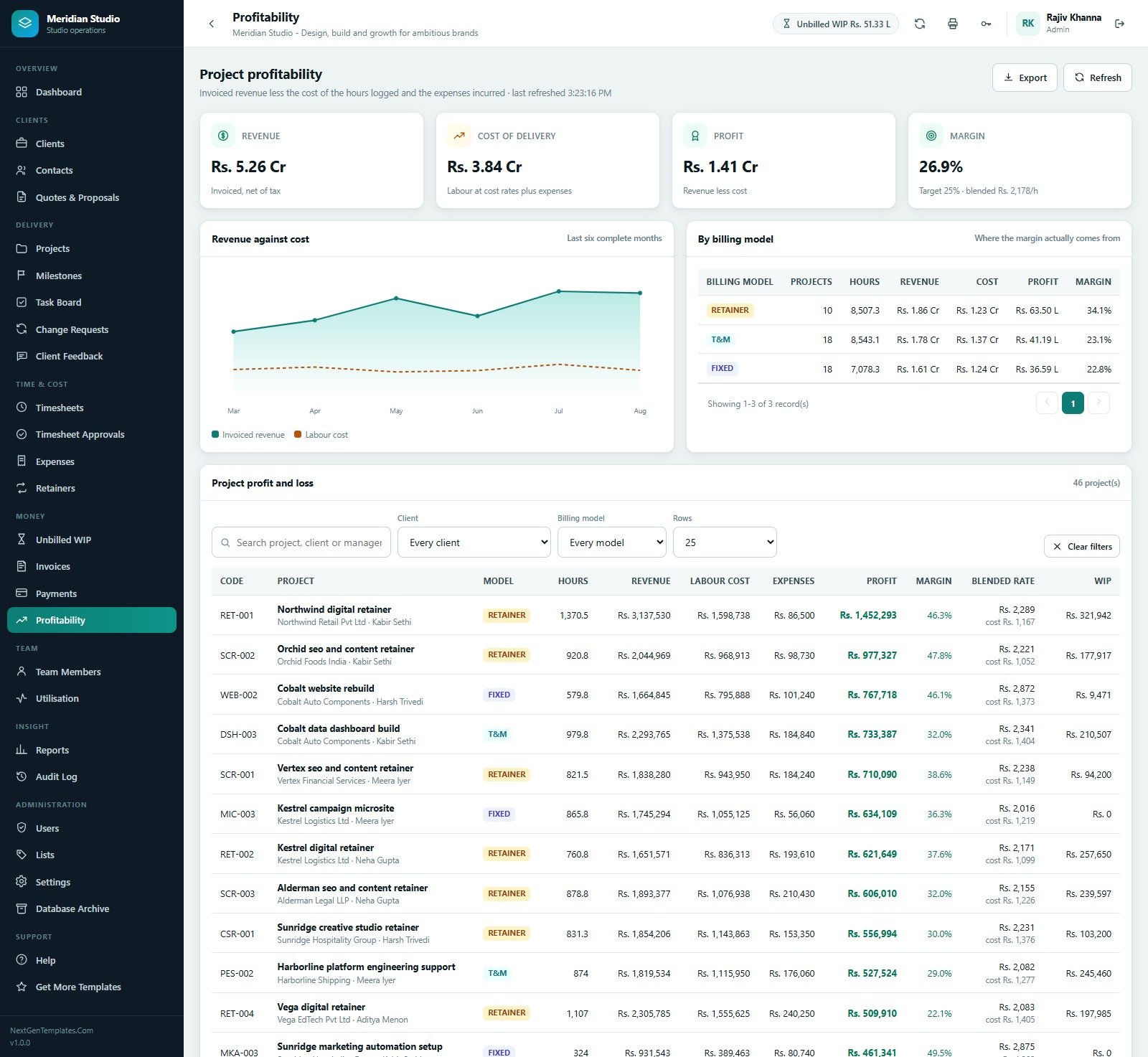
Fixed Price bills on milestone sign-off, so hours are never billed directly and the milestone value carries the WIP. Time & Materials bills approved hours at the rate stored on each time entry. Retainer bills a monthly fee whether or not the allowance is used, carries unused hours forward where the rollover policy allows, caps them where a cap is set, and charges anything drawn beyond allowance plus rollover at the overage rate. In the seeded data those three models produce 34.1%, 23.1% and 22.8% margins respectively – the kind of comparison that changes how you price the next renewal.
Role separation enforced on the server
Admin, Director, Project Manager, Account Manager, Team Member and Accountant each get a different sidebar, and the same permission map is re-checked server-side on every request, so a screen you cannot see is also a screen you cannot reach by guessing a URL. The Users page prints the matrix – 48 permissions for Admin, 41 for Director, 29 for Project Manager, 25 for Accountant, 24 for Account Manager and 15 for Team Member – so access can be audited instead of assumed.
Definitions you can read and change
Settings hold studio identity, currency and symbol, tax percentage and label, invoice prefix, payment terms, invoice footer, default rebill markup, the standard blended charge-out rate, weekly capacity, target utilisation, target margin and the budget-burn warning threshold. Lists hold every dropdown value in the app – 126 of them in the seeded copy – so you extend the vocabulary without touching code.
Screen-by-Screen Walkthrough
Dashboard, Clients, Contacts and Quotes
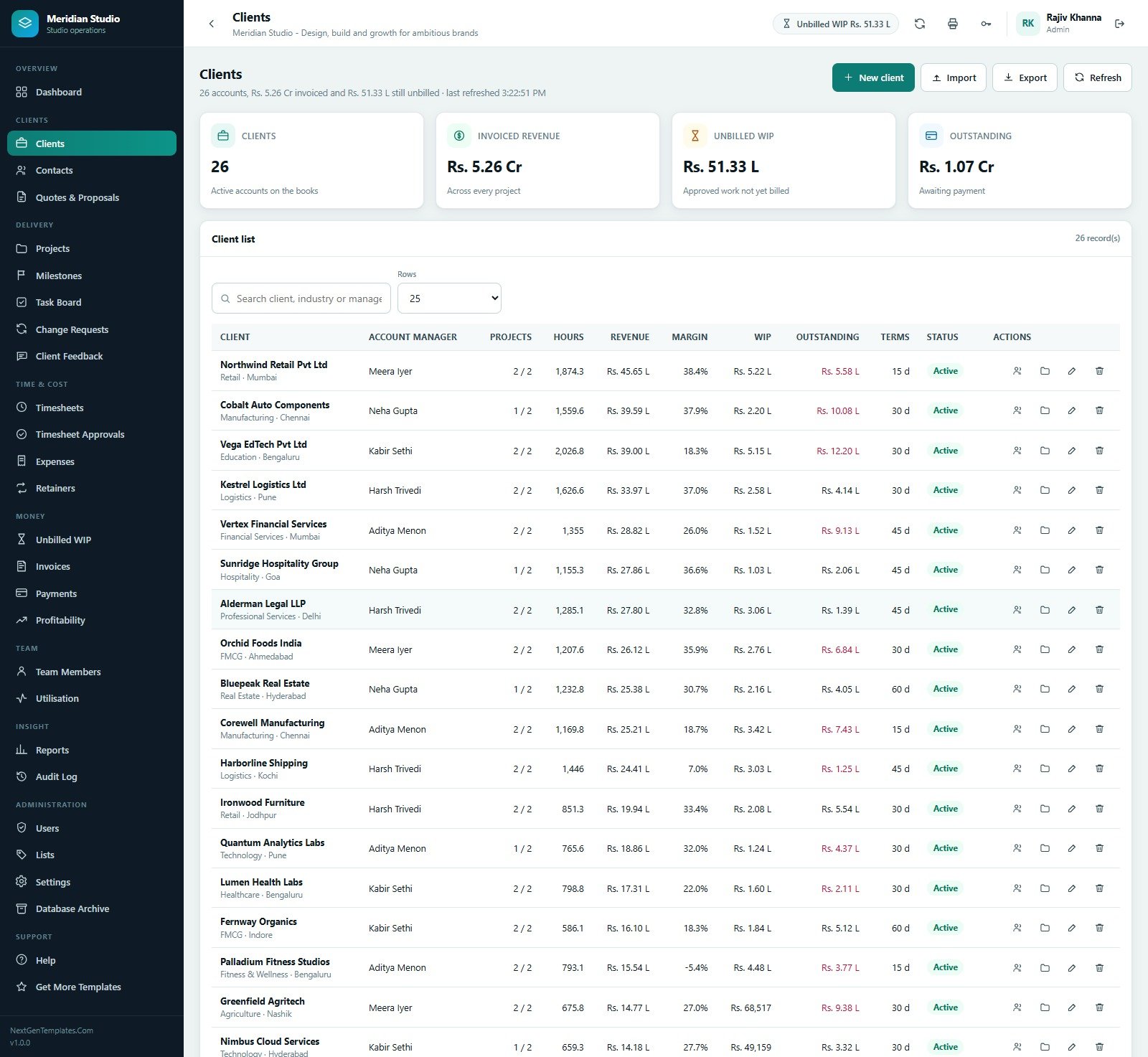
The dashboard leads with eight cards: active projects, invoiced revenue, unbilled WIP, profit margin, 30-day utilisation, hours this month, outstanding and blended rate. Below them a revenue-against-cost trend covers the last six complete months and a receivables ageing donut splits the balance current, 0-30, 31-60, 61-90 and 90+. A project watchlist sorts live work by budget burn, so the 118% job shows up first. Clients record account manager, industry, city, projects, hours, revenue, margin, WIP, outstanding and payment terms. Contacts name the people invoices and status updates actually go to, flagged Primary per client. Quotes & Proposals tracks open, won, lost or expired and a win rate.
Projects, Milestones, Task Board, Change Requests and Feedback
Projects show code, billing model, status and health, target end date, budget burn as hours used against hours budgeted, budget, invoiced, WIP and margin – with over-budget rows called out. Milestones are client-facing deliverables with a due date, a value, a sign-off date and the invoice they landed on; anything past its due date without sign-off appears on the slippage report. The Task Board groups work into Backlog, In Progress, Review, Blocked and Done, and the table underneath compares each task’s estimate with the hours actually logged as a variance. Change Requests record extra hours and extra value with a reason and an approval state, so scope growth is visible instead of absorbed. Client Feedback logs compliments, approvals, review notes and change ideas with a rating and a response date.
Timesheets, Approvals, Expenses and Retainers
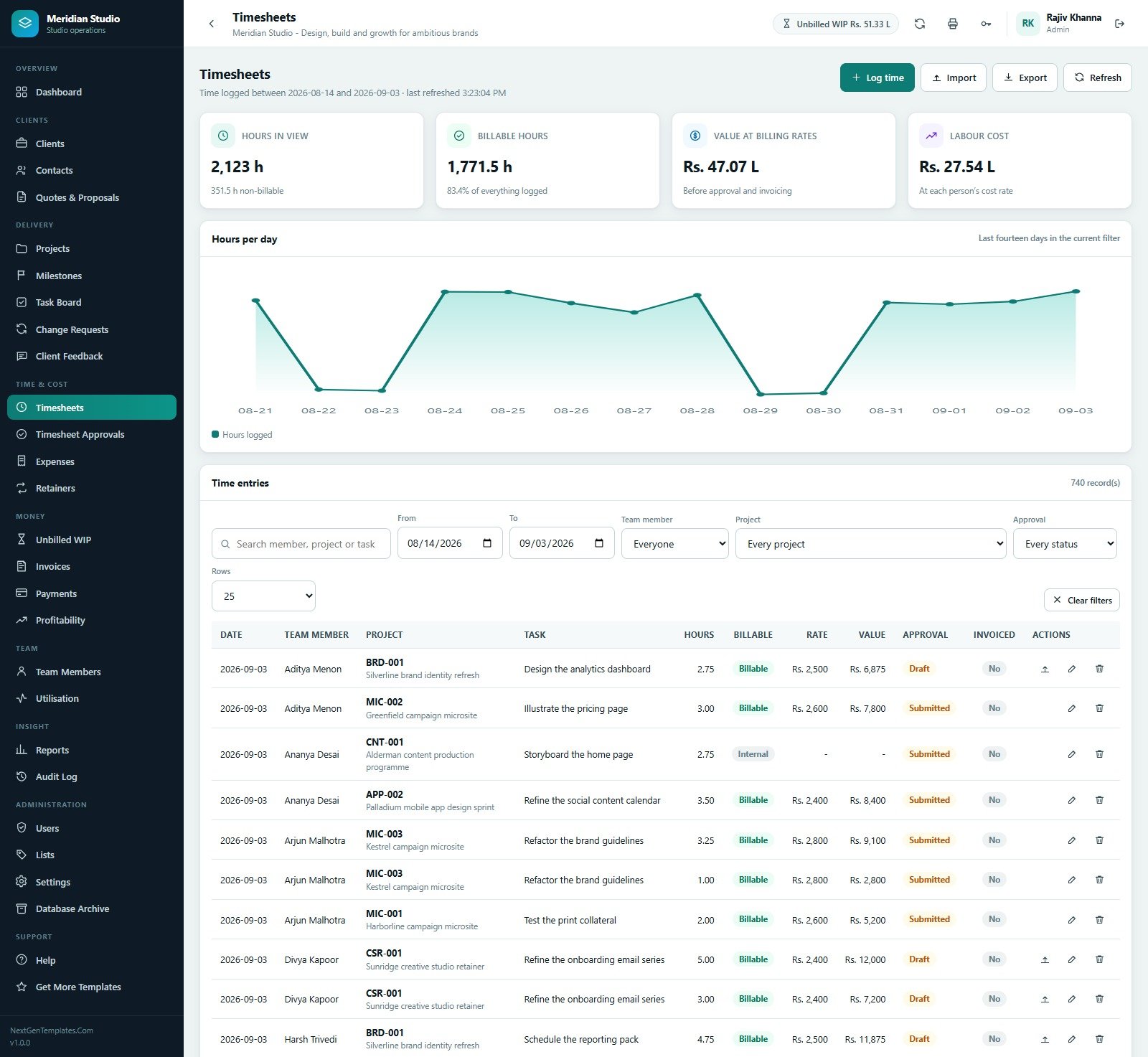
Timesheets filter by date range, person, project and approval state, chart hours per day, and show hours in view, billable hours, value at billing rates and labour cost side by side. Timesheet Approvals is the gate: it groups everything waiting by team member and shows the value locked behind approval – 543 entries, 1,572.5 hours and Rs 35.07 L in the seeded copy. Expenses record category, vendor, amount, a rebillable flag with its markup and the resulting rebill amount, splitting total spend into rebillable and absorbed. Retainers show allowance, rollover in, hours used, remaining, overage, monthly fee, rollover policy and last month’s consumption, with an on-screen explanation of exactly how a retainer is billed.
Unbilled WIP, Invoices, Payments and Profitability
Unbilled WIP is the money screen that matters most: invoiceable now, unbilled hours, rebillable expenses and the value blocked by approval, then a per-project breakdown of unbilled hours, time value, rebillables, milestones and awaiting approval. Invoices carry net, tax, total, paid and balance with an ageing table by client and a status of Sent, Part Paid or Paid. Payments log receipt number, method, reference, amount and the remaining invoice balance. Profitability closes the loop with revenue, cost of delivery, profit and margin, a by-billing-model summary and a per-project profit and loss including the blended rate achieved against cost.
Team, Utilisation, Reports, Audit Log and Archive
Team Members hold the two numbers everything else depends on – cost rate and charge-out rate – plus department, weekly capacity, logged hours and utilisation. Utilisation divides billable hours by capacity per person over a date range and flags who is on target and who is points under. Reports offers twelve operational reports: Project Profitability, Unbilled WIP by Client and Project, Invoice Ageing, Timesheet Summary, Team Utilisation, Budget Burn and Over-Budget Projects, Retainer Utilisation and Overage, Expense Analysis, Milestone Delivery and Slippage, Client Revenue Ranking, Quote Conversion and Payment Collection, each filterable, printable and exportable to CSV. The Audit Log records every create, edit, approval, invoice and archive by user and module. Database Archive moves closed transactions older than a cutoff into a separate spreadsheet after writing and registering a full backup, and never touches master data.
Freelancer & Agency Project Management System vs. a Spreadsheet vs. Paid SaaS – Feature Comparison
| This Web App | Spreadsheet workbook | Asana / Monday.com + invoicing add-on | |
|---|---|---|---|
| Cost | $39.99 once | Free, plus weeks of build time | About $25-$40 per user per month |
| Platform | Google Apps Script on your own Drive | Google Sheets or Excel | Vendor cloud |
| Setup time | 15-20 minutes from the PDF guide | Days to weeks | Hours, plus migration |
| Real-time team collaboration | Yes, multi-user with sign-in | Shared file, easy to break | Yes |
| Mobile access | Yes, responsive browser UI | Awkward on phones | Native apps |
| Customisable fields | Yes, via Lists and Settings, plus full source | Yes | Limited by plan tier |
| Share with a link | Yes, the deployed /exec URL | Yes | Invite-based seats |
| Year-1 cost at 5 users | $39.99 | $0 plus your time | $1,500-$2,400 |
| Retainer allowance, rollover and overage | Built in | Manual formulas | Usually a paid add-on |
| Approved-time-only invoicing | Enforced by the app | Honour system | Higher tiers only |
Who Should Use This Template
It suits a solo freelancer who bills hourly and keeps losing billable time between the work and the invoice; a two-to-thirty person design, content, development or marketing studio running fixed-price, time-and-materials and retainer work at once; and an agency owner or finance lead who wants project margin after real cost rates rather than after gross revenue. It also suits anyone who wants their operating data to stay in their own Google account rather than in a vendor’s database.
It is a poor fit if you need statutory accounting, payroll or tax filing – this raises invoices and records payments, it is not a ledger. It is not a file-storage, versioning or proofing tool. It does not send automated client chasers, does not connect to a payment gateway, and does not forecast resourcing beyond the capacity and utilisation figures you enter yourself.
Real-World Use Cases
A six-person brand studio
Designers log time against tasks during the week; the studio lead approves on Friday; on the first working day of the month the Unbilled WIP screen already says what is invoiceable and what is stuck behind approval. Invoicing stops being an archaeology exercise.
A solo developer on three retainers
The Retainers screen shows allowance, rollover in, used, remaining and overage per client per month. When a client hits 114% of last month’s allowance, the conversation happens before the invoice rather than after it.
A twenty-two person agency reviewing pricing
Profitability and the Client Revenue Ranking report show a retainer running at 47.8% margin against a fixed-price build at 22.8%. The next renewal gets priced on evidence, and the loss-making fixed-price template gets renegotiated or dropped.
Advantages of the Freelancer & Agency Project Management System Web App
- One source of truth. Time, expenses, milestones, invoices and margin all read the same rows, so two screens cannot disagree.
- Billing you cannot fudge. Approval genuinely gates invoicing, and every invoiced row is stamped so it can never be billed twice.
- Honest margin. Profit is calculated after each person’s cost rate and after absorbed expenses, not after gross revenue.
- No per-seat cost. One purchase, unlimited internal accounts, hosted on infrastructure you already pay Google for.
- Your data stays yours. The database is a Google Sheet in your own Drive, created when you run setup.
- Editable source. The complete Apps Script backend and HTML front end ship as plain text; nothing is minified or locked.
- Documented. A PDF user manual plus an in-app Help screen covering all seventeen topics, from the daily rhythm to the archive.
Opportunities for Improvement
Being straight about the edges matters more than a longer feature list. There is no automated email chaser for overdue invoices – you can email an invoice from the register, but nothing nags on a schedule. There is no payment-gateway integration, so payments are recorded after the fact. Reporting is operational rather than analytical: there is no pivot builder or custom report designer beyond the twelve supplied reports and their filters. Resource planning is retrospective – utilisation and capacity are reported, not forecast against a future booking board. Apps Script also has execution quotas, so a very large agency with heavy concurrent use should archive regularly and expect Google’s limits, not this template, to be the ceiling. Finally, currency is single, set in Settings: multi-currency invoicing would need a code change.
Best Practices
- Set real cost and charge-out rates for every team member before you trust a single margin figure. Everything downstream depends on those two numbers.
- Approve time weekly, not monthly. Value blocked behind approval is value you cannot invoice.
- Record change requests as change requests. Scope that gets absorbed silently is the most common reason a fixed-price project ends at negative margin.
- Set the budget-burn warning threshold in Settings low enough that a project turns amber while you can still act on it.
- Review the Retainer Utilisation and Overage report before raising monthly invoices, so overage is expected rather than disputed.
- Change every seeded password the first time you sign in, and delete or deactivate the roles you do not use.
- Run the Database Archive at the end of each financial year; it backs up first and never touches clients, projects or master data.
Explore Relevant Templates
- App Development Project Management System Web App – the same delivery spine tuned to sprints and releases.
- Graphic Design Agency Management System Web App – adds briefs, revisions, approvals and an asset register.
- Expense & Petty Cash Management System Web App – a dedicated claim and reimbursement workflow.
- Franchise Royalty Management System Web App – the same architecture applied to franchise fees and royalties.
Want to build skills like this step by step? The NextGenTemplates Academy learning paths walk you through spreadsheet and data skills with practice files.
Get the Freelancer & Agency Project Management System Web App
Frequently Asked Questions
Can I try it before buying?
Yes. The demo above is a fully seeded copy of this exact system, and all six role accounts are open. Click through every screen; nothing you do there affects your own copy.
Where is my data stored?
In a Google Sheets database inside your own Google Drive, created the first time you run setup. There is no external server, and NextGenTemplates never sees your records.
How long does deployment take?
About fifteen to twenty minutes. Create an Apps Script project, paste the backend into Code.gs, add an HTML file named exactly Index, paste the front end into it, deploy as a web app executing as you with access set to Anyone, accept the permission prompt and run setup once. The steps are also in the official Google Apps Script web app documentation.
How many users can sign in?
There is no seat limit in the template. Add accounts in the Users screen; Google’s Apps Script quotas are the practical ceiling, not a licence.
Can I change currency, tax and invoice numbering?
Yes, all three live in Settings along with payment terms, the invoice footer, rebill markup and the blended charge-out rate. The seeded copy uses INR at 18% GST with an invoice prefix of MER.
Does it replace my accounting software?
No. It raises invoices, records payments and reports project profitability, but it is not a general ledger and does not file returns or run payroll.
Can I edit the code?
Yes. The full Apps Script backend and HTML front end ship as plain text files. Change the fields, the branding or the calculations – you own the copy.
About the Author
Built by PK – Microsoft Certified Professional with 15+ years of Excel, Google Sheets, and Power BI experience. Founder of NextGenTemplates, reaching 300K+ subscribers across YouTube channels. Every template is hand-built and tested before release.
Conclusion
An agency project management system earns its keep when the money and the delivery are the same record. This one links quotes, projects, milestones, tasks, timesheets, approvals, expenses, retainers, WIP, invoices, payments and profitability into a single Apps Script application with six roles and twelve reports, and it hands you the source so you can bend it to how your studio actually works. It will not do your accounts and it will not chase your debtors, but it will tell you, at any moment, what you have delivered, what you can invoice today and what each project is really worth.
Get the Freelancer & Agency Project Management System Web App for $39.99 on sale, down from $59.99. For Google Apps Script tutorials, visit NeoTechNavigators on YouTube.