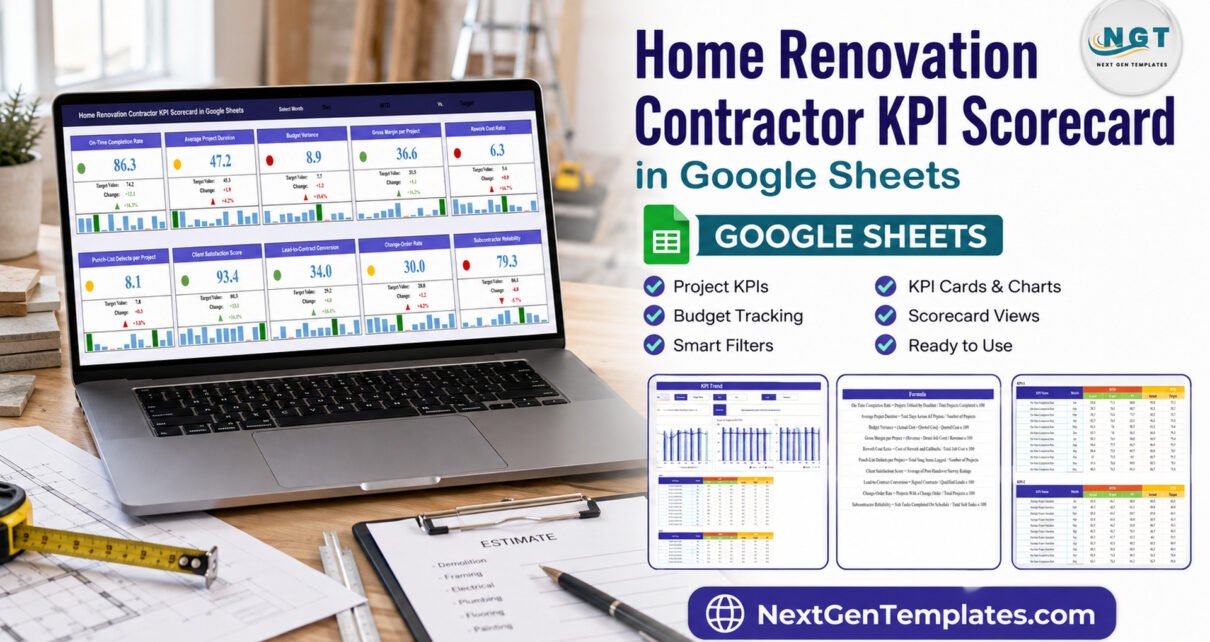
A ten-KPI monthly review can reveal far more than a single revenue figure. The Home Renovation Contractor KPI Scorecard brings delivery, financial health, quality, sales, client experience, and subcontractor performance into one Google Sheets template. It combines a month selector, actual-versus-target cards, red-yellow-green signals, MTD and YTD data, and trend charts. You enter the approved figures; the scorecard organizes them for discussion. It is not estimating, accounting, project-control, licensing, code-compliance, inspection, or warranty software.
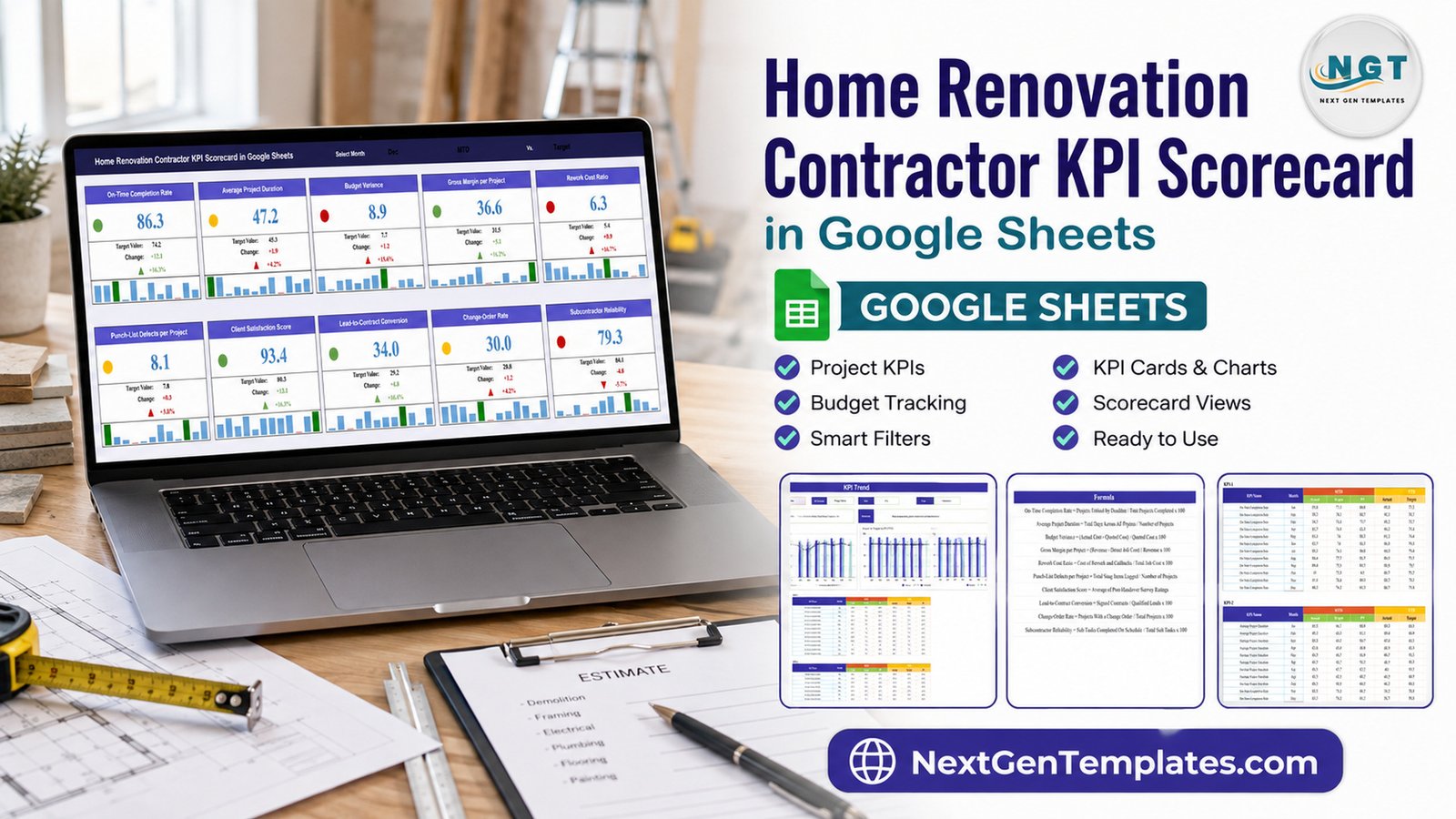
Home Renovation Contractor KPI Scorecard in Google Sheets
Renovation businesses often have the information needed for a useful review, but it is scattered across estimates, invoices, project notes, survey responses, and conversations. A scorecard does not replace those systems. Its job is narrower: define a small set of measures, compare results with targets, and make exceptions visible enough to investigate.
Key Features of Home Renovation Contractor KPI Scorecard
- Ten defined KPIs spanning project delivery, financial health, quality, sales, and operations.
- Monthly scorecard cards showing actual, target, change, status, and recent history.
- Red-yellow-green indicators configured around Upper-the-Better and Lower-the-Better directions.
- MTD and YTD structures for Actual, Target, and Previous Year values.
- KPI trend view with month-by-month comparisons.
- Editable definitions covering group, unit, formula, description, and direction.
- Google Sheets collaboration using the sharing permissions you control.
Home Renovation KPI Scorecard Structure Explained
1. Monthly Scorecard
The main view presents all ten KPIs as cards. After selecting a month, each card shows the current value, target, change, percentage movement, status color, and a compact monthly history. The sample December view includes green, yellow, and red results, making the page useful for exception-led meetings rather than a long spreadsheet review.
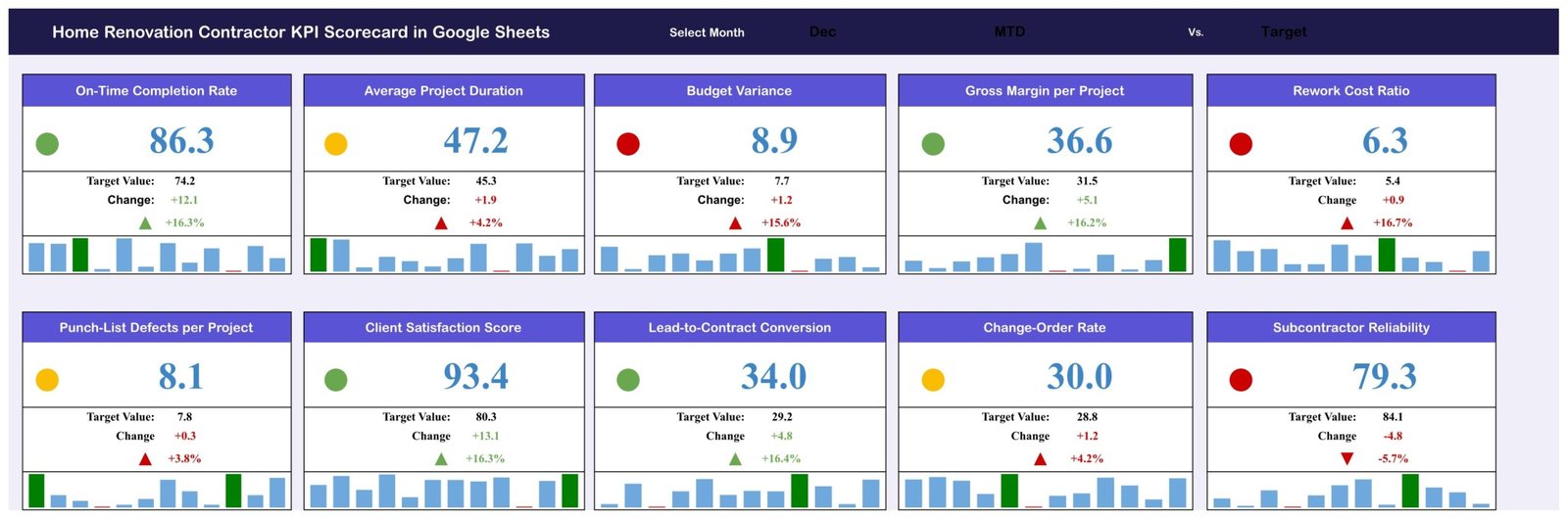
Monthly scorecard with ten renovation KPIs
The template includes the following example measures:
- On-Time Completion Rate: the share of completed projects handed over by the scheduled date.
- Average Project Duration: mean calendar days from job start to final handover.
- Budget Variance: actual cost compared with quoted cost.
- Gross Margin per Project: revenue less direct job cost as a share of revenue.
- Rework Cost Ratio: rework and callback costs as a share of total job cost.
- Punch-List Defects per Project: average snag items recorded at the final walkthrough.
- Client Satisfaction Score: average post-handover survey rating.
- Lead-to-Contract Conversion: signed contracts divided by qualified leads.
- Change-Order Rate: projects requiring a scope or price change order.
- Subcontractor Reliability: scheduled subcontractor tasks completed on time.
2. KPI Trend
The trend view lets you select one KPI and see its group, unit, formula, definition, and direction. The Actual, Previous Year, and Target series are then displayed across the months for MTD and YTD. This makes it easier to distinguish a one-month spike from a persistent gap.
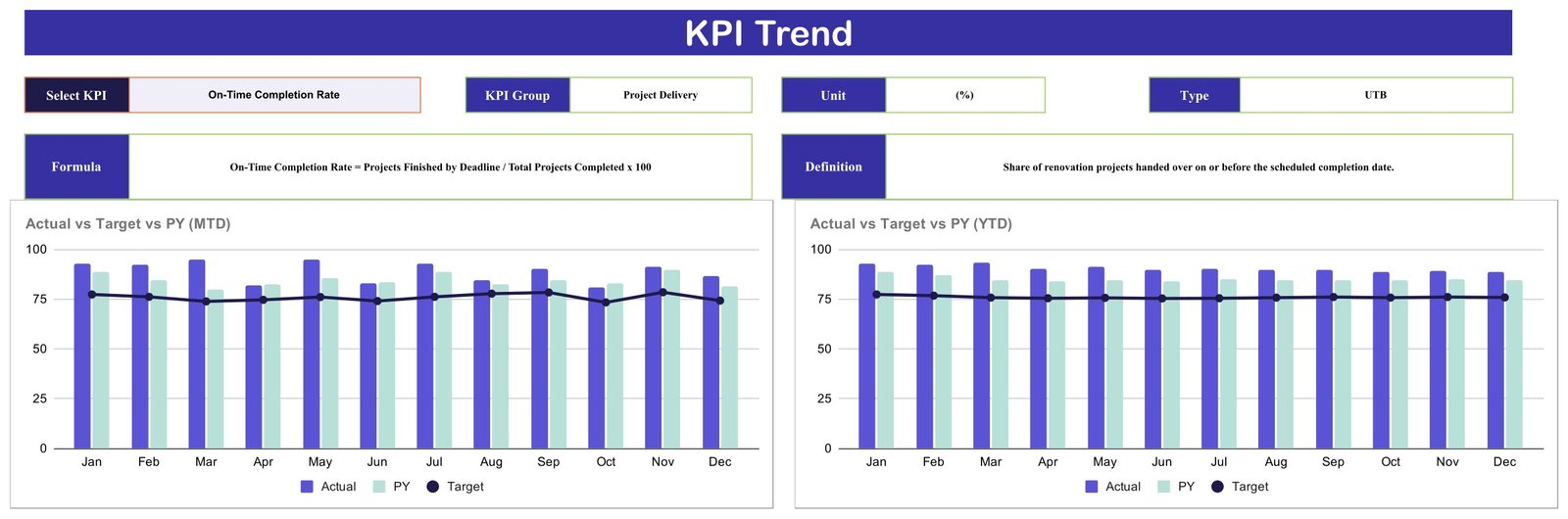
MTD and YTD KPI trend comparisons
3. KPI Definitions
A KPI only works when everyone uses the same meaning. The definition table records each measure’s group, name, unit, formula, explanation, and performance direction. Review these definitions before use, particularly financial calculations such as budget variance and gross margin. Your accounting policy remains the authority.

Editable KPI formula and definition table
4. Monthly KPI Data
The data area stores MTD and YTD Actual, Target, and Previous Year values for every KPI and month. Replace the sample figures with validated data from your normal records. The template does not automatically connect to estimating, accounting, CRM, survey, or scheduling systems.
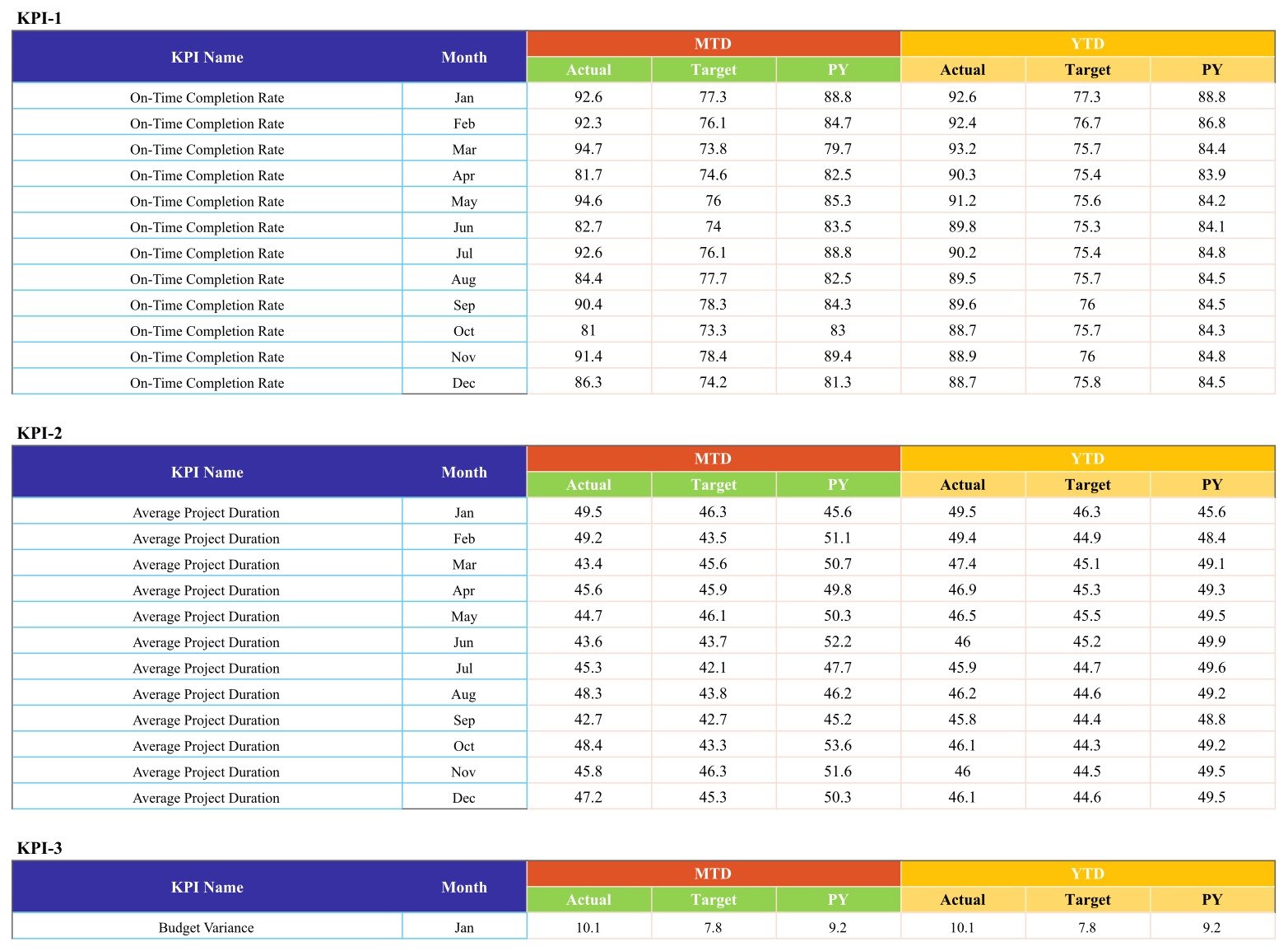
Monthly Actual, Target, and Previous Year data structure
Home Renovation Contractor KPI Scorecard vs. Excel vs. Paid Construction SaaS – Feature Comparison
| Feature | Google Sheets scorecard | Excel scorecard | Paid construction SaaS |
|---|---|---|---|
| Pricing model | One-time template purchase | One-time file purchase | Typically recurring subscription |
| Access | Browser and supported mobile apps | Desktop-focused, cloud options vary | Web and mobile access varies by vendor |
| Collaboration | Google sharing controls | Depends on Excel and storage setup | Role-based features vary by plan |
| Setup time | Create a copy, review definitions, enter data | Download, review, enter data | Configuration and onboarding may be required |
| Custom fields | Editable spreadsheet structure | Editable workbook structure | Vendor-controlled configuration |
| Best fit | Focused monthly KPI review | Local or offline KPI review | Broader project and workflow management |
| Operational controls | Not included | Depends on template | May include scheduling, documents, approvals, and integrations |
Who Should Use This Template
The scorecard is designed for owners, operations managers, project managers, and business advisers who already have source records and want a consistent monthly KPI discussion. It can fit a small renovation company with several active jobs or a growing contractor that needs definitions before investing in a larger platform.
It is not suitable as a replacement for construction accounting, cost estimating, project schedules, daily site records, safety management, contracts, change-order approvals, licensing records, building-code documentation, inspection sign-off, or warranty tracking. If you need those workflows, use dedicated systems and professional guidance.
Real-World Use Cases
Maya’s owner review
Maya checks on-time completion, margin, rework, and satisfaction before meeting her managers. Instead of debating every figure, the team begins with the red and yellow cards and opens the supporting source records.
Daniel’s operations meeting
Daniel compares project duration, defects, and subcontractor reliability with targets. He uses the trend page to see whether the current result reflects one unusual project or a multi-month pattern.
Priya’s KPI design workshop
Priya helps a contractor define formulas and measurement owners. The definition table gives the workshop a concrete starting point, while the team decides which KPIs belong in its real operating model.
Advantages of Home Renovation Contractor KPI Scorecard
The template keeps attention on a manageable number of measures. It combines leading and lagging signals: conversion and subcontractor reliability sit alongside completion, margin, rework, and satisfaction. Because it is a Google Sheet, labels, targets, and definitions can be adapted without a software-development project. The visual status cards support quick review, while the trend page gives enough context for a follow-up question.
Opportunities for Improvement
The template intentionally does not automate source collection. A future implementation could import validated data from another system, add controlled input forms, introduce separate permissions, or build project-level drilldowns. Those enhancements require design and testing; they are not included in this product. Larger organizations may also need audit trails, role management, and formal data governance beyond a shared spreadsheet.
Best Practices
- Agree on definitions first. Confirm each numerator, denominator, unit, and reporting cut-off.
- Assign a data owner. One named person should validate each measure before the review.
- Protect formulas. Limit editing rights and keep a backup before changing structure.
- Use consistent periods. Do not mix estimates, partial months, and final actuals without clear labels.
- Investigate, do not assume. A red status starts a question; it does not prove the cause.
- Control sharing. Follow your privacy and confidentiality obligations when storing business information.
Google explains the available sharing roles and controls in its official Google Drive sharing guidance.
Explore Relevant Templates
For adjacent Google Sheets ideas, compare the Window and Door Installation KPI Scorecard, Glass Installation KPI Scorecard, Elevator Maintenance KPI Scorecard, and Concrete Contractor KPI Dashboard. These are separate templates, not included editions.
To get this product, visit the Home Renovation Contractor KPI Scorecard product page.
Frequently Asked Questions
How many KPIs are included?
The supplied definition and scorecard views include ten example KPIs covering five operational groups.
Can I edit the KPI names, formulas, and targets?
Yes. Work in a backup copy and test changes, because structural edits can affect references and calculations.
Does the template connect to accounting or CRM software?
No connector is included. You enter validated values in the provided monthly structure.
Can my team collaborate in the same file?
Yes, using Google Sheets sharing permissions. You remain responsible for access control and data handling.
Does it manage change orders or approve work?
No. Change-Order Rate is a KPI measure; the template does not create, price, authorize, or store contractual change orders.
Does it prove licensing, compliance, inspection approval, or warranties?
No. It is a performance scorecard and does not replace any legal, regulatory, professional, inspection, or warranty process.
What is delivered?
The download is a PDF containing the link that creates your own editable Google Sheets copy.
About the Author
Built by PK – Microsoft Certified Professional with 15+ years of Excel, Google Sheets, and Power BI experience. Founder of NextGenTemplates, reaching 300K+ subscribers across YouTube channels. Every template is hand-built and tested before release.
Conclusion
The Home Renovation Contractor KPI Scorecard gives a renovation team a focused monthly view of schedule, cost, quality, sales, client, and subcontractor performance. Its strength is clarity: ten defined KPIs, visible targets and status, and a trend view for follow-up. Use it alongside your source systems and professional processes, not in place of them. Visit NextGenTemplates to review the product, and see practical spreadsheet tutorials on the NeoTech Navigators YouTube channel.