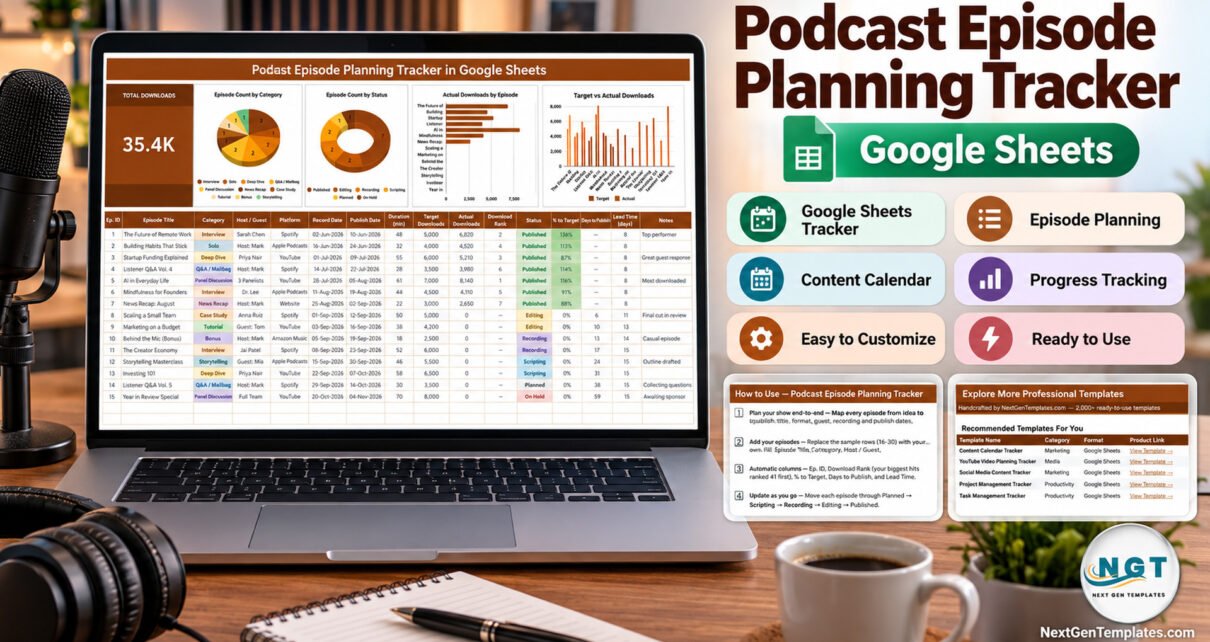
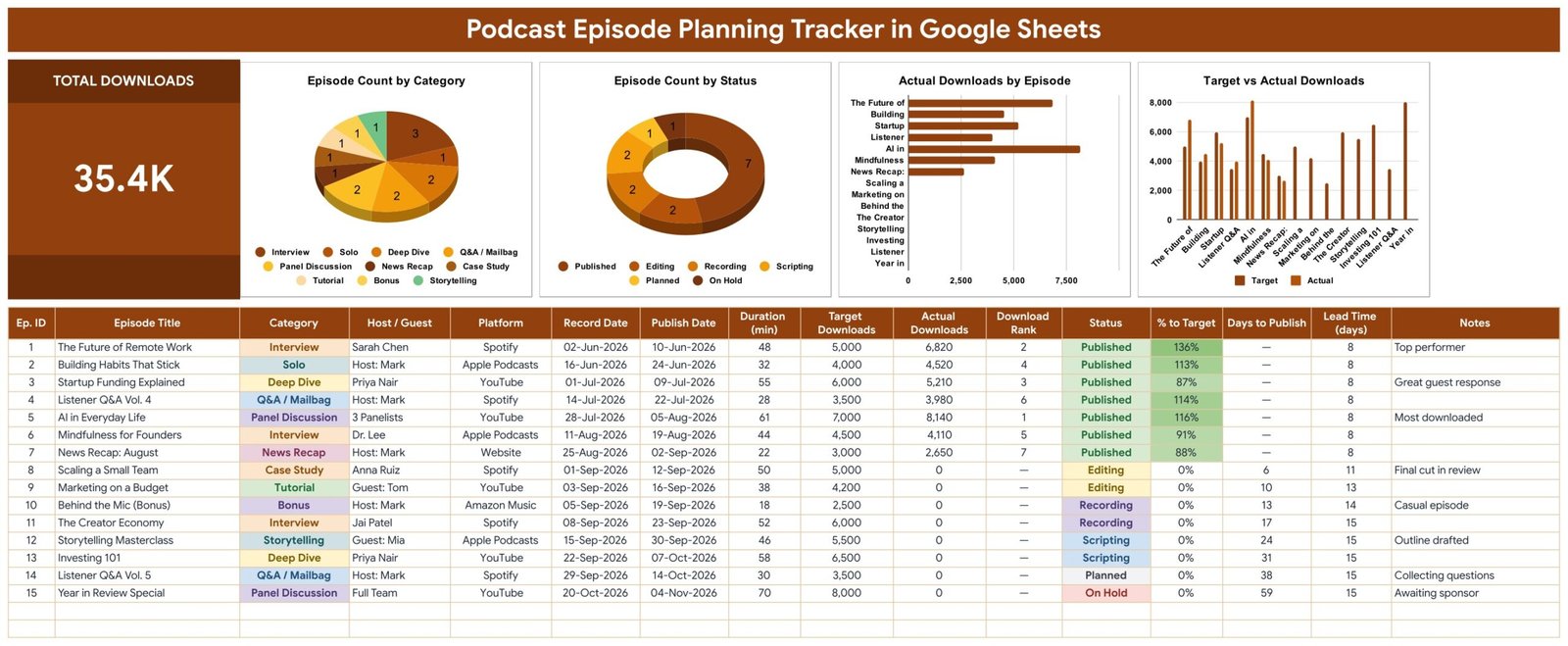
The Podcast Episode Planning Tracker in Google Sheets is a one-page template with a 16-column episode log, 5 automatic formula columns, a Total Downloads card and 4 live charts. Its sample data holds 15 episodes spread across 10 formats, 5 listening platforms and 6 production stages, and the card adds them up to 35.4K downloads.
Most shows start planning in a notes app, a chat thread and a hosting dashboard all at once. That works for three episodes and breaks at thirty: guests get forgotten, edits slip past their release slot, and nobody can say which formats actually earn downloads. A single sheet that holds the plan, the production stage and the result of every episode fixes that, and this guide walks through how the template does it.
Key Features of the Podcast Episode Planning Tracker
- One log from idea to release. Each row records Episode Title, Category, Host / Guest, Platform, Record Date, Publish Date, Duration (min), Target Downloads, Actual Downloads, Status and Notes.
- Five automatic columns. Ep. ID, Download Rank, % to Target, Days to Publish and Lead Time (days) are formulas, so you never calculate them by hand.
- Release warnings. Days to Publish counts down to the publish date, shows “Overdue” once that date passes without the episode being marked Published, and shows “Set Date” when no date is entered.
- Download scorecard. Download Rank lists your most downloaded episode as #1, and % to Target compares actual downloads with the goal you set for each show.
- Four charts that read the data directly. Episode Count by Category, Episode Count by Status, Actual Downloads by Episode, and Target vs Actual Downloads use rows 16-1000, so new episodes appear without editing any chart.
- Dropdowns that grow. Category, Platform and Status come from the List tab (rows 2-500). Add a value there and it shows up in the dropdown at once.
Template Structure Explained
The file has four tabs: the episode tracker, a List tab that feeds the dropdowns, a How to Use guide and an Explore More Templates page. Your download is a PDF containing the “Make a copy” link for your own editable version.
Tab 1: Episode Tracker
The top band pairs the Total Downloads card with the four charts. The sample shows 7 published episodes, 2 in editing, 2 in recording, 2 in scripting, 1 planned and 1 on hold, and its top episode, “AI in Everyday Life”, reached 8,140 downloads against a 7,000 target (116%). Below the charts the log shows every episode with its dates, duration, targets, rank, status, % to Target, Days to Publish and Lead Time, with colour-coded category and status cells.
Tab 2: How to Use
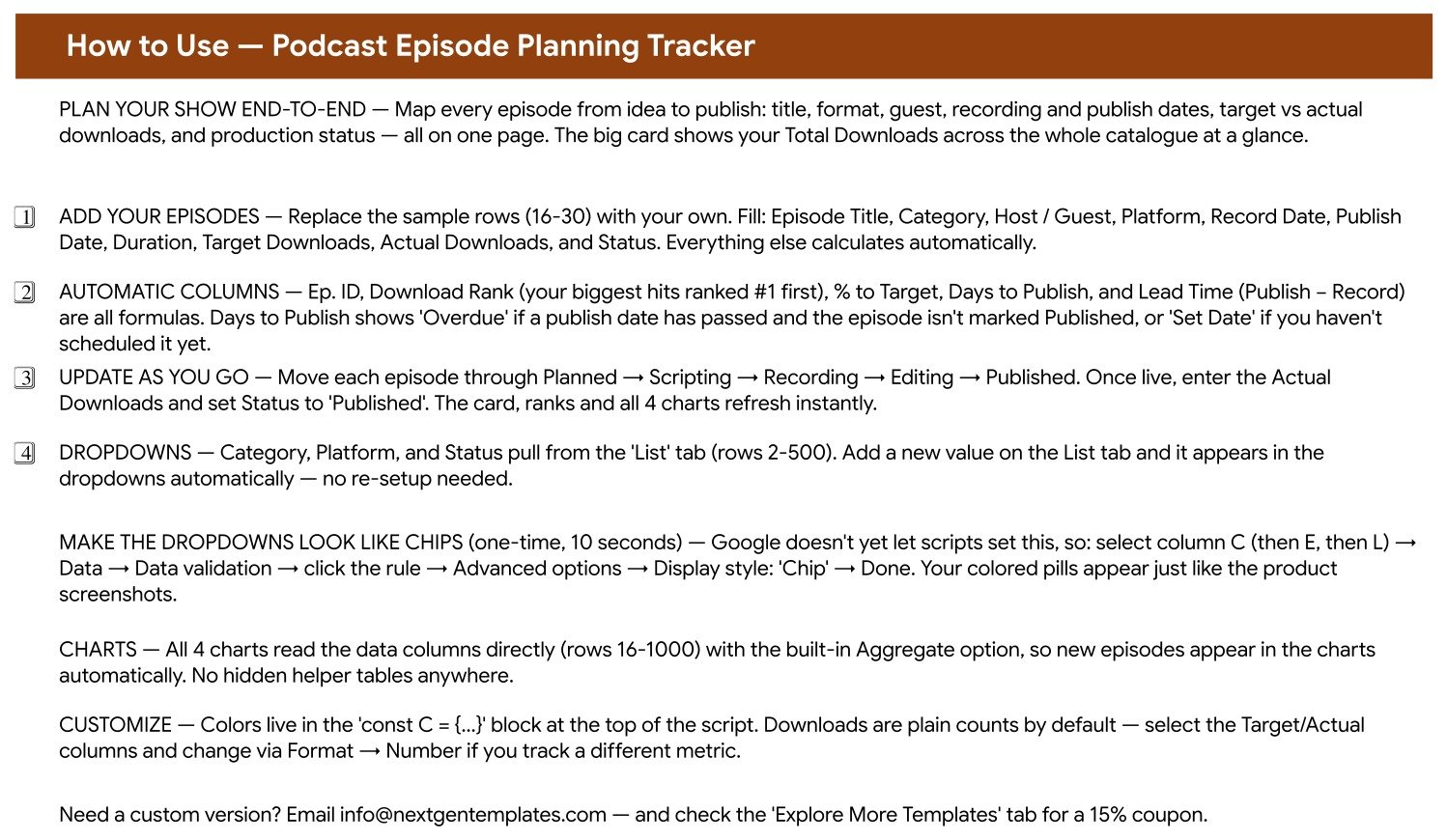
This tab explains where to enter episodes (sample rows 16-30), which columns calculate themselves, how an episode moves from Planned to Published, and the one-time, ten-second step for showing the dropdowns as coloured chips. Google does not let a script set chip style, so it is done once by hand under Data → Data validation.
Tab 3: Explore More Templates
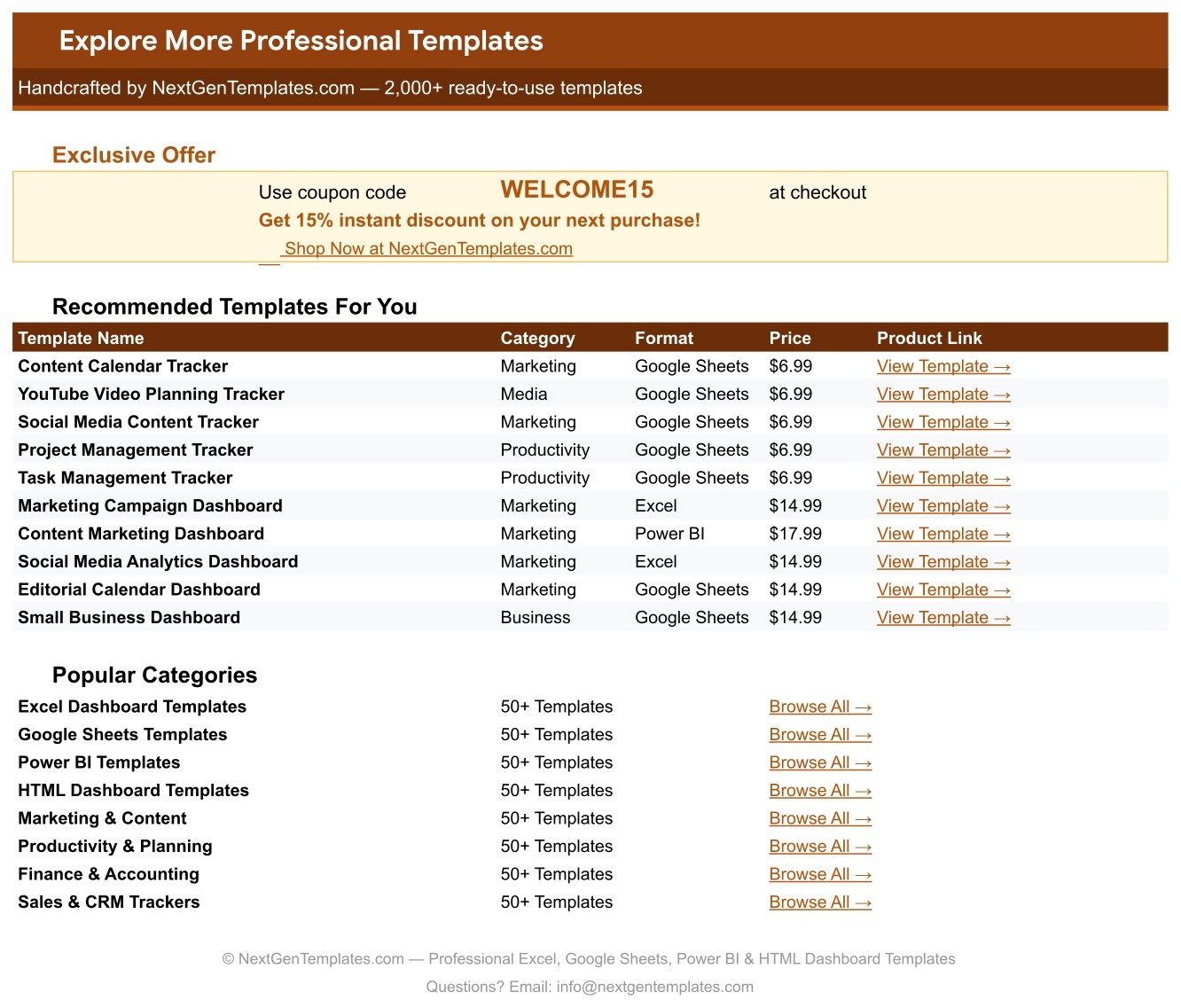
A page of related templates and the WELCOME15 coupon code for 15% off a future purchase on NextGenTemplates.com.
Podcast Planning in Google Sheets vs. Excel vs. Paid Project Tools — Feature Comparison
| Feature | Podcast Episode Tracker (Google Sheets) | Blank Microsoft Excel Sheet | Airtable / Asana / Monday.com |
|---|---|---|---|
| Cost | ✅ One-time payment | Microsoft 365 licence, you build it yourself | Recurring per-user monthly plans on most tiers |
| Platform | ✅ Browser, any free Google account | Excel desktop or Excel for the web | Vendor web app |
| Setup time | ✅ Make a copy, replace 15 sample rows | Hours to design columns, formulas and charts | Build boards, fields and views from scratch |
| Real-time collaboration | ✅ Built into Google Sheets | Via OneDrive / SharePoint | ✅ Yes |
| Mobile access | ✅ Google Sheets app | ✅ Excel app | ✅ Vendor app |
| Customizable fields | ✅ Edit the List tab, dropdowns update | ✅ Fully manual | ✅ Yes, limits vary by plan |
| Download rank, % to target, overdue flags | ✅ Pre-built formulas | You write them | Needs formula fields or add-ons |
| Share with a link | ✅ Standard Google sharing | ✅ With a Microsoft account | ✅ Usually needs a seat |
| Year-1 cost at 5 users | ✅ Same single payment | 5 Microsoft 365 licences | 5 seats × 12 months |
For solo podcasters and small production teams who want a release board and a download scorecard without paying per seat, this Google Sheets template sits in the sweet spot.
Who Should Use This Template
Perfect for:
- Independent podcasters planning weekly or fortnightly episodes and guest interviews
- Small teams where a host, an editor and a producer share one release schedule
- Agencies and brands running a company podcast that reports downloads against targets
- Educators and coaches publishing a mix of solo, tutorial and Q&A episodes
Not a fit if:
- You need audio hosting, RSS publishing or automatic download imports — downloads are typed in by you
- You run a network of many shows and need guest booking, contracts and ad inventory in one system
Real-World Use Cases
Maya hosts a weekly interview show on Spotify and YouTube. She adds each guest the day they confirm, sets the record and publish dates, and checks Days to Publish every Monday so no edit slips past its slot. After release she enters downloads and compares them with her target to decide which formats deserve more bookings.
Daniel produces a company podcast for a marketing agency. His editor moves episodes from Recording to Editing in the shared file, and at month-end Daniel shows the client the Target vs Actual Downloads chart instead of building a slide deck.
Priya runs a two-person educational podcast. She watches Episode Count by Category to keep a balance of solo, deep dive and Q&A shows, and Lead Time tells her how many days the team really needs between recording and release, which makes her next quarter’s calendar realistic.
Advantages of This Google Sheets Tracker
- No per-seat cost. Share it with a co-host, editor and client without adding subscriptions.
- Less admin. Rank, % to Target, Days to Publish and Lead Time calculate themselves, and the charts need no helper tables.
- Earlier warnings. “Overdue” and “Set Date” appear right in the log, so a missing release date is visible before it becomes a missed week.
- Clearer decisions. Downloads by episode and target vs actual show which topics and guests perform, based on your own numbers.
- Familiar tool. It is plain Google Sheets, so filters, comments, version history and mobile editing all work as usual.
Opportunities for Improvement
- Download numbers are entered manually; there is no connection to Spotify, Apple Podcasts, YouTube or any hosting platform.
- There is no calendar view, guest-booking form, reminder email or file storage for audio and show notes.
- The tracker records one number per episode, not downloads over time, so it cannot show 7-day or 30-day growth curves.
- The coloured chip look for dropdowns must be switched on once by hand, because Google does not allow scripts to set it.
Best Practices
- Set a realistic target per format. Interviews and tutorials often behave differently, so give each episode its own Target Downloads value.
- Update downloads on a fixed day. Entering numbers at the same point after release (for example 30 days) keeps % to Target comparable.
- Keep the List tab tidy. Rename or add categories there rather than typing free text, so the category chart stays accurate.
- Use Notes for context. Record a sponsor, a cut-down or a promotion push so later download differences make sense.
- Review Lead Time monthly. If it keeps growing, your editing stage is the bottleneck.
If you are new to dropdowns and charts in Sheets, Google’s help centre explains how to create an in-cell dropdown list and how to add and edit a chart.
Explore Relevant Templates
Once episodes are live and you want deeper audience analysis, read our guides to the Podcast Audience Insights Dashboard in Google Sheets, the Podcast Analytics Dashboard in Google Sheets and the Podcast Performance KPI Dashboard in Google Sheets. Publishing video as well? See the YouTube Channel Performance Tracker in Google Sheets.
You can also browse every Google Sheets tracker on NextGenTemplates.
Frequently Asked Questions
What does the Podcast Episode Planning Tracker calculate automatically?
Five columns are formulas: Ep. ID, Download Rank, % to Target, Days to Publish and Lead Time. The Total Downloads card and all four charts also refresh on their own, so you only type the episode details, targets, actual downloads and status.
Does the template import downloads from Spotify or Apple Podcasts?
No. It does not connect to any podcast host or platform. Copy Actual Downloads from your hosting dashboard into the sheet, and the card, ranks, % to Target and charts recalculate instantly.
How long does setup take?
A few minutes. Open the PDF, click the copy link, adjust the List tab if you need different categories or platforms, and overwrite the 15 sample episodes with your own shows.
Can my co-host and editor work in it at the same time?
Yes. It is a standard Google Sheets file, so you can share edit or view access and everyone sees status changes in real time. Editors need a Google account.
What does “Overdue” mean in Days to Publish?
It means the publish date has already passed but the episode’s status is not Published. “Set Date” means no publish date has been entered, and published episodes show a dash.
How does this compare to Airtable or Asana for podcast planning?
Those are general project platforms with per-seat plans, automations and integrations. This template is built specifically for episodes and downloads, costs a single payment and runs in Google Sheets, but it has no automations or guest-booking forms.
About the Author
Built by PK — Microsoft Certified Professional with 15+ years of Excel, Google Sheets and Power BI experience, and founder of NextGenTemplates. Every template is hand-built and tested before release.
Conclusion
If your show has outgrown scattered notes, this template gives you one page for guests, dates, production stages and download results, with ranks, targets and release warnings calculated for you.
👉 Click here to Purchase the Podcast Episode Planning Tracker in Google Sheets
✅ Instant download · One-time payment · No subscription
🎥 Watch more tutorials: Youtube.com/@NeoTechNavigators
Last updated: September 2026