Applying to study overseas is less about one big deadline and more about thirty small ones: English tests, admissions exams, statements of purpose, recommendation letters, scholarships, education loans, passport renewals, visa appointments and housing forms, each with its own date, time and portal. Miss one and the whole plan can slip by an intake. The Study Abroad Deadline Calendar in Google Sheets puts all of those dates into one shared spreadsheet with an annual, monthly and date-range view, so you always know what is due next.
This guide walks through what the template contains, how to set it up for your own application year, where it fits (and where it does not), and a few habits that keep a study-abroad plan on track.
Quick answer: the Study Abroad Deadline Calendar in Google Sheets is a ready-made Google Sheets file with a Home menu and four views (Annual, Monthly, Daily and Events) driven by one event list. It ships with 100 illustrative sample events for 2026, runs in a free Google account and is sold as a one-time purchase on NextGenTemplates.com.

Why a Study Abroad Plan Needs Its Own Deadline Calendar
A typical postgraduate or undergraduate application to another country involves several organisations that never talk to each other: universities, testing bodies, scholarship funders, banks, passport offices and visa centres. Each publishes dates on its own website and many of them move from one year to the next. Keeping them in email threads, sticky notes and a phone calendar is how a recommendation letter deadline gets missed.
A single study abroad deadline tracker solves three problems at once:
- Visibility: you see the crowded months early, before three deadlines land in the same week.
- Sequence: tests come before applications, offers before loans, loans before visas. A calendar makes the order obvious.
- Sharing: a parent or counsellor can look at the same Google Sheet instead of asking for updates.
What’s Inside the Study Abroad Deadline Calendar in Google Sheets
Home menu
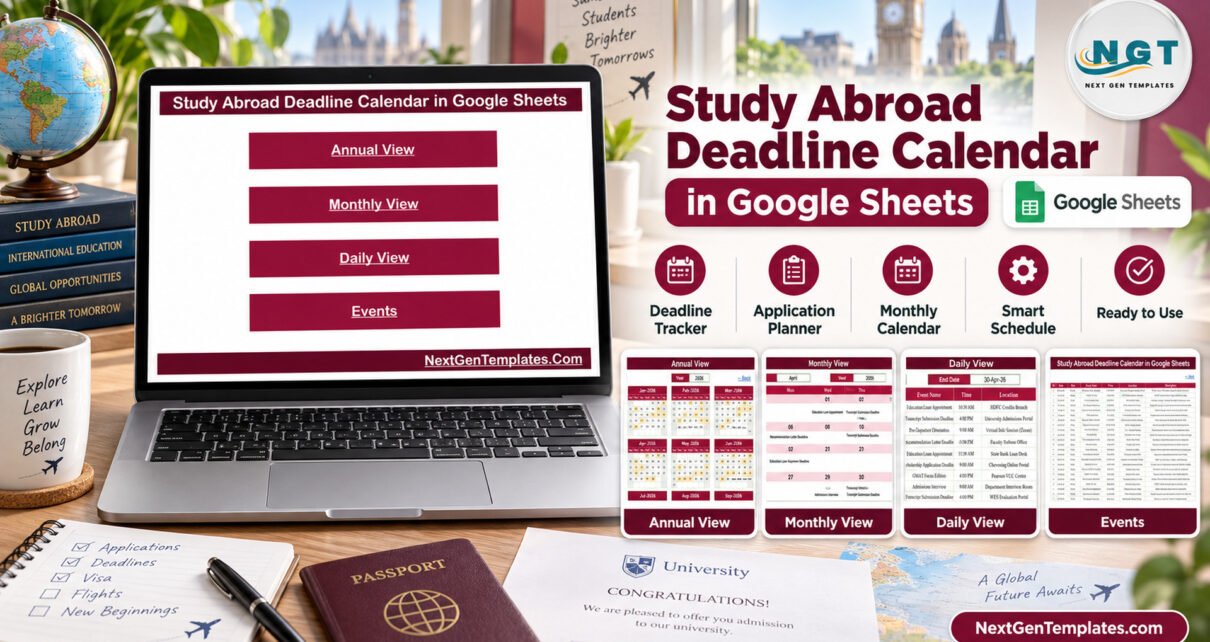
Four buttons lead to Annual View, Monthly View, Daily View and Events. Every view has a Back link, so nobody gets lost in the tabs.
Annual View: the whole application year on one page
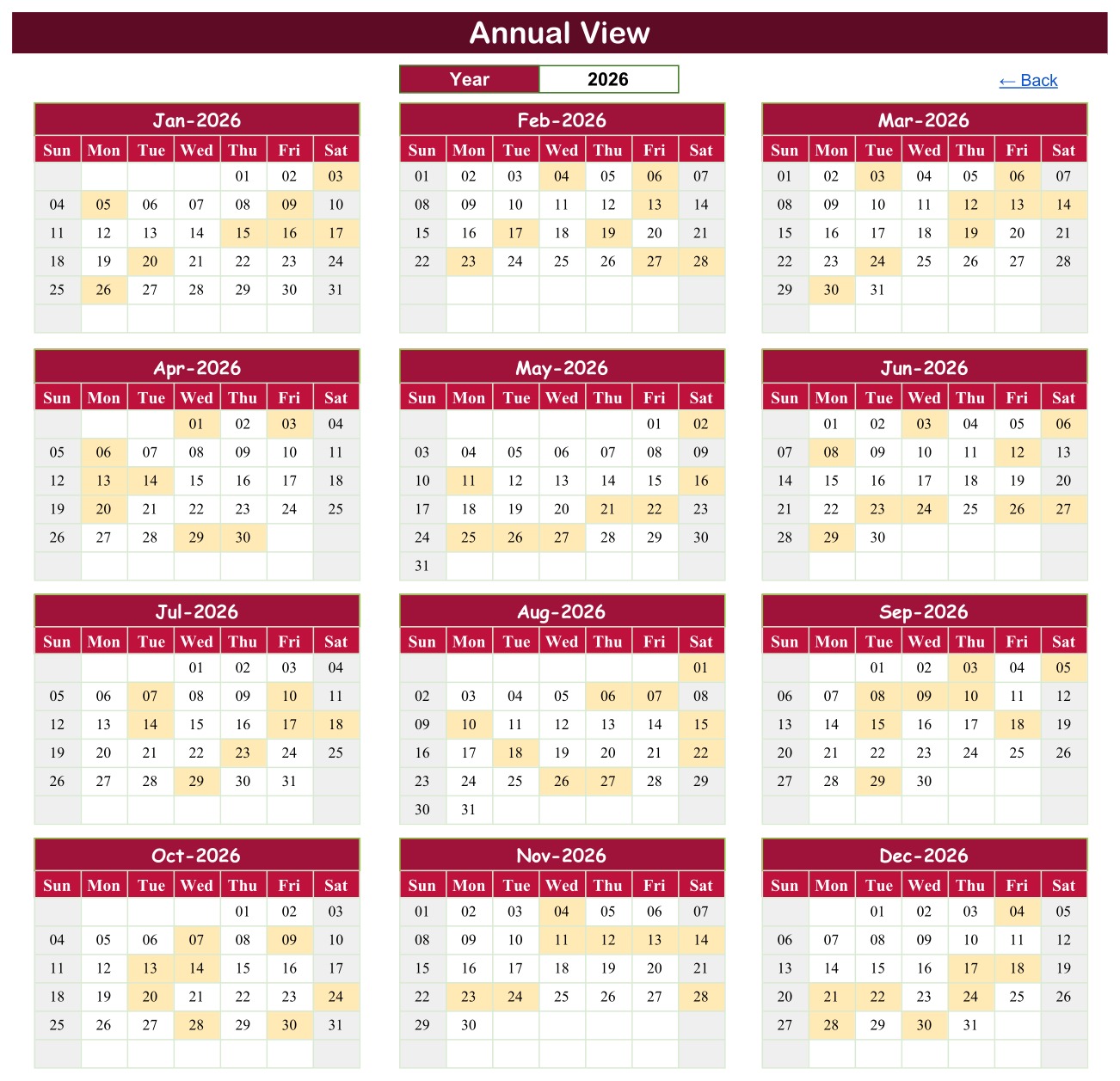
Pick a year and twelve mini calendars redraw on a Sunday-to-Saturday grid. Any date with at least one event is shaded. In the sample, February 2026 stands out immediately: a GRE General Test, a University Application Deadline, a GMAT Focus Edition sitting and a Financial Aid Deadline all fall within about ten days.
Monthly View: event names inside each day

Choose a month and a year from the drop-downs. Each day prints the name of its event, and a busy day shows the first event with a “1 more…” counter underneath, as on 3 April 2026 in the sample, where a Transcript Submission Deadline shares the day with a Pre-Departure Orientation.
Daily View: a to-do list for any date range

Enter a Start Date and an End Date and a live filter returns every event in between with its ID, date, day, event name, time, location and description. For April 2026 it lists nine items, from an Education Loan Appointment at 10:30 AM on the 1st to a Transcript Submission Deadline at 4:00 PM on the 30th.
Events: the single source of truth

Everything above reads from this one table. The sample carries 100 events across 22 event types and 31 locations, including the University Admissions Portal, Common App Portal, Prometric and Pearson VUE test centres, the British Council Test Centre, VFS Global Visa Centre and Financial Aid Office. Replace the rows with your own and every view follows.
How to Set It Up for Your Own Applications
- Make your copy. After purchase, open the PDF in the download and click its link to copy the sheet into your Google Drive.
- List your targets. Write down each university and programme, the tests they accept and every scholarship you plan to apply for.
- Collect official dates. Take each deadline from the institution’s own website. Note the time and time zone, since many portals close at a specific local time.
- Clear the samples and enter your events on the Events tab: date, day, event name, time, location (portal or centre) and a one-line description.
- Work backwards. For every hard deadline, add a preparation event a week or two earlier, such as “Draft SOP to referee” before a Statement of Purpose Deadline.
- Review weekly. Open Daily View for the next 14 or 30 days every Sunday and plan the week from that list.
- Share it. Give a parent view access and a counsellor edit access from the Share button.
Google Sheets Deadline Calendar vs. Other Options
| Option | Strengths | Weak spots |
|---|---|---|
| This Google Sheets template | Annual, monthly and date-range views from one list; free Google account; easy sharing; one-time price | No automatic reminders; you enter dates yourself |
| Study Abroad Deadline Calendar in Excel | Macro entry form and a This Month summary | Desktop Excel for Windows only; sharing means sending a file |
| Phone or email calendar | Reminders built in | No year overview; hard to share a whole plan; details scattered |
| Paid application-planning apps | Reminders, sometimes document storage | Subscriptions or per-student pricing; data held by the vendor |
Used as a study abroad planner template, the spreadsheet works best alongside one other tool. Many applicants combine two: the spreadsheet as the master plan and a phone calendar reminder for the handful of dates that absolutely cannot be missed.
Who Gets the Most Out of It
- Masters and PhD applicants juggling GRE or GMAT, TOEFL or IELTS, several SOPs and recommendation letters.
- Undergraduate applicants and their parents managing applications, financial aid, deposits, passports and housing.
- School and independent counsellors who want a simple university application deadline calendar per student or per cohort.
If you run an agency and need client files, documents and fees as well as dates, look at the Immigration Consultancy Management System Web App instead.
Honest Limits Before You Buy
- It does not send alerts. There is no Apps Script in the file, so no emails, notifications or reminders are sent.
- The sample dates are examples, not official deadlines. They do not match the real dates of any university, test or visa office. Always confirm dates at the source.
- Not affiliated or endorsed. NextGenTemplates and NeoTech Navigators have no link with UCAS, Common App, ETS, IDP, the British Council, Pearson VUE, Prometric, GMAC, Chevening, FAFSA, VFS Global or any embassy, consulate, passport office, bank or university named in the sample.
- It is a planner, not advice. It offers no admissions, visa, immigration or financial guidance.
- Monthly View shows one event name per day with a “more” counter; Daily View shows them all.
- No clash detection and the Day column is typed, so update it when you change a date.
- Keep it private-by-design. Use initials or codes for students and never store passport, visa or bank numbers in a shared sheet.
More Education Calendars in Google Sheets
The same four-view design is used across our education calendars. If you are also chasing funding, the Scholarship Deadline Calendar in Google Sheets focuses on scholarship dates. Admissions teams planning an intake can use the Admission Season Calendar in Google Sheets, and schools timetabling tests will find the Exam Timetable Calendar in Google Sheets useful.
Frequently Asked Questions
Is the template free to use after purchase?
Yes. It is a one-time purchase with no subscription, and a free Google account is all you need.
Will it remind me before a deadline?
No. It shows every deadline clearly but sends no reminders. Add phone calendar reminders for your most critical dates.
Are the included deadlines accurate for 2026?
They are illustrative sample events only and do not reflect official dates. Replace them with the dates published by each university, test body and visa office.
Can I track more than one student?
Yes, add rows for each student and use initials or a code in the event name or description. There is no per-student filter, so a counsellor with many students may prefer one copy per student.
Does it work on a phone?
Yes, in the Google Sheets app, although the Annual and Monthly views are easiest to read on a larger screen.
Conclusion
A study abroad plan succeeds on small dates kept in the right order. This Google Sheets template gives you a year overview, a month calendar and a date-range to-do list from one event table, in a file you can share with the people helping you. Enter your official dates, review Daily View every week, and keep reminders for the few dates that cannot move.
👉 Get the Study Abroad Deadline Calendar in Google Sheets on NextGenTemplates.com