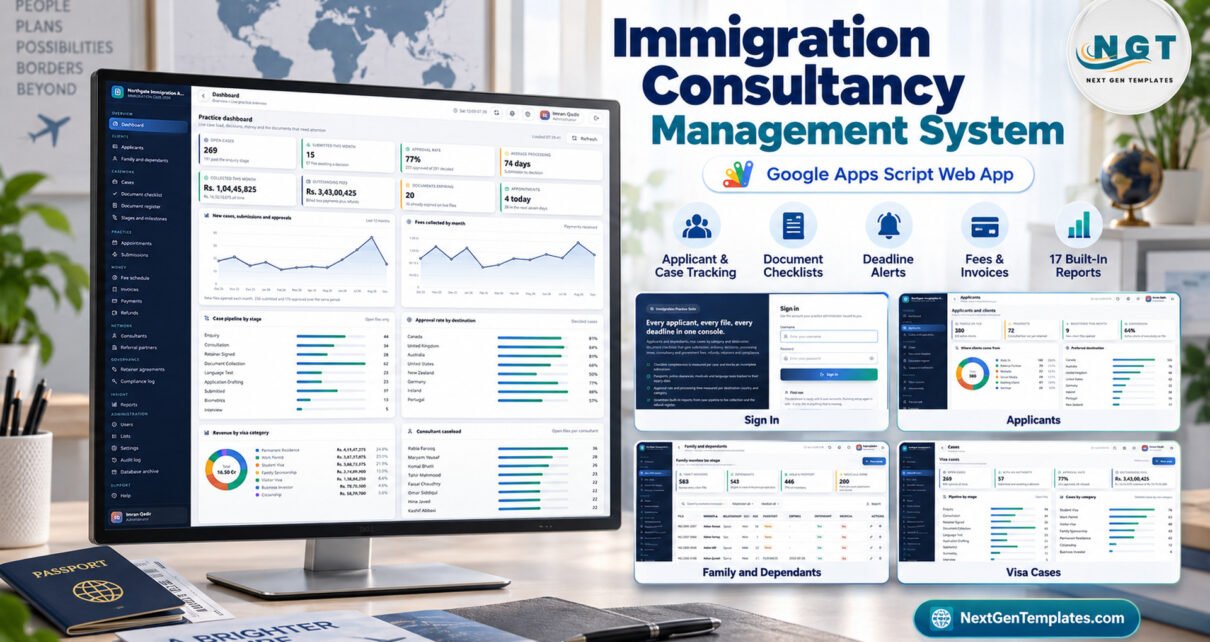
The Immigration Consultancy Management System Web App is a Google Apps Script system with 25 screens, 17 built-in reports, 6 staff roles and 49 server-checked permissions. It seeds about 15,000 rows of fictional sample data across 23 Google Sheets tables, so every chart and register is populated the first time you sign in.Immigration Consultancy Management System Web App
Visa and immigration practices juggle more moving parts than most small businesses: principal applicants and their dependants, document checklists that differ by visa category, passports and police clearances that expire, embassy submissions that wait weeks for a decision, and fees that arrive in stages. This immigration consultancy management system puts those records in one place, inside your own Google account, and it does so without giving legal advice or promising any visa outcome.Immigration Consultancy Management System Web App
Get the Immigration Consultancy Management System Web App
🚀 Try the Live Demo Before You Buy
We have deployed this web app in our own Google account so you can test every page and all 6 roles with realistic sample data before purchasing. No signup, no email required.
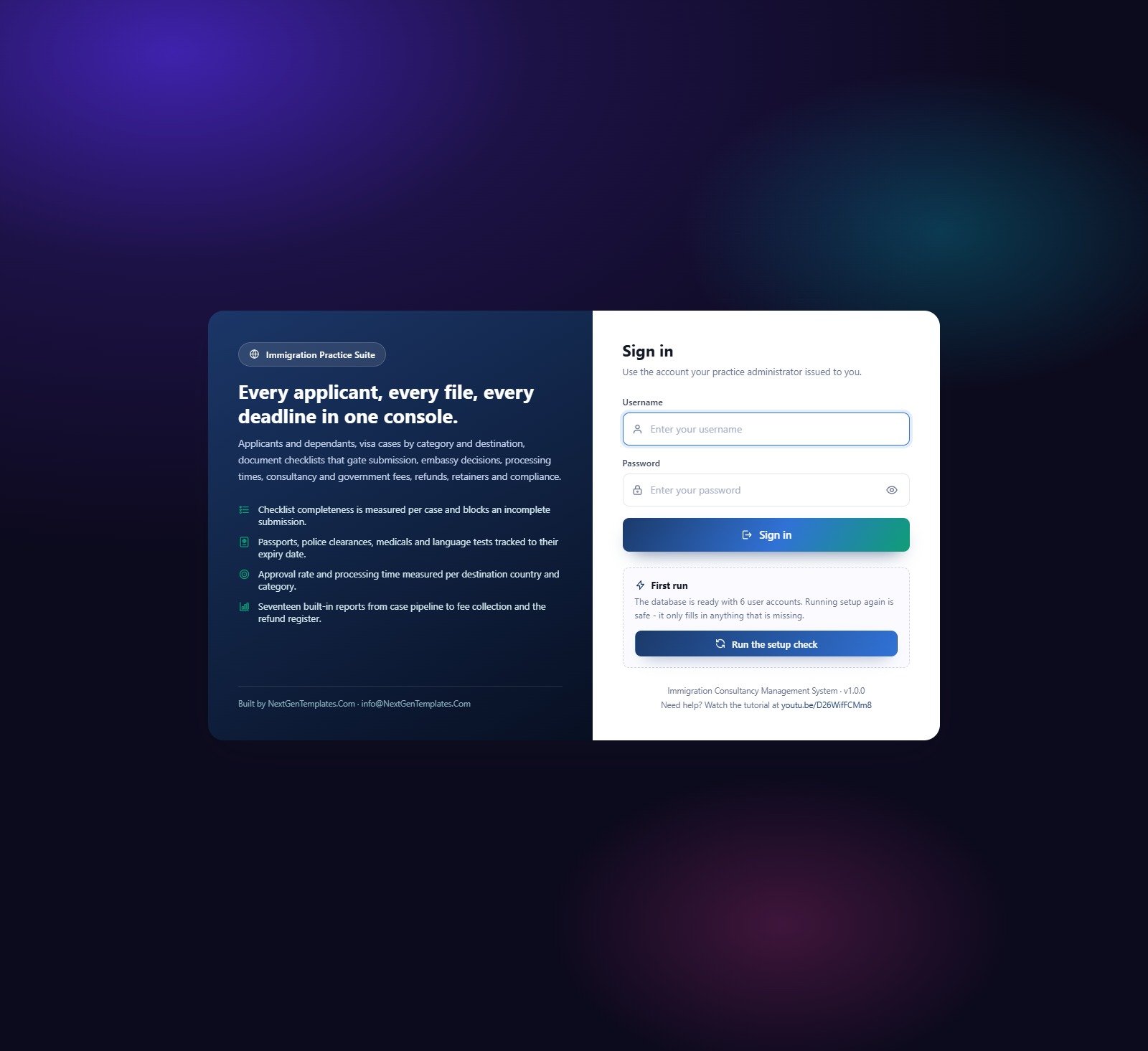
🔑 Test Login Credentials
Sign in as admin to see everything, including Users, the permission matrix, Settings and the Audit log. Then sign in as frontdesk or docofficer and watch the sidebar shrink to that role’s screens.
💡 These are the public logins of a shared demo instance that we reset regularly, not a system you would share with other buyers. Please do not enter real applicant data in the demo. What you get after purchase: the full source code (Code.gs + Index.html) and a user manual PDF with step-by-step deployment, so you run your own private copy in your own Google account.
Key Features of the Immigration Consultancy Management System
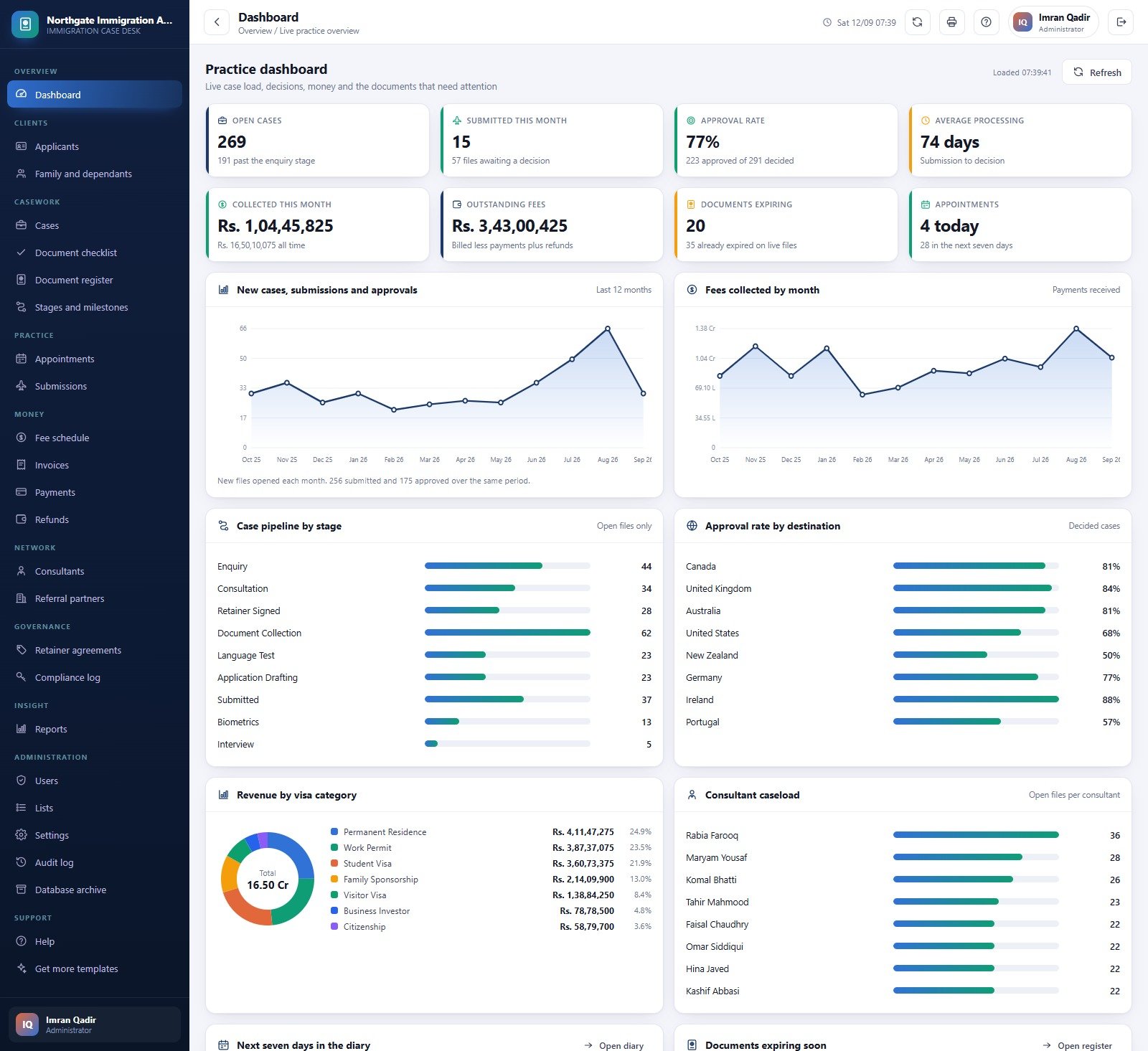
- Practice dashboard with 8 live cards: open cases, submitted this month, approval rate, average processing days, collected this month, outstanding fees, documents expiring and appointments today.Immigration Consultancy Management System Web App
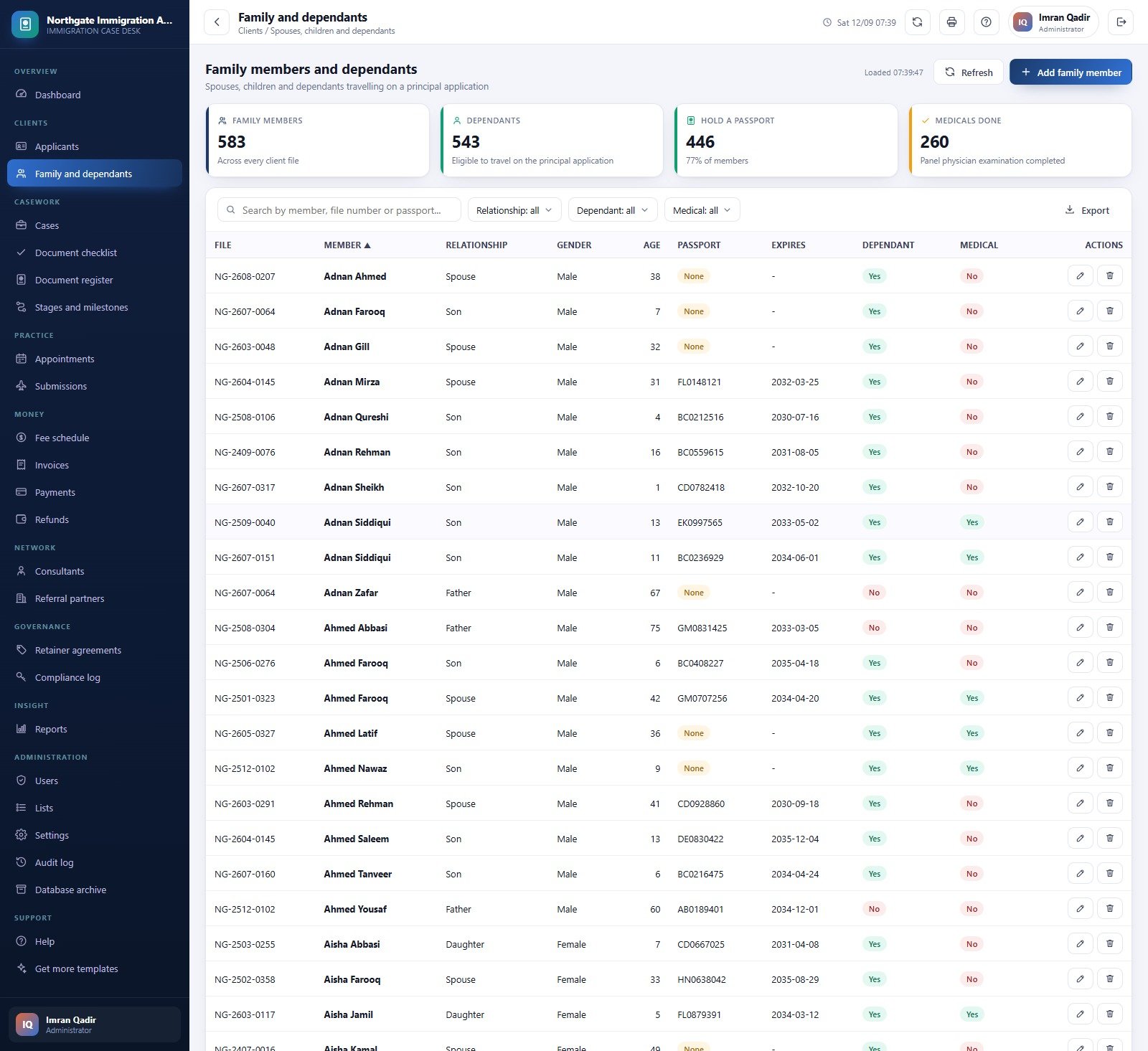
- Applicants with dependants: spouses, children and parents are recorded under the principal applicant with passport number, expiry, dependant flag and medical status.
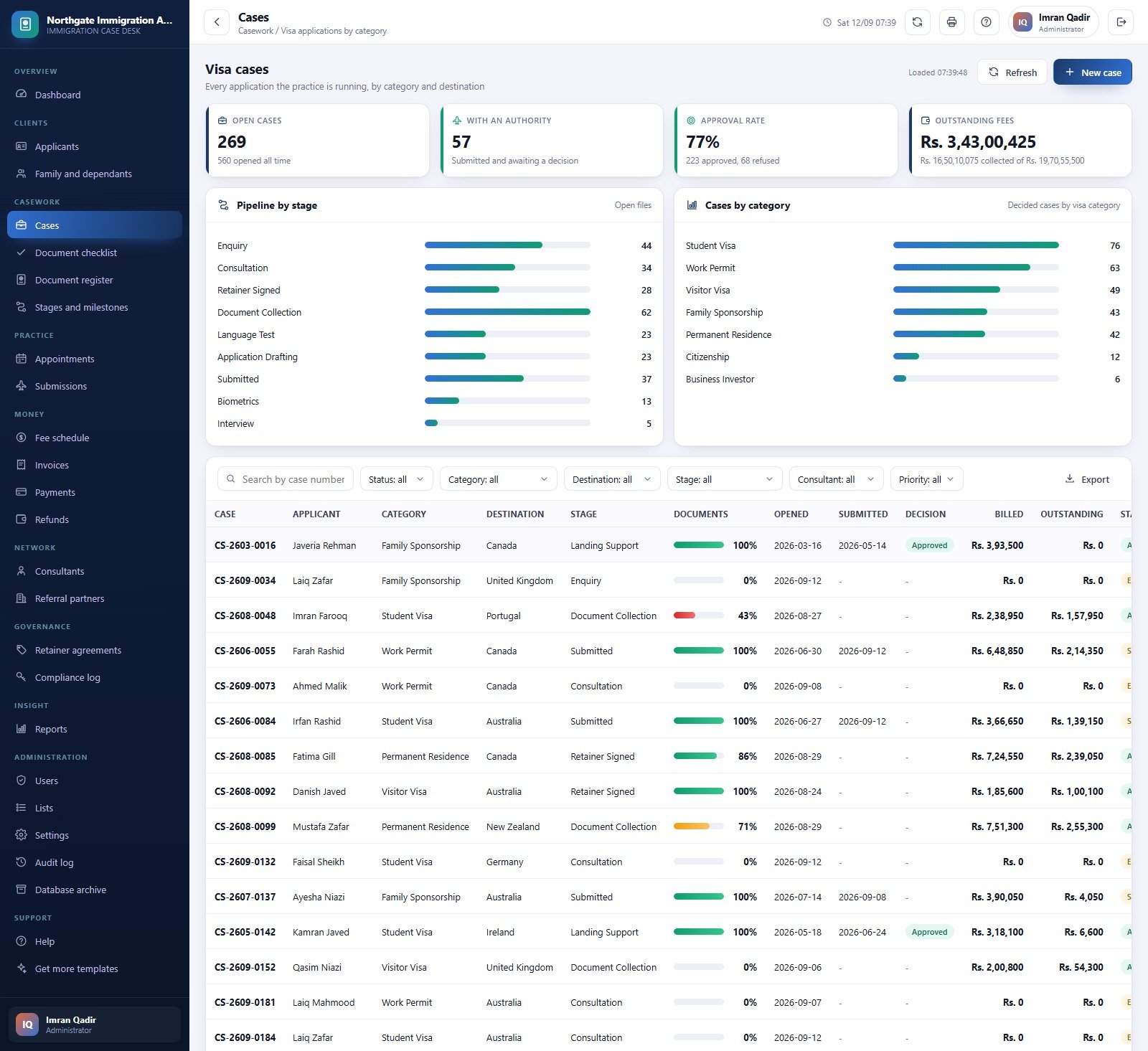
- Visa cases by category and stage: the sample data covers 7 categories (Student Visa, Work Permit, Visitor Visa, Family Sponsorship, Permanent Residence, Citizenship, Business Investor) and 8 destination countries.Immigration Consultancy Management System Web App
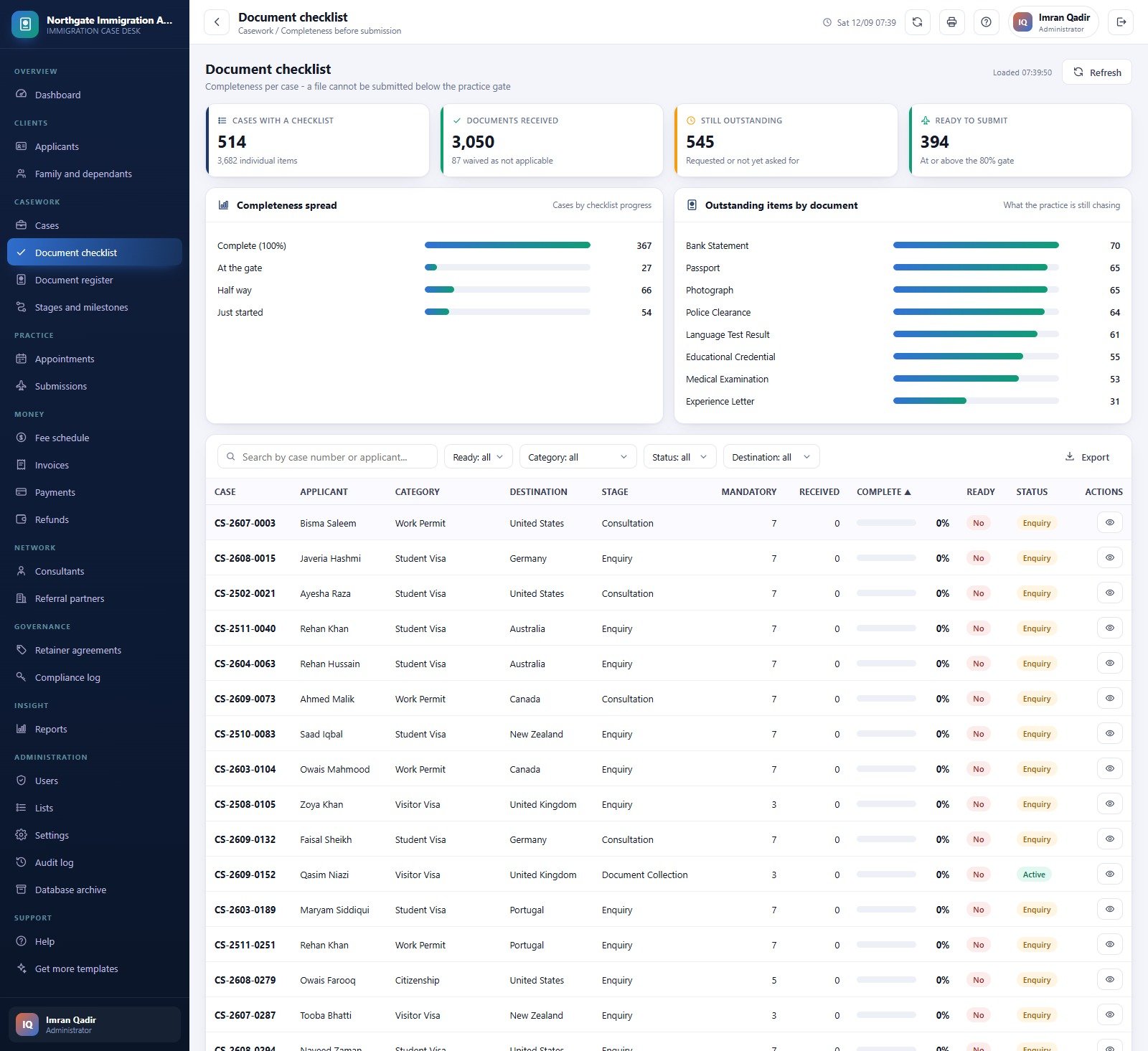
- A submission gate: a case cannot be logged as submitted until its retainer agreement is signed and its mandatory checklist reaches the percentage set in Settings, 80% by default.
- Document expiry tracking: warning and critical thresholds of 60 and 30 days, a dashboard panel and a daily alert email.
- Money from fee to refund: fee schedules, invoices with tax and balance, receipts by payment mode and refunds with an approval status.
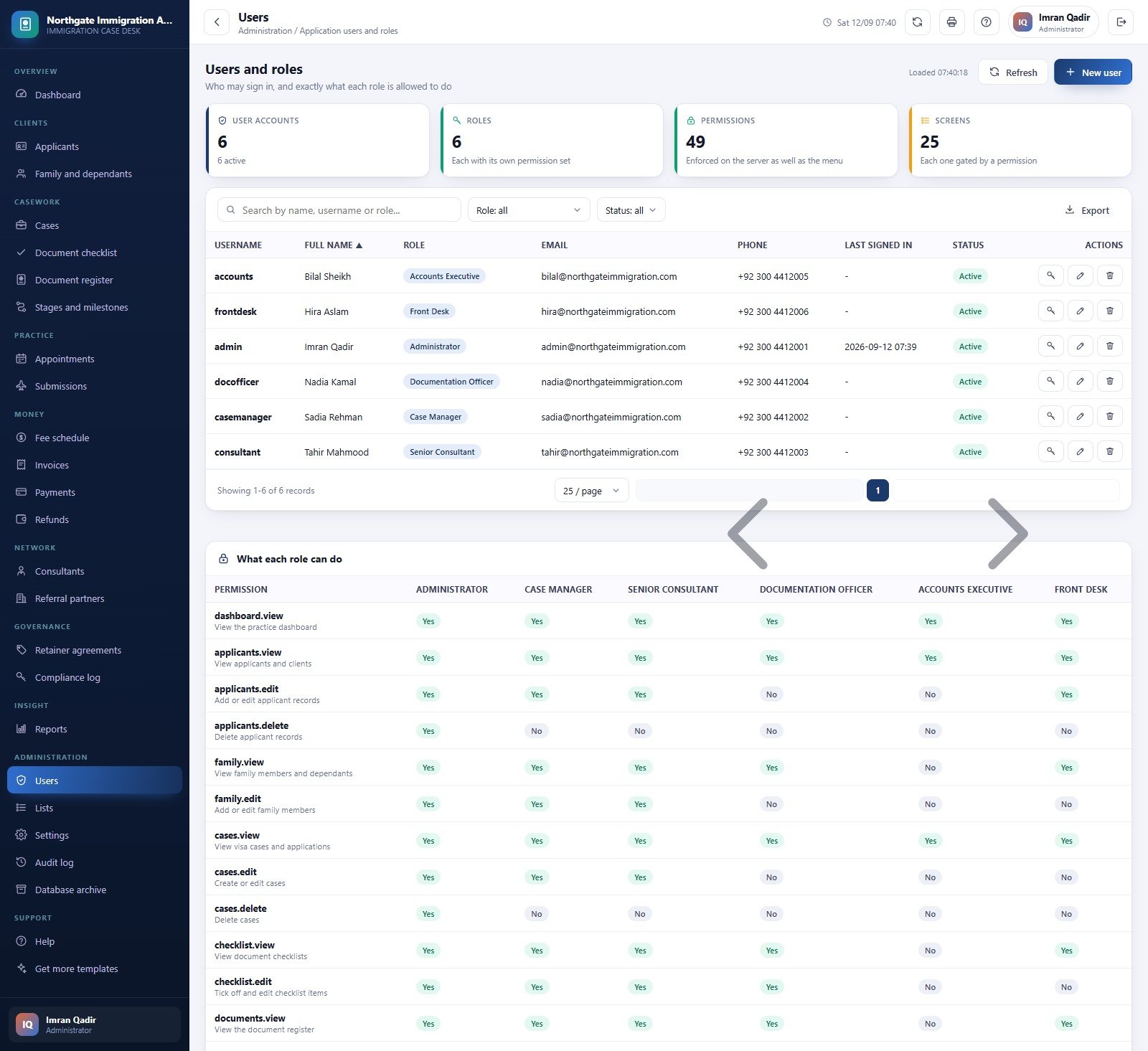
- Roles and audit: 6 roles, 49 permissions checked again on every server call, and an audit log of sign-ins, creates, updates and exports.Immigration Consultancy Management System Web App
- Emails from your own account: invoices, receipts, outstanding-document lists and decision letters can be emailed to the applicant, plus a daily case summary for the practice.Immigration Consultancy Management System Web App
Web App Screens Explained
Practice Dashboard
The dashboard charts new cases, submissions and approvals over the last 12 months, fees collected by month, the case pipeline by stage, approval rate by destination, revenue by visa category and consultant caseload.Immigration Consultancy Management System Web App
Applicants and Family Members
The applicant file shows people on file, prospects, registrations this month and conversion rate, with charts for lead source and preferred destination. The family screen counts members, dependants, passports held and medicals done.Immigration Consultancy Management System Web App
Visa Cases
Every application gets a case number, category, destination, stage, consultant, priority, document completeness, billed and outstanding amounts, with filters for each.Immigration Consultancy Management System Web App
Document Checklist and Document Register
The checklist shows completeness spread across cases and the documents most often outstanding, such as bank statements and police clearances. The register stores each document’s number, issue and expiry dates, days left and verification status.Immigration Consultancy Management System Web App
Stages, Appointments and Submissions
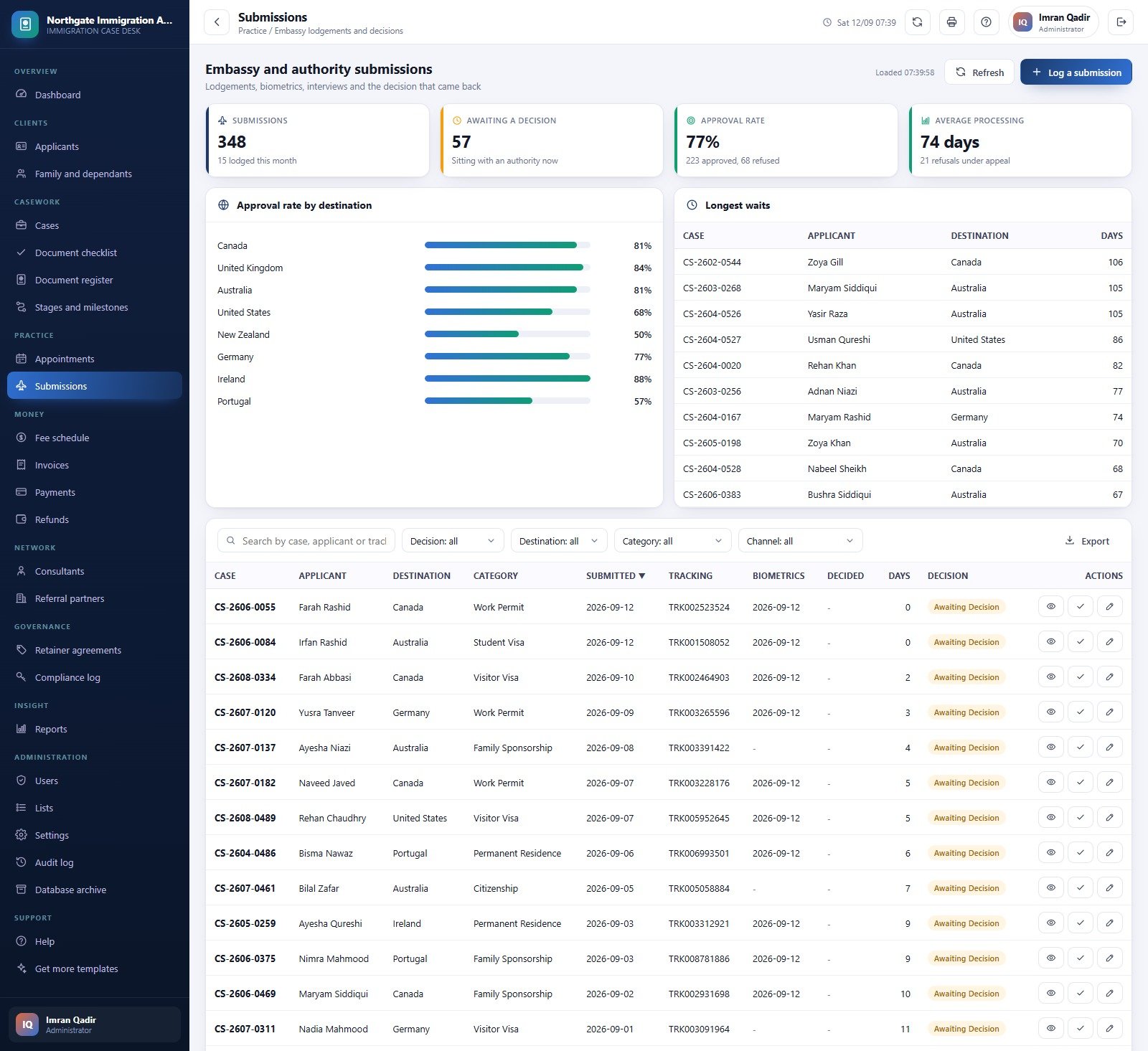
Stages log milestones from Enquiry to Landing Support with average days per stage. The appointment diary records consultations, document reviews and biometrics briefings. Submissions hold the authority, a tracking number your staff enter, the decision and the longest waits.
Fees, Invoices, Payments and Refunds
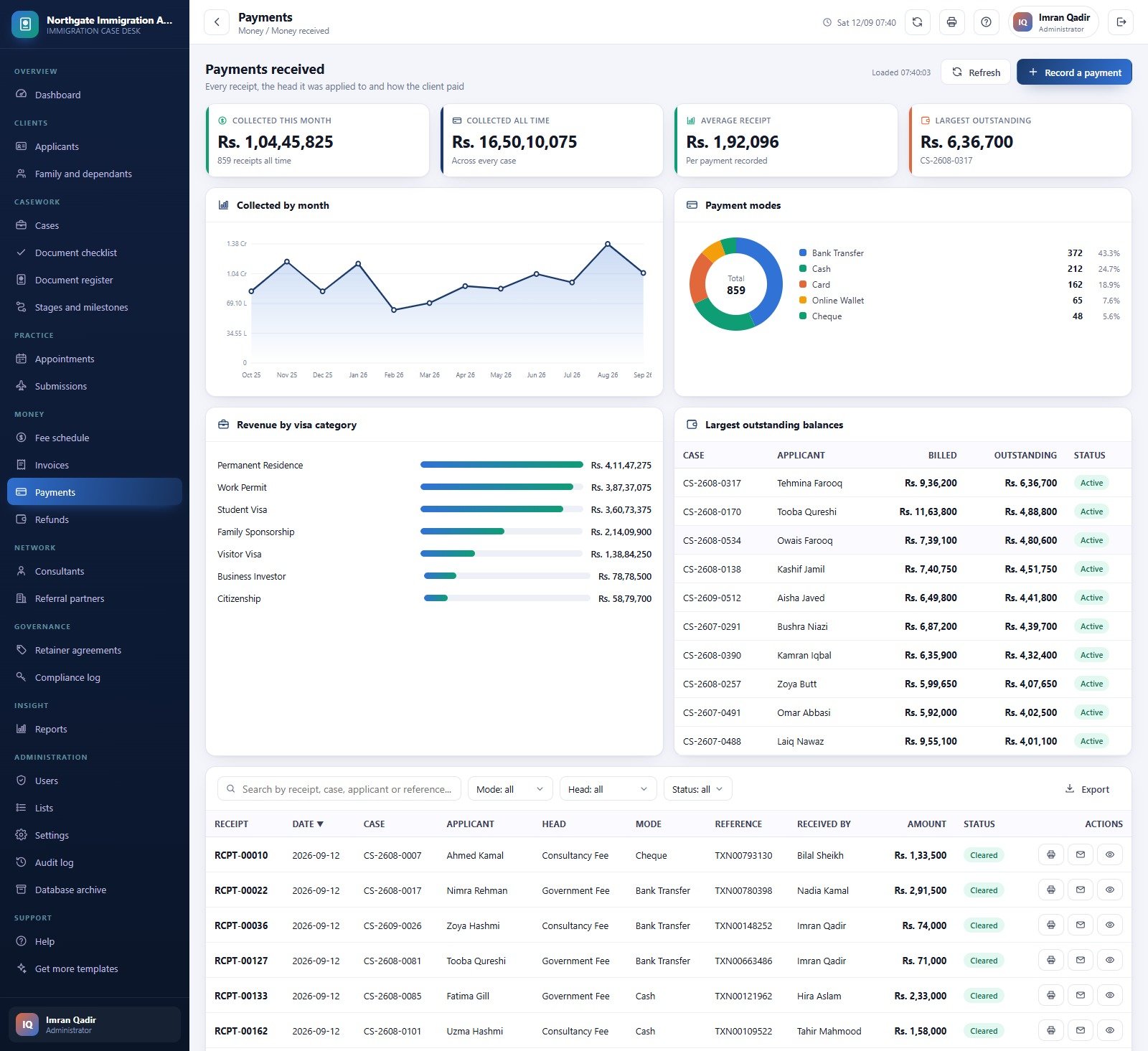
The fee schedule separates consultancy, government, courier and translation fees. Invoices show billed, collected and overdue totals, payments break down receipts by mode, and refunds record the reason and who approved them.
Consultants, Referral Partners, Retainers and Compliance
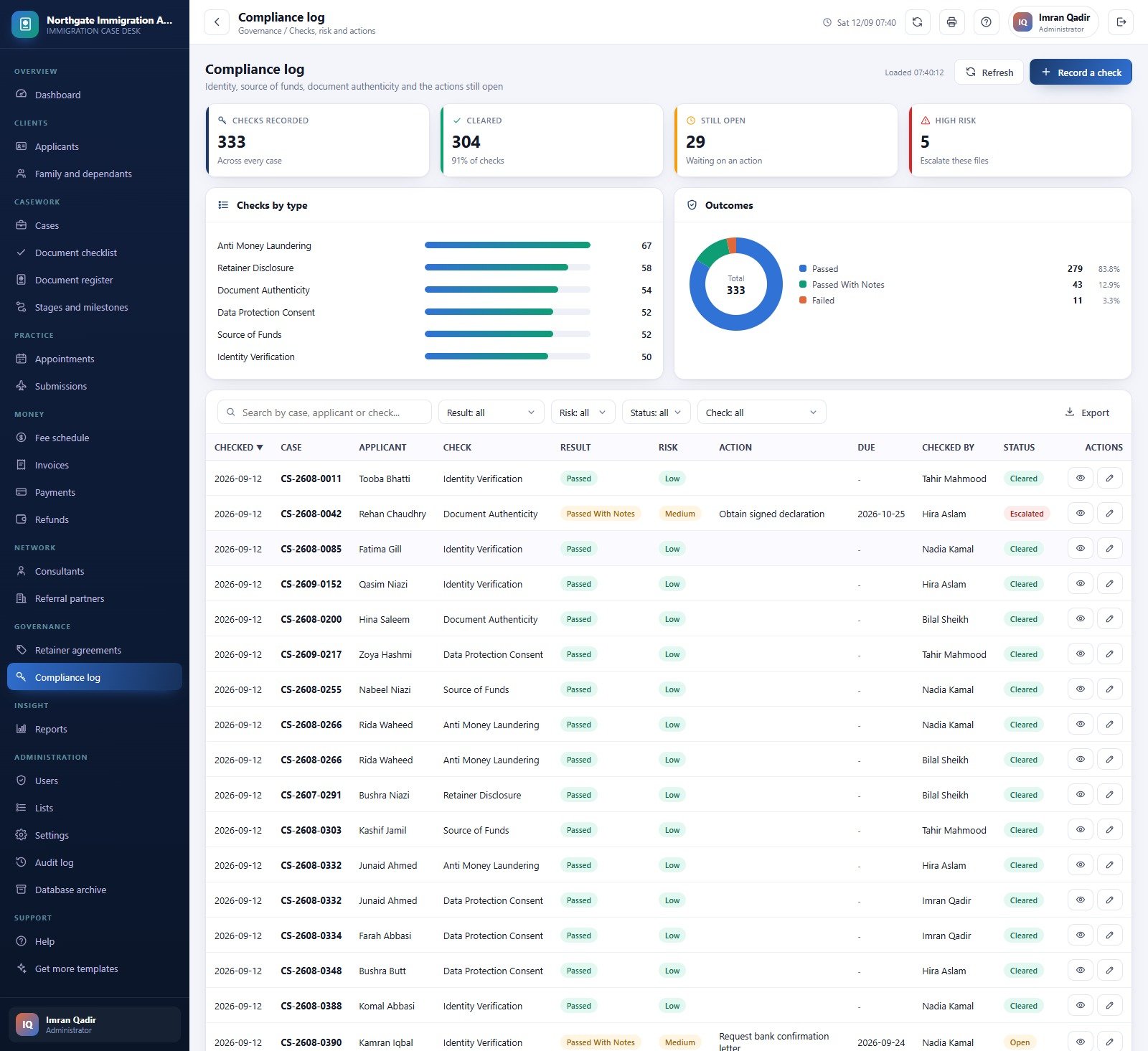
Consultant pages show open files and approval rate per consultant. Referral partners track referrals and commission due. Retainer agreements record value and refund policy, and the compliance log records identity, source-of-funds and data-protection checks with outcome and risk.
Reports, Users, Settings and Archive
Seventeen reports cover case pipeline, approval and refusal rates, processing time, checklist gaps, document expiry, revenue, outstanding ageing, consultant caseload, partner performance and client acquisition, all exportable to CSV. Settings control business details, currency, tax, checklist gate, expiry days, print size and email.
Immigration Consultancy Management System vs. Spreadsheets vs. Paid Immigration CRM
| Feature | Immigration Consultancy Management System Web App | Shared Excel or Google Sheets files | Paid immigration case CRM |
|---|---|---|---|
| Cost | ✅ $39.99 one-time | Free, but you build it | Monthly fee per user |
| Where data lives | ✅ Your own Google Drive | Your own files | Vendor’s servers |
| Role-based access | ✅ 6 roles, 49 permissions | File sharing only | ✅ Usually |
| Checklist gate before submission | ✅ Built in | Manual | Varies |
| Document expiry alerts | ✅ Dashboard and daily email | Manual | ✅ Usually |
| Client portal and e-filing integration | ❌ Not included | ❌ | ✅ Often |
| Source code | ✅ Included | n/a | ❌ |
| Mobile access | ✅ Browser | ✅ Sheets app | ✅ App |
For small practices that want structured casework and fee tracking without a per-user subscription, the Immigration Consultancy Management System Web App sits in the sweet spot.
Who Should Use This Template
Perfect for:
- Visa and immigration consultancies with a handful of consultants and support staff
- Study-abroad agents who work with language institutes and overseas associates
- Practices already on Google Workspace that want their records in their own Drive
Not a fit if:
- You need eligibility assessment, legal advice or outcome prediction. This is record-keeping software, not a licensed-adviser tool
- You need a client self-service portal or direct filing into government systems
- You need enterprise single sign-on or certified data protection controls
Real-World Use Cases
A student visa agency with three consultants. Reception books consultations in the diary, the documentation officer chases transcripts and bank statements from the checklist, and the owner reviews approval rate by destination every week.
A family sponsorship practice. Dependants sit under the principal applicant, passport expiry dates feed the alert email, and accounts reconcile retainer deposits and government fees against invoices.
A consultancy fed by partners. Referral partner performance shows which language institutes send approved clients and how much commission is due.
Advantages of the Web App
- One-time cost instead of a monthly per-user fee.
- Data stays in a Google Sheets database in your own account, which you can open, back up and archive.
- The submission gate stops incomplete files leaving the office.
- Printing on 3 inch, 4 inch or A4 for invoices, receipts and reports.
Opportunities for Improvement
- No client portal: applicants cannot upload their own documents.
- No embassy or government portal integration; tracking numbers and decisions are typed in.
- Uploaded scans are saved to Drive with link sharing, so review sharing settings for passport copies.
- Google Sheets and Apps Script quotas limit very large practices.
Best Practices
- Change all six seeded passwords on the first sign-in and remove accounts you do not need.
- Restrict who can open the database spreadsheet; passport numbers are personal data and you are responsible for protecting them.
- Set the checklist gate and expiry thresholds to match your own practice rules.
- Use the Database archive screen once a year to move closed cases out of the live file.
- Read Google’s guide to deploying Apps Script web apps and its help page on sharing files from Google Drive.
Explore Relevant Templates
Other consultancy and document-heavy systems on this blog: the HR Consultancy Management System Web App, the Import-Export Documentation Management System Web App and the Helpdesk and Ticketing Management System Web App. Browse every Google Apps Script web app on NextGenTemplates.
Curious how systems like this are put together in a spreadsheet? The NextGenTemplates Academy learning paths build up the underlying spreadsheet skills step by step, with practice files.
Get the Immigration Consultancy Management System Web App
Frequently Asked Questions
Can I try it before buying?
Yes. The live demo at the top of this post runs the full Immigration Consultancy Management System Web App with sample data. Use any of the six public demo logins to test every screen and role before you buy.
Does it give immigration advice or guarantee visa approvals?
No. The Immigration Consultancy Management System Web App records your casework. It does not assess eligibility, give legal advice or predict outcomes, and the approval rate only counts decisions you enter.
Does it file applications with embassies or government portals?
No. There is no e-filing or portal integration. Staff record the authority, tracking number and decision by hand.
How does it compare with a paid immigration CRM?
It costs a one-time fee, runs in your own Google account and includes source code. Paid CRMs usually add client portals and integrations and charge per user every month.
How long does setup take?
Pasting the code and deploying takes about 15 minutes. The database build is staged and resumable, so a slow account continues by itself.
Who owns the applicant data?
You do. It lives in your own spreadsheet and Drive folders, and NextGenTemplates never sees it. You are responsible for access control and privacy compliance.
About the Author
Built by PK, Microsoft Certified Professional with 15+ years of Excel, Google Sheets, Apps Script and Power BI experience, and founder of NextGenTemplates. Every template is hand-built and tested before release.
Conclusion
If your practice tracks applicants, documents, submissions and fees across scattered spreadsheets, this web app gives each file a stage, a checklist, an expiry date and a balance in one place. Try the live demo with each role first, then deploy your own private copy.
✅ Instant download · One-time payment · No subscription
Last updated: September 2026