The Music Class Calendar in Google Sheets gives a music school, studio or private teacher five ready-made tabs, a seven-column Events register and 100 sample class records spread across 18 lesson and event types and 23 rooms. Every one of the 100 sample weekdays was checked against its date, and the file runs in any browser with a free Google account.
Most music teachers start with a paper diary, a whiteboard in the office or a long chat thread with other teachers. That works until a recital, an exam-prep block and a room change land in the same week. This template replaces those scattered notes with one shared schedule that shows the whole year, a single month or any date range in seconds.
Key Features of the Music Class Calendar in Google Sheets
- Four views from one table. Annual View, Monthly View and Daily View all read from the same Events register, so you enter a class once and it appears everywhere.
- Year, month and date-range selectors. Change the year on the Annual View, the month and year on the Monthly View, or a start and end date on the Daily View.
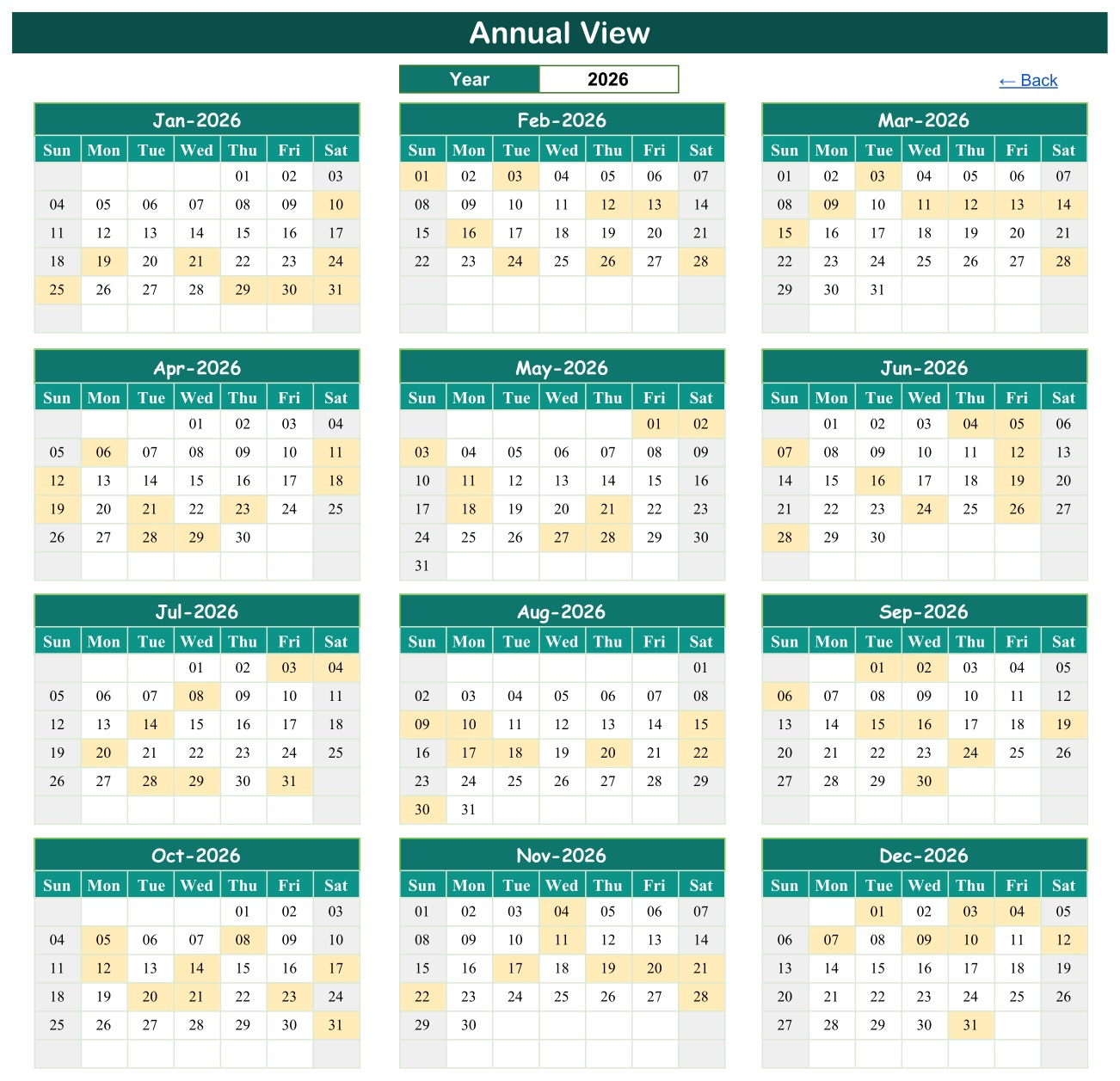
- Highlighted class days. The Annual View shades every date that holds at least one lesson or event, which makes busy terms and quiet holiday weeks easy to spot.
- Simple navigation. A Home menu with four buttons opens each view, and every view carries a Back link.
- No macros or add-ons. Everything runs on built-in Google Sheets features, so it works the same on a laptop, a tablet or the Google Sheets mobile app.
- Realistic sample data. Piano, guitar, violin, drum, flute and vocal lessons sit alongside theory classes, choir and recital rehearsals, exam coaching and a Parent Showcase Concert, so you can see the calendar working before you type anything.
Template Structure: The Five Tabs Explained
Home Menu
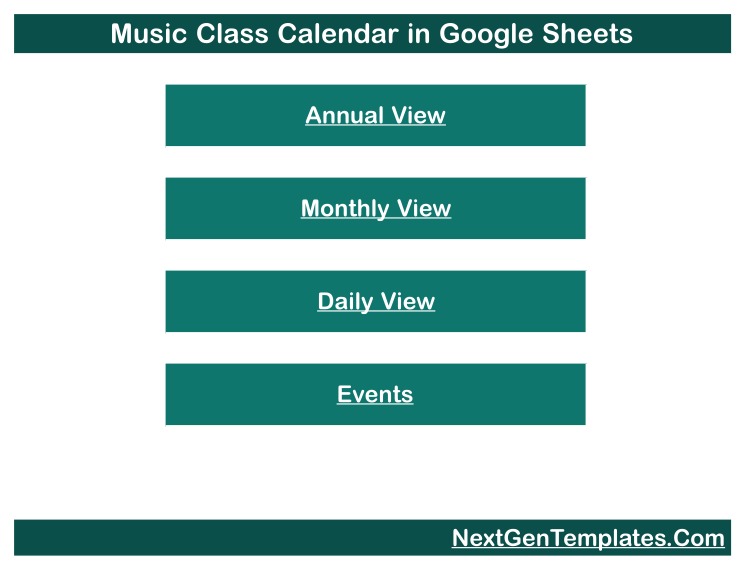
The first tab is a clean launch page with buttons for Annual View, Monthly View, Daily View and Events. New staff can find their way around without any spreadsheet training.
Annual View
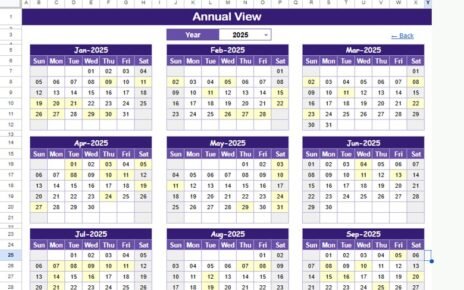
Choose a year and the tab draws twelve mini-calendars from January to December. Any date with a class or event is shaded, giving you a one-page picture of your teaching load across the year. In the 2026 sample you can see clusters around recital and exam periods.
Monthly View
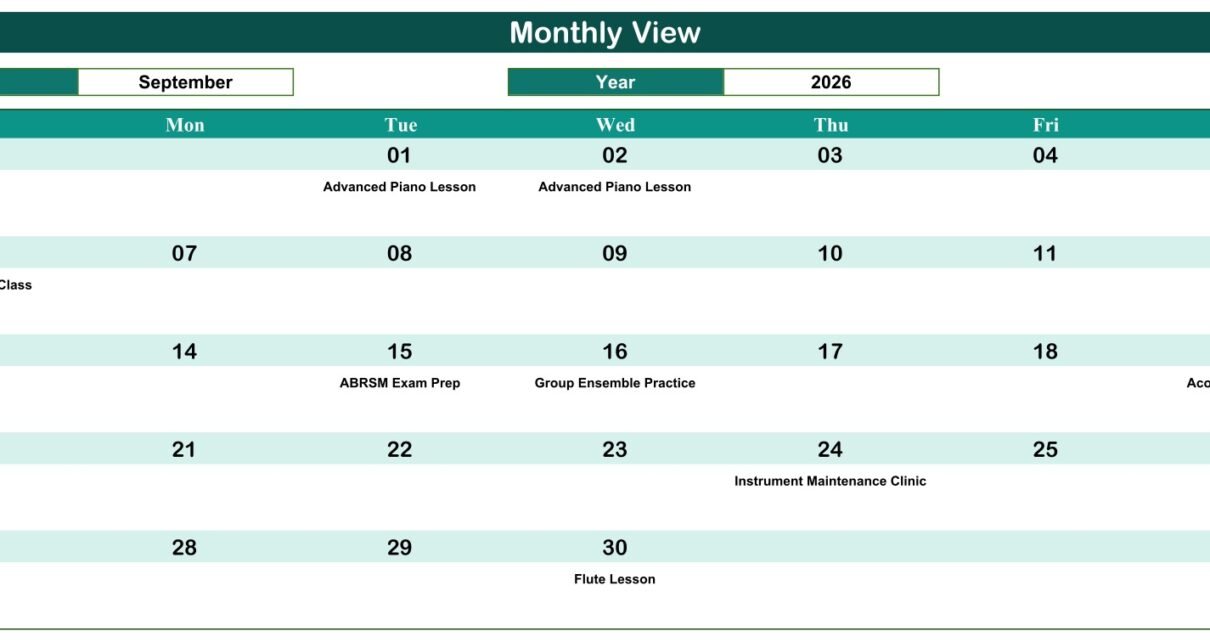
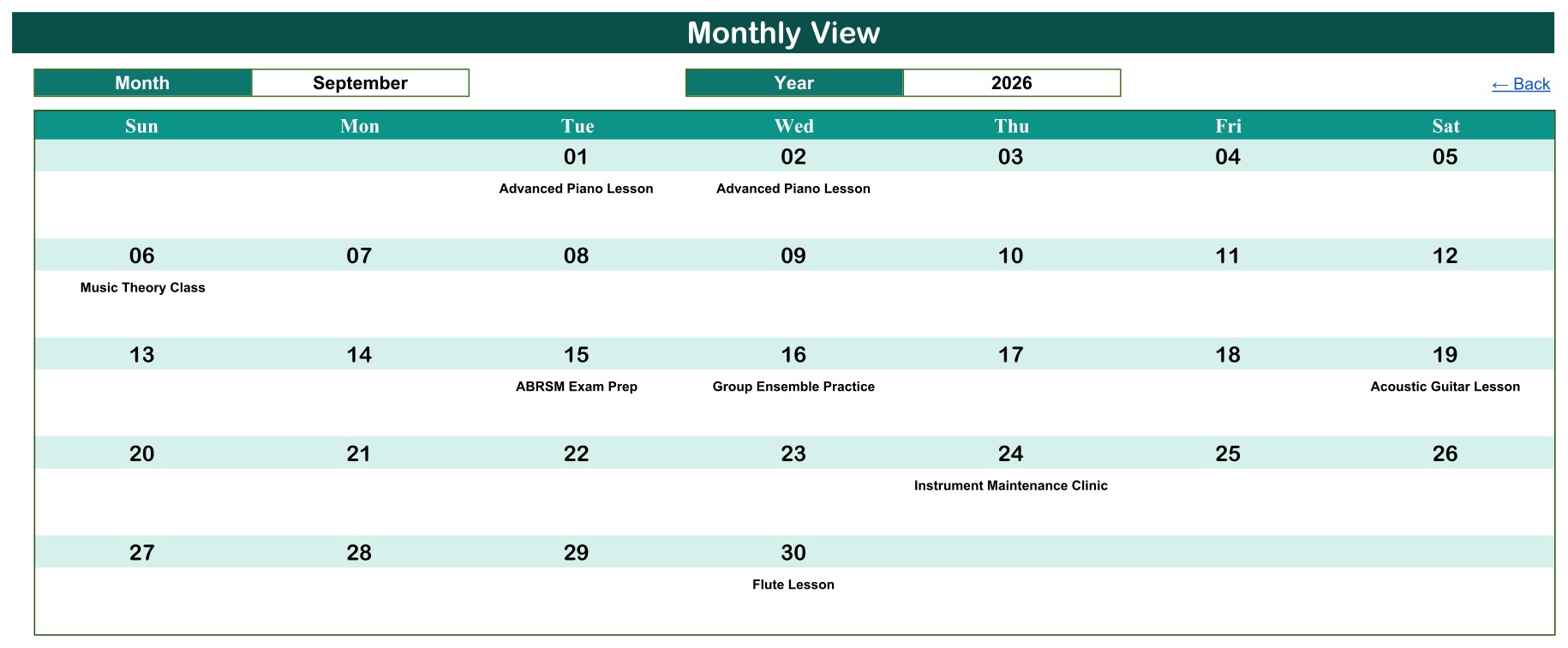
Select a month and a year to see a full-width Sunday-to-Saturday grid with the class name printed under each date. The sample opens on September 2026, showing Advanced Piano Lessons, a Music Theory Class, ABRSM Exam Prep, Group Ensemble Practice, an Acoustic Guitar Lesson, an Instrument Maintenance Clinic and a Flute Lesson. It is the page most studios print for a noticeboard.
Daily View
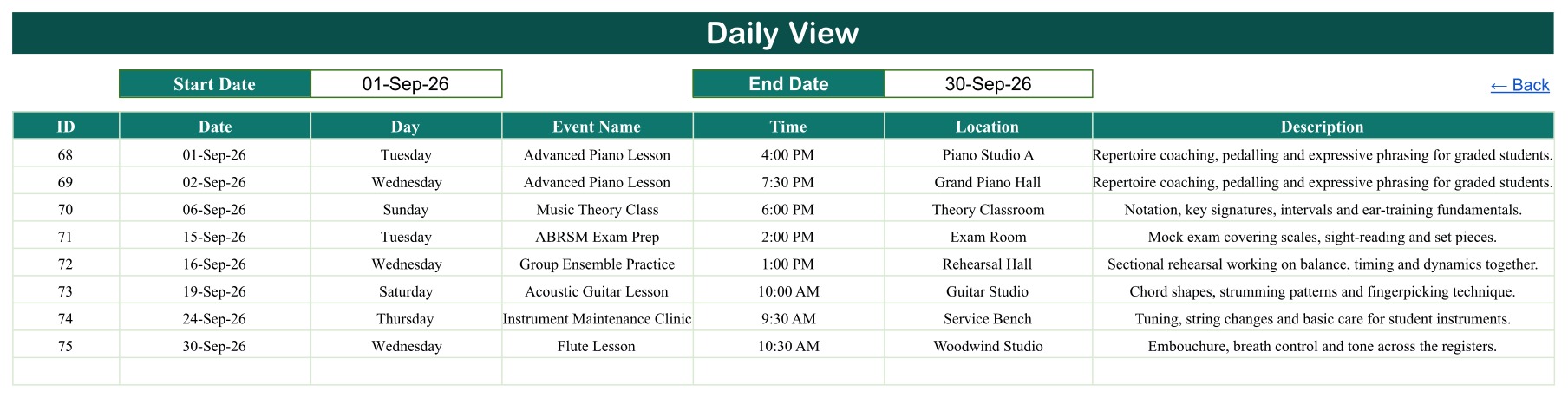
Enter a Start Date and an End Date and the tab lists every class in that window with ID, date, day, event name, time, location and description. Use it on Monday morning to hand each teacher the week ahead.
Events Register
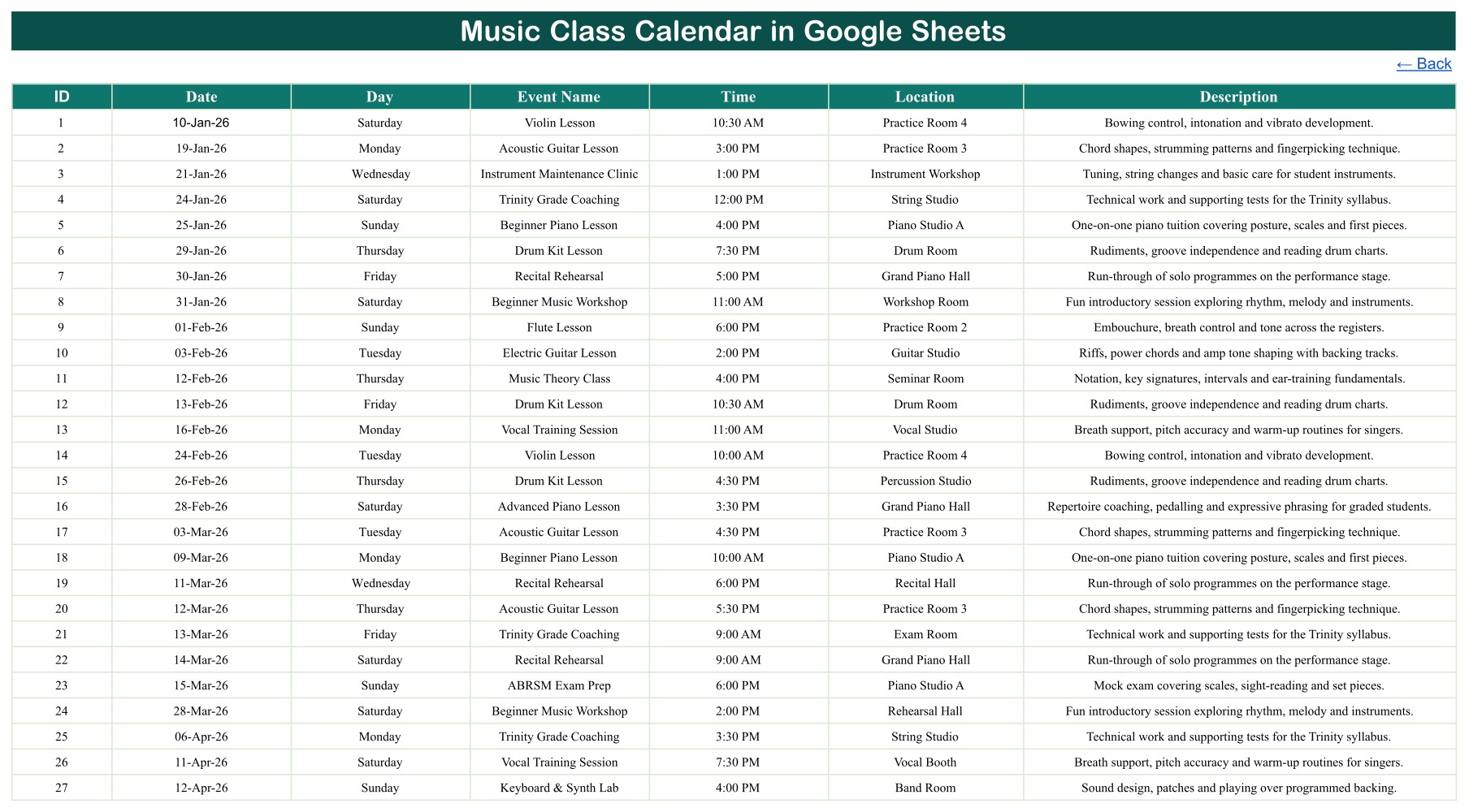
This is the source table behind every view. Each row holds an ID, Date, Day, Event Name, Time, Location and Description. Replace the 100 sample rows with your own lessons and the three calendar views update from it.
Music Class Calendar in Google Sheets vs. Excel Calendar vs. Paid Studio Software
| Feature | This Google Sheets Calendar | Microsoft Excel Calendar | Paid Studio Software |
|---|---|---|---|
| Cost | ✅ One-time purchase | One-time, needs Excel | Monthly subscription |
| Platform | ✅ Any browser, free Google account | Desktop Excel | Vendor web app |
| Setup time | ✅ Minutes | Minutes | Account setup and onboarding |
| Real-time team collaboration | ✅ Built-in sharing | Limited unless stored in OneDrive | ✅ Yes |
| Mobile access | ✅ Google Sheets app | Excel mobile app | ✅ Vendor app |
| Customizable fields | ✅ Fully editable | ✅ Editable | Limited to vendor settings |
| Annual, monthly and date-range views | ✅ All three | Depends on template | ✅ Usually |
| Online booking, invoicing and reminders | ❌ Not included | ❌ Not included | ✅ Usually included |
For studios that want a clear shared class schedule without a monthly software bill, this Google Sheets calendar sits in the sweet spot.
Who Should Use This Template
Perfect for:
- Small music schools and studios that want one shared music school calendar for teachers and the front desk
- Private tutors who need a simple music teacher schedule covering several instruments or rooms
- Community choirs, youth orchestras, church music groups and after-school programs planning rehearsals and concerts
- Anyone already running lessons from Google Drive who wants a calendar that lives next to their other files
Not a fit if:
- You need online booking, automatic reminders, fee collection or invoicing
- You need student records, attendance, progress reports or a parent portal
- You need automatic clash detection across teachers and rooms
Real-World Use Cases
Anna runs a four-room studio. She enters piano, guitar and violin lessons, recital rehearsals and exam-prep sessions in the Events tab, shares the file with her six teachers, and checks the Annual View each term to see which weeks are overloaded before she confirms new pupils.
Marcus teaches drums and keyboard privately. He keeps his whole year in the sheet, prints the Monthly View for his practice-room wall, and pulls the Daily View on his phone between lessons to confirm the next room.
Priya coordinates a community choir. Choir rehearsals, group ensemble practice and a Parent Showcase Concert all sit in one shared file, so volunteers stop asking which Saturday the concert falls on.
Advantages of the Template
- One source of truth. A single Events table removes the version confusion of several diaries.
- Three levels of detail. Year, month and date-range views answer different questions without extra work.
- Lower running cost. A one-time purchase replaces a monthly subscription for studios that only need scheduling.
- Easy to adapt. Rename event types, rooms and descriptions to match your own instruments and venues.
- Shareable. Google Sheets sharing lets teachers view or edit the same file in real time.
Opportunities for Improvement
This is honest scheduling software, not a full studio-management platform, so it helps to know its limits before you buy:
- The Events table has no student, parent, teacher-name, fee or attendance fields. Add your own columns if your process needs them, and keep personal data out of the free-text columns unless your privacy policy allows it.
- It does not take bookings, send reminders, block double-booking of a room or teacher, or sync with Google Calendar.
- When one date holds several classes, the Monthly View shows the first class and a “more” counter. The Daily View and Events tab always show every row.
- The Day column is typed rather than calculated, so update the weekday whenever you move a class to a new date.
Best Practices
- Give every class a unique ID and keep event names consistent, for example always “Beginner Piano Lesson” rather than a mix of spellings.
- Use the Location column for real rooms so teachers can see at a glance where each lesson happens.
- Use the Description column for the lesson focus, such as scales, sight-reading or repertoire, rather than for pupil details.
- Share view-only access with most staff and edit access with one or two coordinators. Google explains the options in its guide to sharing files from Google Drive.
- At the start of each year, make a fresh copy, clear the old rows and set the Year selector on both calendar views.
Explore Relevant Templates
If you run a music school, pair this calendar with the Music School Dashboard in Google Sheets to analyse enrolments and revenue, or the Music and Performing Arts Dashboard in Google Sheets for performance analytics. Schools and academies using the same calendar format can also look at the Class Timetable Calendar in Google Sheets, the Student Attendance Calendar in Google Sheets and the Teacher Substitution Calendar in Google Sheets.
You can browse the full range of Google Sheets calendar template products and every Google Sheets template on NextGenTemplates.
Frequently Asked Questions
What is included with the Music Class Calendar in Google Sheets?
You get a PDF with a Make-a-copy link. Clicking it saves an editable copy of the calendar to your Google Drive with five tabs, Home, Annual View, Monthly View, Daily View and Events, plus 100 sample classes you can replace with your own lessons.
How long does setup take?
Most studios are ready in under 15 minutes. Make your copy, clear the sample rows in the Events tab, type in your first month of classes and set the Year selector. The calendar views update from the Events table straight away.
Can I use it as a music lesson schedule template for several teachers?
Yes. Share the file in Google Sheets and every teacher sees the same schedule. Use the Location and Description columns to show the room and lesson focus. There is no built-in teacher column, so add one if you need to filter by teacher.
Can several classes happen on the same day?
Yes. The Events tab and the Daily View keep every row. The Monthly View shows the first class on a busy date plus a counter for the rest, so switch to the Daily View when a day has several lessons.
How does this compare to paid music studio software?
Paid studio platforms add online booking, billing and automated reminders for a monthly fee. This template focuses on a clear shared schedule for a one-time price with no per-user charges, which suits studios that already handle payments elsewhere.
Does it store student information?
No. The Events table records lesson types, dates, times, rooms and descriptions only. It has no student or parent fields, which keeps the file simple and safer to share with your teaching team.
About the Author
Built by PK, a Microsoft Certified Professional with 15+ years of Excel, Google Sheets and Power BI experience and founder of NextGenTemplates, sharing tutorials across YouTube channels. Every template is hand-built and tested before release.
Conclusion
A music studio runs on its timetable. The Music Class Calendar in Google Sheets gives you a whole-year overview, a printable monthly grid and a date-range list from one simple Events table, without macros, add-ons or a subscription. Replace the sample classes with your own and your teachers can see the same schedule from any device.
👉 Click here to Purchase the Music Class Calendar in Google Sheets
✅ Instant download · One-time payment · No subscription
🎥 For more Google Sheets tutorials visit Youtube.com/@NeoTechNavigators
Last updated: September 2026