The Online Course Sales & Student Tracker in Google Sheets is an online course sales tracker and student log built on a single tab. Each enrollment goes into a 16-column table that calculates the amount paid, completion, revenue rank and days enrolled, and a Total Revenue card plus 4 charts summarise sales and student progress above it. The ready-made copy includes 15 fictional sample enrollments across 9 course categories, adding up to $2.6K, so you can watch every formula and chart work before entering your own students.Online Course Sales & Student Tracker in Google Sheets
Selling courses creates two kinds of questions at once. The money questions – how much did this launch bring in, who is still paying in installments, how much did discounts cost – and the student questions – who has finished, who stalled at 10%, who asked for a refund. Course platforms answer some of these inside their own dashboards, but only for sales made on that platform. This tracker keeps both views in one Google Sheet you own. If you also want to plan launch dates and live sessions, it pairs well with the E-learning Course Calendar in Google Sheets.Online Course Sales & Student Tracker in Google Sheets
Get the Online Course Sales & Student Tracker in Google Sheets
Key Features of the Online Course Sales Tracker
The template is built around one tracker tab, so revenue, payments and progress are visible without switching sheets. These are the features you get:Online Course Sales & Student Tracker in Google Sheets
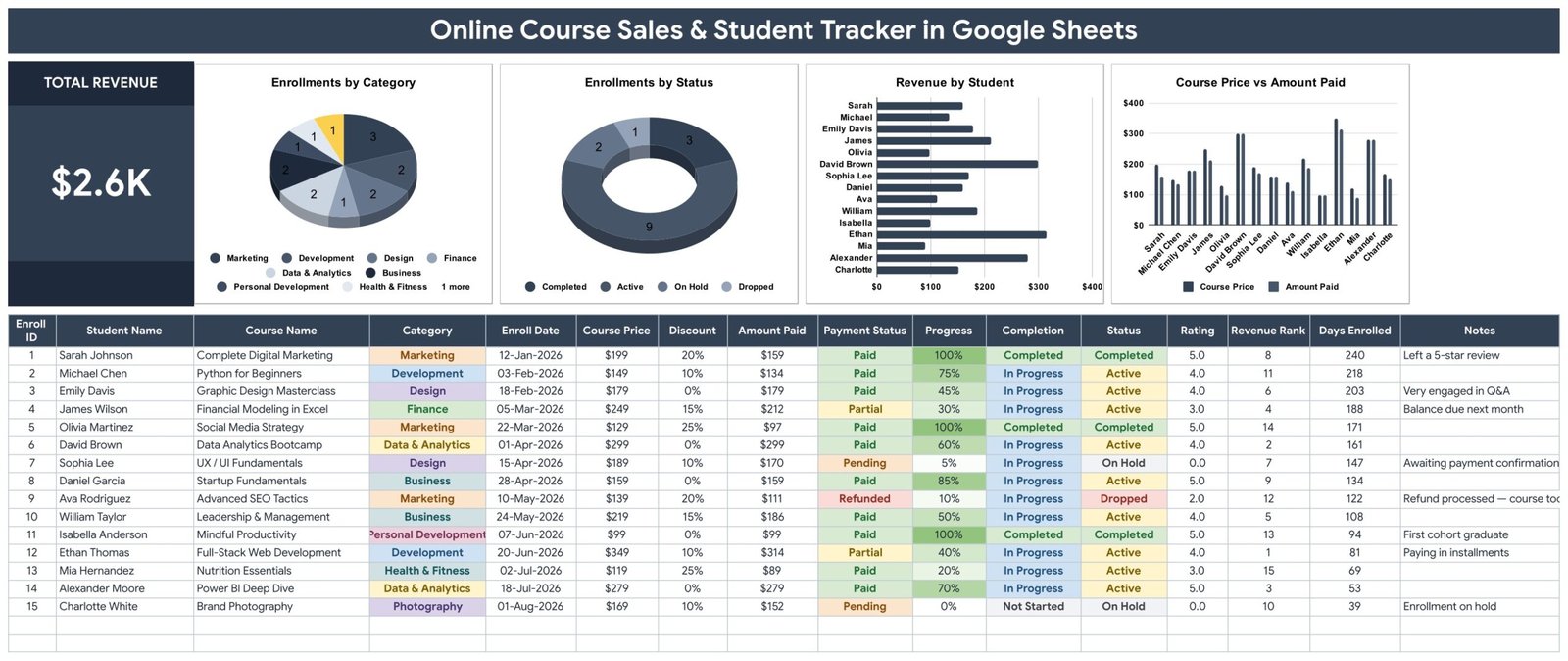
- Total Revenue card: A headline card adds up the Amount Paid column for every enrollment. With the sample data it shows $2.6K, and it changes as soon as you add or edit a row.Online Course Sales & Student Tracker in Google Sheets
- Four charts linked directly to the data: Enrollments by Category, Enrollments by Status, Revenue by Student and Course Price vs Amount Paid. All four read rows 16-1000 with the built-in Aggregate option, so new enrollments appear without any helper tables.
- Automatic Amount Paid: Each row calculates Course Price minus Discount, so a $249 course with a 15% discount shows $212 without any typing.
- Completion from Progress: Type Progress as a percentage. At 100% the Completion column switches to Completed; a student at 0% shows Not Started.Online Course Sales & Student Tracker in Google Sheets
- Revenue Rank and Days Enrolled: Every enrollment is ranked by what the student paid, and Days Enrolled counts the days since the Enroll Date.Online Course Sales & Student Tracker in Google Sheets
- Payment and enrollment statuses: Payment Status offers Paid, Partial, Pending and Refunded; the Status column offers Active, Completed, Dropped and On Hold.
- Expandable dropdowns: Category, Payment Status and Enrollment Status draw from a List tab covering rows 2-500. The Category list ships with 12 options, including Music, Language and Other.
- Rating and Notes: Keep each student’s course rating and a short note, such as a refund reason or an installment plan, next to the enrollment.Online Course Sales & Student Tracker in Google Sheets
Sheets Explanation
Course Sales Tracker Tab: Total Revenue Card, Charts and Enrollment Log
The top band holds the Total Revenue card and the four charts. Enrollments by Category splits students across categories such as Marketing, Development, Design, Finance, Data & Analytics, Business, Personal Development, Health & Fitness and Photography. Enrollments by Status counts Active, Completed, On Hold and Dropped students – 9, 3, 2 and 1 in the sample. Revenue by Student ranks what each student paid, led by Ethan Thomas at $314 for Full-Stack Web Development, and Course Price vs Amount Paid compares list price with the discounted amount for every student.Online Course Sales & Student Tracker in Google Sheets
Below the charts sits the 16-column log: Enroll ID, Student Name, Course Name, Category, Enroll Date, Course Price, Discount, Amount Paid, Payment Status, Progress, Completion, Status, Rating, Revenue Rank, Days Enrolled and Notes. Payment Status, Progress, Completion and Status cells are colour-coded, so a refunded or pending enrollment is easy to spot while scrolling.Online Course Sales & Student Tracker in Google Sheets
How to Use Tab
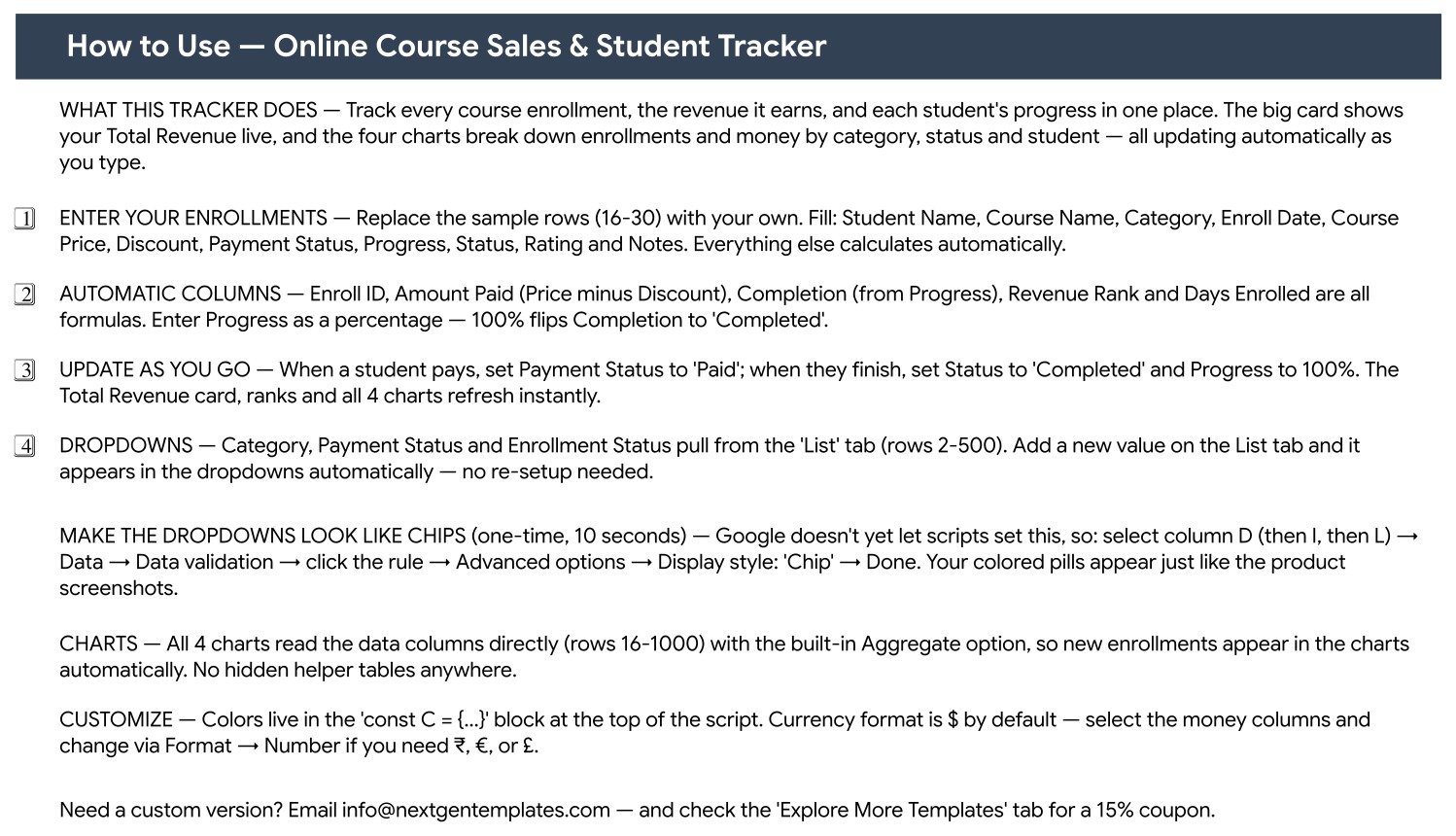
This tab explains which columns to fill in, which columns are formulas, how to update payments and progress as students move through a course, how the List-driven dropdowns work, how to switch the dropdowns to Google’s chip display style, and how to change the $ currency format to ₹, € or £.Online Course Sales & Student Tracker in Google Sheets
Explore More Templates Tab
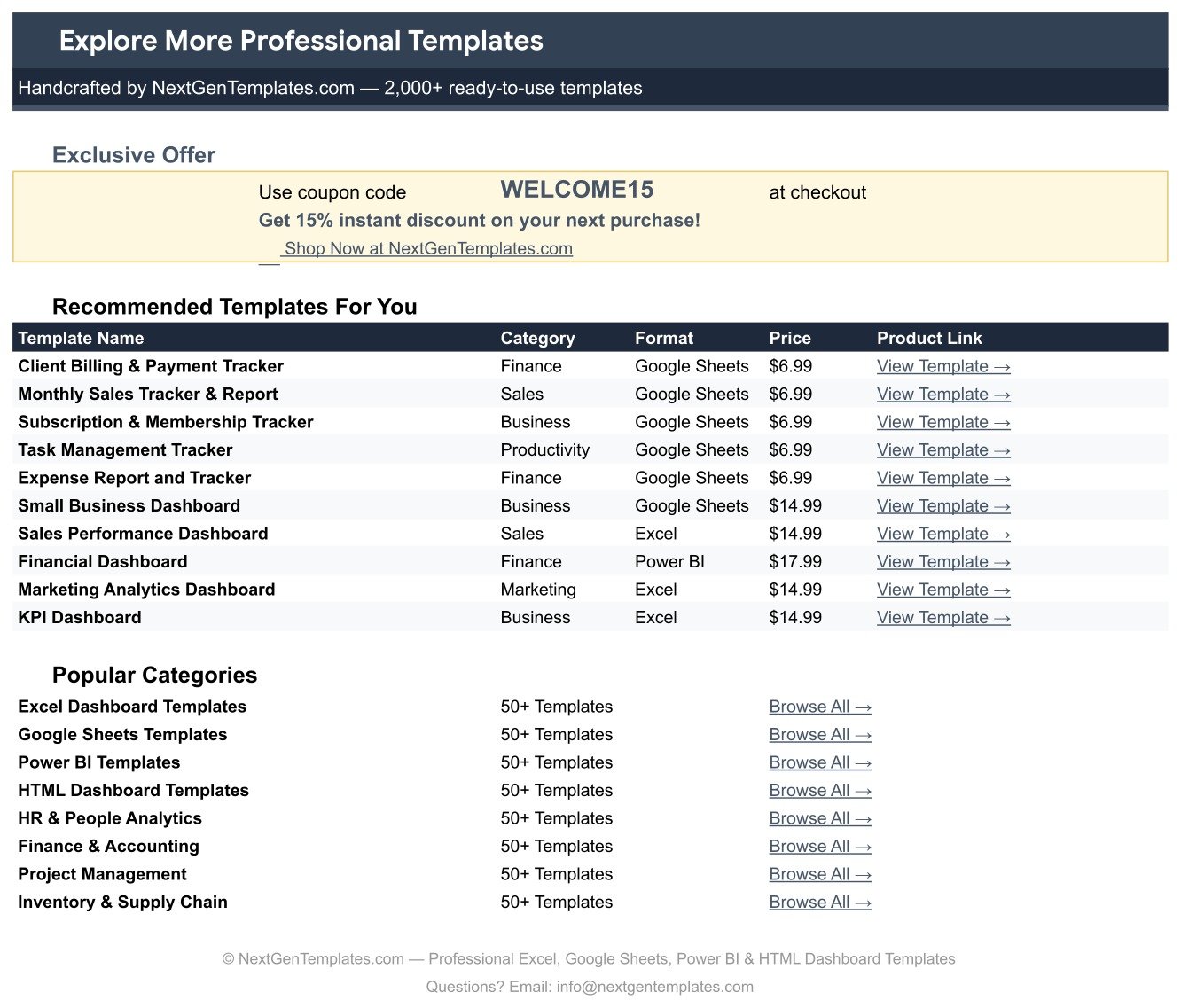
The last tab lists recommended NextGenTemplates templates and includes the WELCOME15 coupon for 15% off your next purchase. A separate List tab stores the dropdown options for Course Category, Payment Status and Enrollment Status.Online Course Sales & Student Tracker in Google Sheets
Google Sheets Course Tracker vs. Excel Workbook vs. Course Platform Reports — Feature Comparison
| Feature | Online Course Sales & Student Tracker in Google Sheets | Microsoft Excel course tracker | Built-in reports of a paid course platform |
|---|---|---|---|
| Cost | ✅ $6.99 one-time | Excel licence plus build time | Part of a recurring platform plan |
| Platform | ✅ Any browser with a free Google account | Excel desktop or Microsoft 365 | Vendor dashboard |
| Setup time | ✅ Make a copy, replace 15 sample rows | Build formulas and charts yourself | Ready once courses are hosted there |
| Data entry | Manual | Manual | ✅ Automatic for that platform’s sales |
| Sales from several channels in one view | ✅ Yes | Yes, if you build it | One platform only |
| Real-time team collaboration | ✅ Live co-editing built in | Co-authoring via OneDrive or SharePoint | Admin seats depend on the plan |
| Mobile access | ✅ Google Sheets app | Excel mobile app | Vendor app or browser |
| Customizable fields | ✅ Fully editable columns and dropdowns | Fully editable | Vendor-defined fields |
| Year-1 cost at 5 users | ✅ $6.99 once | 5 Excel licences | 12 months of the platform plan |
For course creators who sell on more than one channel, or who simply want a payment and progress log they fully own, this Google Sheets tracker sits in the sweet spot.
Who Should Use This Template
Perfect for:
- Independent course creators selling a handful of courses
- Coaches and trainers running paid cohorts with partial payments or installments
- Small online academies following enrollments, completion and ratings by category
- Creators who sell through their own website and a marketplace and want one combined view
Not a fit if:
- You need enrollments imported automatically – there is no Teachable, Thinkific, Udemy, Kajabi or Stripe connection
- You need a learning management system with lessons, quizzes or certificates
- You need accounting, invoicing, tax or payout reconciliationOnline Course Sales & Student Tracker in Google Sheets
Real-World Use Cases
Priya sells three design courses on her own website. She logs each purchase with the launch discount she offered. Course Price vs Amount Paid shows how much a 25% launch coupon really cost, and Revenue by Student shows which buyers picked her premium masterclass.
Marcus runs a paid coding cohort with installment plans. He marks students Partial until their balance clears and keeps due dates in the Notes column. Enrollments by Status tells him how many students are Active, On Hold or have Dropped before each live session.Online Course Sales & Student Tracker in Google Sheets
A two-person online academy teaches marketing and finance. Enrollments by Category shows which subject brings in the most students, while Rating and Completion flag courses where learners stall early. When the academy outgrows a tracker, the Online Learning Platforms Dashboard in Google Sheets offers a fuller analytics view.Online Course Sales & Student Tracker in Google Sheets
Advantages of This Online Course Sales Tracker
- Sales and students together: Payment status and course progress sit on the same row, so a refund request or a stalled student is never in a separate file.
- No formulas to write: Enroll ID, Amount Paid, Completion, Revenue Rank and Days Enrolled are already built.
- Low, one-time cost: $6.99 once instead of a recurring subscription.
- Easy to share: Google Sheets sharing lets a co-instructor or assistant view or edit the same file in real time.
- Grows with you: Charts cover rows 16-1000, and the List tab holds up to 499 options per dropdown.
Opportunities for Improvement
- Manual entry only: Every enrollment is typed in or pasted from an export. There is no automatic import from any course platform or payment processor.
- Total Revenue ignores Payment Status: Amount Paid is Course Price minus Discount, so Pending, Partial and Refunded rows still count at their discounted price. Adjust those rows if you want cash received.
- No time-series view: There is no revenue-by-month chart; sort or filter by Enroll Date to review a launch period.
- Chip styling is a manual step: The coloured dropdown chips need a one-time Data validation setting per column.
Best Practices
- Log each enrollment on the day it happens, with the discount actually applied, so Course Price vs Amount Paid reflects real pricing.
- Update Progress on a fixed rhythm – for example weekly – so Completion and Status stay trustworthy.
- Keep category names consistent on the List tab so Enrollments by Category stays clean.
- Use the Notes column for refund reasons and installment dates; it turns the log into a record you can learn from.
- Learn Google’s data validation options to switch dropdowns to chips, and its chart editing guide if you want to restyle a chart.
Explore Relevant Templates
- Online Learning Platforms Dashboard in Google Sheets – a full analytics dashboard for e-learning businesses.
- Coaching & Tutoring Dashboard in Google Sheets – see the coaching and tutoring dashboard walkthrough.
- Side Hustle Income Tracker in Google Sheets – follow course income alongside other income streams (read the side hustle tracker guide).
- E-learning Course Calendar in Google Sheets – plan launches and live sessions.Online Course Sales & Student Tracker in Google Sheets
Want to build trackers like this one step by step? The NextGenTemplates Academy learning paths cover the spreadsheet skills behind them, with practice files.
Get the Online Course Sales & Student Tracker in Google Sheets
Frequently Asked Questions
Does the Online Course Sales & Student Tracker connect to Teachable, Udemy or Stripe?
No. The tracker has no API connection or automatic import. You type each enrollment or paste it from your platform’s export, and Amount Paid, Completion, Revenue Rank, Days Enrolled, the Total Revenue card and the four charts update from those entries.Online Course Sales & Student Tracker in Google Sheets
How is Total Revenue calculated?
Total Revenue adds up the Amount Paid column, and Amount Paid is Course Price minus Discount. It does not change with Payment Status, so Pending, Partial and Refunded enrollments still count at their discounted price until you edit or remove them.Online Course Sales & Student Tracker in Google Sheets
Can I add course categories that are not in the list?
Yes. Category, Payment Status and Enrollment Status read rows 2-500 of the List tab. The Category list ships with 12 options – Business, Design, Marketing, Development, Data & Analytics, Personal Development, Finance, Health & Fitness, Photography, Music, Language and Other – and new entries appear in the dropdown immediately.Online Course Sales & Student Tracker in Google Sheets
Can I change the currency?
Yes. The money columns use $ by default. Select them and choose another currency under Format → Number.
How long does setup take?
There is nothing to install. Make a copy from the link in the PDF, overwrite the 15 fictional sample rows with your own enrollments, and the formulas and charts do the rest.Online Course Sales & Student Tracker in Google Sheets
Is the sample data real?
No. All 15 students, courses, prices and ratings are fictional and are there to demonstrate the formulas and charts. Teachable, Thinkific, Udemy, Kajabi and Stripe are trademarks of their respective owners, and NextGenTemplates is not affiliated with them.Online Course Sales & Student Tracker in Google Sheets
About the Author
Built by PK — Microsoft Certified Professional with 15+ years of Excel, Google Sheets, and Power BI experience. Founder of NextGenTemplates, reaching 300K+ subscribers across YouTube channels. Every template is hand-built and tested before release.Online Course Sales & Student Tracker in Google Sheets
Conclusion
If you sell online courses, knowing what each student paid and how far they have progressed should not take three dashboards. This online course sales tracker gives you a Total Revenue card, four charts, automatic Amount Paid, Completion and Revenue Rank, and clear payment and enrollment statuses, all inside a Google Sheet you own.Online Course Sales & Student Tracker in Google Sheets
✅ Instant download · One-time payment · No subscription
Last updated: September 2026