The Music School Dashboard in Google Sheets is a 6-sheet reporting system that tracks 4 headline KPIs and 17 analysis charts for music schools, academies, and studios. It compares revenue and enrollments across programs, instructors, branches, and payment methods, and refreshes automatically the moment you paste new data onto the Data sheet. For a one-time price of $9.99, it does the reporting job that monthly music school SaaS tools charge $15–50 a month for.
Click here to purchase the Music School Dashboard in Google Sheets.
Running a music school usually means juggling enrollment spreadsheets, fee records, and instructor schedules in separate files. The Music School Dashboard in Google Sheets pulls all of that into one place so owners and coordinators can see revenue, active students, and branch performance at a glance — without rebuilding charts every month or paying per-student software fees.

Key Features of the Music School Dashboard in Google Sheets
Click here to purchase the Music School Dashboard in Google Sheets.
This dashboard tracks 4 KPIs — Total Revenue, Total Enrollments, Active Students, and Average Fee — and breaks them down across 17 charts on four pages. Every chart reads from native Google Sheets pivot tables, so figures stay accurate as your enrollment roster grows.
- Slicer-based filtering: filter the whole dashboard by program, level, class type, or branch in one click, with no formulas to edit.
- Pivot-driven charts: all 17 charts auto-expand as new enrollment rows are added, so trends never break.
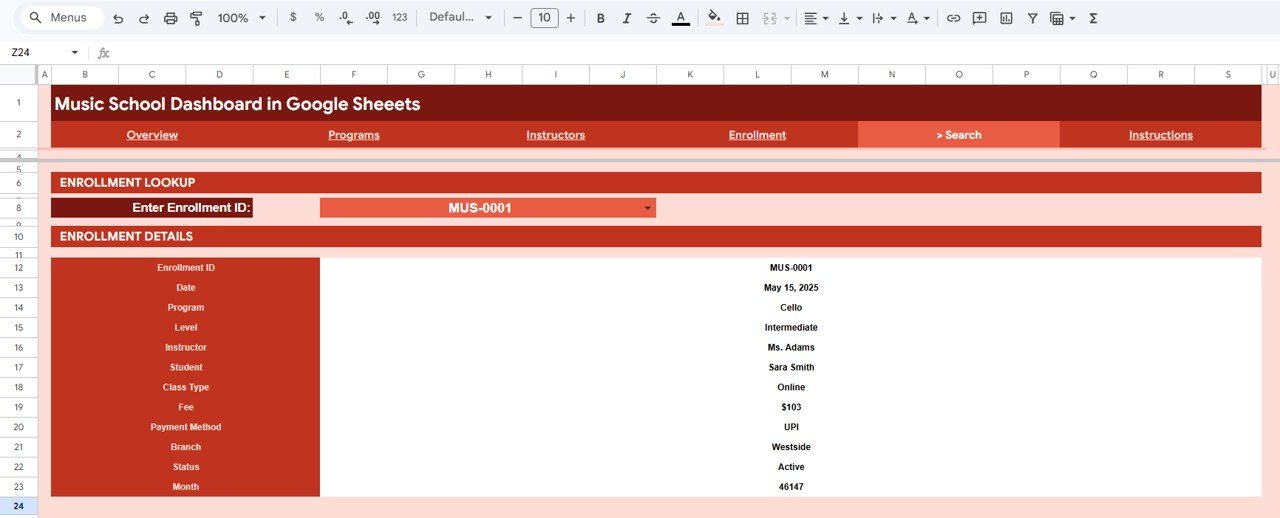
- Enrollment lookup: the Search sheet returns a full record for any Enrollment ID, including instructor, fee, payment method, branch, and status.
- Mobile and team-ready: because it runs in Google Sheets, the whole team can open it in any browser and share it with a single link.
Dashboard Pages Explanation
The Music School Dashboard in Google Sheets is organized into six sheets — an Overview page, three analysis pages, a Search sheet, and a Data sheet.
Overview Page
The Overview page leads with 4 KPI cards — Total Revenue, Total Enrollments, Active Students, and Average Fee — and a row of slicers for instant filtering. Charts include Revenue by Program, Revenue by Level, Revenue by Class Type, Monthly Revenue and Enrollments by Month, and Revenue by Branch.
Programs Page
The Programs page shows how each course or instrument program performs by revenue and headcount. Charts include Revenue by Program, Enrollments by Program, Revenue by Program and Class Type, and Revenue by Program and Level.

Instructors Page
Click here to purchase the Music School Dashboard in Google Sheets.
The Instructors page reveals which teachers generate the most revenue and enrollments and how they perform across levels and class types. Charts include Revenue by Instructor, Enrollments by Instructor, Revenue by Instructor and Level, and Enrollments by Instructor and Class Type.

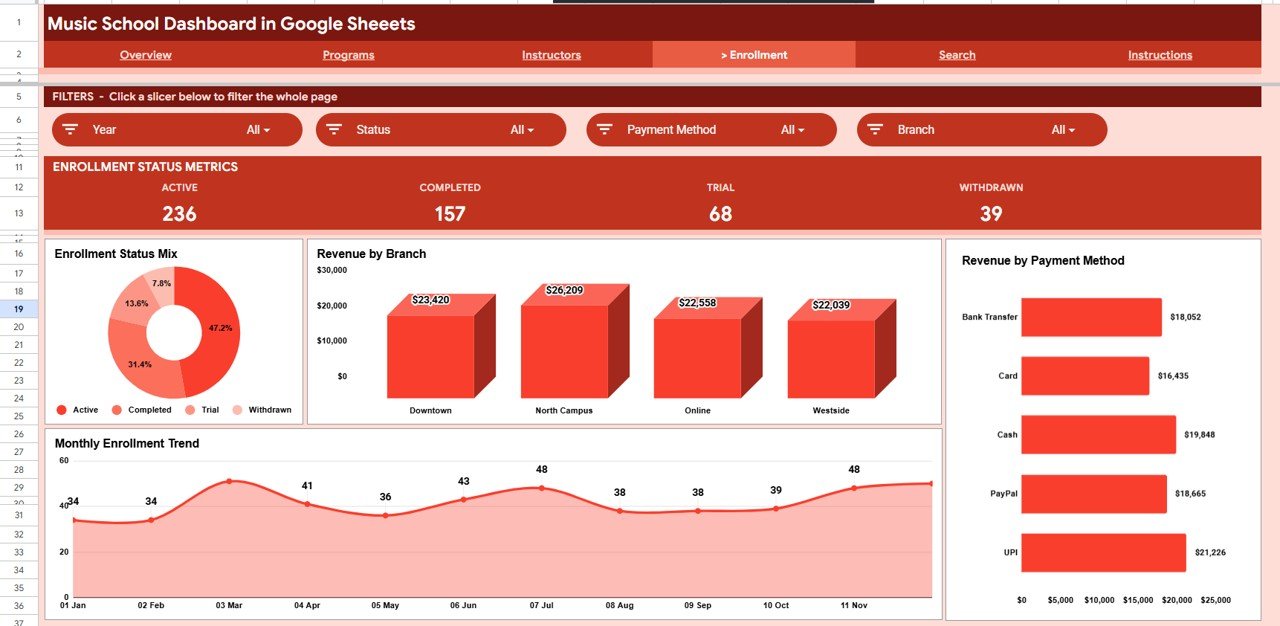
Enrollment Page
The Enrollment page tracks the mix and trend of sign-ups alongside how money comes in. Charts include Enrollment Status Mix by Status, Revenue by Branch, Monthly Enrollment Trend by Month, and Revenue by Payment Method.
Search Sheet
Click here to purchase the Music School Dashboard in Google Sheets.
The Search sheet lets you pick any Enrollment ID from a dropdown and instantly see the full record — date, program, level, instructor, student, class type, fee, payment method, branch, and status. It is the fastest way to answer a parent or staff question without scrolling raw data.
Data Sheet
The Data sheet is where you enter enrollment records in the same column format provided. Add your rows here and every page, pivot table, chart, and KPI card updates automatically — no manual formula edits required.

Music School Dashboard in Google Sheets vs. Excel Dashboard vs. Paid Music School SaaS — Feature Comparison
| Feature | Music School Dashboard (Google Sheets) | Microsoft Excel Dashboard | Paid Music School SaaS (My Music Staff / Opus1) |
|---|---|---|---|
| Cost | $9.99 one-time | $12–18 one-time | $15–50 / month |
| Platform | Google Sheets (browser) | Microsoft Excel (desktop) | Web app |
| Setup time | Under 10 minutes | Under 10 minutes | Hours of onboarding |
| Real-time team collaboration | ✅ Built in | Limited | ✅ Yes |
| Mobile access | ✅ Any browser | Excel app needed | ✅ Yes |
| Customizable fields | ✅ Fully editable | ✅ Fully editable | ❌ Locked |
| Share with link | ✅ One click | File send | ✅ Yes |
| Per-user fees | ✅ None | ✅ None | ❌ Per seat / per student |
| Year-1 cost at 5 users | $9.99 | $12–18 | $900–3,000 |
For music schools that want clean reporting and team access without paying $900+ a year for SaaS, the Music School Dashboard in Google Sheets sits in the sweet spot.
Who Should Use This Template
Perfect for:
- Independent music school and academy owners running 1–5 branches
- Program coordinators tracking enrollments across piano, guitar, vocal, and other instrument programs
- Studio managers who want instructor and branch revenue comparisons without monthly fees
Not a fit if:
- You need automated payment processing, SMS reminders, and student portals built in
- You require role-based logins and audit trails inside the tool itself
Real-World Use Cases
Click here to purchase the Music School Dashboard in Google Sheets.
Maria owns a piano and vocal academy with two branches. She uses the Music School Dashboard in Google Sheets to compare revenue by branch each month and to spot which instructors fill the most class slots — without paying $39 a month for My Music Staff.
James coordinates programs at a community music school. He filters the Overview page by class type to see whether group lessons or one-on-one sessions bring in more revenue, then shares the link with the board before each quarterly meeting.
Priya manages front desk operations. When a parent calls about a sign-up, she types the Enrollment ID into the Search sheet and reads back the program, instructor, fee, and payment status in seconds.
Advantages of the Music School Dashboard in Google Sheets
The biggest advantage is cost certainty: a single $9.99 purchase replaces an ongoing subscription that can reach $900–3,000 in year one for a small team. Because the charts are pivot-driven, you save the recurring hours normally spent rebuilding monthly reports. And since it lives in Google Sheets, sharing is a single link — no software installs, no per-seat licensing, and full editability if you want to add your own programs or branches.
Opportunities for Improvement
This is a reporting dashboard, not a full management platform. It does not process payments, send automated reminders, or provide student login portals. Very large multi-branch chains that need those workflows will outgrow a spreadsheet. For schools that mainly need clear visibility into revenue, enrollments, and instructor performance, those gaps rarely matter — but it is worth knowing the boundary before you buy.
Best Practices
- Keep the Data sheet columns in the exact format provided so pivots and charts don’t break.
- Enter a unique Enrollment ID for every row so the Search sheet returns clean single records.
- Use the slicers on the Overview page to build quick filtered views before exporting or screenshotting for meetings.
- Duplicate the file at the start of each year to keep an archive while starting a fresh roster.
Explore Relevant Templates
The same dashboard is also available as a Music School Dashboard in Excel and a Music School Dashboard in Power BI, so you can match the platform your team already uses. If you run a different kind of school, see the Driving School Dashboard in Google Sheets and the related Tutoring Business Dashboard in Google Sheets. For broader institution-level reporting, the School Management System Web App covers multi-user administration, and the Event Success Tracking Dashboard in Google Sheets works well for recital and concert planning. You can browse the full Google Sheets dashboards collection too. For pivot-table technique, Google’s own pivot table guide is a useful reference.
Frequently Asked Questions
Click here to purchase the Music School Dashboard in Google Sheets.
What KPIs does the Music School Dashboard in Google Sheets track?
The Music School Dashboard in Google Sheets tracks 4 headline KPIs — Total Revenue, Total Enrollments, Active Students, and Average Fee — plus 17 charts covering revenue and enrollments by program, level, class type, instructor, branch, payment method, and month.
How long does setup take?
Setup takes under 10 minutes. Make your own copy of the Music School Dashboard in Google Sheets, paste your enrollment records onto the Data sheet, and every pivot table, chart, slicer, and KPI card refreshes automatically.
How does this compare to paid music school SaaS?
Paid music school software like My Music Staff or Opus1 costs $15–50 per month. The Music School Dashboard in Google Sheets is a one-time $9.99 purchase with no per-student fees, giving you the core reporting without an ongoing subscription.
Can I use the dashboard on my phone?
Yes. The Music School Dashboard in Google Sheets runs entirely in Google Sheets, so you and your team can open it in any browser on a laptop, tablet, or phone and share it with a single link.
Is the Music School Dashboard available for Excel or Power BI?
Yes. The same template is available as a Music School Dashboard in Excel and a Music School Dashboard in Power BI, so you can pick the platform your team already uses while keeping the same layout and metrics.
About the Author
Built by PK — Microsoft Certified Professional with 15+ years of Excel, Google Sheets, and Power BI experience. Founder of NextGenTemplates, reaching 300K+ subscribers across YouTube channels. Every template is hand-built and tested before release.
Conclusion
The Music School Dashboard in Google Sheets turns scattered enrollment and fee records into a single, automatically updating reporting hub for under $10. If you want clear visibility into revenue, instructors, and branches without a monthly subscription, it is a low-risk place to start. Click here to purchase the Music School Dashboard in Google Sheets.
Instant download · One-time payment · No subscription.
🎥 For step-by-step video tutorials, visit YouTube.com/@NeoTechNavigators.
Last updated: June 2026