Influencer marketing budgets keep growing, yet many teams still track creator campaigns in scattered spreadsheets with no single view of return. The Social Media Influencer Tracking Dashboard in Google Sheets fixes that. It shows 4 headline KPIs on the Overview page, spreads 14 pre-built charts across four analysis tabs, and lets you filter every page with native slicers. It runs entirely in your browser and is a one-time purchase.
If you run creator campaigns across Facebook, Instagram, LinkedIn, Pinterest, Snapchat, TikTok, X and YouTube, you already know the problem: revenue, cost, reach and engagement live in different places, and proving ROI to a client or founder means rebuilding a report every month. This influencer tracking dashboard in Google Sheets turns one flat data table into a connected reporting system, so spend and return are visible as soon as you paste your numbers in.
🎥 Watch the Video Tutorial
Get the Influencer Tracking Dashboard
Key Features of the Social Media Influencer Tracking Dashboard
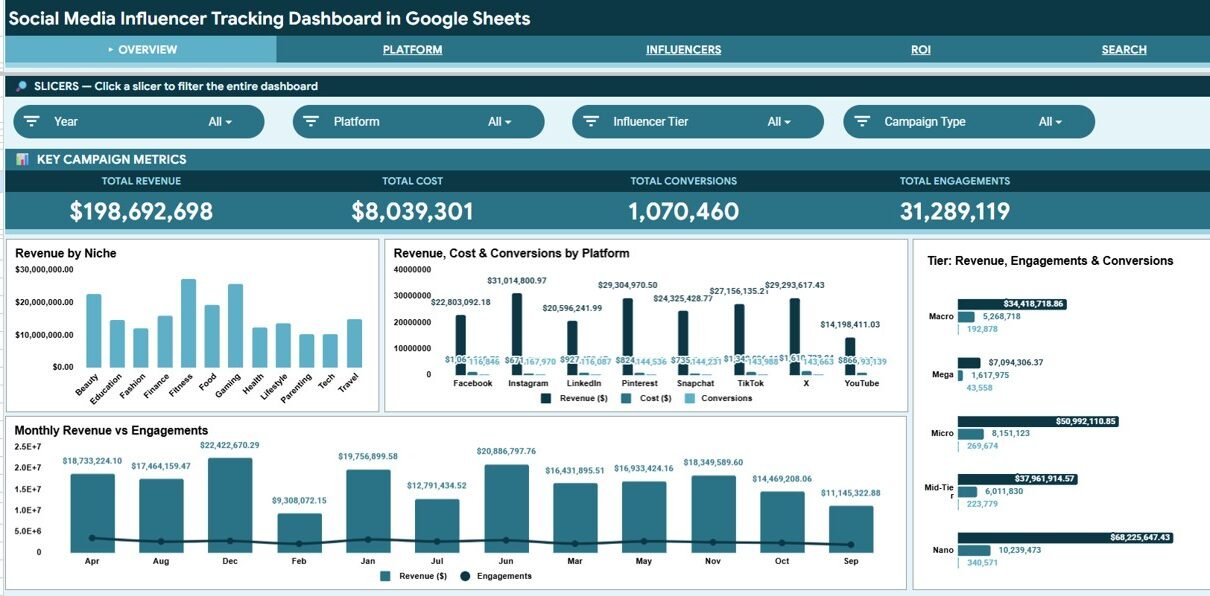
The Overview page tracks 4 headline KPIs: Total Revenue, Total Cost, Total Conversions and Total Engagements. They recalculate as soon as you add or edit a campaign row. Above the cards, native Google Sheets slicers let you filter the page by Year, Platform, Influencer Tier and Campaign Type, and each analysis tab has its own set of four slicers.
Across its four analysis tabs, the workbook holds 14 pre-built charts covering revenue, cost, reach, impressions, engagements, clicks and conversions, broken down by platform, niche, influencer tier, content type, campaign type and month. You do not need to write a formula: replace the sample data and the visuals follow.
A dedicated Search sheet acts as a campaign lookup. Choose any Campaign ID from the dropdown and the sheet returns that campaign’s full record, from Date and Platform through to Reach, Impressions, Engagements, Clicks and Conversions.
KPI Cards on Each Page
Every dashboard tab opens with its own row of four KPI cards. These are the cards shown in the template’s screenshots:
| Tab | KPI cards | Slicers |
|---|---|---|
| Overview | Total Revenue, Total Cost, Total Conversions, Total Engagements | Year, Platform, Influencer Tier, Campaign Type |
| Platform | Total Reach, Total Impressions, Total Clicks, Avg Engagement Rate | Year, Month, Campaign Type, Content Type |
| Influencers | Unique Influencers, Avg Rev / Influencer, Mega Tier Revenue, Micro Tier Revenue | Influencer Tier, Niche, Platform, Month |
| ROI | Total Revenue, Total Cost, Net Profit, Overall ROI | Platform, Campaign Type, Influencer Tier, Month |
Net Profit is Total Revenue minus Total Cost. In the sample data that is $198,692,698 − $8,039,301 = $190,653,397, which matches the ROI tab. Overall ROI on that tab is Net Profit divided by Total Cost: $190,653,397 ÷ $8,039,301 = 23.715, shown as 2371.5%.
Dashboard Pages Explained
The workbook is built from 6 connected tabs: Overview, Platform, Influencers, ROI, Search and the Data sheet. A navigation bar at the top of each dashboard tab lets you jump between them. Here is what each one does.
Overview
The landing page shows a row of four slicers with the four KPI cards directly below them. Its charts are Revenue by Niche, Revenue, Cost & Conversions by Platform, Tier: Revenue, Engagements & Conversions, and Monthly Revenue vs Engagements.

Platform
This tab compares how each social platform performs. Its charts are Total Reach by Platform, Platform: Impressions, Engagements & Clicks, and Revenue by Content Type, so you can separate platforms that drive raw reach from those that drive paid return.

Influencers
This tab profiles performance by tier and niche. Its charts are Tier Reach by Platform (Stacked), Niche Revenue & Engagements, and Tier: Revenue, Cost, Engagements & Conversions. Use it to decide whether Mega, Macro, Mid-Tier, Micro or Nano creators give the best return.

ROI
This tab focuses on money in versus money out. Its charts are Platform: Revenue vs Cost, Niche: Revenue vs Cost, Campaign Type: Revenue, Cost & Conversions, and Monthly Revenue & Cost Trend. Profitable channels and campaign formats stand out at a glance.

Search
The Search sheet is the campaign lookup. Pick a Campaign ID from the dropdown and it returns the complete record: Date, Platform, Campaign Type, Influencer Name, Influencer Tier, Niche, Content Type, Reach, Impressions, Engagements, Clicks and Conversions. You never have to scroll the raw data.

Data Sheet
The Data sheet is the single source for the whole workbook. Its columns are Campaign ID, Date, Platform, Campaign Type, Influencer Name, Influencer Tier, Niche, Content Type, Reach, Impressions, Engagements, Clicks, Conversions, Revenue ($), Cost ($) and Month. Add your campaigns in the same column format and every KPI card, chart, slicer and lookup includes the new rows.

Influencer Tracking Dashboard in Google Sheets vs. Excel vs. Paid Influencer SaaS
| Feature | This Google Sheets Dashboard | Microsoft Excel Dashboard | Paid Influencer SaaS |
|---|---|---|---|
| Cost | One-time purchase | One-time purchase | Monthly subscription |
| Platform | Google Sheets (browser) | Microsoft Excel (desktop) | Vendor web app |
| Setup time | Under 10 minutes | Under 10 minutes | Onboarding and integrations |
| Real-time team collaboration | Built in via Google Drive | Needs OneDrive or SharePoint | Included |
| Mobile access | Google Sheets app | Excel mobile, limited | Usually included |
| Customizable fields | Fully editable | Fully editable | Limited to the vendor schema |
| Campaign ID lookup | Built-in Search sheet | With formulas | Included |
| Live API data from social platforms | No (manual entry) | No (manual entry) | Usually yes |
For agencies and brands that want platform, tier and ROI reporting on creator campaigns without a monthly platform fee, this dashboard covers the core reporting job.
Who Should Use This Template
Good fit for:
- Influencer marketing managers who need one tracker for spend and return across platforms
- Small and mid-size agencies reporting creator results to clients
- Brand and social teams comparing Mega, Macro, Mid-Tier, Micro and Nano creators on cost and conversions
- Freelancers who want a clean, shareable Google Sheets report per client
Not a fit if:
- You need automatic API data from Instagram, TikTok or YouTube. This is a manual-entry tracker.
- You need built-in influencer discovery, contracts or payment processing
- You never open Google Sheets and want a fully managed service
Real-World Use Cases
Priya manages influencer campaigns at a 12-person beauty brand. She uses the dashboard to compare revenue and cost across Instagram and TikTok, spot which niches convert, and show her founder a clean monthly ROI view without paying for an influencer platform.
Marcus runs a small social agency with six clients. He keeps a copy of the dashboard per client, filters the Influencers tab by tier, and checks whether micro creators return more revenue per dollar than the bigger names his clients wanted to chase.
Lena is a freelance creator-marketing consultant. She uses the Search sheet to answer client questions live on a call, pulling a single campaign’s reach, engagements and conversions in seconds.
Advantages of the Social Media Influencer Tracking Dashboard in Google Sheets
The biggest advantage is cost against capability. A one-time purchase covers the core reporting job most small teams actually need. Because it lives in Google Sheets, sharing is a single link and collaboration is built in, with no extra licences or per-seat pricing.
The slicer-driven pages also save time. Instead of rebuilding a filtered report, you click a platform or tier and every chart on that page re-filters at once. For agencies juggling several clients, that difference adds up across every monthly review.
Limitations to Know
The dashboard relies on manual data entry. It does not pull live numbers from social platform APIs, so someone has to keep the Data sheet current. Teams running dozens of simultaneous campaigns with daily refresh needs may outgrow a spreadsheet. It also does not handle influencer discovery, contracts or payments. It is a reporting tool, not an end-to-end management suite.
Best Practices
- Keep your Data sheet columns consistent. The charts and lookup depend on the existing structure, so add rows rather than inserting columns in the middle.
- Standardise your niche and platform labels (always “Instagram”, never “IG”) so the slicers group cleanly.
- Review the ROI tab monthly to catch creators whose cost is outrunning their revenue early.
- Give each campaign a unique Campaign ID so the Search sheet always returns the right record.
Related Templates and Guides
The same topic is also available as the Influencer Campaign Dashboard in Excel and the Influencer Campaign Dashboard in Power BI. To cover your wider marketing reporting, see the Marketing and Social Media Analytics Kit.
On NeoTech Navigators, you can also compare the Influencer Campaign Dashboard in Google Sheets, the Brand Influencer Analytics Dashboard and the Influencer ROI KPI Dashboard. If you are still planning collaborations, the Influencer Collaboration Checklist helps you organise outreach before results start coming in.
If you want to build dashboards like this yourself, the Excel Pivot Tables and Dashboards course on NextGenTemplates Academy walks through pivots, slicers and charts step by step. For the slicer feature itself, see Google’s guide to slicers in Sheets.
Frequently Asked Questions
What KPIs does the Social Media Influencer Tracking Dashboard track?
The Overview page tracks Total Revenue, Total Cost, Total Conversions and Total Engagements. The Platform, Influencers and ROI tabs add cards such as Total Reach, Avg Engagement Rate, Unique Influencers, Net Profit and Overall ROI.
How long does setup take?
Under 10 minutes. Make your own copy, paste your campaign rows into the Data sheet in the existing column order, and every KPI card, chart, slicer and the Search lookup update.
How does this compare to paid influencer platforms?
Paid influencer platforms charge a monthly fee and add discovery, contracts and live API data. This dashboard is a one-time purchase that covers platform, tier and ROI reporting from data you enter yourself.
Can I filter the dashboard by platform or influencer tier?
Yes. Each dashboard tab has four native Google Sheets slicers. The Overview page filters by Year, Platform, Influencer Tier and Campaign Type, and the other tabs add Month, Niche and Content Type.
Do I need to install anything?
No. The dashboard runs in Google Sheets in your browser. Make a copy to your own Google Drive and start entering data.
Can I add more campaigns over time?
Yes. The Data sheet is the single input table. Add new campaign rows in the same format and the charts, KPI cards, slicers and Search lookup include them.
About the Author
Built by PK, a Microsoft Certified Professional with 15+ years of Excel, Google Sheets and Power BI experience. He founded NextGenTemplates, and its YouTube channels reach 300K+ subscribers. Every template is built by hand and tested before release.
Wrapping Up
If you want a clear, shareable view of influencer spend and return without a monthly platform bill, the Social Media Influencer Tracking Dashboard in Google Sheets is built for that job. Paste your campaigns into the Data sheet, filter by platform or tier, and take the ROI tab into your next client or founder review.
Get the Social Media Influencer Tracking Dashboard
📅 Last updated: October 2026