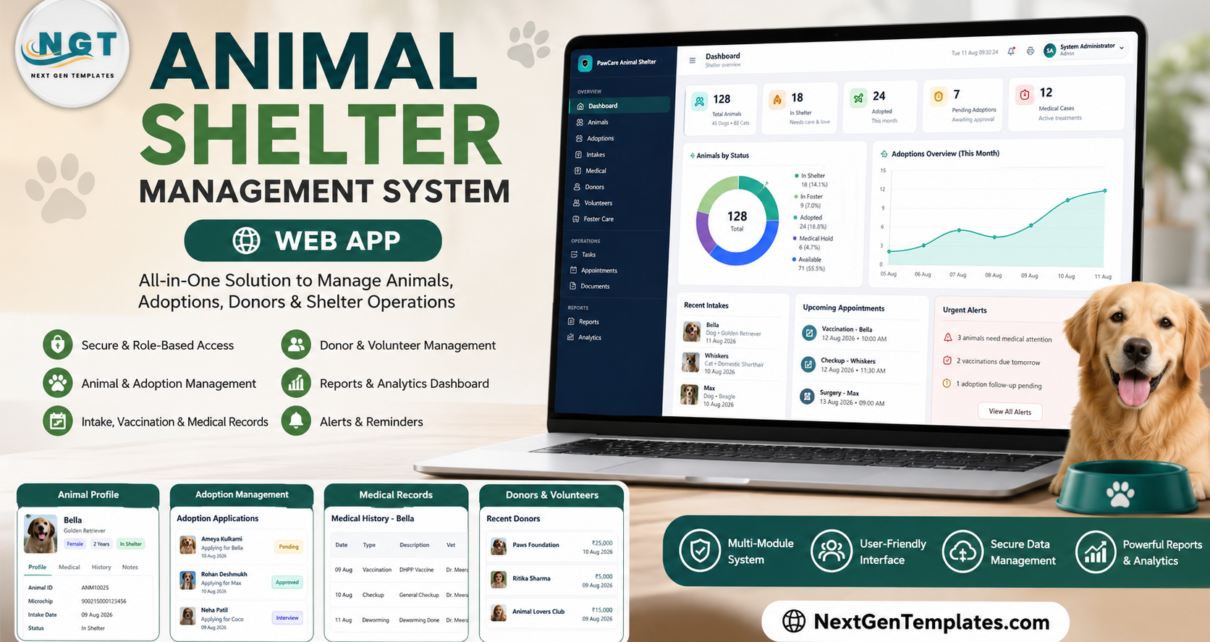
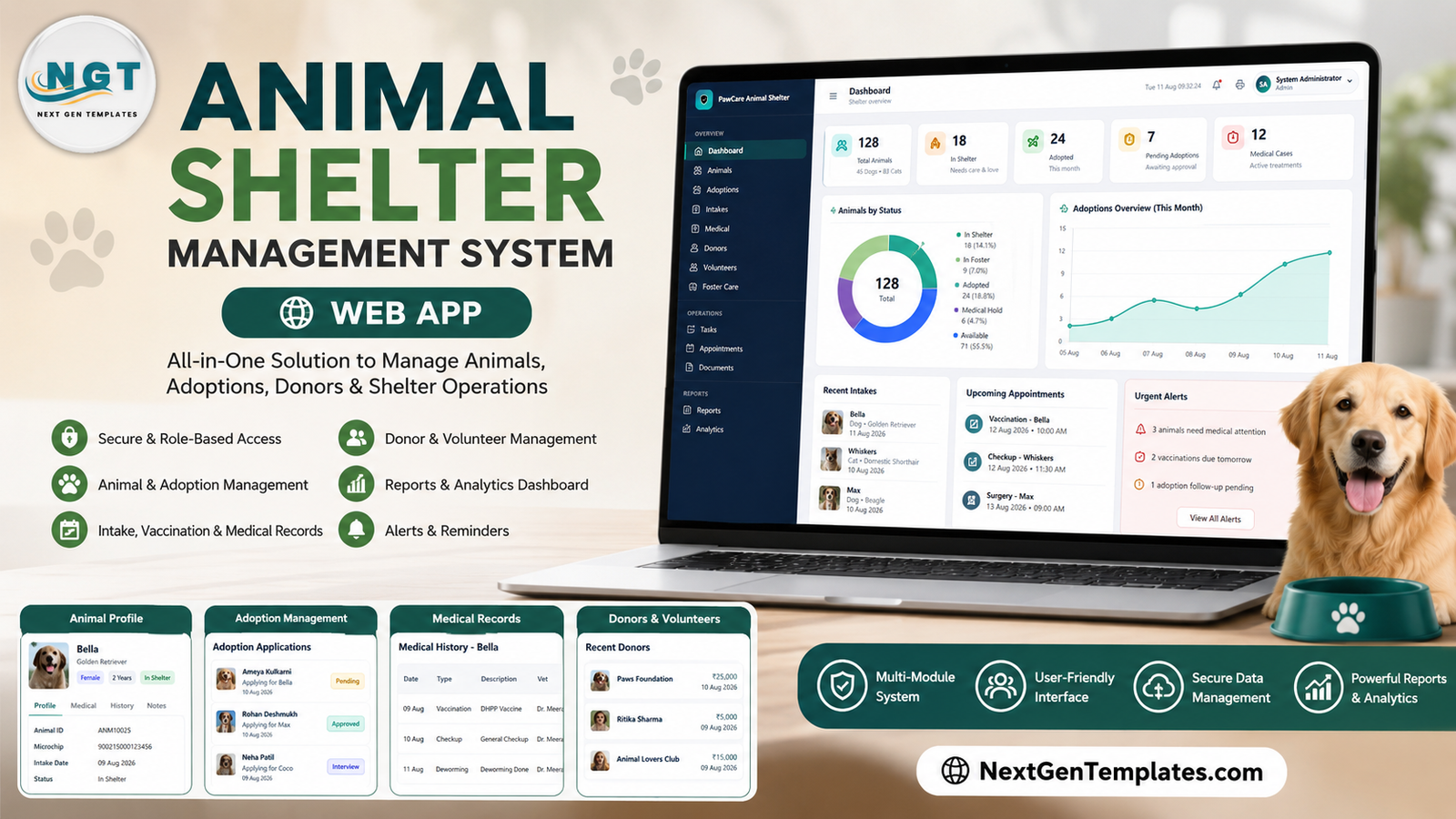
A shelter with 50 animals in care generates a surprising amount of paperwork: an intake record, a kennel assignment, a vaccination schedule, a foster placement, an adoption application, a donor receipt and a volunteer shift – often for the same animal in the same week. Most small shelters handle that with three or four spreadsheets and a lot of goodwill. The Animal Shelter Management System Web App puts all of it into one Google Apps Script application: 15 working modules, 5 seeded staff roles whose permissions are enforced on the server, a visual grid of 25 kennels, and roughly 660 rows of demo data so nothing is empty on first login.
This walkthrough goes screen by screen, shows where the design is strong and where it is deliberately limited, and gives you a live deployment to sign into before you read another word.
Get the Animal Shelter Management System Web App
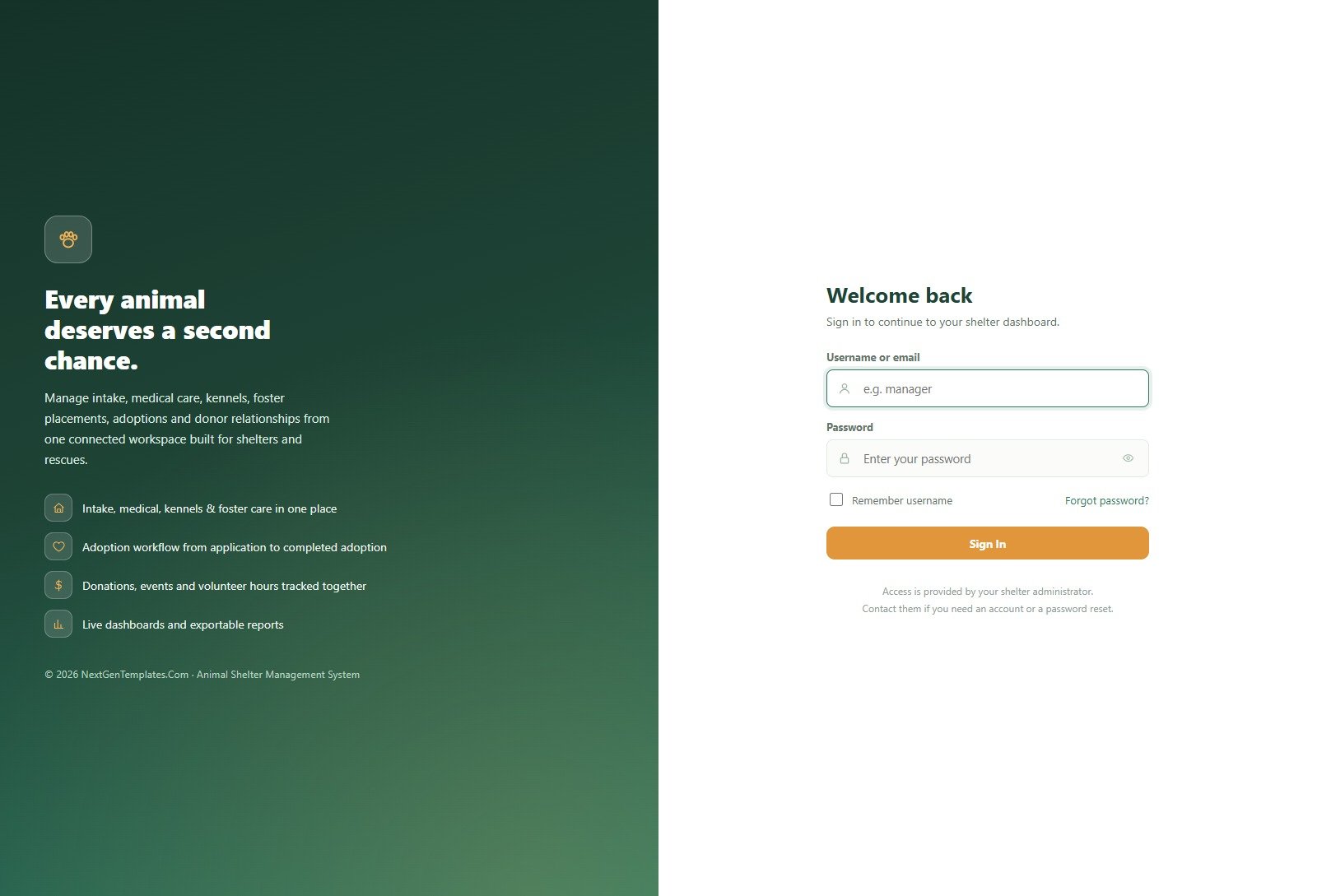
🚀 Try the Live Demo Before You Buy
We have deployed this web app in our own Google account so you can test every page, every role and every report – with real sample data – before purchasing. No signup, no email required.
🔑 Test Login Credentials
Sign in as admin to see every module including User Management, Settings and the Audit Log, then sign out and come back as frontdesk to see how little a front-of-house volunteer can reach. That comparison takes ten seconds and explains the whole product.
💡 These are public demo logins on a shared instance that resets periodically – not anybody’s live shelter. Please treat the data as disposable and do not enter anything real. After purchase you get the full source (Code.gs + Index.html) and a deployment guide, and you create your own users and passwords in your own Google account.
Key Features of the Animal Shelter Management System Web App
- One profile per animal, with every history attached – medical timeline, kennel history, foster history and adoption history in one place instead of four spreadsheets keyed on a name.
- Five roles, checked on the server. The sidebar hides what a role cannot use and the backend refuses the call as well, so a denied module cannot be reached by calling it directly.
- Vaccination scheduling that maintains itself. A Next Due date on any medical record puts the animal on the Vaccination Schedule tab and into the dashboard alert bell.
- A visual kennel grid of 25 kennels split across North Wing and South Wing, colour-coded Available / Occupied / Cleaning / Out of Service, with one-click Assign and Release.
- A real adoption pipeline – Submitted, Under Review, Approved, Denied, Withdrawn, Completed – with the reviewing user stamped on each application.
- Foster care with return tracking, including an Email Returns Due action and a Converted to Adoption status.
- Fundraising in the same database – cash, cheque, online, grant and in-kind gifts by campaign, with one-click receipt emails.
- Volunteer hours by person and task type, totalled automatically.
- Excel and CSV export on every table, plus print sizing configured once in Settings.
- A complete audit log of every create, update, delete and status change.
Module-by-Module Walkthrough
Dashboard
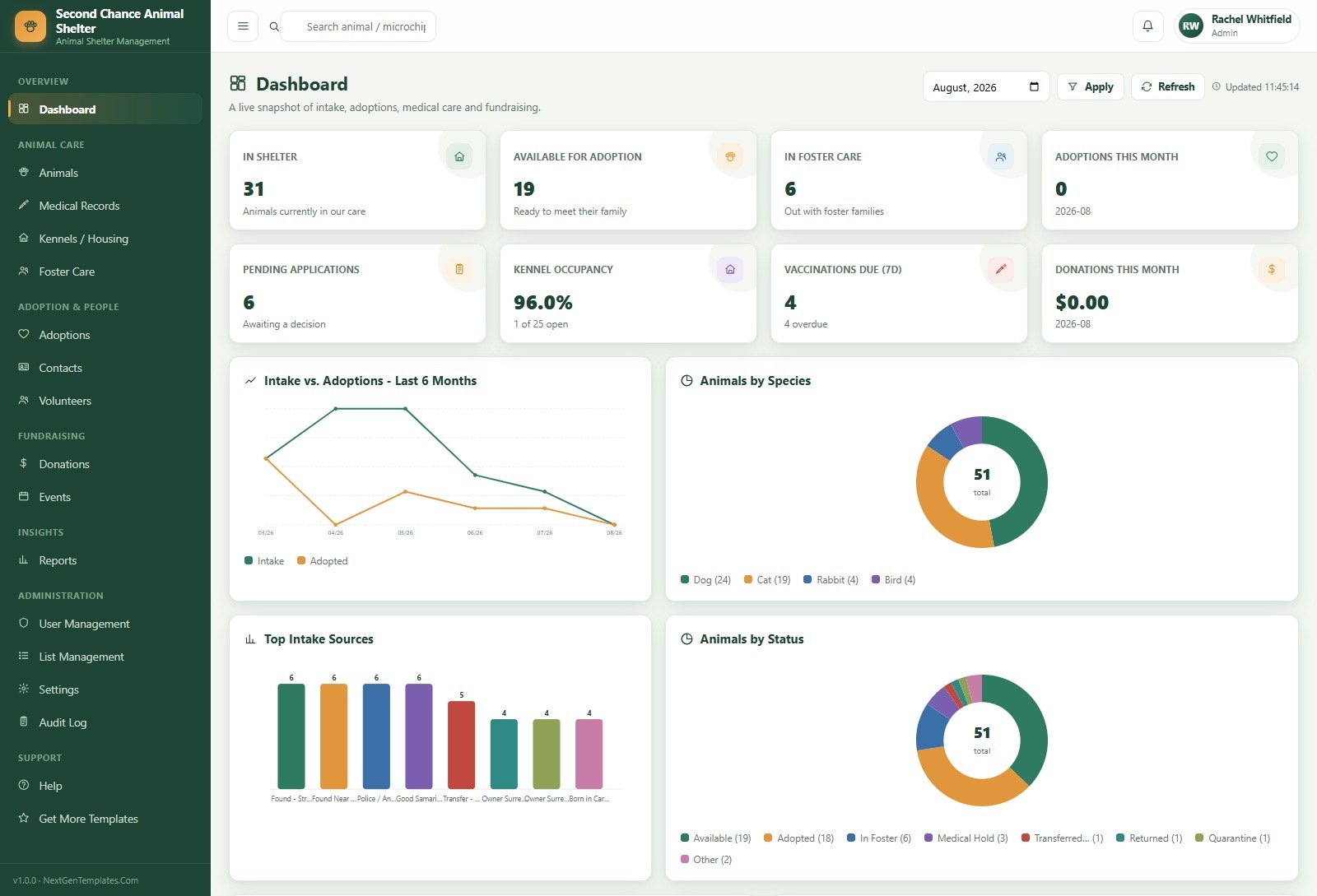
A month picker at the top drives eight cards: In Shelter, Available for Adoption, In Foster Care, Adoptions This Month, Pending Applications, Kennel Occupancy, Vaccinations Due (7 days) and Donations This Month. Below them are four charts – Intake vs. Adoptions – Last 6 Months, Animals by Species, Top Intake Sources and Animals by Status. Occupancy at 96% with only one open kennel is exactly the kind of number that should be on a wall, not buried in a tab.
Animals
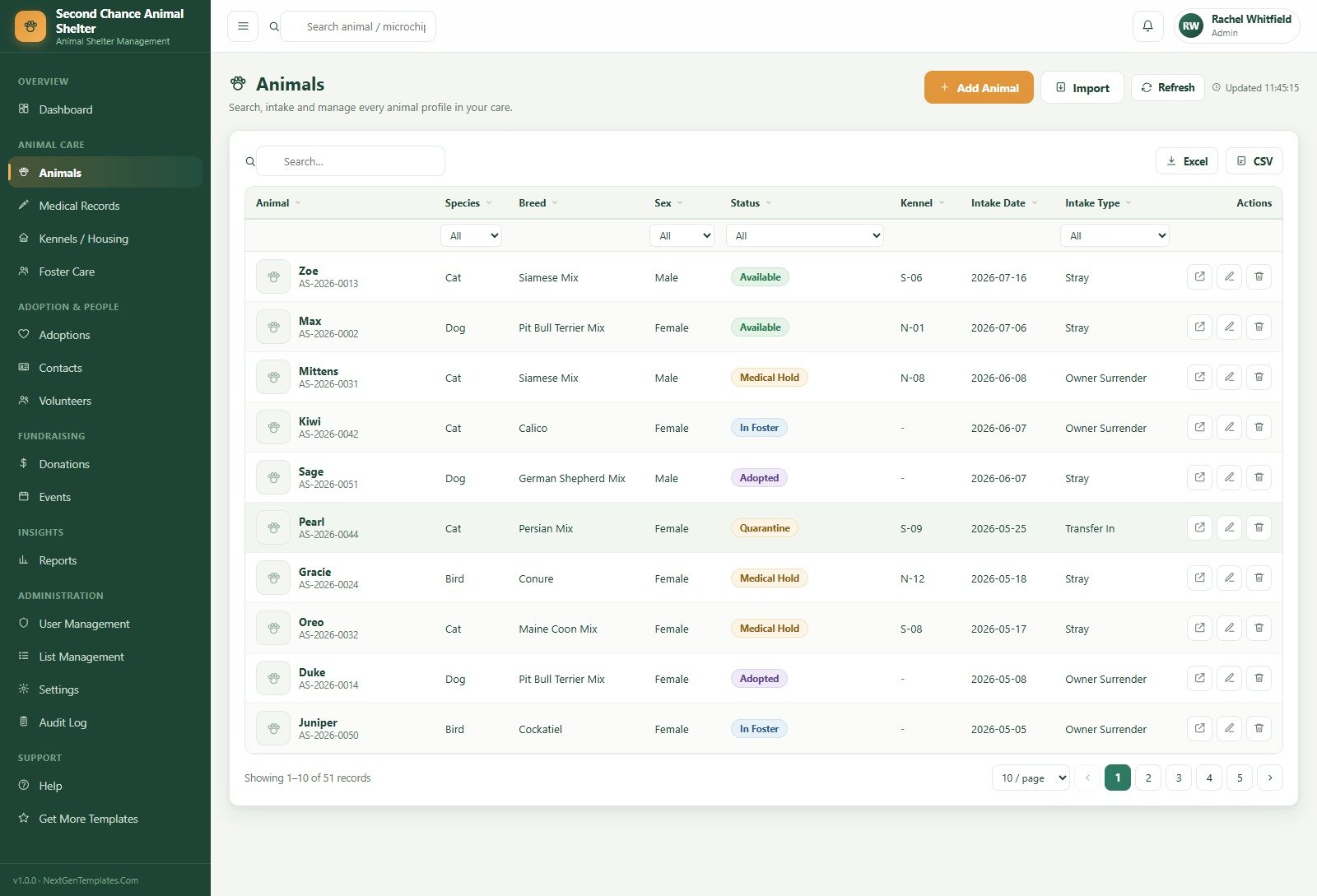
Every animal carries an auto-numbered ID, species, breed, sex, status, kennel, intake date and intake type. Column-level filters sit directly under the headers, and there is a bulk Import alongside Add Animal, which matters if you are migrating from a spreadsheet rather than starting fresh.
Medical Records
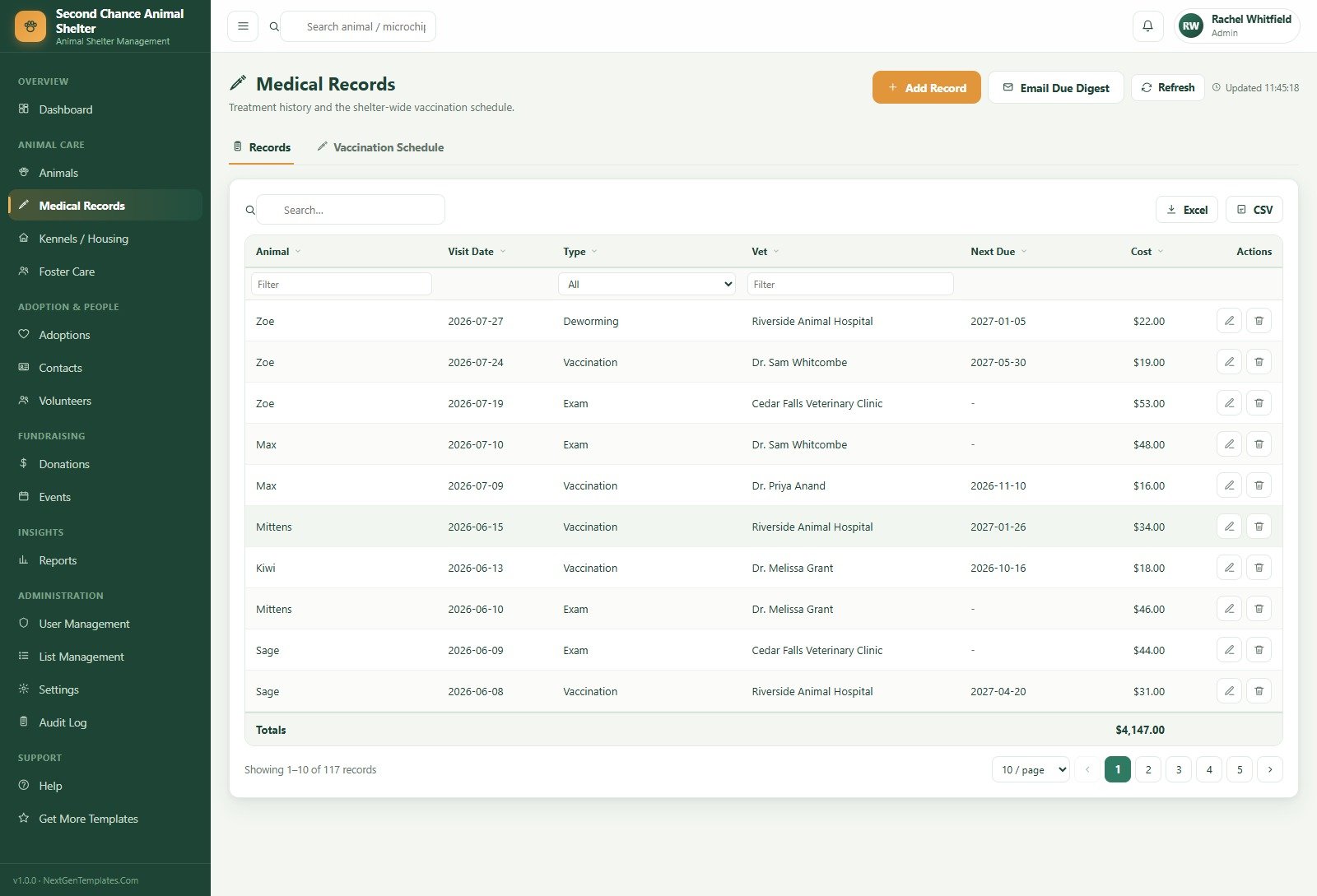
Two tabs: Records and Vaccination Schedule. Each record has a type (exam, vaccination, surgery, treatment, lab test, deworming, flea/tick), a vet, a cost and an optional Next Due date, and the table foots to a running total – useful when the medical line item is the one your board actually questions. An Email Due Digest button sends the upcoming list to staff.
Kennels / Housing
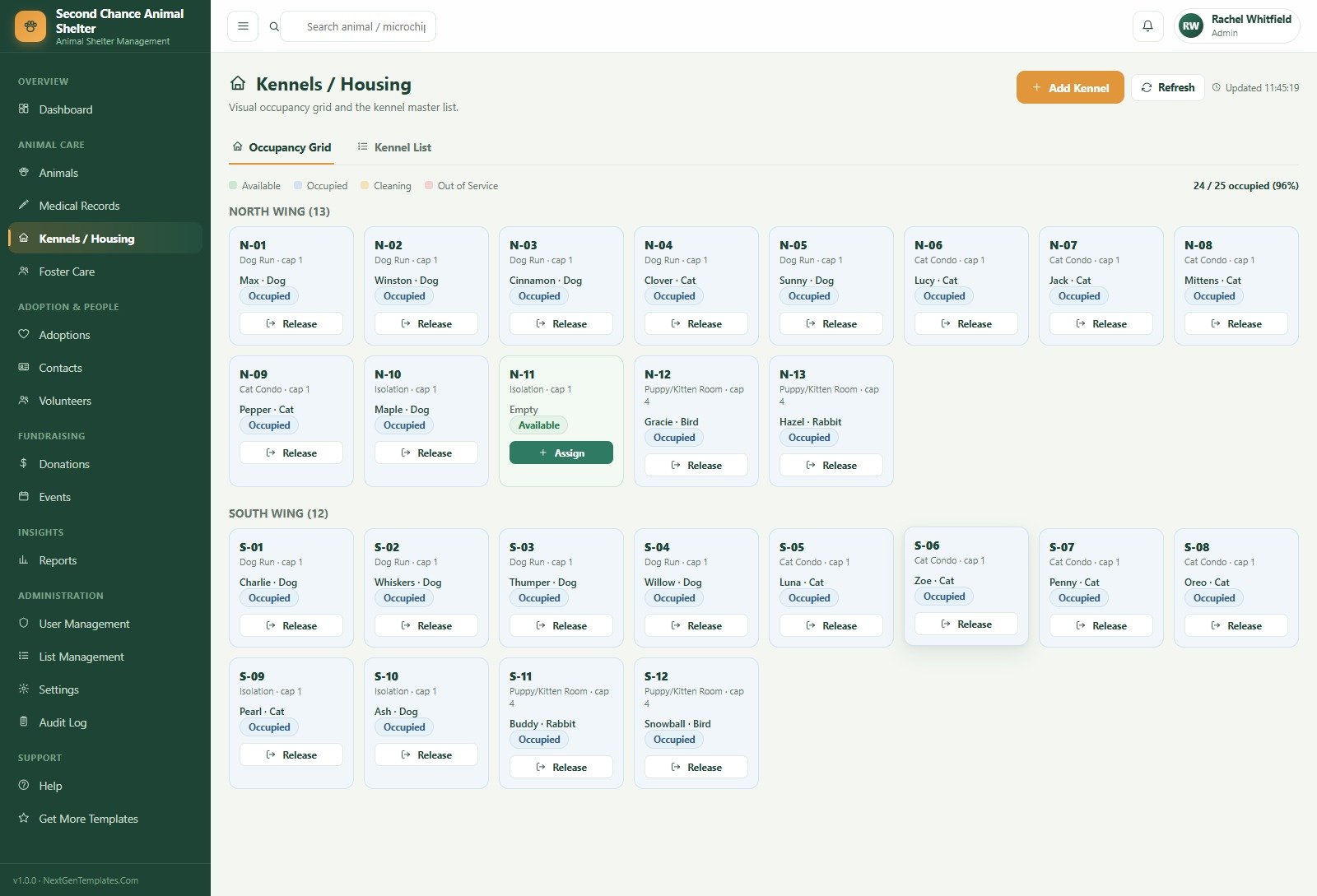
The Occupancy Grid is the single best screen in the app. Each tile shows the kennel code, its type (Dog Run, Cat Condo, Isolation, Puppy/Kitten Room), capacity, the occupant and a Release button; empty tiles offer Assign. A Kennel List tab holds the master data. Releasing an animal moves the kennel to Cleaning rather than straight back to Available, which is a small detail that says somebody has actually run a shelter.
Foster Care and Adoptions
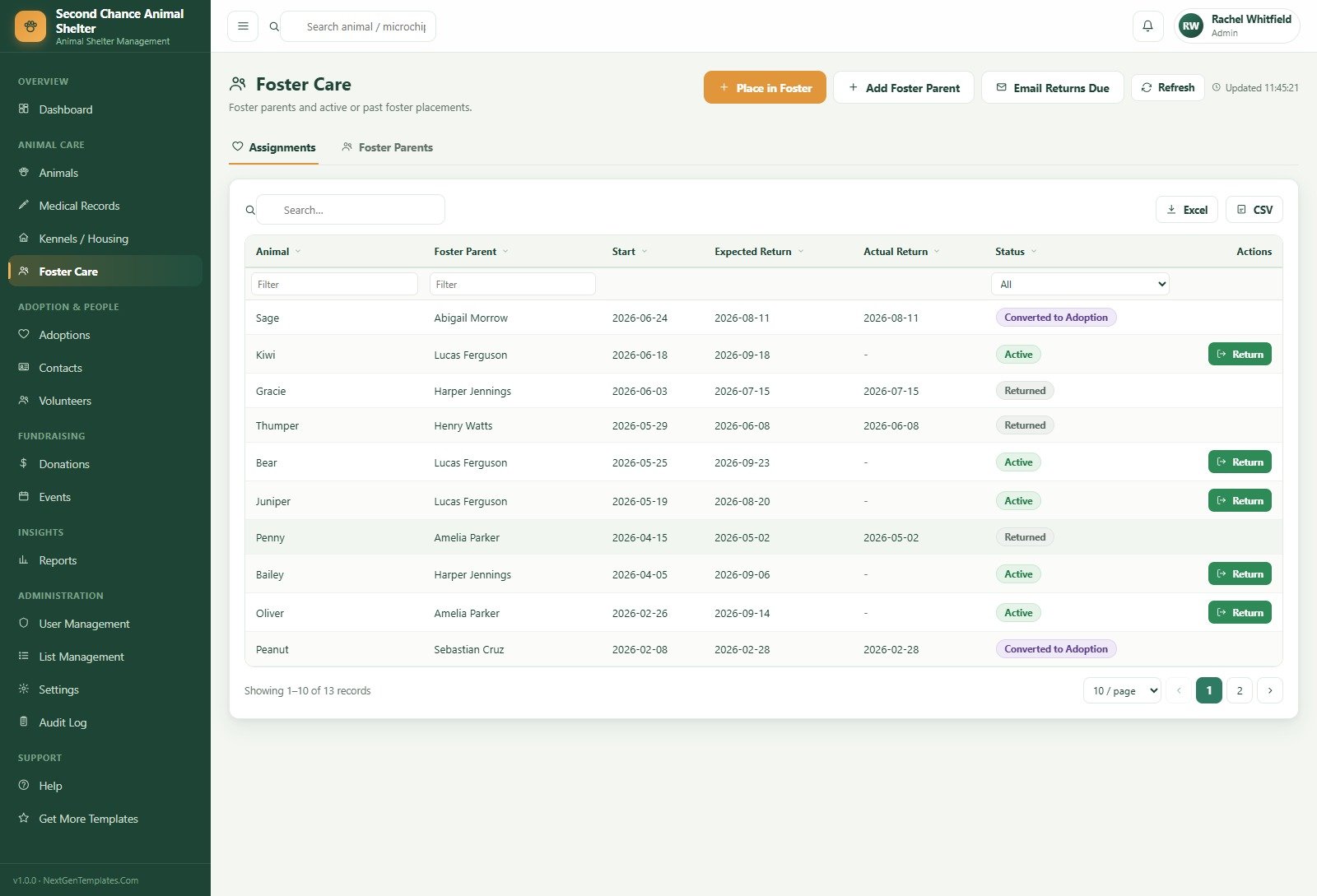
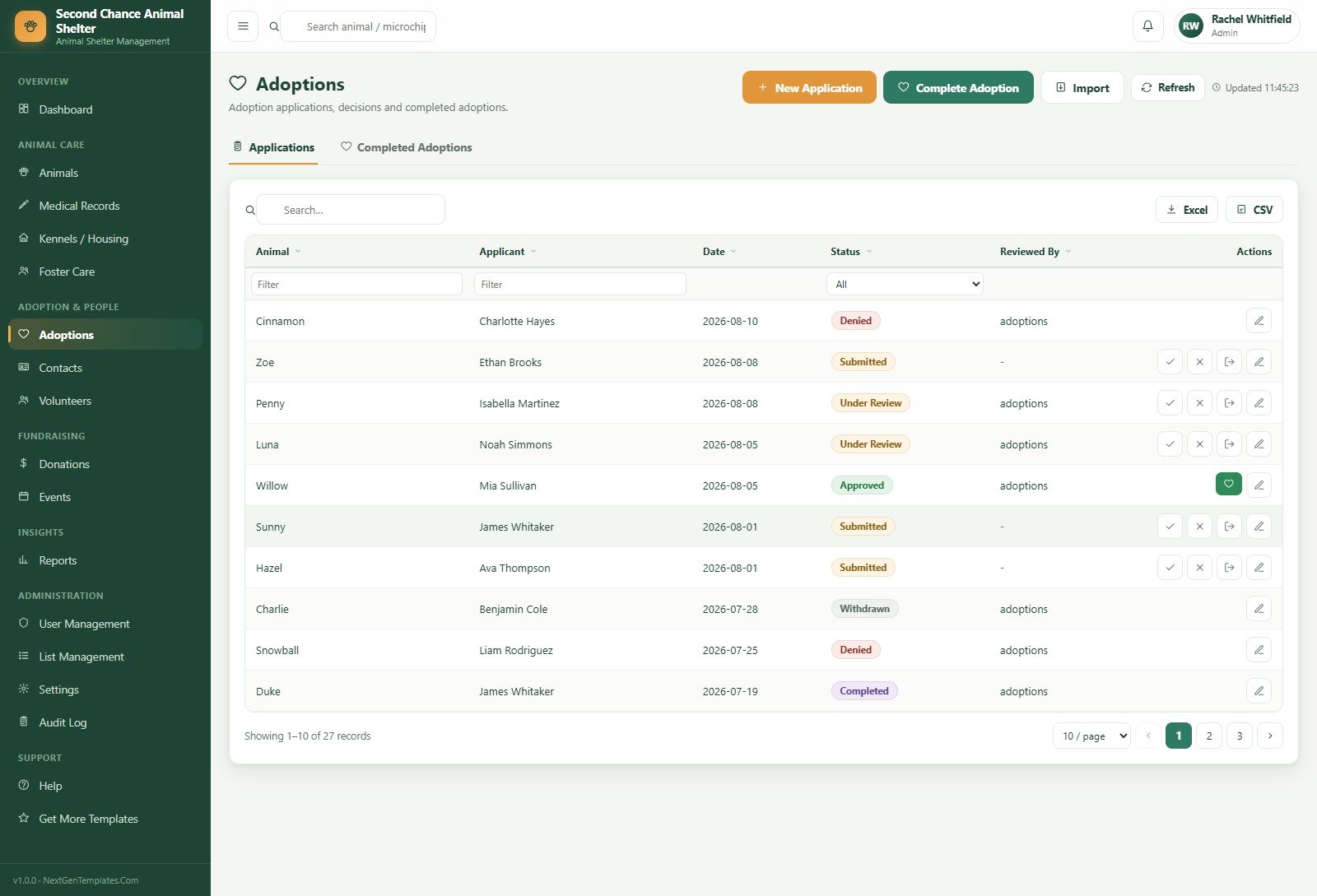
Foster Care splits into Assignments and Foster Parents; each assignment tracks start, expected return and actual return, and closes as Returned or Converted to Adoption. Adoptions splits into Applications and Completed Adoptions – approve an application to reserve the animal, then Complete Adoption to finalise the paperwork, fee and microchip transfer.
Contacts, Volunteers and Donations
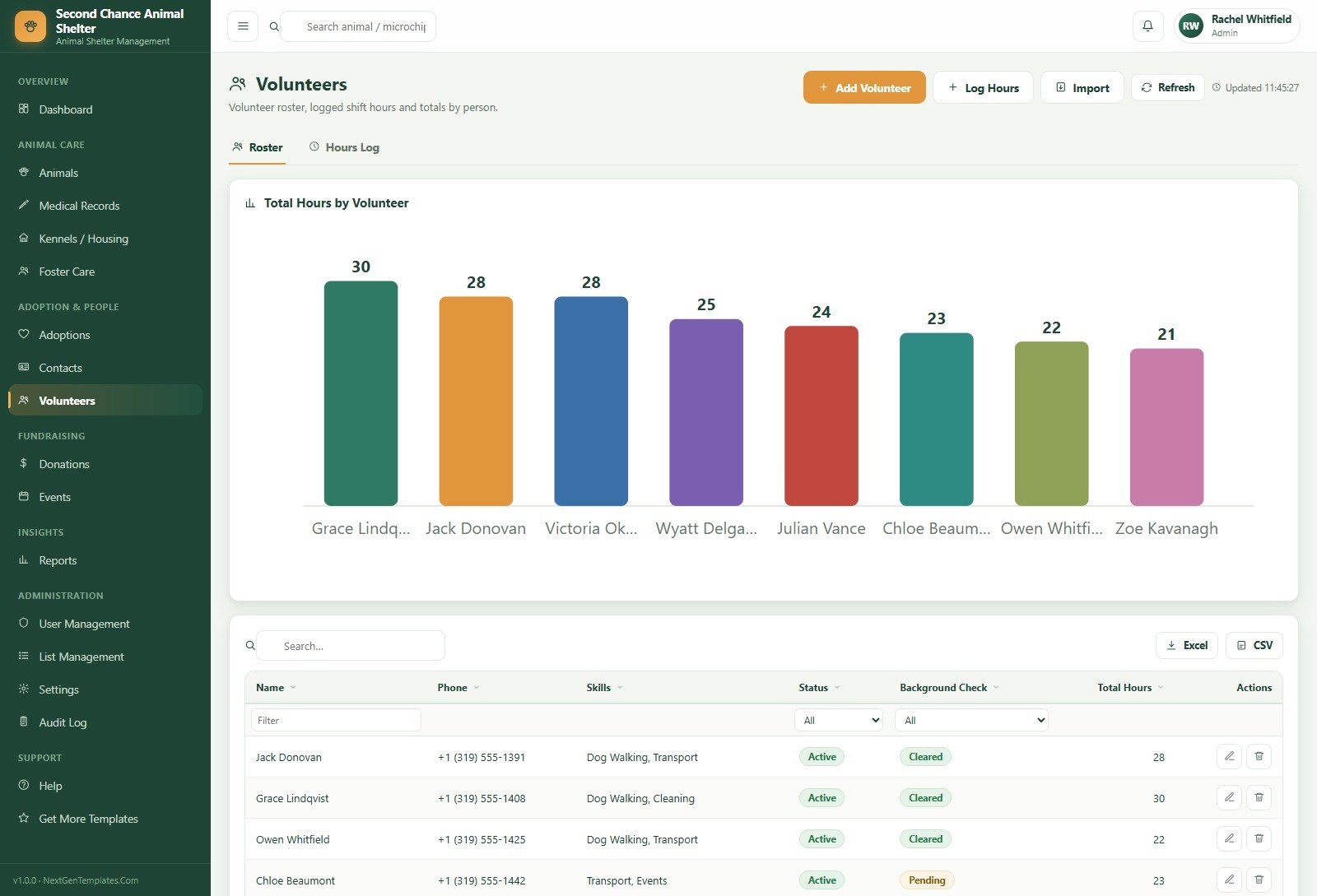
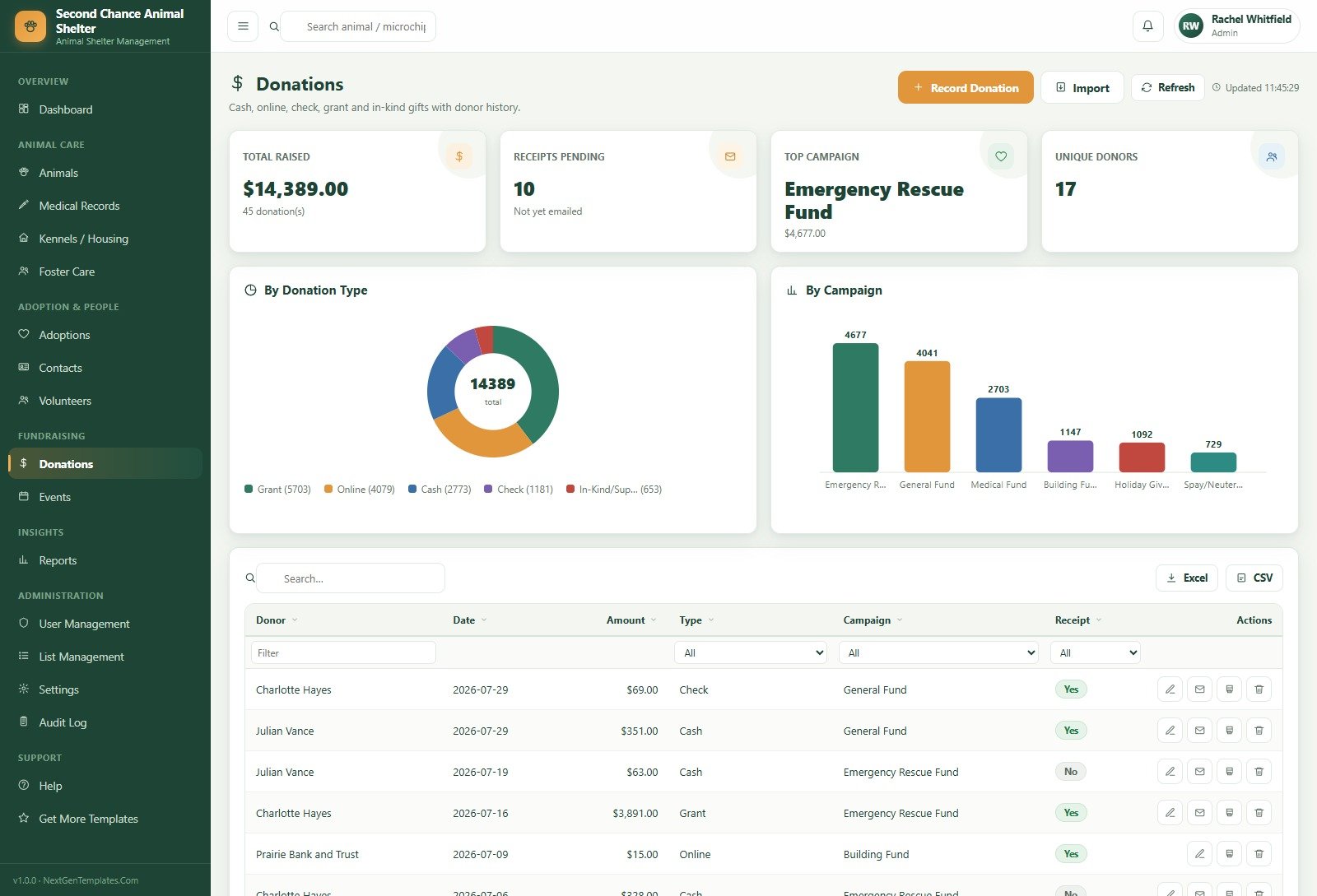
Contacts is one directory for adopters, foster parents, donors, volunteers and surrendering owners, tag-filtered so the same person is never entered twice. Volunteers adds skills, status, background-check state and a Total Hours by Volunteer chart. Donations shows Total Raised, Receipts Pending, Top Campaign and Unique Donors, with breakdowns By Donation Type and By Campaign and a receipt-email action per row.
Reports and Administration
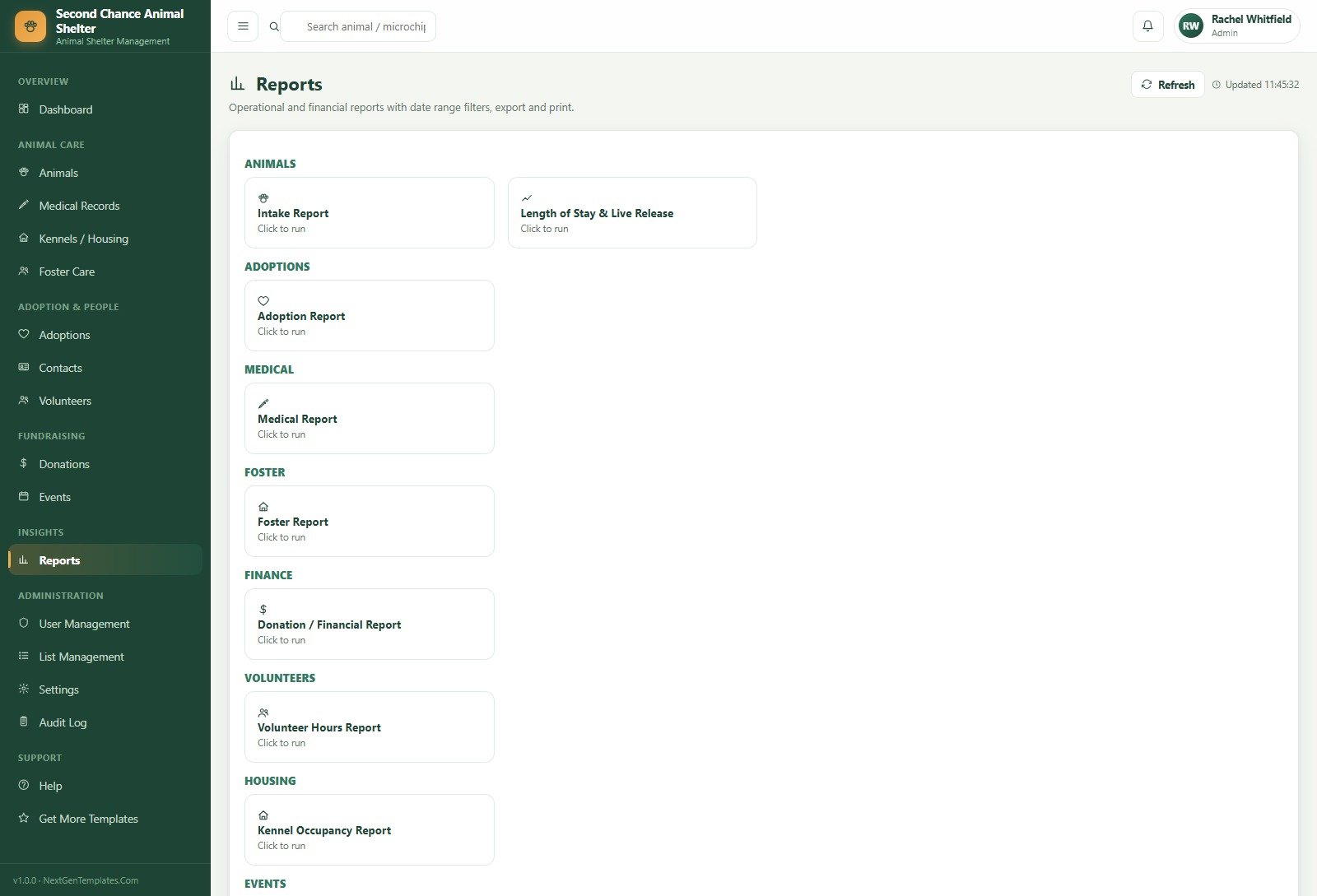
Reports are grouped under Animals (Intake Report, Length of Stay & Live Release), Adoptions, Medical, Foster, Finance, Volunteers, Housing and Events, each with a date range, export and print. Administration covers User Management with a Role Permissions matrix, List Management for 24 dropdown categories, Settings across nine tabs (Business, Finance, Numbering, Operations, Print, Email, Theme, Security, Database Archive) and a full Audit Log.
Animal Shelter Management System Web App vs. Spreadsheets vs. Paid Shelter SaaS – Feature Comparison
| This web app | Spreadsheets | Paid shelter SaaS | |
|---|---|---|---|
| Cost | One-time purchase | Free, plus every evening you spend maintaining it | Recurring subscription |
| Platform | Google Apps Script on your own account | Google Sheets or Excel | Vendor cloud |
| Setup time | Under 15 minutes | Days | Onboarding plus migration |
| Real-time team collaboration | Yes, with named users | Yes, with no permissions | Yes |
| Mobile access | Any browser | Painful | Usually an app |
| Customisable fields | Yes – you have the source | Yes | Only what the vendor exposes |
| Share with link | One deployment URL | Yes, and that is the risk | Yes |
| Year-1 cost at 5 users | The purchase price, once | Zero cash, high labour | Several hundred upwards |
| Role-based permissions | 5 roles, server-enforced | None | Yes |
| Where your data lives | Your Google Drive | Your Drive | The vendor’s servers |
Who Should Use This Template
Municipal and independent shelters with roughly 20-200 animals in care will get the most from it, because the kennel grid, the vaccination schedule and the intake reporting all assume a physical facility. Foster-based rescues with no building still fit well – they simply live in Foster Care and Adoptions and leave the kennel module idle. Humane societies that report live-release rate and length of stay to a board or a grantmaker will find those two numbers already computed. It is a good fit for any rescue currently running an intake sheet, a vaccination sheet and a donor sheet that nobody reconciles.
Real-World Use Cases
The morning triage. A shelter manager opens the dashboard at eight, sees occupancy at 96%, four vaccinations overdue and six applications pending. Two long-stay dogs go to foster before the day’s intake arrives; the vet gets an Email Due Digest; the coordinator works the application queue. The whole decision took one screen.
The visiting vet. A vet who is on site two days a week signs in and sees only Dashboard, Animals, Medical Records and Reports. She logs the week’s exams and vaccinations with next-due dates and never has to ask which animals are outstanding, because the Vaccination Schedule tab already lists them.
The grant report. A development officer pulls the Donation / Financial Report for the last fiscal year, filtered to the Emergency Rescue Fund, and the Length of Stay & Live Release report for the same period. Both export to Excel and go into the application unaltered.
Advantages of the Animal Shelter Management System Web App
The obvious one is cost: a one-time purchase against a recurring subscription, with no per-seat pricing as your volunteer roster grows. The less obvious ones matter more day to day. Because it runs on Google Apps Script web apps, the database is an ordinary Google Sheet in your own Drive – you can open it, back it up, or walk away with it, and no vendor can lock you out. Permissions are real rather than cosmetic. The seeded data means you can train three volunteers on a Saturday morning without touching a live record. And you own the source, so the field your shelter needs and nobody else does is a fifteen-minute change rather than a feature request.
Opportunities for Improvement
It is a staff back office, not a public website: there is no adoptable-pets page for the public and no online application form that feeds the queue – applications are entered by staff. There is no direct integration with a microchip registry or a state reporting API, so those numbers are typed. Photographs are referenced by URL rather than uploaded and stored. And because it is built on Apps Script, very large shelters will eventually meet execution quotas; the Database Archive tab in Settings exists for exactly that reason, but a 2,000-animal-per-year operation should test with its own volumes first. We would rather list these plainly than have you discover them in month three.
Best Practices
- Change all five passwords before anyone else signs in. User Management, edit each user, set a new password. The seeded ones are public knowledge.
- Set up List Management before your first real intake – species, breeds, intake sources, campaigns and task types. Every form reads from it, and renaming values later is messier than getting them right once.
- Give every person a named account. Shared logins destroy the audit log, which is the one thing that answers “who released that kennel?”.
- Always set a Next Due date on vaccinations. That single field is what makes the schedule and the alert bell work.
- Run Reseed Demo Data during training, then clear it before go-live so no demo animal ends up in a grant report.
- Use Backup Copy monthly from Settings, and run Integrity Check after any bulk import.
Explore Relevant Templates
- Aquarium and Fish Store Management System Web App – the same architecture applied to livestock, tanks and retail.
- Veterinary Clinic Dashboard in Google Sheets – for the clinical and billing side rather than the shelter floor.
- Nonprofit Fundraising Dashboard in Google Sheets – deeper donor and campaign analysis to sit beside this app.
- Pet Care Business Dashboard in Google Sheets – boarding, grooming and daycare metrics.
- Browse every Mini Web App.
Planning to adapt a system like this to your own records? The NextGenTemplates Academy learning paths build the underlying spreadsheet skills step by step with practice files.
Get the Animal Shelter Management System Web App
Frequently Asked Questions
Can I try it before buying?
Yes. The green box above holds a live deployment and all five role logins. Sign in, add an animal, assign a kennel, run a report. Those are public demo credentials on a shared instance that resets periodically, so please do not store anything real in it.
Do I need to know how to code?
No. You paste two files into the Apps Script editor, run one menu command and click Deploy. Coding knowledge only matters if you later want to change the app – and you can, because the source is yours.
Where is the data stored?
In a Google Sheet in your own Google Drive. Nothing is sent to us or to any third party.
Can I add my own species, breeds or campaigns?
Yes. List Management holds 24 dropdown categories and every form reads from it, so changes appear everywhere immediately without touching code.
How many users can it handle?
Create a named account per staff member or volunteer and assign one of the five roles. Permissions are checked on the server for every request, so an account cannot reach a denied module by any route.
What is in the download?
A zip containing the Apps Script backend, the full frontend, a seeded-login and first-run file, and a user manual covering every module, the role matrix and deployment.
About the Author
Built by PK – Microsoft Certified Professional with 15+ years of Excel, Google Sheets, and Power BI experience. Founder of NextGenTemplates, reaching 300K+ subscribers across YouTube channels. Every template is hand-built and tested before release.
Conclusion
A shelter’s real problem is not storage, it is connection: the vaccination that belongs to the animal that belongs to the kennel that belongs to the foster placement that became an adoption. Spreadsheets store all of those and connect none of them. The Animal Shelter Management System Web App connects them, decides who is allowed to see which part, and produces the intake, live-release and financial reports at the end of the month – once, for a fixed price, on infrastructure you already own. It will not run your public adoption website, and we would rather say that up front.
Start with the live demo – sign in as manager, place one animal in foster and complete one adoption. If that is how your shelter works, the full system is here.