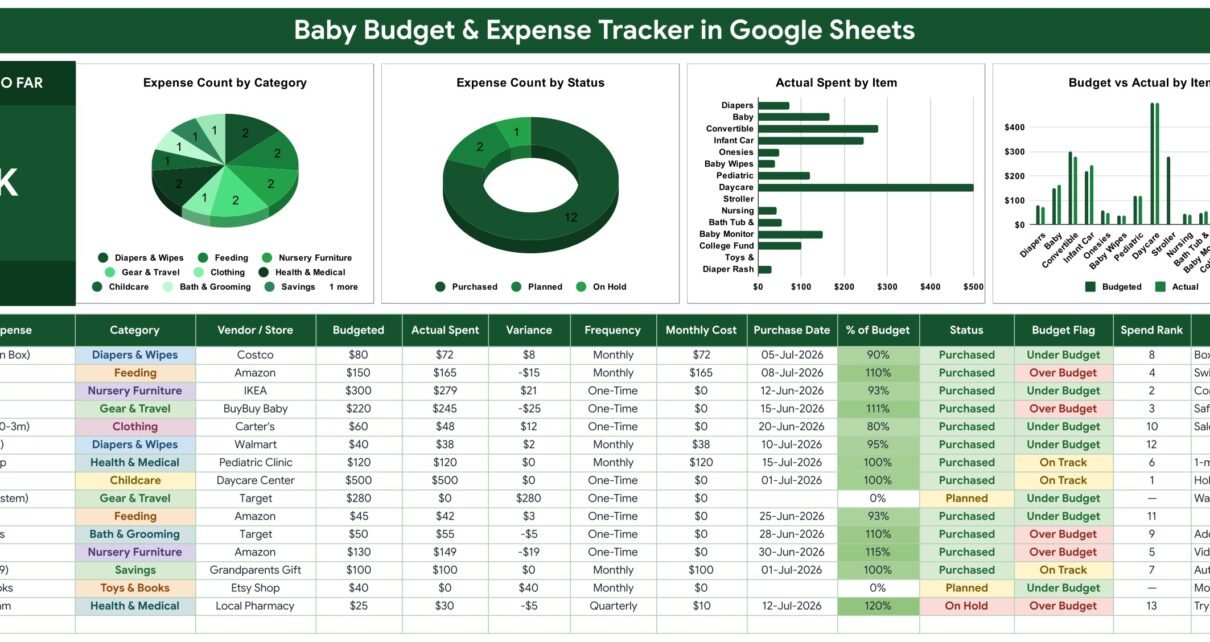
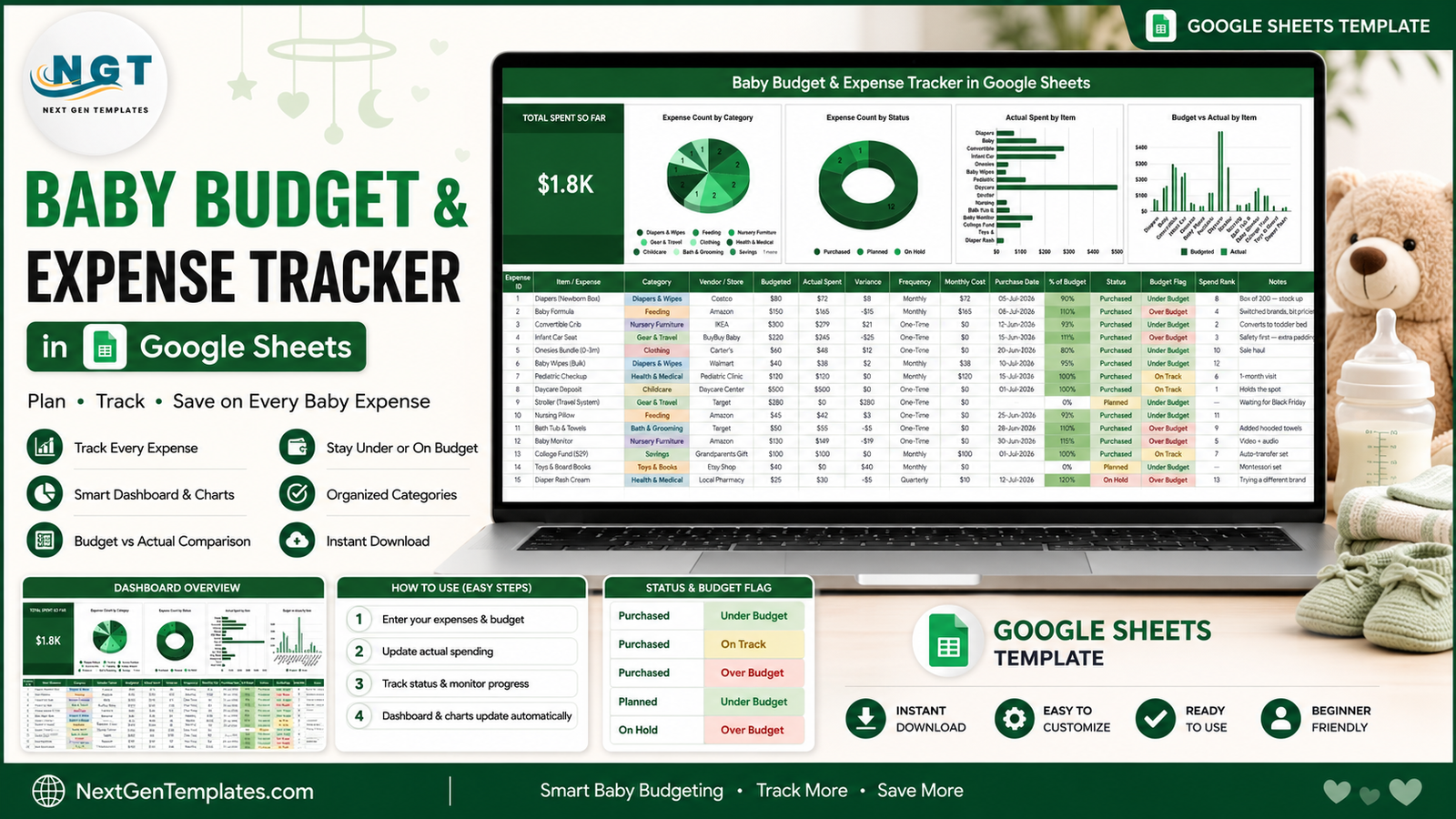
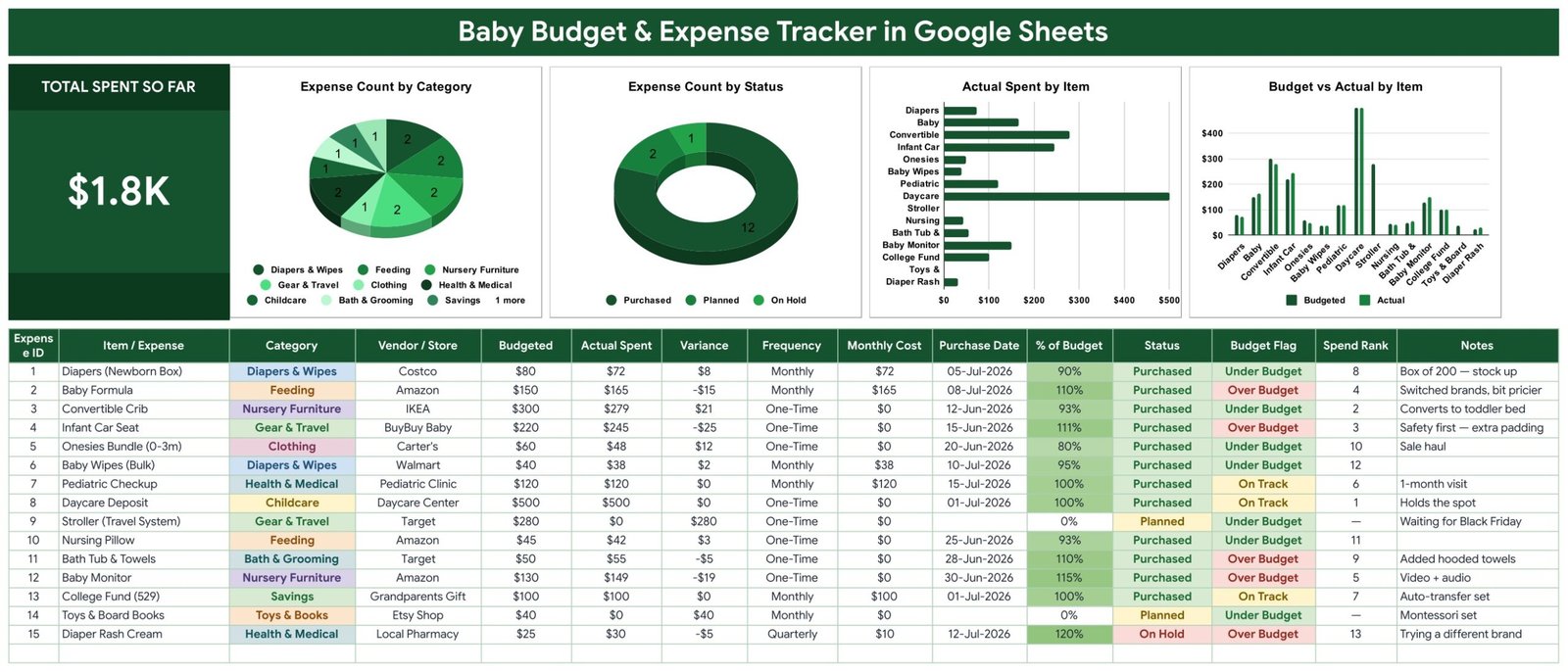
The Baby Budget & Expense Tracker in Google Sheets holds every newborn cost on a single page: a 15-column entry table, 6 columns that calculate themselves, 4 charts wired straight to the data across rows 16 to 1000, and a Total Spent So Far card that reads $1.8K in the sample file. Ten spending categories, three purchase states and three budget flags come pre-configured, and setup takes under 10 minutes.
Baby spending is death by a thousand line items. A $500 daycare deposit and a $279 crib are easy to remember; the weekly wipes, the formula switch that cost $15 more than planned and the quarterly diaper-rash cream are not. Most parents only discover the overspend at the end of the quarter. This tracker flags it on the row, the moment you type the number.
Get the Baby Budget & Expense Tracker in Google Sheets
Key Features of the Baby Budget & Expense Tracker in Google Sheets
- Budget versus actual on every line. Enter Budgeted and Actual Spent and the sheet returns Variance, % of Budget and a Budget Flag of Under Budget, On Track or Over Budget.
- Six automatic columns. Expense ID, Variance, Monthly Cost, % of Budget, Budget Flag and Spend Rank are formulas. You never touch them.
- Four charts with no helper tables. Expense Count by Category, Expense Count by Status, Actual Spent by Item and Budget vs Actual by Item read the data columns directly with the built-in Aggregate option.
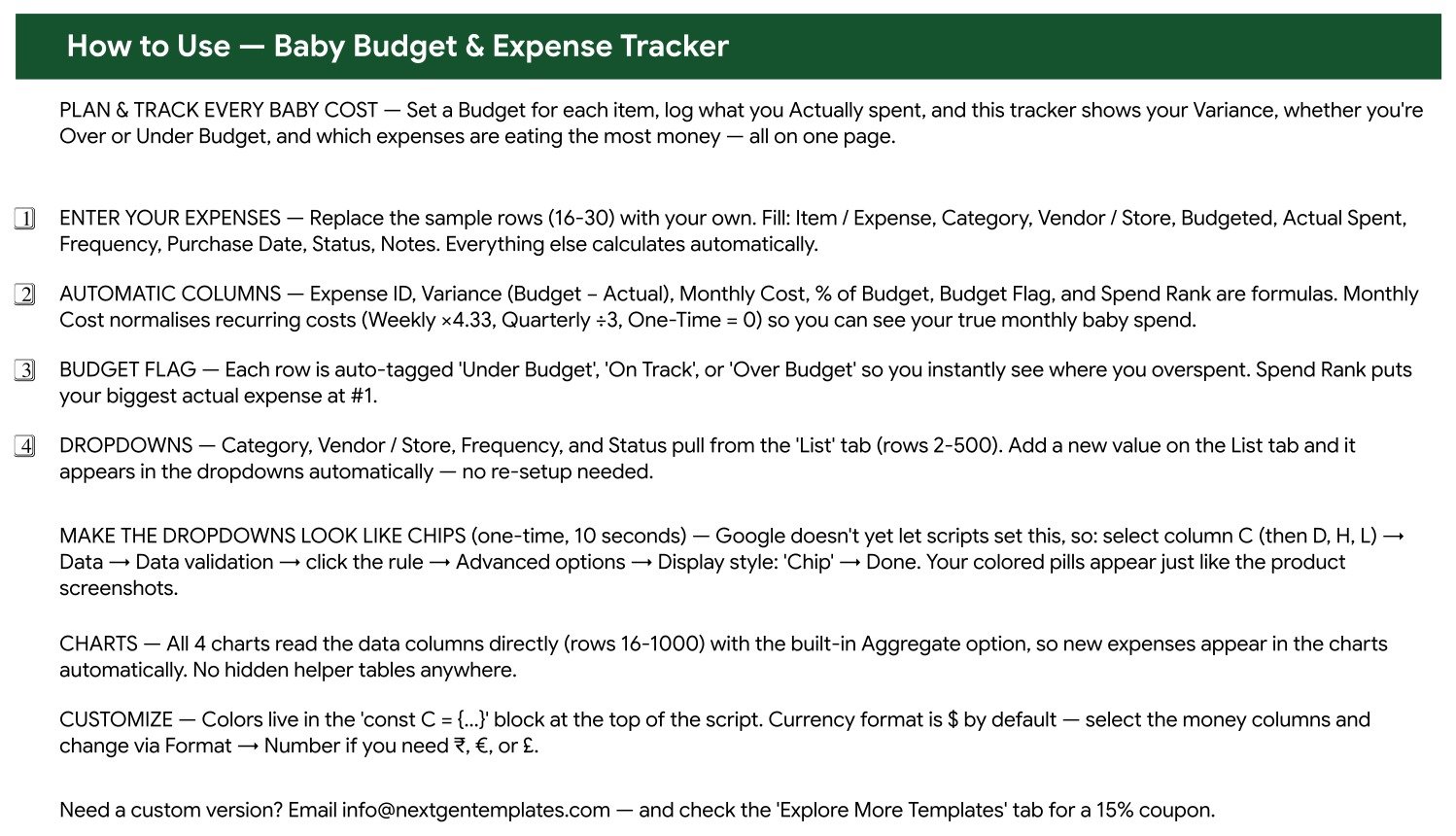
- Recurring costs normalised. Monthly Cost multiplies Weekly items by 4.33, divides Quarterly items by 3 and counts One-Time purchases as 0, so your true monthly baby spend is a single honest number.
- Ten baby categories out of the box: Diapers & Wipes, Feeding, Nursery Furniture, Gear & Travel, Clothing, Health & Medical, Childcare, Bath & Grooming, Savings and Toys & Books.
- Dropdowns that expand themselves. Category, Vendor / Store, Frequency and Status pull from the List tab, rows 2 to 500.
- Spend Rank. Your largest actual expense is ranked #1 automatically, so the negotiation target is obvious.
Template Structure: Every Sheet Explained
Sheet 1: Baby Budget Tracker Dashboard
The working page. A dark green title banner, a Total Spent So Far KPI card, then the four charts side by side, then the entry table. The 15 columns are Expense ID, Item / Expense, Category, Vendor / Store, Budgeted, Actual Spent, Variance, Frequency, Monthly Cost, Purchase Date, % of Budget, Status, Budget Flag, Spend Rank and Notes. Sample rows cover a newborn diaper box from Costco, formula from Amazon, a convertible crib from IKEA, an infant car seat from BuyBuy Baby, a daycare deposit and a 529 college fund started by grandparents.
Sheet 2: How to Use
A four-step onboarding page covering data entry, the automatic columns, how the Budget Flag and Spend Rank behave, and how the List tab drives every dropdown. It also documents the one-time ten-second step that turns plain dropdown text into the coloured chips shown in the screenshots, using Google Sheets data validation and the Chip display style.
Sheet 3: Explore More Professional Templates
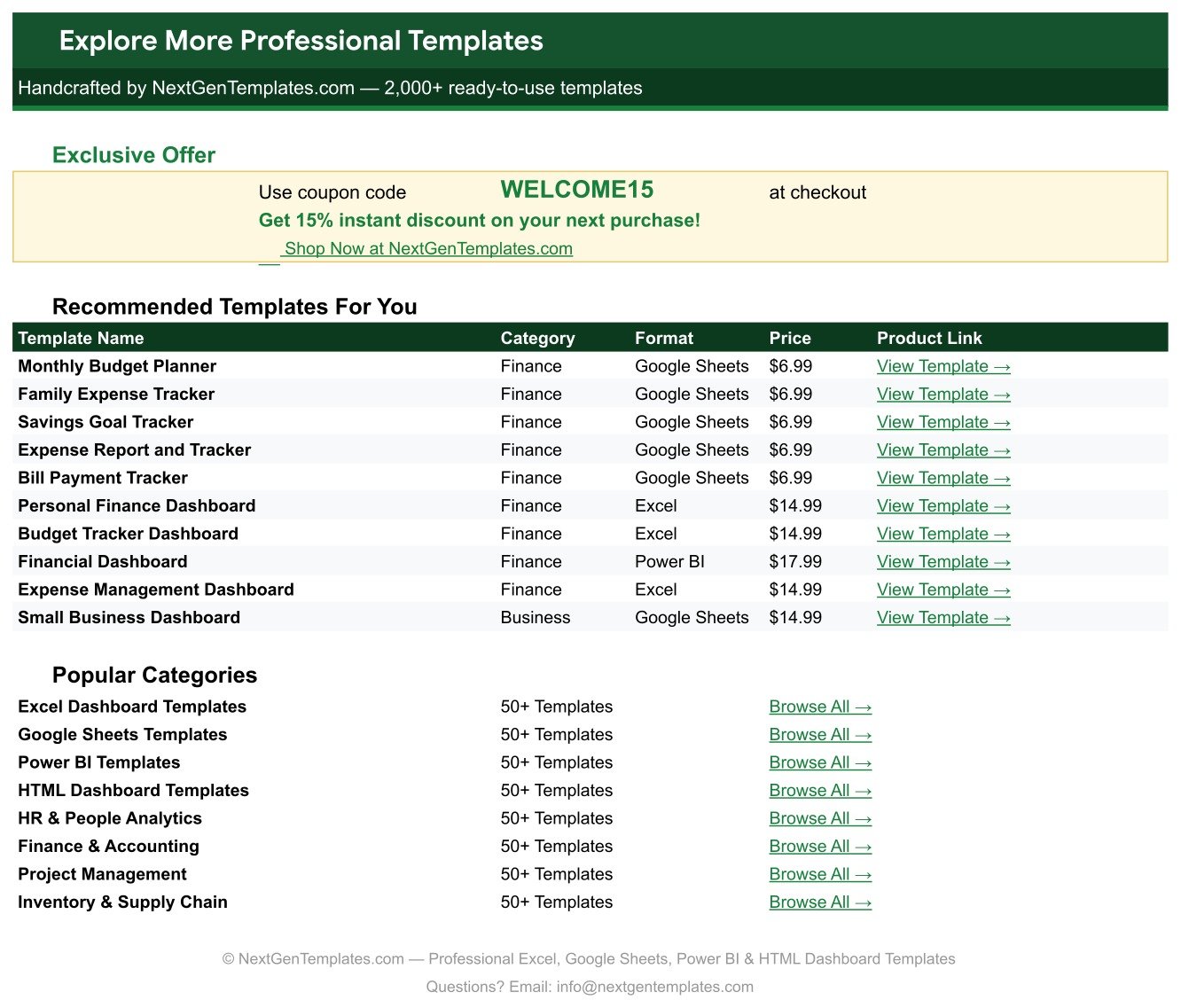
A bonus page with a WELCOME15 coupon worth 15% off, ten recommended finance templates with direct product links, and shortcuts into the main template categories. Behind the scenes a List tab stores every dropdown value; add a row there and the dropdown updates instantly.
Baby Budget Tracker in Google Sheets vs. Microsoft Excel vs. Paid Budgeting Apps — Feature Comparison
| Feature | Baby Budget & Expense Tracker in Google Sheets | Microsoft Excel budget workbook | YNAB / Monarch Money |
|---|---|---|---|
| Cost | $6.99 one-time | $5-20 one-time, plus Microsoft 365 | $8.99-14.99 / month |
| Platform | Google Sheets, any browser | Desktop Excel | Vendor app only |
| Setup time | Under 10 minutes | 20-45 minutes | Account linking, 30+ minutes |
| Both parents editing live | Yes, native Sheets sharing | Only via OneDrive co-authoring | Extra seat often costs more |
| Mobile access | Google Sheets app | Excel mobile, limited charts | Yes |
| Custom baby categories | Edit the List tab | Manual named-range edits | Fixed category schema |
| Share with a link | Yes | File attachment or OneDrive | Invite only |
| Bank connection required | No | No | Yes, credentials linked |
| Year-1 cost for two parents | $6.99 total | ~$70 with Microsoft 365 | $108-180 |
For parents who want budget-versus-actual clarity on baby spending without linking a bank account or paying a monthly fee, the Baby Budget & Expense Tracker in Google Sheets sits in the sweet spot.
Who Should Use This Template
Perfect for:
- Expecting parents building a first-year baby budget before the due date
- New parents who want to see exactly where diaper, formula and daycare money goes
- Couples who need one shared sheet both partners can edit from a phone
- Anyone tracking registry gifts, shower contributions or a 529 fund alongside monthly costs
- People who prefer transparent formulas over a closed budgeting app
Not a fit if:
- You want automatic bank-feed imports. This tracker is manual entry by design.
- You need whole-household budgeting with income, debt and investments. The Annual Family Budget Tracker in Google Sheets covers that ground.
- You run a daycare or nursery and bill multiple families. This is a personal tracker, not a business system.
Real-World Use Cases
Priya, 30 weeks pregnant, planning the first year. She enters every anticipated purchase with Status set to Planned and a Budgeted figure. The Budget vs Actual by Item chart starts empty on the Actual side and fills in as things are bought, so she can see her plan and her reality side by side. Before the baby arrives she already knows the daycare deposit and the car seat will absorb most of the budget.
Daniel and Mia, splitting spending across two cards. They share one copy of the sheet and log purchases from their phones. Because Vendor / Store is a dropdown rather than free text, the Actual Spent by Item chart stays clean and they can tell whether Amazon, Target or Costco is genuinely cheaper on bulk wipes.
Rachel, back at work and watching the recurring bill. The Monthly Cost column converts her weekly and quarterly items to a monthly figure, so she finally has one true number for monthly baby spend. Spend Rank tells her which single line item to renegotiate first, and the Budget Flag column shows the three purchases that ran over.
Advantages of the Baby Budget & Expense Tracker
The financial argument is simple: $6.99 once against $108 to $180 for a year of a subscription budgeting app, and the sheet keeps working forever. The practical argument is better. Because everything lives in your own Google Drive, no bank credentials are shared, the file opens offline in the Sheets app, and either parent can edit it without buying a seat.
The structural argument matters most. Charts read the data columns directly rather than a hidden helper table, so nothing breaks when you add rows. Dropdown values live on a List tab you control, so the categories match how your family actually spends rather than a vendor’s schema. And because the six calculated columns are ordinary Google Sheets formulas, you can read them, audit them and change them.
Opportunities for Improvement
Being honest about the limits: this is a manual-entry tracker, so if you want transactions pulled in automatically you will need to add a bank export and a lookup yourself. The Total Spent card is a single running figure rather than a month-by-month trend, so month-over-month analysis means a pivot table or a second chart. There is also no built-in multi-currency conversion; the currency format is changed on the money columns via Format then Number, which is fine for one currency but not for a family spending across two. Finally, the chip-style dropdown colours require the one-time data-validation step described on the How to Use sheet, because Google Apps Script cannot yet set that display style programmatically.
Best Practices
- Enter Planned items before you buy them. The gap between Budgeted and Actual is where the value is.
- Keep Vendor / Store a dropdown, never free text, or the vendor comparison becomes meaningless.
- Set Frequency honestly. A Weekly item marked One-Time will understate your monthly cost by a factor of four.
- Use Notes for the reason, not the amount. “Switched brands, bit pricier” is what you will want in three months.
- Review the Over Budget flags monthly and re-baseline the Budgeted column rather than leaving stale targets in place.
Explore Relevant Templates
If you are tracking baby costs you are probably tracking other things too. The Annual Family Budget Tracker handles the full household. The Holiday & Christmas Budget Tracker and the Wedding Budget Tracker use the same budget-versus-actual layout for one-off events. For cash discipline, the No Spend Challenge Tracker pairs well with a tight baby budget, and the Bank Account Balance Tracker keeps the account side visible. On the store, look at the College Savings Goal Tracker in Google Sheets for the 529 fund and the Financial Goals & Milestones Tracker for the longer horizon, or browse all Google Sheets trackers.
Want to build skills like this step by step? The NextGenTemplates Academy learning paths cover budgeting-sheet fundamentals with practice files.
Get the Baby Budget & Expense Tracker in Google Sheets
Frequently Asked Questions
What does the Baby Budget & Expense Tracker in Google Sheets track?
The Baby Budget & Expense Tracker in Google Sheets tracks 15 columns per expense including Budgeted, Actual Spent, Variance, Frequency, Monthly Cost, % of Budget, Status, Budget Flag and Spend Rank, across ten categories from diapers and feeding to childcare and savings.
How long does it take to set up?
Under 10 minutes. Open the PDF, click the Make a Copy link, edit the List tab dropdown values, then replace the 15 sample rows with your own. Every formula column, chart and the Total Spent card update automatically as you type.
Do I have to connect a bank account?
No. The Baby Budget & Expense Tracker in Google Sheets is entry-based and lives entirely in your own Google Drive. No credentials are linked and no data is sent to a third party, which is the main privacy difference from a subscription app.
How does this compare to YNAB or Monarch Money?
Those apps cost $8.99 to $14.99 per month and fix your categories to their schema. The Baby Budget & Expense Tracker in Google Sheets costs $6.99 once, lets you define every category on the List tab, and keeps working after you stop paying anyone.
Can both parents edit it at the same time?
Yes. It is a native Google Sheet, so you share it like any other Drive file and both parents can edit simultaneously from a browser or the mobile app. There are no per-user fees and no seat limits.
Can I change the currency?
Yes. Select the money columns and use Format then Number to switch from $ to the rupee, euro or pound. The formulas are currency-agnostic, so Variance, Monthly Cost and % of Budget keep working unchanged.
How many rows can I add?
Charts and formulas extend to row 1000, so the Baby Budget & Expense Tracker in Google Sheets handles roughly 985 expense entries, which covers several years of baby and toddler spending without any rework.
About the Author
Built by PK — Microsoft Certified Professional with 15+ years of Excel, Google Sheets, and Power BI experience. Founder of NextGenTemplates, reaching 300K+ subscribers across YouTube channels. Every template is hand-built and tested before release.
Conclusion
Baby costs do not arrive as one big bill. They arrive as fifteen small ones a month, and the only way to stay in control is to write each one down next to what you expected it to cost. The Baby Budget & Expense Tracker in Google Sheets does exactly that on one page, with the arithmetic already done for you.
Instant download · One-time payment · No subscription
Last updated: August 2026