In today’s competitive electronics industry, companies must track performance with accuracy and speed. However, many businesses still rely on scattered spreadsheets and manual reports. As a result, managers struggle to monitor sales, production efficiency, inventory movement, and profitability in one place.
Therefore, organizations need a centralized and dynamic KPI monitoring system. More importantly, they need a scorecard that updates automatically and highlights performance clearly.
That is exactly where the Electronics KPI Scorecard in Google Sheets becomes a powerful solution.
This ready-to-use template helps electronics manufacturers, retailers, distributors, and operations managers track key performance indicators with clarity and control. Moreover, it allows monthly and yearly performance analysis through an interactive interface.
In this complete guide, you will learn:
What Is an Electronics KPI Scorecard in Google Sheets?
Click to Buy Electronics KPI Scorecard in Google Sheets
An Electronics KPI Scorecard in Google Sheets is an interactive dashboard designed to monitor key operational, sales, and financial metrics in the electronics industry.
Instead of reviewing multiple reports, you can track all major KPIs in one structured view. Consequently, decision-makers gain faster insights and improve performance control.
Because this scorecard runs in Google Sheets, teams can collaborate in real time from anywhere.
Why Do Electronics Businesses Need a KPI Scorecard?
Electronics companies manage complex operations including manufacturing, supply chain, retail sales, and service support. Therefore, tracking performance manually becomes inefficient.
However, with a KPI scorecard, businesses can:
- Monitor monthly revenue trends
- Track production efficiency
- Evaluate inventory turnover
- Compare actual vs target performance
- Identify underperforming areas instantly
As a result, leadership teams make smarter and faster decisions.
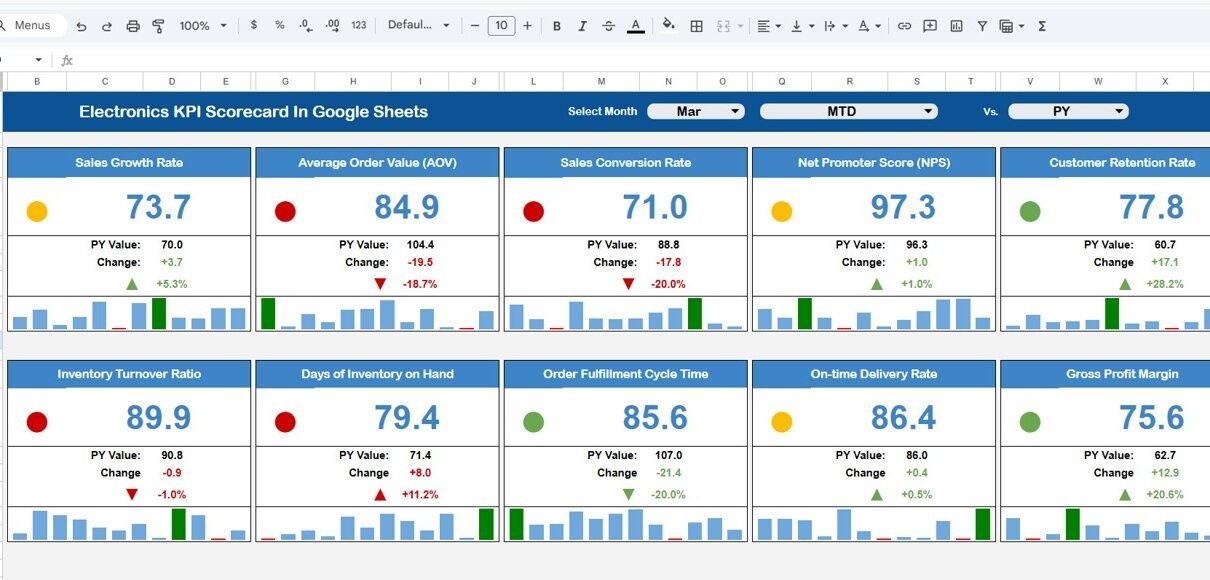
Dashboard Sheet Tab (Main Scorecard Page)
Click to Buy Electronics KPI Scorecard in Google Sheets
This is the central and most important sheet.
Key Features:
- Month dropdown at the top
- Select any month for monthly scorecard view
- Automatically updates all numbers
- Traffic light indicators
- Up and down arrow percentage change
- MTD view (Month-to-Date)
- YTD view (Year-to-Date)
When you select a month, the entire dashboard updates instantly. Therefore, users analyze performance without manual recalculations.
Moreover, conditional formatting highlights:
- Green → Positive performance
- Red → Underperformance
- Arrows → Growth or decline
As a result, management identifies issues quickly.

Click to Buy Electronics KPI Scorecard in Google Sheets
KPI Trend Sheet Tab
This sheet provides detailed analysis for individual KPIs.
Key Features:
KPI selection dropdown in Range C3
Displays:
- KPI Group
- Unit
- KPI Type (LTB or UTB)
- KPI Formula
- KPI Definition
Additionally, it shows monthly performance trend charts.
Because of this feature, users analyze long-term performance patterns easily.

Click to Buy Electronics KPI Scorecard in Google Sheets
KPI Definition Sheet Tab
This sheet maintains structured KPI documentation.
You enter:
- KPI Name
- KPI Group
- Unit
- Formula
- KPI Definition
Therefore, stakeholders understand each metric clearly.
This sheet also ensures standardization across teams.

Click to Buy Electronics KPI Scorecard in Google Sheets
Data Input Sheet Tab
This sheet handles all raw data entries.
You input:
- Monthly MTD data
- Monthly YTD data
- KPI values for each period
Once you enter the data, the dashboard updates automatically.
Because data drives performance, accurate entry remains critical.

Click to Buy Electronics KPI Scorecard in Google Sheets
Colour Settings Sheet
This sheet controls conditional formatting rules.
You define:
- Green threshold
- Yellow warning level
- Red alert level
Because performance types differ (LTB vs UTB), color rules adjust accordingly.
As a result, visual clarity improves dramatically.

Click to Buy Electronics KPI Scorecard in Google Sheets
Advantages of Electronics KPI Scorecard in Google Sheets
Implementing this scorecard delivers powerful benefits.
Real-Time Performance Tracking
Because Google Sheets updates instantly, teams monitor KPIs without delay.
Automated Monthly & Yearly Comparison
Users switch between MTD and YTD views easily. Therefore, performance analysis becomes faster.
Smart Visual Indicators
Traffic lights and arrows highlight performance instantly.
Centralized KPI Documentation
All definitions and formulas remain structured in one place.
Improved Decision-Making
Clear KPI insights support faster operational decisions.
Easy Customization
You can modify KPIs, add new metrics, or adjust thresholds.
Best Practices for the Electronics KPI Scorecard in Google Sheets
Click to Buy Electronics KPI Scorecard in Google Sheets
To maximize value, follow these best practices.
Define Clear Monthly Targets
Without defined targets, KPI tracking loses meaning. Therefore, always set realistic goals.
Update Data Consistently
Enter data regularly. Because consistency ensures reliability, insights become trustworthy.
Validate Input Data
Check numbers before entry. Small errors can distort performance results.
Review KPIs Weekly
Although the dashboard supports monthly review, weekly analysis improves agility.
Focus on Actionable KPIs
Avoid unnecessary metrics. Instead, track KPIs that drive real business results.
Conclusion
The Electronics KPI Scorecard in Google Sheets provides a structured, dynamic, and easy-to-use performance tracking solution for electronics businesses.
Instead of depending on scattered reports, companies gain centralized visibility into:
- Revenue
- Profitability
- Inventory efficiency
- Production performance
- Quality control
- Customer experience
Moreover, the automatic updates, traffic lights, and trend analysis features ensure quick and accurate decision-making.
If you want to improve operational control and boost electronics business performance, this KPI scorecard delivers everything you need.
Frequently Asked Questions (FAQs)
Click to Buy Electronics KPI Scorecard in Google Sheets
What is the purpose of the Electronics KPI Scorecard?
It tracks key operational, financial, and sales KPIs in one interactive Google Sheets dashboard.
Can I customize the KPIs?
Yes. You can edit, remove, or add KPIs in the KPI Definition sheet.
Does it support MTD and YTD tracking?
Yes. You can switch between MTD and YTD views easily.
Is this suitable for small electronics retailers?
Yes. Both small and large businesses can use this scorecard.
Do I need advanced Google Sheets skills?
No. Basic knowledge is enough to operate this template.
Visit our YouTube channel to learn step-by-step video tutorials
Youtube.com/@NeotechNavigators
Watch the step-by-step video tutorial: