Managing finance and accounting operations without structured reporting creates confusion, delays, and financial risks. However, many organizations still depend on scattered spreadsheets and manual reports. As a result, finance managers struggle to monitor budgets, forecasts, actual spending, and variance analysis in one centralized system.Finance and Accounting Dashboard in Google Sheets
Therefore, businesses need a smart, interactive, and real-time financial monitoring solution. The Finance and Accounting Dashboard in Google Sheets provides a ready-to-use, dynamic reporting system that tracks budget performance, department spending, category analysis, and monthly financial trends — all in one powerful dashboard.
In this article, we will explain the complete structure, features, KPIs, analysis pages, advantages, and best practices of the Finance and Accounting Dashboard in Google Sheets.Finance and Accounting Dashboard in Google Sheets
What Is a Finance and Accounting Dashboard in Google Sheets?
A Finance and Accounting Dashboard in Google Sheets is a performance monitoring tool designed to track financial metrics such as budget amount, forecast amount, actual spending, variance, and budget status.
Instead of reviewing multiple sheets manually, managers analyze performance through interactive charts, summary cards, and filters. Moreover, the dashboard allows filtering by:
- Year
- Month
- Department
- Category
- Budget Status
- Date
As a result, finance teams gain complete visibility into financial performance without expensive BI tools.
Main Dashboard Overview (Executive Summary Page)
Click to Buy Finance and Accounting Dashboard in Google Sheets
This page acts as the command center for financial monitoring.
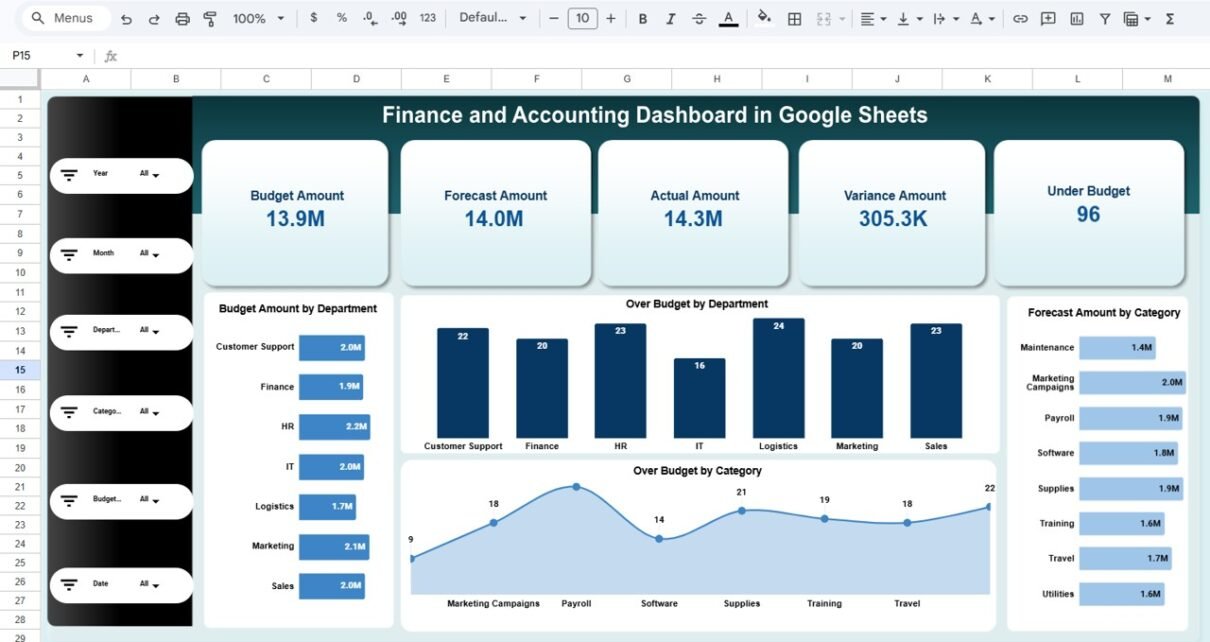
Top KPI Summary Cards
The dashboard displays key financial metrics at the top:
- Budget Amount – Total allocated budget
- Forecast Amount – Projected spending
- Actual Amount – Real spending
- Variance Amount – Difference between actual and budget
- Under Budget Count – Number of departments or categories under budget
Because these KPIs appear prominently, leadership quickly understands financial health.
Key Visualizations on Main Page
🔹 Budget Amount by Department
Shows how budget distributes across:
🔹 Over Budget by Department
Identifies departments exceeding allocated budget.
🔹 Forecast Amount by Category
Tracks projected expenses by:
🔹 Over Budget by Category
Highlights spending risk areas by category.
Because this page consolidates financial insights, executives review financial performance in seconds.

Click to Buy Finance and Accounting Dashboard in Google Sheets
Department Analysis Page
This page provides detailed department-level insights.
Included Metrics:
- Variance Amount by Department
- Actual Amount by Department
- Budget Amount by Department
- Forecast Amount by Department

Click to Buy Finance and Accounting Dashboard in Google Sheets
Budget Analysis Page
This page focuses on budget status performance.
Key Charts:
- Forecast Amount by Budget Status (On Track, Over Budget, Under Budget)
- Budget Amount by Budget Status
- Actual Amount by Budget Status
- Variance Amount by Budget Status
Because budget status classification simplifies monitoring, teams quickly identify problem areas.

Click to Buy Finance and Accounting Dashboard in Google Sheets
Category Analysis Page
This page analyzes expense categories in depth.
Metrics Included:
- Forecast Amount by Category
- Actual Amount by Category
- Budget Amount by Category
- Variance Amount by Category

Click to Buy Finance and Accounting Dashboard in Google Sheets
Monthly Trends Page
This page provides time-based financial analysis.
Included Visualizations:
-
Forecast Amount by Month
-
Budget Amount by Month
-
Actual Amount by Month
-
Variance Amount by Month

Click to Buy Finance and Accounting Dashboard in Google Sheets
Advantages of Finance and Accounting Dashboard in Google Sheets
Using this dashboard delivers several operational and strategic benefits.
Real-Time Financial Visibility
Managers track budget performance instantly.
Improved Cost Control
Variance tracking highlights overspending areas.
Better Forecast Planning
Forecast vs Actual comparison improves planning accuracy.
Department-Level Accountability
Spending transparency increases responsibility.
Interactive Filtering
Users analyze data dynamically by department or category.
Cloud Collaboration
Google Sheets allows multi-user access.
Cost-Effective Reporting
No expensive ERP analytics modules required.
Best Practices for Implementing This Dashboard
Click to Buy Finance and Accounting Dashboard in Google Sheets
To maximize results, follow these best practices.
1. Update Financial Data Regularly
Enter monthly actual and forecast numbers consistently.
2. Review Variance Frequently
Monitor departments exceeding budget closely.
3. Align Forecast with Historical Trends
Use Monthly Trends page for planning.
4. Standardize Expense Categories
Maintain consistent classification.
5. Set Realistic Budget Targets
Avoid unrealistic allocation that distorts variance.
6. Monitor Budget Status Weekly
Do not wait until month-end for review.
7. Validate Data Accuracy
Ensure error-free financial entries.
How Does This Dashboard Improve Financial Management?
Click to Buy Finance and Accounting Dashboard in Google Sheets
This dashboard transforms raw accounting data into structured insights. It helps organizations:
- Prevent overspending
- Improve budget utilization
- Enhance forecast accuracy
- Increase financial transparency
- Support executive decision-making
- Strengthen cost control policies
Therefore, businesses maintain stronger financial discipline.
Conclusion
The Finance and Accounting Dashboard in Google Sheets provides a complete financial monitoring solution. Because it combines executive summary cards, department analysis, budget status tracking, category insights, and monthly trends, it delivers comprehensive financial visibility.
Moreover, its interactive filtering and cloud-based structure ensure easy collaboration and real-time updates. Therefore, organizations that want structured budget tracking, improved forecasting, and better financial control should implement this dashboard system.
Frequently Asked Questions (FAQs)
Click to Buy Finance and Accounting Dashboard in Google Sheets
1. What is the purpose of a Finance Dashboard?
It tracks budget, forecast, actual spending, and variance in one system.
2. Can I customize departments and categories?
Yes, you can modify them according to your organization.
3. Does it support monthly financial tracking?
Yes, it includes a Monthly Trends page.
4. Is it suitable for small businesses?
Yes, both small and large organizations can use it.
5. Can multiple users access it?
Yes, Google Sheets allows real-time collaboration.
Visit our YouTube channel to learn step-by-step video tutorials
Youtube.com/@NeotechNavigators
Watch the step-by-step video tutorial:
Click to Buy Finance and Accounting Dashboard in Google Sheets