Employee leave management plays a critical role in workforce planning, productivity tracking, and organizational efficiency. Companies must balance employee well-being with operational continuity. However, many HR teams still manage leave data using disconnected spreadsheets or manual reports. Consequently, managers struggle to understand leave patterns, costs, and workforce availability.
So, how can HR professionals monitor leave data efficiently while gaining meaningful insights?
The answer is the HR Leave Monitoring Dashboard in Google Sheets.
In this article, we will explain everything about the HR Leave Monitoring Dashboard in Google Sheets, including dashboard features, analytical pages, benefits, best practices, and frequently asked questions.
What Is an HR Leave Monitoring Dashboard in Google Sheets?
Click to Buy HR Leave Monitoring Dashboard in Google Sheets
An HR Leave Monitoring Dashboard in Google Sheets is an interactive HR analytics solution designed to track employee leave trends, costs, and patterns using visual dashboards and structured data.
Instead of reviewing multiple leave reports manually, this dashboard consolidates all leave-related KPIs into one centralized reporting system. Therefore, HR teams can analyze workforce availability instantly.
The dashboard monitors:
- Total leaves taken
- Leave cost analysis
- Leave balance tracking
- Average leave duration
- Unplanned leave trends
- Department-wise leave analysis
- Monthly leave patterns
Because Google Sheets operates in the cloud, teams collaborate in real time while maintaining data accuracy.
Why Is Leave Monitoring Important for Organizations?
Employee leave directly impacts productivity, staffing levels, and operational costs. Without structured monitoring, organizations face several challenges.
Common Problems Without Leave Analytics
- Workforce shortages during peak periods
- Rising absenteeism unnoticed
- Increased operational costs
- Poor resource planning
- Lack of visibility into leave trends
However, a leave monitoring dashboard provides clarity and control.
Key Features of HR Leave Monitoring Dashboard in Google Sheets
Click to Buy HR Leave Monitoring Dashboard in Google Sheets
This ready-to-use dashboard includes advanced HR analytics features.
Core Dashboard Capabilities
- KPI summary cards
- Dynamic slicers and filters
- Department-wise analysis
- Leave type analysis
- Monthly trend monitoring
- Leave cost tracking
- Average leave duration measurement
- Unplanned leave tracking
Because all visuals update dynamically, HR managers can analyze leave data instantly.
Main Dashboard Overview – Workforce Leave Snapshot
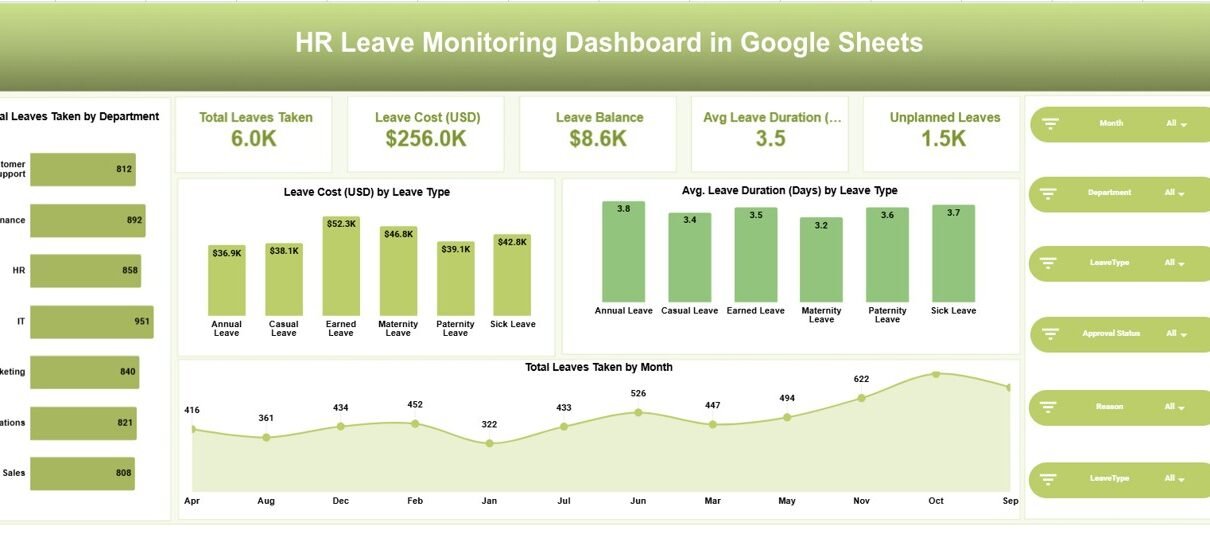
The main dashboard page provides an overall summary of leave performance.
KPI Summary Cards
At the top, the dashboard displays key metrics:
- Total Leaves Taken: 6.0K
- Leave Cost (USD): $256.0K
- Leave Balance: $8.6K
- Average Leave Duration: 3.5 Days
- Unplanned Leaves: 1.5K
These KPIs give HR leaders an immediate understanding of workforce leave status.

Click to Buy HR Leave Monitoring Dashboard in Google Sheets
Reason Analysis Page – Understanding Why Employees Take Leave
The Reason Analysis page focuses on leave causes.
Metrics Included
- Total leaves by reason
- Average leave duration by reason
- Unplanned leaves by reason
- Leave cost by reason
Common leave reasons include:
- Emergency
- Family Events
- Medical
- Personal Work
- Travel
- Vacation
This analysis helps HR teams identify recurring workforce challenges.

Click to Buy HR Leave Monitoring Dashboard in Google Sheets
Leave Analysis Page – Performance by Leave Type
The Leave Analysis page evaluates leave behavior based on leave categories.
Insights Provided
- Total leaves by leave type
- Average leave duration comparison
- Unplanned leave trends
- Leave cost distribution
Because different leave types affect operations differently, this analysis supports better leave policy decisions.

Department Analysis Page – Workforce Impact by Department
The Department Analysis page compares leave patterns across departments.
Key Analytics
- Total leaves taken by department
- Leave cost by department
- Average leave duration
- Unplanned leaves by department
HR managers can quickly detect departments experiencing higher absenteeism.
Consequently, leadership can implement targeted interventions.

Click to Buy HR Leave Monitoring Dashboard in Google Sheets
Monthly Trends Page – Long-Term Leave Patterns
The Monthly Trends page helps HR teams understand changes over time.
Trend Metrics
- Total leaves taken by month
- Average leave duration trend
- Unplanned leave trend
- Monthly leave cost analysis
Because trends reveal behavior patterns, organizations can plan staffing proactively.

Interactive Filters and Slicers
Across all dashboard pages, users can filter data using slicers:
- Month
- Department
- Leave Type
- Approval Status
- Reason
These filters allow deep analysis without changing underlying data.
Data Structure Behind the Dashboard
Click to Buy HR Leave Monitoring Dashboard in Google Sheets
The dashboard uses structured HR leave data containing:
- Employee Name
- Department
- Leave Type
- Leave Start & End Date
- Leave Duration
- Approval Status
- Leave Reason
- Leave Balance
- Leave Cost
- Month & Year
Because the data remains standardized, reporting stays consistent.
Advantages of HR Leave Monitoring Dashboard in Google Sheets
Centralized Leave Analytics
All leave information appears in one place.
Improved Workforce Planning
Managers predict staffing needs accurately.
Cost Control
Track leave-related expenses easily.
Better Policy Decisions
Identify excessive leave patterns.
Real-Time Collaboration
Multiple users work simultaneously.
Automated Calculations
Reduces manual reporting effort.
Easy Customization
Modify KPIs based on company policies.
How Does This Dashboard Improve HR Decision-Making?
Click to Buy HR Leave Monitoring Dashboard in Google Sheets
When HR teams monitor leave patterns regularly, they gain actionable insights.
The dashboard helps organizations:
-
Reduce absenteeism risks
-
Optimize workforce scheduling
-
Improve employee wellness programs
-
Control overtime costs
-
Maintain operational stability
Therefore, HR moves from reactive management to proactive planning.
Best Practices for the HR Leave Monitoring Dashboard in Google Sheets
To maximize dashboard effectiveness, follow these practices.
1. Update Leave Data Regularly
Maintain consistent monthly updates.
2. Monitor Unplanned Leaves Closely
Focus on sudden absenteeism trends.
3. Analyze Department Differences
Compare teams regularly.
4. Review Leave Policies Periodically
Adjust policies using data insights.
5. Encourage Proper Leave Planning
Promote advance leave requests.
6. Track Leave Costs Continuously
Monitor financial impact.
Who Should Use This Dashboard?
Click to Buy HR Leave Monitoring Dashboard in Google Sheets
This dashboard benefits multiple roles:
- HR Managers
- Workforce Planners
- Operations Managers
- Business Leaders
- HR Analysts
- Payroll Teams
Because the dashboard remains simple and scalable, organizations of any size can use it effectively.
Why Choose Google Sheets for HR Leave Monitoring?
Google Sheets offers flexibility without expensive software.
Key Benefits
- Cloud-based access
- Real-time collaboration
- Automatic saving
- Easy sharing
- Low implementation cost
Therefore, it becomes an ideal solution for HR analytics.
Conclusion
Click to Buy HR Leave Monitoring Dashboard in Google Sheets
Employee leave management directly influences productivity, workforce planning, and operational efficiency. However, manual reporting methods limit visibility and slow decision-making.
The HR Leave Monitoring Dashboard in Google Sheets transforms leave data into actionable insights through visual analytics, department comparisons, and trend monitoring.
By combining leave cost analysis, duration tracking, and unplanned leave monitoring, this dashboard empowers HR teams to make smarter decisions and maintain workforce balance.
Visit our YouTube channel to learn step-by-step video tutorials
Youtube.com/@NeotechNavigators
Watch the step-by-step video tutorial: