Managing employee leave efficiently is critical for maintaining productivity, controlling costs, and ensuring workforce well-being. However, many HR teams still rely on scattered spreadsheets or manual calculations, which makes tracking leave data slow and error-prone.
That is exactly where the Employee Leave Dashboard in Google Sheets becomes a powerful solution.
This ready-to-use Google Sheets dashboard transforms raw leave records into clear, interactive, and actionable insights. With dynamic slicers, automated calculations, and visually rich charts, HR teams and managers can instantly understand leave patterns, costs, and risks—all from a single dashboard.
Get the Employee Leave Dashboard in Google Sheets
What Is the Employee Leave Dashboard in Google Sheets?
The Employee Leave Dashboard in Google Sheets is a professionally designed analytics dashboard that helps you:
- Track employee leave usage across departments
- Monitor leave costs and balances
- Identify unplanned leave trends
- Analyze leave by type, reason, and month
- Make data-driven HR decisions without complex formulas
It works entirely inside Google Sheets, so there is no need for additional tools, add-ons, or technical expertise.
Dashboard Structure & Key Pages
This dashboard is thoughtfully structured into multiple analytical pages, each answering a specific HR question.
Overview Page
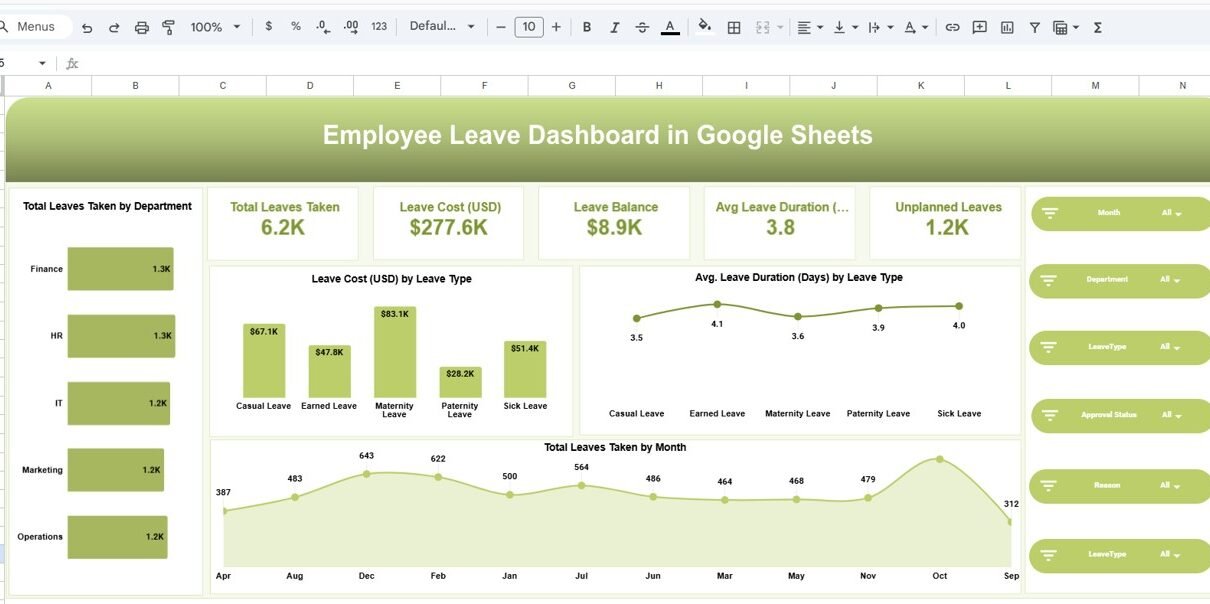
The Overview page gives you an instant summary of overall leave performance.
KPI Cards Included
- Total Leaves Taken
- Total Leave Cost (USD)
- Leave Balance
- Average Leave Duration (Days)
- Unplanned Leaves
Key Visuals
- Total leaves taken by department
- Leave cost by leave type
- Average leave duration by leave type
- Monthly trend of leaves taken
Interactive Filters
- Month
- Department
- Leave Type
- Approval Status
- Reason
With just one click, the entire dashboard updates automatically.

Department Analysis Page – Department-Wise Insights
This page helps HR leaders compare leave behavior across departments.
Analysis Covered
-
Total leaves taken by department
-
Leave cost (USD) by department
-
Average leave duration by department
-
Unplanned leaves by department
Business Value
-
Identify departments with high leave impact
-
Detect workload or burnout patterns
-
Support workforce planning and staffing decisions

Leave Type Analysis Page – Understanding Leave Categories
Different leave types affect operations differently. This page focuses on that breakdown.
Visuals Included
- Total leaves taken by leave type
- Average leave duration by leave type
- Unplanned leaves by leave type
- Leave cost by leave type
Examples of Leave Types
- Casual Leave
- Earned Leave
- Maternity Leave
- Paternity Leave
- Sick Leave
This analysis helps HR teams balance policies and improve leave planning.

Reason Analysis Page – Why Employees Take Leave
Understanding why employees take leave is just as important as how much they take.
Key Metrics
-
Total leaves taken by reason
-
Average leave duration by reason
-
Unplanned leaves by reason
-
Leave cost by reason
Common Reasons Tracked
- Personal Work
- Family Event
- Medical
- Travel
- Vacation
This page supports policy reviews and wellness initiatives.

Monthly Trends Page – Time-Based Leave Patterns
The Monthly Trends page highlights seasonal and recurring leave behaviors.
Trend Analysis
-
Total leaves taken by month
-
Average leave duration by month
-
Unplanned leaves by month
-
Leave cost by month
Why This Matters
-
Forecast future leave demand
-
Prepare for peak leave periods
-
Optimize staffing schedules

Underlying Data Sheet – Clean & Structured
Behind the dashboard is a well-structured data table, including:
- Employee Name
- Department
- Leave Type
- Leave Start & End Date
- Days Requested
- Approval Status
- Reason
- Leave Balance
- Leave Cost (USD)
- Month & Year
This structure ensures the dashboard remains Pivot-ready, scalable, and easy to maintain.
Advantages of the Employee Leave Dashboard in Google Sheets
-
Real-time analytics with dynamic filters
-
Saves hours of manual reporting
-
Improves leave cost visibility
-
Supports data-driven HR decisions
-
Cloud-based & shareable via Google Sheets
-
Fully reusable for any organization
Opportunities for Improvement
-
Integrate with HRMS exports
-
Add employee-level drill-down views
-
Automate monthly data refresh
-
Expand predictive leave forecasting
Best Practices for Using This Dashboard
-
Keep leave data updated monthly
-
Standardize leave types and reasons
-
Review unplanned leave trends regularly
-
Share insights with department managers
-
Use trends for policy and staffing reviews
Who Can Use This Dashboard?
-
HR Managers
-
HR Analysts
-
Operations Managers
-
Business Owners
-
Workforce Planning Teams
-
People Analytics Professionals
Get the Employee Leave Dashboard in Google Sheets
Final Thoughts
The Employee Leave Dashboard in Google Sheets is a practical, powerful, and business-ready solution for modern HR teams. Instead of working with scattered data and manual summaries, you get a single source of truth for leave analytics.
If you want to learn how to build HR reports and dashboards like this, the Excel Pivot Tables & Dashboards course on NextGenTemplates Academy teaches the method with practice files.