Internship programs play an important role in developing future talent, improving employer branding, and building a strong talent pipeline. However, organizations often struggle to track internship performance, engagement, hiring outcomes, and program effectiveness.Internship Program KPI Dashboard in Google Sheets
The Internship Program KPI Dashboard in Google Sheets is a ready-to-use analytical tool designed to help HR and L&D teams monitor internship KPIs, evaluate intern progress, measure hiring conversion rates, and optimize the overall program.
This article explains the dashboard structure, key worksheets, and a complete list of internship KPIs with unit, formula, definition, and performance type.Internship Program KPI Dashboard in Google Sheets
What Is the Internship Program KPI Dashboard?
This dashboard provides end-to-end visibility into internship program performance. It helps organizations measure:
-
Intern engagement and attendance
-
Training progress
-
Mentor effectiveness
-
Project completion
-
Offer conversion rate
-
Internship ROI
-
Internship satisfaction and feedback
The dashboard updates automatically through monthly selection and supports MTD, YTD, Target, and Previous Year comparisons.
Why Use Google Sheets for Internship Program Tracking?
Click to Buy Internship Program KPI Dashboard in Google Sheets
Google Sheets is ideal because it offers:
-
Multi-user collaboration
-
Live updates
-
Easy customization
-
Simple KPI integration
-
No additional software cost
-
Built-in dashboards and charts
HR teams can easily edit and share the dashboard with managers, mentors, and leadership.
Dashboard Structure and Worksheets
The dashboard includes 6 intelligent worksheet tabs, each designed for accurate KPI tracking.
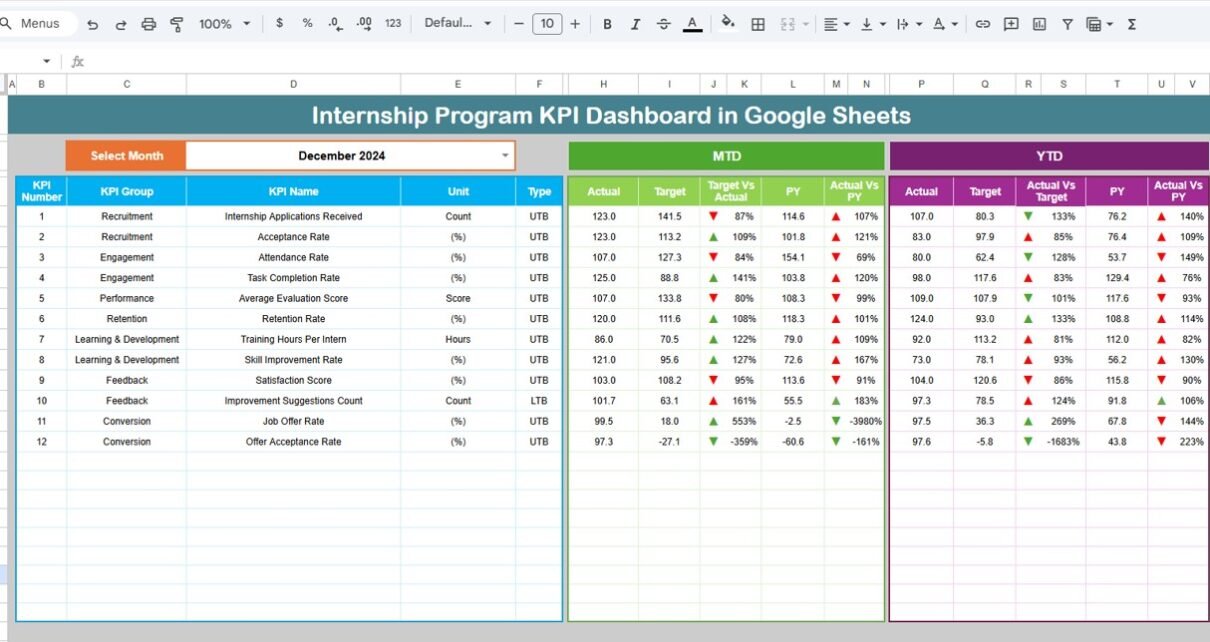
1. Dashboard Sheet Tab
This is the main sheet showing all internship KPIs.
Features:
Month selection → Range D3
MTD Actual, Target, Previous Year
YTD Actual, Target, Previous Year
Conditional arrows for:
- Target vs Actual
- Previous Year vs Actual
This gives quick insights into internship program performance trends.

Click to Buy Internship Program KPI Dashboard in Google Sheets
2. KPI Trend Sheet Tab
Select any KPI from Range C3 and view:
-
KPI Group
-
Unit
-
Formula
-
KPI Type (Upper / Lower the Better)
-
KPI Definition
-
Monthly performance trend chart

3. Actual Numbers Sheet Tab
You will enter:
-
MTD Actual
-
YTD Actual
You can set the program’s starting month in Range E1.

Click to Buy Internship Program KPI Dashboard in Google Sheets
4. Target Sheet Tab
Enter monthly targets and year-to-date targets for each KPI.

5. Previous Year Numbers Sheet Tab
Enter previous year internship KPI metrics for comparison.

Click to Buy Internship Program KPI Dashboard in Google Sheets
6. KPI Definition Sheet Tab
Contains:
-
KPI Name
-
KPI Group
-
Formula
-
Unit
-
Type of KPI
-
Definition

Advantages of Using the Internship Program KPI Dashboard
-
All KPIs in a single, easy-to-read dashboard
-
Better tracking of intern performance and engagement
-
Helps identify productivity and training gaps
-
Supports HR in improving internship structure
-
Provides evidence for program ROI and improvement
-
Easy comparison of actual vs target vs previous year
-
Fully cloud-based and real-time
Opportunities for Improvement
Click to Buy Internship Program KPI Dashboard in Google Sheets
-
Add certificate tracking
-
Add reminders for pending feedback
-
Integrate Google Forms for evaluations
-
Add internship budget forecasting
-
Add department-wise internship analysis
Best Practices
-
Update Actual sheet weekly
-
Review KPI trends monthly
-
Align internship goals with business needs
-
Use data to refine onboarding and training
-
Track conversion rates for long-term workforce planning
Conclusion
Click to Buy Internship Program KPI Dashboard in Google Sheets
The Internship Program KPI Dashboard in Google Sheets provides a powerful, flexible, and structured way to track internship effectiveness. With meaningful KPIs, trend charts, MTD/YTD comparisons, and full KPI definitions, HR teams gain deep insight into program performance and areas of improvement.
This dashboard helps organizations build strong internship programs, improve talent development, and boost long-term hiring success.
Frequently Asked Questions (FAQs)
1. What KPIs does the dashboard track?
Recruitment, training, performance, engagement, conversion, and internship ROI.
2. Can I customize KPIs?
Yes, all KPIs can be edited in the KPI Definition sheet.
3. Does the dashboard support MTD/YTD?
Yes, it supports both for Actual, Target, and Previous Year.
4. Is this designed for HR teams?
Yes, it is ideal for HR, L&D, mentors, and leadership.
5. Can multiple users update the dashboard?
Yes, Google Sheets supports complete collaboration.
Visit our YouTube channel to learn step-by-step video tutorials
Youtube.com/@NeotechNavigators
Watch the step-by-step video Demo:
Click to Buy Internship Program KPI Dashboard in Google Sheets