Managing office furniture across departments, locations, and vendors becomes challenging as organizations grow. Chairs, desks, cabinets, workstations, meeting tables, and storage units spread across multiple offices. Without a centralized tracking system, businesses face issues such as misplaced assets, uncontrolled costs, delayed repairs, and inaccurate inventory records.Office Furniture Inventory Dashboard in Google Sheets
An Office Furniture Inventory Dashboard in Google Sheets solves these problems by offering a ready-to-use, centralized, and visual solution. It helps organizations track furniture quantity, condition, cost, location, department usage, vendor details, and monthly trends—all in one place.Office Furniture Inventory Dashboard in Google Sheets
What Is an Office Furniture Inventory Dashboard in Google Sheets?
Click to Buy Office Furniture Inventory Dashboard in Google Sheets
An Office Furniture Inventory Dashboard is a structured reporting tool built in Google Sheets that converts raw furniture data into meaningful insights using cards, charts, filters, and search functionality.Office Furniture Inventory Dashboard in Google Sheets
Because it is built in Google Sheets, it offers:
- Real-time collaboration
- Automatic calculations
- Easy customization
- Cloud access from anywhere
- Zero dependency on expensive software
This dashboard acts as a single source of truth for all office furniture data.
Why Organizations Need a Furniture Inventory Dashboard
Many organizations still rely on manual registers or disconnected spreadsheets. This often leads to:Office Furniture Inventory Dashboard in Google Sheets
- Duplicate purchases
- Missing or untracked furniture
- High maintenance costs
- Poor asset utilization
- No visibility into department-wise usage
A dashboard solves these issues by providing instant visibility and actionable insights.
Dashboard Structure Overview
The dashboard is divided into multiple analytical sections:
- Overview Sheet
- Department Analysis
- Category Analysis
- Vendor Analysis
- Monthly Trends
- Search Functionality
- Data Sheet
Each section focuses on a specific dimension of furniture management.
Overview Sheet Tab
Click to Buy Office Furniture Inventory Dashboard in Google Sheets
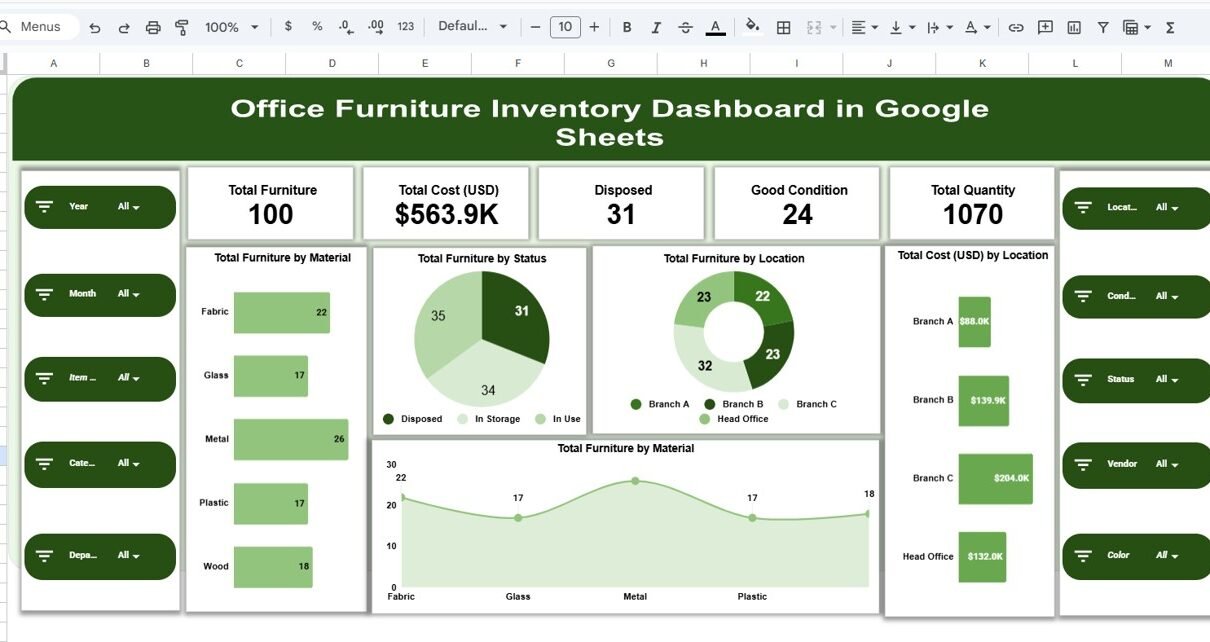
The Overview sheet gives a high-level summary of the entire furniture inventory.
KPI Cards in Overview
These cards show instant metrics:
-
Total Furniture – Total number of furniture items
-
Total Cost (USD) – Overall investment in furniture
-
Disposed – Furniture items removed or discarded
-
Good Condition – Furniture in usable condition
-
Total Quantity – Total physical units available
These KPIs help management quickly assess inventory health.
Overview Charts
The charts in this section provide quick insights into distribution and cost.
Total Furniture by Material
Shows furniture distribution by material such as wood, metal, plastic, or mixed.
Total Furniture by Status
Displays how many items are in good, repair-needed, or disposed condition.
Total Furniture by Location
Helps understand how furniture is spread across offices or buildings.
Total Cost (USD) by Location
Highlights which locations have the highest furniture investment.

Click to Buy Office Furniture Inventory Dashboard in Google Sheets
Department Analysis
This section focuses on how furniture is used across departments.
Department-Level Charts
-
Total Cost (USD) by Department
-
Total Furniture by Department
-
Repair Needed by Department
These charts help identify:
-
Departments with higher furniture costs
-
Departments requiring frequent repairs
-
Opportunities for cost optimization
This analysis supports better budgeting and asset planning.

Click to Buy Office Furniture Inventory Dashboard in Google Sheets
Category Analysis
Furniture is often classified into categories such as chairs, desks, cabinets, tables, workstations, or storage units.
Category Charts
-
Total Cost (USD) by Category
-
Total Furniture by Category
-
Repair Needed by Category
These insights help organizations understand:
-
Which furniture category consumes the highest budget
-
Which category requires frequent maintenance
-
Where standardization can reduce costs

Click to Buy Office Furniture Inventory Dashboard in Google Sheets
Vendor Analysis
Vendor performance plays a critical role in furniture quality and maintenance.
Vendor-Wise Charts
-
Total Cost (USD) by Vendor
-
Total Furniture by Vendor
-
Repair Needed by Vendor
This section helps organizations:
-
Identify high-cost vendors
-
Track quality issues linked to vendors
-
Negotiate better contracts
-
Select reliable suppliers for future purchases

Click to Buy Office Furniture Inventory Dashboard in Google Sheets
Monthly Trends Analysis
This section tracks changes over time and supports trend analysis.
Monthly Trend Charts
-
Total Cost (USD) by Month
-
Total Furniture by Month
-
Repair Needed by Month
These charts help in:
-
Monitoring new purchases
-
Identifying spikes in maintenance
-
Tracking seasonal procurement patterns
-
Planning future budgets

Click to Buy Office Furniture Inventory Dashboard in Google Sheets
Search Functionality
The dashboard includes a Search Panel that allows users to search by:
-
Search Keyword
-
Field Name (Department, Location, Vendor, Category, Status, etc.)
This feature allows users to instantly filter records without manually scrolling or applying filters.
Benefits of Search
-
Faster audits
-
Quick asset verification
-
Efficient inventory checks
-
Easy support for management queries

Click to Buy Office Furniture Inventory Dashboard in Google Sheets
Data Sheet
The Data Sheet acts as the backend where all raw furniture data is stored.
Typical fields include:
- Furniture ID
- Furniture Name
- Category
- Material
- Quantity
- Cost (USD)
- Location
- Department
- Vendor
- Purchase Date
- Condition
- Repair Required (Yes/No)
All dashboard visuals update automatically when data changes.

Click to Buy Office Furniture Inventory Dashboard in Google Sheets
Advantages of Office Furniture Inventory Dashboard
1. Centralized Asset Management
All furniture data stays in one place.
2. Better Cost Control
Track where money is spent and reduce unnecessary purchases.
3. Improved Maintenance Planning
Identify items needing repair before failure.
4. Data-Driven Decisions
Make informed purchasing and disposal decisions.
5. Easy Collaboration
Multiple users can update and view data simultaneously.
6. No Additional Software Cost
Works entirely in Google Sheets.
Opportunities for Improvement
Click to Buy Office Furniture Inventory Dashboard in Google Sheets
Organizations can enhance the dashboard by adding:
-
Asset depreciation tracking
-
Barcode or QR code mapping
-
Automated alerts for repairs
-
Furniture lifecycle management
-
Integration with procurement systems
These enhancements further strengthen asset governance.
Best Practices for Using the Dashboard
-
Update inventory records regularly
-
Maintain standardized categories and vendors
-
Review repair trends monthly
-
Conduct quarterly inventory audits
-
Restrict editing access to authorized users
Conclusion
Click to Buy Office Furniture Inventory Dashboard in Google Sheets
An Office Furniture Inventory Dashboard in Google Sheets provides a powerful yet simple way to manage furniture assets across departments, locations, vendors, and time periods. With real-time insights, clear visuals, and a flexible structure, organizations gain full control over inventory, reduce costs, and improve operational efficiency.
This ready-to-use dashboard is ideal for facility managers, admin teams, procurement departments, and finance teams who want accurate, transparent, and actionable furniture data.
Visit our YouTube channel to learn step-by-step video tutorials
Youtube.com/@NeotechNavigators
Watch the step-by-step video tutorial:
Click to Buy Office Furniture Inventory Dashboard in Google Sheets