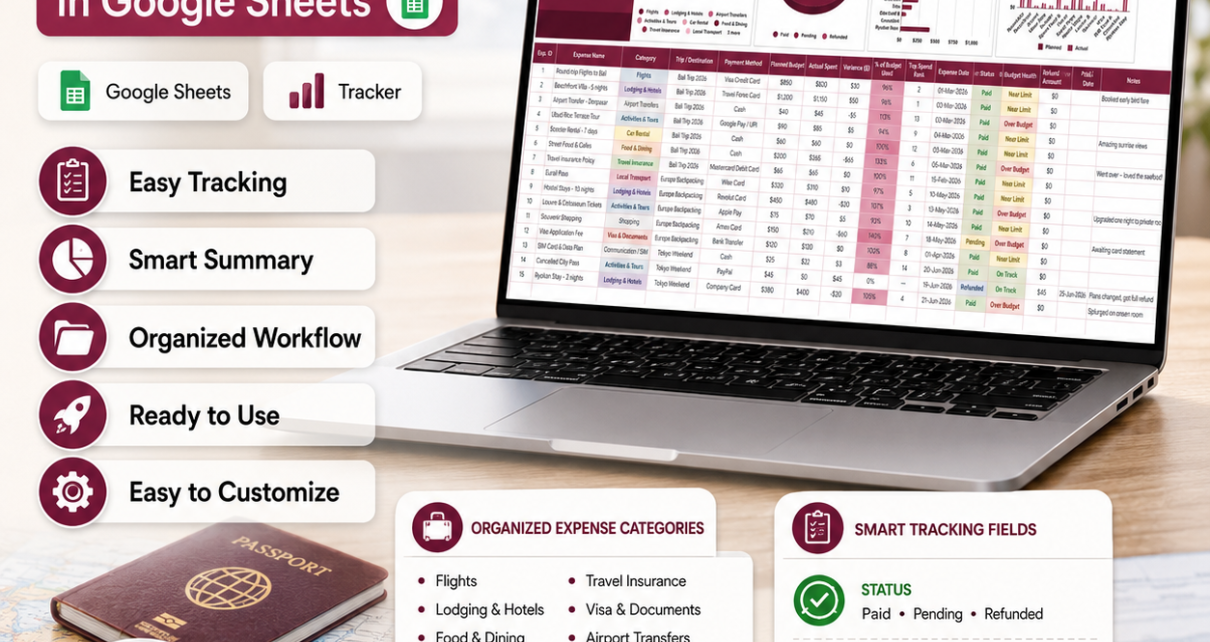
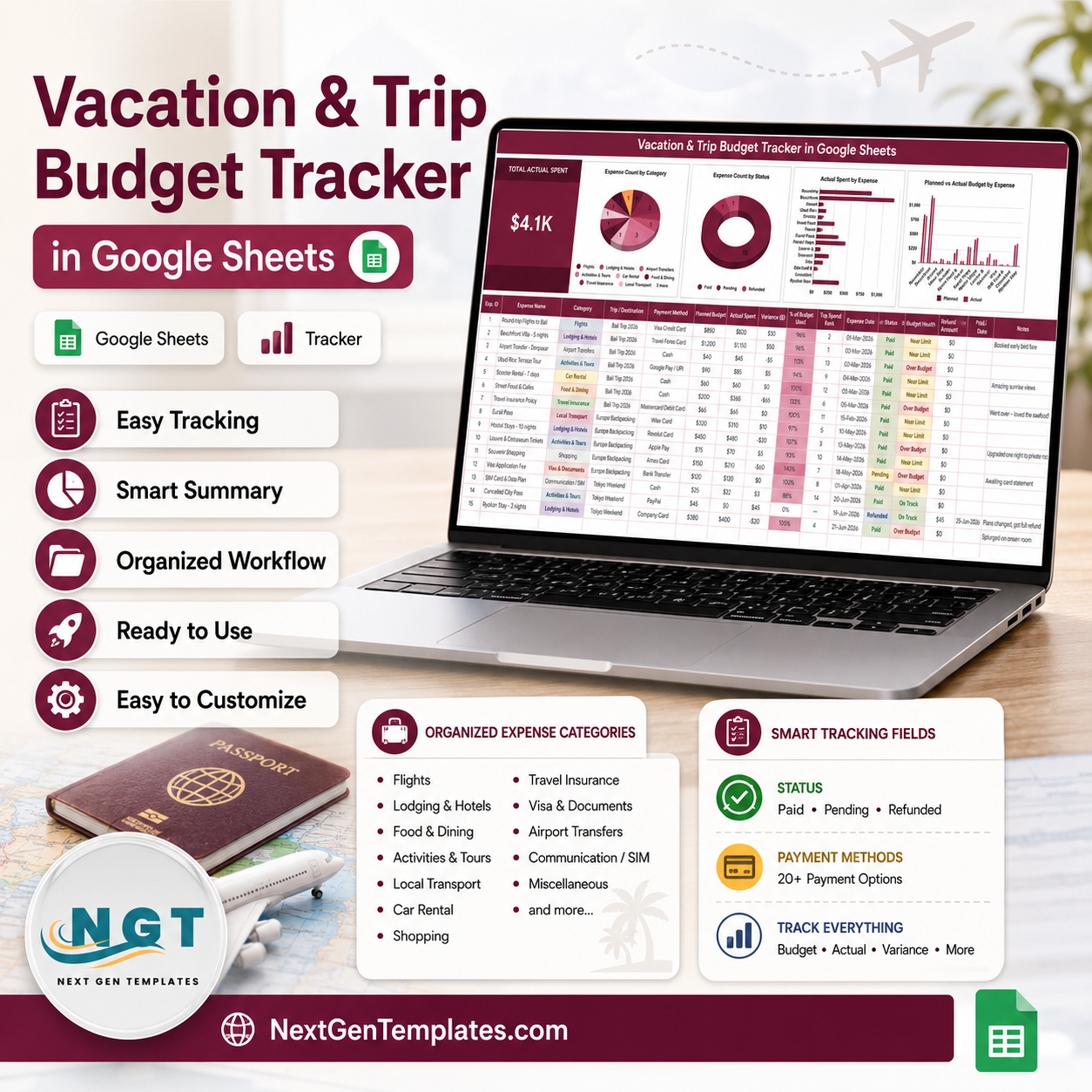
The Vacation & Trip Budget Tracker in Google Sheets captures 16 fields per expense, calculates 4 of them for you, and summarises the whole holiday in 1 KPI card and 4 charts. The sample file arrives loaded with 15 expenses spread across 3 separate trips – Bali Trip 2026, Europe Backpacking and Tokyo Weekend – plus a Lists sheet carrying 12 expense categories, 15 payment methods and 3 status values. Setup takes under 10 minutes from download to first row.
Most holiday budgets fail the same way: the plan lives in one place, the spending lives in a card statement three weeks later, and nobody notices the overspend until it is already paid. This vacation budget tracker for Google Sheets closes that gap by putting Planned Budget and Actual Spent on the same row and flagging the difference the moment you type it.
Get the Vacation & Trip Budget Tracker in Google Sheets
Key Features of the Vacation & Trip Budget Tracker in Google Sheets
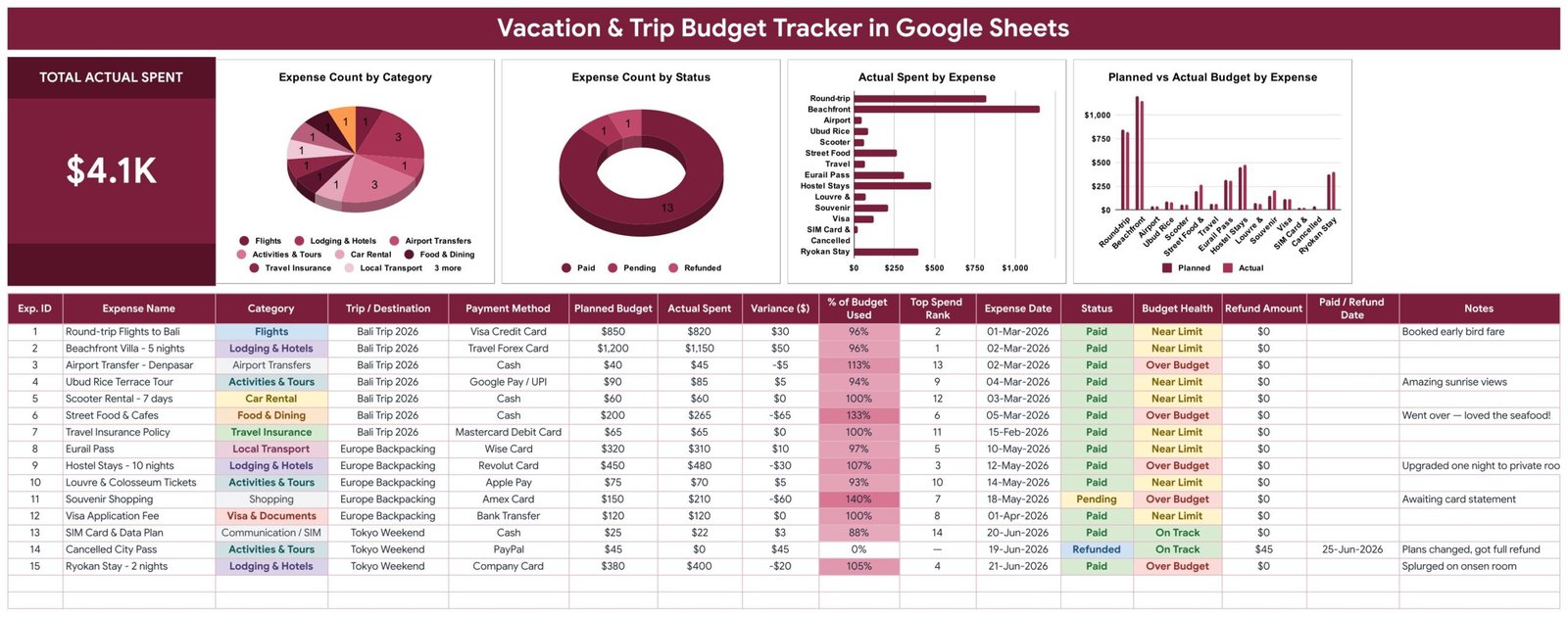
- Planned vs actual on every line. Enter a Planned Budget and an Actual Spent figure and the tracker returns Variance ($) and % of Budget Used automatically. A $850 flight booked at $820 shows +$30 and 96% with no formula work from you.
- A Budget Health flag with three states. On Track, Near Limit and Over Budget are derived from % of Budget Used. In the sample data, Street Food & Cafes lands at 133% and Souvenir Shopping at 140%, and both flip to Over Budget instantly.
- Top Spend Rank. Every expense is ranked by actual spend, so the $1,150 Beachfront Villa sits at rank 1 and the $22 SIM card sits near the bottom. You always know which line is driving the total.
- Three trips, one file. The Trip / Destination column keeps Bali Trip 2026, Europe Backpacking and Tokyo Weekend separate inside a single sheet. Filter the column and the KPI card and all four charts redraw for that trip alone.
- Refund and cancellation columns. Refund Amount and Paid / Refund Date exist as first-class fields, so a cancelled $45 city pass refunded on 25-Jun-2026 is recorded properly rather than deleted and forgotten.
- Dropdowns you own. 12 categories, 3 statuses and 15 payment methods live on a separate Lists sheet. Edit that sheet and the dropdowns follow.
Sheets Explanation
Sheet 1: Tracker – KPI Card, Charts and the Expense Table
The Tracker sheet opens with the TOTAL ACTUAL SPENT card showing $4.1K across the three sample trips, then four charts: Expense Count by Category, Expense Count by Status, Actual Spent by Expense and Planned vs Actual Budget by Expense. Underneath sits the 16-column entry table – Exp. ID, Expense Name, Category, Trip / Destination, Payment Method, Planned Budget, Actual Spent, Variance ($), % of Budget Used, Top Spend Rank, Expense Date, Status, Budget Health, Refund Amount, Paid / Refund Date and Notes – with coloured category chips and a shaded % of Budget Used column that darkens as you approach the limit.
Sheet 2: Lists – The Dropdown Values
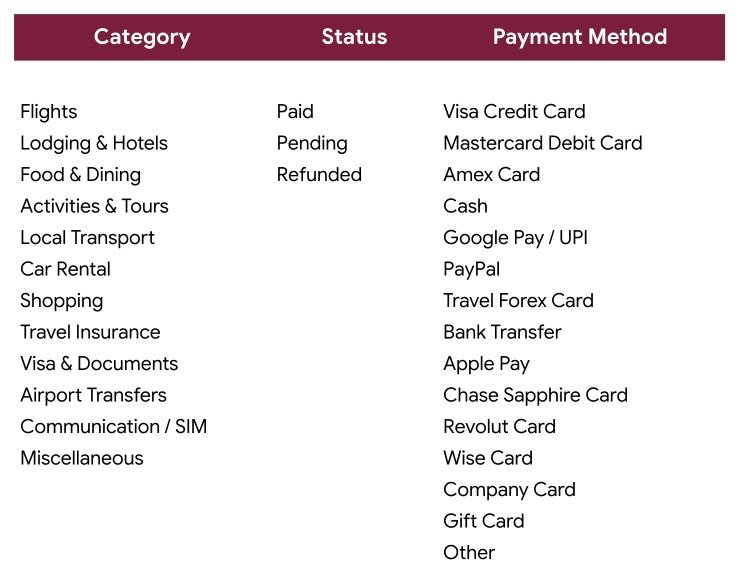
The Lists sheet holds three columns of source values. Category carries Flights, Lodging & Hotels, Food & Dining, Activities & Tours, Local Transport, Car Rental, Shopping, Travel Insurance, Visa & Documents, Airport Transfers, Communication / SIM and Miscellaneous. Status carries Paid, Pending and Refunded. Payment Method carries Visa Credit Card, Mastercard Debit Card, Amex Card, Cash, Google Pay / UPI, PayPal, Travel Forex Card, Bank Transfer, Apple Pay, Chase Sapphire Card, Revolut Card, Wise Card, Company Card, Gift Card and Other. Because the dropdowns read from a range rather than a hard-coded list, adding a row here is all it takes – see Google’s own guide to data validation in Google Sheets if you want to extend the ranges further.
Vacation & Trip Budget Tracker vs. a Microsoft Excel Budget Sheet vs. Expensify / YNAB – Feature Comparison
| Feature | Vacation & Trip Budget Tracker (Google Sheets) | Microsoft Excel budget sheet | Expensify / YNAB |
|---|---|---|---|
| Cost | $6.99 one-time | $0 file, but Microsoft 365 from $69.99 / year | $5-$20 per user per month |
| Platform | Browser, iOS and Android | Desktop-first; mobile editing is limited | Mobile app plus web |
| Setup time | Under 10 minutes | 15-30 minutes | 30-60 minutes, plus bank linking |
| Real-time travel-partner collaboration | Yes, live in the same sheet | Only via OneDrive co-authoring | Yes, on paid plans |
| Share with a link | Yes, one link, no account needed to view | File attachment or OneDrive link | Invite-only, seat required |
| Customisable categories and payment methods | Yes – edit the Lists sheet | Yes, manual data-validation edits | Fixed taxonomy, limited edits |
| Planned vs actual variance per expense | Built in, auto-calculated | Build it yourself | Budget-level only, not per line |
| Refund and cancellation tracking | Dedicated Refund Amount + date columns | Manual workaround | Partial |
| Year-1 cost at 5 users | $6.99 total | $349.95 in Microsoft 365 seats | $300-$1,200 |
For travellers who want per-expense variance and shared visibility without paying a monthly subscription for a holiday that lasts two weeks, the Vacation & Trip Budget Tracker sits in the sweet spot.
Who Should Use This Template
Perfect for:
- Couples and families planning one big trip who need a single shared budget both people can edit from a phone
- Backpackers running several destinations in one long trip who want each leg costed separately
- Anyone who wants to know mid-trip which category has already blown past its plan
- Freelancers who self-fund travel and want a clean per-trip expense record at tax time
- Group organisers splitting a trip fund who need a transparent, link-shareable record
Not a fit if:
- You need automatic bank-feed imports and receipt OCR – a paid expense app does that better
- You need an approval workflow, corporate travel policy enforcement or SSO
- You want live FX conversion; this tracker records amounts in whatever currency you type
Real-World Use Cases
Priya and Arjun, two-week Bali trip. They front-load the sheet with a $2,500 plan across flights, a beachfront villa, airport transfers and tours. By day three the Budget Health column has flagged Food & Dining at 133%. Because they both have the sheet open on their phones, they see it at breakfast and adjust the rest of the week rather than discovering the overspend on a statement.
Marcus, six weeks backpacking through Europe. He logs a Eurail Pass, ten nights of hostels and museum tickets as he goes, paying across Wise Card, Revolut Card and cash. Payment Method is a dropdown, so at month end he filters by card and reconciles each statement in a few minutes instead of guessing.
Dana, Tokyo weekend with a cancellation. She books a city pass, then cancels. Instead of deleting the row she sets Status to Refunded, enters $45 in Refund Amount and 25-Jun-2026 as the refund date. Her TOTAL ACTUAL SPENT stays accurate and the cancellation stays visible in the history.
Advantages of the Vacation & Trip Budget Tracker
The first advantage is arithmetic you do not have to maintain. Four of the sixteen columns – Variance ($), % of Budget Used, Top Spend Rank and Budget Health – are calculated, so the sheet cannot drift out of sync with itself the way a hand-built spreadsheet does after a few rushed edits on a train.
The second is cost. At $6.99 one-time, the tracker costs less than a single month of most expense apps, and there is no per-user fee – you can share it with a partner, a parent and three friends without the price changing. Over a year with five people involved, a subscription tool would run $300 or more.
The third is visibility. A shared Google Sheets link means everyone on the trip sees the same numbers at the same moment. Add the charts – Expense Count by Category, Expense Count by Status, Actual Spent by Expense and Planned vs Actual Budget by Expense – and the shape of the spending is obvious without anyone building a pivot table. Google’s chart documentation covers how to restyle them if you want a different look.
Opportunities for Improvement
Being honest about the limits: the tracker records a single currency per amount. If you spend in rupiah, euros and yen on the same trip you will need to convert as you enter, or add a rate column of your own. There is also no receipt attachment field – the Notes column takes text, not images, so photos of receipts live somewhere else.
It is a one-page tracker rather than a multi-page dashboard, which is the right size for a holiday but tight if you want month-over-month trending across years of travel. For that, a larger multi-page build such as the Complete Wedding Budget Tracker Dashboard in Google Sheets is a better shape. Finally, the four charts are fixed – you can restyle them, but adding a fifth means building it yourself.
Best Practices
- Fill in every Planned Budget before you leave. The whole variance mechanism is dead weight if the planned column is blank.
- Use one consistent Trip / Destination label per trip. “Bali 2026” and “Bali Trip 2026” will filter as two different trips.
- Trim the Lists sheet to the categories you actually use. Twelve options is a good default, but six well-chosen ones make the dropdown faster on a phone.
- Enter expenses the day they happen. Ten minutes of daily logging beats a two-hour reconstruction after you land.
- Use Pending for anything booked but not yet charged, so your TOTAL ACTUAL SPENT reflects money that has actually left the account.
- Duplicate the file per year rather than letting one sheet grow forever – the charts stay readable and old trips stay archived.
Explore Relevant Templates
- Holiday & Christmas Budget Tracker in Google Sheets – the same planned-vs-actual model applied to gifts, food and festive travel.
- Annual Family Budget Tracker in Google Sheets – the year-round budget that the travel fund comes out of.
- Cash Envelope Budget Tracker in Google Sheets – ring-fence a holiday envelope and watch it drain.
- Financial Goals & Milestones Tracker in Google Sheets – set and hit the savings target that funds the next trip.
- Bank Account Balance Tracker in Google Sheets – keep an eye on the accounts behind the cards you travel with.
You may also like our earlier write-ups on the Wedding Budget Tracker in Google Sheets and the No Spend Challenge Tracker in Google Sheets.
If you like building trackers like this yourself, the NextGenTemplates Academy learning paths take you through the spreadsheet skills step by step, with practice files.
Get the Vacation & Trip Budget Tracker in Google Sheets
Frequently Asked Questions
What does the Vacation & Trip Budget Tracker in Google Sheets track?
The Vacation & Trip Budget Tracker records 16 fields per expense, including Planned Budget, Actual Spent, Variance ($), % of Budget Used, Top Spend Rank, Expense Date, Status, Budget Health, Refund Amount and Notes. Four of those columns calculate themselves from what you enter.
Can I track several trips in one file?
Yes. The Trip / Destination column exists for exactly that – the sample file runs Bali Trip 2026, Europe Backpacking and Tokyo Weekend together. Filter that column and the TOTAL ACTUAL SPENT card and all four charts recalculate for the selected trip only.
How long does setup take?
Under 10 minutes. Open the PDF included with the download, click the Google Sheets copy link, make your copy, edit the Lists sheet if you want different categories, then clear the 15 sample rows. No add-ons and no script permissions are involved.
How does the Vacation & Trip Budget Tracker compare to Expensify or YNAB?
Expensify and YNAB cost $5-$20 per user per month and are built for continuous personal or corporate finance with bank feeds. The Vacation & Trip Budget Tracker is a $6.99 one-time purchase focused on a single trip, and it gives per-expense planned-vs-actual variance that those tools do not expose at line level.
Can I change the expense categories and payment methods?
Yes. The Lists sheet holds all 12 categories, 3 statuses and 15 payment methods. Add, rename or remove a row there and the dropdowns on the Tracker sheet update automatically, with no data-validation editing required.
Does it work on a phone?
Yes. The Vacation & Trip Budget Tracker runs in the Google Sheets app on iOS and Android, so you can log a taxi fare or a meal the moment you pay. Anyone you have shared the sheet with sees the change immediately.
What exactly is in the download?
The download is a PDF containing the Google Sheets copy link for the Vacation & Trip Budget Tracker. Clicking it creates a private, fully editable copy in your own Google Drive; the master template is never modified.
About the Author
Built by PK – Microsoft Certified Professional with 15+ years of Excel, Google Sheets, and Power BI experience. Founder of NextGenTemplates, reaching 300K+ subscribers across YouTube channels. Every template is hand-built and tested before release.
Conclusion
A holiday budget only works if the plan and the spending sit next to each other. The Vacation & Trip Budget Tracker in Google Sheets does that in one page: 16 columns, 4 automatic calculations, a live TOTAL ACTUAL SPENT card and four charts that redraw as you type – across as many trips as you want to keep in one file.
Instant download · One-time payment · No subscription
Last updated: August 2026