Understanding client satisfaction is key to maintaining strong relationships and improving service delivery. The Client Satisfaction Survey Tracker in Google Sheets provides a ready-to-use solution to track, analyze, and act on survey responses efficiently.
In this article, we’ll explain the features, advantages, and best practices for using this tracker to enhance client satisfaction.
Get the Client Satisfaction Survey Tracker in Google Sheets
What Is a Client Satisfaction Survey Tracker?
A Client Satisfaction Survey Tracker is a tool that consolidates survey data to monitor service quality, responsiveness, and client feedback. Using Google Sheets, this tracker allows teams to:
-
Measure satisfaction across multiple service types
-
Identify trends in timeliness, resolution, professionalism, and communication
-
Quickly retrieve and analyze survey responses
Key Features of the Client Satisfaction Survey Tracker
This tracker includes three main functionalities for comprehensive client satisfaction management:
1. Tracker Sheet Tab
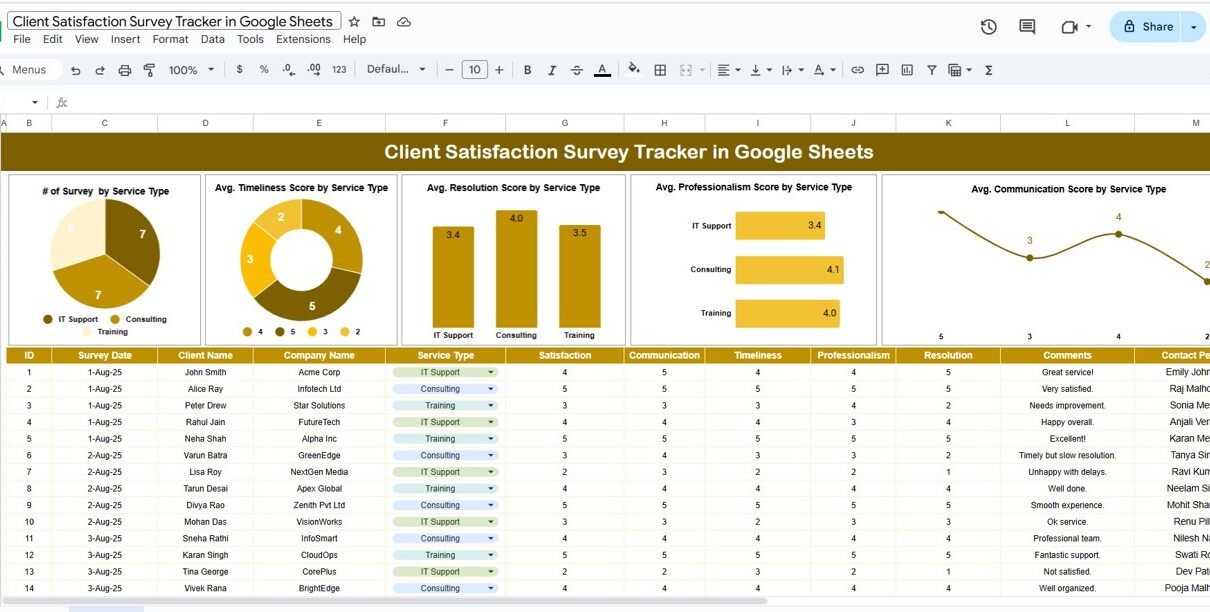
The Tracker Sheet visualizes survey results with charts for quick insights:
Charts Include:
-
# of Surveys by Service Type: Tracks how many surveys were completed for each service
-
Average Timeliness Score by Service Type: Measures client perception of promptness
-
Average Resolution Score by Service Type: Evaluates how effectively issues are resolved
-
Average Professionalism Score by Service Type: Tracks client impressions of staff professionalism
-
Average Communication Score by Service Type: Measures effectiveness of communication
These charts provide a visual overview of service performance and highlight areas needing improvement.

2. Data Sheet Tab
The Data Sheet is the input sheet where all survey responses are recorded:
-
Each survey entry includes ratings for timeliness, resolution, professionalism, and communication
-
Service type and client details are also captured for analysis
-
Data in this sheet drives the charts in the Tracker Sheet
This ensures accuracy and consistency in your reporting.
3. Search Functionality
The tracker includes a Search feature:
-
Search by keyword and field name
-
Quickly locate specific survey responses
-
Save time in analyzing or reporting results
This functionality is especially useful for large datasets with multiple service types and client entries.

Advantages of Using the Client Satisfaction Survey Tracker
-
Centralized Data: All survey responses stored in one Google Sheet
-
Visual Insights: Charts make trends easy to understand
-
Identify Weak Points: Quickly spot areas needing improvement
-
Actionable Reporting: Use insights to enhance client service
-
Time-Saving: Automates data visualization and analysis
-
Flexible: Customize service types, metrics, and ratings as needed
Best Practices for Using the Tracker
-
Update Data Regularly: Input survey results as soon as they are collected
-
Segment by Service Type: Compare satisfaction across different services for actionable insights
-
Monitor Trends: Track monthly or quarterly changes in client satisfaction
-
Share Results: Provide managers and teams with dashboard insights to drive improvement
-
Follow Up: Use low-scoring responses to identify issues and implement corrective actions
How This Tracker Helps Organizations
-
Improve Client Satisfaction: Identify areas of weakness and address them quickly
-
Enhance Service Quality: Use feedback to train staff or optimize processes
-
Data-Driven Decisions: Base operational decisions on real client feedback
-
Track Performance Over Time: Monitor trends to ensure continuous improvement
-
Streamline Reporting: Visual charts allow easy reporting to leadership teams
Interested in building trackers like this from scratch? The NextGenTemplates Academy learning paths cover the core spreadsheet skills, with practice files to work through.
Get the Client Satisfaction Survey Tracker in Google Sheets
Frequently Asked Questions (FAQs)
Q1: Can I customize the service types in the tracker?
Yes, you can add or remove service types in the Data Sheet to match your organization’s offerings.
Q2: How do I analyze specific survey responses?
Use the Search feature to filter responses by keyword or field for detailed analysis.
Q3: Can multiple team members update the tracker simultaneously?
Yes, Google Sheets supports real-time collaboration for multiple users.
Q4: Can I track monthly trends?
Yes, you can organize survey data by month and visualize trends using the charts.
Q5: Can the tracker handle large datasets?
Absolutely. Google Sheets can manage thousands of entries while maintaining chart functionality.
Conclusion
The Client Satisfaction Survey Tracker in Google Sheets is an essential tool for organizations looking to monitor service quality and improve client satisfaction. By consolidating survey responses, visualizing trends, and providing actionable insights, this tracker ensures that teams can respond effectively to client feedback and continuously enhance service delivery.