The Vendor Contract Renewal Calendar in Google Sheets tracks vendor contract deadlines across 4 interactive views — Annual, Monthly, Daily, and Events — with auto-calculated day names and custom date-range filtering. According to the International Association for Contract and Commercial Management (IACCM), 83% of businesses miss at least one contract renewal deadline per year, leading to auto-renewals on unfavorable terms. This calendar template eliminates that risk by giving procurement teams a single, shared Google Sheets file that displays every vendor renewal date in the format they need — whether that’s a 12-month bird’s-eye view or a filtered daily list.Vendor Contract Renewal Calendar in Google Sheets
Managing vendor contracts with email reminders, sticky notes, or scattered spreadsheets creates gaps. A missed renewal can lock a company into another year of overpriced services or lapsed vendor agreements. The Vendor Contract Renewal Calendar in Google Sheets solves this by centralizing all contract dates, vendor names, times, locations, and descriptions in one Events database — then surfacing that data automatically in 3 additional calendar views. Setup takes under 5 minutes.Vendor Contract Renewal Calendar in Google Sheets
Get the Vendor Contract Renewal Calendar in Google Sheets
Key Features of Vendor Contract Renewal Calendar in Google Sheets
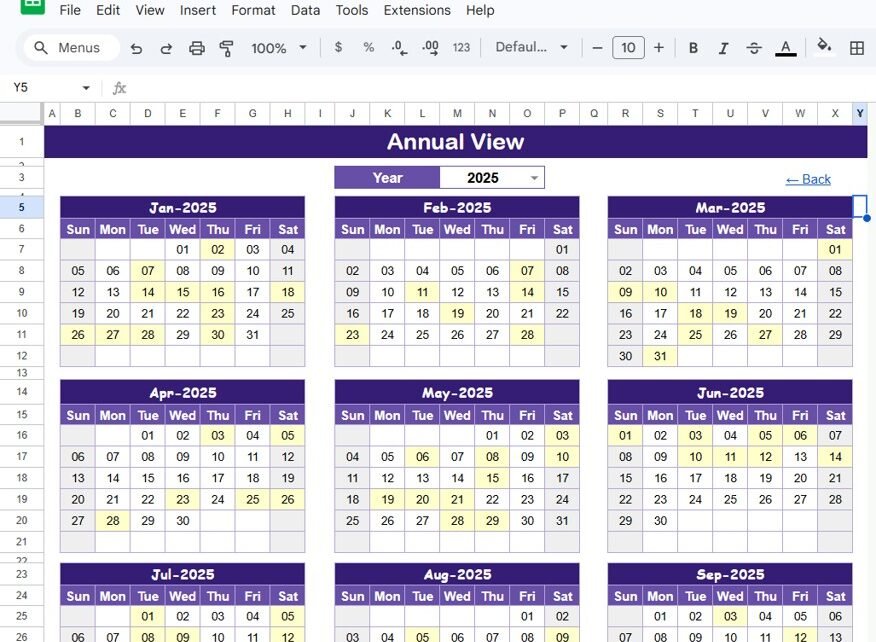
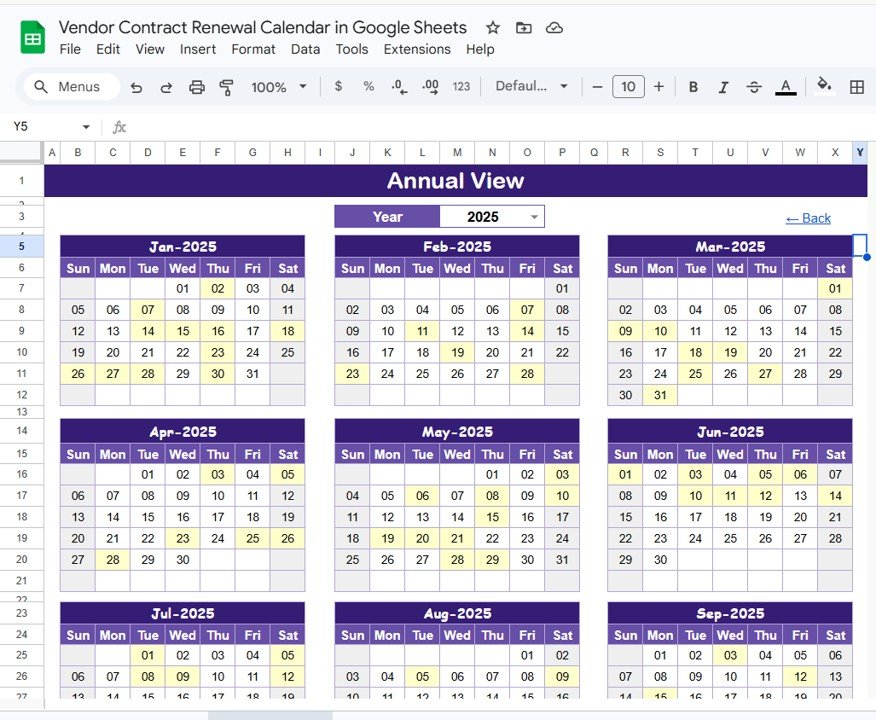
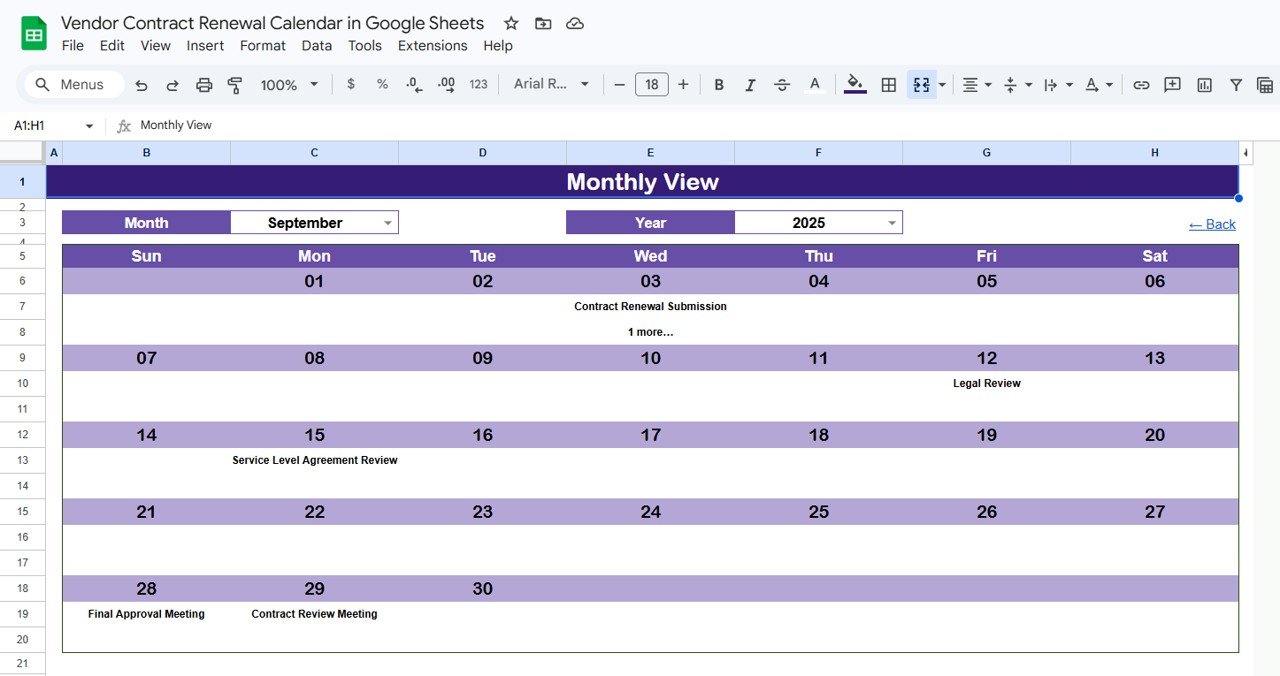
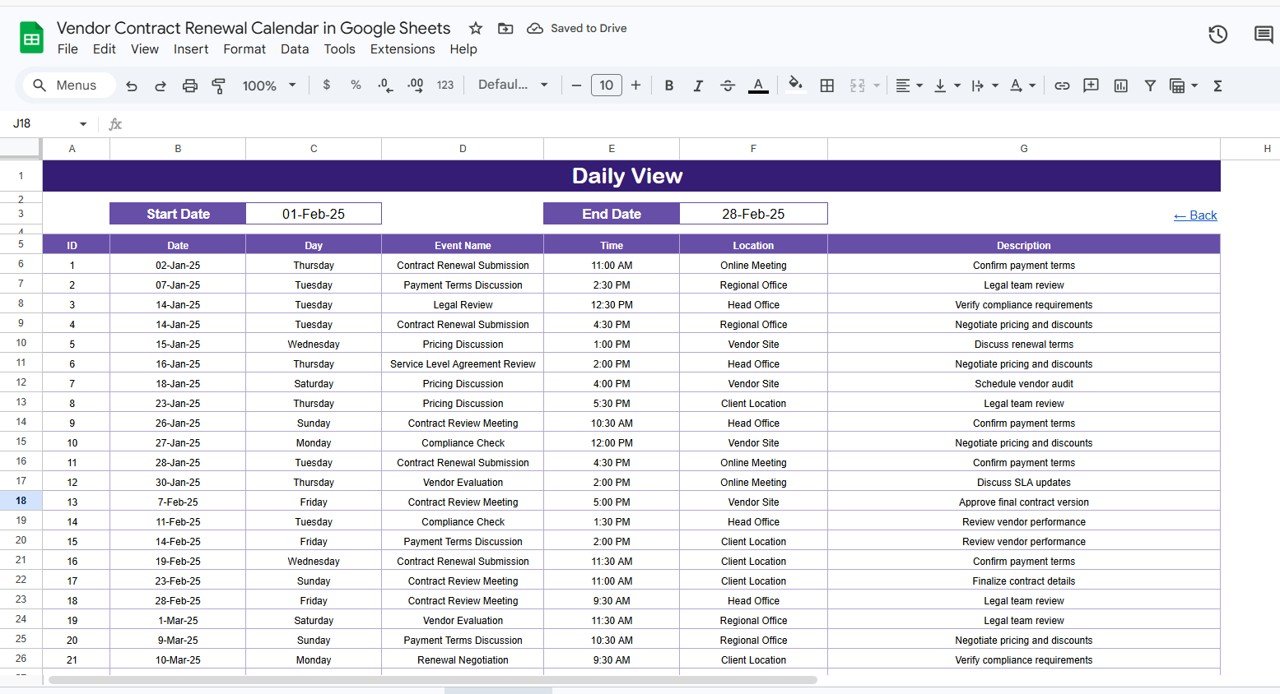
This calendar template tracks vendor contract renewal dates across 4 dedicated views, each designed for a different planning horizon. The Annual View displays all 12 months on a single screen so procurement managers can spot renewal clusters at a glance. The Monthly View lets you select any month and year from dropdown menus and highlights contracts due that month — showing one event per date cell and flagging dates with multiple renewals. The Daily View filters events by a custom start-and-end date range, listing every vendor name, time, location, and description in a sortable table.
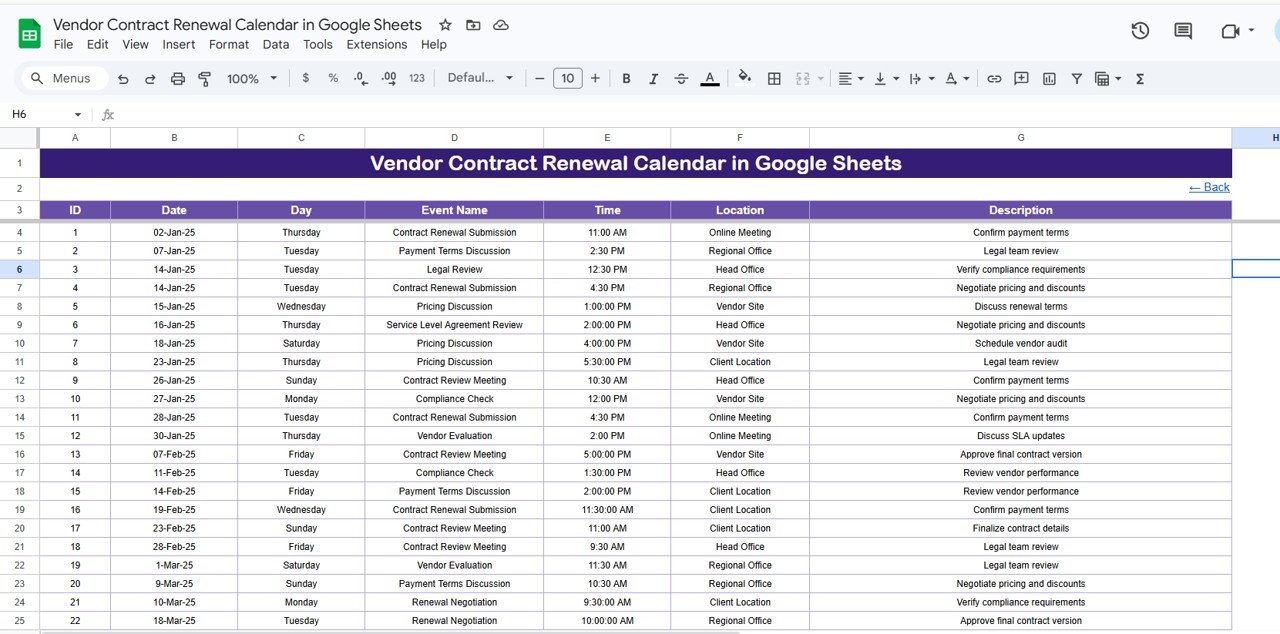
The Events sheet serves as the central database where you enter each contract’s ID, date, day, event name, time, location, and description — all other views pull from this single source of truth. The Day column auto-calculates from the date, so you never need to manually type “Monday” or “Wednesday.” The auto-generated ID column ensures every event has a unique identifier for reference.Vendor Contract Renewal Calendar in Google Sheets
Template Structure — 5 Worksheets Explained
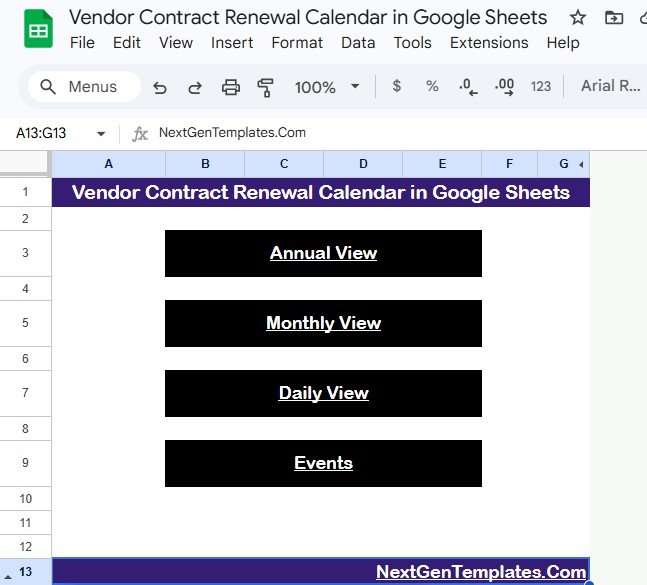
1. Home Sheet
This is an index sheet with 4 navigation buttons: Annual View, Monthly View, Daily View, and Events. Click any button to jump directly to that section — no scrolling through tabs required.
2. Annual View Sheet
Displays 12 monthly calendars side by side, giving you a bird’s-eye view of all vendor contract renewal dates for the selected year. Procurement managers use this view during annual budgeting to identify which quarters have the most renewals coming due.
3. Monthly View Sheet
A single-month calendar where you select the month and year from dropdown menus at the top. Each date cell shows one event, and if a date has more than one contract renewal, it displays “more than 1…” so nothing gets missed. This is the view most users open daily to check upcoming vendor deadlines.
4. Daily View Sheet
Lists all events within a selected date range. Set your Start Date and End Date at the top — double-click in the cell to open the date picker — and the sheet filters all matching contract events with full details including event name, time, location, and description. This view works well for generating weekly or biweekly renewal reports.
5. Events Sheet
The master database where all vendor contract data lives. Each row captures 7 fields:
- ID — Auto-generated unique number
- Date — Date of the contract renewal event
- Day — Auto-calculated day of the week (Sunday, Monday, etc.)
- Event Name — Name of the vendor contract event
- Time — Scheduled time for the renewal meeting or deadline
- Location — Physical or virtual location for the event
- Description — Short description of the renewal terms or action required
Enter your vendor contract data manually here, and all 3 calendar views update automatically.
Vendor Contract Renewal Calendar vs. Microsoft Excel Calendar vs. Paid Contract Management Software — Feature Comparison
| Feature | Vendor Contract Renewal Calendar (Google Sheets) | Microsoft Excel Calendar | Concord / Agiloft |
|---|---|---|---|
| Cost | $4.99 one-time | $5-15 one-time | $17-65 / user / month |
| Platform | Google Sheets (browser-based) | Microsoft Excel (desktop) | Web-based SaaS |
| Setup Time | Under 5 minutes | 10-15 minutes | 1-4 weeks |
| Real-Time Team Collaboration | ✅ Built-in | Limited (OneDrive required) | ✅ Yes |
| Mobile Access | ✅ Google Sheets app | Limited via Excel mobile | ✅ Mobile app |
| Customizable Fields | ✅ Fully editable | ✅ Fully editable | ✅ Admin-configured |
| Share with Link | ✅ One-click sharing | Requires OneDrive/email | ✅ Role-based sharing |
| Year-1 Cost at 5 Users | $4.99 total | $5-15 total | $1,020-3,900 |
| Automated Renewal Alerts | Manual (use Google Calendar sync) | Manual | ✅ Built-in workflows |
For procurement teams that want a visual contract renewal calendar without paying $17-65 per user per month, the Vendor Contract Renewal Calendar in Google Sheets sits in the sweet spot.
Who Should Use This Template
✅ Perfect for:
- Procurement managers tracking 10-200 vendor contracts with annual or quarterly renewals
- Small business owners who manage vendor relationships without dedicated contract software
- Operations and admin teams that need a shared, browser-based calendar for contract deadlines
- Startups and SMBs looking to avoid $17-65/user/month contract management SaaS costs
❌ Not a fit if:
- You manage 500+ contracts and need automated clause extraction, e-signatures, and approval workflows
- Your organization requires SOC 2 compliance, audit trails, and role-based access controls beyond Google Sheets sharing
- You need automated email/SMS alerts for upcoming renewals — this calendar is visual-only (pair it with Google Calendar for notifications)
Real-World Use Cases
Priya manages procurement at a 45-person logistics company. She tracks 38 vendor contracts — from warehouse leases to software licenses — using the Vendor Contract Renewal Calendar. Each quarter, she opens the Annual View to flag contracts expiring in the next 90 days, then switches to Monthly View to schedule renegotiation meetings. Her team accesses the same Google Sheet from their browsers, eliminating the scattered email chains they used before.
Daniel runs operations at a mid-size retail chain with 22 supplier agreements. He enters each contract’s renewal date, vendor name, and terms summary in the Events sheet. When his CFO asks for a renewal schedule before budget season, Daniel pulls up the Daily View with a January-to-March date range and shares the filtered list in 30 seconds — no paid software required.
Maria is an office manager at a healthcare clinic with 15 vendor contracts covering medical supplies, cleaning services, and IT support. She uses the Monthly View to check which contracts renew each month and sets reminders in her personal Google Calendar based on the dates she sees. Setup took her 4 minutes.
Advantages of the Vendor Contract Renewal Calendar
- $4.99 one-time vs. $17-65/user/month — replaces the cost of dedicated contract management software for small and mid-size teams
- Zero learning curve — anyone who has used Google Sheets can start immediately
- Real-time collaboration — entire procurement team works from the same live file, no version control issues
- 4 purpose-built views — Annual, Monthly, Daily, and Events cover every planning horizon from strategic annual reviews to daily deadline checks
- Works on any device — browser-based with full mobile support via Google Sheets app
- No macros or add-ons — uses native Google Sheets formulas, so nothing breaks on updates
Opportunities for Improvement
- No automated email alerts — the calendar does not send push notifications or reminders. You need to manually sync key dates with Google Calendar or set phone reminders for upcoming renewals.
- Single-event display on Monthly View — when multiple contracts renew on the same date, only one event name shows (with a “more than 1…” flag). You need to check the Daily View or Events sheet for the complete list.
- No contract value tracking built-in — the default Events sheet captures date, name, time, location, and description but does not include a dollar amount column. You can add one manually, but it won’t flow into the calendar views automatically.
- No workflow automation — unlike Concord or Agiloft, there are no approval workflows, e-signature integrations, or automated status updates.
Best Practices
- Enter all vendor contracts in the Events sheet first — the Annual, Monthly, and Daily views pull from this master database, so start there.
- Use consistent naming in the Event Name column — include the vendor name and contract type (e.g., “Acme Corp – Annual Software License”) for quick scanning.
- Set a monthly review cadence — open the Monthly View on the first business day of each month to spot upcoming renewals 30-60 days out.
- Pair with Google Calendar — for contracts with firm deadlines, create a Google Calendar reminder 30 days before the renewal date so you have time to renegotiate.
- Add a contract value column — extend the Events sheet with a “Contract Value” column to prioritize which renewals deserve the most attention.
- Share with view-only access for stakeholders — give edit access only to the procurement team and view-only access to department heads who need visibility.Vendor Contract Renewal Calendar in Google Sheets
Explore Relevant Templates
📌 Contract Expiry and Compliance Dashboard in Google Sheets — Track contract expiration dates, compliance status, and renewal deadlines with interactive charts and KPI cards.
📌 Corporate Contract Management Dashboard in Google Sheets — Manage contract values, vendor performance scores, and renewal pipelines in a full dashboard format.
📌 Inventory Audit Calendar in Google Sheets — Schedule and track inventory audits with the same Annual, Monthly, and Daily view structure used in this template.
📌 Monthly Sales Goals Calendar in Google Sheets — Plan monthly sales targets with calendar-based goal tracking and event management.
📌 Procurement Management Dashboard in Excel — Full procurement analytics dashboard with vendor scoring, spend analysis, and order tracking.
Browse all Google Sheets Dashboard Templates | Calendar Templates
Get the Vendor Contract Renewal Calendar in Google Sheets
Want to build spreadsheet skills like these step by step? The NextGenTemplates Academy learning paths walk you through them with practice files.
Frequently Asked Questions
What views does the Vendor Contract Renewal Calendar include?
The Vendor Contract Renewal Calendar in Google Sheets includes 4 views: Annual View (12-month overview), Monthly View (single-month calendar with event display), Daily View (date-range filtered event list), and Events (master database). All views update automatically from the Events sheet.
Can multiple team members edit this calendar at the same time?
Yes. Google Sheets supports real-time collaboration, so your entire procurement team can view and edit the calendar simultaneously. Changes appear instantly for all users — no file-syncing or version conflicts.
How many vendor contracts can this calendar handle?
There is no hard limit. Google Sheets supports up to 10 million cells, so you can track hundreds of vendor contracts with renewal dates, locations, and descriptions without performance issues.
Does the calendar send automatic renewal reminders?
The calendar itself does not send email or push notifications. However, you can pair it with Google Calendar by creating reminders based on the dates shown. For fully automated alerts, consider dedicated contract management platforms.
How does this compare to paid contract management software like Agiloft?
The Vendor Contract Renewal Calendar costs $4.99 one-time versus $17-65 per user per month for Agiloft. It covers visual scheduling and date tracking but does not include automated workflows, clause extraction, or e-signatures. For teams managing under 200 contracts, it replaces the need for paid software.
Can I add custom fields to the Events sheet?
Yes. You can add columns for contract value, payment terms, vendor category, risk score, or any other field your team needs. The existing calendar views pull from the core columns (Date, Event Name, Time, Location, Description), but the Events sheet is fully customizable.Vendor Contract Renewal Calendar in Google Sheets
Does this template work on mobile devices?
Yes. Google Sheets works on iOS and Android through the Google Sheets app. You can view, edit, and share the Vendor Contract Renewal Calendar from your phone or tablet with full functionality.Vendor Contract Renewal Calendar in Google Sheets
About the Author
Built by PK — Microsoft Certified Professional with 15+ years of Excel, Google Sheets, and Power BI experience. Founder of NextGenTemplates, reaching 300K+ subscribers across YouTube channels. Every template is hand-built and tested before release.Vendor Contract Renewal Calendar in Google Sheets
Conclusion
The Vendor Contract Renewal Calendar in Google Sheets gives procurement and operations teams a visual, collaborative way to track every vendor contract deadline — without paying $17-65 per user per month for contract management software. With 4 dedicated views (Annual, Monthly, Daily, Events), a centralized database, and auto-calculated fields, it takes under 5 minutes to set up and works on any device with a browser.
✅ Instant download · One-time payment · No subscription