Performance appraisals play a critical role in employee growth, organizational productivity, and talent retention. However, many organizations still rely on manual spreadsheets, disconnected HR systems, or subjective evaluations. As a result, performance reviews often feel inconsistent, time-consuming, and unclear.Performance Appraisal KPI Dashboard in Google Sheets
This is exactly where a Performance Appraisal KPI Dashboard in Google Sheets becomes extremely valuable. This ready-to-use dashboard brings structure, transparency, and data-driven insights into the appraisal process. Moreover, it helps HR teams and managers track performance outcomes clearly, compare targets versus actual results, and identify improvement areas with confidence.Performance Appraisal KPI Dashboard in Google Sheets
In this article, you will learn what this dashboard is, how it works, which KPIs it tracks, how each worksheet functions, and why this tool improves appraisal accuracy and decision-making.Performance Appraisal KPI Dashboard in Google Sheets
What Is a Performance Appraisal KPI Dashboard in Google Sheets?
A Performance Appraisal KPI Dashboard in Google Sheets is a centralized reporting and monitoring tool that tracks employee performance indicators across months and years. Instead of reviewing scattered appraisal forms, managers can analyze standardized KPIs in one interactive dashboard.
Because the dashboard runs in Google Sheets, it offers:
- Real-time collaboration
- Automatic calculations
- Easy customization
- Cloud-based access
- No additional software cost
As a result, performance evaluation becomes more objective, transparent, and actionable.
Key Features of the Performance Appraisal KPI Dashboard
Click to Buy Performance Appraisal KPI Dashboard in Google Sheets
This dashboard includes 6 structured worksheets, each designed to support a specific part of the appraisal lifecycle.
Dashboard Sheet Tab (Main Page)
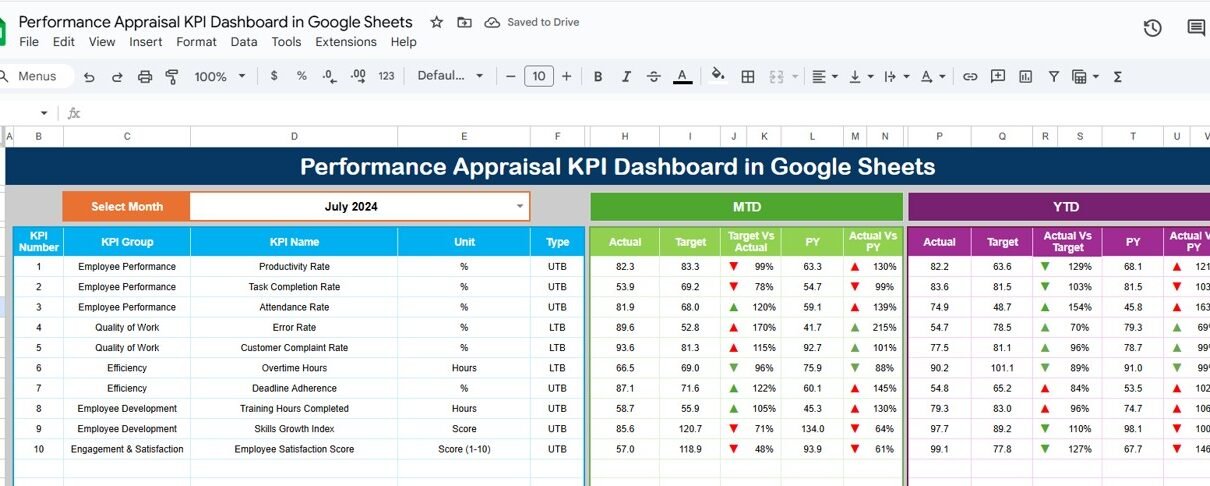
The Dashboard Sheet acts as the executive summary of the entire appraisal system.
Month Selector
-
On cell D3, you can select a month from the dropdown.
-
Once you change the month, all KPI values update instantly.
MTD Analysis
The dashboard shows:
-
MTD Actual
-
MTD Target
-
MTD Previous Year
-
Target vs Actual
-
Previous Year vs Actual
YTD Analysis
It also displays:
-
YTD Actual
-
YTD Target
-
YTD Previous Year
-
Target vs Actual
-
Previous Year vs Actual
Visual Indicators
Conditional formatting with up and down arrows highlights:
-
Performance improvement
-
Performance decline
-
Stable results
Because of this, managers can quickly understand performance trends without reviewing raw data.

Click to Buy Performance Appraisal KPI Dashboard in Google Sheets
KPI Trend Sheet Tab
The KPI Trend Sheet helps you analyze one KPI in detail.
How It Works
-
Select the KPI name from the dropdown in cell C3.
The sheet automatically displays:
- KPI Group
- KPI Unit
- KPI Type (Lower the Better / Upper the Better)
- KPI Formula
- KPI Definition
Additionally, monthly trend charts show how the selected KPI behaves across the year. Therefore, managers can identify patterns, improvements, or performance gaps easily.

Click to Buy Performance Appraisal KPI Dashboard in Google Sheets
Actual Number Sheet Tab
The Actual Number Sheet is where you enter real performance values.
Key Inputs
-
Enter MTD and YTD actual values for each KPI.
-
In cell E1, select the first month of the year.
-
The template automatically adjusts the monthly structure.
Because all formulas are pre-built, the dashboard updates instantly after data entry.

Click to Buy Performance Appraisal KPI Dashboard in Google Sheets
Target Sheet Tab
The Target Sheet stores expected performance values.
Here, you define:
-
Monthly performance targets (MTD)
-
Cumulative annual targets (YTD)
Targets help organizations:
-
Set clear expectations
-
Compare planned vs actual performance
-
Drive accountability

Click to Buy Performance Appraisal KPI Dashboard in Google Sheets
Previous Year Number Sheet Tab
This sheet stores previous year performance values for every KPI.
It enables:
-
Year-over-Year comparison
-
Long-term performance evaluation
-
Trend-based decision making
As a result, leadership can assess whether appraisal initiatives truly improve performance over time.

Click to Buy Performance Appraisal KPI Dashboard in Google Sheets
KPI Definition Sheet Tab
The KPI Definition Sheet acts as the knowledge base of the dashboard.
It includes:
- KPI Name
- KPI Group
- Unit
- Formula
- Definition
- KPI Type (LTB or UTB)
This sheet ensures consistency and clarity across departments and reviewers.

Click to Buy Performance Appraisal KPI Dashboard in Google Sheets
Advantages of the Performance Appraisal KPI Dashboard
Improves appraisal transparency
Employees understand how evaluations work.
Reduces subjectivity
KPIs introduce measurable standards.
Saves HR time
Automated calculations reduce manual work.
Supports talent decisions
Promotion, training, and rewards become data-driven.
Enhances employee trust
Clear metrics improve fairness perception.
Opportunities for Improvement in Performance Appraisal Tracking
Click to Buy Performance Appraisal KPI Dashboard in Google Sheets
Although the dashboard is powerful, organizations can enhance it further.
Add skill-wise scoring
Track technical and soft skills separately.
Integrate peer feedback
Include 360-degree evaluation data.
Add succession planning KPIs
Identify future leaders early.
Introduce weighting logic
Assign higher weight to critical goals.
Automate reminders
Send appraisal completion alerts using Apps Script.
Best Practices for Using the Performance Appraisal Dashboard
Click to Buy Performance Appraisal KPI Dashboard in Google Sheets
Define KPI definitions clearly
This avoids confusion during reviews.
Review performance quarterly
Frequent reviews improve accuracy.
Combine numbers with feedback
Qualitative comments add context.
Train managers on KPI usage
This improves adoption and consistency.
Protect sensitive data
Use Google Sheets access controls properly.
Conclusion
Click to Buy Performance Appraisal KPI Dashboard in Google Sheets
A Performance Appraisal KPI Dashboard in Google Sheets transforms the appraisal process into a structured, transparent, and data-driven system. It helps organizations measure performance accurately, reward high performers fairly, and support employee development strategically. Because the dashboard is simple, flexible, and cloud-based, it suits organizations of all sizes.
With the right KPIs, clear targets, and consistent data entry, this dashboard becomes a powerful foundation for long-term talent management success.
Frequently Asked Questions (FAQs)
Who should use this dashboard?
HR teams, managers, department heads, and leadership.
Can I customize KPIs?
Yes, the KPI Definition sheet allows full customization.
Does this support monthly and yearly reviews?
Yes, it supports both MTD and YTD analysis.
Is Google Sheets secure for appraisal data?
Yes, with proper sharing and access settings.
Do I need advanced Excel skills?
No, basic Google Sheets knowledge is enough.
Can this dashboard scale for large teams?
Yes, it works for small and large organizations alike.
Visit our YouTube channel to learn step-by-step video tutorials
Youtube.com/@NeotechNavigators
Watch the step-by-step video tutorial:
Click to Buy Performance Appraisal KPI Dashboard in Google Sheets