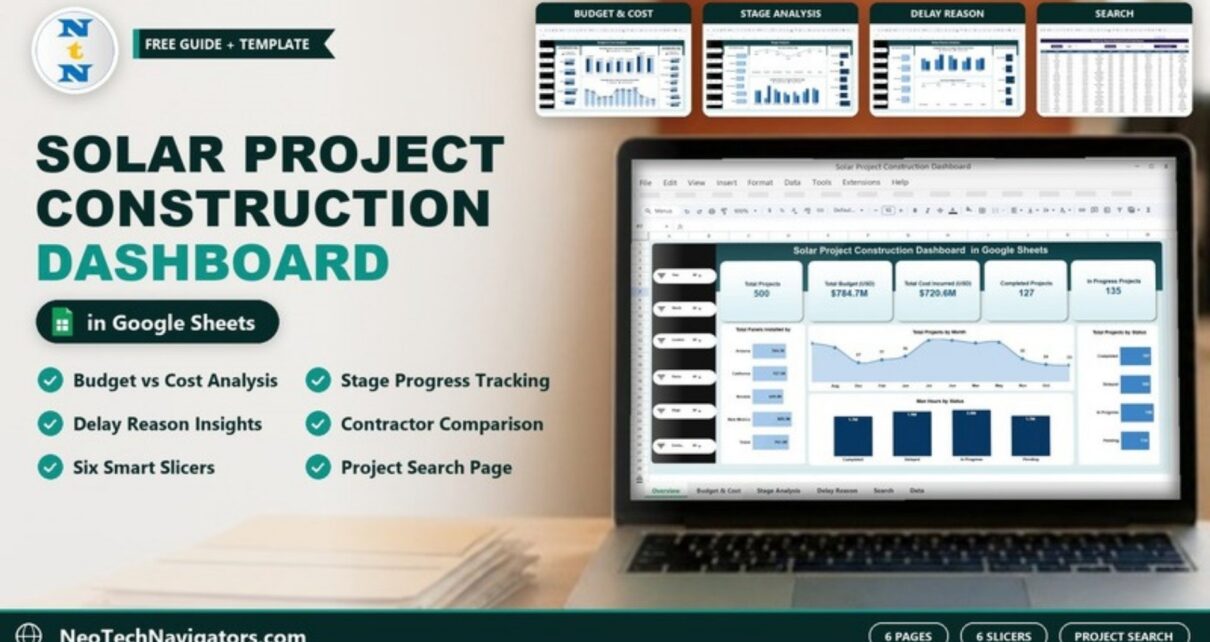
The Solar Project Construction Dashboard in Google Sheets lets solar EPC contractors, developers and project managers see the whole construction portfolio on one screen: how many projects are running, how the budget compares with cost incurred, which stages are overspending and which delay reasons hold work back.
It is built from a single project data table and split into six pages: Overview, Budget & Cost Analysis, Stage Analysis, Delay Reason Analysis, Contractor & Performance and a Search page. Six slicers (Year, Month, Location, Status, Stage and Contractor) filter every chart at once, so you can focus on one state, one contractor or one month in a couple of clicks.
Below you will find what each page shows, a worked budget-versus-cost example using the template’s sample data, and steps for loading your own projects.
🎥 Watch the Video Tutorial
Get the Solar Project Construction Dashboard
What Problem Does It Solve?
A solar construction business can run hundreds of projects across several states, each moving through planning, site preparation, foundation, panel installation, wiring, testing and commissioning. Budgets, panel counts, man-hours and delay causes usually live in separate trackers. The result is that cost overruns and recurring delays are spotted late.
This dashboard pulls those facts together. Each project is one row with its location, dates, stage, status, budget, cost incurred, contractor, panels installed, man-hours and delay reason. The charts summarise that table, so a project manager can see in seconds where money and time are being lost.
It is a good fit for:
- Solar EPC companies managing many utility or commercial installations
- Renewable energy developers tracking contractors across regions
- Construction project managers who report budget versus actual cost
- PMO and finance teams that need a quick status count for leadership
Dashboard Pages at a Glance
| Page | What it shows |
|---|---|
| Overview | KPI cards for Total Projects, Total Budget (USD), Total Cost Incurred (USD), Completed Projects and In Progress Projects; panels installed by location; projects by month; projects by status; man-hours by status |
| Budget & Cost Analysis | Total Budget vs Total Cost Incurred by Location, by Contractor, by Stage and by Month |
| Stage Analysis | Projects by stage, panels installed by stage, completed vs in-progress projects by stage, actual amount by category |
| Delay Reason Analysis | Projects by delay reason, completed vs in-progress by delay reason, panels installed by delay reason, actual amount by delay reason |
| Contractor & Performance | A page set aside for contractor reviews, used together with the Contractor slicer and the Budget vs Cost by Contractor chart |
| Search | Pick a column and a keyword to list every matching project with all its details |
Page-by-Page Walkthrough
1. Overview
The sample data holds 500 projects with a Total Budget of $784.7M and a Total Cost Incurred of $720.6M. Of those, 127 are Completed and 135 are In Progress. The Total Projects by Status chart also shows 123 Delayed and 115 Pending.
The Total Panels Installed chart breaks panels down by location (Arizona, California, Nevada, New Mexico and Texas), with New Mexico highest at 825.3K. A Total Projects by Month area chart and a Man Hours by Status column chart complete the page. The slicer panel on the left filters everything.

2. Budget & Cost Analysis
This page compares Budget (USD) with Cost Incurred (USD) from four angles: by location, by contractor (Flores Group, Olson LLC, Palmer PLC, Rivera PLC, Scott LLC, Thompson PLC and Walker-Brown), by stage and by month. Wherever the cost bar is longer than the budget bar, that group is over budget.

3. Stage Analysis
Seven construction stages are tracked: Commissioning, Foundation, Panel Installation, Planning, Site Preparation, Testing and Wiring. In the sample, Commissioning has the most projects (79), and Testing and Wiring have 78 each. The Completed vs In Progress chart shows that Foundation has only 8 completed against 28 in progress, an obvious bottleneck to investigate.

4. Delay Reason Analysis
Every project carries a delay reason: Labor Shortage, Permit Issue, Supply Chain, Weather or None. In the sample, 96 projects list Labor Shortage as their delay reason, 101 Permit Issue, 103 Supply Chain and 96 Weather, while 104 show None. Panels installed and completed-versus-in-progress counts are also split by reason. That tells you which cause actually stalls progress, not just which one appears most often.

5. Contractor & Performance
This page is set aside for contractor reviews. The most direct contractor comparison in the template is the Total Budget (USD) Vs Total Cost Incurred (USD) by Contractor chart on the Budget & Cost page. In the sample, Thompson PLC has the largest budget ($147.9M against $137.8M incurred), while Palmer PLC is furthest under budget ($101.2M against $79.0M). Select one name in the Contractor slicer, which filters every page, to see that contractor’s stages, delay reasons and project status before a review meeting.
6. Search Page
Choose a field in Select Column and type a value in Search Keyword. In the screenshot, Status = “Delayed” returns 123 records, which matches the Delayed count on the Overview. Each result shows Project ID, Project Name, Location, Start Date, Expected Completion Date, Stage, Status, Budget (USD), Cost Incurred (USD), Contractor, Panels Installed, Man Hours, Delay Reason, Month and Year.

Worked Example: Finding Budget Overruns by Stage
At portfolio level, the sample data is under budget:
Budget variance = Total Budget − Total Cost Incurred
                = $784.7M − $720.6M = $64.1M under budget (about 8.2%)
The Stage chart on the Budget & Cost page tells a different story for some stages:
- Testing: budget $112.8M, cost $121.6M, so $8.8M over
- Foundation: budget $101.4M, cost $105.5M, so $4.1M over
- Wiring: budget $136.8M, cost $109.2M, so $27.6M under
So the portfolio total looks healthy while two stages overspend. Select Testing in the Stage slicer, then use the Search page with Stage = “Testing” to list those projects and check their contractors and delay reasons.
How to Use It With Your Own Data
- Open the data sheet and look at the column headers: Project ID, Project Name, Location, Start Date, Expected Completion Date, Stage, Status, Budget, Cost Incurred, Contractor, Panels Installed, Man Hours, Delay Reason, Month and Year.
- Delete the sample rows and paste your own projects, one row per project, keeping the same column order.
- Use consistent labels for Stage, Status and Delay Reason. “Permit Issue” and “Permit issues” will show up as two different bars.
- Keep budget and cost in the same currency (the template labels them USD).
- Return to the Overview and check that Total Projects matches your row count.
- Use the slicers to filter by Year, Month, Location, Status, Stage or Contractor.
- Update the data weekly or monthly and review the Budget & Cost page each time.
Three Real-World Use Cases
Monthly portfolio review for an EPC contractor
The PMO filters to the current month and presents the KPI cards, the status chart and the stage overruns to leadership, then lists delayed projects from the Search page as actions.
Contractor performance meetings
A developer filters the dashboard to one contractor at a time to compare budget against cost and count delayed projects before renewing contracts.
Permit and supply-chain planning
When the Delay Reason page shows permit issues and supply chain problems as the biggest causes, the planning team starts permit applications earlier and orders long-lead equipment sooner on new projects.
Best Practices
- Record cost incurred to date, not forecast cost. Otherwise the budget comparison overstates overruns.
- Keep one row per project. Update the row when the stage or status changes instead of adding duplicates.
- Review delay reasons with the field team. “None” should mean no delay at all, not “not recorded”.
- Filter before you decide. Check overruns by location and contractor before blaming a stage.
- Share view-only links with stakeholders and keep edit access for the people who maintain the data.
Limitations
- It is a reporting dashboard, not a scheduling tool. It does not draw Gantt charts or calculate critical paths.
- Data entry is manual (or by pasting from your ERP or project system). There is no automatic sync.
- Very large portfolios with many thousands of rows may slow Google Sheets down. A database or BI tool suits those better.
Related Templates and Further Reading
The same dashboard is available as a Solar Project Construction Dashboard in Excel and a Power BI version. On NeoTech Navigators you can also explore the Solar Panel Installation KPI Dashboard, the Solar Energy Dashboard in Google Sheets, the Construction Project Cost Dashboard and the Renewable Energy KPI Dashboard.
To learn how slicer-driven dashboards like this one are built, the Pivot Tables & Dashboards course on NextGenTemplates Academy walks through the method step by step.
Frequently Asked Questions
What does the Solar Project Construction Dashboard track?
It tracks project count, total budget, cost incurred, project status, panels installed, man-hours, construction stage, contractor and delay reason, summarised across six pages.
Which filters are available?
Six slicers: Year, Month, Location, Status, Stage and Contractor. Each one filters the charts on the page.
What project statuses does the template use?
The sample uses Completed, Delayed, In Progress and Pending.
Can I add more construction stages or delay reasons?
Yes. Type the new label in the Stage or Delay Reason column of the data sheet, and it appears in the charts and slicers once the data refreshes.
How does the Search page work?
Select a column in Select Column and type a keyword in Search Keyword. The page lists every matching project and shows the total record count.
Is the sample data real?
No. The 500 sample projects show how the dashboard works. Replace them with your own project data.
Wrapping Up
The Solar Project Construction Dashboard in Google Sheets gives solar builders one view of budget, cost, stage progress, contractors and delays. Paste in your project list, check the stage overruns first and use the Search page to turn each finding into a list of projects to fix.
Get the Solar Project Construction Dashboard
📅 Last updated: October 2026