The Complete Wedding Budget Tracker Dashboard in Google Sheets gives couples and wedding planners a structured way to manage 6 sheet tabs, 4 headline budget cards, 12+ analysis views, and a searchable item lookup in one shared workbook. Wedding budgets can quickly turn into 100+ line items once venue, catering, decor, outfits, photography, transport, deposits, balance payments, and last-minute extras start moving. This Google Sheets dashboard keeps estimated cost, actual cost, payment status, vendor spend, priority, and due dates in one place.Complete Wedding Budget Tracker Dashboard in Google Sheets
Click here to purchase the Complete Wedding Budget Tracker Dashboard in Google Sheets
Because the template is built in Google Sheets, users can work in the same live file with a partner, family member, or wedding planner. Google also documents native spreadsheet collaboration, filters, charts, and sharing through Google Sheets Help, making this format practical for teams that need a browser-based budget tracker without buying a wedding planning subscription.
Complete Wedding Budget Tracker Dashboard in Google Sheets
Key Features of Complete Wedding Budget Tracker Dashboard in Google Sheets
Click here to purchase the Complete Wedding Budget Tracker Dashboard in Google Sheets
- Overview dashboard: Total Estimated, Total Actual, Total Items, and Over/Under Budget appear as top-level summary cards.Complete Wedding Budget Tracker Dashboard in Google Sheets
- Budget analysis tab: Compare estimated cost and actual cost by month, sub-category, and priority level.
- Payment analysis tab: Review payment status, spending by payment method, and payment amount by method and status.
- Vendor tab: Monitor total spend by vendor, vendor category mix, and vendor spending by month.
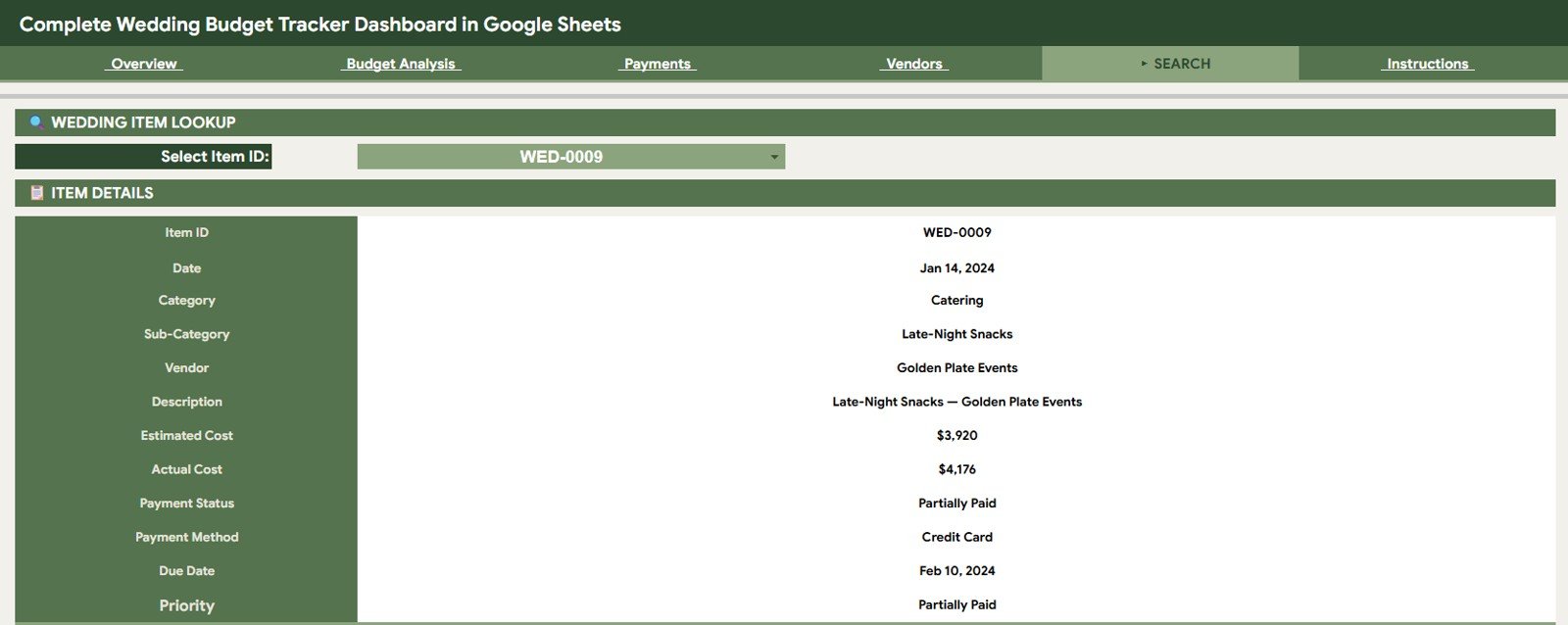
- Search Sheet: Select an Item ID and instantly view all matching wedding budget details.
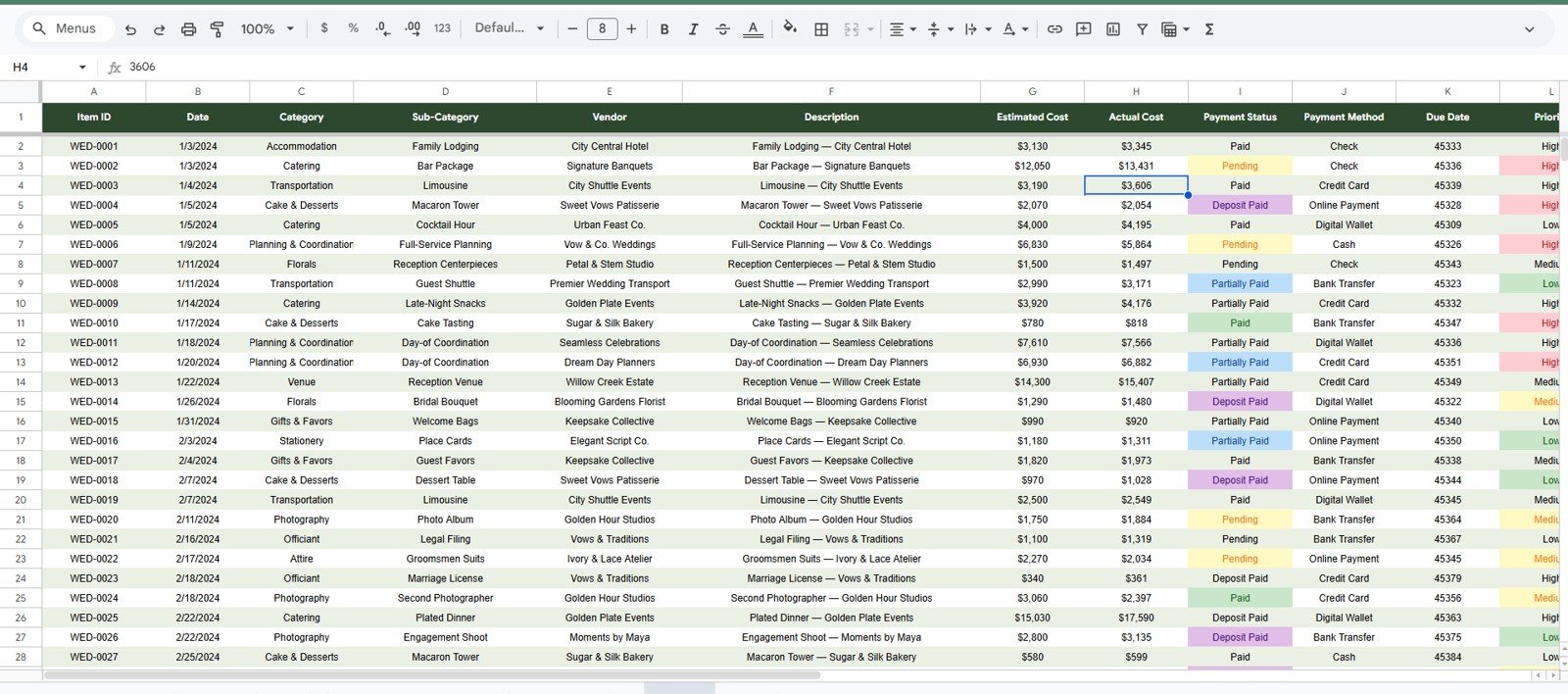
- Data Sheet: Add your own rows in the same structure and let the dashboard pages update from the source data.
- Google Drive collaboration: Share the file with your partner, planner, or family members using Google Sheets permissions.
Dashboard Pages Explanation
1 – Overview Page
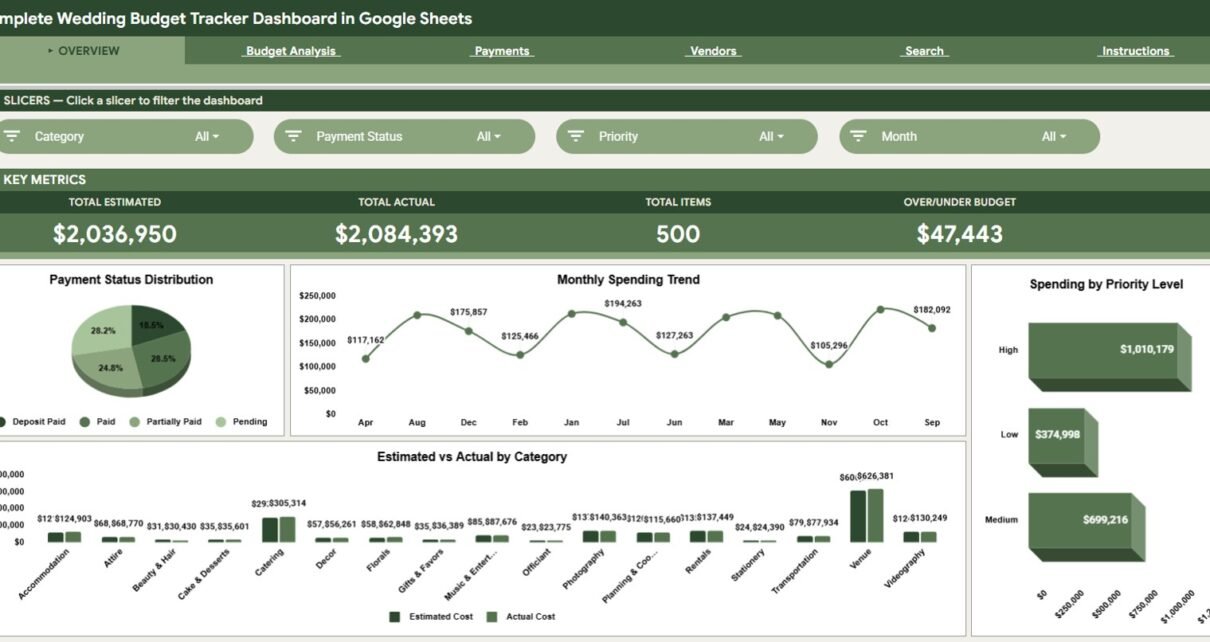
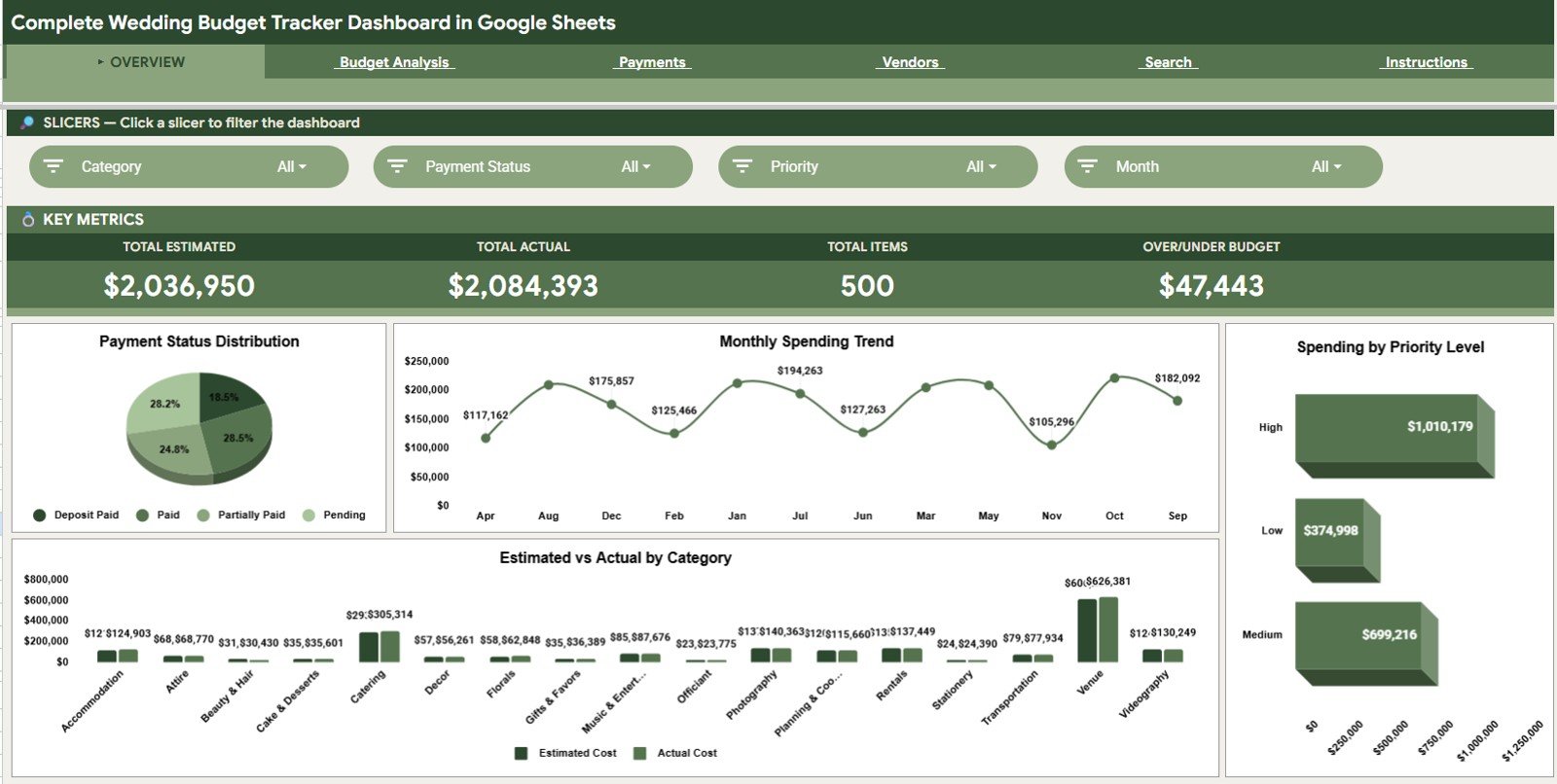
The Overview page is the main command center for the wedding budget. The top cards show Total Estimated, Total Actual, Total Items, and Over/Under Budget, while slicers let users filter the dashboard quickly.
Payment Status Distribution by Status: This chart shows how wedding items are split across paid, pending, or other payment statuses. It helps you see whether the budget is moving toward completion or still carrying many open payments.
Monthly Spending Trend by Month: This chart shows how spending changes month by month. It helps couples prepare for deposit-heavy months and final balance months before cash flow becomes tight.
Spending by Priority Level: This chart groups spend by priority. It helps decide whether high-priority items are receiving enough budget and whether lower-priority costs can be reduced.
Estimated and Actual Cost by Category: This chart compares planned and real costs by category. It is the quickest way to identify categories that are over budget or still safely under plan.
Complete Wedding Budget Tracker Dashboard in Google Sheets
2 – Budget Analysis
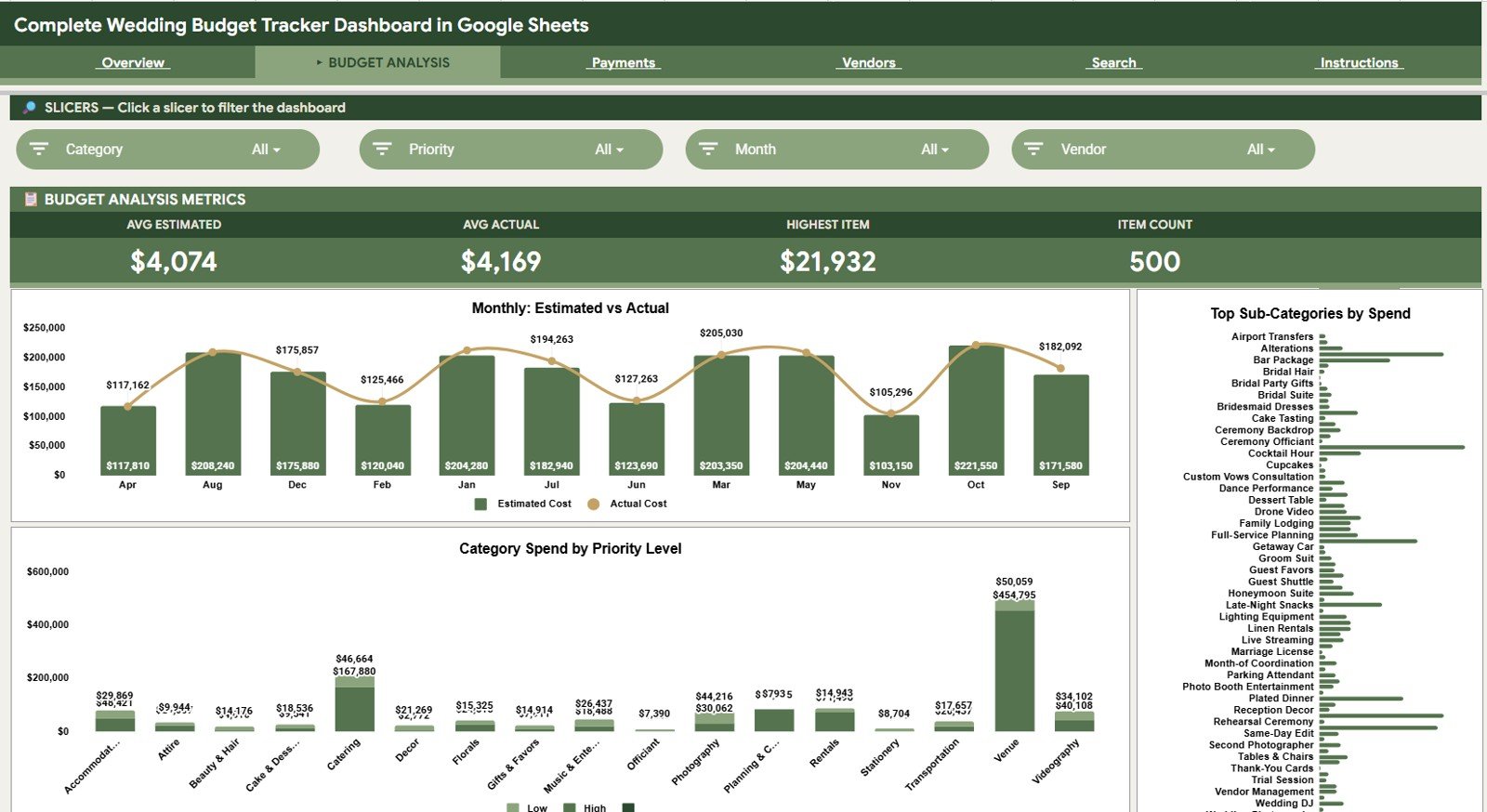
The Budget Analysis tab focuses on the planned vs actual side of the wedding budget. It is useful for reviewing where costs are changing across months, categories, and priorities.
Estimated Cost and Actual Cost by Month: This chart compares planned monthly spend against real monthly spend. It helps spot months where actual costs are climbing faster than expected.
Spend by Sub-Category: This chart breaks budget movement into more detailed wedding areas such as decor, catering, clothing, photography, or entertainment. It helps find the smaller areas where overspending begins.
Category Spend by Priority Level: This chart connects category spend with priority. It helps balance emotional priorities with financial limits, especially when deciding what to keep, delay, or reduce.
Budget Analysis
3 – Payments
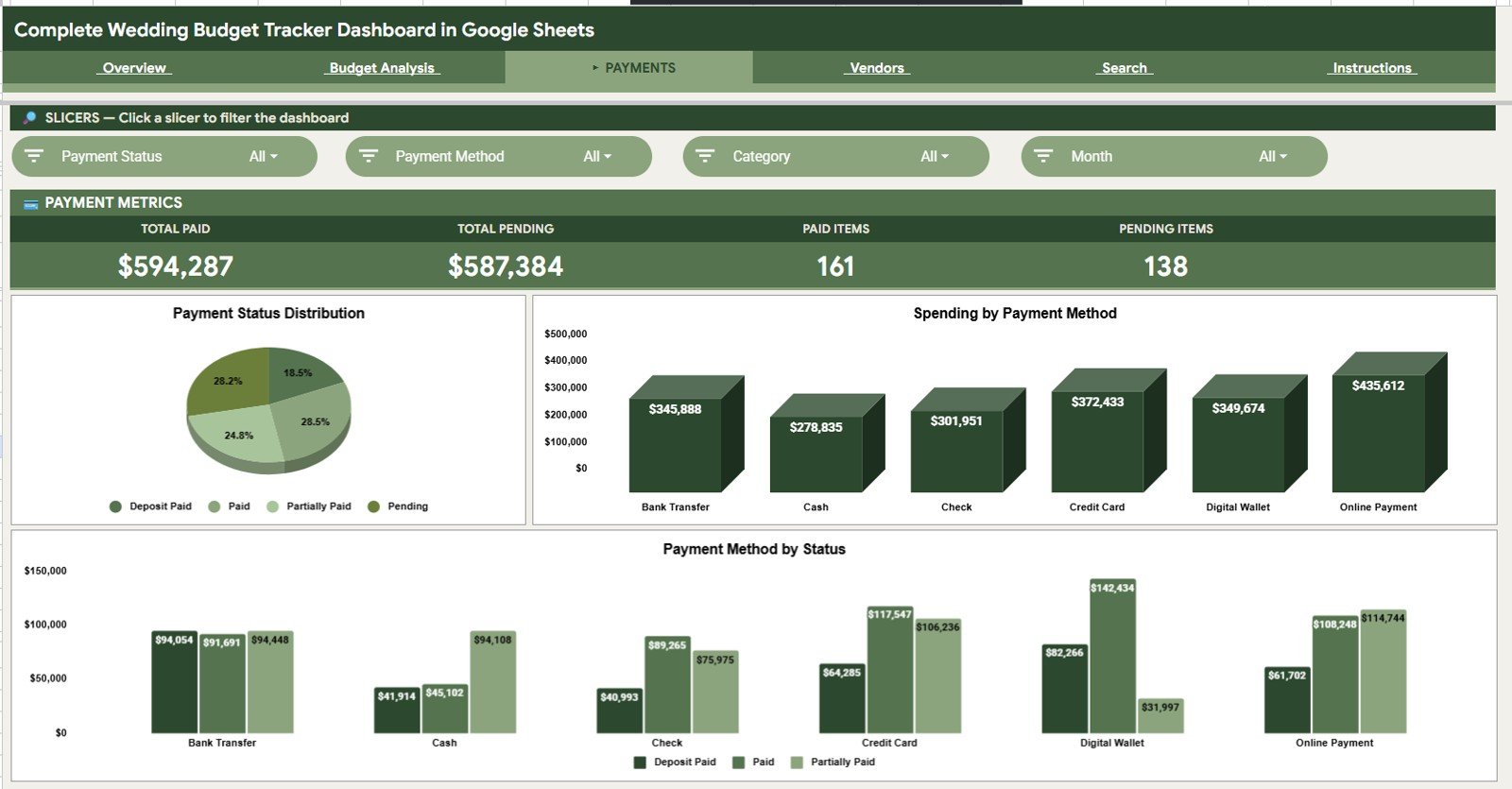
The Payments tab is designed for tracking payment behavior and pending commitments. It helps users see which amounts are already handled and which still need attention before due dates arrive.
Payment Status Distribution by Status: This chart summarizes the payment pipeline by status. It helps identify whether the wedding budget is mostly paid or still waiting on many vendor balances.
Spending by Payment Method: This chart shows how costs are distributed across cash, card, bank transfer, or other methods. It helps users reconcile expenses and understand how the wedding is being funded.
Payment Amount by Payment Method and Status: This chart combines method and status so unpaid or pending amounts can be reviewed by payment channel. It is helpful for planning upcoming transfers or card payments.
Payments
4 – Vendors
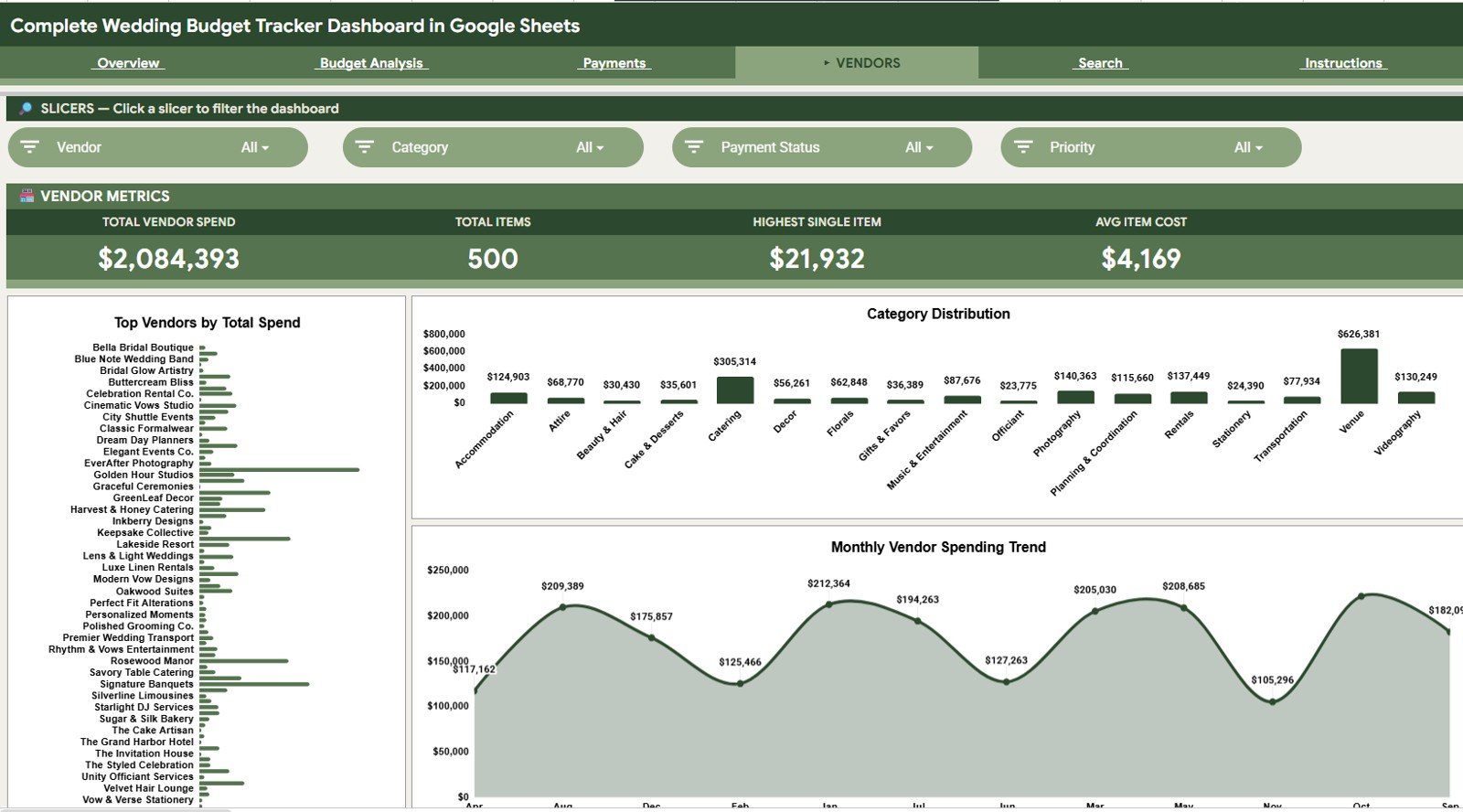
The Vendors tab focuses on supplier-level budget visibility. It helps couples and planners review the vendors receiving the largest payments and the months where vendor spend is concentrated.
Total Spend by Vendor: This chart ranks vendors by total spend. It helps identify the suppliers with the biggest effect on the wedding budget.
Vendor Spend by Category: This chart connects vendors to wedding categories. It helps review whether each vendor is tied to venue, catering, decor, photography, entertainment, or another category.
Vendor Spending by Month: This chart shows vendor spending across the planning timeline. It helps prepare for months when multiple deposits or balances are due.
Vendors
5 – Search Sheet
The Search Sheet helps users look up a specific wedding item by selecting the Item ID. It displays Item ID, Date, Category, Sub-Category, Vendor, Description, Estimated Cost, Actual Cost, Payment Status, Payment Method, Due Date, and Priority.
This is useful during vendor calls, planning meetings, and quick payment checks. Instead of scrolling through the full Data Sheet, users can pull one record and see the complete detail instantly.
Search Sheet tab
Click here to purchase the Complete Wedding Budget Tracker Dashboard in Google Sheets
6 – Data Sheet Tab
The Data Sheet is the source table for the entire dashboard. Users add the data in the same format as the sample rows, including dates, categories, vendors, descriptions, estimated cost, actual cost, payment status, payment method, due date, and priority.
Keeping this sheet structured is what makes the dashboard pages useful. When the rows are updated consistently, the Overview, Budget Analysis, Payments, Vendors, and Search Sheet tabs stay aligned.
Data Sheet tab
Click here to purchase the Complete Wedding Budget Tracker Dashboard in Google Sheets
Complete Wedding Budget Tracker Dashboard in Google Sheets vs. Excel Dashboard vs. Paid Wedding SaaS – Feature Comparison
| Feature | Complete Wedding Budget Tracker Dashboard | Excel dashboard alternative | Paid wedding SaaS |
|---|---|---|---|
| Cost | $9.99 one-time sale price | One-time file cost or Excel template purchase | Subscription, upgrade, or vendor marketplace model |
| Platform | Google Sheets in Google Drive | Microsoft Excel desktop or cloud | Vendor-hosted web platform |
| Setup time | Copy the Sheet and replace sample rows | Download and edit workbook | Account setup and workflow configuration |
| Real-time team collaboration | Built into Google Sheets | Depends on OneDrive or SharePoint setup | Usually included |
| Mobile access | Google Sheets mobile app | Excel mobile app with some limitations | Usually included |
| Customizable fields | Editable source rows and labels | Editable workbook structure | Often limited to vendor settings |
| Share with link | Yes, through Google Drive sharing | Yes, if hosted in cloud storage | Usually account-based |
| Year-1 cost at 5 users | $9.99 template cost | Template cost plus Excel access | Can become much higher with upgrades or premium services |
| Item ID lookup | Included through Search Sheet | Requires template-specific setup | Depends on vendor feature set |
Who Should Use This Template
- Couples who want a shared wedding budget tracker in Google Drive.
- Wedding planners who need a repeatable budget analysis workbook for clients.
- Families contributing to wedding costs and needing one source of truth.
- Event coordinators tracking categories, vendors, payments, and due dates.
This template is not the right fit if you need RSVP management, guest seating, invitation workflows, vendor booking, contract e-signature, or a full client portal. It is focused on budget tracking and dashboard analysis.
Real-World Use Cases
Priya and Aarav are planning a 250-guest wedding. They use the Overview page every week to compare Total Estimated and Total Actual while using slicers to isolate decor, venue, and catering costs. When a category moves over budget, they review the Budget Analysis tab before approving new spending.
Rachel manages several wedding clients. She creates one copy per client, uses the Vendors tab before planning calls, and uses the Search Sheet to answer item-specific questions without scrolling through hundreds of rows.
Marco and Elena are planning a destination wedding. They update vendor payments from their phones during meetings and review Vendor Spending by Month to prepare for upcoming deposits and final balances.
Advantages of Complete Wedding Budget Tracker Dashboard in Google Sheets
- Shareable by design: Google Sheets makes it easy to share with a partner, family member, or planner.
- Clear budget variance: Estimated vs actual cost views make overruns easier to catch.
- Payment visibility: Payment status and method charts reduce confusion around what has been paid.
- Vendor clarity: Vendor charts show who is driving the largest spend.
- Fast item lookup: The Search Sheet helps users find one wedding item by Item ID.
Opportunities for Improvement
- The template does not include RSVP or guest list management, so users may pair it with a separate guest tracker.
- Google Sheets charts are practical, but users wanting advanced animated visuals may prefer Power BI or HTML dashboards.
- Data quality depends on consistent entry in the Data Sheet, especially for vendor names, payment methods, and priority values.
- Automated email reminders for due dates are not included by default.
Best Practices
- Enter every wedding budget item in the Data Sheet as soon as it is quoted or paid.
- Use consistent category and vendor names so charts group correctly.
- Review the Overview page weekly during active planning months.
- Use priority levels before cutting costs so essential items are protected.
- Check the Payments tab before vendor due dates to avoid missed balances.
- Use the Search Sheet during calls when one Item ID needs quick review.
Explore Relevant Templates
- Wedding Budget Dashboard in Google Sheets – a related wedding budget dashboard template.
- Event Management Analysis Dashboard in HTML – event performance and budget analysis in a browser dashboard.
- Photography Studios Dashboard in Power BI – useful for photography teams tracking booking and profitability data.
- Browse more Google Sheets dashboard templates.
Frequently Asked Questions
Click here to purchase the Complete Wedding Budget Tracker Dashboard in Google Sheets
What is included in the Complete Wedding Budget Tracker Dashboard in Google Sheets?
It includes Overview, Budget Analysis, Payments, Vendors, Search Sheet, and Data Sheet tabs, with 4 KPI cards and multiple charts for cost, payment, priority, category, vendor, and monthly analysis.
Can I use this with my own wedding data?
Yes. Replace the sample rows in the Data Sheet with your own wedding budget records, categories, vendors, estimates, actual costs, payment statuses, methods, due dates, and priorities.
Does it work for wedding planners?
Yes. A planner can create a separate copy for each client and use the same dashboard structure for budget reviews, vendor meetings, and payment tracking.
Can multiple people edit it?
Yes. Since it is in Google Sheets, you can share the file through Google Drive with view or edit access.
Does it manage RSVP or seating charts?
No. This template focuses on budget tracking, cost analysis, payments, vendors, search lookup, and data entry. Use a dedicated planner or guest list tool for RSVP and seating.
Do I need advanced Google Sheets skills?
No. The dashboard is designed so users can replace sample data and use the built-in tabs. Basic spreadsheet comfort is enough for normal use.
About the Author
Click here to purchase the Complete Wedding Budget Tracker Dashboard in Google Sheets
Built by PK – Microsoft Certified Professional with 15+ years of Excel, Google Sheets, and Power BI experience. Founder of NextGenTemplates, reaching 300K+ subscribers across YouTube channels. Every template is hand-built and tested before release.
Conclusion
The Complete Wedding Budget Tracker Dashboard in Google Sheets gives couples and planners a practical way to track estimates, actual costs, payment status, vendor spend, monthly trends, and item-level details without moving into a paid wedding SaaS platform. It keeps the workflow simple: add rows to the Data Sheet, review the dashboard pages, use slicers for quick filtering, and search any item by Item ID when detail matters.
Click here to purchase the Complete Wedding Budget Tracker Dashboard in Google Sheets
Visit our YouTube channel for step-by-step tutorials: Youtube.com/@NeotechNavigators