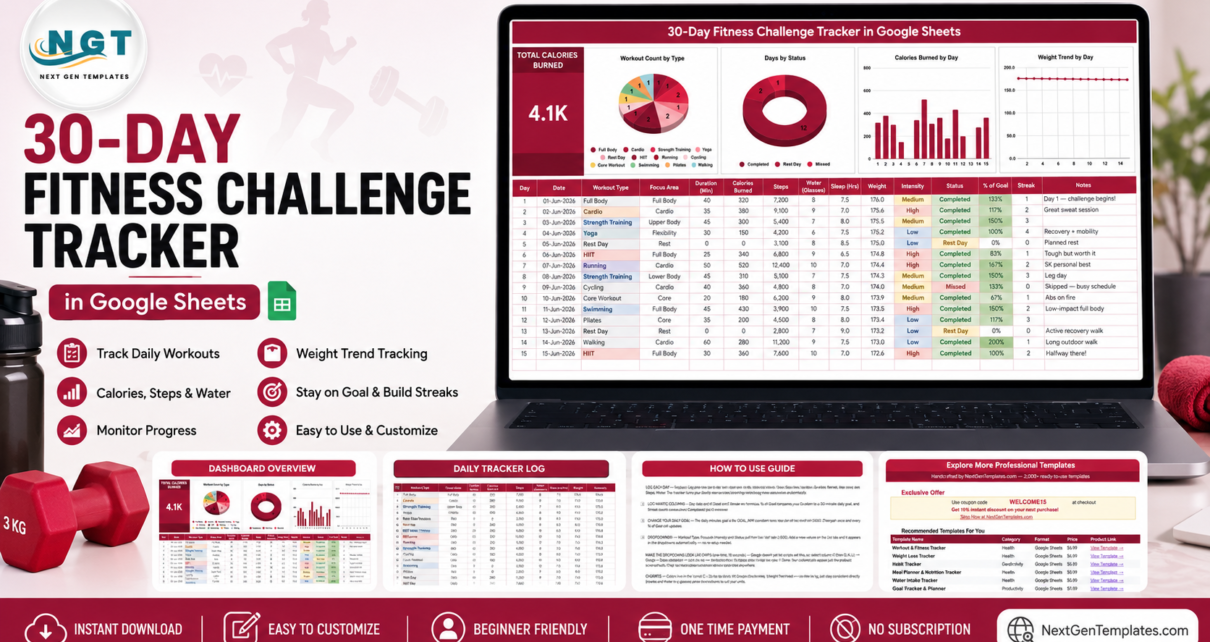
The 30-Day Fitness Challenge Tracker in Google Sheets is a single-page tracker built around three numbers you have to type and three the sheet works out for you. It ships with 30 numbered day rows, 15 tracking columns, 1 headline KPI card and 4 charts that read the data columns over rows 16 to 1000 directly – no helper tables, no add-ons, no pivot refresh. Three columns – Day, % of Goal and Streak – are formulas.
Most people who start a 30-day challenge end it with the log scattered across a notes app, a watch, a photo of a whiteboard and their own memory. This template exists to put all of it on one page you own, in a file you can share by link, so that on day 30 you can actually see what happened instead of guessing.
Before anything else, one honest sentence: this is a logging and charting template, not medical, coaching, nutrition or fitness advice. It records and totals the numbers you type. It prescribes nothing, recommends nothing and predicts nothing. Whatever challenge you run is yours to choose, ideally alongside a qualified professional.
Get the 30-Day Fitness Challenge Tracker in Google Sheets
Key Features of the 30-Day Fitness Challenge Tracker
Everything below is on one tab. There is no navigation to learn.
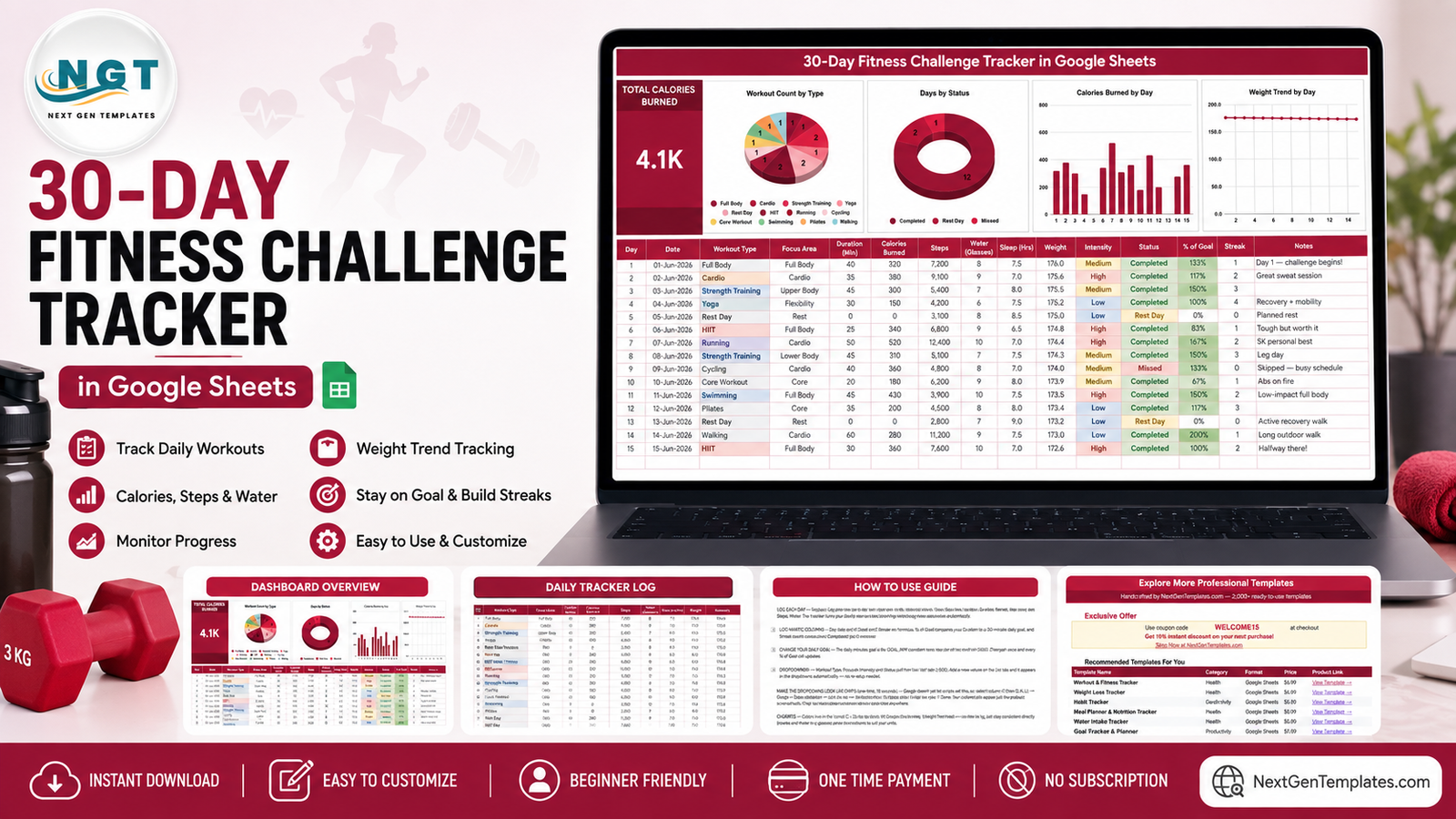
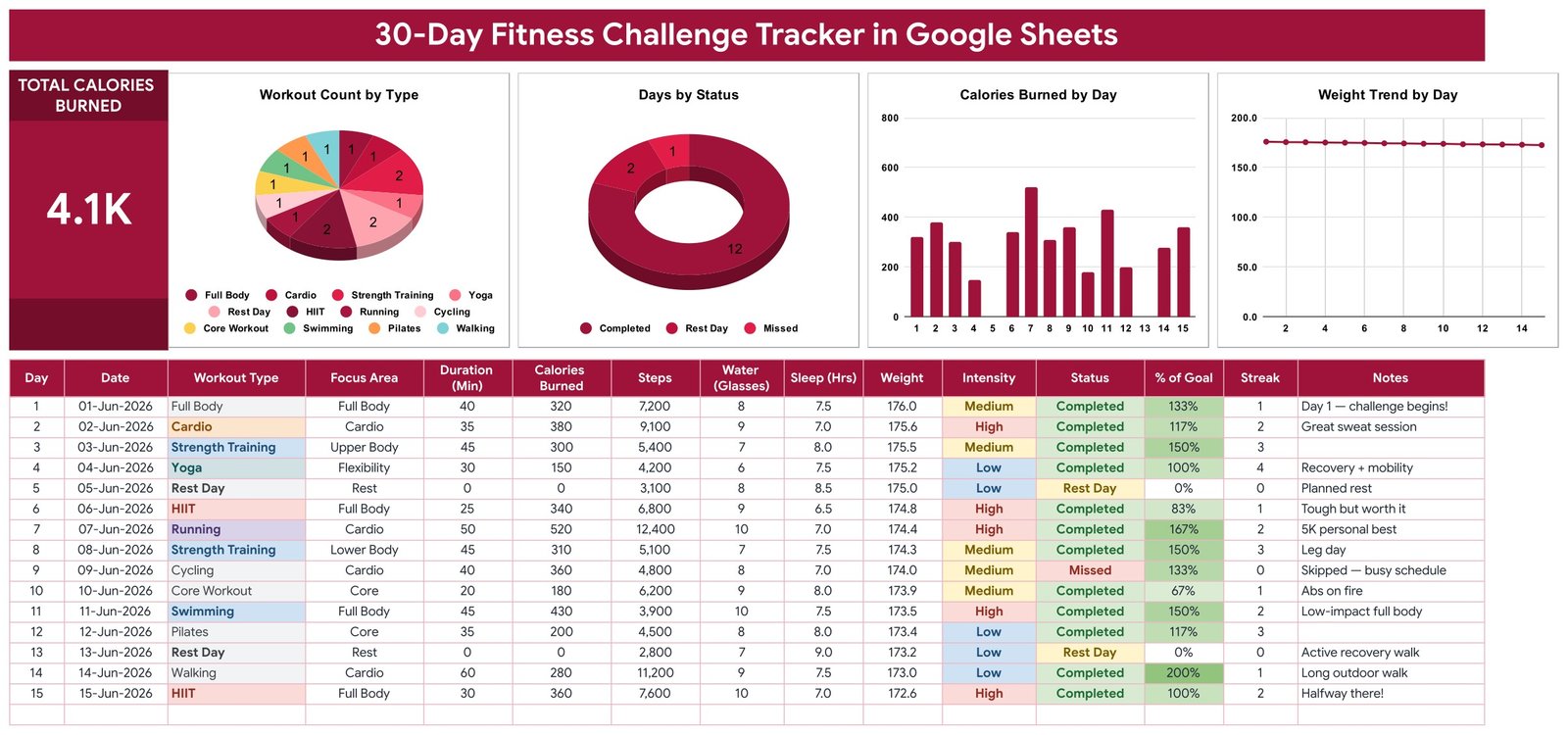
- 15 columns per day. Day, Date, Workout Type, Focus Area, Duration (Min), Calories Burned, Steps, Water (Glasses), Sleep (Hrs), Weight, Intensity, Status, % of Goal, Streak and Notes. You type eleven of them; three are formulas and one (Notes) is free text.
- One KPI card: Total Calories Burned. It sums the Calories Burned column across every row you have entered and sits top-left of the page. The sample file reads 4.1K because of its demo rows – yours will read your own total.
- Four charts, all wired to columns rather than fixed ranges. Workout Count by Type, Days by Status, Calories Burned by Day and Weight Trend by Day. They use the built-in Aggregate option over rows 16 to 1000, so a day added in week four appears without you touching a chart setting.
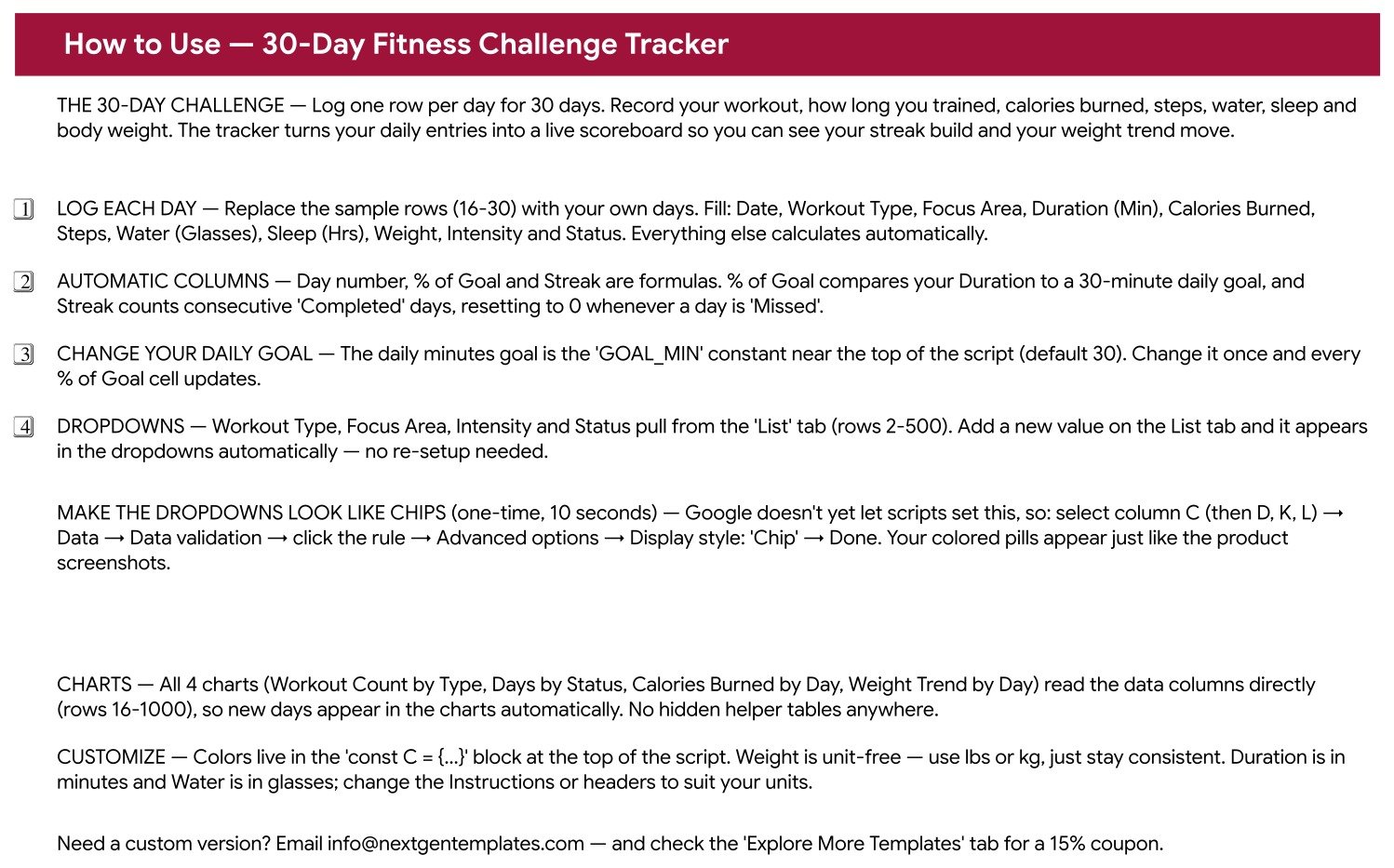
- An automatic Streak column. It counts consecutive days marked Completed and resets to 0 the moment a day is marked Missed. Rest Day rows sit outside the streak count.
- A % of Goal column with a single control. It compares each day’s Duration against a daily minutes goal held in one GOAL_MIN constant near the top of the sheet’s script. Change that number once and the whole column follows.
- Four auto-expanding dropdowns. Workout Type, Focus Area, Intensity and Status all read a List tab over rows 2 to 500. Add a value there and it shows up in the dropdown immediately.
- Colour banding on Intensity and Status. Low / Medium / High and Completed / Rest Day / Missed are colour-coded so the shape of the month is visible from the column alone.
- Nothing locked. Add columns, delete charts, rewrite the formulas. It is an ordinary Google Sheet in your own Drive.
Template Structure – Every Tab Explained
The file has four tabs: the tracker itself, How to Use, Explore More Templates, and a List tab that feeds the dropdowns.
Tab 1: Challenge Tracker
The KPI card, the four charts and the 30-row log all live here. The card and charts sit across the top; the log runs underneath with all 15 columns visible without scrolling sideways on a laptop. The rows you can see in the screenshot are sample data supplied so the charts have something to draw – they are demo entries, not a suggested programme, and the first thing to do is delete them.
Tab 2: How to Use
A plain-English instruction sheet that answers the four questions everyone asks: which columns to fill, which three columns are formulas, where the daily minutes goal lives, and how the List tab drives the dropdowns. It also spells out the one-time ten-second Data validation step that turns the dropdowns into the rounded coloured chips you see in the screenshots, and points at the colour block in the script if you want to rebrand the whole sheet.
Tab 3: Explore More Templates
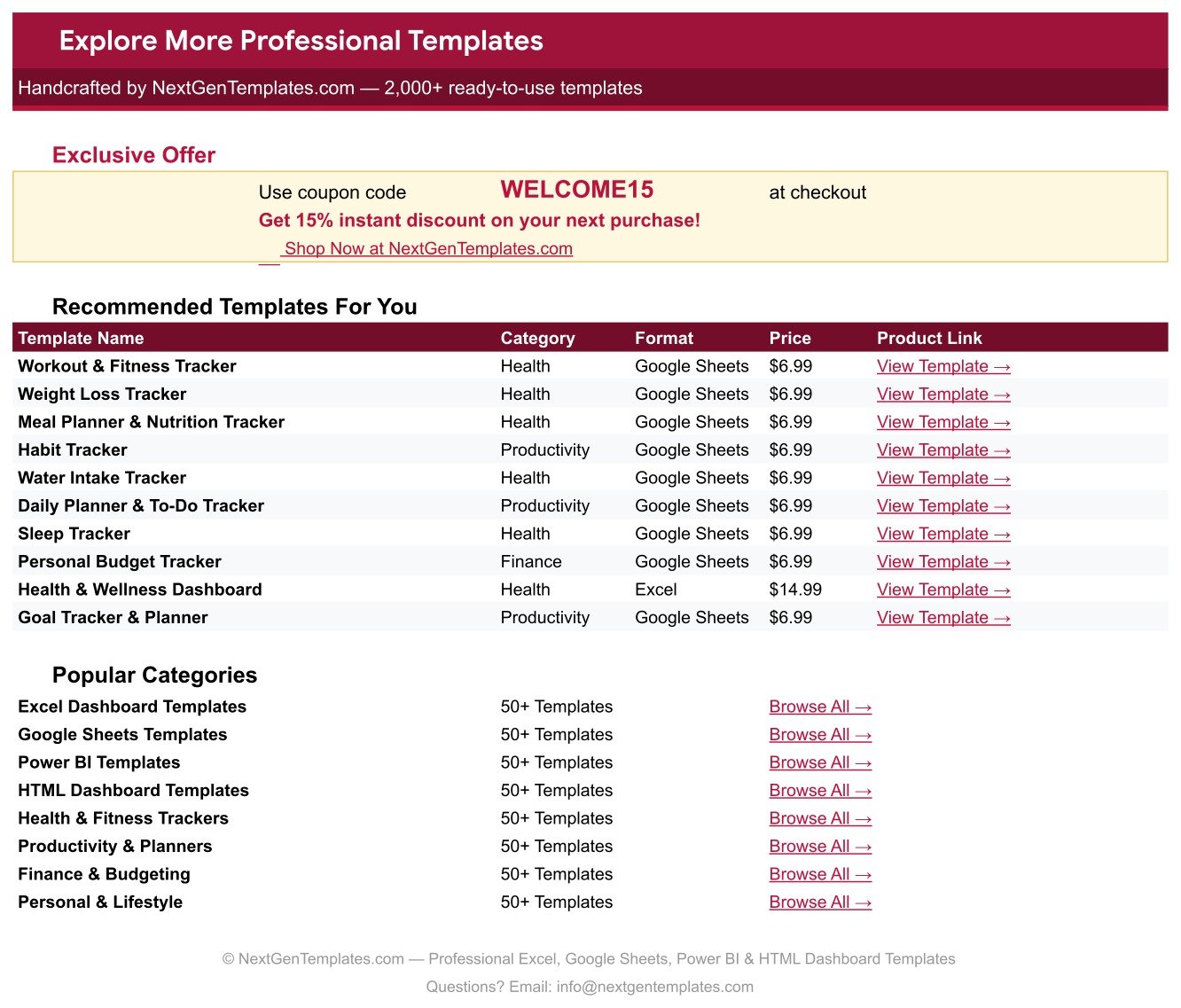
A small directory tab listing recommended NextGenTemplates trackers and dashboards with category, format, price and a direct product link, plus a WELCOME15 coupon code and shortcuts to the main template categories.
Tab 4: List
Four columns of dropdown values covering rows 2 to 500 – Workout Type, Focus Area, Intensity and Status. It is the one tab worth editing before you log anything: swap in the names of the activities you actually do and the tracker speaks your vocabulary from day one. Google’s own Docs Editors Help covers how Sheets data validation works if you want to extend it further.
30-Day Fitness Challenge Tracker vs. an Excel Workbook vs. a Paid Fitness App – Feature Comparison
| Feature | 30-Day Fitness Challenge Tracker in Google Sheets | Excel workbook you build yourself | Paid fitness app subscription (Strava / MyFitnessPal / Fitbit Premium tier) |
|---|---|---|---|
| Cost | $6.99 one-time | Free if you already own Excel, plus your own build time | Typically $5-15 per person per month, forever |
| Platform | Google Sheets – browser, Android and iOS | Excel desktop, plus a licence | Vendor’s own app only |
| Setup time | Under 5 minutes | Hours to build the charts and formulas | Minutes to sign up, then account setup |
| Where your raw data lives | A file in your own Google Drive | A file on your own machine | The vendor’s servers, under their terms |
| Add your own columns | Yes – it is a spreadsheet | Yes | Limited to the fields the app offers |
| Share with a coach or friend by link | Standard Google Sheets sharing | Send the file, or pay for cloud sharing | Often needs the other person on a paid plan |
| Automatic sync from a watch or phone sensor | No – you type the numbers | No | Yes, that is what you pay for |
| Calorie estimation done for you | No – the column stores what you enter | No | Yes, from the vendor’s own model |
| Year-1 cost for a household of five | $6.99 total | Your time, five times over | Roughly $300-900 across five subscriptions |
For people who want their 30-day log in a file they own and can shape, without a monthly fee for a dashboard they cannot edit, the 30-Day Fitness Challenge Tracker sits in the sweet spot. If you want the watch to do the logging for you, buy the app – this tracker never pretends to do that.
Who Should Use This Template
Perfect for:
- Anyone running a self-chosen 30-day challenge who wants one tidy place to record each day.
- People who already train and simply want duration, calories, steps, water, sleep and weight in one file instead of five apps.
- Spreadsheet-comfortable users who want to add columns, change charts, or feed the data into their own formulas.
- Anyone asked to keep a written activity log who needs something legible to share by link.
- Small groups or households who would rather buy one $6.99 file than five subscriptions.
Not a fit if:
- You want a workout programme or training plan. This file contains none – the sample rows are demo data, not a recommendation.
- You want automatic sync from a smartwatch, chest strap or phone. Every number here is typed by hand.
- You want calories estimated for you. The Calories Burned column stores whatever you enter; it does not calculate.
- You are a gym or trainer managing many clients’ billing and attendance – a membership tracker or a multi-page dashboard suits that better.
- You need a clinical or medical record. This is a personal log and nothing more.
Real-World Use Cases
Priya is doing a 30-day walking-and-yoga challenge with two friends. Each of them takes their own copy and logs duration, steps and status every evening. On day 30 they put their three Days by Status charts side by side over coffee. Nobody paid a subscription, and nobody’s data left their own Drive.
Daniel keeps an activity diary ahead of a routine check-up. He fills in duration, steps, sleep hours, water and weight each night and uses the Notes column when something feels worth mentioning. When the appointment comes round he shares the sheet by link. The tracker interprets none of it – that is his clinician’s job. It simply makes 30 days of his own numbers legible on one page.
Meera runs a strength block she wrote herself. She replaced the List tab with her own lift names, added two columns for sets and top-set weight, and left everything else alone. The Workout Count by Type chart carried on working, because it reads the column rather than a fixed range.
Advantages of the 30-Day Fitness Challenge Tracker
It is honest about what it is. A log, charted. Nothing is estimated, inferred or scored behind your back. Every number on the page traces back to a cell you typed.
One control per behaviour. The daily minutes goal lives in one constant. The dropdown vocabulary lives on one tab. The colours live in one block. There is no settings maze, and no risk of two half-configured copies of the same setting drifting apart.
It grows past 30 days without being rebuilt. The charts cover rows 16 to 1000. Run a second challenge in the same file, or keep logging for a year – the charts keep up either way.
The cost is a rounding error. $6.99 once, against roughly $60-180 a year for a single premium fitness app subscription. For a household of five the gap is wider still.
It works on the device you have. Google Sheets runs in any browser and in the mobile app, so logging from the changing room is the same file as reviewing on a laptop. See Google Sheets for platform details.
Opportunities for Improvement
A balanced look, because no template is right for everyone:
- Manual entry only. There is no watch integration, no API, no import. If you already wear a device that logs automatically, typing the same numbers again will feel like duplication.
- Calories are an input, not an output. The tracker will happily total whatever figure you type, including a wrong one. It has no model of its own and cannot sanity-check the number.
- One challenge per copy is the tidiest pattern. You can keep adding rows past day 30, but the charts then cover both challenges at once. Copying the file for a second round keeps each block readable.
- The goal setting lives in the script, not on the page. Changing GOAL_MIN means opening the script editor once. It is a two-minute job the How to Use tab walks through, but it is not a cell you click.
- The dropdown chips need one manual step. Google does not currently let a script set the chip display style, so the coloured pills in the screenshots take a ten-second Data validation tweak per column on first use.
- No weekly or monthly roll-up. Everything is daily. If you want month-over-month charting, a multi-page dashboard is the better tool.
Best Practices
- Edit the List tab before day one. Five minutes spent putting your real activity names in makes every later entry a two-tap job on mobile.
- Log the same time every day. The Streak column only means something if the Status field is honest, and the easiest way to keep it honest is to fill it at a fixed moment.
- Use Rest Day rather than leaving a row blank. A blank row tells the charts nothing; Rest Day tells them a deliberate choice was made.
- Pick one unit and stay with it. Weight is unit-free by design – lbs or kg both work, but mixing them mid-month makes the Weight Trend by Day chart meaningless.
- Keep Notes short and specific. “Left knee stiff on the last set” is worth more in three weeks than “tough one”.
- Duplicate the file before a second challenge. Cleanest history, cleanest charts, and the old month stays intact.
Explore Relevant Templates
This tracker covers a single 30-day block at a daily grain. Several companions on NextGenTemplates cover the rest:
- Workout Log Tracker in Google Sheets – set-by-set detail rather than a daily summary.
- Sleep Tracker in Google Sheets – the nights around your training days, in more depth than a single Sleep column.
- Daily Steps Tracker in Google Sheets – for people whose main number is steps.
- Running Log & Mileage Tracker in Google Sheets – distance, pace and weekly mileage for runners.
- Fitness and Wellness Dashboard in Google Sheets – the multi-page version, when one 30-day block is no longer enough.
Browse the whole Google Sheets Trackers catalogue, or the wider Google Sheets Templates range.
Curious how trackers like this are put together? The NextGenTemplates Academy learning paths cover the spreadsheet skills behind them, with practice files.
Get the 30-Day Fitness Challenge Tracker in Google Sheets
Frequently Asked Questions
Does the 30-Day Fitness Challenge Tracker tell me what workouts to do?
No. The 30-Day Fitness Challenge Tracker is a logging and charting template only. It records the workouts, minutes, calories, steps, water, sleep and weight you type in. It contains no programme, no prescribed exercises and no medical, nutrition or coaching advice of any kind.
Are the sample rows a recommended 30-day plan?
No. They exist purely so the KPI card and four charts have data to draw when you first open the file. Delete them before you start. Nothing in the 30-Day Fitness Challenge Tracker recommends any activity, duration or intensity to anybody.
How long does setup take?
Under five minutes. Click the copy link in the PDF, edit the List tab so the dropdowns use your own activity names, set your daily minutes goal, and delete the sample rows. The 30-Day Fitness Challenge Tracker is usable from the first row you type.
How does this compare to a paid fitness app subscription?
A paid app syncs automatically from your watch and estimates calories for you; this tracker does neither – you type the numbers. In exchange the 30-Day Fitness Challenge Tracker costs $6.99 once rather than $5-15 a month, keeps raw data in your own Drive, and lets you add any column you want.
Can I change the daily minutes goal?
Yes, in one place. The GOAL_MIN constant near the top of the sheet’s script holds it and every % of Goal cell reads from there. It ships at 30 purely as a neutral placeholder, not a recommendation – set it to whatever figure you have decided on.
Will the charts include days I add after day 30?
Yes. All four charts in the 30-Day Fitness Challenge Tracker read the data columns over rows 16 to 1000 directly, with no helper tables in between. Add day 31 or day 90 and the charts include it with no re-linking or range editing.
Do I need Excel or any add-on?
Neither. The 30-Day Fitness Challenge Tracker is a native Google Sheet that opens in any browser and in the Google Sheets mobile app. If you prefer Excel, File then Download then Microsoft Excel works, though chart styling shifts slightly on the way across.
About the Author
Built by PK – Microsoft Certified Professional with 15+ years of Excel, Google Sheets and Power BI experience. Founder of NextGenTemplates, reaching 300K+ subscribers across YouTube channels. Every template is hand-built and tested before release.
Conclusion
A 30-day challenge is easy to start and easy to lose track of. The 30-Day Fitness Challenge Tracker in Google Sheets fixes the second half of that sentence: one page, 15 columns, one KPI card, four self-updating charts and a Streak column that is brutally honest about the days you missed. It does not coach you, does not judge you and does not estimate anything on your behalf – it just makes your own 30 days readable.
Instant download · One-time payment · No subscription · Lifetime access
Reminder: this template is a logging and charting tool. It is not medical, coaching or fitness advice. Talk to a qualified professional about what you should actually be doing.
Last updated: August 2026