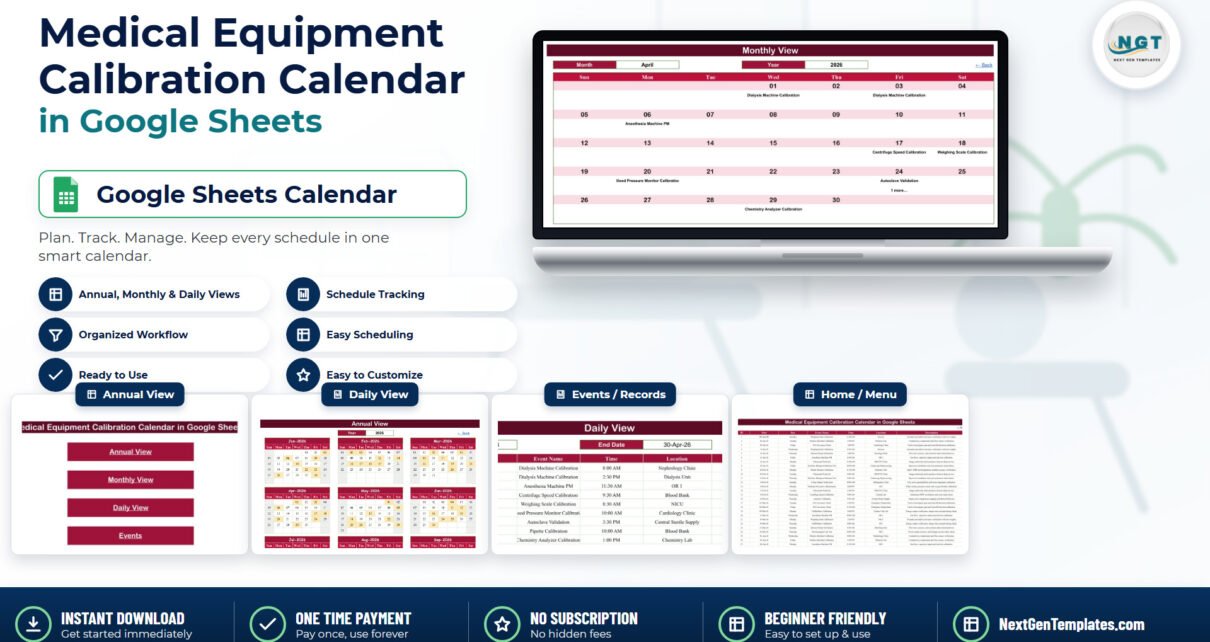
Ask a biomedical technician in a small hospital where the calibration schedule lives and you will usually get one of three answers: a wall planner, a printed list in a folder, or “it’s in my head.” None of those survive a holiday, a resignation or an unexpected audit request. The Medical Equipment Calibration Calendar in Google Sheets is a small, honest fix for that: one shared spreadsheet, six tabs, three linked views, and a full year of planned calibration and preventive-maintenance work visible to anyone you send the link to.
Before anything else, let us be precise about what this is, because in a regulated environment vagueness is worse than a limitation. It is a calendar. It is not a calibration management system, not a CMMS, not a quality system of record and not a medical device. It does not work out when anything is next due, it stores no readings, tolerances or certificates, and it makes no FDA, ISO 13485, ISO 17025, IEC 62353, Joint Commission, CQC, NABH, MHRA or CE claim of any kind. If your department is inspected against a standard, this file is not your evidence – your certificates and your quality system are. What it does is stop the schedule from living in one person’s head.
Get the Medical Equipment Calibration Calendar in Google Sheets
What the workbook actually contains
Six tabs, five of them visible:
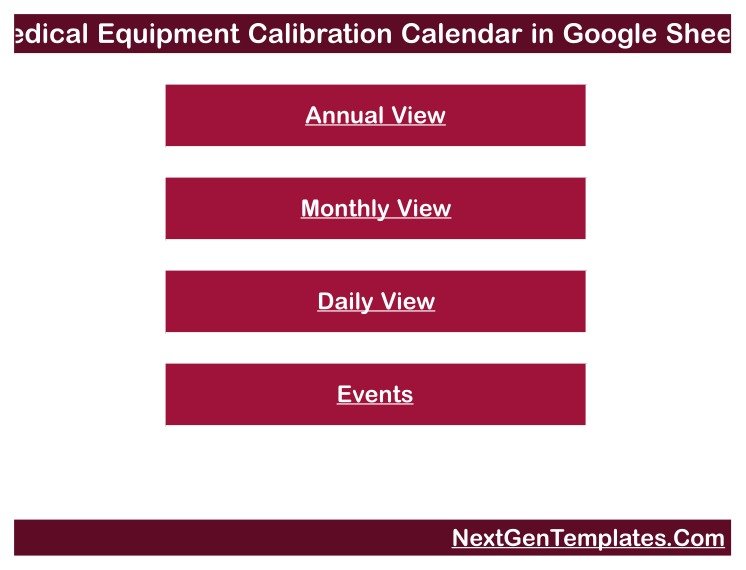
- Home – a title banner and four buttons that jump to each view.
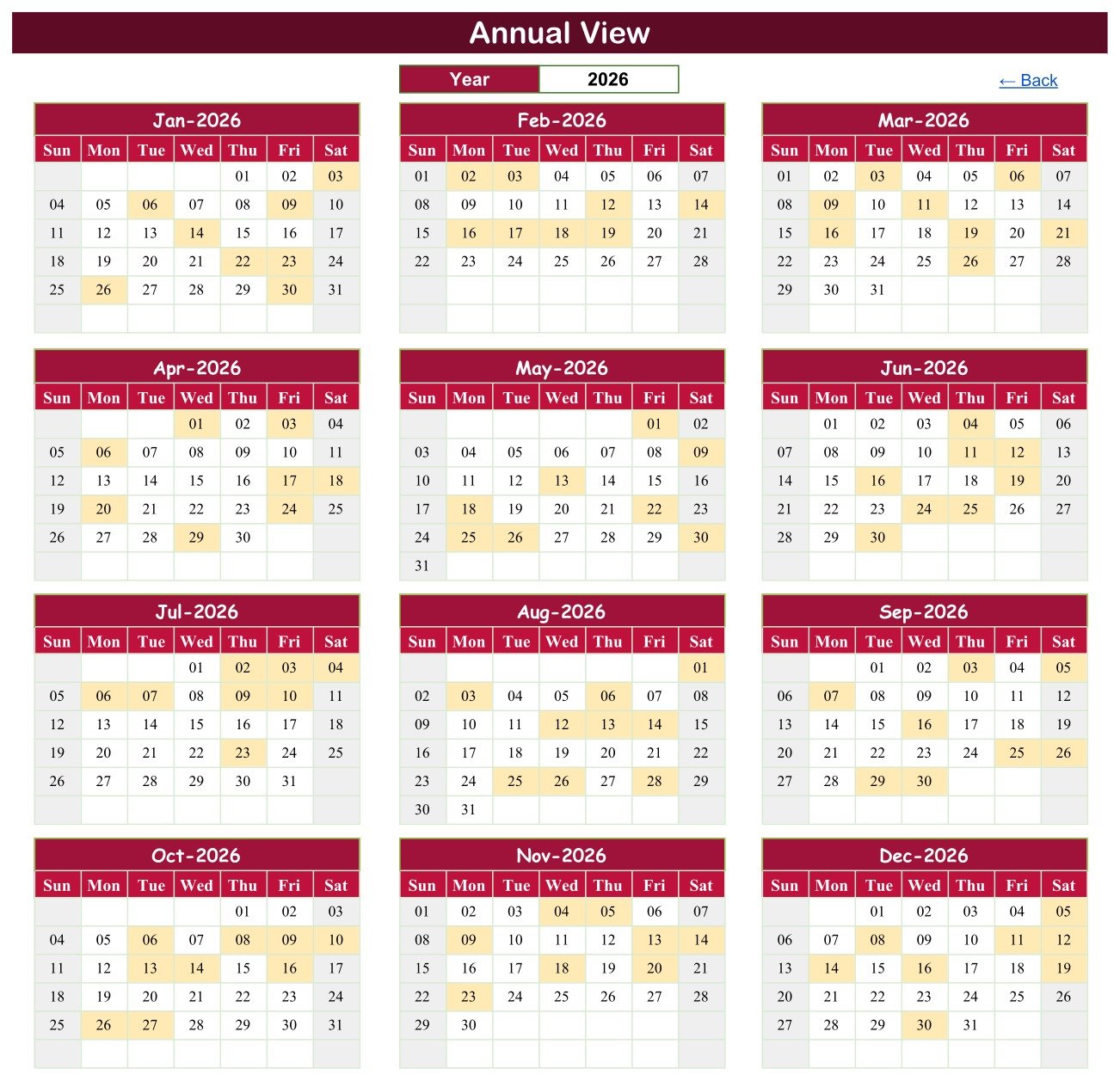
- Annual View – twelve month grids for one year, three across and four down, with every scheduled day shaded.
- Monthly View – Month and Year dropdowns over a Sun-to-Sat grid.
- Daily View – a Start Date and an End Date over a
FILTERthat returns every matching job. - Events – the one table everything else reads from.
- List – hidden, holding the twelve month names and a 2021-2056 year range for the dropdowns.
The Events tab has exactly seven columns – ID, Date, Day, Event Name, Time, Location and Description – and it ships with 100 sample rows dated 03-Jan-2026 to 30-Dec-2026, eight or nine a month for all twelve months. Everything on the other three tabs is a formula reading that one table. Change a row on Events and all three views change with it.
One table, three ways of looking at it
Annual View: the year at a glance
Type a year into the single Year cell and all twelve grids rebuild. Days that carry a scheduled job are shaded, so you can see the shape of the year immediately – which months are heavy, where the gaps are, and whether you have accidentally stacked half the department’s work into one week in March.
Monthly View: the planner you print
Pick a month and a year from the dropdowns and the grid fills with that month’s jobs on their dates. Set it to April 2026 in the sample data and you get Dialysis Machine Calibration on the 1st and the 3rd, Anesthesia Machine PM on the 6th, Centrifuge Speed Calibration on the 17th, Weighing Scale Calibration on the 18th, Blood Pressure Monitor Calibration on the 20th, Autoclave Validation on the 24th and Chemistry Analyzer Calibration on the 29th.
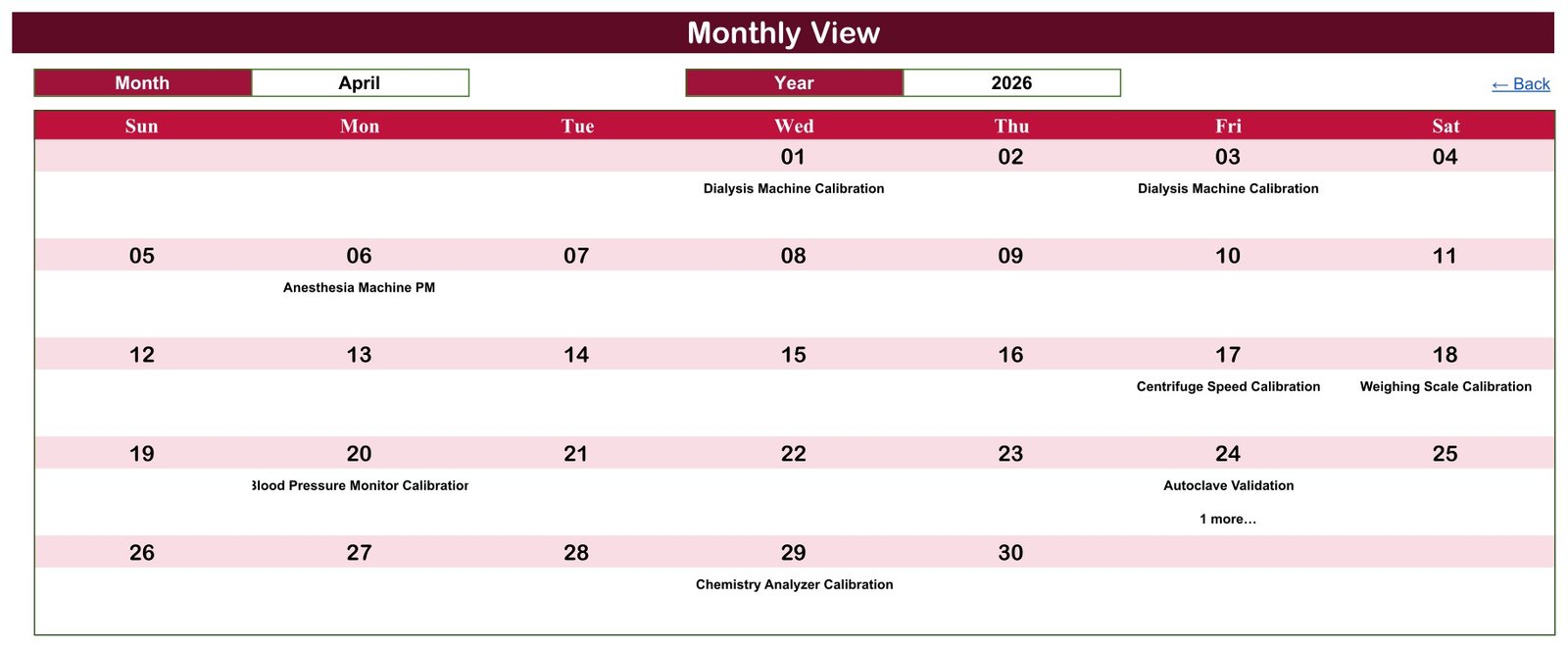
One thing to understand about this view: it uses VLOOKUP, and VLOOKUP returns the first match. If a date carries two jobs, the grid prints one of them and a COUNTIF underneath adds a “1 more…” note so you know something is hidden. Look at the 24th in the screenshot above – that is exactly what the note is telling you. In the sample year it happens on two dates, 24-Apr-2026 and 25-Jun-2026. It is not a bug, but it is a thing you have to know, because a busy month in a real department will trigger it far more often than a demo year does.
Daily View: the list you hand to whoever is on shift
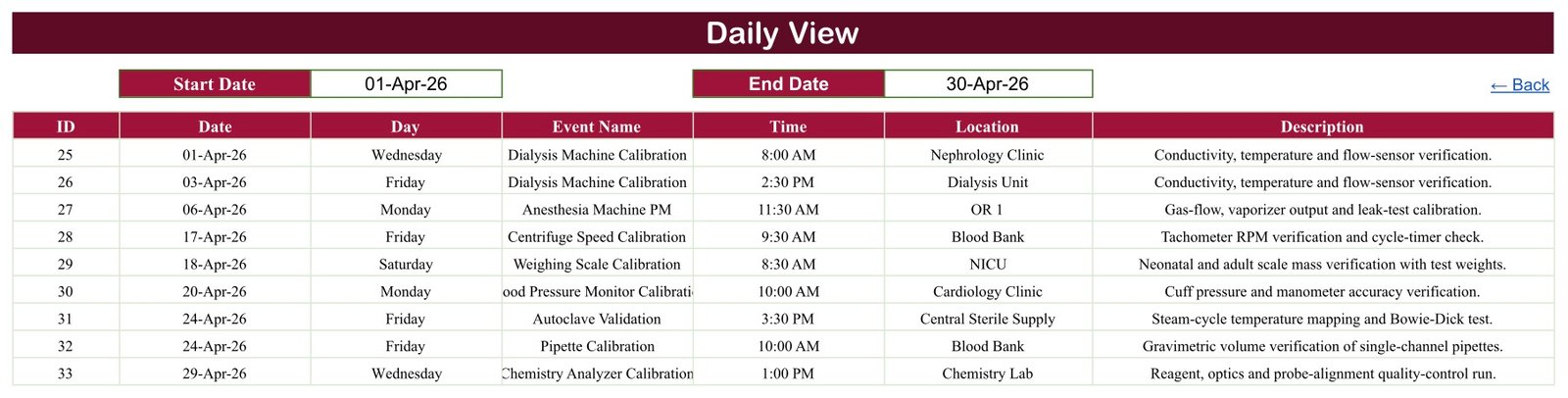
Set a Start Date and an End Date and a FILTER returns every job in the range with all seven columns, in date order. Set it to a single day and it is a work list. Set it to 01-Apr-26 through 30-Apr-26 and you get April’s nine jobs on one screen – and unlike Monthly View, this one shows every job on a stacked date.
The sample year is a real workload, not filler
The 100 demonstration entries were written to look like a small hospital’s actual year rather than lorem ipsum. There are 19 task labels:
Anesthesia Machine PM, Pipette Calibration, Weighing Scale Calibration, ECG Accuracy Check, Ultrasound Probe QA, Chemistry Analyzer Calibration, Autoclave Validation, Blood Pressure Monitor Calibration, Vaccine Fridge Logger Check, Dialysis Machine Calibration, Infusion Pump Verification, X-Ray Output Verification, Electrosurgical Unit Test, Sterilizer Biological Indicator Test, Centrifuge Speed Calibration, Patient Monitor Calibration, Ventilator Preventive Maintenance, Defibrillator Calibration and Infant Incubator Inspection.
They are spread across 34 named locations – three operating theatres, PACU, ICU, NICU, the Nursery, the Dialysis Unit, the Emergency Department, the Cardiac Cath Lab, Telemetry, Med-Surg, Oncology, Paediatrics, Labour and Delivery, Central Sterile Supply, Endoscopy Reprocessing and the Endoscopy Suite, the Blood Bank, four separate laboratories, Radiology, the Vascular Lab, the Vaccine Cold Room, Pharmacy, Respiratory Therapy, the Anaesthesia Workroom and five outpatient clinics – at 14 start times between 8:00 AM and 3:30 PM. Every one of the 100 rows carries the correct weekday name for its date, so a printed Daily View reads properly straight out of the box.
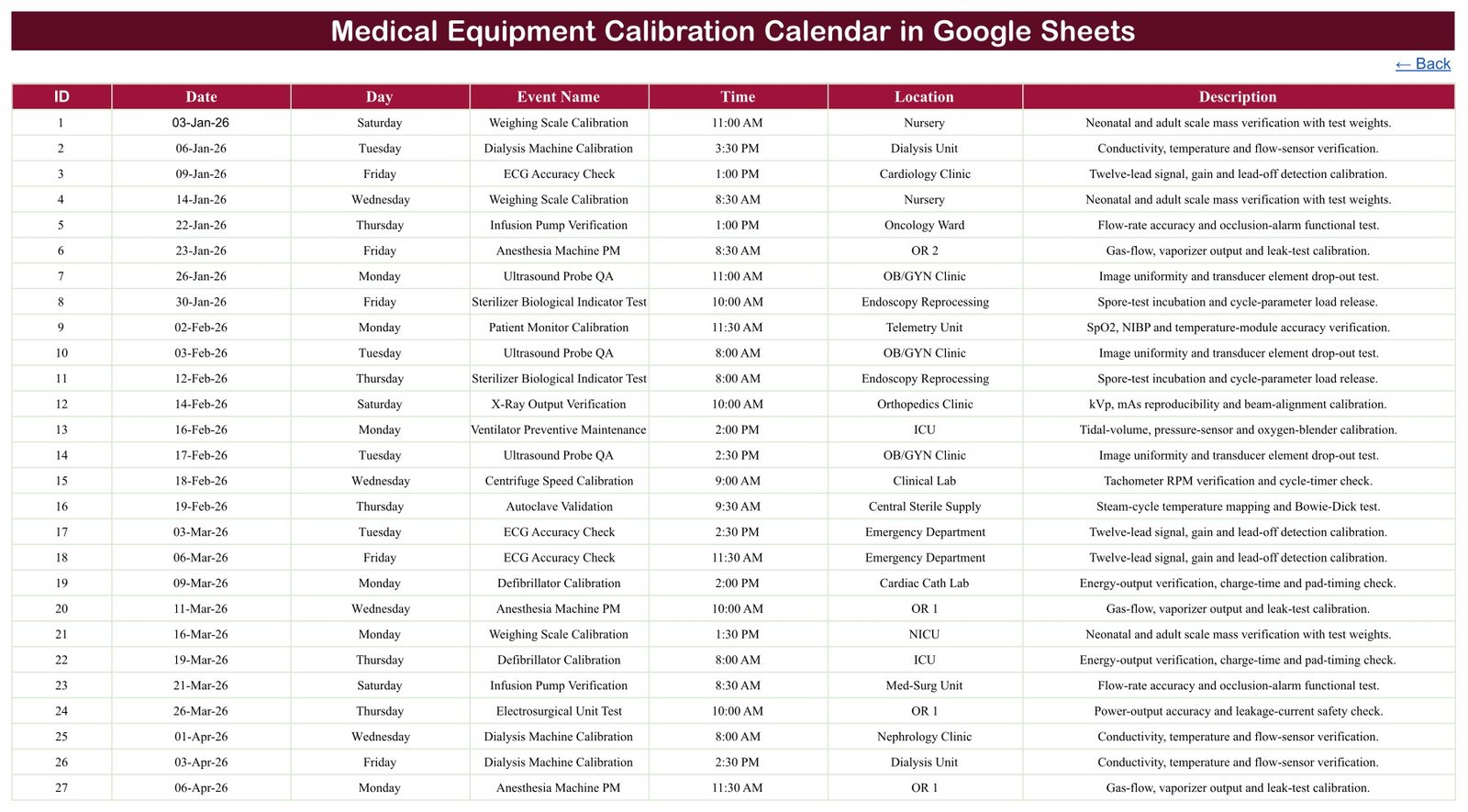
All of it is plain typed text. Delete rows 4 to 103 and put your own equipment, your own rooms and your own wording in their place.
It schedules machines, not people
This is the part worth dwelling on, because it is a healthcare file and the instinct is to ask what personal data it holds. The answer is none.
There are seven columns on the Events tab and not one of them is a patient name, a patient ID, a hospital or NHS number, a date of birth, a contact detail, a diagnosis or a clinical value. Across all 100 sample rows the word “patient” appears in exactly one place – inside the device name Patient Monitor Calibration – because a patient monitor is a bedside vital-signs machine. “Nursery” and “NICU” are rooms. Nobody’s identity is in this file.
For a calibration diary that is not an oversight, it is the correct design. The thing being scheduled is an instrument in a room: the autoclave in Central Sterile Supply, the scales in the Nursery, the pipettes in Microbiology. And a shared Google Sheet is the wrong home for clinical identities anyway – once you share a link there is no meaningful access control, no encryption you own, no audit trail and no retention policy. Schedule the work here; keep the records where your organisation has decided they belong.
There is no staff name, technician, engineer or vendor column either, and no signature field. Who did the job and who signed it off belongs in your quality system.
What it deliberately does not do
A calibration calendar that does not manage calibration is counter-intuitive, so here it is plainly. Read this list before you buy, not after.
- It does not calculate the next due date. There is no interval field and no “last done plus twelve months” formula. Every date on the Events tab is a date you typed. This is the single biggest thing to understand – the sheet shows a schedule, it does not build one.
- It records no results. No pass/fail, no as-found or as-left readings, no tolerance, no uncertainty, no deviation, no corrective action.
- It holds no certificates or traceability. No certificate number, no issuing laboratory, no standard reference, no expiry.
- It has no asset register. No serial number, asset tag, model, manufacturer or service history. It schedules a task type in a named room, so four identical infusion pumps in one ward look the same to it.
- It does not stop a clash. Nothing prevents two jobs in the same room at the same time. There is no validation and no warning.
- It has no duration or end time, so downtime and technician hours cannot be calculated from it.
- It sends nothing. No reminders, no email, no SMS – and no overdue alert, because it has no concept of overdue.
- It carries no compliance claim. Naming FDA regulation, ISO 13485, ISO 17025, ISO 9001, IEC 62353, IEC 60601, Joint Commission, CQC, NABH, MHRA or CE marking here is a statement that this template is not certified, validated or approved under any of them.
Where a spreadsheet is the right answer – and where it is not
| What you need | This Google Sheets calendar | Calibration / CMMS software |
|---|---|---|
| See a year, a month and a date range of planned work | Yes | Yes |
| Share it with biomedical, nursing and lab staff instantly | Yes – send a link | Yes, with accounts and licences |
| Open it on a phone at the bench | Yes | Usually yes |
| Generate next due dates from calibration intervals | No | Yes, that is the core of it |
| Capture results, readings and certificates | No | Yes |
| Track individual assets by serial number | No | Yes |
| Flag overdue items and escalate | No | Yes |
| Audit trail, access control, e-signature, validation | No | Yes |
| Cost | $4.99 once | Recurring, per seat or per asset |
The honest reading of that table: if your hospital already runs a validated calibration platform, this is a shared wall-planner for the workshop screen, not a replacement. If your department currently runs on a paper diary and a group chat, this is a genuine step up for the price of a coffee – and it is still not a quality system, so keep the certificates where they belong.
Getting started in about ten minutes
- Make your copy. The download is a PDF containing a “Make a copy” link. Click it and Google puts an editable copy in your own Drive. Nothing is installed and nothing is shared back with us.
- Explore the sample year before you touch it. Set Monthly View to April 2026, then set Daily View to 01-Apr-26 and 30-Apr-26. Same nine jobs, two views. That is the whole mechanism.
- Clear the samples. Select Events rows 4 to 103 and delete the contents – not the rows themselves, and not row 3, which holds the headers.
- Work out your own dates first. Take your intervals from your certificates and manufacturer guidance, decide the dates, and then type them in. The sheet will not do this step for you.
- Keep the Day column honest. It is typed text, not a formula. If you move a date, update the day name – or replace the column with
=TEXT(B4,"dddd")and fill it down. - Check every “1 more…” in Daily View before you print a month.
- Share it read-only with the wards and editable with the one or two people who own the schedule. That single decision is the closest this file has to access control.
Who gets the most out of it
The 40-bed private hospital with a single biomedical technician, who maps the year in January and shares the month view with the ward managers. The clinical laboratory that wants pipette, centrifuge and analyser checks on the bench noticeboard. The Central Sterile Supply lead tracking autoclave validations and biological indicator tests. The vaccination programme keeping fridge logger checks off a separate scrap of paper. The third-party service company that would rather send a client a read-only link than another emailed spreadsheet. And the imaging department that wants X-ray output verification and ultrasound probe QA visible next to everything else instead of buried in a vendor portal.
It is not for anyone who needs the calendar to drive compliance. If you need due dates generated, results captured, certificates stored and an audit trail that will stand up to an inspection, buy the software. This is a diary, and it is honest about being one.
Google Sheets or Excel?
Both editions exist and they are companions rather than copies. Choose the Google Sheets version if the schedule needs to be shared and edited live by several people, or read on a phone at the bench. Choose the Excel edition if your department works from a desktop workbook on a local drive – it adds a “This Month” summary page and runs as a macro-enabled file. There is a full write-up of the Excel edition if you want to compare them side by side. The sample data in each is its own, so owning both is not a duplicate purchase.
Get the template
The Medical Equipment Calibration Calendar in Google Sheets is a one-time purchase – no subscription and no per-user licence. The download is a PDF with the copy link inside it; click it and the calendar is in your Drive in about two minutes.
Get the Medical Equipment Calibration Calendar in Google Sheets
If spreadsheet skills are the real gap, the NextGenTemplates Academy learning paths take you through the basics step by step, with practice files.
Related Google Sheets calendars
If you are building out the rest of the department’s diary, the same layout is used across a family of healthcare calendars: the Operation Theatre Booking Calendar for theatre lists, the Radiology Slot Booking Calendar for imaging rooms, and the Pharmacy Stock Expiry Calendar for the other thing a hospital has to watch by date.
For the staffing side there is the Nurse Duty Roster Calendar and the Doctor On-Call Calendar; for a general clinic diary, the Medical Appointment Calendar and the Patient Follow-Up Visit Calendar.
And if it is maintenance scheduling in general that interests you rather than medical devices specifically, the Fleet Maintenance Calendar in Google Sheets applies the identical three-view pattern to vehicles.