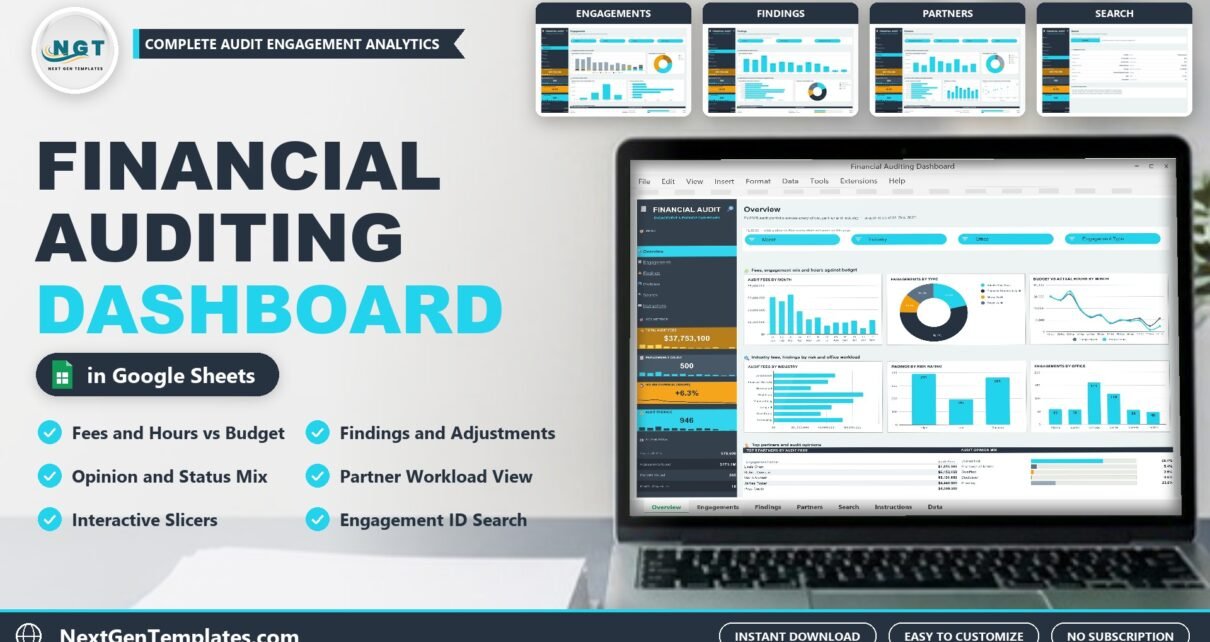
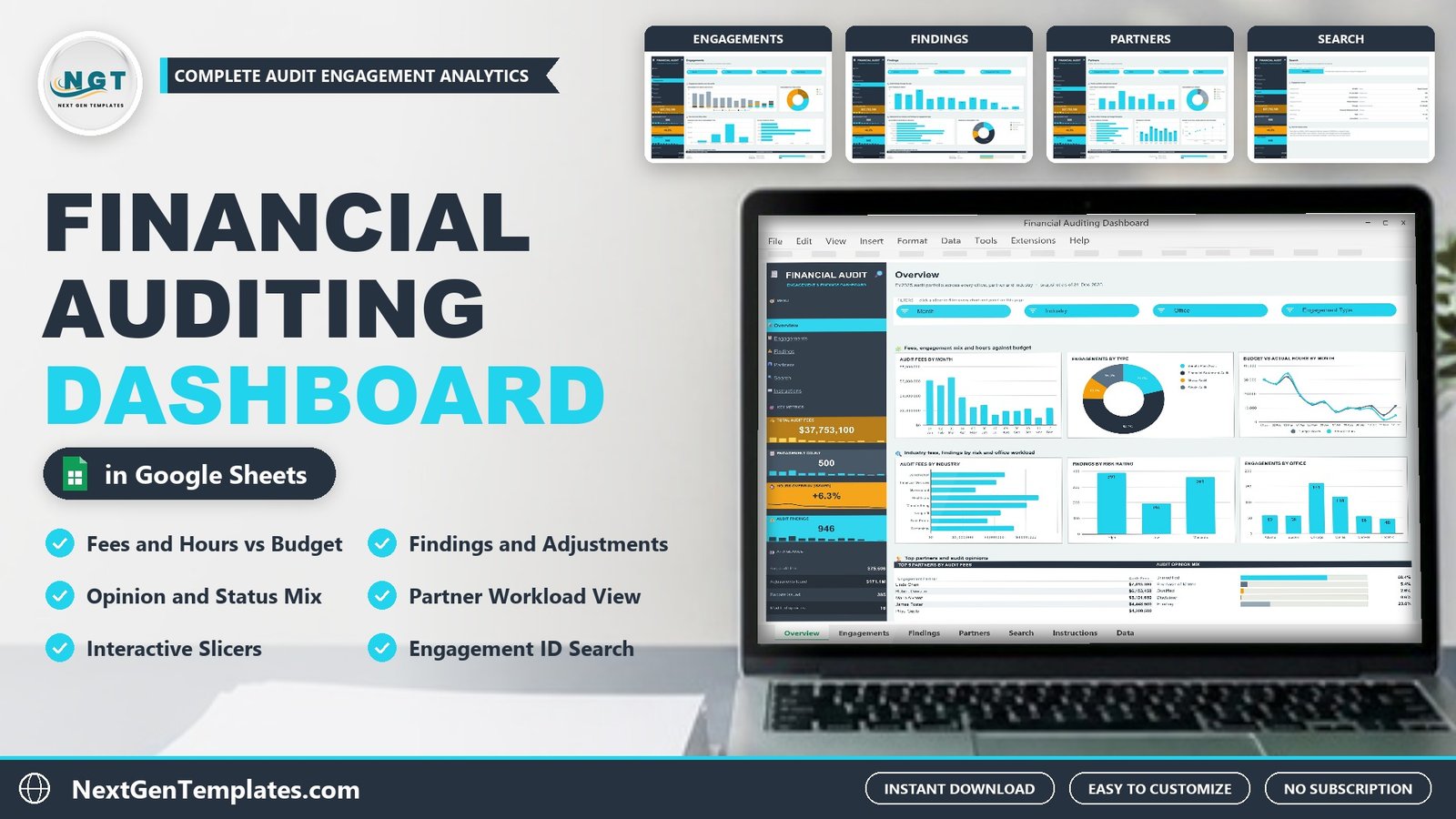
This audit dashboard in Google Sheets turns a year of audit engagements into one clear report. The Financial Auditing Dashboard in Google Sheets covers six offices, eight engagement partners and eight industries, laid out over four dashboard pages plus a Search page, an Instructions page and a Data tab. Four KPI cards, fifteen slicers and eighteen charts are ready to read, and the formulas already cover 1,000 engagements.
Audit teams live between fees, hours and findings. Budgets slip in busy season, risk ratings drive the work, and the engagement list usually sits in a practice management export that nobody has time to analyse. This dashboard is that analysis, done in advance: paste your export over the Data tab and every page follows.
Get the Financial Auditing Dashboard in Google Sheets
Watch the Financial Auditing Dashboard in Google Sheets walkthrough
Key Features of the Financial Auditing Dashboard in Google Sheets
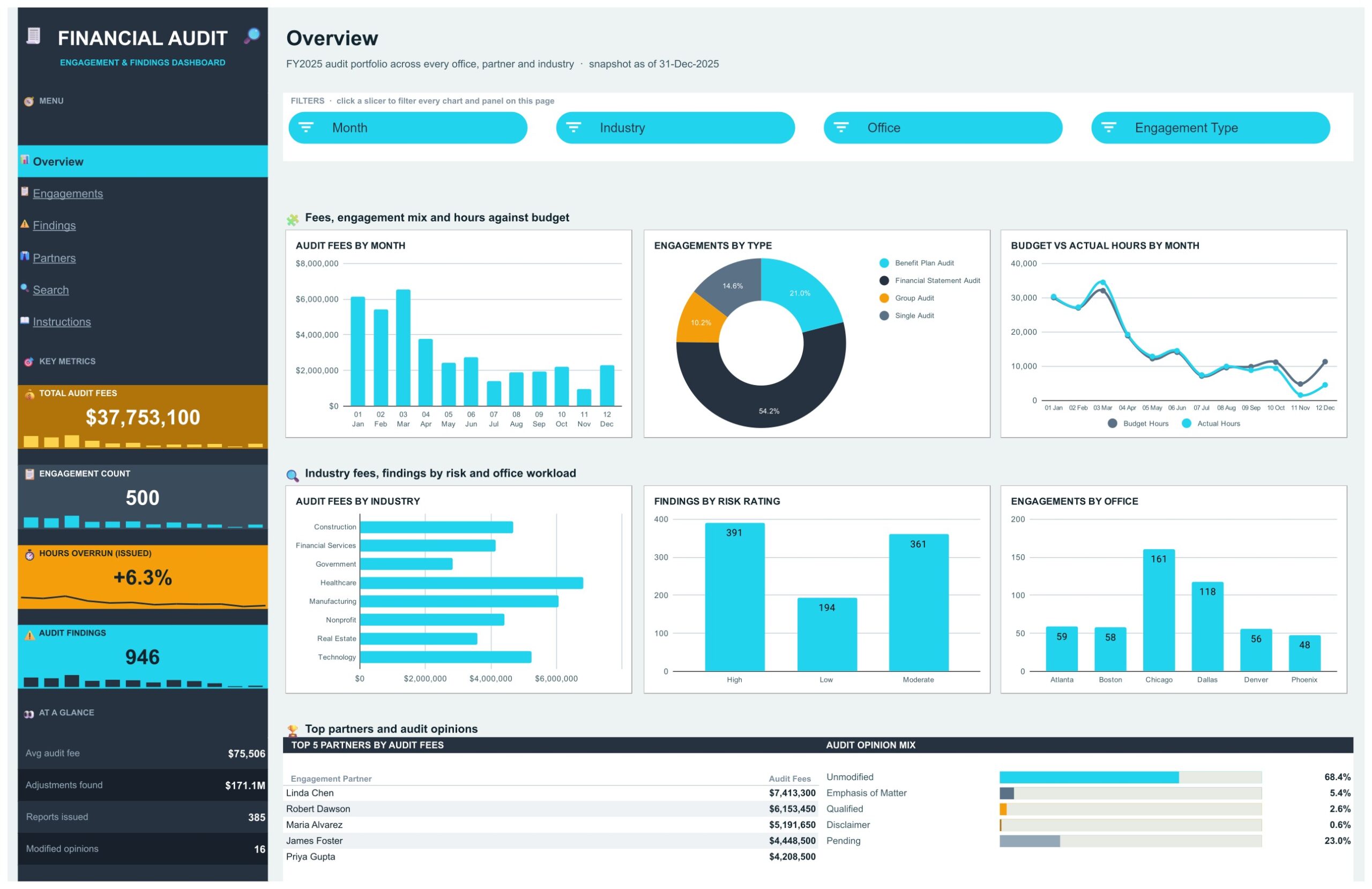
- Four KPI cards in a dark side rail. On the sample data: Total Audit Fees $37,753,100, Engagement Count 500, Hours Overrun +6.3% on issued reports and Audit Findings 946.
- Fifteen cyan slicers. Month, Industry, Office, Engagement Type, Status, Risk Rating, Engagement Partner and Opinion, grouped in a filter strip at the top of each dashboard page. Each slicer filters the charts and the Top 5 table on its own page.
- Eighteen charts. Six on Overview, four on Engagements, three on Findings and five on Partners.
- An At a Glance block. Average audit fee ($75,506), adjustments found ($171.1M), reports issued (385) and modified opinions (16) sit under the KPI cards on every page.
- An Engagement Lookup page. Type an Engagement ID and the full record is pulled from the Data tab with INDEX / MATCH, with Not found shown for a missing ID.
- 1,000-engagement capacity and no add-ons. Built with pivot tables, formulas and native slicers, so there is no script or add-on to install.
Dashboard Pages Explanation
The Financial Auditing Dashboard in Google Sheets ships four dashboard pages, a Search page and an Instructions page, plus the Data tab that feeds them. A side rail menu moves you between pages with one click.
Page 1: Overview, Fees, Engagement Mix and Hours Against Budget
The landing page reports the whole audit portfolio at once. Charts are Audit Fees by Month, Engagements by Type, Budget vs Actual Hours by Month, Audit Fees by Industry, Findings by Risk Rating and Engagements by Office. On the sample data January to March bring in between $5.4M and $6.5M of fees a month, financial statement audits are 54.2% of engagements, Chicago carries 161 of the 500 engagements and high and moderate risk clients raise the most findings (391 and 361). At the bottom, a Top 5 Partners by Audit Fees table is led by Linda Chen at $7,413,300, next to an Audit Opinion Mix where 68.4% of engagements are unmodified and 23.0% are still pending.
Page 2: Engagements, Pipeline, Risk and Effort
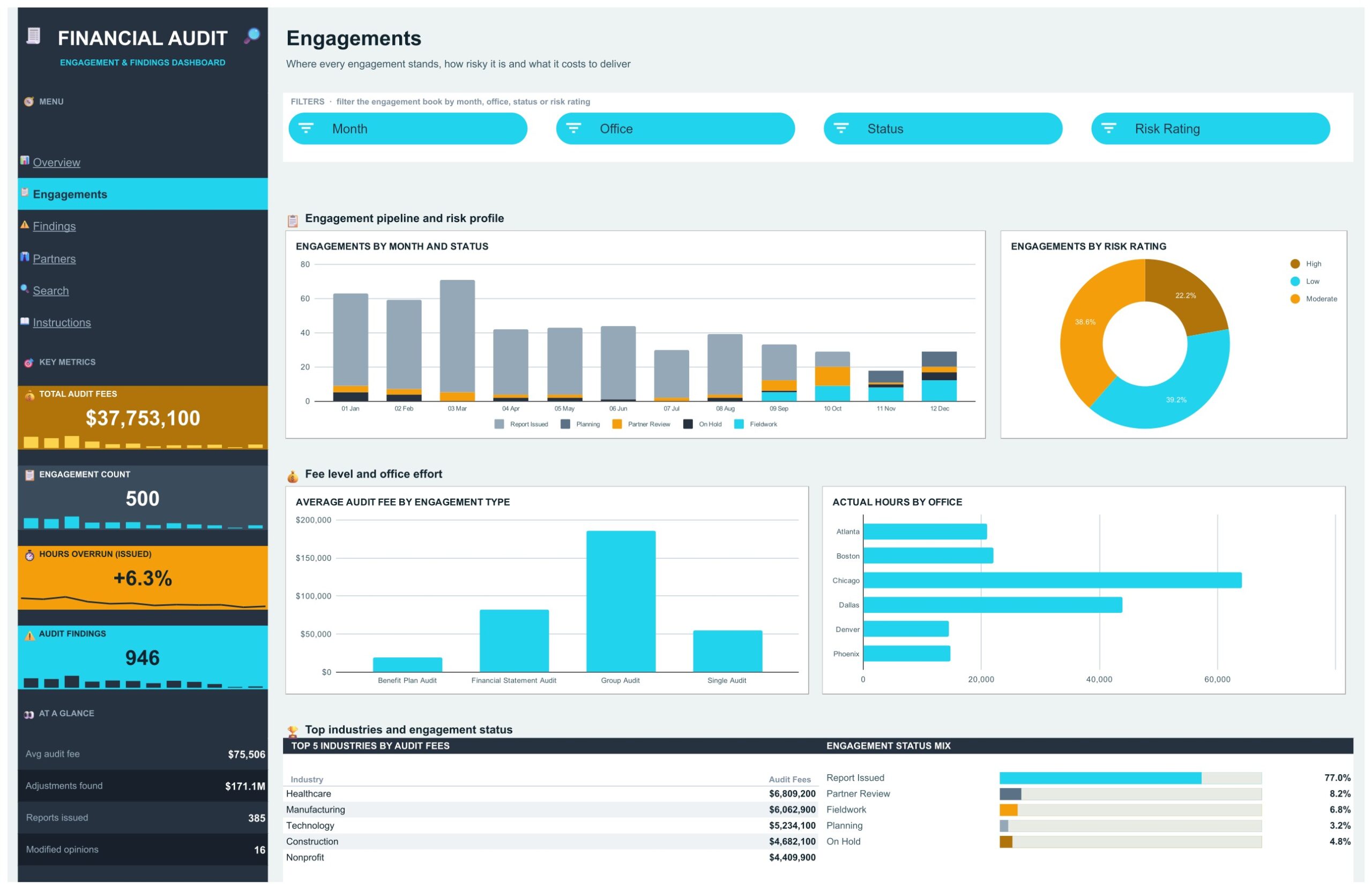
Where every engagement stands, how risky it is and what it costs to deliver. Charts are Engagements by Month and Status, Engagements by Risk Rating, Average Audit Fee by Engagement Type and Actual Hours by Office. The early months are almost all report issued, while October to December still hold work in fieldwork, partner review and planning. Group audits are the largest jobs by far, at well over $150,000 each on average, and risk splits into 39.2% low, 38.6% moderate and 22.2% high. A Top 5 Industries by Audit Fees table puts healthcare first at $6,809,200, beside an Engagement Status Mix showing 77.0% of engagements with the report issued.
Page 3: Findings, Adjustments and Client Risk Mix
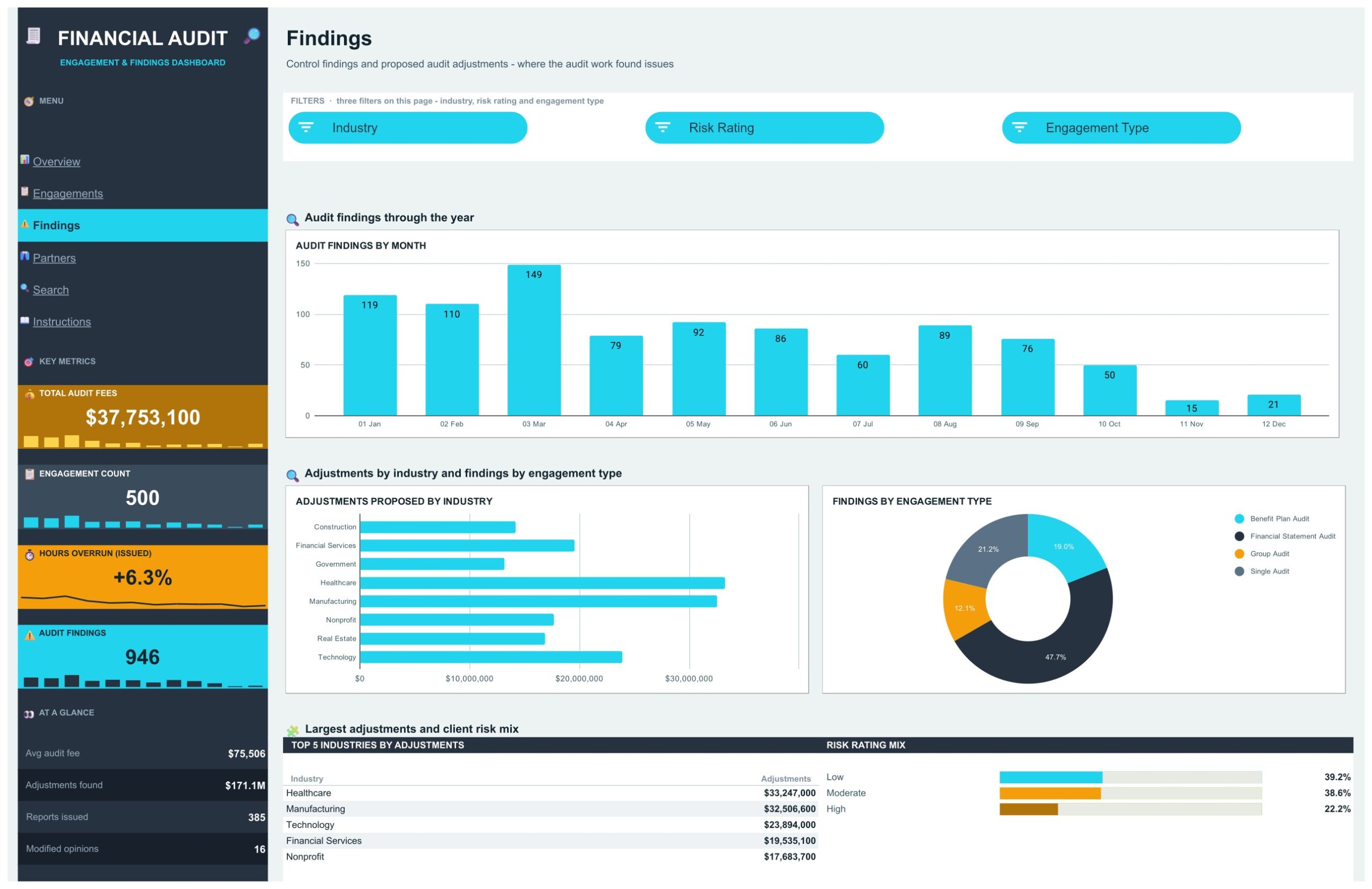
Control findings and proposed audit adjustments, and where the audit work found issues. Charts are Audit Findings by Month, Adjustments Proposed by Industry and Findings by Engagement Type. Findings peak in March at 149 and fall away through the year. Healthcare ($33,247,000) and manufacturing ($32,506,600) have the largest proposed adjustments, and financial statement audits produce 47.7% of all findings. A Top 5 Industries by Adjustments table sits beside a Risk Rating Mix panel.
Page 4: Partners, Workload, Findings and Budget Discipline
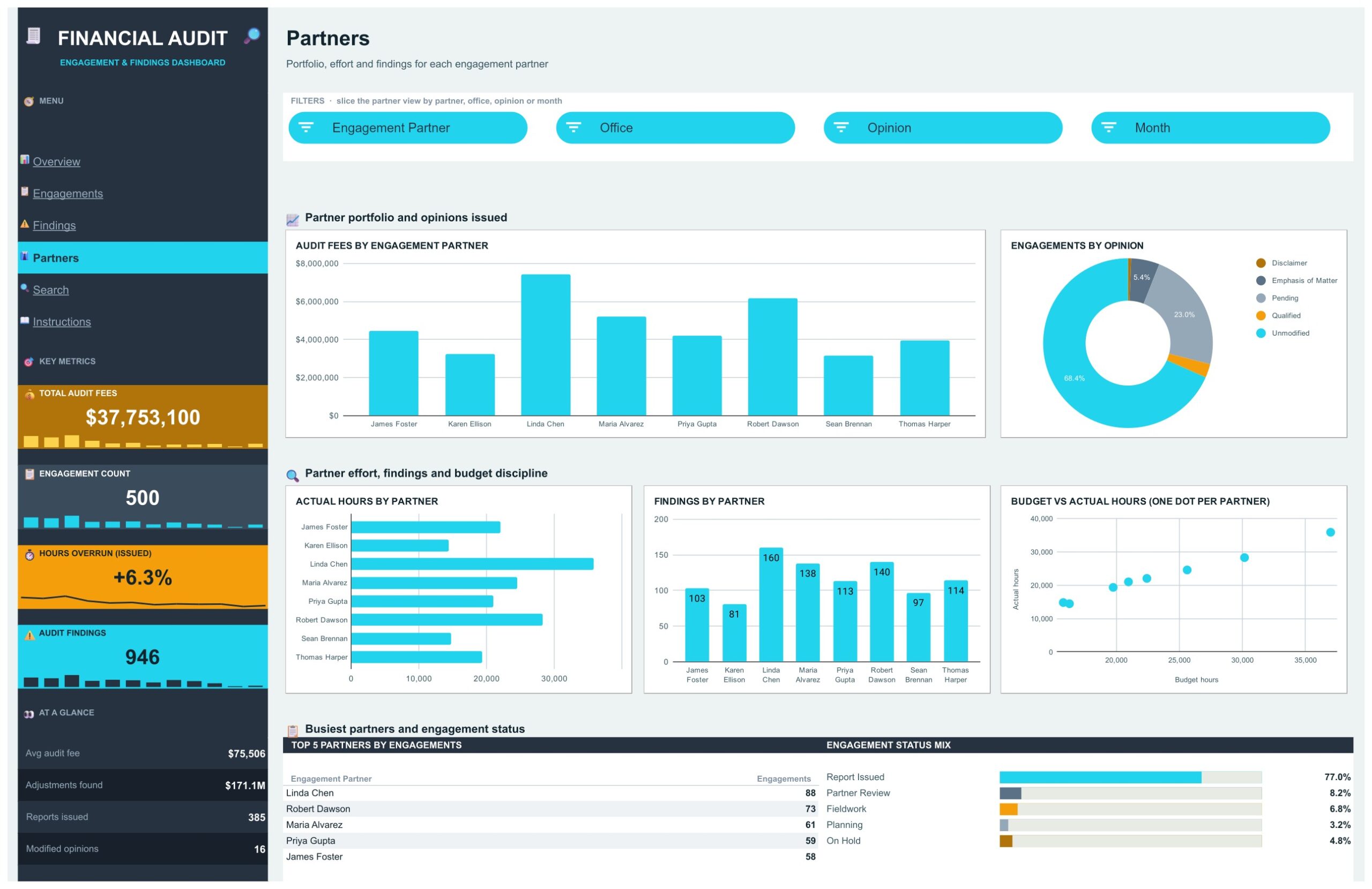
Portfolio, effort and findings for each engagement partner. Charts are Audit Fees by Engagement Partner, Engagements by Opinion, Actual Hours by Partner, Findings by Partner and a scatter of Budget vs Actual Hours with one dot per partner. Linda Chen leads on fees, hours and findings (160), and the scatter shows at a glance which partners use more hours than they budgeted. A Top 5 Partners by Engagements table shows Linda Chen with 88 engagements, ahead of Robert Dawson (73) and Maria Alvarez (61).
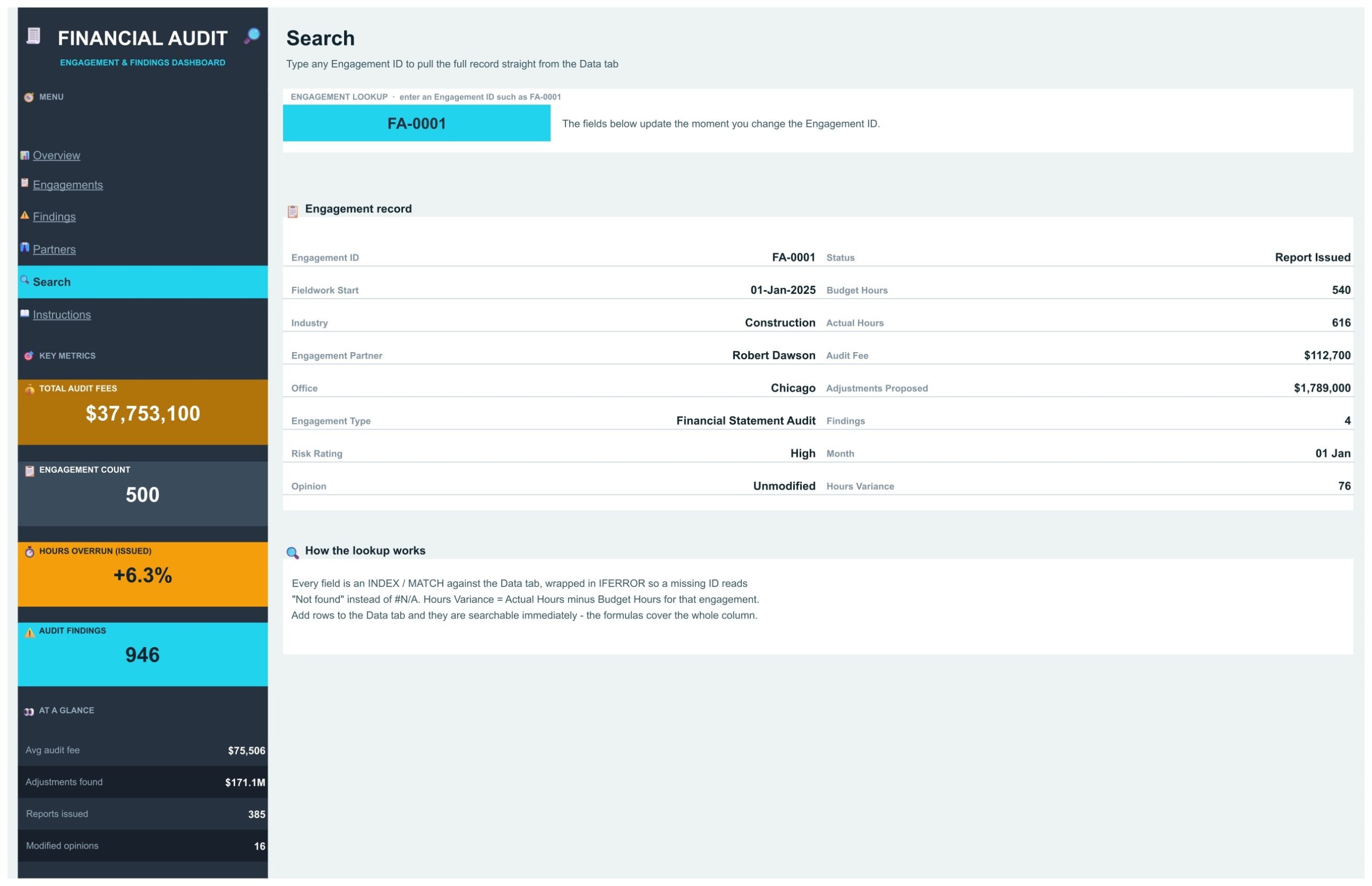
Page 5: Search, Engagement Lookup
Type any Engagement ID, such as FA-0001, into the cyan input box and the page pulls the full engagement record from the Data tab: status, fieldwork start, budget and actual hours, industry, partner, audit fee, office, adjustments proposed, engagement type, findings, risk rating, month, opinion and hours variance. Every field is an INDEX / MATCH wrapped in IFERROR, so a missing ID reads Not found instead of an error.
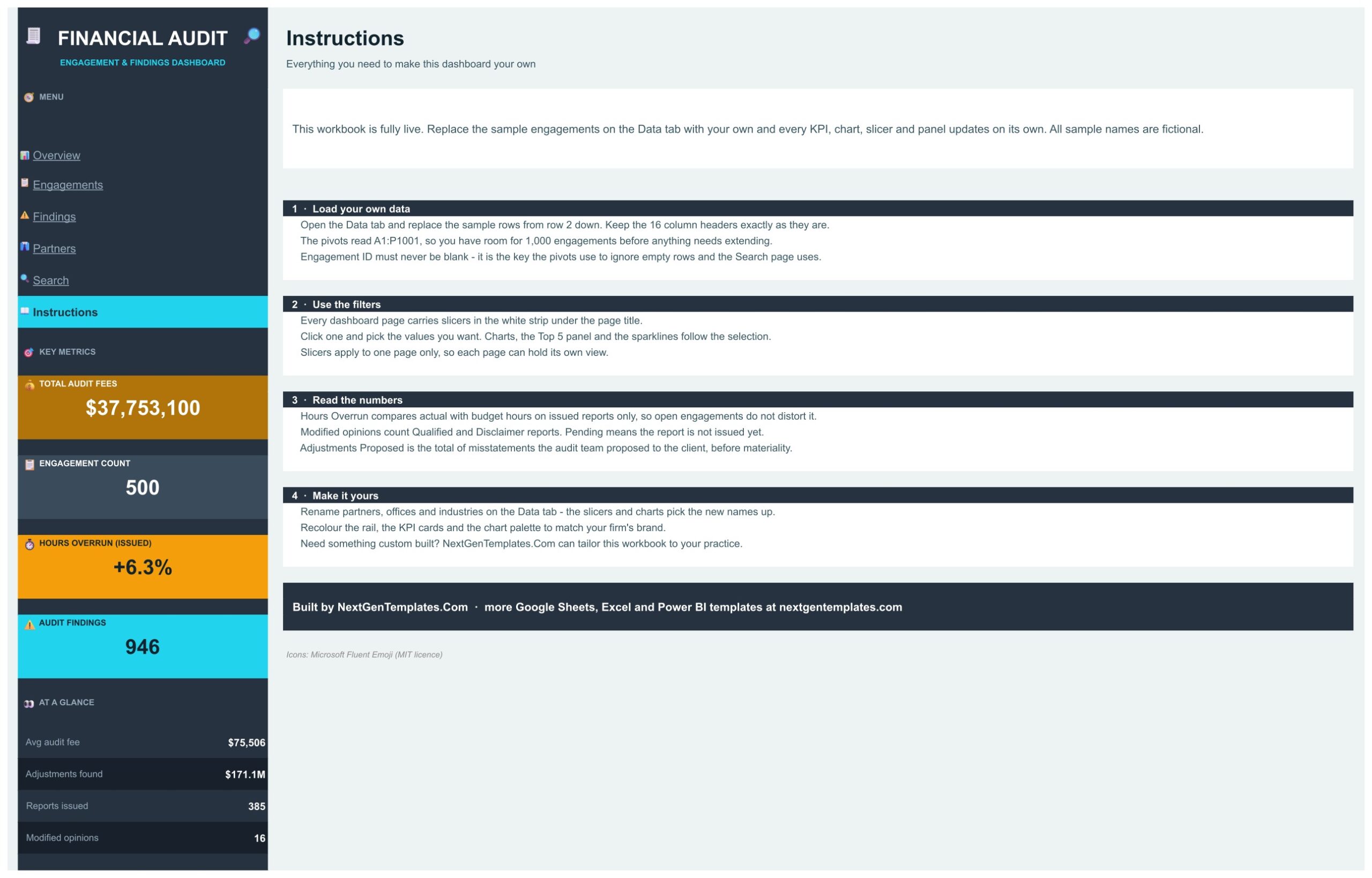
Page 6: Instructions, User Guide
A short guide explains how to load your own engagements into the Data tab, how to use the slicers, how Hours Overrun, Modified Opinions and Adjustments are calculated, and how to rename the partners, offices and industries or change the colors.
The Data Tab
The Data tab holds 500 sample engagements for 2025 in 16 columns, from Engagement ID and Fieldwork Start to Findings, Month and Count. Paste your own rows under the headers and keep the Engagement ID filled in, because the pivots use it to skip empty rows and the Search page uses it to find an engagement.
Financial Auditing Dashboard vs. an Excel Dashboard vs. a Paid BI Suite
| Feature | Financial Auditing Dashboard (Google Sheets) | Microsoft Excel dashboard | Paid BI suite (Tableau, Domo) |
|---|---|---|---|
| Cost | One-time purchase ✅ | One-time purchase plus Microsoft 365 | Per-user monthly subscription |
| Platform | Any browser, nothing to install ✅ | Desktop Excel | Browser plus a data pipeline |
| Setup | Paste your engagements and go ✅ | Build or adapt the dashboard first | Connectors and data modelling first |
| Team collaboration | Built in ✅ | Only via OneDrive co-authoring | Yes, on paid seats |
| Share with a link | Yes, view or edit ✅ | File attachment or OneDrive link | A seat is required to view |
| Engagement-level lookup | Search page ✅ | Needs a lookup formula | Yes, via a detail view |
Who Should Use This Audit Dashboard
- CPA firms and audit practices that keep an engagement list in a spreadsheet
- Internal audit teams that need fees, hours and findings across offices
- Audit partners comparing workload, findings and budget discipline
- Practice managers following the pipeline from planning to report issued
- Consultants who want a finished google sheets dashboard template to drop a client export into
It is not audit software. It holds no workpapers, sampling or sign-offs, and it has no live connection to a practice management system. It reports engagement numbers from the Data tab you paste into.
Real-World Use Cases
An audit partner pastes the month’s engagement export over the Data tab, opens the Partners page and checks budget versus actual hours before the weekly staffing meeting.
A practice manager opens the Engagements page, selects Fieldwork in the Status slicer and sees every engagement still in the field, by office and risk rating.
An internal audit lead uses the Findings page to see which industries and risk ratings produce the most findings and the largest proposed adjustments, then filters by High risk for the committee pack.
Advantages of the Financial Auditing Dashboard in Google Sheets
- Ready the moment you make a copy, with sample data that shows every chart working
- One file covers the pipeline, findings, partner workload and single-engagement questions
- Shares by link with no seat licences
- Fully editable: rename partners, offices and industries, or recolor the cards
Opportunities for Improvement
- Data is pasted in, not synced, so the dashboard is only as current as the last export
- Engagement lists far beyond 1,000 rows need the ranges extended first
- The layout is built for desktop and tablet screens; on a phone it is better for a quick look than for analysis
Best Practices
- Keep the 16 column headers exactly as they are and paste values only
- Use one consistent spelling for each partner, office and industry, or the slicers will list duplicates
- Clear every slicer with Select all before you share a view with your team
- Keep a dated copy of the file each month so you can compare periods
Explore Relevant Templates
- Accounting Firms Dashboard in Google Sheets: the practice-wide view for an accounting firm
- Accounting Firm Revenue Dashboard in Google Sheets: revenue and work in progress
- Private Equity Dashboard in Google Sheets: another finance dashboard in the same style
- Auditing Firm Management System Web App: manage audit clients and engagements in a web app
Frequently Asked Questions
What does the Financial Auditing Dashboard in Google Sheets track?
Audit fees, engagement status, budget and actual hours, findings, proposed adjustments and audit opinions across 6 offices, 8 engagement partners, 8 industries and 4 engagement types, on 500 sample engagements you replace with your own.
How long does setup take?
Open the PDF in your download, click Make a copy, then paste your engagement rows over the sample data on the Data tab. Nothing needs re-ranging for up to 1,000 engagements.
Is it audit software?
No. It is a reporting dashboard with sample data only and no live connection. You paste or import your own engagement list into the Data tab.
Are the sample clients and figures real?
No. Every engagement, partner name and figure on the sample Data tab is fictional.
Do I need any add-on or code?
No. It uses pivot tables, formulas and native Google Sheets slicers only.
About the Author
Built by PK, Microsoft Certified Professional with 15+ years of Excel, Google Sheets and Power BI experience. Founder of NextGenTemplates, reaching 300K+ subscribers across YouTube channels. Every template is hand-built and tested before release.
Conclusion
If your engagement data already exists and the only thing missing is a view of it, this audit dashboard closes that gap in an afternoon: four dashboard pages, four KPI cards, fifteen slicers and eighteen charts, plus a Search page for single-engagement questions. It runs in any browser and shares by link.
Download the Financial Auditing Dashboard in Google Sheets
✅ Instant download · One-time payment · No subscription
Last updated: October 2026