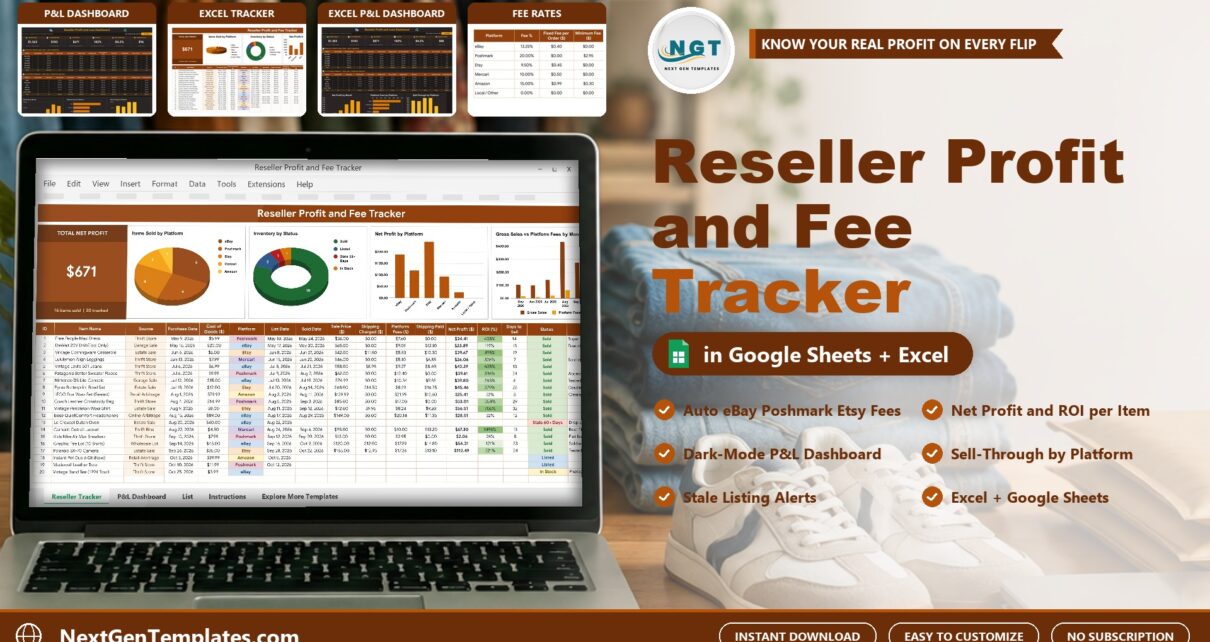
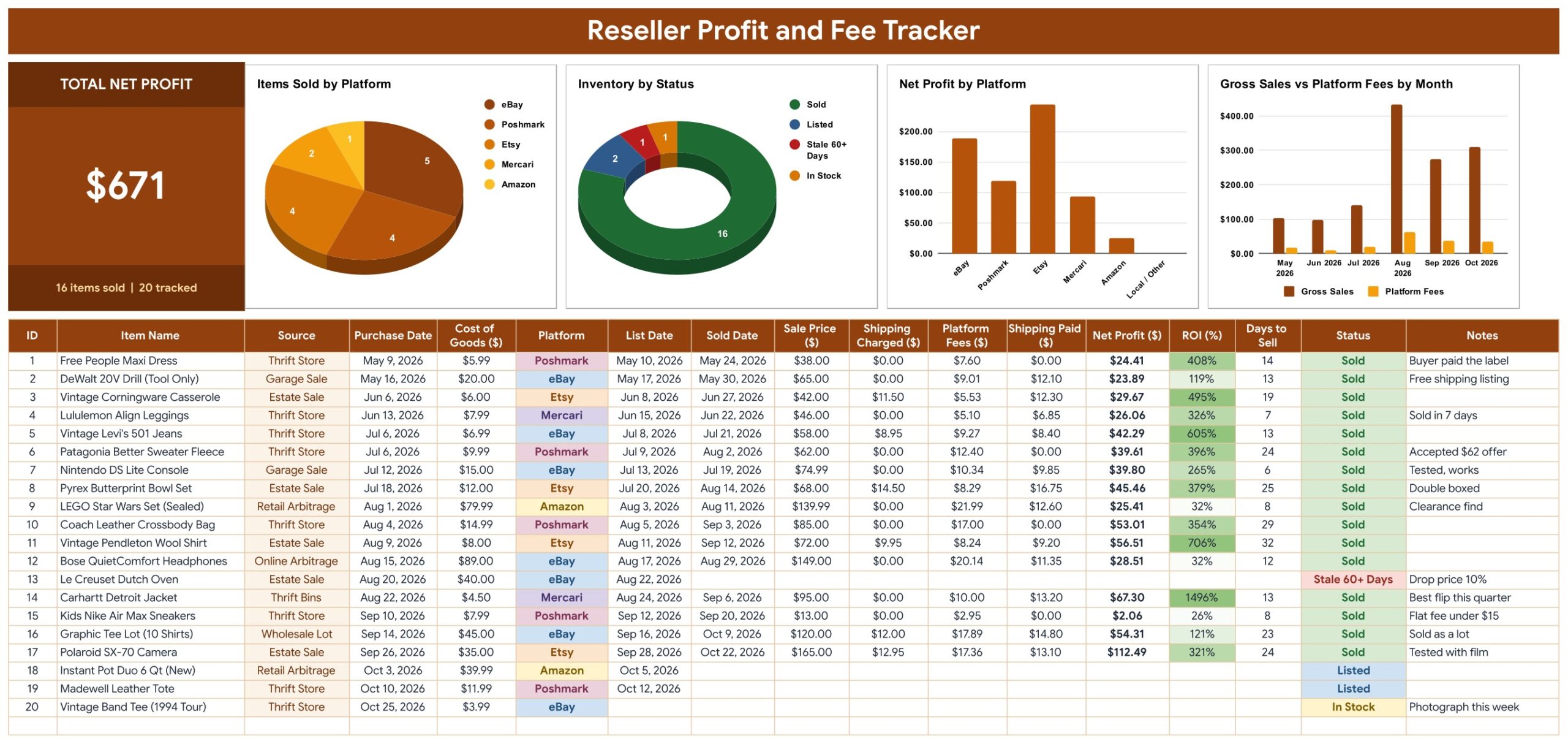
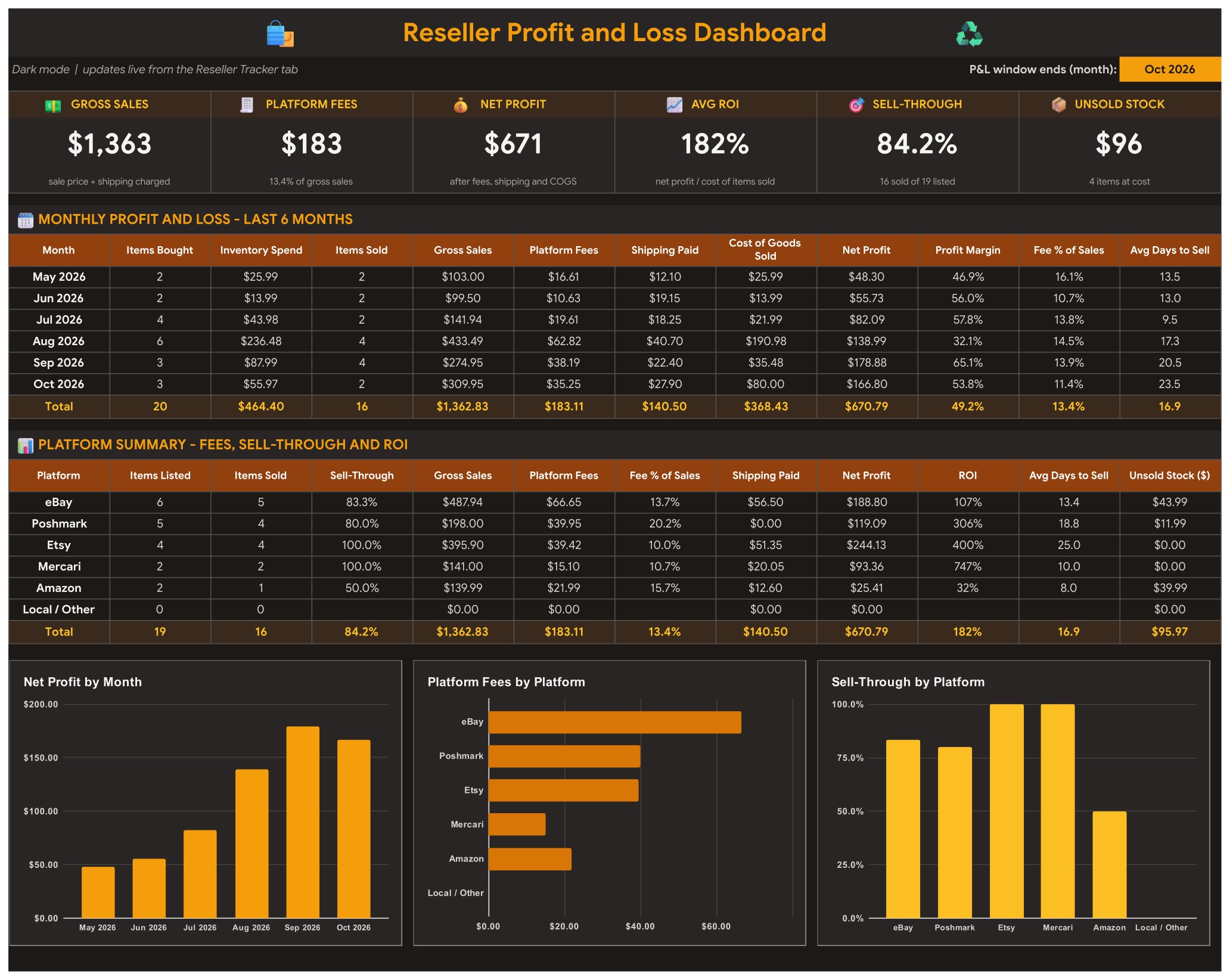
The reseller profit tracker in Google Sheets from NextGenTemplates answers one question for every item you flip: what did I really keep? In the sample data, 16 of 20 items sold for $1,363 of gross sales, platform fees took $183 (13.4%), and the net profit was $671 with an average ROI of 182%. The Reseller Profit and Fee Tracker in Excel and Google Sheets works that out per item, per month and per platform, with a fee table you can edit.
Anyone who sells at thrift, garage sale or retail clearance prices knows the trap: a $95 sale feels like a $95 win until you take off the platform fee, the shipping label and what you paid. A reselling profit spreadsheet that applies each platform’s fee rules removes the guesswork, and this one comes in two editions, Google Sheets and Microsoft Excel, with the same five tabs and formulas.
Watch the Reseller Profit Tracker in Google Sheets and Excel: Know Your Real Profit After Fees walkthrough
Key Features of the Reseller Profit and Fee Tracker
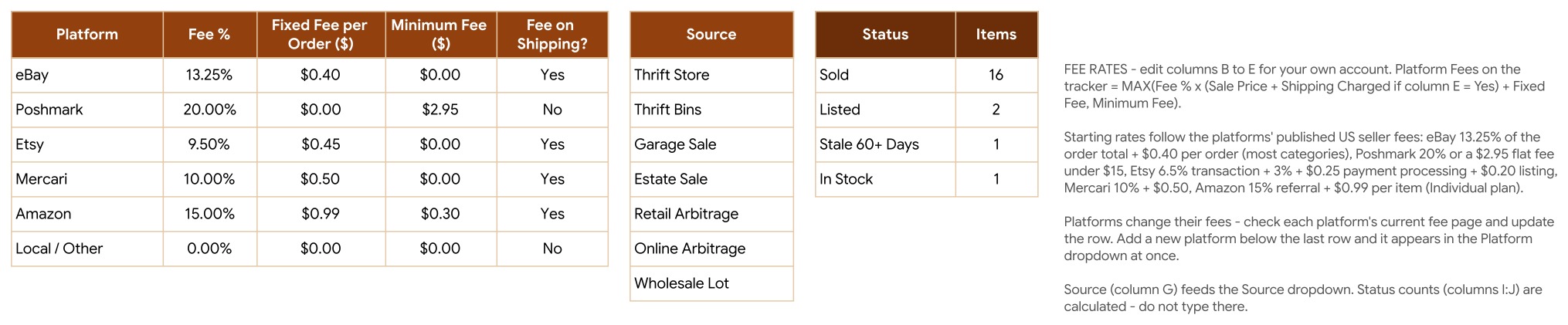
- Platform fee per item. The tracker takes the larger of (Fee % x (Sale Price + Shipping Charged, when the platform charges on shipping) + Fixed Fee) and the Minimum Fee. eBay, Poshmark, Etsy, Mercari, Amazon and Local / Other are set up.
- Net profit, ROI and days to sell. Net Profit = Sale Price + Shipping Charged – Platform Fees – Shipping Paid – Cost of Goods. ROI = Net Profit divided by Cost of Goods.
- Automatic status. Sold, Listed, In Stock and Stale 60+ Days, so slow stock is flagged without a filter.
- Total Net Profit card and four charts on the tracker tab, plus a dark mode P&L Dashboard with six KPI tiles, a 6-month profit and loss table, a platform summary and three more charts.
- No macros. Both editions use formulas only, so nothing needs enabling.
Dashboard Pages Explanation
Reseller Tracker tab
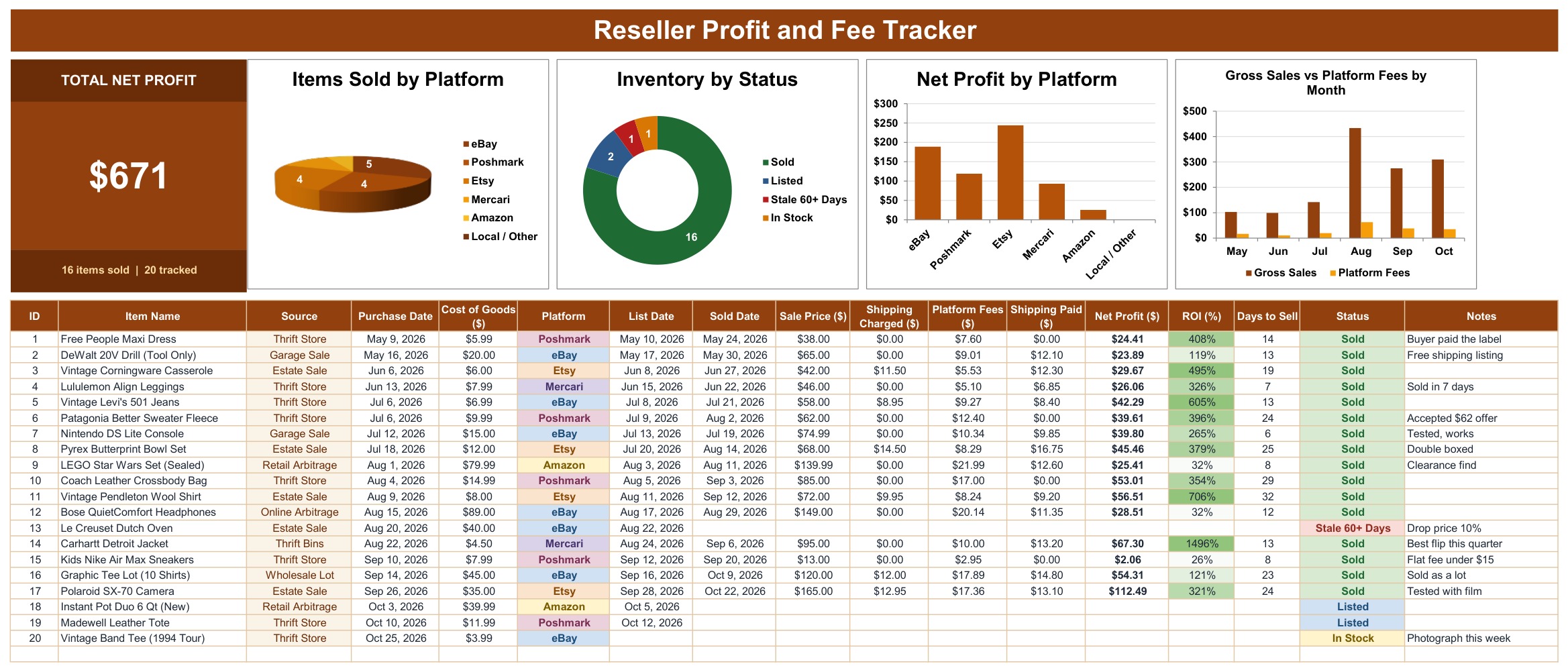
The Total Net Profit card shows $671 with “16 items sold | 20 tracked”. Next to it are Items Sold by Platform, Inventory by Status, Net Profit by Platform and Gross Sales vs Platform Fees by Month. Below, the 17-column item table holds ID, Item Name, Source, Purchase Date, Cost of Goods, Platform, List Date, Sold Date, Sale Price, Shipping Charged, Platform Fees, Shipping Paid, Net Profit, ROI, Days to Sell, Status and Notes.
P&L Dashboard tab
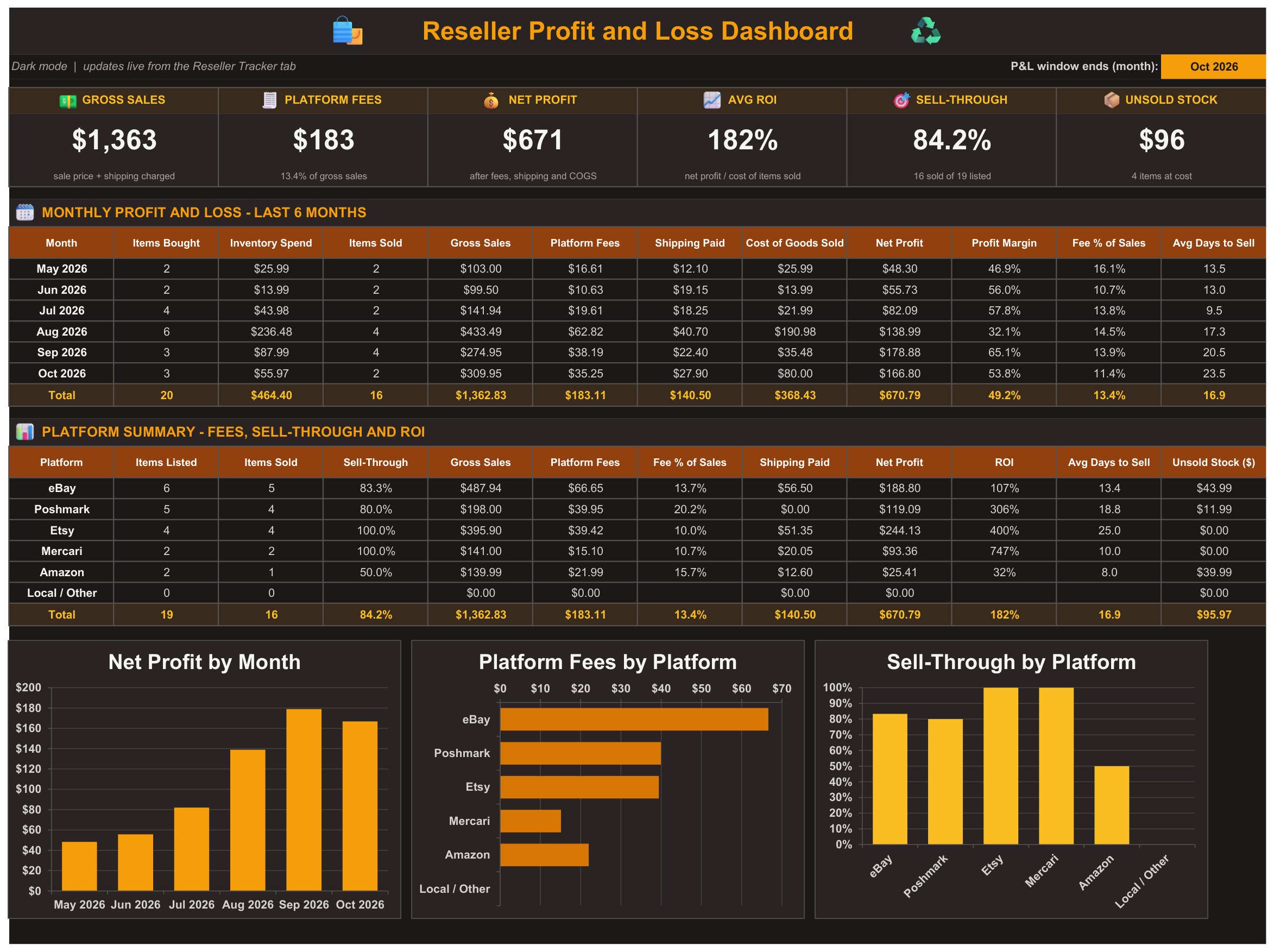
Six tiles: Gross Sales, Platform Fees, Net Profit, Avg ROI, Sell-Through and Unsold Stock. The monthly table shows items bought, inventory spend, items sold, gross sales, fees, shipping paid, cost of goods sold, net profit, profit margin, fee % of sales and average days to sell for the last six months. Change the month in the yellow cell to move the window.
The Excel edition
The download also includes the same tracker in Microsoft Excel. Recording a sale there works the same way: type the sold date and sale price and the fee, profit, ROI and status calculate.
List tab: platform fee rates
One row per platform with Fee %, Fixed Fee per Order, Minimum Fee and Fee on Shipping. eBay starts at 13.25% plus $0.40 per order, Poshmark at 20% with a $2.95 minimum, Etsy at 9.50% plus $0.45, Mercari at 10% plus $0.50 and Amazon at 15% plus $0.99 with a $0.30 minimum. These starting rates follow each platform’s published US seller fees, which change, so check your own account.
Reseller Profit and Fee Tracker vs. Blank Spreadsheet vs. Reseller Software: Feature Comparison
| Feature | Reseller Profit and Fee Tracker (Google Sheets + Excel) | Blank spreadsheet | Reseller inventory software |
|---|---|---|---|
| Cost | ✅ $6.99 one-time | Free to build, but your time | Monthly subscription, often tiered by listings |
| Platform | ✅ Google Sheets and Microsoft Excel, both included | One platform, one blank file | Web app |
| Setup time | ✅ About 10 minutes | Hours of formula building | Account setup plus marketplace connections |
| Platform fee worked out per item | ✅ From an editable fee table | You write the formulas | Usually yes, fixed by the vendor |
| Fee rules (percent, fixed fee, minimum fee) | ✅ All three, per platform | Rarely handled | Varies |
| Stale listing flag (60+ days) | ✅ Built in | Add it yourself | Varies |
| Dark mode P&L dashboard | ✅ 6 KPI tiles, 6-month P&L, platform summary | Not included | ✅ Yes |
| Customizable columns and fee rates | ✅ Edit any rate or column | ✅ Yes | Fixed by the vendor |
| Live marketplace sync | No, you type each sale | No | ✅ Often yes |
For resellers who want to know what they really keep on each item without paying a monthly subscription, this tracker sits in the sweet spot.
Who Should Use This Template
Perfect for:
- Part-time and full-time resellers on eBay, Poshmark, Etsy, Mercari and Amazon
- Thrift, garage sale and estate sale flippers
- Retail and online arbitrage sellers who track ROI and sell-through
Not a fit if:
- You want sales imported automatically from a marketplace account
- You manage thousands of SKUs with barcode scanning
Real-World Use Cases
A weekend thrift flipper bought a Carhartt jacket for $4.50 and sold it on Mercari for $95. After the $10.00 fee and a $13.20 label, the net profit is $67.30, a return of almost 15 times the cost, and it sold in 13 days. Without the tracker, that same sale looks like a plain $95.
A cross-platform seller opens the platform summary and sees fees of 13.7% of sales on eBay against 20.2% on Poshmark. That makes the next listing decision easier.
A seller clearing slow stock filters the Status column for Stale 60+ Days, finds a Dutch oven that has sat on eBay for over two months and drops the price by 10%.
Advantages of the Reseller Profit and Fee Tracker
- Honest numbers. Profit is after fees, shipping and cost of goods, not just sale price minus cost.
- One-time price. $6.99 on sale, with no per-month fee and no per-user fee.
- You own the fee table. When a platform changes its fees, you edit one row and every item recalculates.
- Two editions. Work in the browser with Google Sheets or offline in Excel.
Opportunities for Improvement
This is a manual tracker. You type each purchase and sale, so it will not match a marketplace payout report to the cent, and it does not scan barcodes or connect to eBay or Poshmark. Some fees, such as promoted listings, ad fees and sales tax, are not modeled; add them to Shipping Paid or Notes if they matter to you. Rates in the fee table are starting values, so confirm them against your own seller account.
Best Practices
- Update the fee table first, then enter items.
- Enter the purchase date and cost of goods the day you buy, so ROI and days to sell stay accurate.
- Leave the grey calculated columns alone; ID, fees, profit, ROI, days to sell and status calculate themselves.
- Review the Stale 60+ Days items every week and reprice or cross-list them.
- Use the Notes column for offers, bundles and condition details.
Dropdown lists in Google Sheets are explained in Google’s guide to in-cell dropdown lists.
Explore Relevant Templates
📌 Seller Analytics Dashboard in Google Sheets
📌 Online Marketplaces Dashboard in Google Sheets
📌 Print-on-Demand Sales Tracker in Google Sheets
📌 Digital Product Sales Tracker in Google Sheets
📌 Side Hustle Income Tracker in Google Sheets
Prefer Excel only? See the Online Marketplaces Dashboard in Excel. Browse every Google Sheets template in the store.
Frequently Asked Questions
What does the Reseller Profit and Fee Tracker calculate?
The Reseller Profit and Fee Tracker calculates the platform fee, net profit, ROI, days to sell and status for every item, plus gross sales, fees, sell-through and unsold stock on the P&L Dashboard.
How does the tracker handle Poshmark’s flat fee under $15?
The List tab has a Minimum Fee column. Poshmark is set to 20% with a $2.95 minimum, so a $13.00 sale uses $2.95 instead of $2.60. The tracker always takes the larger of the percentage fee and the minimum, so it doubles as a Poshmark fee calculator and an eBay fee calculator spreadsheet in one file.
Is it a Google Sheets or an Excel template?
Both. The download is a ZIP with the Excel edition (.xlsx, no macros) and a PDF guide containing the Make a copy link for Google Sheets. The tabs, formulas and sample data are the same.
How is this different from a simple profit spreadsheet?
A basic sheet subtracts cost from price. This tracker also applies each platform’s percentage, fixed fee and minimum fee, subtracts your shipping label, and rolls everything into a monthly profit and loss table and a platform summary.
Can I add another platform?
Yes. Add a row under the last platform on the List tab. It shows up in the Platform dropdown right away and the fee rules apply to its items.
Are the fee rates always correct?
No. They are starting rates based on published US seller fees. Platforms change them, so check your account and edit the row.
About the Author
Built by PK, Microsoft Certified Professional with 15+ years of Excel, Google Sheets and Power BI experience. Founder of NextGenTemplates, reaching 300K+ subscribers across YouTube channels (@PKAnExcelExpert, @NextGenTemplates, @NeoTechNavigators). Every template is hand-built and tested before release.
Conclusion
If you resell on eBay, Poshmark, Etsy, Mercari or Amazon, this tracker turns every sale into a real profit figure. Click here to Purchase the Reseller Profit and Fee Tracker in Excel and Google Sheets.
🌠Join 10,000+ customers in 180+ countries. ✅ Instant download · One-time payment · No subscription.
Watch more tutorials on Youtube.com/@NeoTechNavigators.
📅 Last updated: October 2026