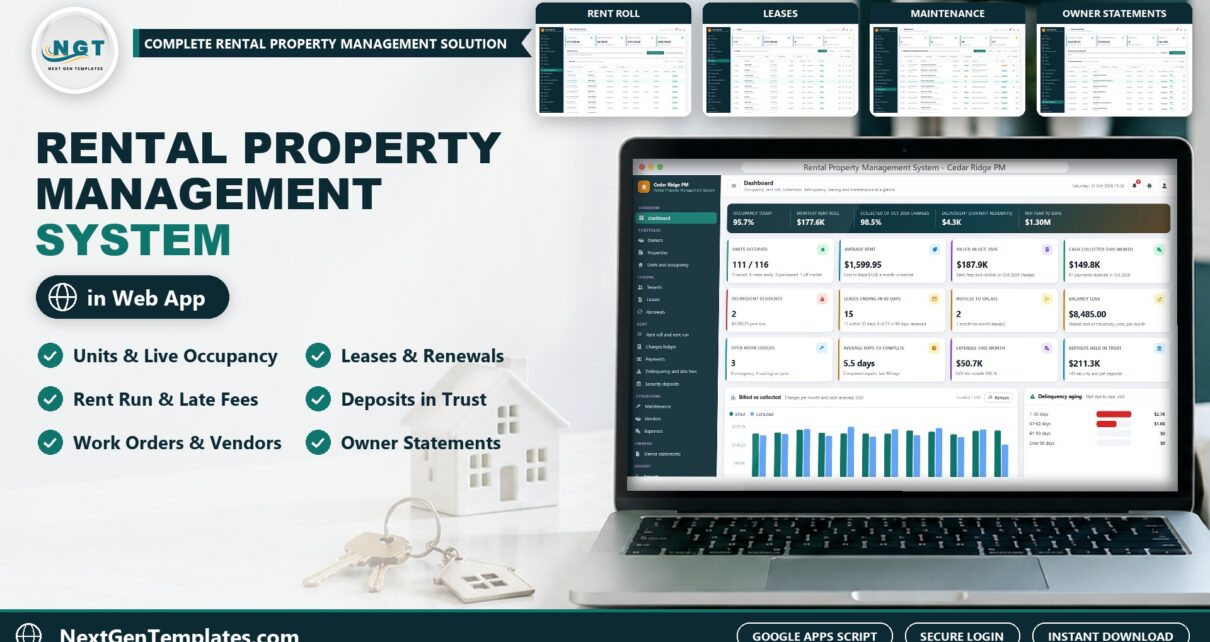
If you run rentals from a pile of spreadsheets, the rental property management system web app from NextGenTemplates puts owners, units, tenants, leases, the monthly rent run, late fees, deposits, maintenance and owner statements into one browser application on your own Google account. This guide shows what it does, how each screen works and who should buy it.
Join 10,000+ customers in 180+ countries.
Watch the Rental Property Management System Web App walkthrough
🚀 Try the Live Demo: Login Details
Open the working Rental Property Management System Web App in your browser right now: no download, no sign-up, nothing to install. Sign in as any role below and see exactly which screens that person can and cannot reach.
Demo sign-in details: 7 logins across 6 roles
| Role | Username | Password | What this role can reach |
|---|---|---|---|
| Administrator | admin |
Admin@123 |
Everything, including users and roles, settings, the audit log, the database archive and backups |
| Property Manager | manager |
Manager@123 |
Owners, properties, units, tenants, leases (new, renew, notice, move out), the rent run, late fees, payments, NSF, waivers, deposits, maintenance, vendors, expenses, owner statements, reports, lists, audit log, import, export and email |
| Leasing Agent | leasing |
Leasing@123 |
Units, tenants, leases and renewals, payments, work orders and reports |
| Leasing Agent (second login) | leasing2 |
Leasing@123 |
The same leasing screens, for a second agent on the team |
| Accountant | accounts |
Accounts@123 |
Owners, the rent run, late fees, payments, NSF, waivers, deposits, expenses, owner statements, reports, audit log, import and export |
| Maintenance Coordinator | maintenance |
Maint@123 |
Work orders, vendors, expenses and reports |
| Owner Viewer | owner |
Owner@123 |
Read only: dashboard, owners, properties, leases, rent, deposits, maintenance, expenses, owner statements and reports |
These credentials are public on purpose. The demo is a shared instance seeded with a fictional company (Cedar Ridge Property Management, Charlotte, North Carolina, with 117 units, 20 properties and 10 owners) and it may be reset at any time. It is not anybody’s live rental portfolio. Your own copy gets its own database, its own users and its own passwords, and the setup notes ask you to change every seeded password before anyone else signs in.
What is the Rental Property Management System Web App?
It is rental property management software built on Google Apps Script. You paste two text files into your own Google account, press Run setup now, and the app creates its own Google Sheet database and Drive folders. It ships with a fictional company, Cedar Ridge Property Management in Charlotte, North Carolina, with 117 units across 20 properties for 10 owners, so every screen is populated from the first sign-in.
What the rental property management software does
- Portfolio: owners with management fee and payout method, properties with an occupancy bar and gross yield, and units with live status (Occupied, Notice Given, Pre-Leased, Make Ready, Vacant, Off Market).
- Leasing: tenants, leases with term, rent, due day, grace days, late fee rule, pet rent, parking and deposits, renewals with the market rent beside the proposed offer, notices and move outs.
- Rent: a one-click monthly rent run with proration and prepaid credit, a charges ledger, payments applied to the oldest charge first, NSF handling and receipts at 3 inch, 4 inch or A4.
- Collections: delinquency aging in 1 to 30, 31 to 60, 61 to 90 and over 90 day bands and a late fee run that charges each lease once per month.
- Operations: security deposits held in trust with itemized deductions, work orders, vendors with insurance expiry alerts and expenses by property.
- Owners and insight: month-end owner statements, 20 reports with print and CSV export, 7 logins across 6 roles and an audit log.
Screen by screen
Dashboard, properties and units
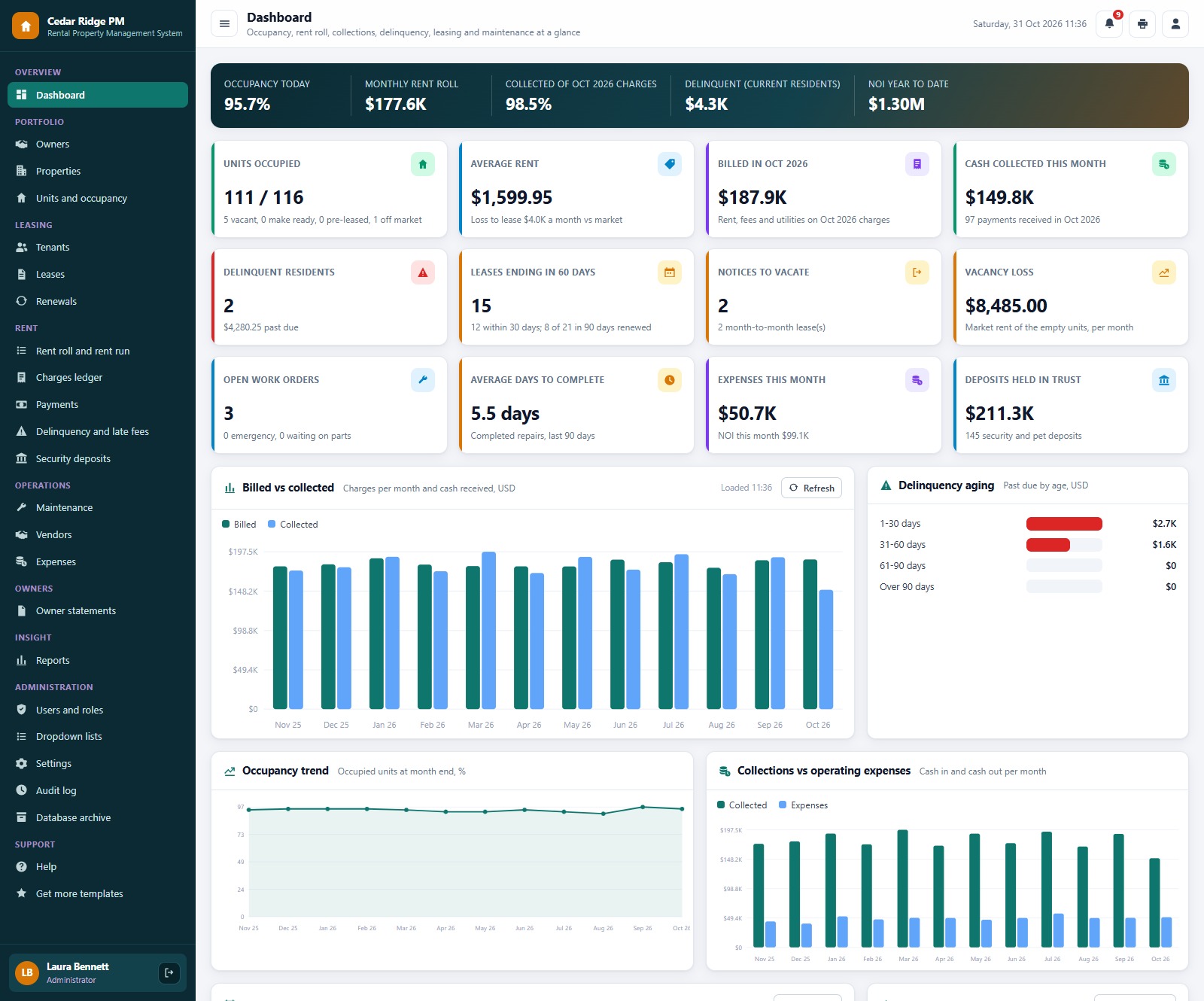
The dashboard shows 111 of 116 rentable units occupied, a monthly rent roll of about $177.6K, 98.5% of the month’s charges collected, $4.3K past due and net operating income of about $1.30M year to date. Properties and Units show the same portfolio building by building and door by door.
The monthly rent run
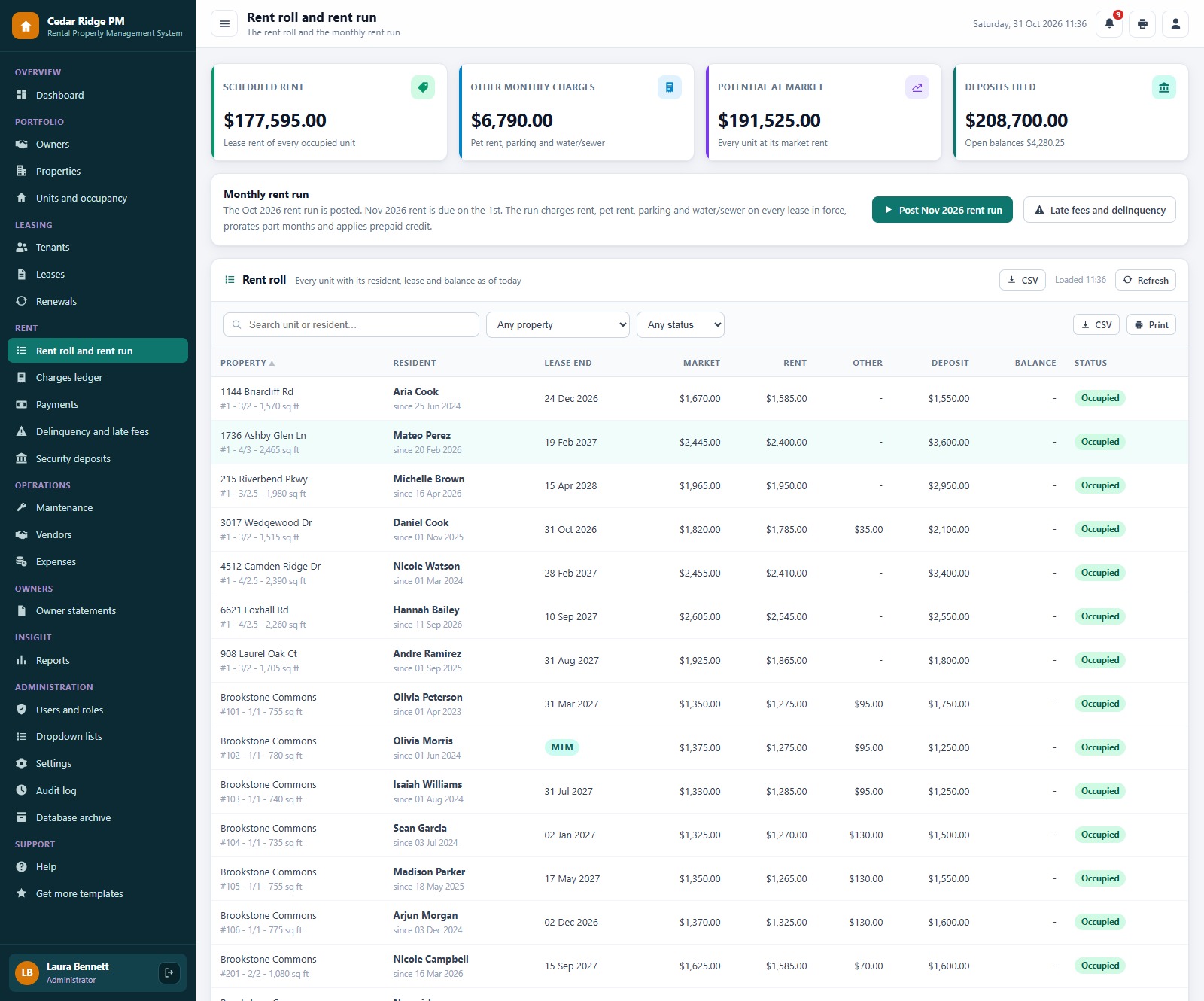
Post the rent run around the 25th so residents see next month’s charges before the 1st. Leases that are already charged are skipped, so posting twice never double-charges, and part months are prorated.
Delinquency, deposits and maintenance
Delinquency separates current residents who are behind from former residents who owe, and the late fee run follows each lease’s own rule. Deposits are held in trust, and after a move out you add itemized deductions, settle the deposit and refund the rest. Work orders post the property expense when they complete, and a repair billed to the tenant also charges the resident.
How the rental property management system compares
| Feature | Rental Property Management System Web App | Shared spreadsheet | Paid property management software |
|---|---|---|---|
| Cost | ✅ One-time purchase | Free to low cost | Monthly subscription, often per unit or per user |
| Platform | ✅ Browser, on your own Google account | A file everyone edits | Vendor cloud |
| Monthly rent run with proration | ✅ One click, never double-charges | Manual | ✅ Yes |
| Leases, renewals and notices | ✅ Built in | Separate sheets | ✅ Yes |
| Delinquency aging and late fees | ✅ Per lease rule | Manual | ✅ Yes |
| Deposits held in trust | ✅ Settlement with deductions | Manual | Varies by plan |
| Owner statements | ✅ Month-end, net to owner | Manual | Often a higher plan |
| Role-based logins | ✅ 6 roles and an audit log | No | ✅ Yes |
| Online rent portal for residents | Not included, payments are recorded with a reference | No | ✅ Yes |
| Your data stays in your Drive | ✅ A Google Sheet you own | ✅ Yes | No, vendor hosted |
| Source code you can change | ✅ Full Apps Script code | ✅ Yes | No |
Who this is for, and who it is not for
✅ Built for:
- Small and mid-size property managers who run apartments, townhomes, duplexes, fourplexes and single-family rentals for several owners
- Landlords and investors who want landlord software for their own portfolio, with a rent roll, leases and deposits in one place
- Brokers and leasing teams that need a property management web app with separate logins for the manager, agents, accountant, maintenance and the owner
❌ Not built for:
- Teams that need an online rent portal, a tenant app or built-in card and ACH collection, because payments are recorded with a reference and collected by your bank or processor
- Operations that need tenant screening, e-signature or accounting and tax filing, because this system tracks leases, rent, deposits and owner payouts, not your books
- Teams that must work offline, because the app runs in the browser and needs an internet connection
How to set it up
- Try the live demo first with the login details above, one role at a time.
- Create a new Google Apps Script project, paste Code.cs.txt into Code.gs, and add an HTML file named exactly Index containing Index.txt.
- Deploy it as a web app (Execute as: Me, choose who has access) and accept the Google permission prompt.
- Open the web app URL and press Run setup now on the first-run panel, or run setup once from the editor. Setup creates the database spreadsheet, its 19 tables and the Drive folders, and resumes by itself if Google’s time limit interrupts it.
- Sign in as admin and change every seeded password (or delete the accounts you do not need).
- In Settings, enter your company details, late fee and renewal increase rules and print size.
- Add your owners, properties, units, tenants and leases, or import them from a sheet, then post your first rent run.
The ZIP contains Code.cs.txt, Index.txt and the PDF user manual with every screen explained.
Frequently asked questions
Can I try the Rental Property Management System before buying?
Yes. The live demo above runs the full system with fictional data. Sign in with any of the 7 demo accounts to see the dashboard, the screens each role can reach and all 20 reports before you spend anything.
What do I need to run it?
A Google account. The web app runs on Google Apps Script and creates its own Google Sheet database in your Drive during setup. Your team signs in with the usernames you create, so they do not need their own Google accounts.
Does it collect rent online?
No. It records every payment with a reference such as a check number or ACH trace, applies it to the oldest open charge and prints a receipt. Your bank, resident portal or payment processor collects the money, and the app never stores a bank account or card number.
Can it handle part months and prepaid rent?
Yes. The first month of a lease and the last month after a move out are prorated, and any credit left over from a payment is applied on the next rent run.
Can an owner sign in to see their own numbers?
Yes. The Owner Viewer role is read only and covers the dashboard, owners, properties, leases, rent, deposits, maintenance, expenses, owner statements and reports.
Can I change the currency, dates and print size?
The demo uses US dollars and US date formats. Settings lets you change the company details, the fee and increase rules and the print size for receipts (3 inch, 4 inch or A4).
Get the Rental Property Management System Web App
One-time payment, no subscription and no per-user fees. The ZIP contains Code.cs.txt, Index.txt and the PDF user manual. Get the Rental Property Management System Web App on NextGenTemplates.com
Related templates
- AI Vacation Rental & Airbnb Host Management System Web App
- Tenant and Property Management Dashboard in Google Sheets
- Property Management Dashboard in Google Sheets
- Property Portfolio Dashboard in Google Sheets
- Real Estate Property Tracker in Google Sheets
About the author
Built by PK, Microsoft Certified Professional with 15+ years of Excel, Google Sheets, Apps Script and Power BI experience, founder of NextGenTemplates and the YouTube channels @PKAnExcelExpert, @NextGenTemplates and @NeoTechNavigators. Every template is hand-built and tested before release.