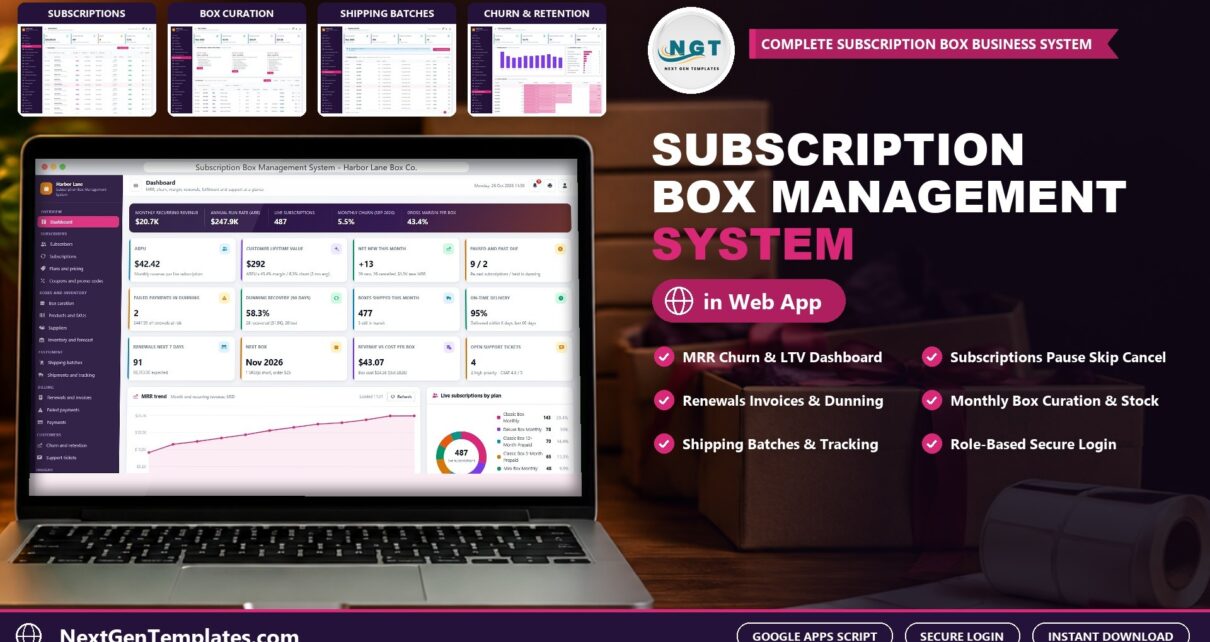
The Subscription Box Management System Web App is a Google Apps Script web app that runs a monthly box business end to end: subscribers, plans, box curation, stock, shipping, renewals, failed payment dunning and churn. This post walks through what is inside, how each role uses it and how to set it up. You can also open the working demo first, with a login for every role.
Watch the Subscription Box Management System Web App walkthrough
🚀 Try the Live Demo: Login Details
Open the working Subscription Box Management System in your browser right now: no download, no sign-up, nothing to install. Sign in as any role below and see exactly which screens that person can and cannot reach.
Demo sign-in details: all 7 logins
| Role | Username | Password | What this role can reach |
|---|---|---|---|
| Administrator | admin |
Admin@123 |
Everything, including users and roles, settings, the audit log, the database archive and backups |
| Operations Manager | manager |
Manager@123 |
Subscribers, subscriptions, plans, coupons, box curation, SKUs, suppliers, stock, shipping batches, renewals, payment results, refunds, retention, tickets, reports, lists, audit log, import and export |
| Fulfilment Lead | fulfilment |
Fulfilment@123 |
Box curation, SKUs, suppliers, stock receipts and adjustments, shipping batches, shipments and reships, reports |
| Customer Support | support |
Support@123 |
Subscribers, start, pause, resume, skip, cancel and reactivate, plan changes, shipments, retention events, support tickets, email to subscribers, reports |
| Customer Support | support2 |
Support@123 |
Same screens as the first support login, for a second agent on weekend and chat shifts |
| Finance | finance |
Finance@123 |
Plans and prices, coupons, renewal runs, payment results, dunning, refunds, voids, reports and the audit log |
| Viewer | viewer |
Viewer@123 |
Read only: dashboard, subscribers, subscriptions, boxes, stock, shipments, billing, retention, tickets and reports |
These credentials are public on purpose. The demo is a shared instance seeded with a fictional company (Harbor Lane Box Co., Portland, Oregon, shipping Mini, Classic and Deluxe boxes to 49 states) and it may be reset at any time. It is not anybody’s live business. Your own copy gets its own database, its own users and its own passwords, and the setup notes ask you to change every seeded password before anyone else signs in.
What the Subscription Box Management System does
Most small box companies start in spreadsheets and outgrow them when renewals, declined cards and monthly stock planning pile up. This system keeps all of it in one browser app, with the data in a Google Sheet in your own Drive. It is subscription box software you buy once and own, with 7 logins across 6 roles so that support, fulfilment, finance and owners each see what they need.
The seeded company, Harbor Lane Box Co. in Portland, Oregon, has 751 subscribers and 761 subscriptions on 7 plans, 3,200 invoices and 4,352 shipments, so every screen has something to show from the first minute.
Key features at a glance
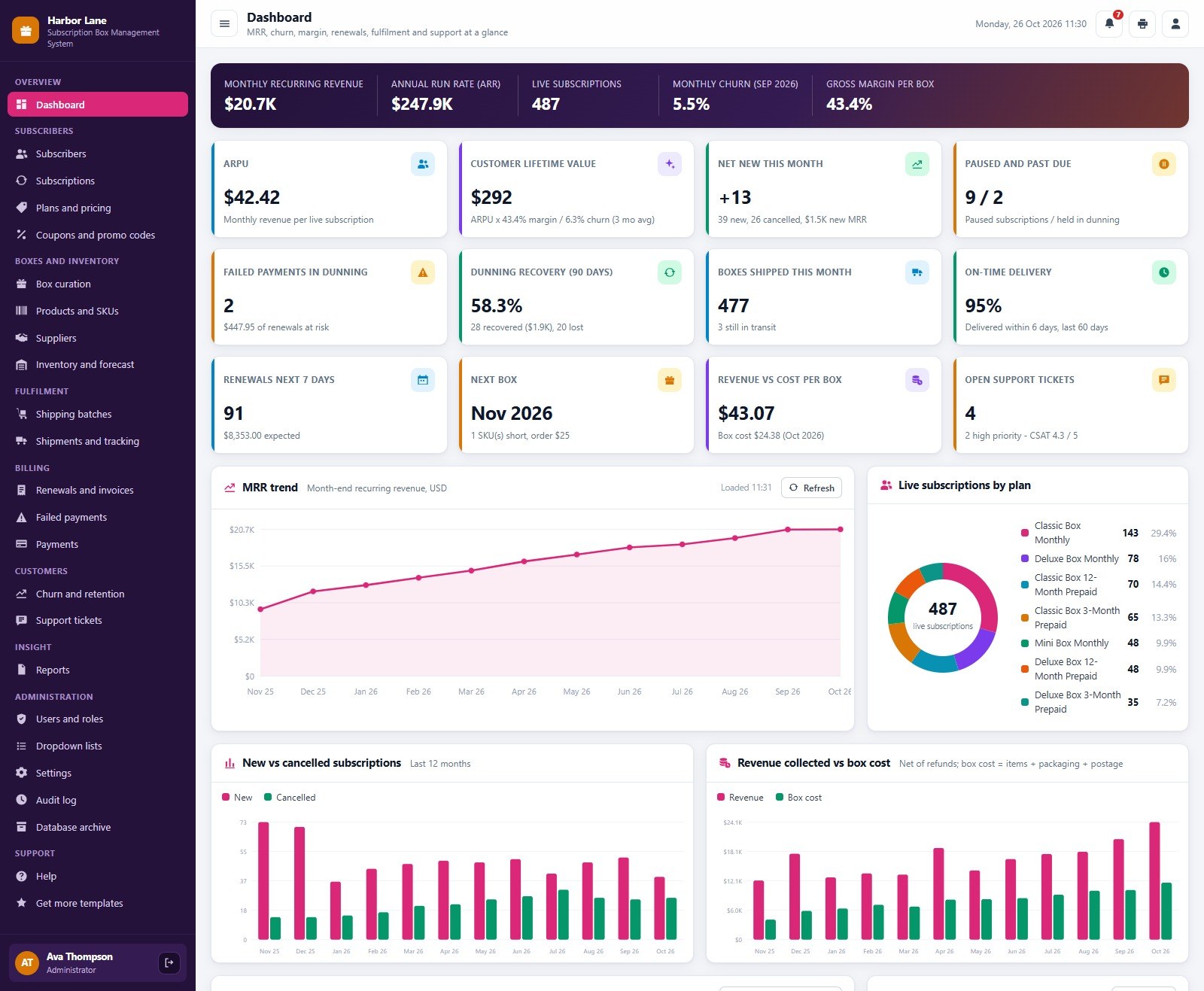
📊 Dashboard that shows the health of the business. A hero band with monthly recurring revenue (MRR), annual run rate, live subscriptions, last month’s churn and gross margin per box, then twelve KPI cards: ARPU, customer lifetime value, net new this month, paused and past due, failed payments in dunning, dunning recovery, boxes shipped, on-time delivery, renewals in the next 7 days, the next box, revenue against cost per box and open support tickets.
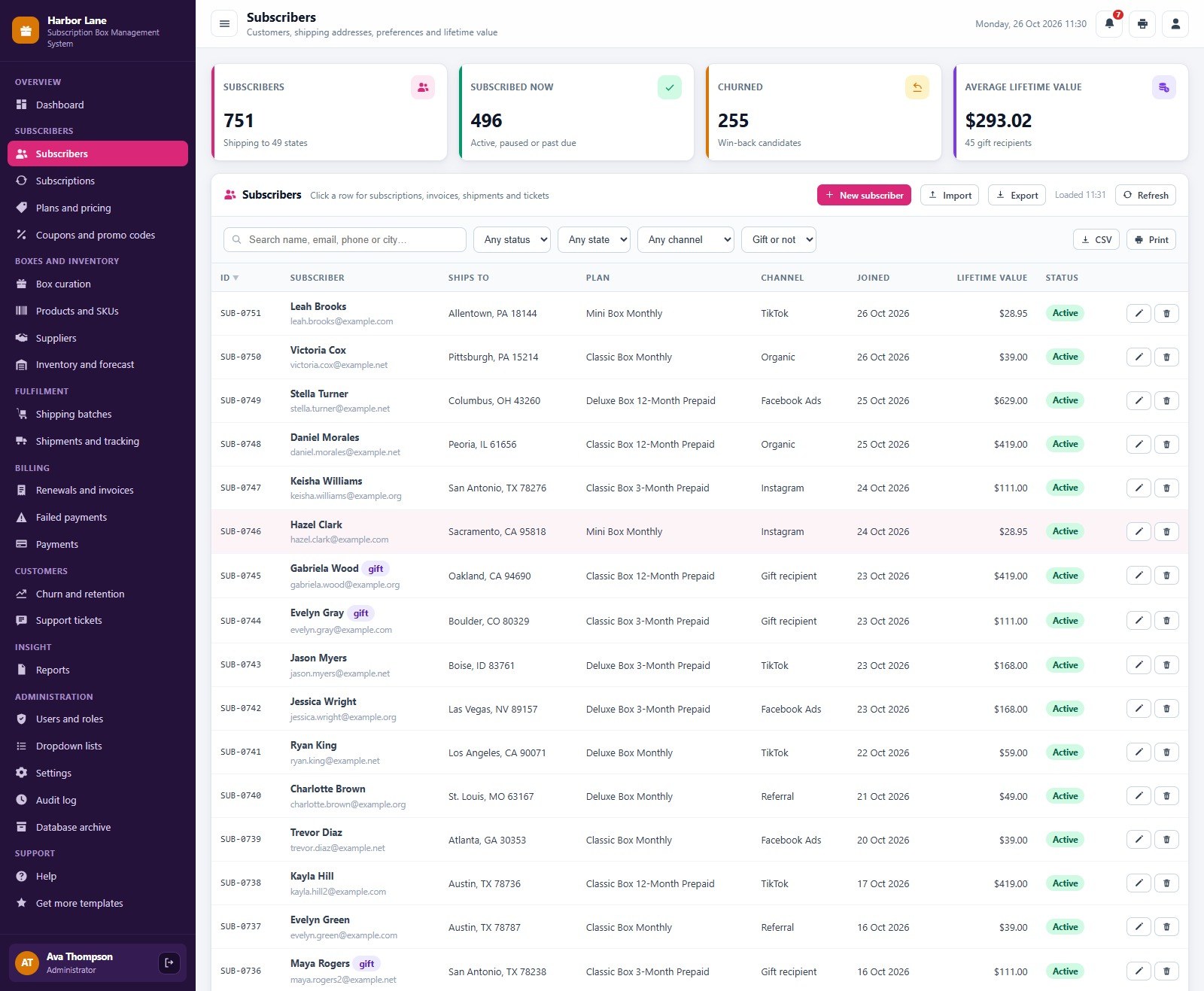
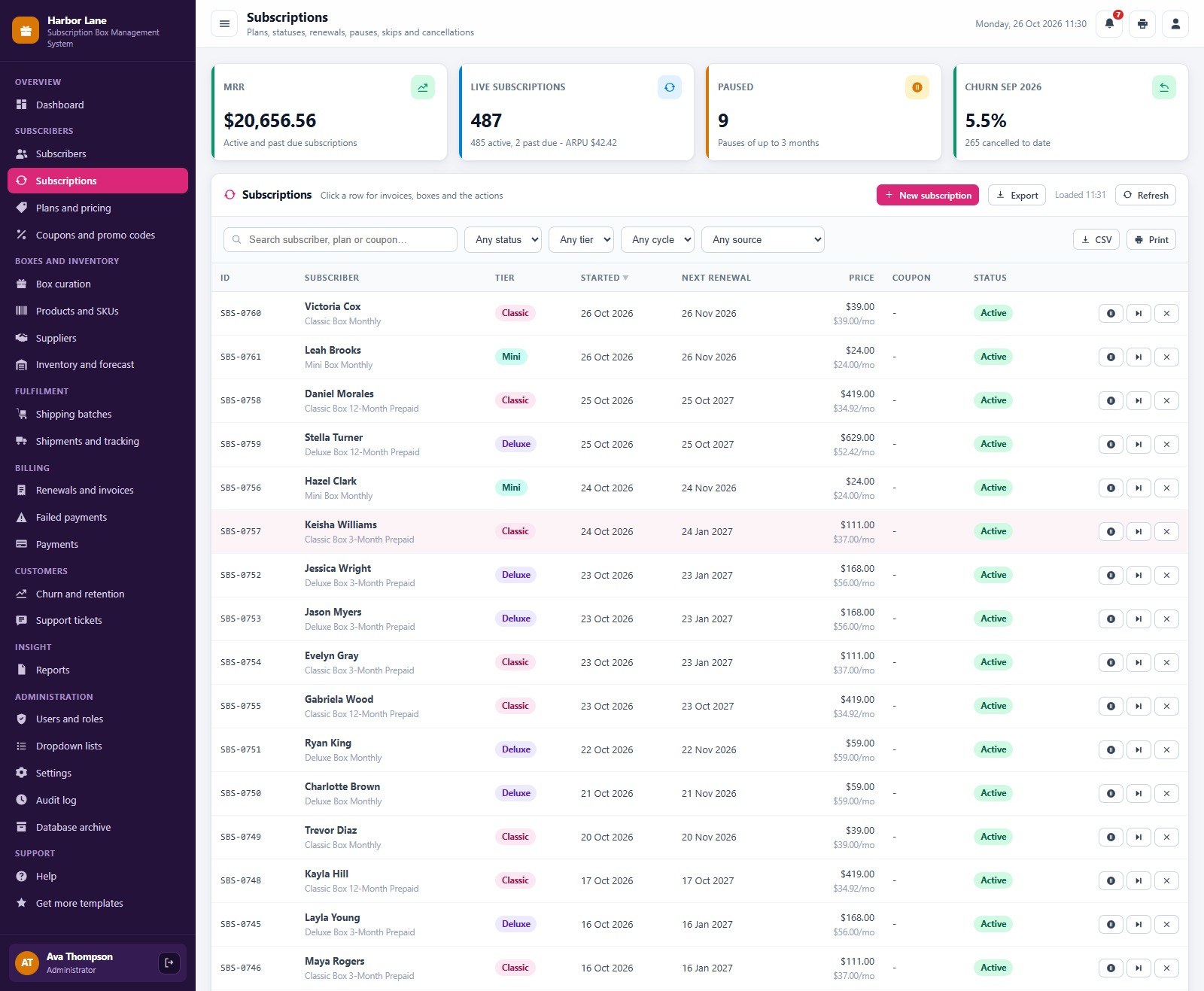
👥 Subscribers and subscriptions. One record per subscriber with state, plan, acquisition channel, preferences and allergies (allergies print in red on the packing slip). Start, pause, resume, skip a month, change plan, cancel with a save offer or reactivate, and see each subscription’s invoices and boxes.
💲 Plans, pricing and coupons. Mini, Classic and Deluxe tiers on monthly, 3-month prepaid and 12-month prepaid plans, with the per-month price that feeds MRR. Coupons take a percent or fixed discount, valid dates, a redemption limit and a number of invoices, and a Black Friday reminder appears in the 60 days before the sale.
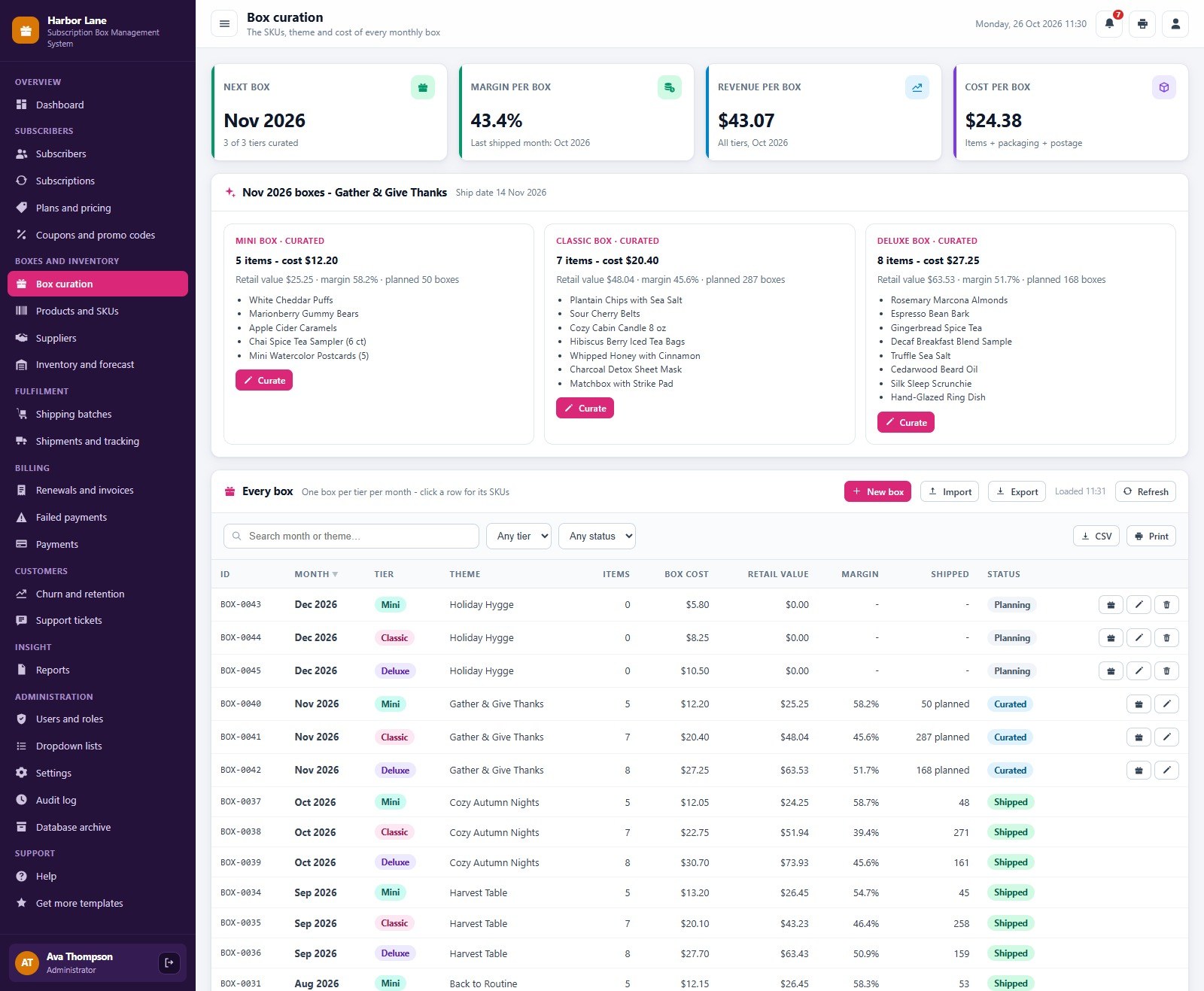
🎁 Monthly box curation. Plan each tier’s box with its items, cost per box, retail value and margin. The seeded November Classic box, for example, carries seven items at a margin near 45 percent.
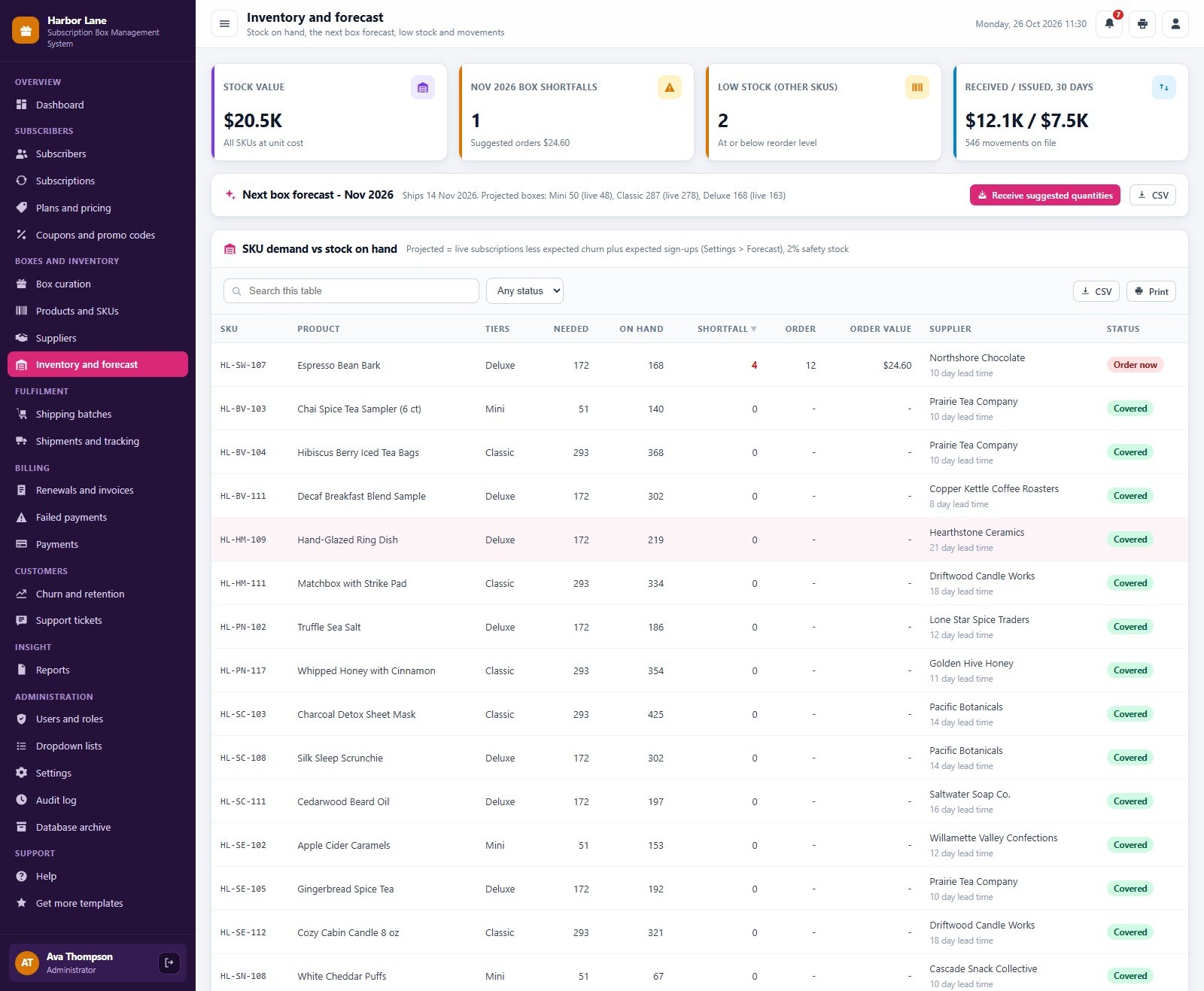
📦 Products, suppliers and the next box forecast. Every SKU with category, supplier, unit cost, retail value and stock on hand, plus supplier lead times. The forecast projects how many boxes you ship next month, lists the SKUs that are short and suggests the order quantity and supplier, which makes it a working subscription box inventory management tool.
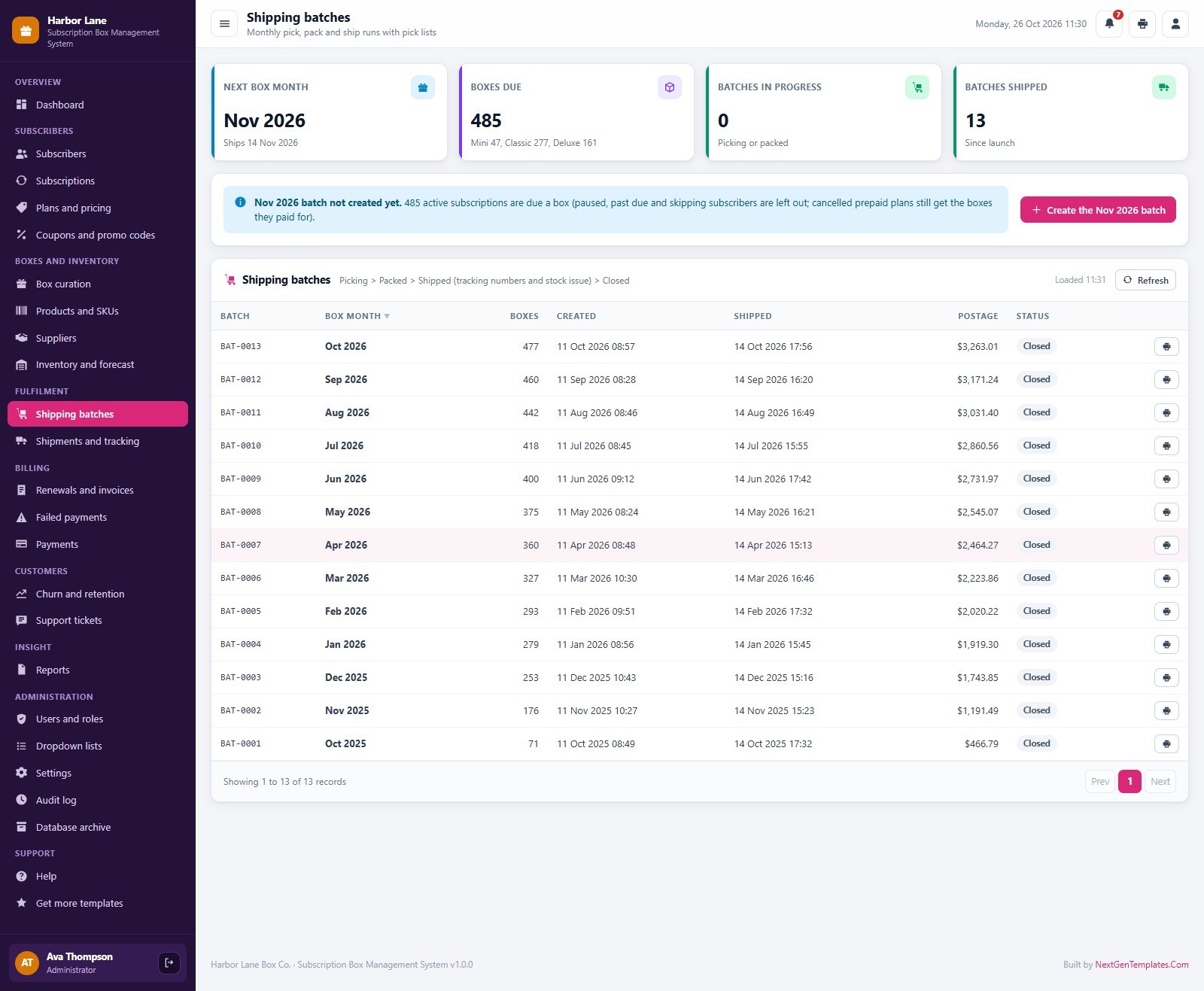
🚚 Shipping batches and shipments. Create the month’s batch a few days before ship day, print the pick list, pack and ship. Follow each parcel (pending, in transit, delivered, returned or lost), print packing slips at 3 inch, 4 inch or A4, and reship a lost or damaged box straight from stock.
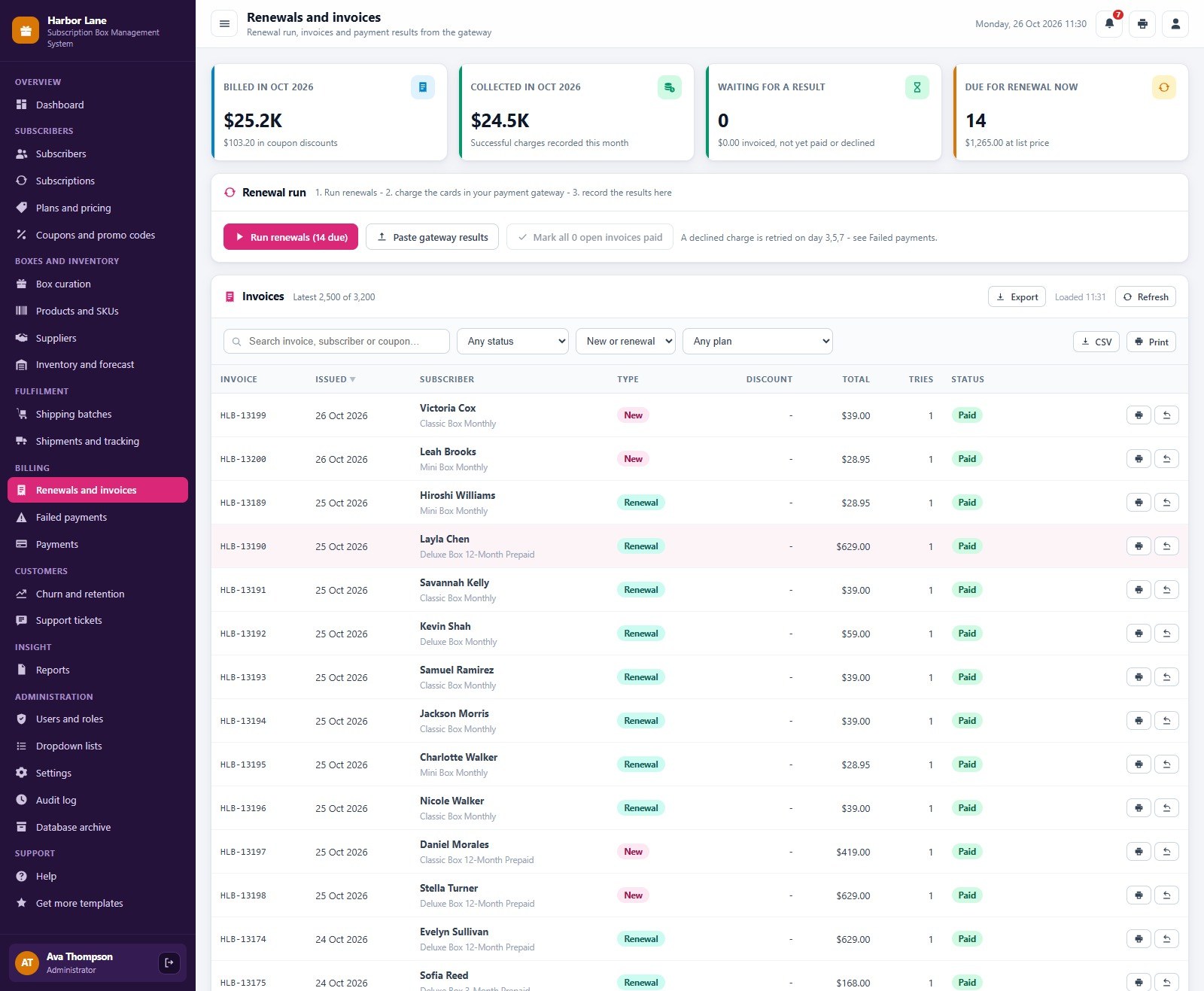
🧾 Renewals, invoices and payments. Run renewals to create one invoice per subscription due, charge the cards in your payment gateway (Stripe, Shopify Payments or PayPal) and record the results one by one, by pasting the gateway export or all at once. The app keeps only the last 4 digits of a card, never the number.
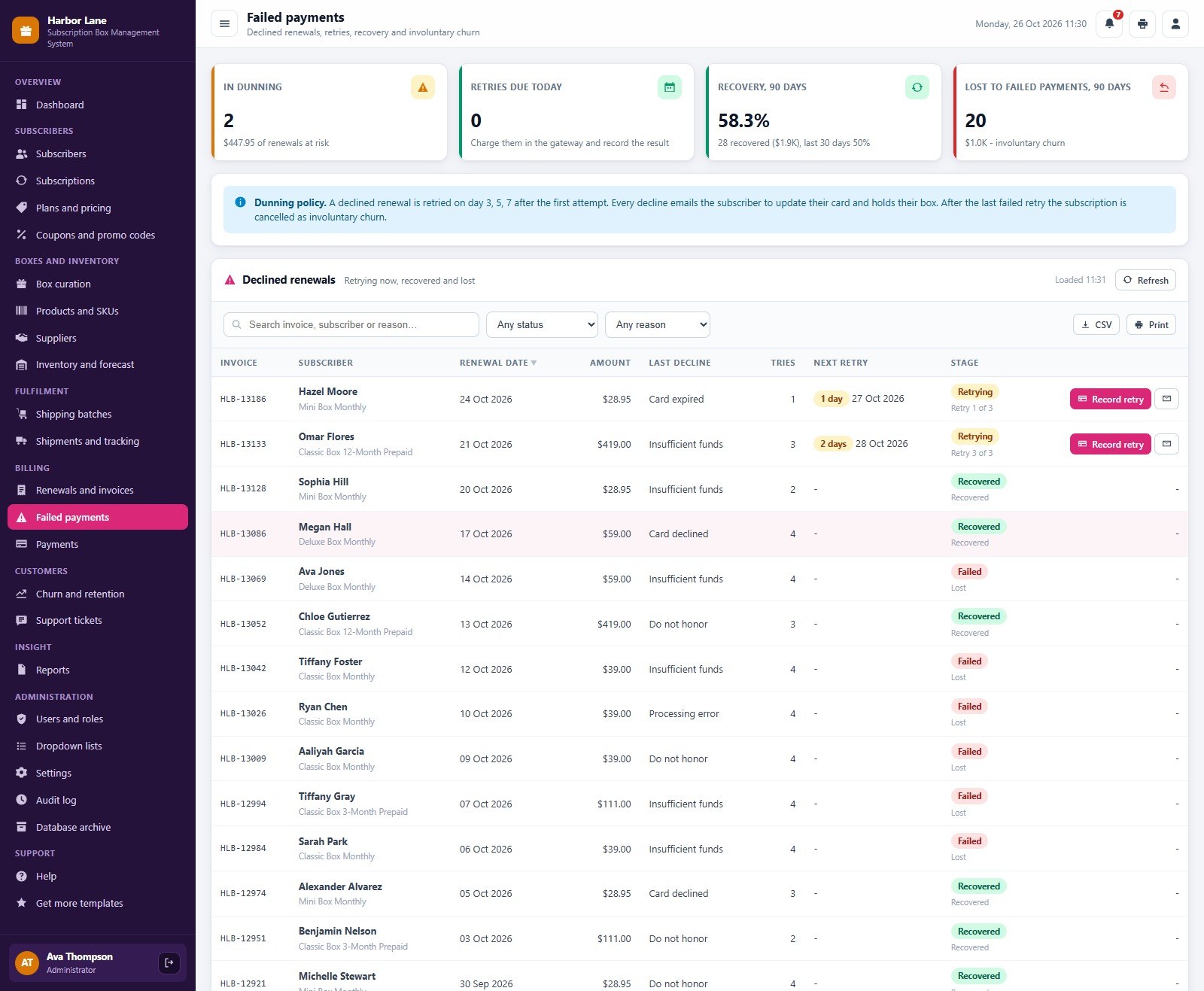
🔁 Failed payments and dunning. A declined renewal is retried on day 3, 5 and 7 by default, every decline emails the subscriber to update the card, and the recovery rate and involuntary churn are tracked. After the last failed retry the subscription can be cancelled automatically.
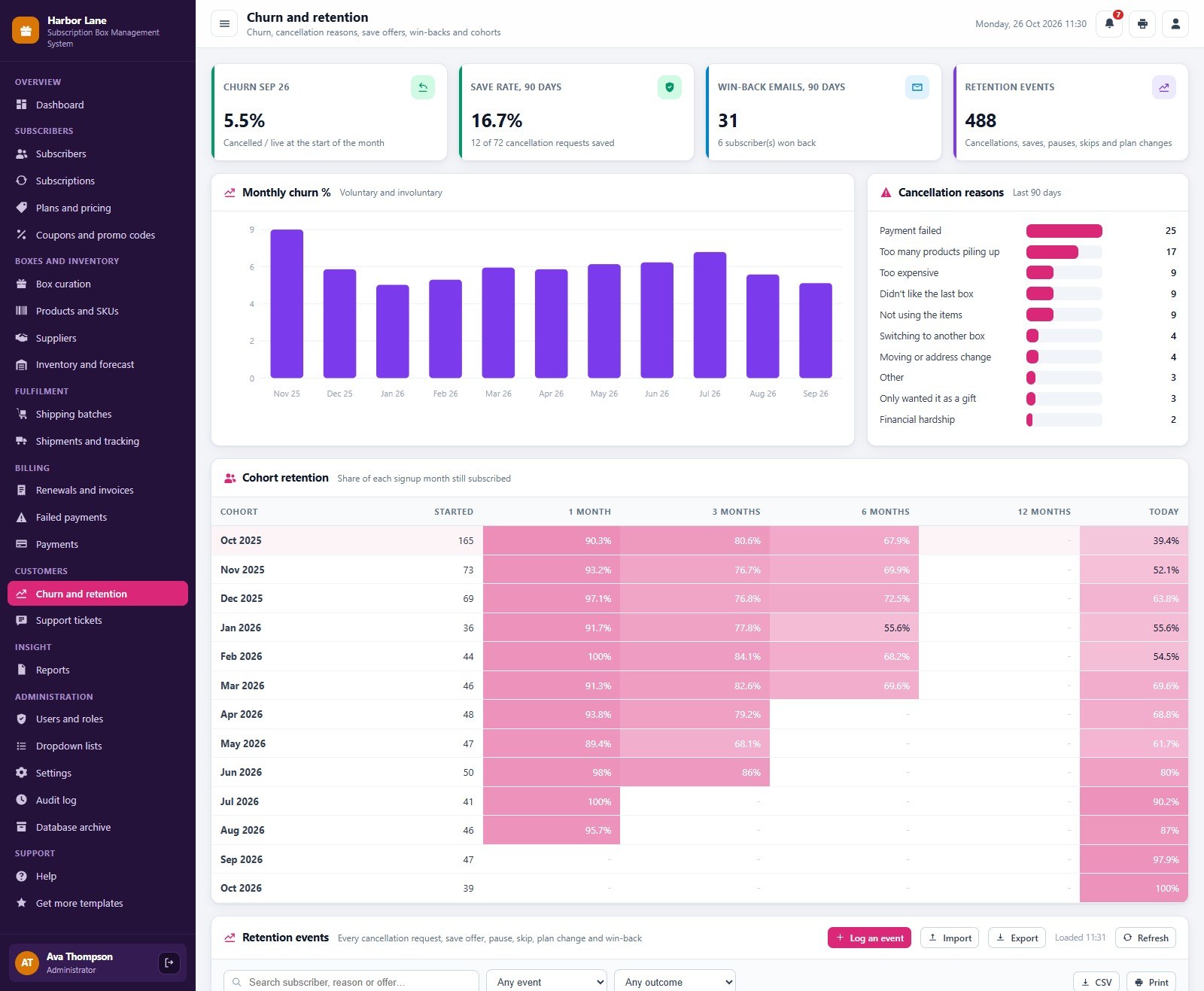
📉 Churn and retention. Monthly churn, cancellation reasons, the save rate of your offers (pause, skip, 20 percent off the next 2 boxes or a move to Mini), win-back emails and a cohort retention table by signup month, so you can see subscription box churn by signup month.
🎫 Support tickets. Log tickets with category and priority, link them to the subscriber and track resolution time and customer satisfaction.
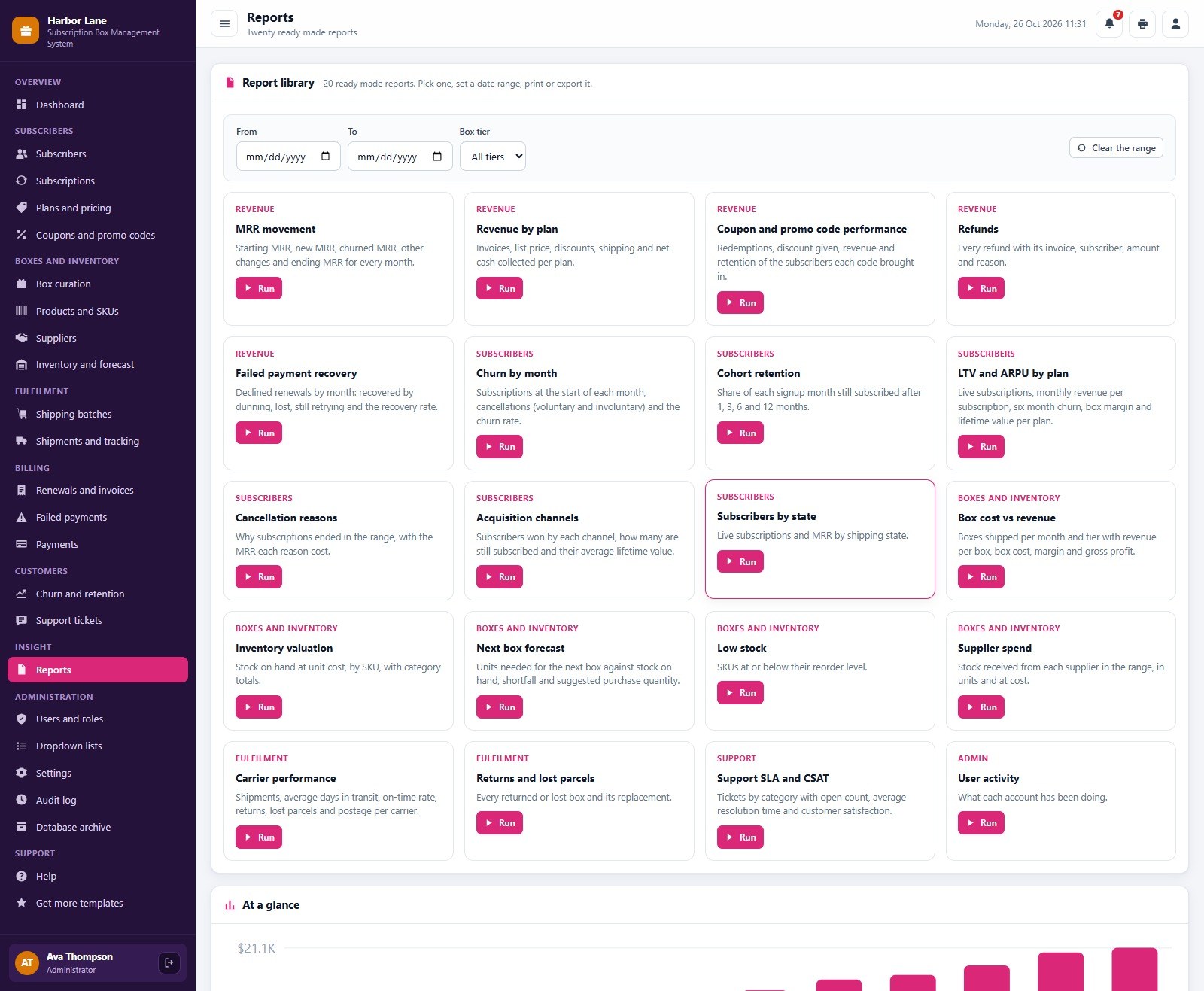
📑 20 ready-made reports. MRR movement, revenue by plan, coupon performance, refunds, failed payment recovery, churn by month, cohort retention, LTV and ARPU by plan, cancellation reasons, acquisition channels, subscribers by state, box cost against revenue, inventory valuation, next box forecast, low stock, supplier spend, carrier performance, returns and lost parcels, support SLA and CSAT and user activity. Pick a date range and box tier, then print or download CSV.
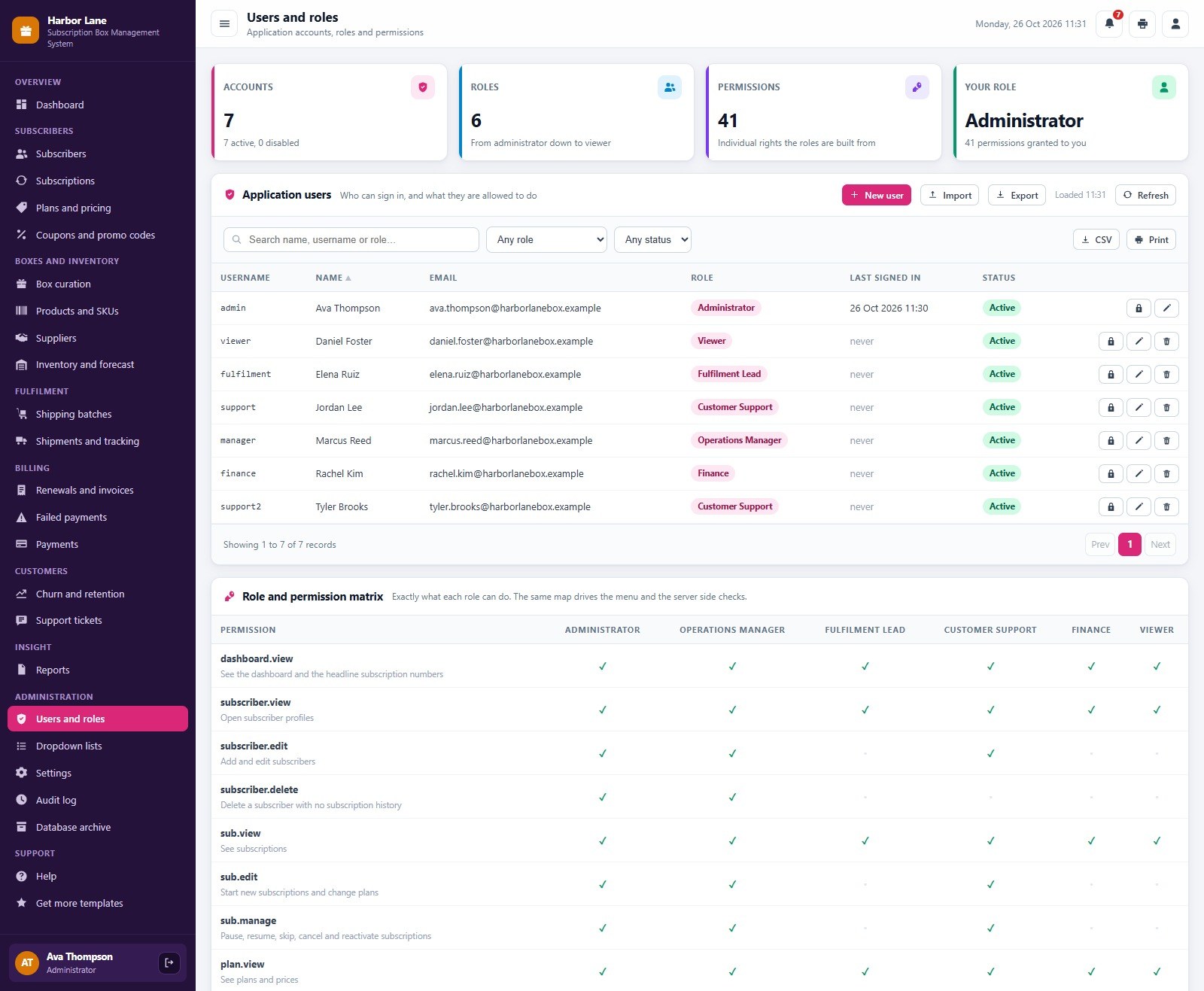
🔐 Roles, audit log and archive. 7 seeded logins across 6 roles with a 41-permission matrix that drives both the menu and the server checks, an audit log of every sign in and change, dropdown lists you can extend, settings for company, currency, dunning days and print size, CSV import and export, and a database archive.
A tour of the main screens
Dashboard
The hero band and twelve KPI cards sit above the MRR trend, live subscriptions by plan, new against cancelled subscriptions and revenue collected against box cost.
Subscribers
Search, filter and sort every subscriber, see lifetime value, and export the list or import new ones from CSV.
Subscriptions
Open a subscription to pause it, skip a month, change the plan or cancel it with a save offer.
Box curation
Each tier’s box for the month with items, cost, retail value and margin.
Inventory and forecast
The next box forecast shows the boxes you will ship and which SKUs are short, with order quantity and supplier.
Shipping batches
One batch per box month with boxes, postage and status, plus the pick list and packing slips.
Renewals and invoices
The billing run: run renewals, record the gateway results and see what was billed and collected.
Failed payments
Declined renewals with their next retry date, decline reason and the recovery rate.
Churn and retention
Monthly churn, cancellation reasons and the cohort retention table by signup month.
Reports
A library of 20 reports across revenue, subscribers, boxes and inventory, fulfilment and support.
Users and roles
Application users with role and status, and the permission matrix that drives the menu and the server checks.
A monthly routine with the system
- Curate next month’s box for each tier in Box curation.
- Check the next box forecast, order the short SKUs and receive the stock.
- Every day, run renewals, charge the cards in your gateway and record the results.
- Work the Failed payments screen: retries on day 3, 5 and 7.
- A few days before ship day, create the shipping batch, print the pick list, pack and ship.
- Confirm deliveries, handle returns and lost parcels, answer tickets.
- Review churn, retention, the dashboard and the reports.
Subscription Box Management System vs. spreadsheet vs. paid software
| Feature | Subscription Box Management System | Shared spreadsheet | Paid subscription box software |
|---|---|---|---|
| Cost | ✅ One-time purchase | Free to low cost | Monthly fee, often tied to subscriber count |
| Platform | ✅ Browser, on your own Google account | A file everyone edits | Vendor cloud |
| MRR, churn and margin per box | ✅ Built in dashboard and reports | Manual formulas | ✅ Yes |
| Failed payment dunning | ✅ Retries on day 3, 5 and 7 | Manual follow up | ✅ Yes |
| Box curation, stock and forecast | ✅ Cost, margin and shortages per box | Separate sheets | Often a separate add-on |
| Role-based logins | ✅ 7 logins, 6 roles, 41 permissions | No | ✅ Yes |
| Your data stays in your Drive | ✅ A Google Sheet you own | ✅ Yes | No, vendor hosted |
| Source code you can change | ✅ Full Apps Script code | ✅ Yes | No |
Who it is for
✅ Built for:
- Subscription box companies that curate a monthly box in tiers and ship from their own stock
- Small teams that want subscription box management software without a per-subscriber fee
- Operators who need MRR, churn, renewals, dunning and box margin in one place
❌ Not built for:
- Businesses that need the app to charge cards itself; your gateway charges them and you record the result
- Teams that need a customer-facing subscriber portal or online store checkout
- Teams that must work offline; the app runs in the browser and needs an internet connection
How to set it up
- Try the live demo first with the login details above, one role at a time.
- Create a new Google Apps Script project, paste Code.cs.txt into Code.gs, and add an HTML file named exactly
Indexcontaining Index.txt. - Deploy it as a web app (Execute as: Me, choose who has access) and accept the Google permission prompt.
- Open the web app URL and press Run setup now on the first-run panel, or run
setuponce from the editor. Setup creates the database spreadsheet and the Drive folders, and resumes by itself if Google’s time limit interrupts it. - Sign in as admin and change every seeded password.
- In Settings, enter your company details, currency, dunning retry days and print size, then replace the sample data with your own plans, products, suppliers and subscribers (or import them from CSV).
- Optional: run
installTriggersfor the daily 6 am job that resumes paused subscriptions, refreshes lifetime values and emails the alert digest.
Frequently asked questions
Can I try the Subscription Box Management System before buying?
Yes. The live demo above runs the full system with fictional data. Sign in with any of the 7 demo logins to see the dashboard, the screens each role can reach and all 20 reports before you spend anything.
Does it charge my customers’ cards?
No. Your payment gateway (Stripe, Shopify Payments or PayPal) charges the card. You run renewals here, charge in the gateway, then record the result, one by one, by pasting the gateway export or all at once. The app stores only the last 4 digits of a card.
What do I need to run it?
A Google account. The web app runs on Google Apps Script and creates its own Google Sheet database and Drive folders during setup. Your team signs in with the usernames you create, so they do not need their own Google accounts.
How does dunning work?
A declined renewal marks the subscription Past Due, emails the subscriber and is retried on day 3, 5 and 7 by default. You change the retry days in Settings, and you choose whether the subscription cancels automatically after the last failed retry.
Can I change plans, tiers, currency and print size?
Yes. Plans, prices and coupons are editable screens, and Settings lets you change the company details, currency, dunning retry days, print size (3 inch, 4 inch or A4) and label size. The demo uses US dollars.
Does it send emails?
Yes, through your own Google account: a dunning email on every declined renewal, emails to subscribers from the support screens and a daily alert digest if you switch on the optional 6 am trigger. Settings has switches for each.
Get the Subscription Box Management System Web App
The download includes the full Apps Script code, the Index screens and a PDF user manual. Get the Subscription Box Management System Web App on NextGenTemplates.com. If you run a food or nonprofit operation instead, read the walkthrough of the Food Bank Management System Web App or the IT Asset Management System Web App.
Prefer a dashboard only? See the Subscription Box Dashboard in Google Sheets.