Airbnb hosts are operating in a faster, more data-driven market than ever. In Airbnb’s official Q1 2026 results, revenue grew 18% year over year to $2.7 billion, Gross Booking Value grew 19%, and Nights and Seats Booked grew 9%. Airbnb also reported more than 5.5 million hosts and over 2.5 billion guest arrivals across almost every country. That scale is exciting, but it also means hosts need tighter control over pricing, calendar availability, turnovers, reviews, and owner reporting.AI Vacation Rental & Airbnb Host Management System Web App
The AI Vacation Rental & Airbnb Host Management System Web App is built for that daily reality. It brings 21 screens, 9 AI tools, reservations, pricing rules, guest CRM, reviews, cleaning tasks, reports, audit logs, archive controls, and import/export utilities into one browser-based workspace for vacation rental operators.
Get the AI Vacation Rental & Airbnb Host Management System Web App
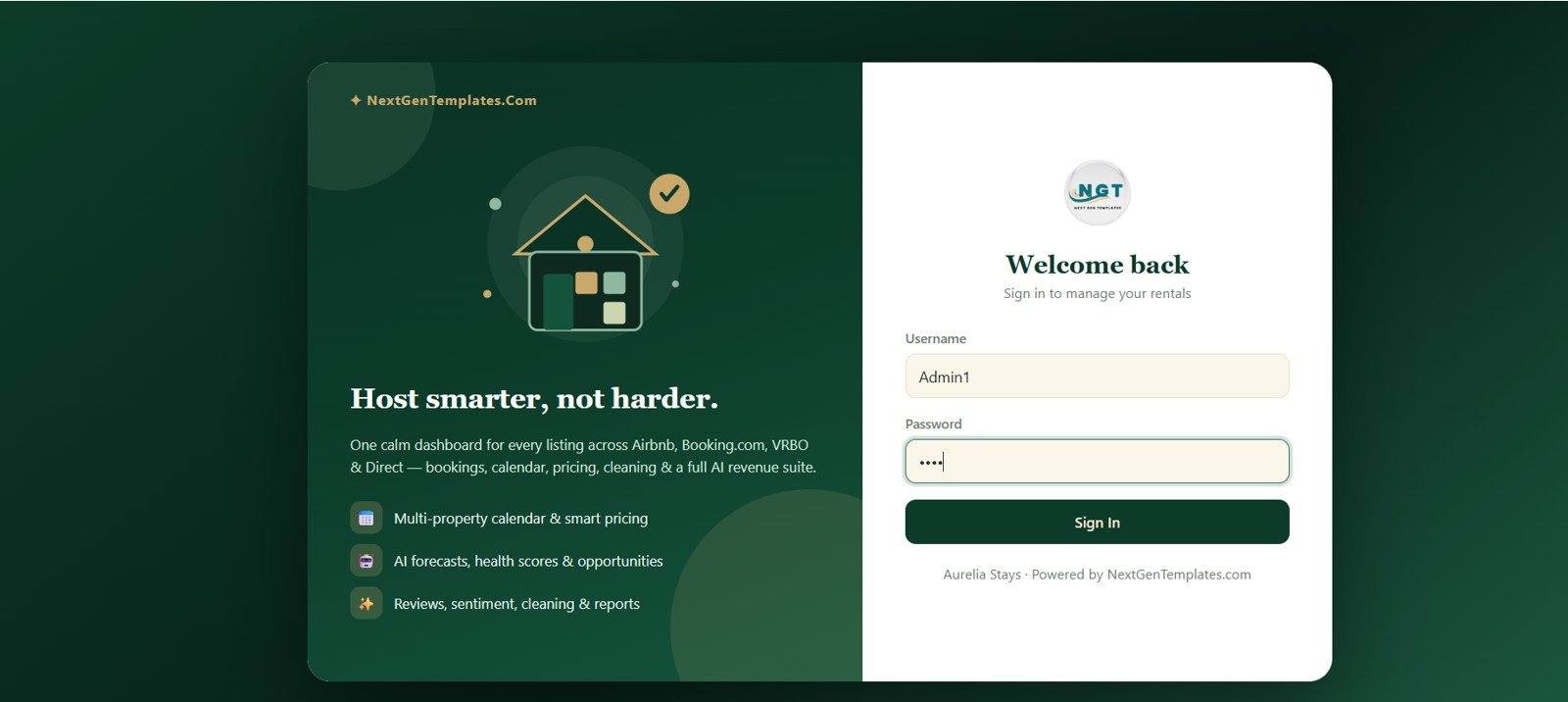
Login Page
Get the AI Vacation Rental & Airbnb Host Management System Web App NextGenTemplates.com
🚀 Try the Live Demo Before You Buy
We have deployed this web app in our own Google account so you can test every page, every role, and the full AI Hub — with real sample data — before purchasing. No signup, no email required.
🔑 Test Login Credentials
Sign in as Admin1 for full owner-level control, Manager1 to run day-to-day co-host operations including the AI Hub, or either Cleaner1 / Cleaner2 to see the restricted staff turnover view. 💡 Tip: log in as Admin first to assign a cleaning task, then log in as a Cleaner to watch it appear.
💡 What you get after purchase: The full source code (Code.gs + Index.html) plus a step-by-step deployment guide so you can deploy your own private instance in your own Google account in under 15 minutes.
Key Features of AI Vacation Rental & Airbnb Host Management System Web App
- 21 operational screens for login, dashboard, availability, reservations, properties, guests, pricing, channels, expenses, reviews, tasks, events, competitors, AI tools, reports, users, settings, archive, audit log, and import/export.AI Vacation Rental & Airbnb Host Management System Web App
- 9 AI Hub tools covering Dynamic Smart Pricing, Occupancy Forecast, Revenue Forecast, Property Health Score, Revenue Opportunity Finder, Superhost Assistant, Competitor Intelligence, Listing Audit, and Guest Sentiment Analysis.AI Vacation Rental & Airbnb Host Management System Web App
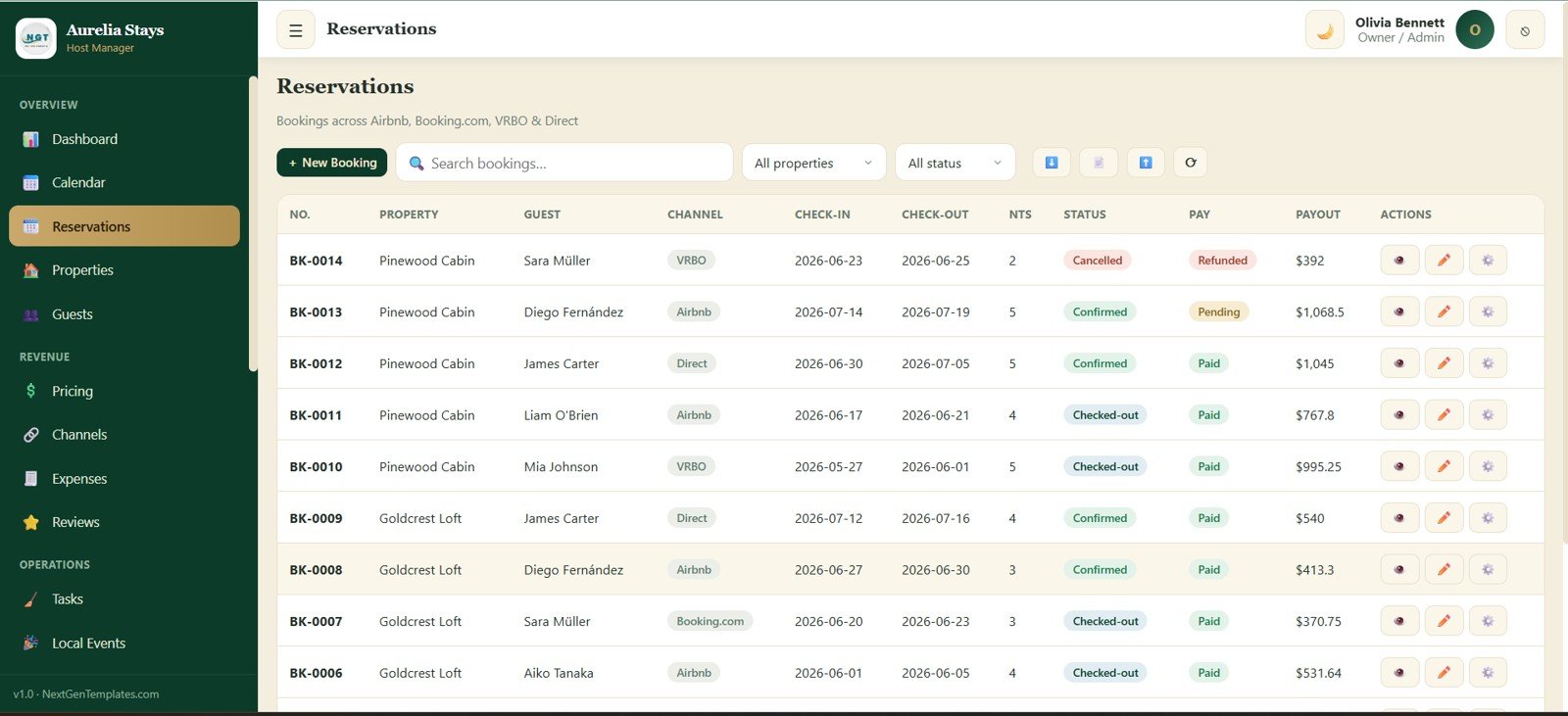
- Multi-channel reservation tracking for Airbnb, Booking.com, VRBO, and direct bookings, including check-in, check-out, nights, payment, payout, and booking status.
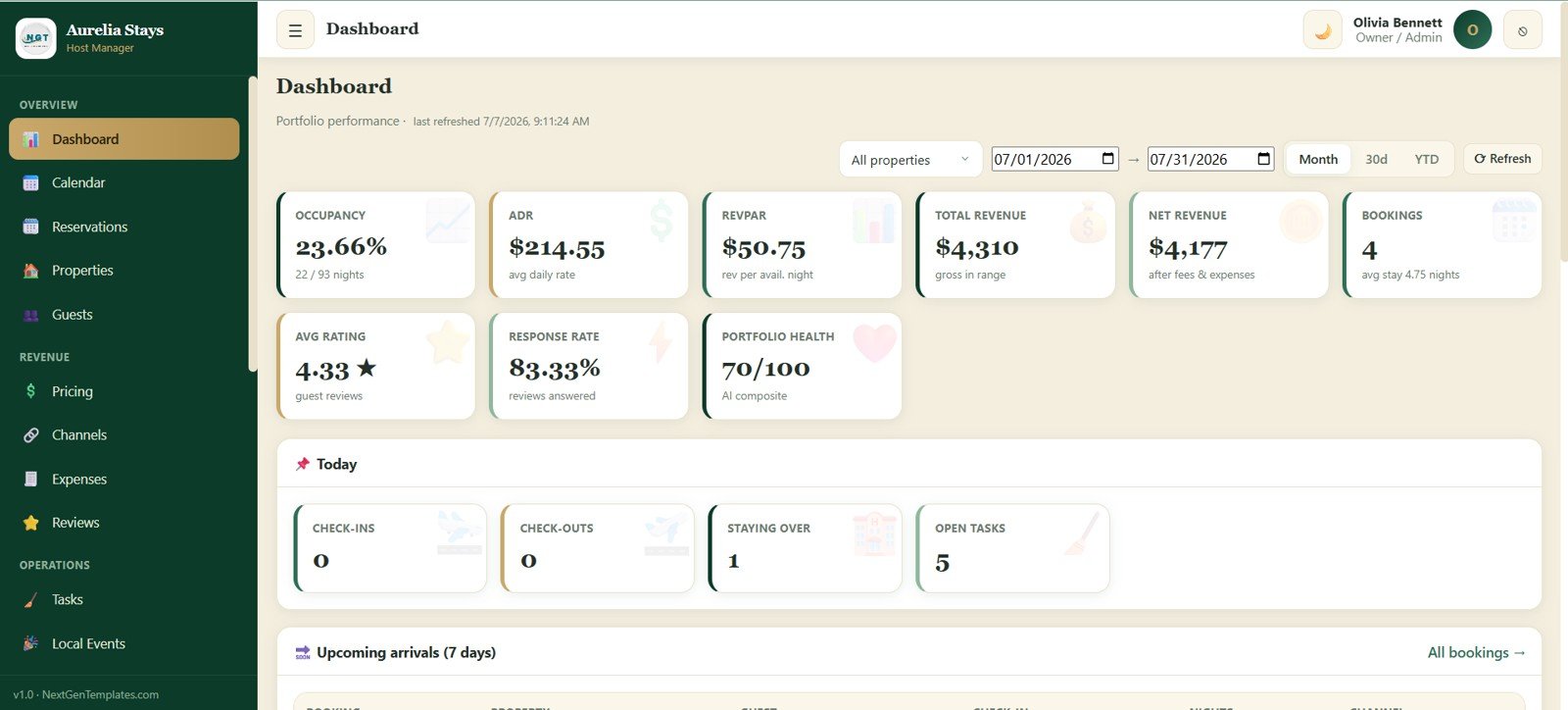
- Daily host dashboard with occupancy, ADR, RevPAR, total revenue, net revenue, bookings, average rating, response rate, check-ins, check-outs, staying-over guests, and open tasks.
- Admin and control layer for users, settings, dropdown values, audit log, archive database, and data import/export.
Dashboard Pages Explanation
1. Login Page
The login page is the secure entry point for the Aurelia Stays workspace. It includes username and password fields, a Sign In button, and a clear value proposition around multi-property calendars, smart pricing, forecasts, health scores, reviews, sentiment, cleaning, and reports.AI Vacation Rental & Airbnb Host Management System Web App
Login Page
2. Dashboard
The dashboard gives a fast portfolio snapshot with cards for Occupancy, ADR, RevPAR, Total Revenue, Net Revenue, Bookings, Avg Rating, Response Rate, and Portfolio Health. Property and date filters help hosts review today’s arrivals, check-ins, check-outs, staying-over guests, and open tasks without digging through separate files.AI Vacation Rental & Airbnb Host Management System Web App
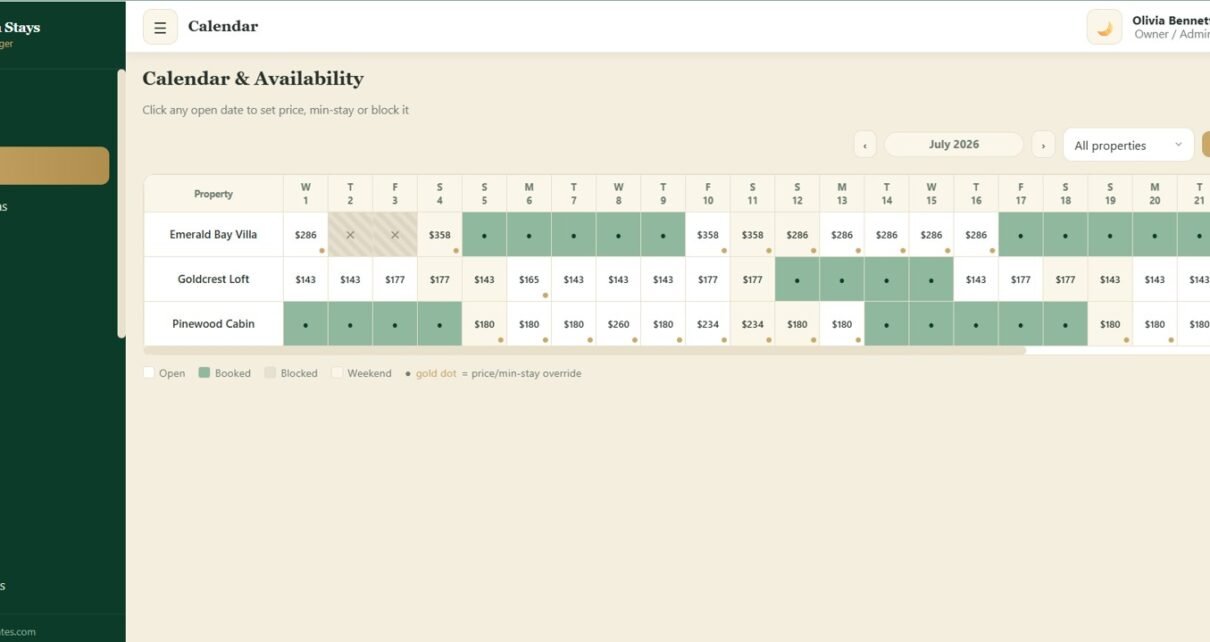
3. Calendar & Availability
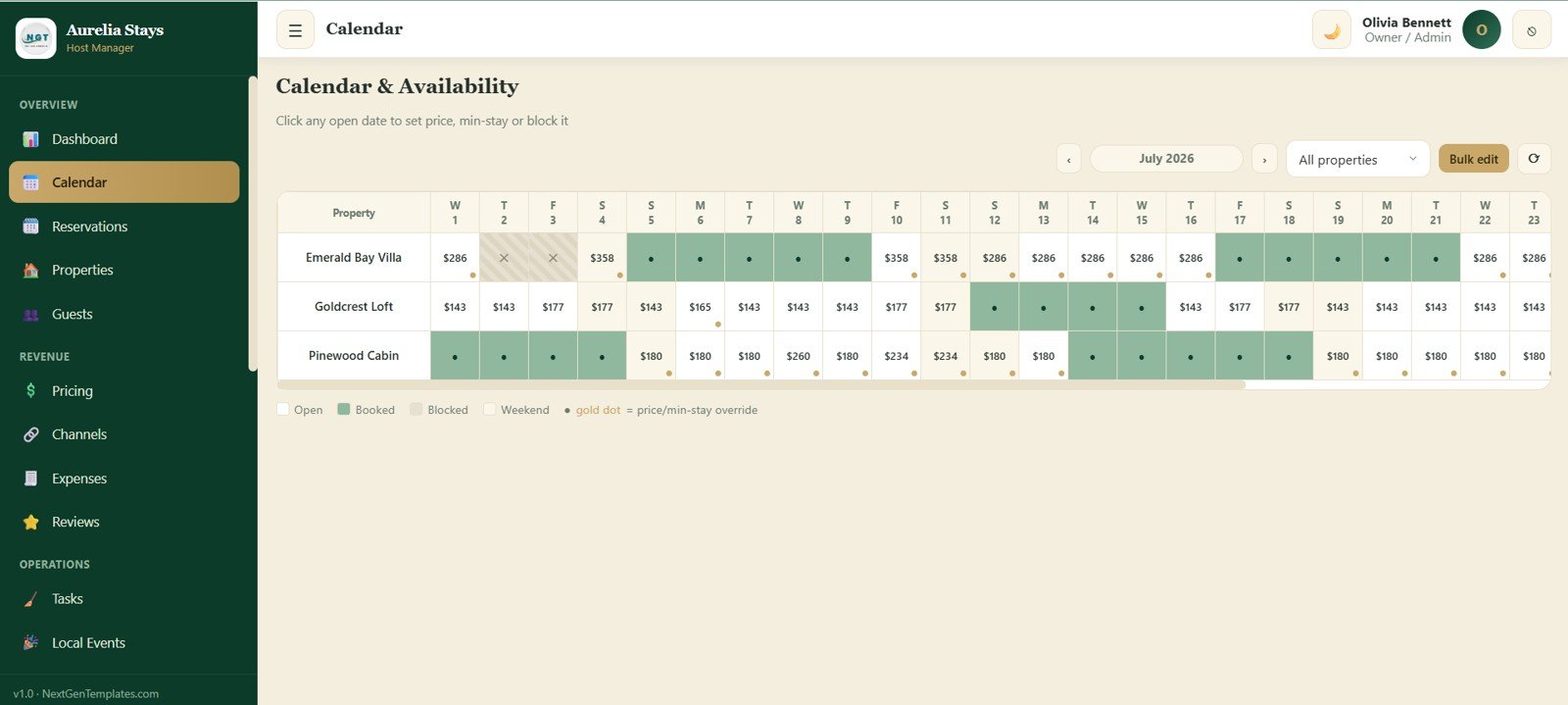
The Calendar & Availability module controls nightly prices, open dates, booked dates, blocked dates, weekend dates, and minimum-stay or price overrides. A property filter and bulk edit option make it easier to adjust inventory and rates across a monthly date grid.
Calendar & Availability
4. Reservations
The Reservations screen is where hosts manage stays from Airbnb, Booking.com, VRBO, and direct channels. Each row captures property, guest, channel, check-in, check-out, nights, booking status, payment status, payout, and action buttons.AI Vacation Rental & Airbnb Host Management System Web App
Reservations
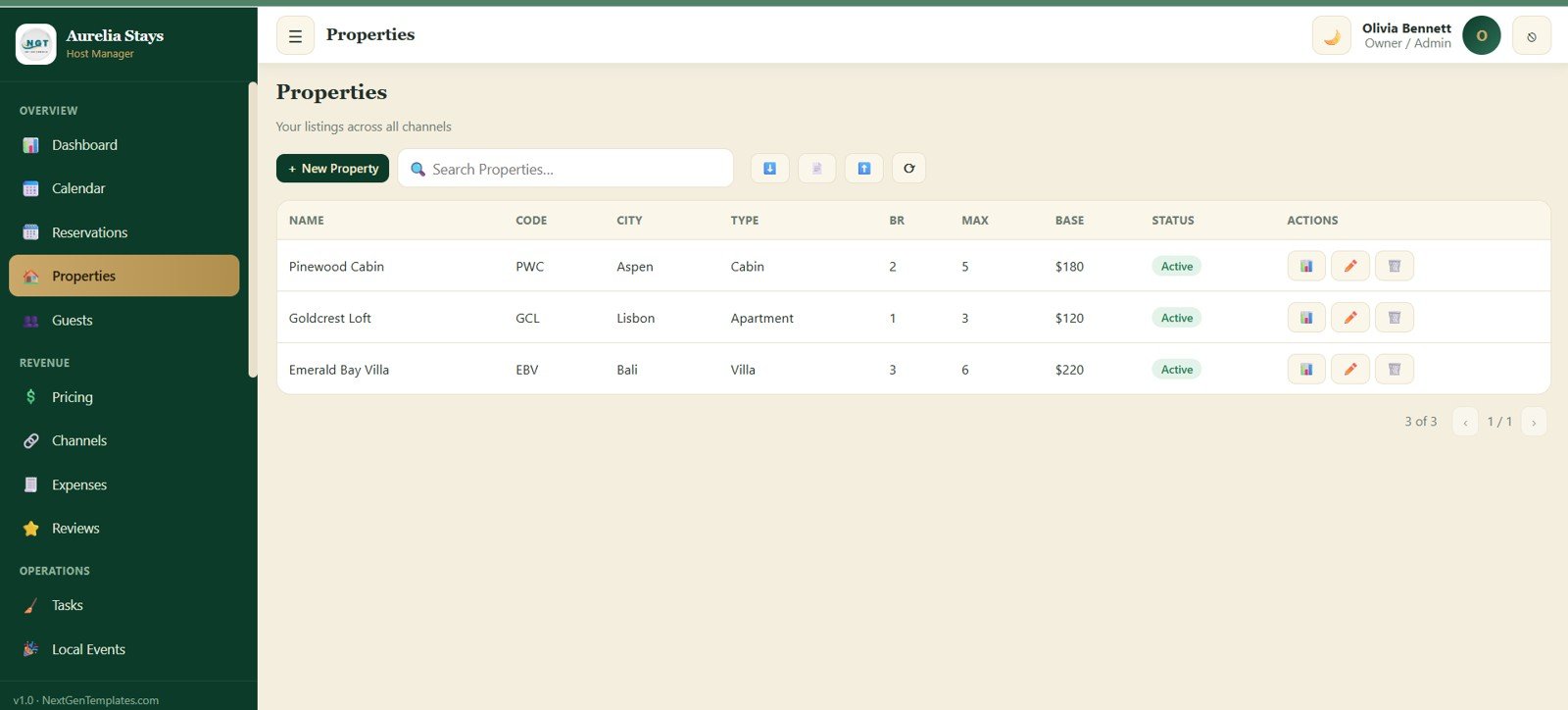
5. Properties
The Properties module stores every vacation rental listing in one place. It tracks name, code, city, type, bedrooms, maximum guests, base rate, listing status, and available actions for edits or review.
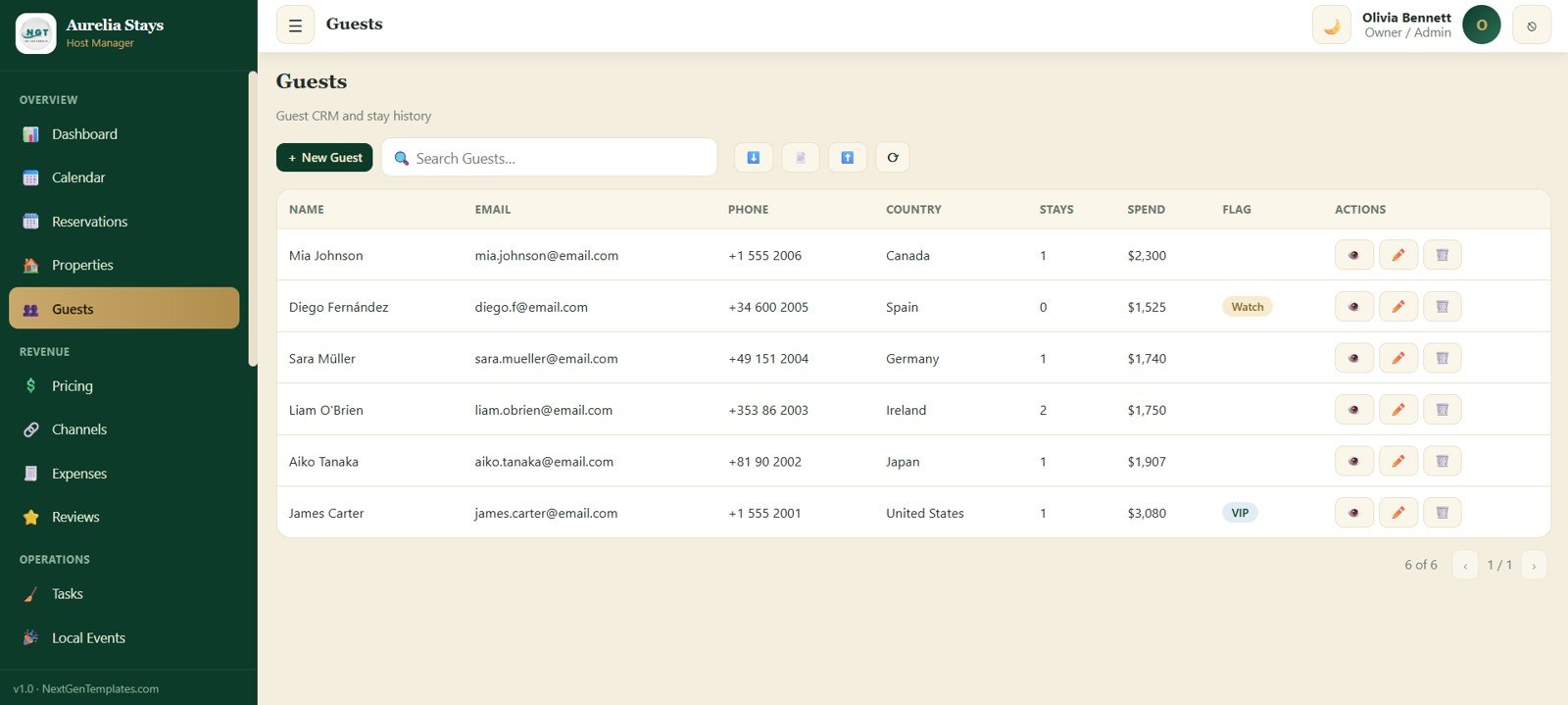
6. Guests
The Guests screen works as a lightweight CRM for repeat visitors and stay history. Hosts can track guest name, email, phone, country, total stays, spend, flag status, and quick actions from a single guest table.
Guests
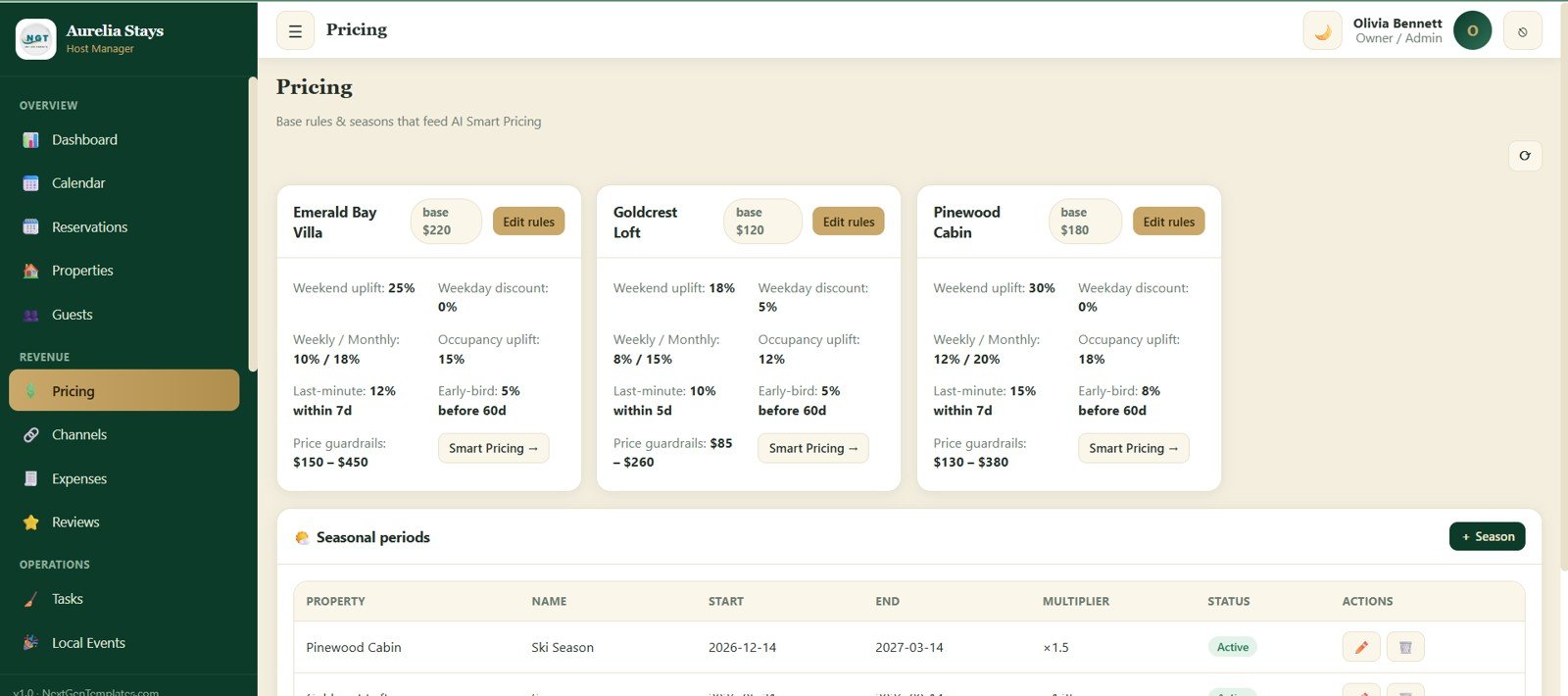
7. Pricing
The Pricing module stores the rules that feed AI Smart Pricing. It covers base rate, weekend uplift, weekday discount, weekly and monthly discounts, occupancy uplift, last-minute rules, early-bird rules, price guardrails, seasonal periods, multipliers, and status.AI Vacation Rental & Airbnb Host Management System Web App
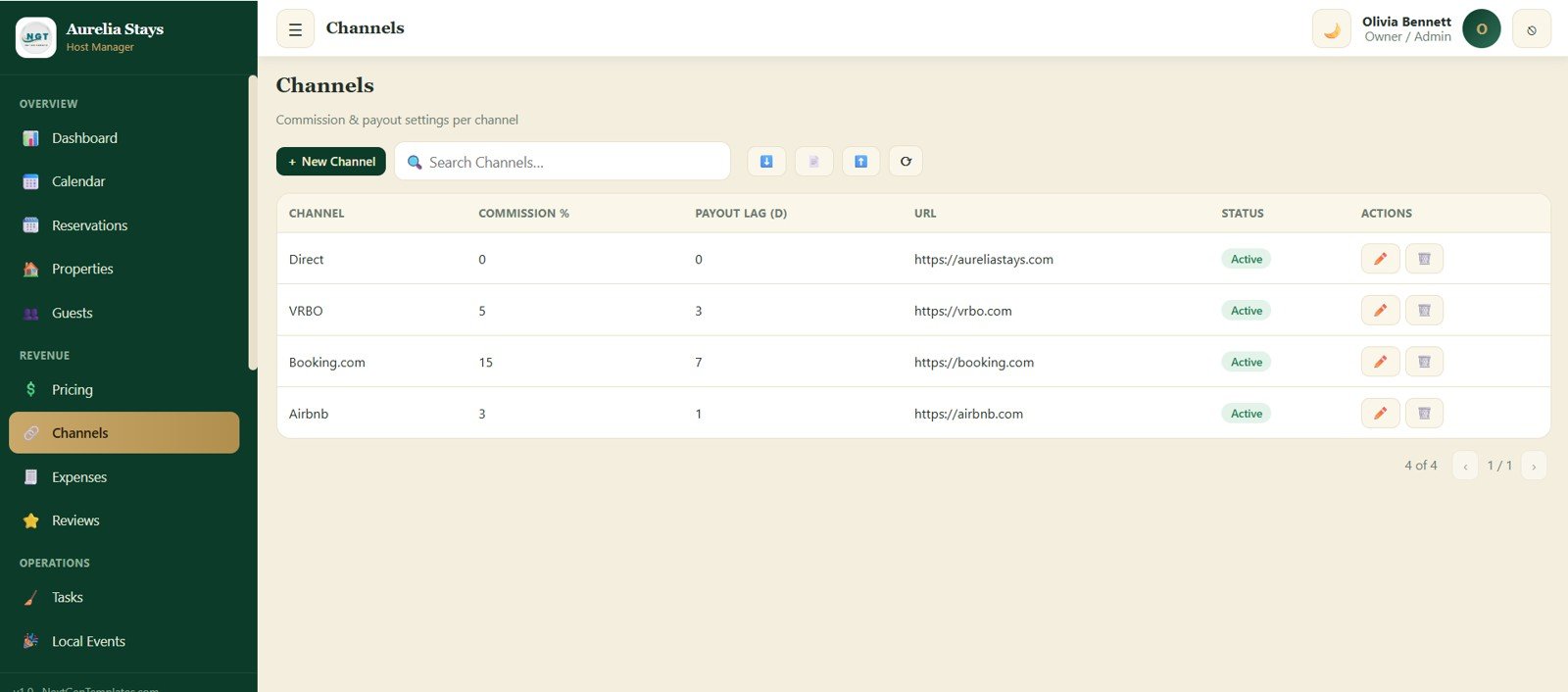
8. Channels
The Channels screen captures commission percentage, payout lag, public URL, status, and actions for each booking channel. This helps hosts understand net revenue after platform fees and delayed payouts.
Channels
9. Expenses
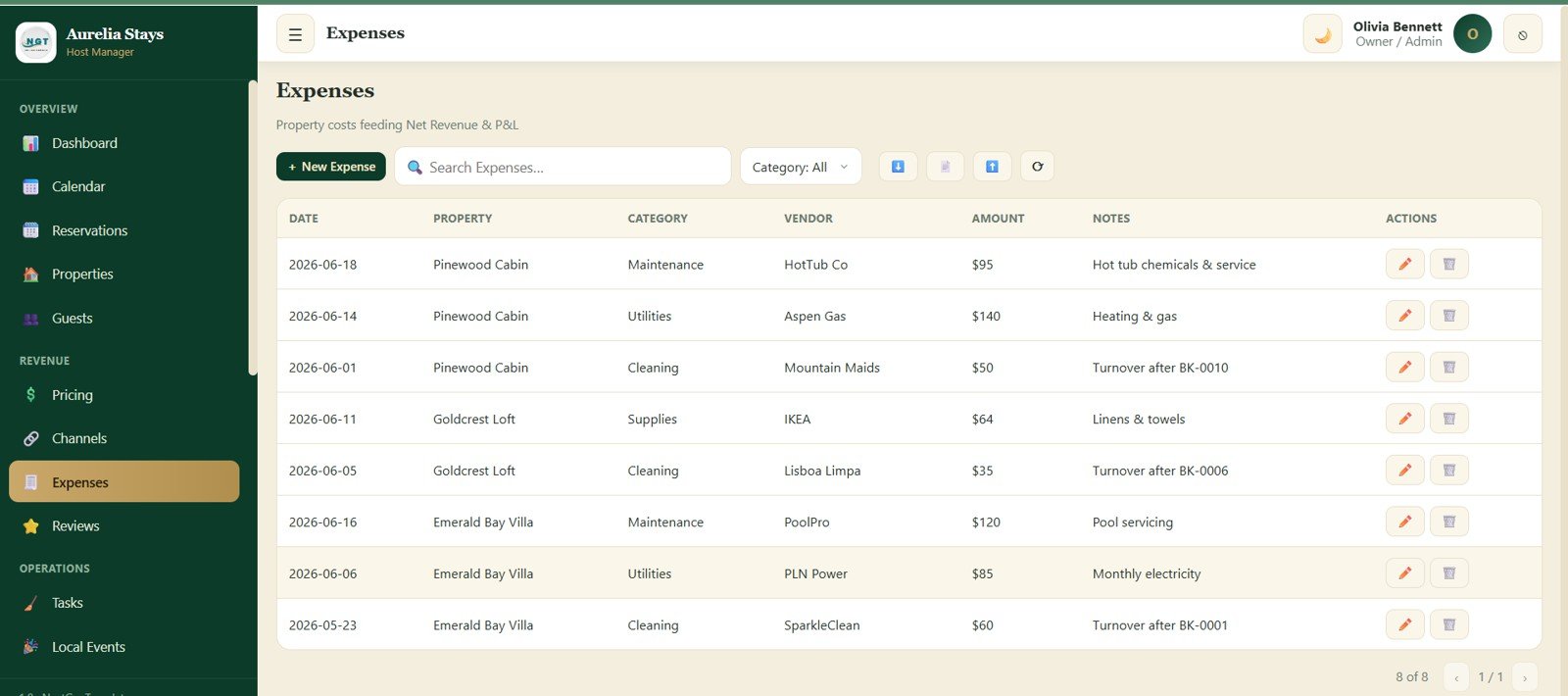
The Expenses module records property costs that feed Net Revenue and P&L reporting. It includes date, property, category, vendor, amount, notes, and actions so owners can track cleaning, maintenance, supplies, subscriptions, and repairs.AI Vacation Rental & Airbnb Host Management System Web App
10. Reviews
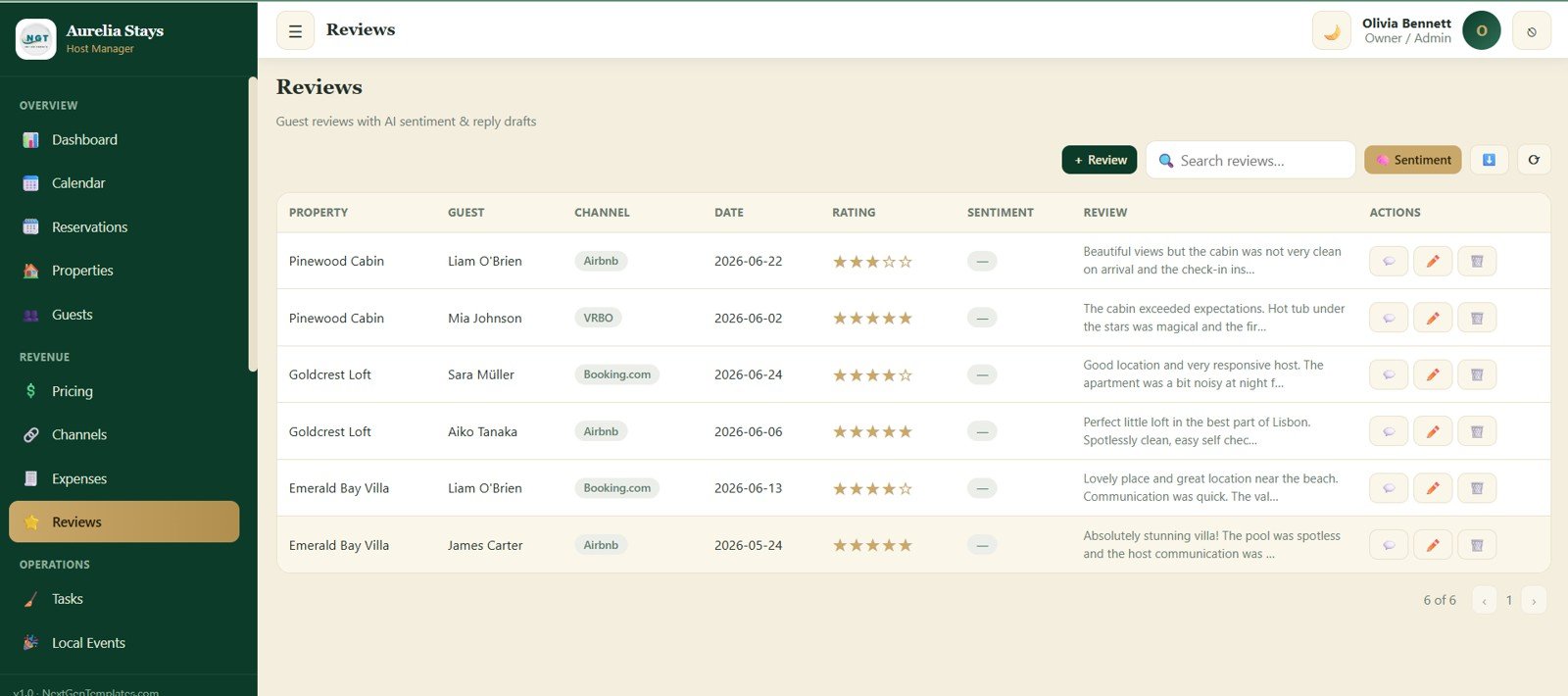
The Reviews screen combines guest feedback with AI sentiment and reply support. Hosts can track property, guest, channel, date, rating, sentiment, review text, and actions for follow-up.
Reviews
11. Tasks
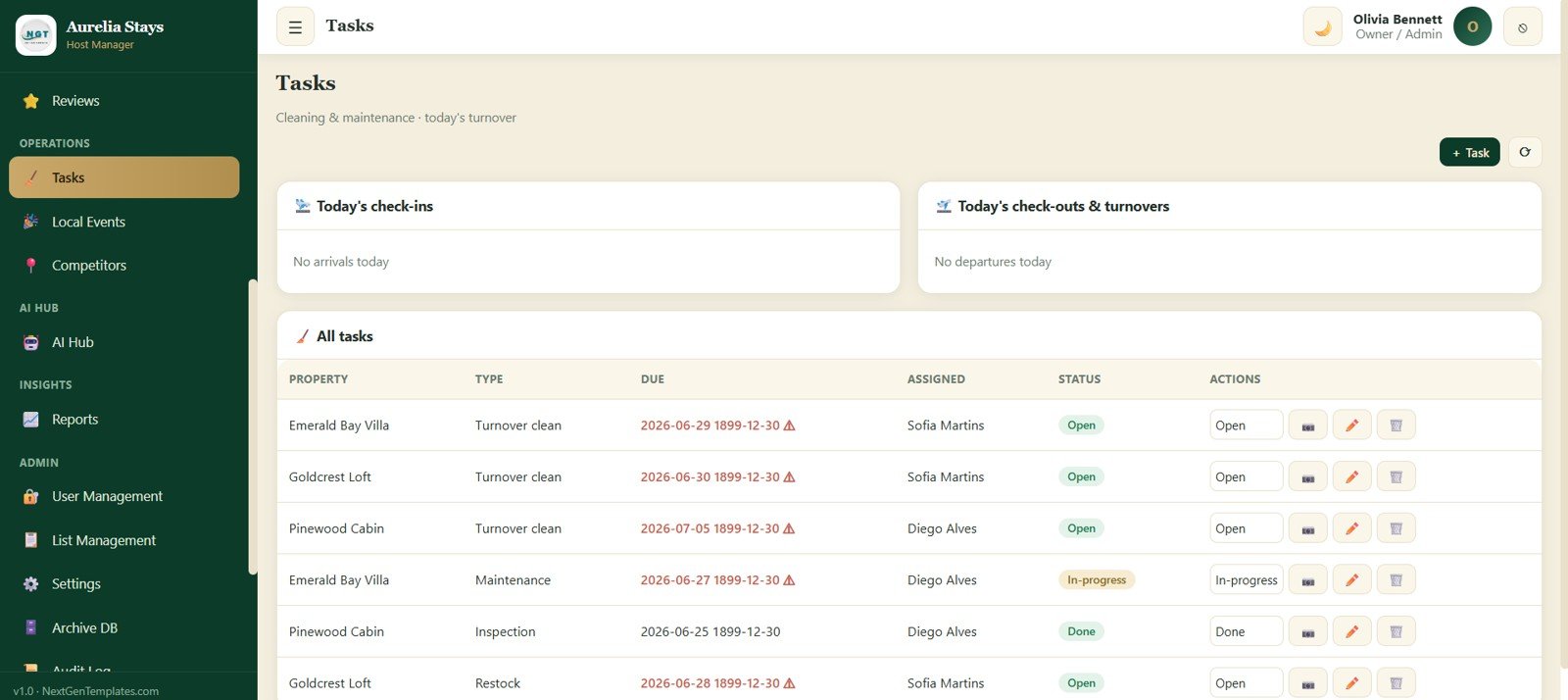
The Tasks screen helps manage cleaning and maintenance work around daily turnovers. It highlights today’s check-ins, today’s check-outs, property, task type, due date, assigned person, status, and actions.
12. Local Events
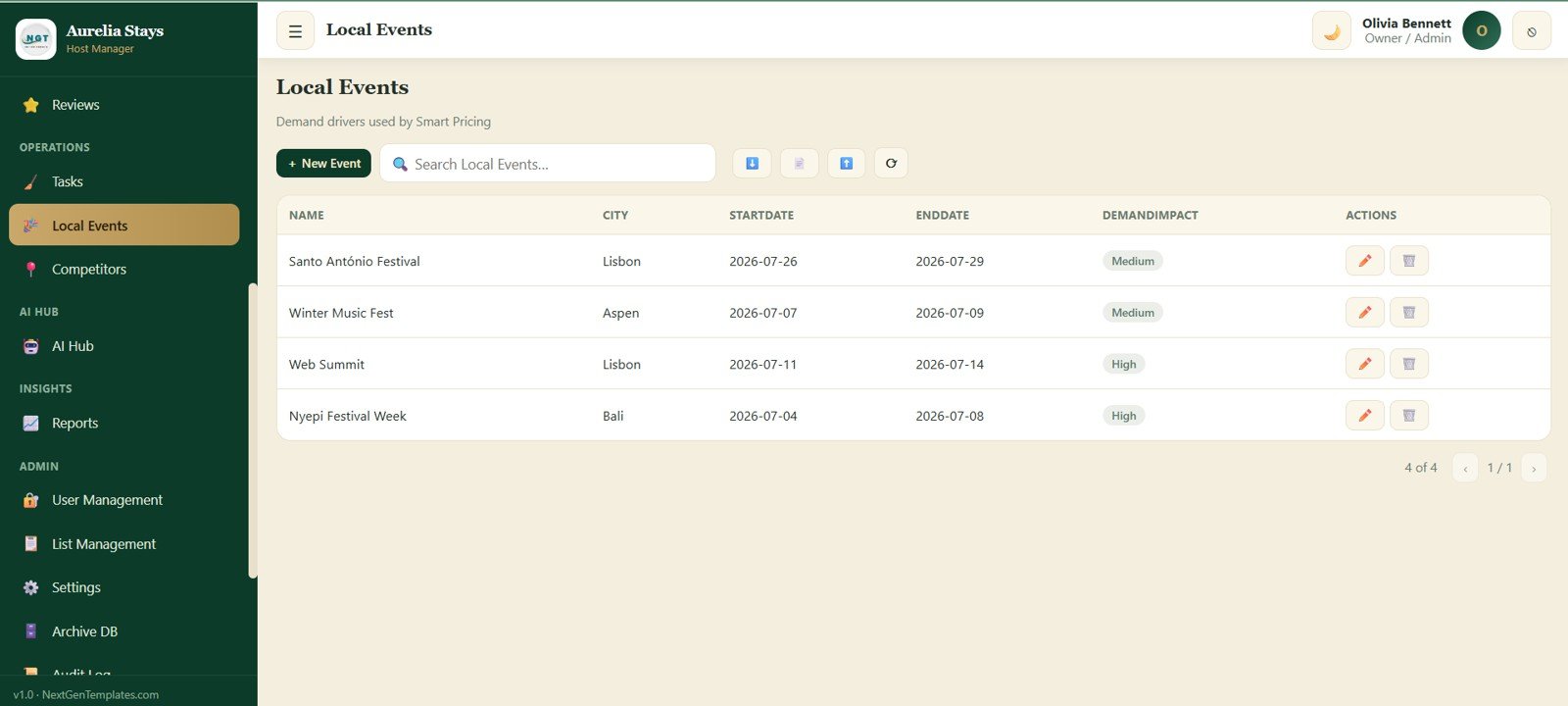
The Local Events module tracks demand drivers that can influence pricing and occupancy. Hosts can record event name, city, start date, end date, demand impact, and actions, then use those inputs when planning seasonal or event-based pricing.AI Vacation Rental & Airbnb Host Management System Web App
Local Events
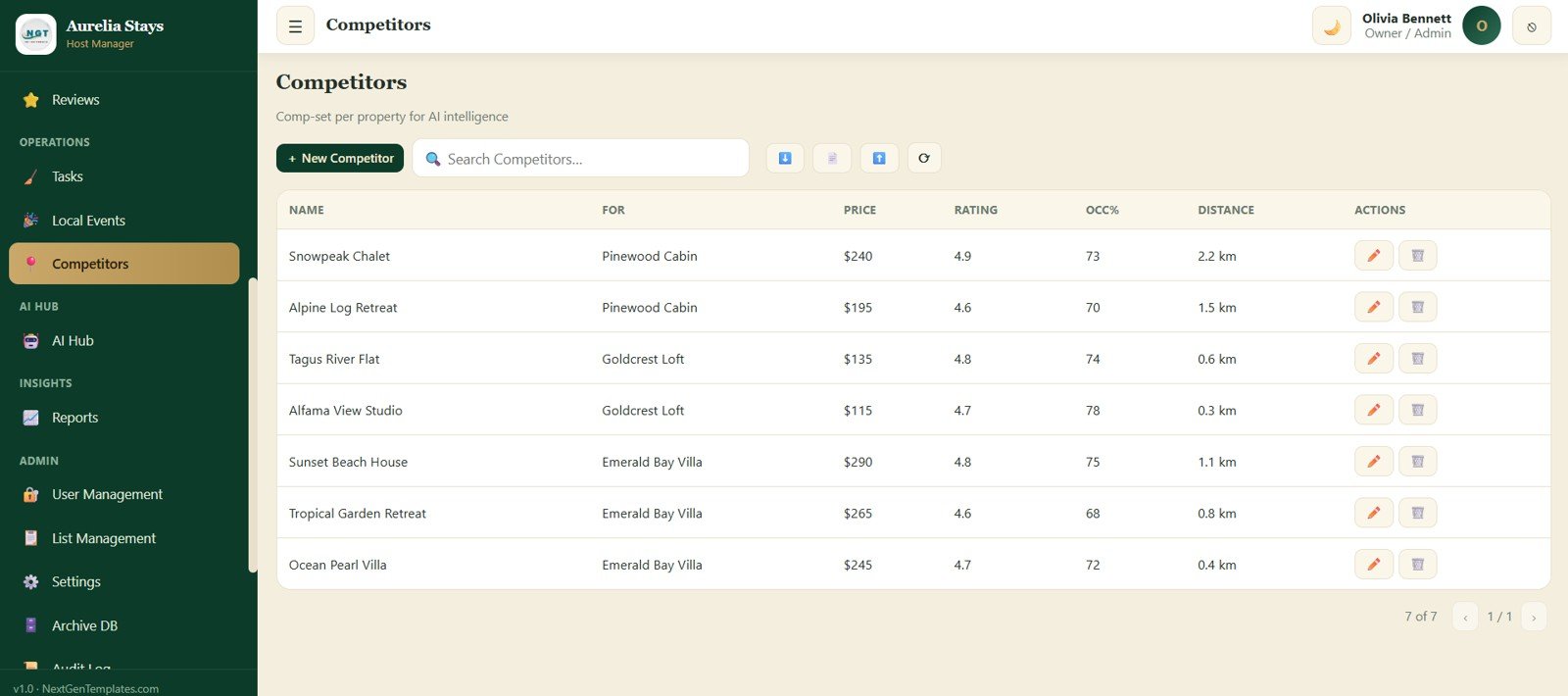
13. Competitors
The Competitors screen gives hosts a structured way to track nearby listings. It includes competitor name, linked property, price, rating, occupancy percentage, distance, and actions for pricing comparison and market intelligence.
14. AI Hub
The AI Hub contains the main intelligence tools: Dynamic Smart Pricing, Occupancy Forecast, Revenue Forecast, Property Health Score, Revenue Opportunity Finder, Superhost Assistant, Competitor Intelligence, Listing Audit, and Guest Sentiment Analysis. It is designed to turn operational data into next-step recommendations.AI Vacation Rental & Airbnb Host Management System Web App
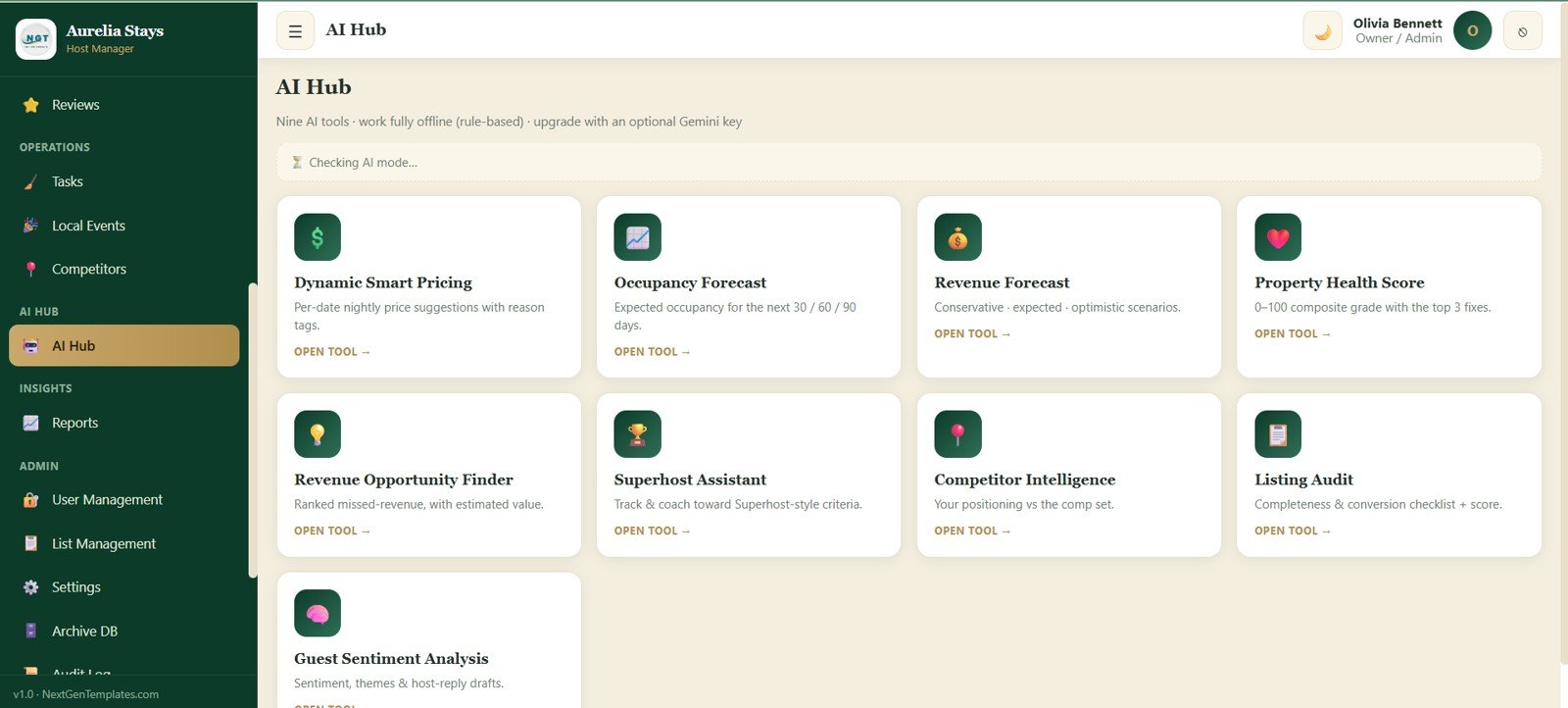
AI Hub
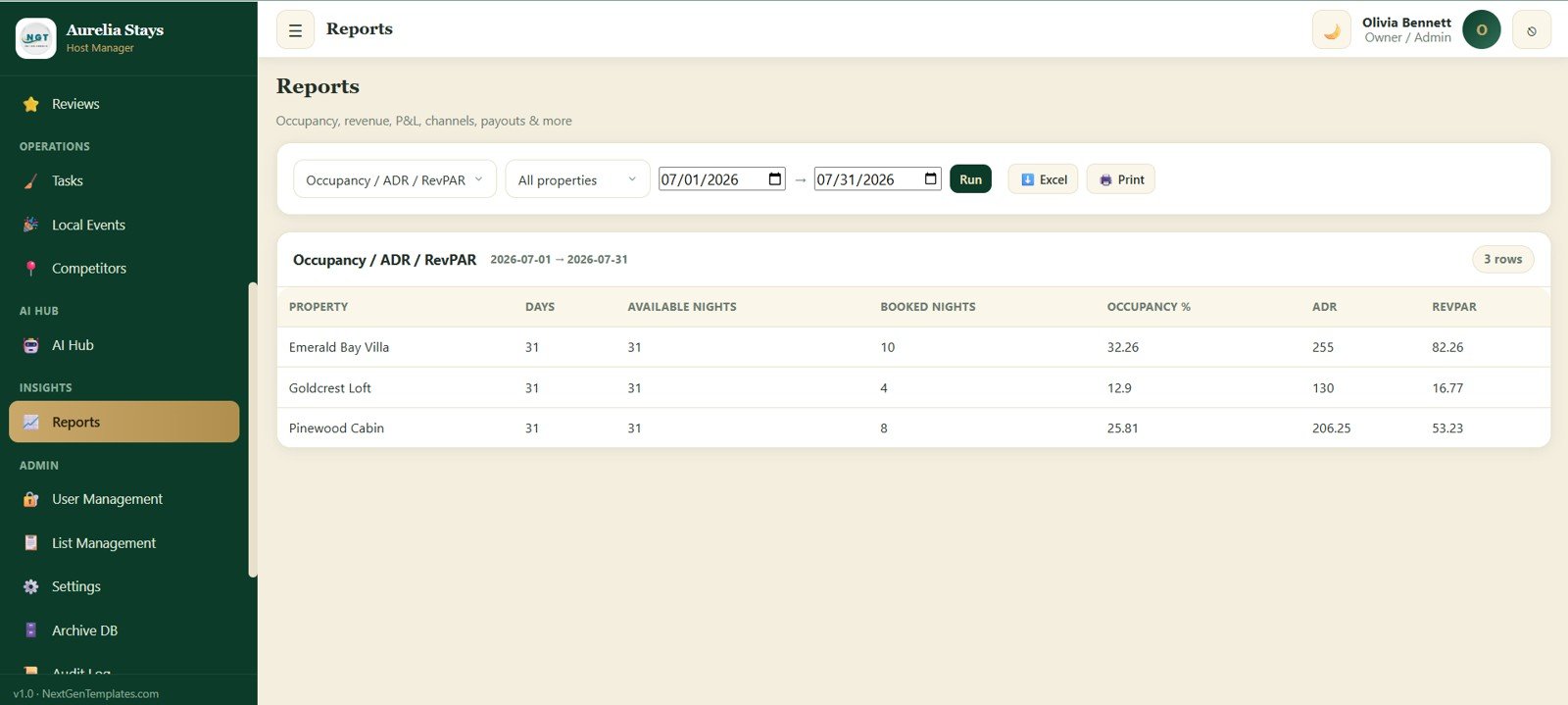
15. Reports
The Reports module supports occupancy, revenue, P&L, channels, payouts, and other operational views. Hosts can choose report type, property filter, date range, run report, export to Excel, print, and review fields such as Days, Available Nights, Booked Nights, Occupancy %, ADR, and RevPAR.
16. User Management
User Management is built for owners, co-hosts, cleaners, and admins. It tracks username, name, role, email, status, and actions so access can be controlled as the team grows.
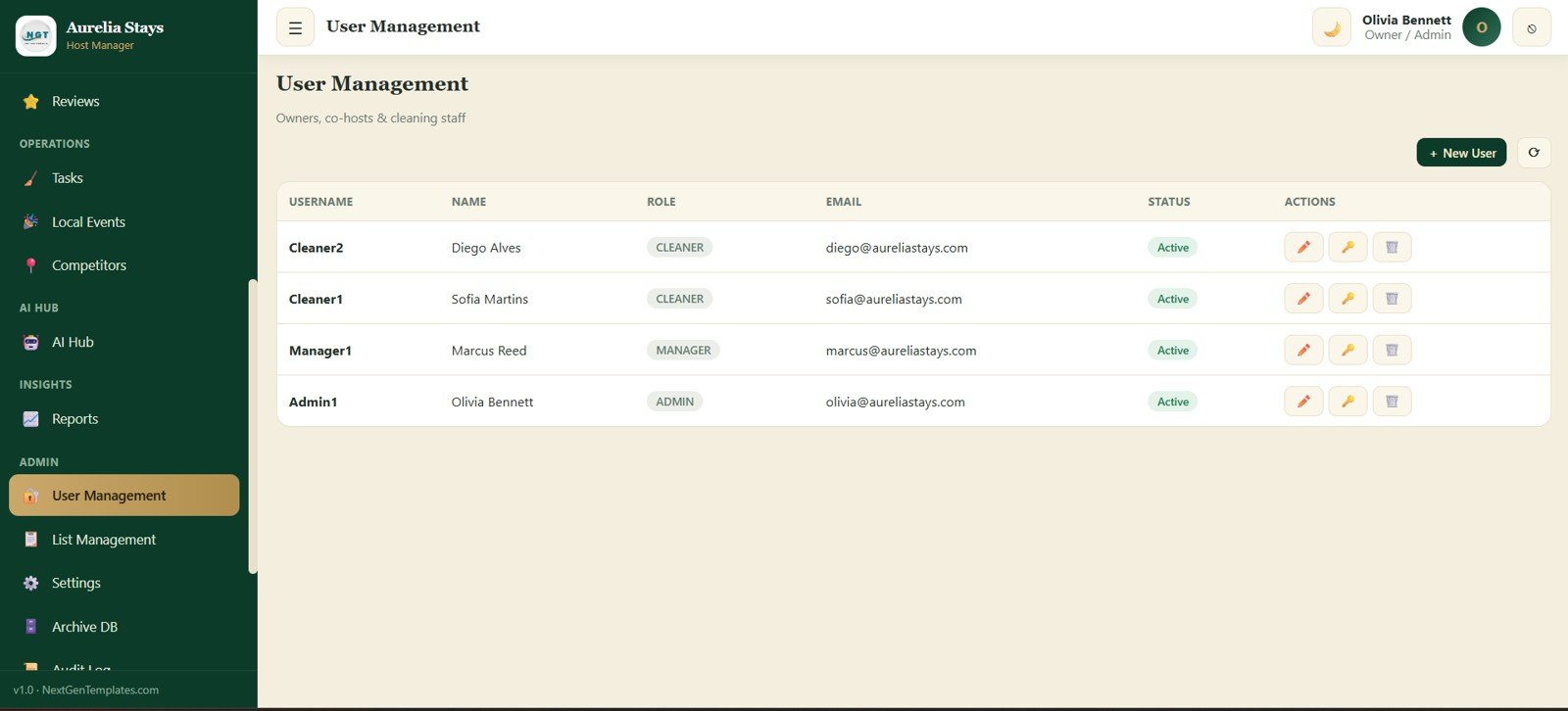
User Management
17. List Management
List Management keeps dropdown values organized across the app. Admins can choose a list type, update values, set order, control status, and keep operational fields consistent without editing code.
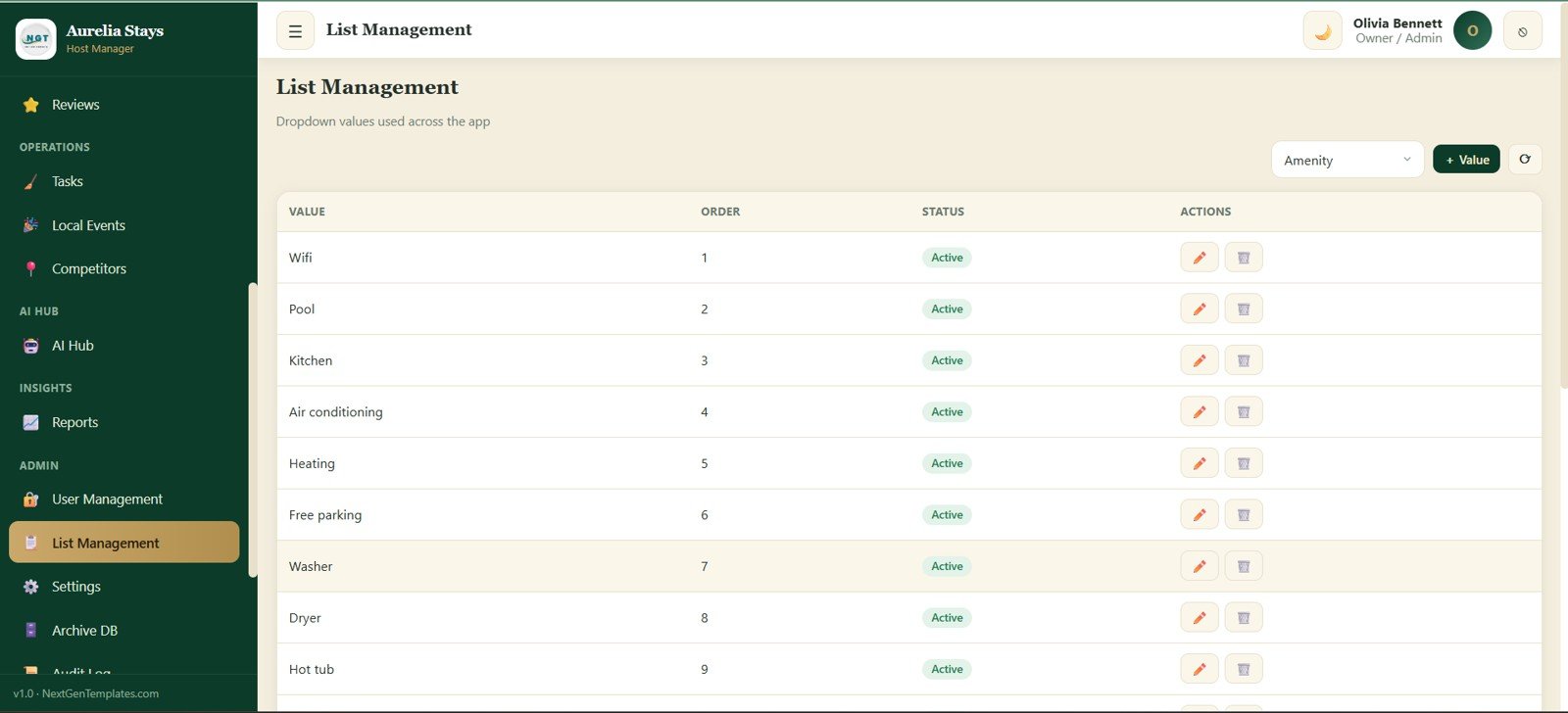
List Management
Get the AI Vacation Rental & Airbnb Host Management System Web App NextGenTemplates.com
18. Settings
The Settings screen controls business profile and technical setup fields. It includes business name, tagline, address, city, country, phone, email, website, logo image URL, currency symbol, AI settings, print settings, email settings, Drive settings, and Save Settings.
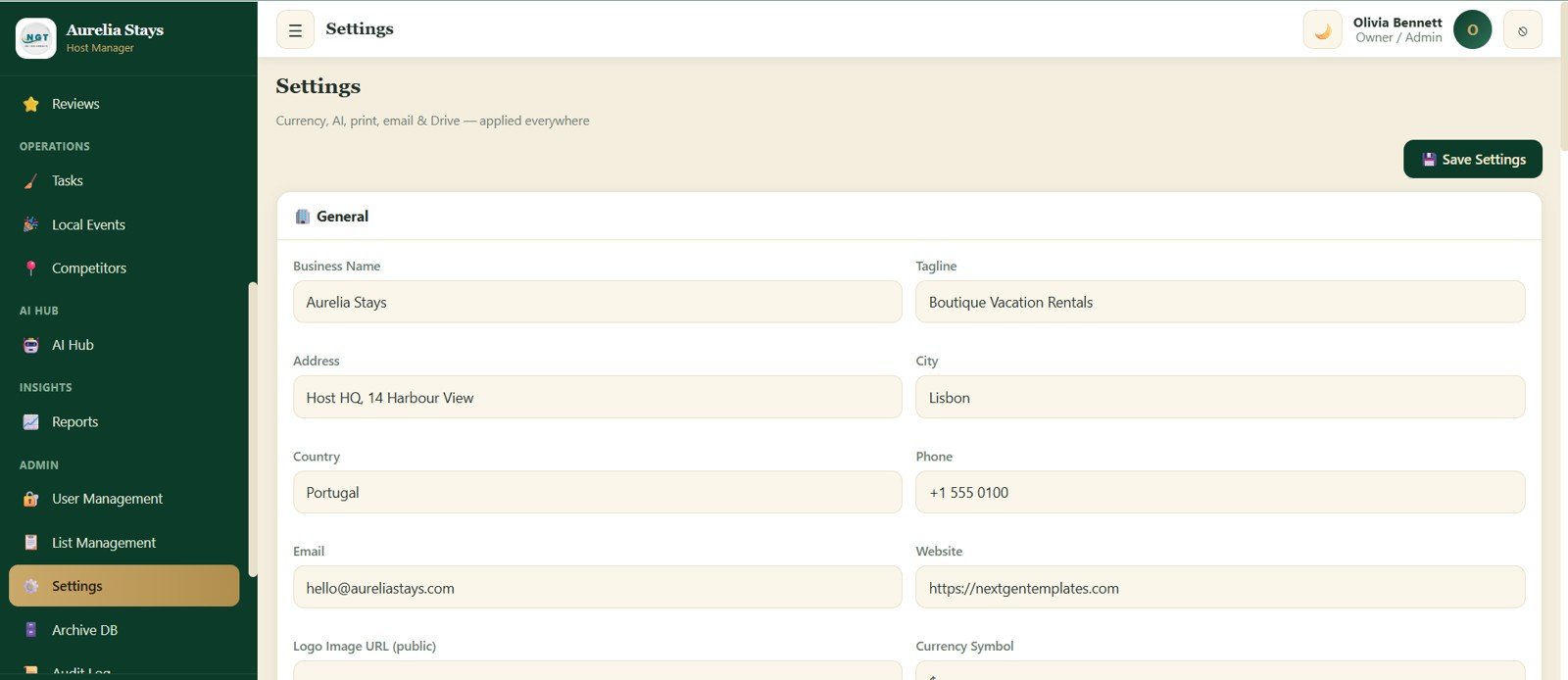
Settings
19. Archive DB
The Archive DB screen moves old closed, cancelled, and no-show bookings into a dated archive so the active database stays clean. It includes cutoff date, preview, run archive, archive register, archived spreadsheet ID, module selector, and archive search.
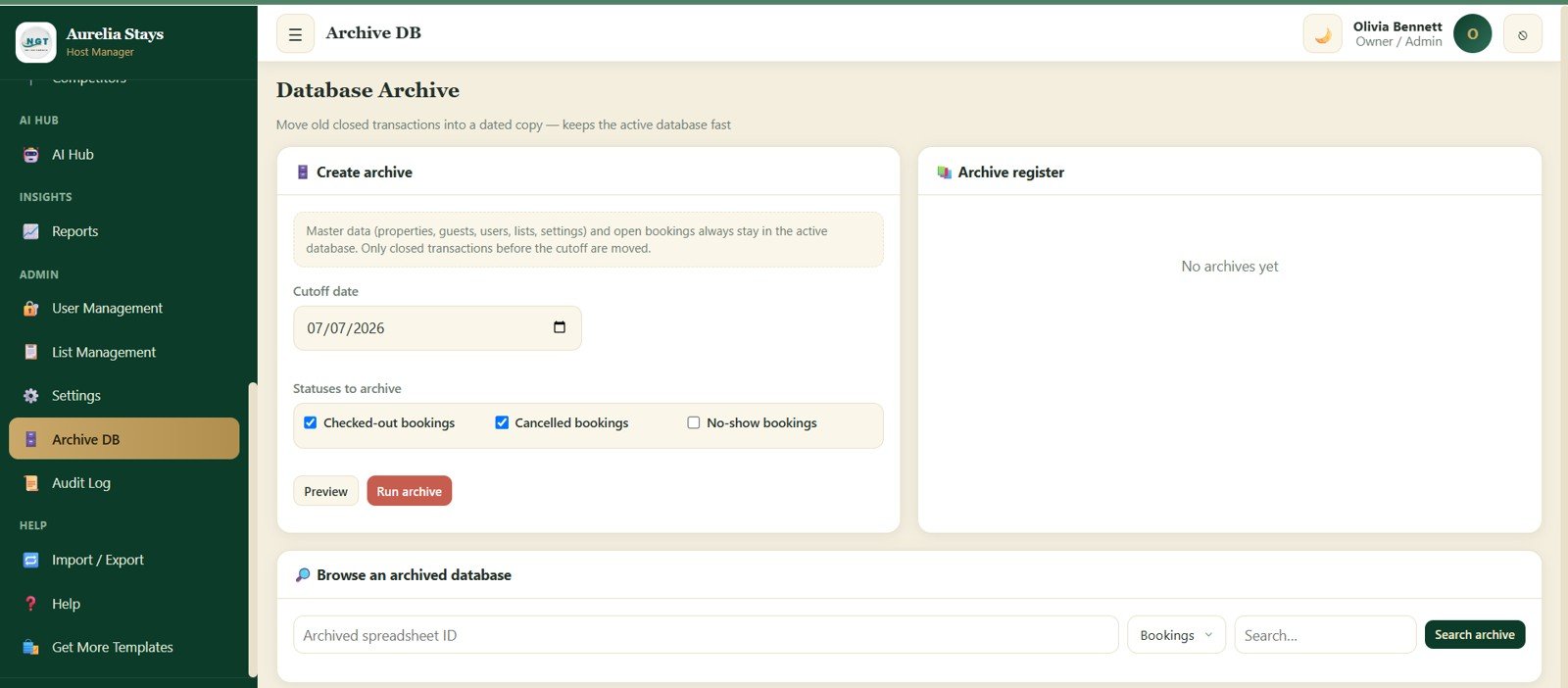
20. Audit Log
The Audit Log records every login and change for accountability. It tracks when the action happened, which user performed it, the action type, the module affected, and the detail of the change.
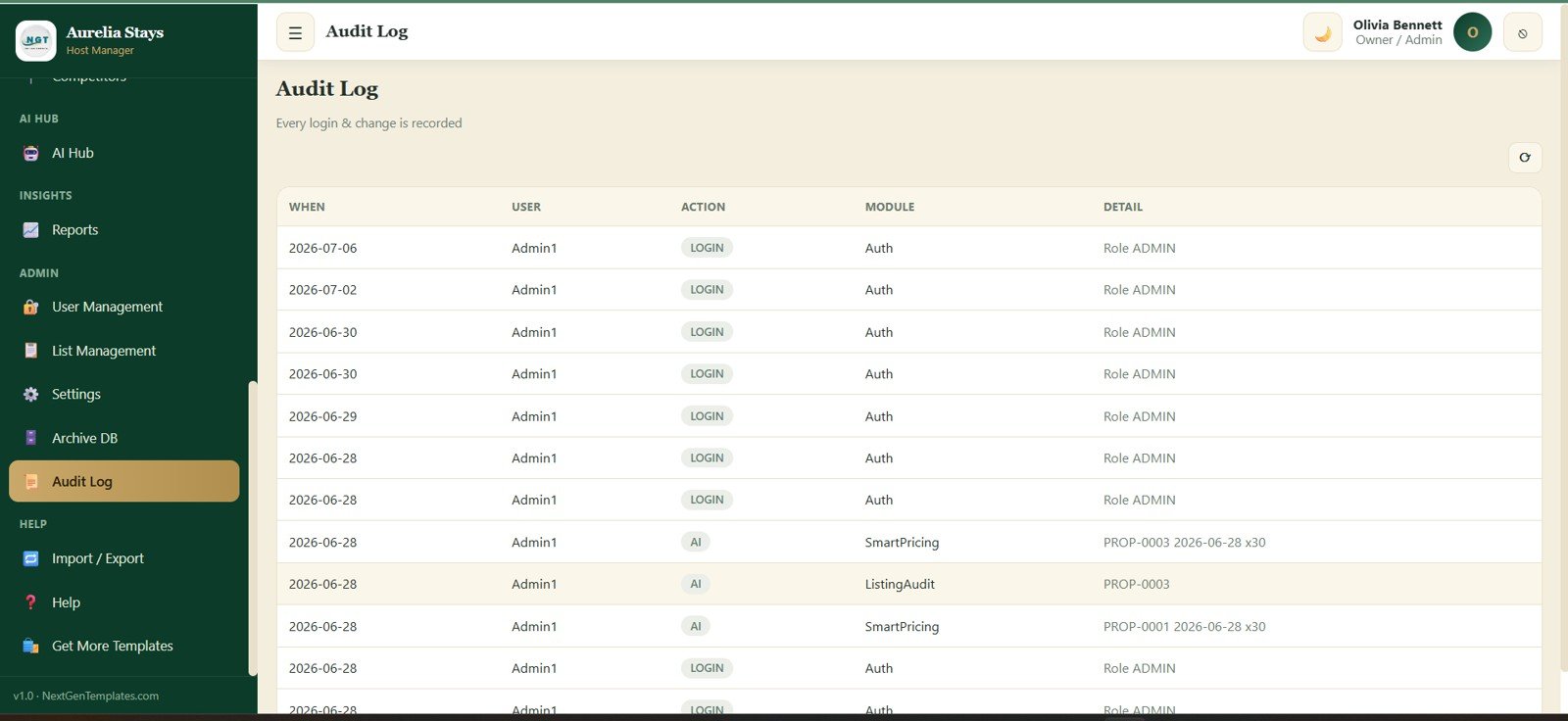
Audit Log
21. Import / Export
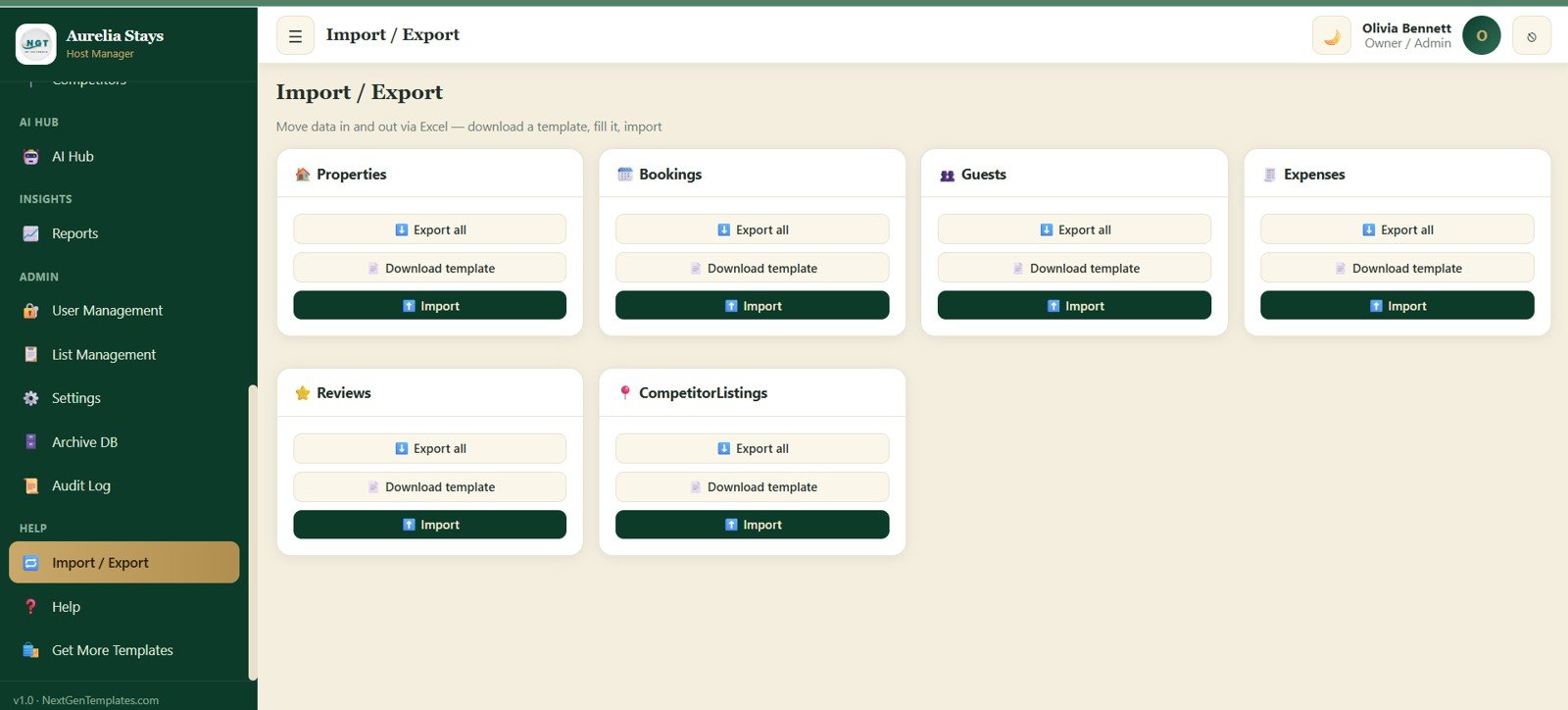
The Import / Export module helps move data in and out of the app through Excel templates. It supports Properties, Bookings, Guests, Expenses, Reviews, CompetitorListings, Export all, Download template, and Import workflows.
Import / Export
Get the AI Vacation Rental & Airbnb Host Management System Web App NextGenTemplates.com
AI Vacation Rental Management Web App vs. Google Sheets Tracker vs. Paid CRM/SaaS – Feature Comparison
| Feature | AI Vacation Rental Web App | Google Sheets Tracker | Paid PMS / SaaS |
|---|---|---|---|
| Cost | $39.99 one-time | Free to low one-time cost | Monthly, often per listing |
| Platform | Browser web app | Spreadsheet tabs | Vendor cloud |
| Setup time | Replace sample data and configure settings | Fast but manual | Onboarding and integrations |
| Real-time team collaboration | Supported through deployed workspace | Shared sheet collaboration | Built in by plan |
| Mobile access | Browser access | Sheets app/browser | Native app or browser |
| Customizable fields | Settings, lists, and editable app files | Editable cells and formulas | Plan-dependent |
| Share with link | Yes, based on deployment settings | Yes | Yes |
| Year-1 cost at 5 users | $39.99 total | Low, more manual work | Often hundreds or thousands |
| AI pricing and review tools | Included in AI Hub | Manual or add-on scripts | Usually paid add-ons |
Who Should Use This Template
Get the AI Vacation Rental & Airbnb Host Management System Web App NextGenTemplates.com
This template is ideal for Airbnb hosts, vacation rental owners, co-hosts, boutique property managers, real estate investors, and hospitality consultants who want one workspace for reservations, rates, reviews, tasks, reports, and decision support. It is especially useful for teams managing several properties but not ready for a high-cost PMS contract.
It is not a replacement for a live OTA channel manager, online payment processor, or guest messaging automation suite. If you need real-time sync with every booking platform, keep using dedicated channel-manager software and use this web app as your operating, analytics, and reporting layer.
Real-World Use Cases
Independent host with 5 listings: A host can review today’s arrivals, turnovers, pending payments, and open tasks every morning before adjusting nightly prices for the weekend.AI Vacation Rental & Airbnb Host Management System Web App
Co-host managing owner portfolios: A co-host can filter by property, pull revenue reports, check guest sentiment, and send cleaner assignments without rebuilding the same spreadsheet each week.
Vacation rental consultant: A consultant can use the AI Hub, competitors screen, local events, and reports to show owners where pricing, listing quality, and operations can improve.
Advantages of AI Vacation Rental & Airbnb Host Management System Web App
- More complete than a simple tracker: It includes operating screens, AI tools, reporting, archive, audit log, and import/export.
- Lower cost than SaaS: One-time pricing makes it easier for new hosts and small teams to control costs.
- Better context for decisions: Pricing, events, competitors, reviews, tasks, and reports live together instead of in separate files.
- Admin-ready structure: Users, settings, list management, and audit logs help teams stay organized as they scale.
Opportunities for Improvement
The template is designed as a flexible management system, not a live API-connected PMS. Future improvements could include automated OTA sync, calendar feed imports, live competitor scraping, AI-generated guest messages, owner portal views, and direct integrations with accounting or payment tools.
Best Practices
- Standardize property names before importing historical data.
- Update channel commission and payout lag settings before reviewing net revenue.
- Refresh local events and competitor records before high-demand seasons.
- Use the Archive DB module monthly or quarterly to keep active tables fast.
- Review the Audit Log after adding new users or changing pricing rules.
- Compare your exports with official platform records. Airbnb hosts can also review official hosting guidance in the Airbnb Help Center.AI Vacation Rental & Airbnb Host Management System Web App
Explore Relevant Templates
- AI Vacation Rental & Airbnb Host Management System Web App – the complete product featured in this walkthrough.
- Web App Based: Hotel Booking Management System – a related web app for hotel booking workflows.
- Real Estate & Property Bundle – a broader property analytics pack.
- Airbnb Host Dashboard in HTML – a lighter browser dashboard for Airbnb reporting.
- Airbnb Host Dashboard in Power BI – a Microsoft BI version for host analytics.
Want to build skills like this step by step? The NextGenTemplates Academy learning paths walk you through spreadsheet and data skills with practice files.
Get the AI Vacation Rental & Airbnb Host Management System Web App
Frequently Asked Questions
What is the AI Vacation Rental & Airbnb Host Management System Web App?
It is a browser-based vacation rental management template with 21 screens for reservations, calendar availability, pricing rules, properties, guests, channels, expenses, reviews, tasks, local events, competitors, AI tools, reports, settings, archive, audit log, and import/export.
How many AI tools are included?
The AI Hub includes 9 tools: Dynamic Smart Pricing, Occupancy Forecast, Revenue Forecast, Property Health Score, Revenue Opportunity Finder, Superhost Assistant, Competitor Intelligence, Listing Audit, and Guest Sentiment Analysis.
Can this replace Guesty, Hostaway, or Lodgify?
No. It does not provide live OTA sync, direct payment processing, or automated guest messaging. It is best used as a private operations, analysis, and reporting layer for small to mid-sized host teams.AI Vacation Rental & Airbnb Host Management System Web App
Does it support Airbnb, Booking.com, VRBO, and direct bookings?
Yes. The reservations and channels modules include fields for Airbnb, Booking.com, VRBO, and direct booking workflows.AI Vacation Rental & Airbnb Host Management System Web App
Can I export data?
Yes. The Import / Export screen includes Export all, Download template, and Import options for core modules such as Properties, Bookings, Guests, Expenses, Reviews, and CompetitorListings.
Is this a one-time purchase?
Yes. The template is sold through NextGenTemplates as a one-time download with no recurring subscription from NextGenTemplates.
About the Author
Built by PK – Microsoft Certified Professional with 15+ years of Excel, Google Sheets, and Power BI experience. Founder of NextGenTemplates, reaching 300K+ subscribers across YouTube channels. Every template is hand-built and tested before release.
Conclusion
The AI Vacation Rental & Airbnb Host Management System Web App is built for hosts who want more structure than a spreadsheet but do not want to jump straight into expensive SaaS. With 21 screens, 9 AI tools, reservation management, pricing rules, review sentiment, task tracking, reports, archive, audit log, and import/export, it gives vacation rental teams a practical operating workspace.AI Vacation Rental & Airbnb Host Management System Web App
Get the AI Vacation Rental & Airbnb Host Management System Web App NextGenTemplates.com and start organizing your short-term rental operations in one connected workspace.AI Vacation Rental & Airbnb Host Management System Web App