The Dry Clean Service Management System Web App runs 13 connected screens — from multi-garment order intake and Kanban-style status tracking to payments, staff, GST-ready invoicing and reports — inside one login-based browser tool. Its dashboard surfaces 8 KPI cards and 5 analytics widgets, and the whole system runs on Google Apps Script, so there is no server to rent and no per-user subscription.
🌍 Join 8,400+ teams in 40+ countries using NextGenTemplates to replace paid SaaS tools with one-time-purchase Excel, Google Sheets, Power BI, and HTML templates.Dry Clean Service Management System Web App
Get the Dry Clean Service Management System Web App
✅ Instant download · One-time payment · No subscription · No per-user fees · Lifetime access
🔑 Key Features of the Dry Clean Service Management System Web App
This dry cleaning software is a complete browser-based application built on Google Sheets and Google Apps Script. An order taken at the counter flows straight into tracking, payments, and reports without re-typing anything.
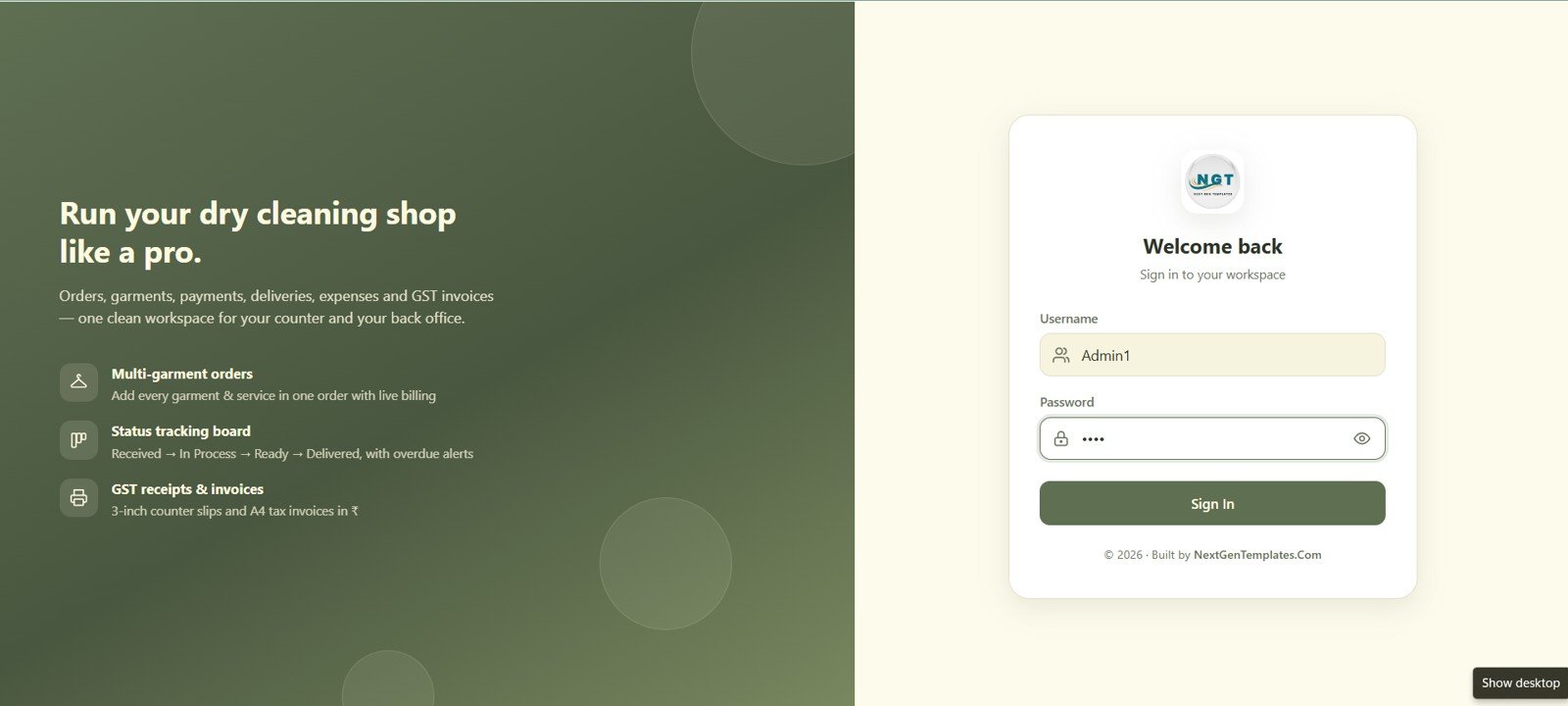
- 🔐 Branded login screen: a split-screen sign-in page lists the shop’s core promises — multi-garment orders, status tracking and GST receipts — before staff even reach the dashboard.
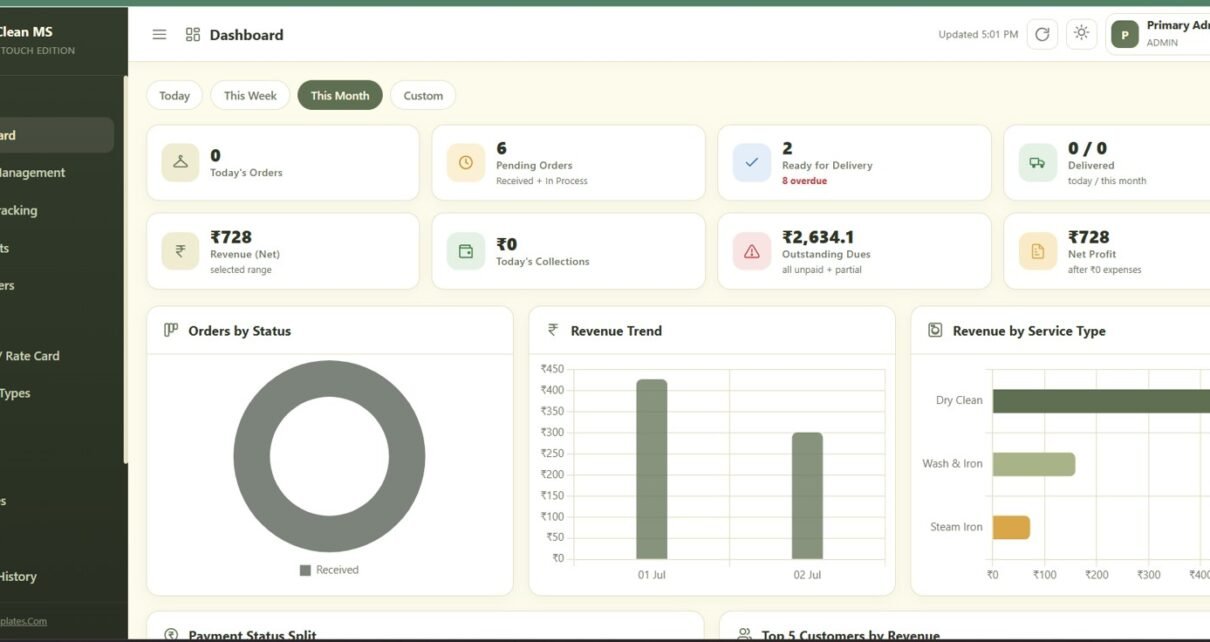
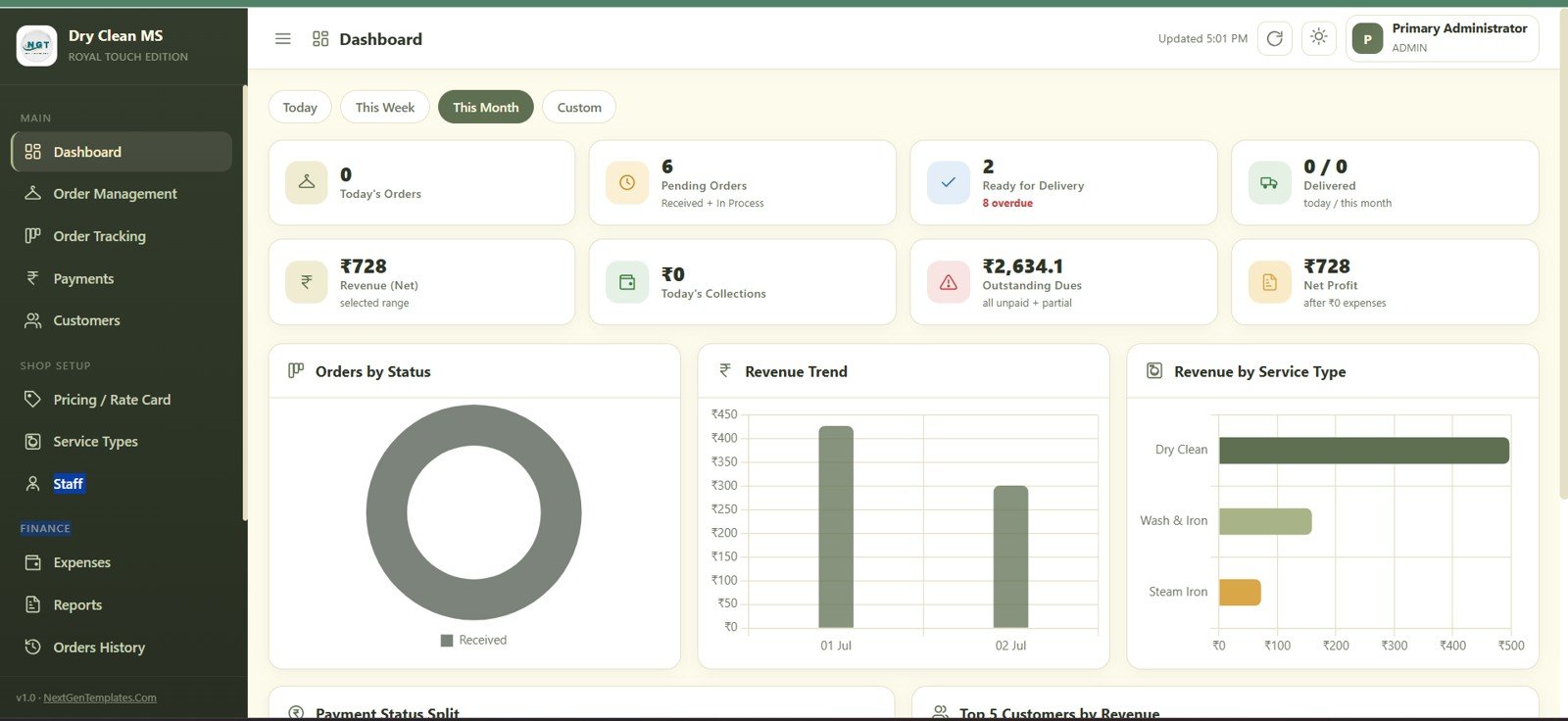
- 📊 Live dashboard: 8 KPI cards — Today’s Orders, Pending Orders, Ready for Delivery, Delivered, Revenue (Net), Today’s Collections, Outstanding Dues and Net Profit — plus Orders by Status, Revenue Trend, Revenue by Service Type, Payment Status Split and Top 5 Customers by Revenue.
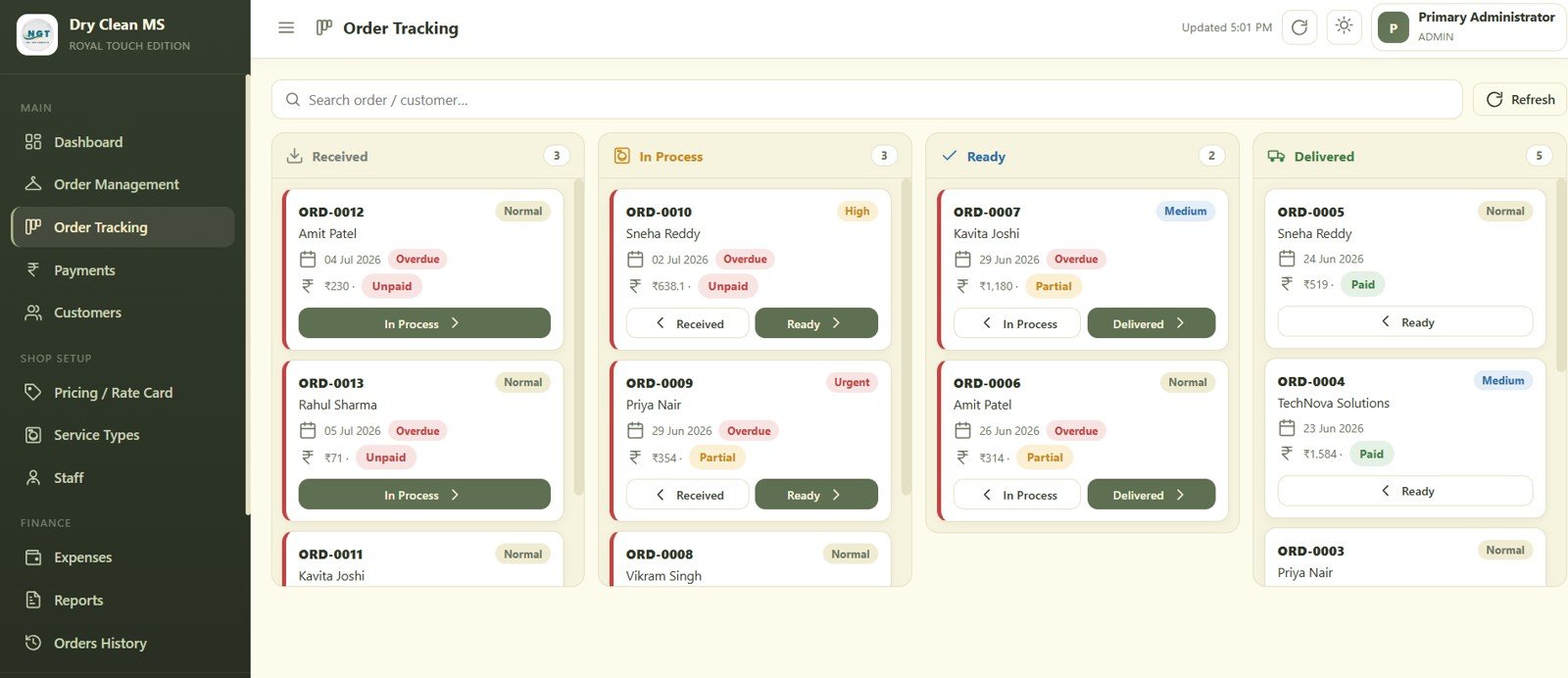
- 🧺 Visual order tracking board: a Kanban-style board moves every order through Received, In Process, Ready and Delivered with a single click, flagging overdue jobs automatically.
- 🏷️ Configurable rate card: Dry Clean, Steam Iron, Wash & Iron, Premium Dry Clean, Express Dry Clean and Same Day Iron pricing with tax %, so every new order bills correctly the first time.
- 🧾 GST receipts & invoices: 3-inch counter slips and A4 tax invoices pull the shop’s GST number, address and footer message straight from Settings.
📦 What’s Inside the Dry Clean Service Management System Web App
1. Login Page
A branded sign-in screen that greets staff with the shop’s core promise of running the dry cleaning business like a pro, highlighting multi-garment orders, status tracking and GST receipts above the username and password fields.
2. Dashboard
The live dashboard opens with 8 KPI cards — Today’s Orders, Pending Orders, Ready for Delivery, Delivered, Revenue (Net), Today’s Collections, Outstanding Dues and Net Profit — followed by Orders by Status, Revenue Trend and Revenue by Service Type charts, plus Payment Status Split and Top 5 Customers by Revenue.
3. Order Management
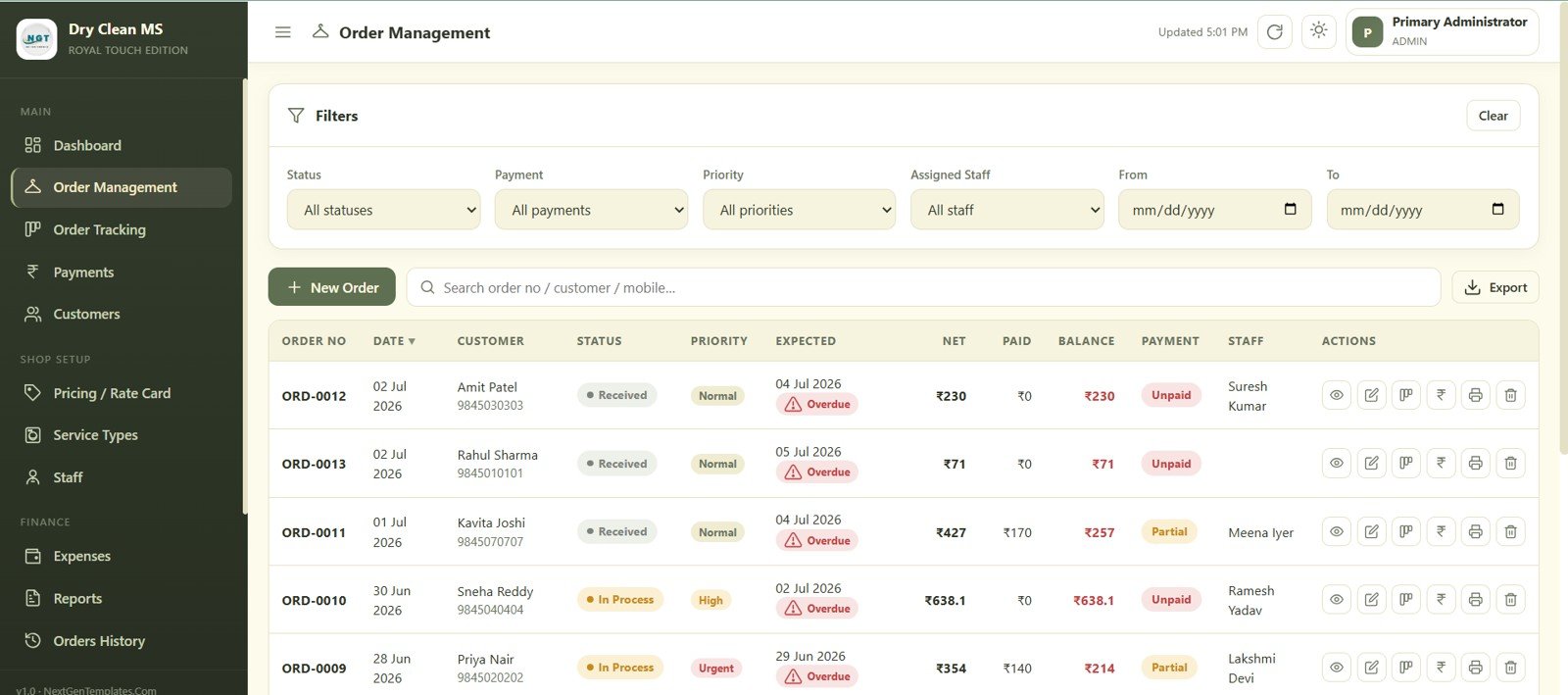
Filter every order by status, payment, priority, assigned staff or date range, then create a new order or search by order number, customer or mobile. Each row shows net, paid, balance and payment status with quick actions to view, edit, print or delete.
4. Order Tracking
A four-column Kanban board — Received, In Process, Ready, Delivered — lets staff move each order forward with one click, showing customer, due date, amount and payment status, with overdue orders flagged automatically.
5. Payments
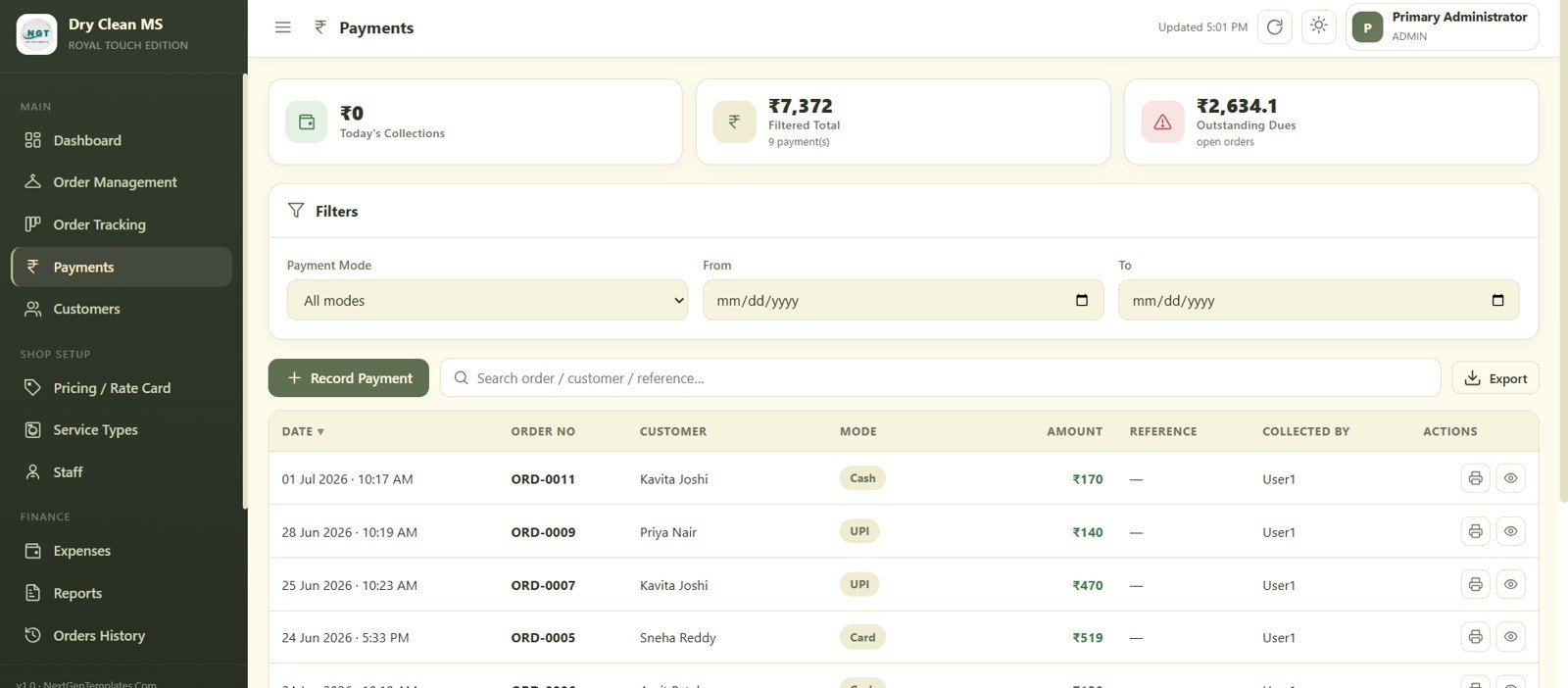
Record a payment against any order and filter collections by payment mode and date range. Today’s Collections, Filtered Total and Outstanding Dues sit at the top, with every entry showing mode, reference and who collected it.
6. Customers
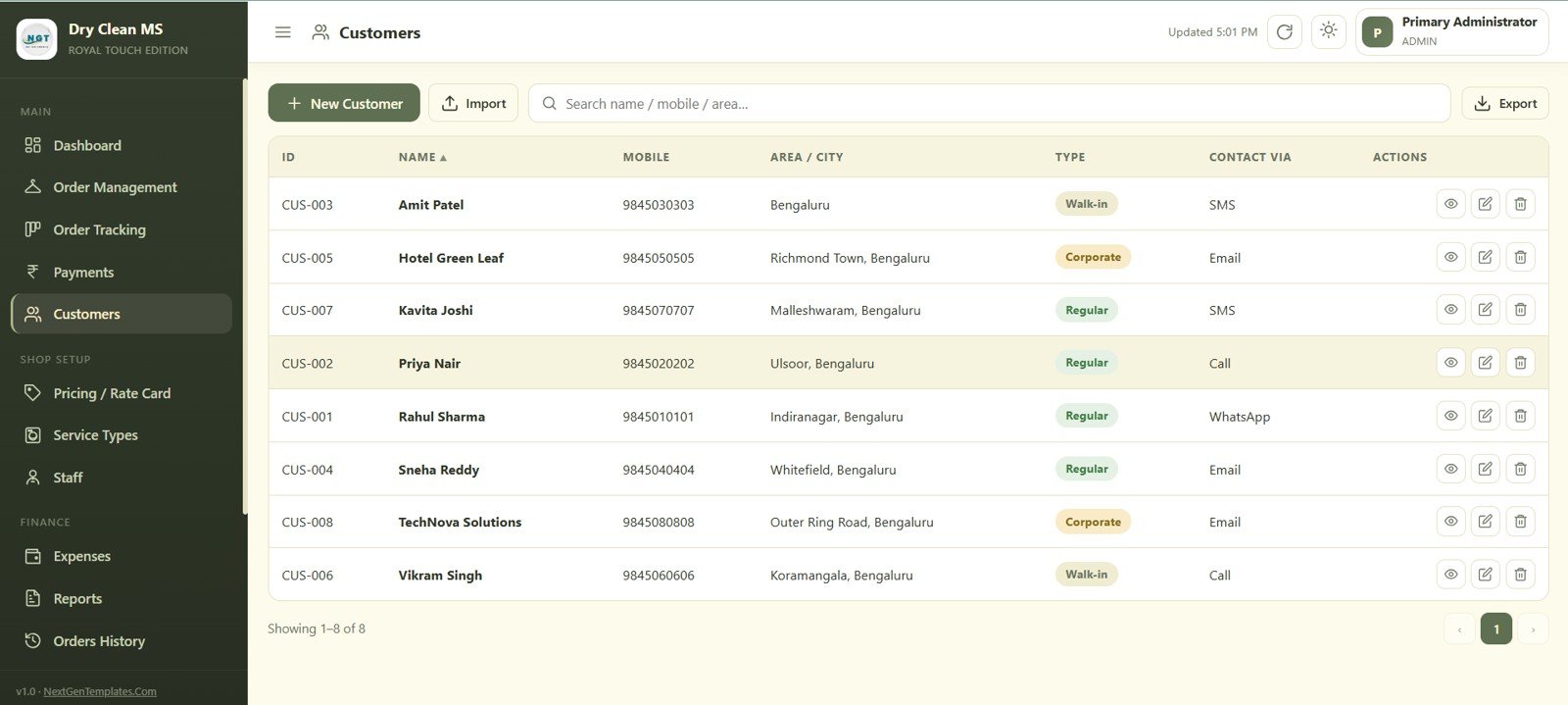
Manage every customer record with mobile number, area, type — Walk-in, Regular or Corporate — and preferred contact channel, and add, search, import or export the full list.
7. Pricing / Rate Card
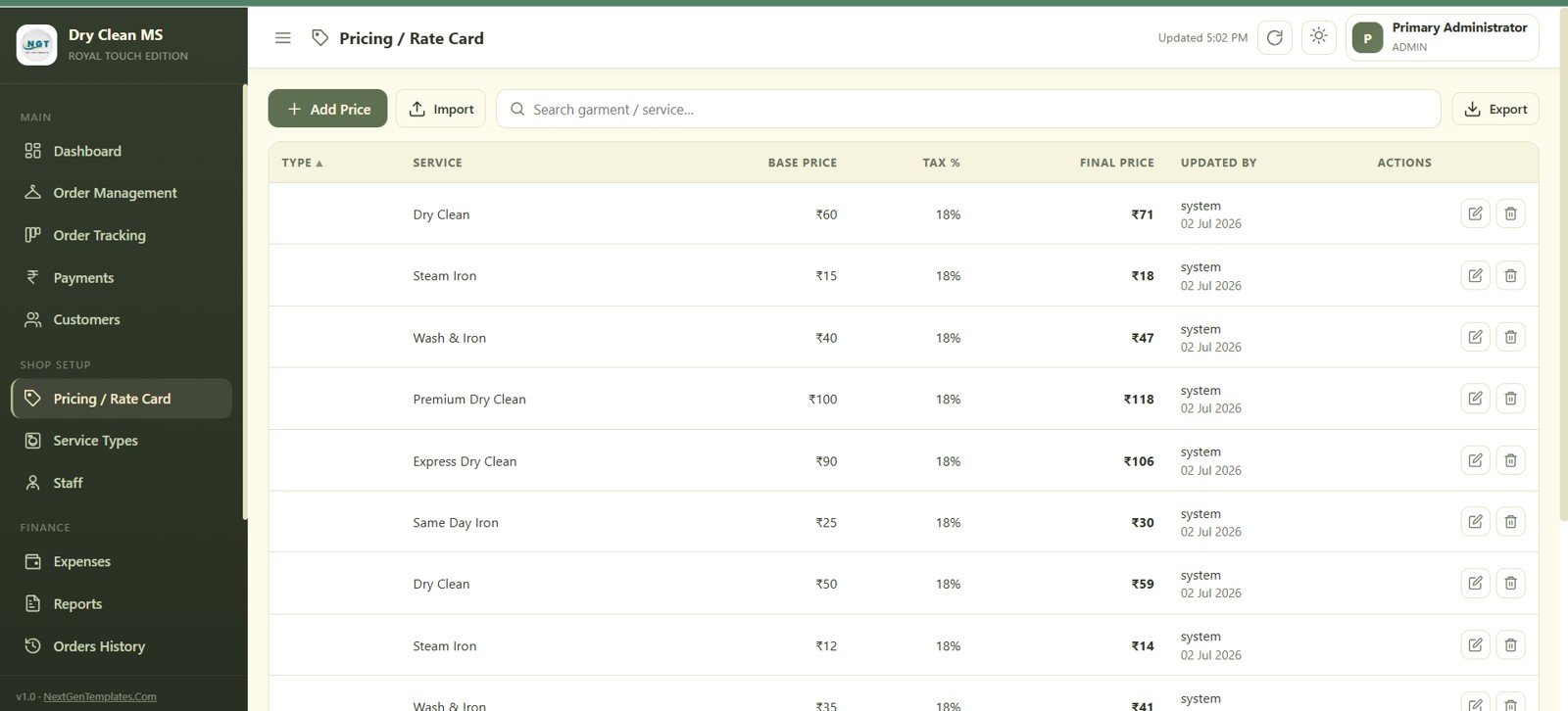
Set base price and tax % for every garment and service — Dry Clean, Steam Iron, Wash & Iron, Premium Dry Clean, Express Dry Clean, Same Day Iron and more — with the final price calculated automatically.
8. Service Types
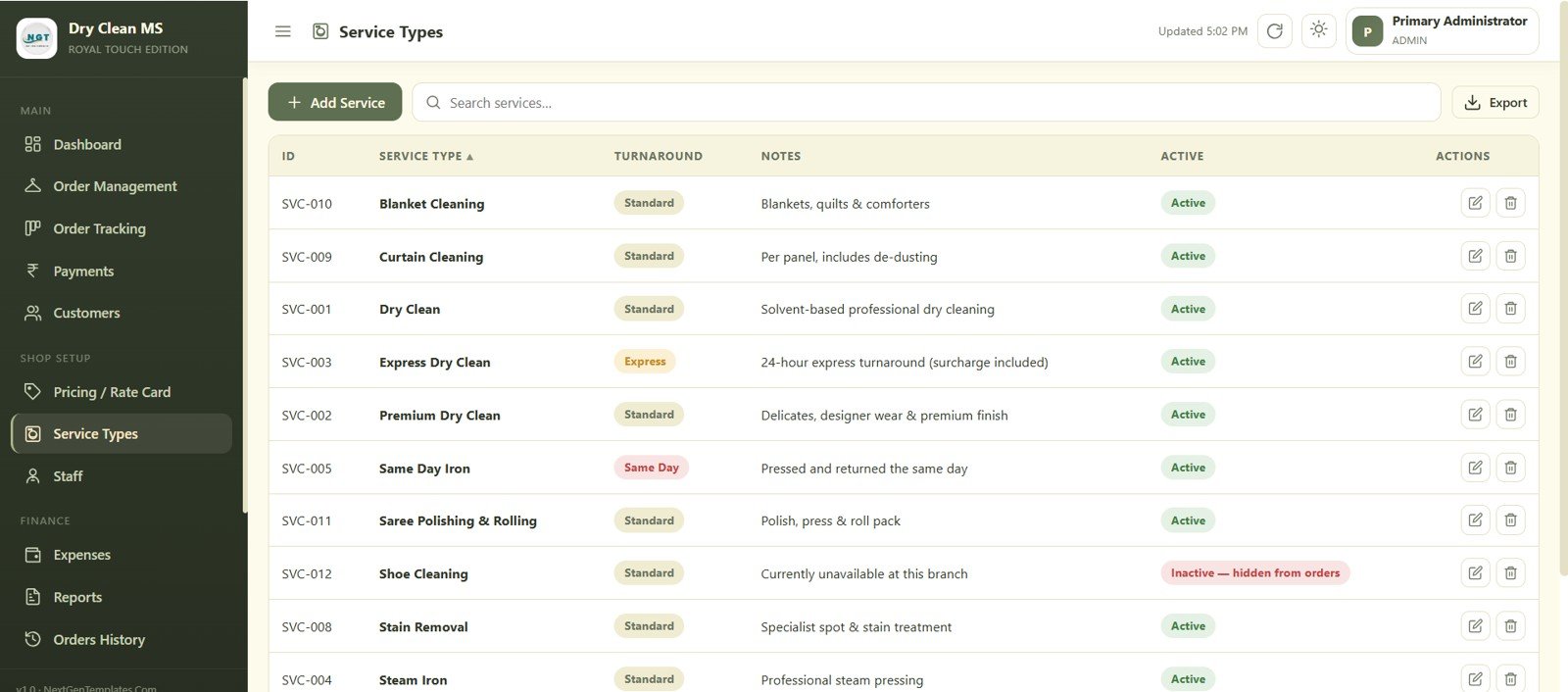
Define each service with its turnaround — Standard, Express or Same Day — plus notes and an active/inactive toggle, so services like Shoe Cleaning can be hidden from new orders without deleting the record.
9. Staff
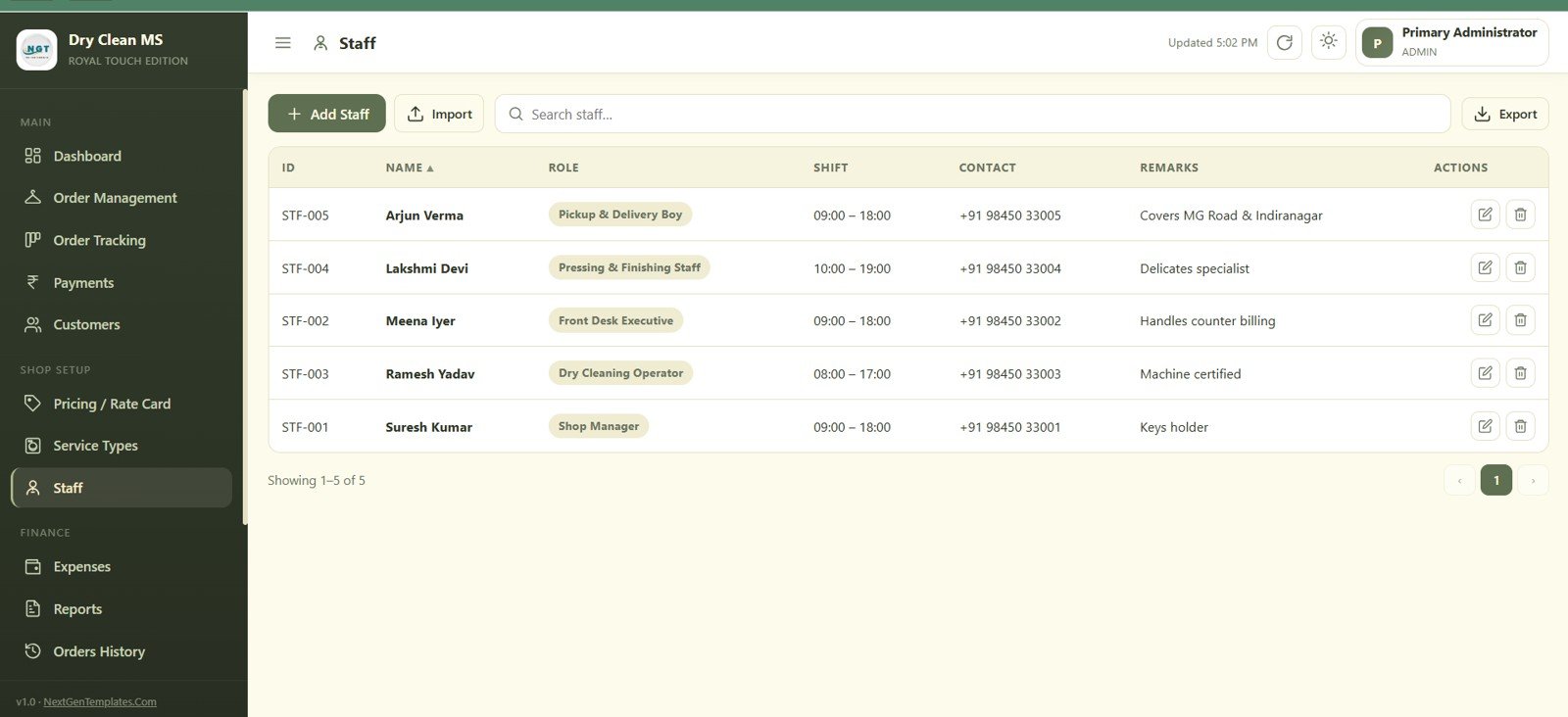
Track every team member’s role, shift timing, contact number and remarks, covering Shop Manager, Dry Cleaning Operator, Front Desk Executive, Pressing & Finishing Staff and Pickup & Delivery Boy.
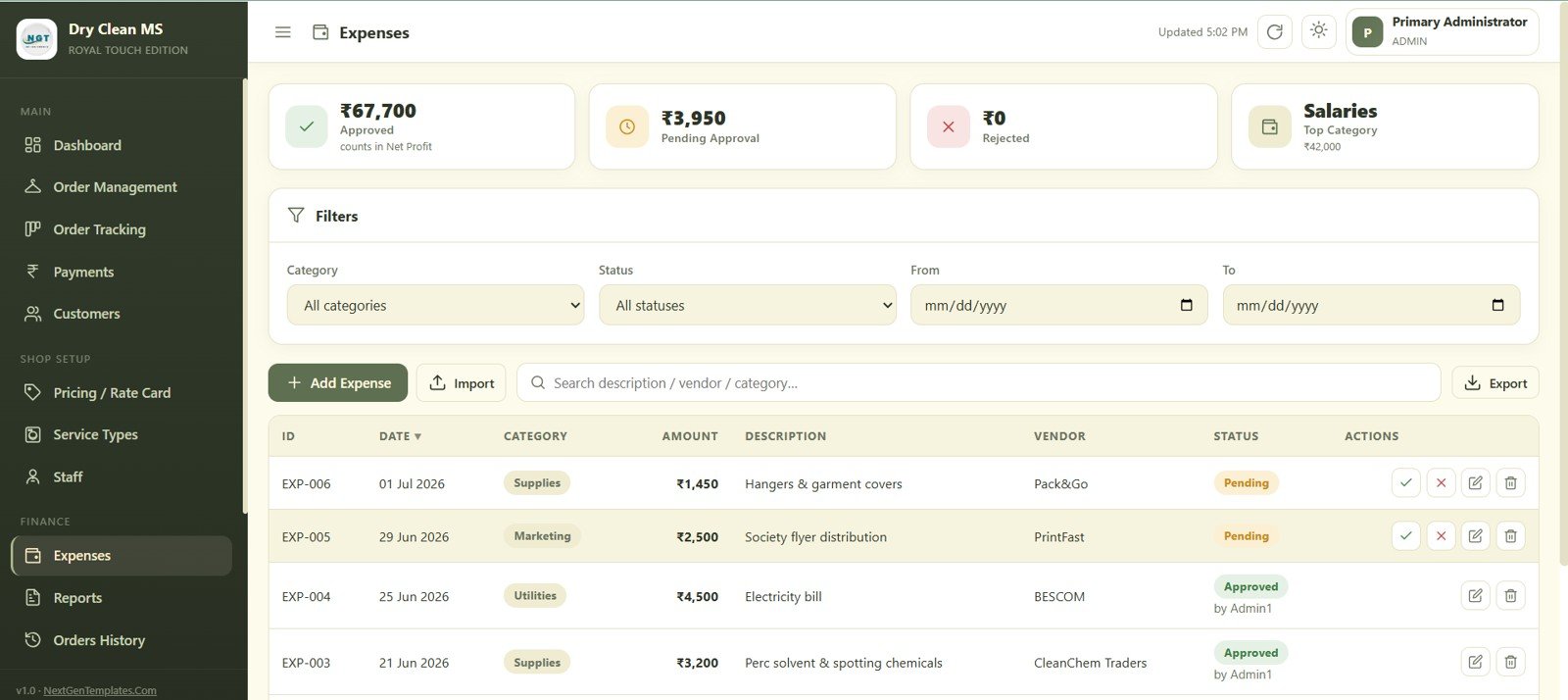
10. Expenses
Log business expenses by category and vendor, then approve or reject each one. Approved, Pending Approval and Rejected totals sit at the top alongside the top expense category by spend.
11. Reports
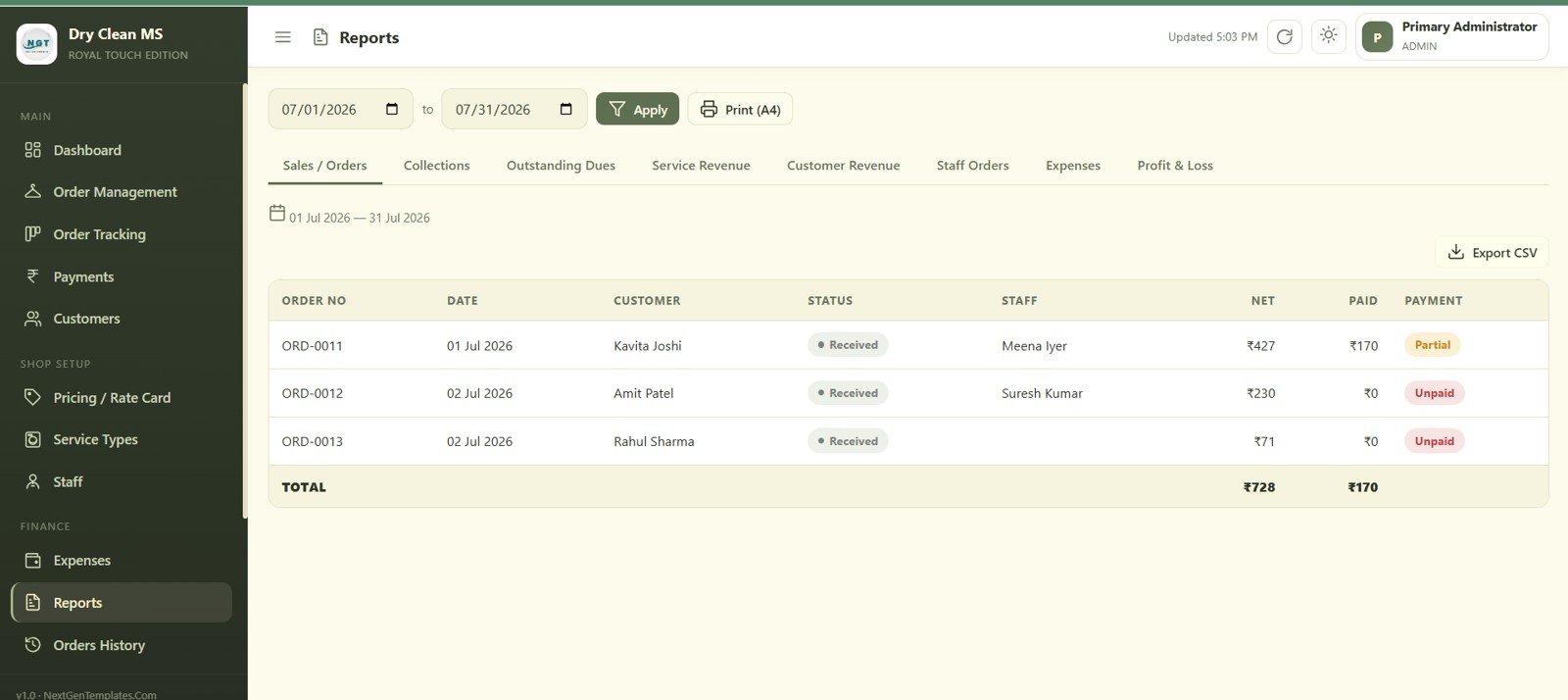
Pick a date range and generate Sales/Orders, Collections, Outstanding Dues, Service Revenue, Customer Revenue, Staff Orders, Expenses or Profit & Loss reports, then print an A4 copy or export to CSV.
12. Orders History
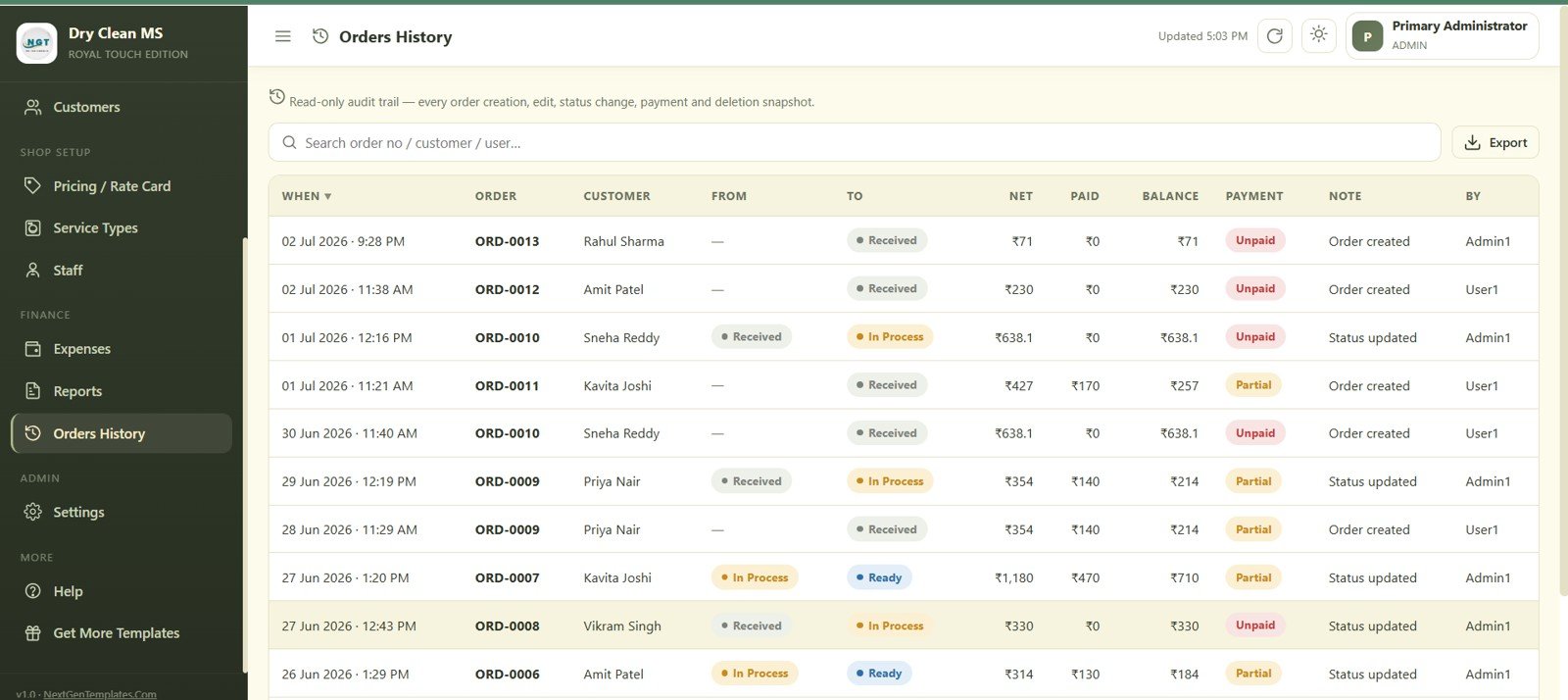
A read-only audit trail lists every order creation, edit, status change, payment and deletion with a timestamp and the staff member responsible, so nothing changes without a record.
13. Settings
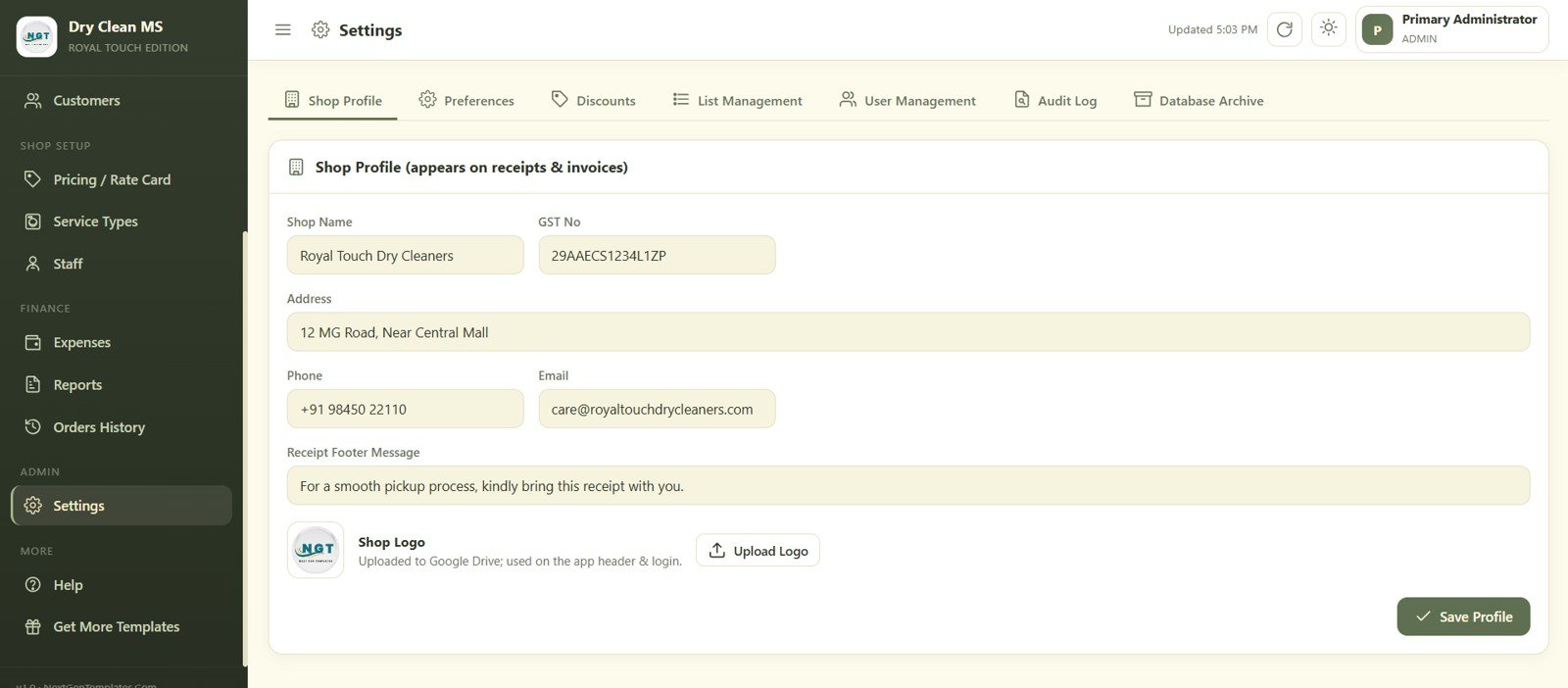
Configure the shop profile that appears on every receipt and invoice — name, GST number, address, phone, email, footer message and logo — plus preferences, discounts, list management, user management, audit log and database archive from the same screen.
👥 Who This Template Is For — and Who It’s Not For
✅ This template is built for:
- Single-outlet dry cleaning and laundry shops handling 20–500 orders a month
- Shop owners who want a Kanban view of every order’s stage instead of a paper register
- Businesses that need GST-compliant receipts and invoices at the counter
- Managers replacing disconnected Excel sheets for pricing, staff and expenses
❌ This template is NOT for:
- Multi-branch chains needing centralized, vendor-hosted infrastructure across locations
- Shops that require an integrated card/UPI payment gateway (payments are recorded manually)
- Businesses with no Google account or Gmail to host the app
⚙️ How to Use the Dry Clean Service Management System Web App
- Copy the script to your Google Drive and deploy it as a web app.
- Set your shop name, GST number, address, logo and receipt footer message in Settings.
- Add your services and rate card, then add staff and their shifts.
- Create customers as they walk in, or import your existing list.
- Log every order, move it across the tracking board, and record payments as they come in.
- Review the dashboard daily and run reports at month-end for GST filing.
💼 Real-World Use Cases
Rohan runs a single-outlet dry cleaning shop near a shopping mall. He uses the Order Tracking board to see every garment’s stage at a glance, prints GST receipts at the counter, and checks Outstanding Dues on the dashboard each evening — without paying a monthly fee for laundry SaaS.
Kavita manages a laundry shop with three counter staff and two delivery boys. She assigns priority to express orders, tracks staff shifts in the Staff module, and reviews the Revenue by Service Type chart to see which service brings in the most money each month.
A dry cleaning franchisee uses Pricing/Rate Card to update prices across Dry Clean, Steam Iron and Premium Dry Clean in one place, tracks vendor expenses for chemicals and packaging, and exports the Profit & Loss report every month for her accountant.
Want to build skills like this step by step? The NextGenTemplates Academy learning paths take you through spreadsheet systems and templates with practice files.
Get the Dry Clean Service Management System Web App
❓ Frequently Asked Questions
What does the Dry Clean Service Management System Web App include?
The Dry Clean Service Management System Web App includes 13 screens covering Login, Dashboard, Order Management, Order Tracking, Payments, Customers, Pricing/Rate Card, Service Types, Staff, Expenses, Reports, Orders History and Settings.
Does this web app require any paid subscription or server?
No. The Dry Clean Service Management System Web App runs entirely on Google Apps Script, which is free with any Google account. You pay once for the template and deploy it yourself, with no monthly fee and no separate server.
How does it compare to CleanCloud or SpeedQueen Apps?
Those platforms typically charge $40–150 per month. The Dry Clean Service Management System Web App is a one-time $39.99 purchase covering order tracking, billing, GST invoices, staff and expenses while keeping data in your own Google account.
Can it generate GST receipts and invoices?
Yes. The system pulls the shop name, GST number, address and footer message from Settings to print 3-inch counter receipts and full A4 tax invoices for every order.
How long does setup take?
Most users deploy the Dry Clean Service Management System Web App in under 15 minutes: copy the script to Google Apps Script, deploy it as a web app, then configure the shop profile, services and rate card in Settings.
Can I track staff shifts and order priority together?
Yes. The Staff screen tracks role, shift and contact details, while Order Management lets you assign priority — Normal, High or Urgent — and staff to every order, both feeding into the same dashboard KPIs.
👤 About the Author
Built by PK — Microsoft Certified Professional with 15+ years of Excel, Google Sheets, and Power BI experience. Founder of NextGenTemplates, reaching 300K+ subscribers across YouTube channels (@PK-AnExcelExpert, @NextGenTemplates, @NeoTechNavigators). Every template is hand-built and tested before release.
Watch the step-by-step video Demo:
📅 Last updated: July 2026