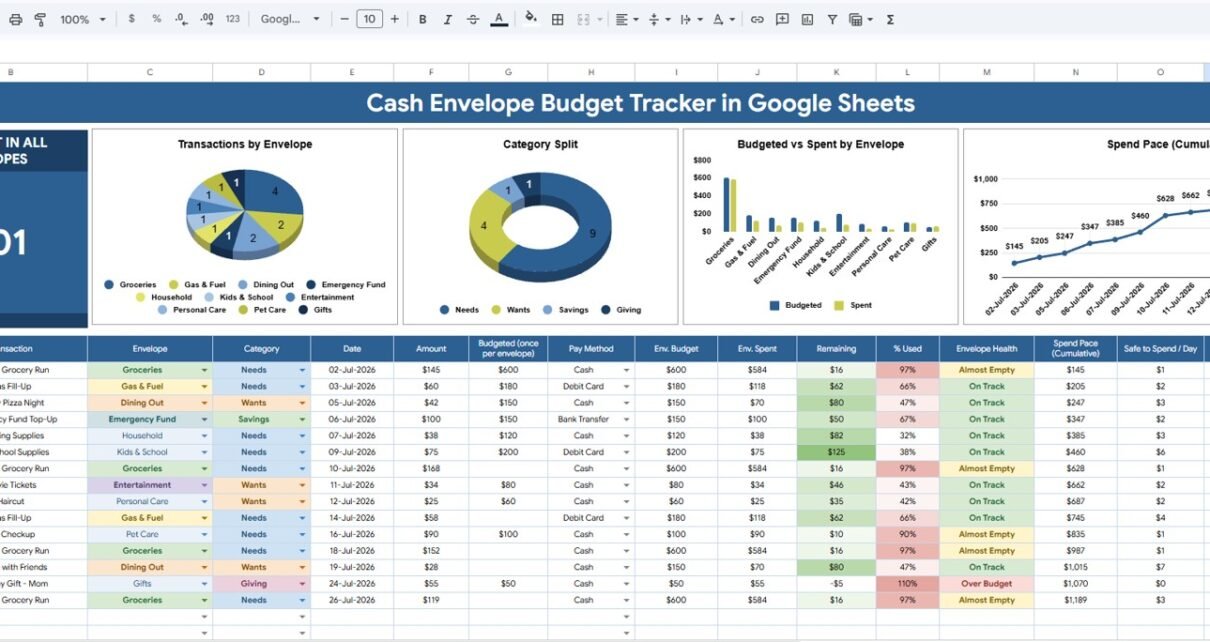
Cash Envelope Budget Tracker in Google Sheets Those two numbers show why everyday budget control still matters. The Cash Envelope Budget Tracker in Google Sheets gives spreadsheet users a practical way to organize envelope balances, transaction categories, payment methods, budgeted amounts, spending, and cash left in one editable Google Sheets file.Cash Envelope Budget Tracker in Google Sheets
Cash envelope budgeting does not have to mean carrying physical cash for every purchase. Many people now use the envelope idea as a planning structure: assign money to envelopes, record each transaction, and review whether spending is staying inside the assigned amount. Because this template runs in Google Sheets, it can be copied into Google Drive, shared with a household member, and updated from a browser or mobile app. For chart editing and dashboard customization, Google’s own help center explains how to add and edit charts in Google Sheets.
Get the Cash Envelope Budget Tracker in Google Sheets
Key Features of Cash Envelope Budget Tracker in Google Sheets
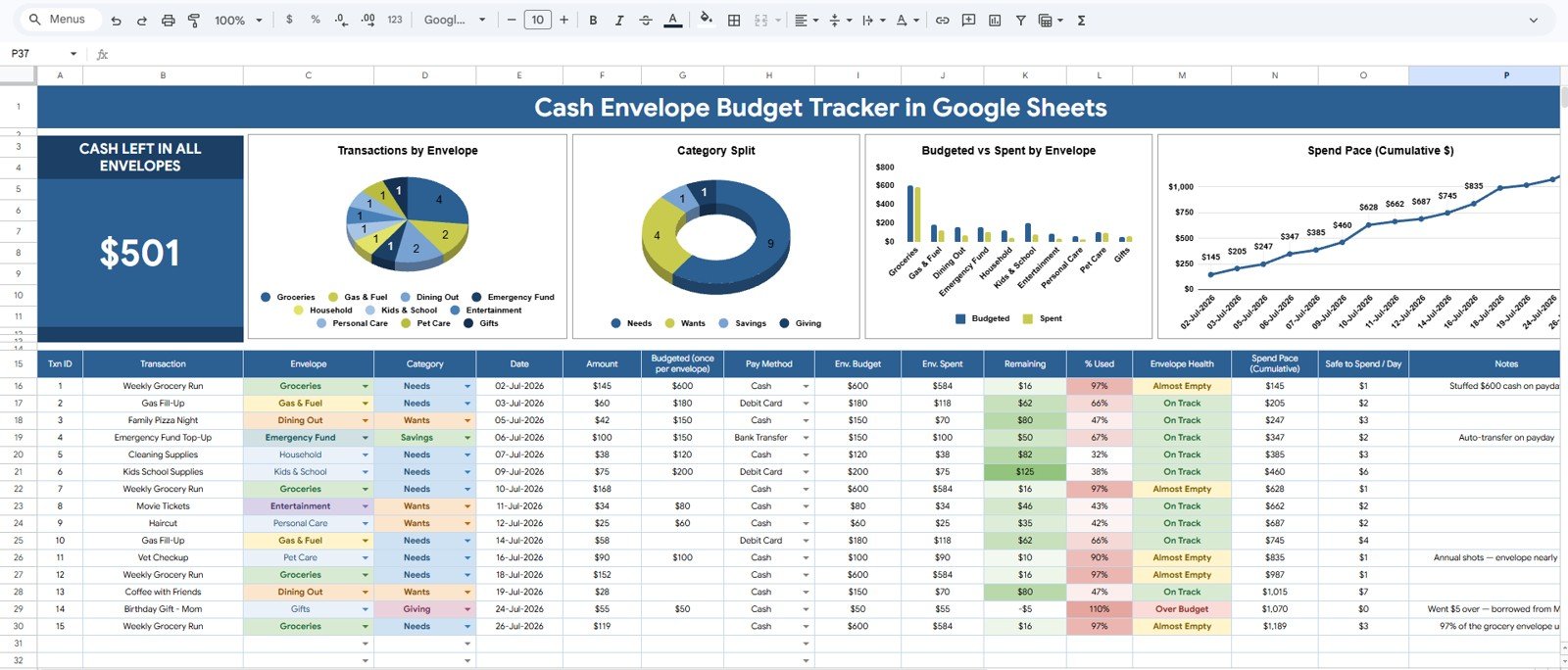
- Cash Left in All Envelopes card: Start every review with one headline number showing the remaining balance across envelopes.
- Transactions by Envelope: See which envelopes are receiving the most activity during the selected period.
- Transactions by Category: Review spending patterns by budget category for cleaner household analysis.Cash Envelope Budget Tracker in Google Sheets
- Budgeted and Spent Amount by Envelope: Compare the planned budget with actual spending for every envelope.
- Cumulative Spend Pace by Date: Track how quickly spending is happening across the month.Cash Envelope Budget Tracker in Google Sheets
- Setup Lists sheet: Maintain envelope options, budget categories, and payment methods in one editable tab.
- Interactive slicers: Filter the dashboard quickly without changing formulas or rebuilding charts.
- Google Sheets format: Copy the tracker into Google Drive and share controlled access with another trusted person.Cash Envelope Budget Tracker in Google Sheets
Dashboard Pages Explanation
1 – Overview Page
The Overview Page is the main dashboard tab. At the top, the tracker shows the Cash Left in All Envelopes card so users can quickly see the remaining money available after transactions and filters are applied.
Transactions by Envelope: This chart groups recorded transactions by envelope. It helps users identify whether groceries, rent, transport, utilities, entertainment, debt payoff, savings, or other custom envelopes are receiving the most activity.
If one envelope dominates the chart, that may be expected, such as rent or mortgage. If a flexible envelope grows too quickly, the chart gives users a reason to review that spending before the month ends.
Transactions by Category: This chart groups activity by budget category. It helps users see spending behavior from a category perspective, even when categories are connected to different envelopes.
For example, a household may have several envelope names but still want to know whether food, travel, children, subscriptions, debt, or savings-related categories are driving the most entries.Cash Envelope Budget Tracker in Google Sheets
Budgeted and Spent Amount by Envelope: This chart compares planned budget and actual spending for each envelope. It is the fastest visual check for envelopes that are under budget, close to the limit, or already above plan.Cash Envelope Budget Tracker in Google Sheets
The comparison is useful during weekly reviews because users can reassign behavior early. They may pause spending, move money from another envelope, or adjust next month’s envelope targets.
Cumulative Spend Pace by Date: This trend shows how spending accumulates over time. It helps users spot whether spending is happening evenly or too quickly at the start of the month.
A spend pace view is especially helpful for envelope budgeting because the problem is often timing. A monthly envelope can look fine on day five, then feel tight by day twenty if the early pace was too fast.
2 – Setup Lists
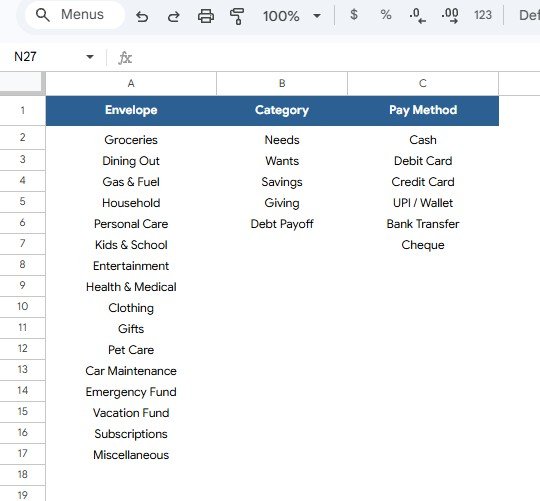
The Setup Lists sheet keeps the tracker flexible. Instead of typing new labels every time, users can maintain clean dropdown options for envelope names, budget categories, and payment methods.Cash Envelope Budget Tracker in Google Sheets
Envelope Options by Tracker Setup: This list stores the envelope names used in the tracker. Users can customize the labels for rent, groceries, utilities, gas, debt payoff, savings, fun money, household supplies, gifts, or any other envelope system.Cash Envelope Budget Tracker in Google Sheets
Budget Categories by Category Type: This list stores category labels for transaction analysis. Consistent category names help the Overview Page produce cleaner charts and make month-to-month review easier.
Payment Methods by Payment Option: This list stores the payment methods available for transactions. Users can track cash, debit card, credit card paid in full, bank transfer, digital wallet, or any custom method while still keeping the envelope budgeting structure.
Cash Envelope Budget Tracker in Google Sheets vs. Microsoft Excel Tracker vs. Paid Finance SaaS – Feature Comparison
| Feature | This Google Sheets tracker | Microsoft Excel tracker | Paid finance SaaS |
|---|---|---|---|
| Cost | $6.99 one-time sale price | Template cost plus possible Microsoft access | Usually monthly or annual subscription |
| Platform | Google Sheets in Google Drive | Excel desktop or Excel Online | Vendor-hosted web or mobile app |
| Setup time | Copy the file, adjust setup lists, enter transactions | Download workbook and customize formulas | Create account, configure rules, and possibly connect accounts |
| Real-time team collaboration | Native Google sharing | Depends on OneDrive or SharePoint | Usually included, plan dependent |
| Mobile access | Google Sheets app or browser | Excel app or browser | Vendor app |
| Customizable fields | Edit envelopes, categories, methods, records, and charts | Editable if workbook is unlocked | Limited by app settings |
| Share with link | Yes, using Google Drive permissions | Yes, through Microsoft sharing | Usually account based |
| Year-1 cost at 5 users | $6.99 before any Google Workspace costs | Template plus Microsoft access | Can become recurring household or per-user pricing |
| Envelope budget analysis | Cash left, transaction, budgeted vs. spent, and spend pace views included | Must be built or customized | Depends on the app’s envelope features |
| Bank connection required | No | No | Often encouraged for automation |
Who Should Use This Template
This template is a good fit for individuals, couples, families, students, budget coaches, household managers, and anyone who wants a visual envelope budget without paying for another monthly finance app. It works especially well when the user already understands their income and wants a practical habit for assigning money to envelopes and checking the remaining balance.
It is also useful for people moving from physical cash envelopes to a digital process. Users can still keep the discipline of assigning money to categories while recording digital payments in a shareable spreadsheet.
This template is not intended for users who need live bank feeds, debt settlement, tax filing, bill payment, credit monitoring, accounting compliance, or financial advice. It is a tracker and dashboard, not a regulated finance product.
Real-World Use Cases
Anaya: weekly household budget review
Anaya updates transactions every Friday and checks Cash Left in All Envelopes before weekend shopping. If groceries or dining are running ahead of plan, she can adjust behavior before the month-end crunch.
Marcus and Lena: couple money meeting
Marcus and Lena share one Google Sheets copy. During their Sunday review, they use Budgeted and Spent Amount by Envelope to decide whether any envelope should be paused, adjusted, or watched more closely next week.
Priya: budget coaching workflow
Priya uses the cumulative spend pace chart with clients because it shows when spending accelerates. The chart helps clients understand whether the issue is the total monthly amount or the timing of purchases.
Advantages of Cash Envelope Budget Tracker in Google Sheets
- Spreadsheet control: Users can edit labels, lists, fields, formulas, and charts to match their household language.
- No bank credentials: The tracker works through manual entry, so users do not need to connect bank or card accounts.
- Clear envelope discipline: Cash left, budgeted amounts, spent amounts, and spend pace stay visible in one overview.
- Shareable workflow: Google Sheets makes it simple to share view or edit access with a trusted collaborator.
- One-time purchase: The template avoids another recurring budget app subscription.
Opportunities for Improvement
Because this is a manual tracker, it depends on consistent data entry. If users forget to record transactions for several weeks, the dashboard will not represent the real cash position. A short weekly update routine is important.
Advanced users may also want to extend the file with monthly rollover logic, automatic form entry, Apps Script reminders, bank CSV imports, or additional charts. Those additions are possible in Google Sheets, but they are outside the core template described here.
Best Practices
- Set up envelope names before entering a large number of transactions.
- Use consistent category labels from the Setup Lists sheet instead of typing new labels manually.
- Record transactions at least once per week so cash left stays useful.
- Review cumulative spend pace before the middle of the month, not only at month end.
- Do not store bank passwords, card numbers, or sensitive login details in the tracker.
- Make a backup copy before changing formulas, chart ranges, or dashboard structure.
Explore Relevant Templates
- Cash Envelope Budget Tracker in Google Sheets – the template covered in this article.
- Savings Goal Tracker in Google Sheets – useful for savings goals, categories, target amounts, and saved amount tracking.
- Personal Finance Net Worth Tracker in Google Sheets – useful for assets, liabilities, liquidity, and net worth review.
- FIRE Milestone Tracker in Google Sheets – useful for monthly financial independence progress.
- Kids Allowance and Chores Money Tracker in Google Sheets – useful for family money habits and child-level balances.
- Browse Google Sheets Tracker Templates – explore more tracker templates from NextGenTemplates.
Curious how trackers like this are put together? The NextGenTemplates Academy learning paths teach the spreadsheet skills behind them, using hands-on practice files.
Get the Cash Envelope Budget Tracker in Google Sheets
Frequently Asked Questions
What is the Cash Envelope Budget Tracker in Google Sheets?
It is an editable Google Sheets template for tracking cash envelopes, budget categories, payment methods, transactions, budgeted amounts, spent amounts, and remaining cash.
Does it require physical cash envelopes?
No. You can use the tracker with physical cash or with a digital envelope-style budgeting habit where transactions are recorded manually.
Can I customize the envelope names?
Yes. The Setup Lists sheet is built for custom envelope options, budget categories, and payment methods.
Does this connect directly to my bank?
No. The template is manual entry. This keeps setup simple and avoids requiring bank or credit card login credentials.
Can I share it with another person?
Yes. After copying the template to your own Google Drive, you can share the file with view or edit permissions.
Is this suitable for business accounting?
No. It is designed for envelope-style budgeting and household spending review, not formal accounting, tax reporting, payroll, or compliance.
What pages are included?
The template workflow described here includes an Overview Page and a Setup Lists sheet, with charts, slicers, and dropdown options for envelope budgeting.
About the Author
Built by PK – Microsoft Certified Professional with 15+ years of Excel, Google Sheets, and Power BI experience. Founder of NextGenTemplates, reaching 300K+ subscribers across YouTube channels. Every template is hand-built and tested before release.
Conclusion
The Cash Envelope Budget Tracker in Google Sheets gives users a simple way to track envelope balances, spending categories, payment methods, budgeted amounts, actual spending, and cumulative spend pace from one editable spreadsheet. It is best for people who want the discipline of envelope budgeting with the flexibility of Google Sheets.Cash Envelope Budget Tracker in Google Sheets
Last updated: July 31, 2026.