Ayurvedic Or Homeopathy Clinic Management System Web App in Google Apps Script is a ready-to-deploy browser-based clinic operations template for Ayurveda, homeopathy, and integrative medicine practices. It brings appointments, patients, consultations, prescriptions, follow-ups, pharmacy stock, batches, dispensing, purchases, suppliers, billing, payments, therapy packages, reports, import/export, user permissions, settings, archive, and audit history into one structured system.
The demand for organized traditional medicine operations is real. WHO notes that traditional medicine is used across more than 170 of 194 Member States, while Google documents that Apps Script web apps can be deployed as browser-accessible interfaces. That combination makes this template a practical fit for small clinics that want a private, editable system without paying monthly SaaS fees.
Get the Ayurvedic Or Homeopathy Clinic Management System Web App
Sources: WHO traditional medicine overview and Google Apps Script web app documentation.
🚀 Try the Live Demo Before You Buy
We have deployed this web app in our own Google account so you can test every page, every module and all five role logins — with real sample clinic data (Ayurveda + Homeopathy patients, appointments, prescriptions, therapy packages, medicine batches and bills) — before purchasing. No signup, no email required.
🔑 Test Login Credentials
Sign in as admin to see the complete system including Settings, User Management, List Management, Database Archive and Audit Log — or try doctor, reception and pharmacy to see exactly what each staff member is allowed to access. 💡 Tip: log in as admin first to view the full menu, then switch roles to compare the restricted views.
💡 What you get after purchase: The full source code (Code.gs + Index.html) plus a step-by-step deployment guide so you can deploy your own private instance in your own Google account in under 15 minutes.
Key Features of Ayurvedic Or Homeopathy Clinic Management System Web App
- Secure clinic login: Username and password entry with role-based access, mobile-friendly messaging, and Google Sheets database positioning.
- Daily operations dashboard: Cards and charts for appointments, patients, revenue, pending payments, medicine stock, expiry, follow-ups, prescriptions, therapy packages, and collections.
- Patient records: Track patient ID, gender, age, phone, city, Prakriti or Miasm, visit count, due amount, and active status.
- Appointments and consultations: Manage scheduled visits, practitioner, visit type, reason, diagnosis, category, fee, follow-up date, and consultation history.
- Prescription and dispensing workflow: Connect prescription items, prescription value, pharmacy status, medicine, batch, quantity, rate, amount, and dispensing user.
- Pharmacy inventory: Medicine master, batches, expiry dates, remaining quantity, reorder level, rack location, purchase invoices, suppliers, and payable status.
- Billing and collections: Bills, discounts, totals, paid amounts, balances, payment modes, receipts, references, users, and daily payment reports.
- Therapy packages: Track Panchakarma or therapy sessions, package value, therapist, rate, start date, and progress status.
- Administrative controls: Import/export, user management, list management, settings, archive viewer, and audit log.
Dashboard Pages Explanation
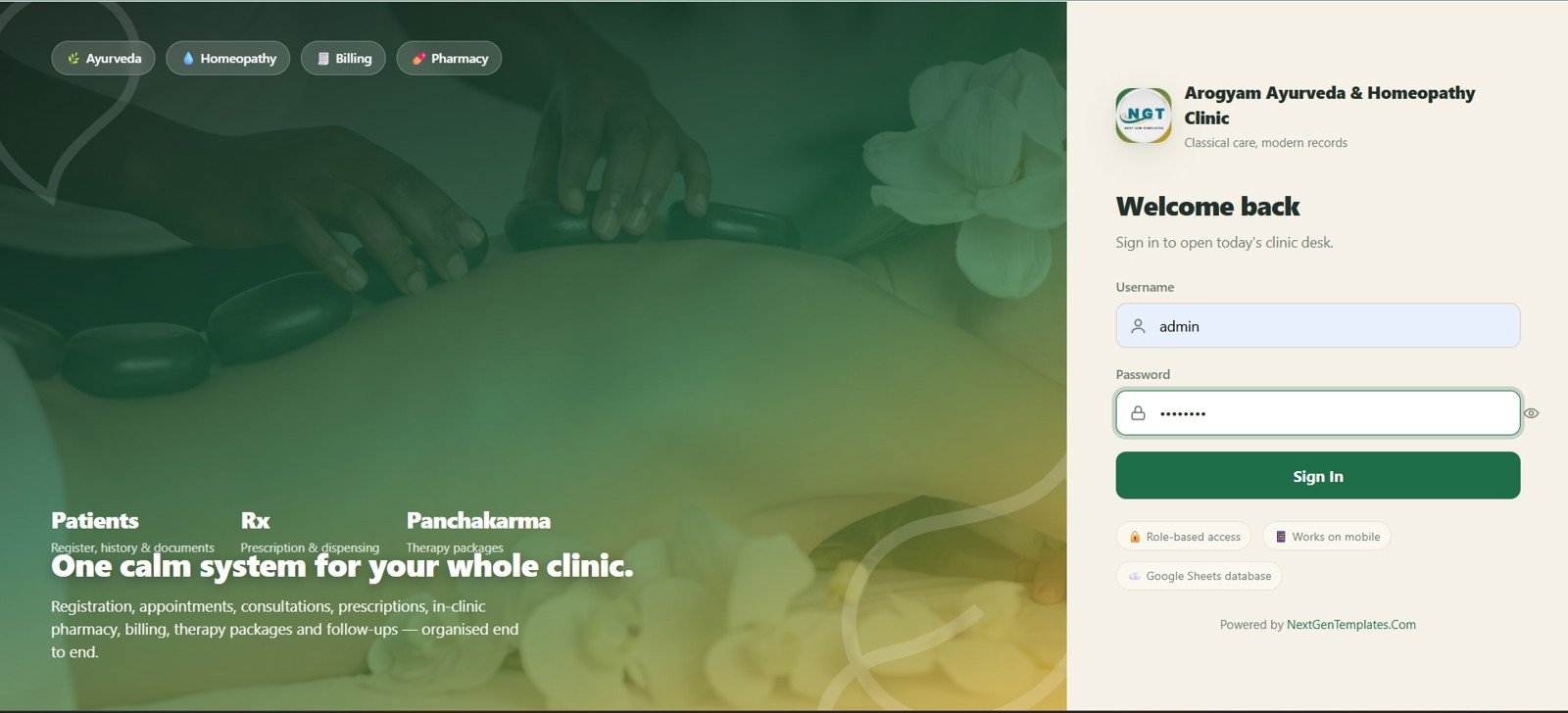
1. Login Page
The login page creates a clear entry point for the Arogyam Ayurveda and Homeopathy Clinic workspace. It shows Ayurveda, homeopathy, billing, pharmacy, patients, Rx, and Panchakarma signals while keeping access behind username and password fields.
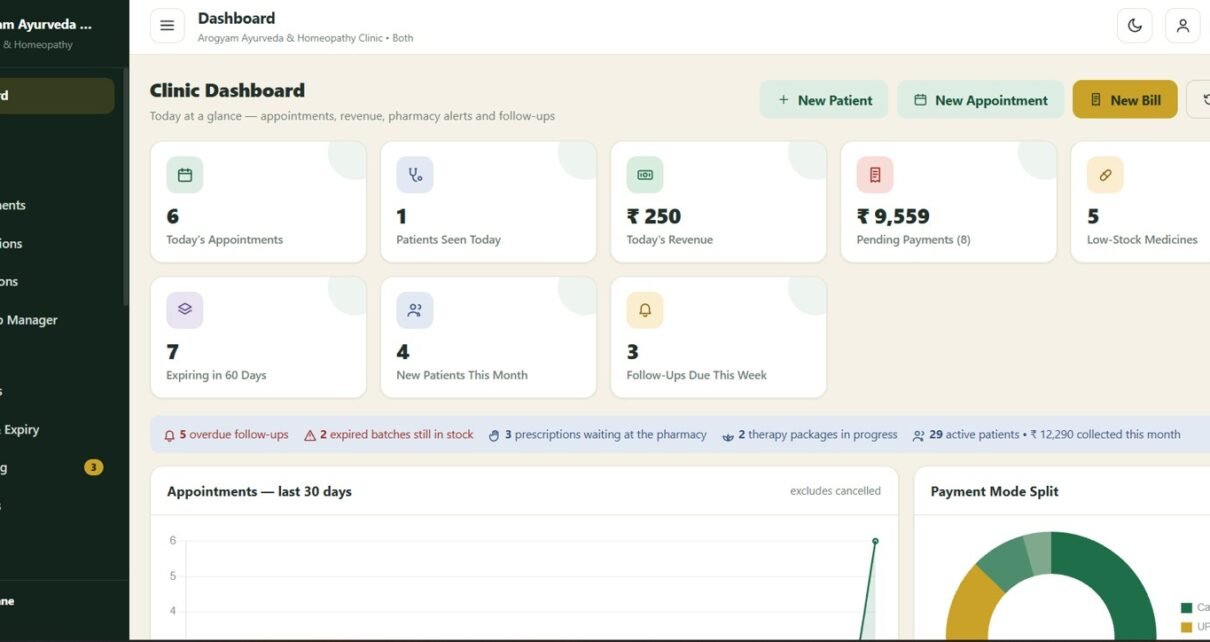
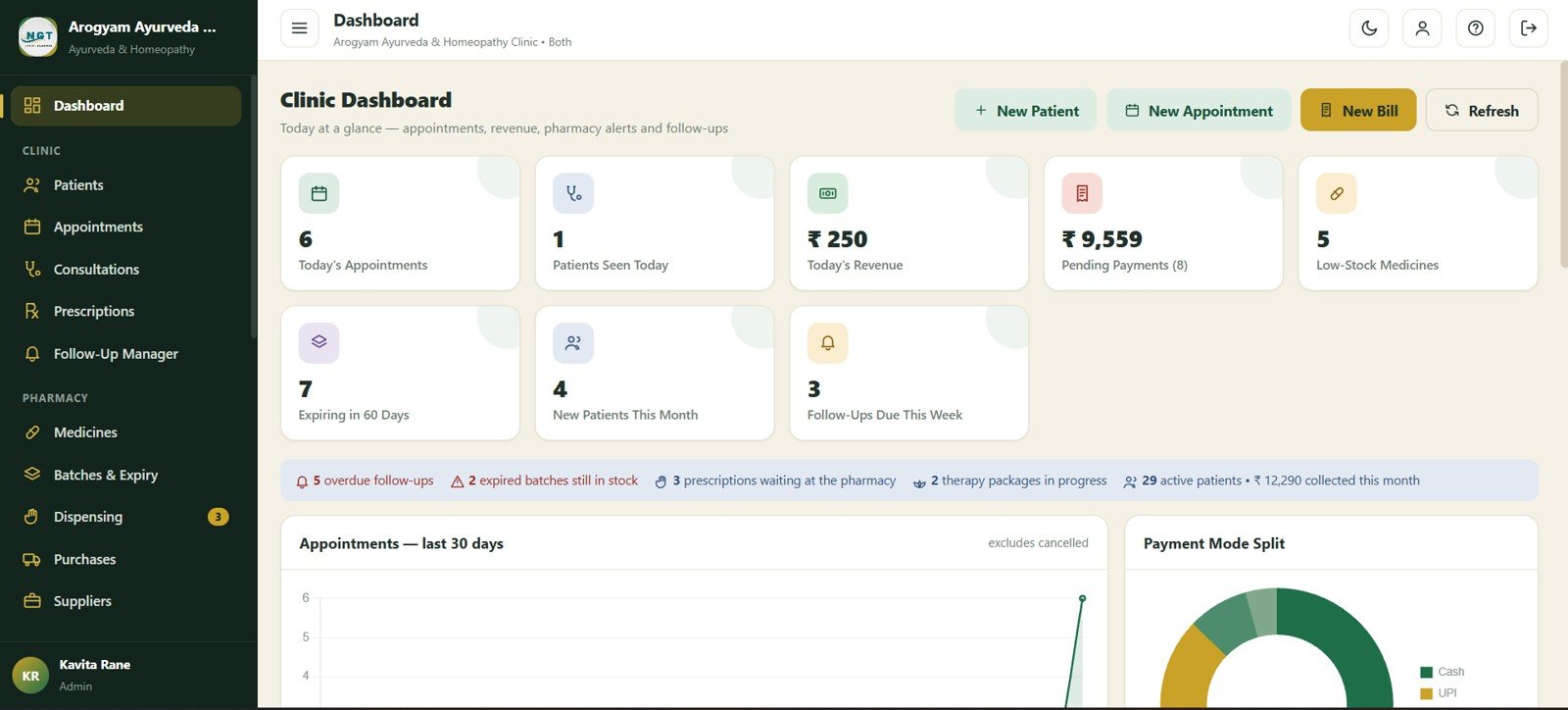
2. Dashboard
The dashboard summarizes daily clinic activity: today’s appointments, patients seen, revenue, pending payments, low-stock medicines, expiring batches, new patients, follow-ups, payment mode collections, prescriptions waiting, active patients, and monthly collections.
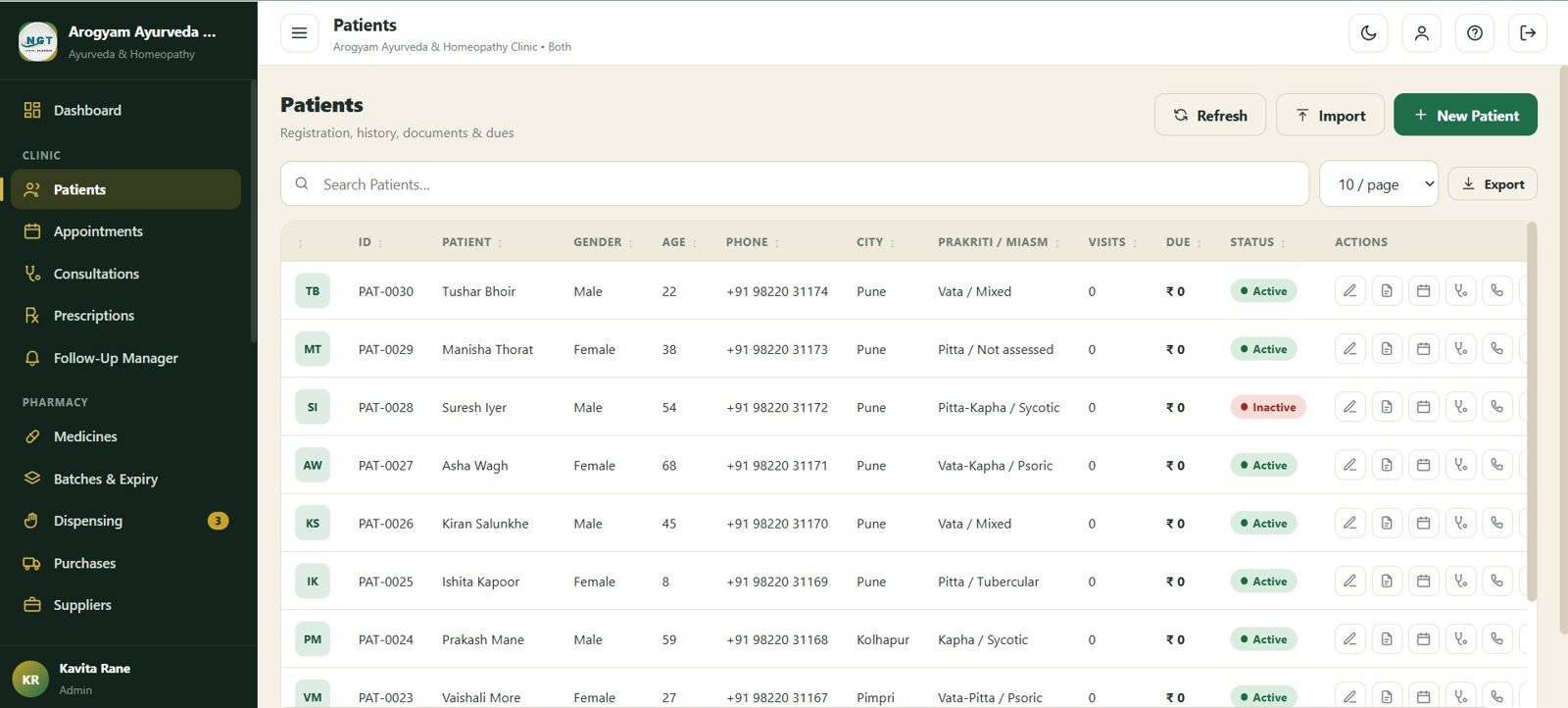
3. Patients
The Patients page keeps the clinic master record organized with patient ID, gender, age, phone, city, Prakriti or Miasm, visits, due amount, and status columns.
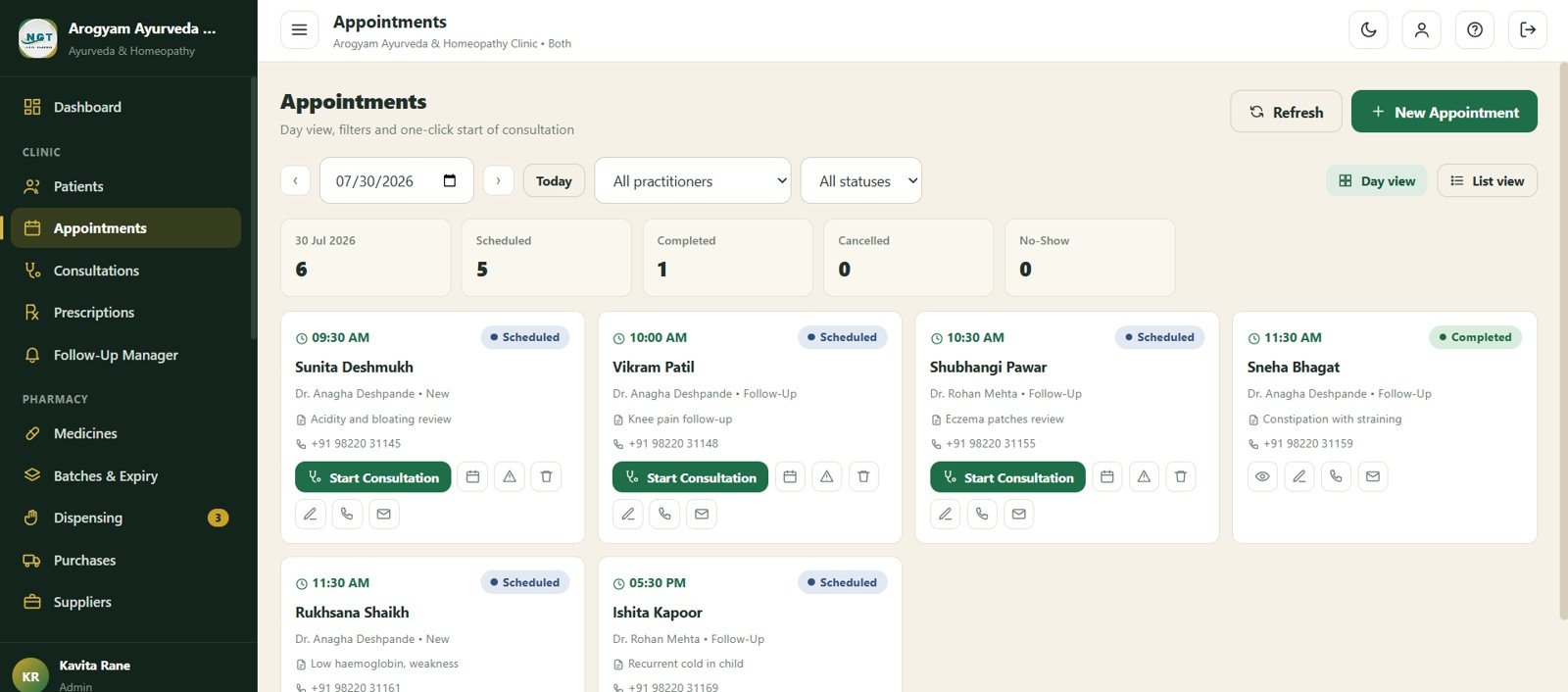
4. Appointments
The Appointments page shows appointment date, scheduled count, completed count, cancelled count, no-show count, patient, appointment time, practitioner, visit type, reason, phone, and status.
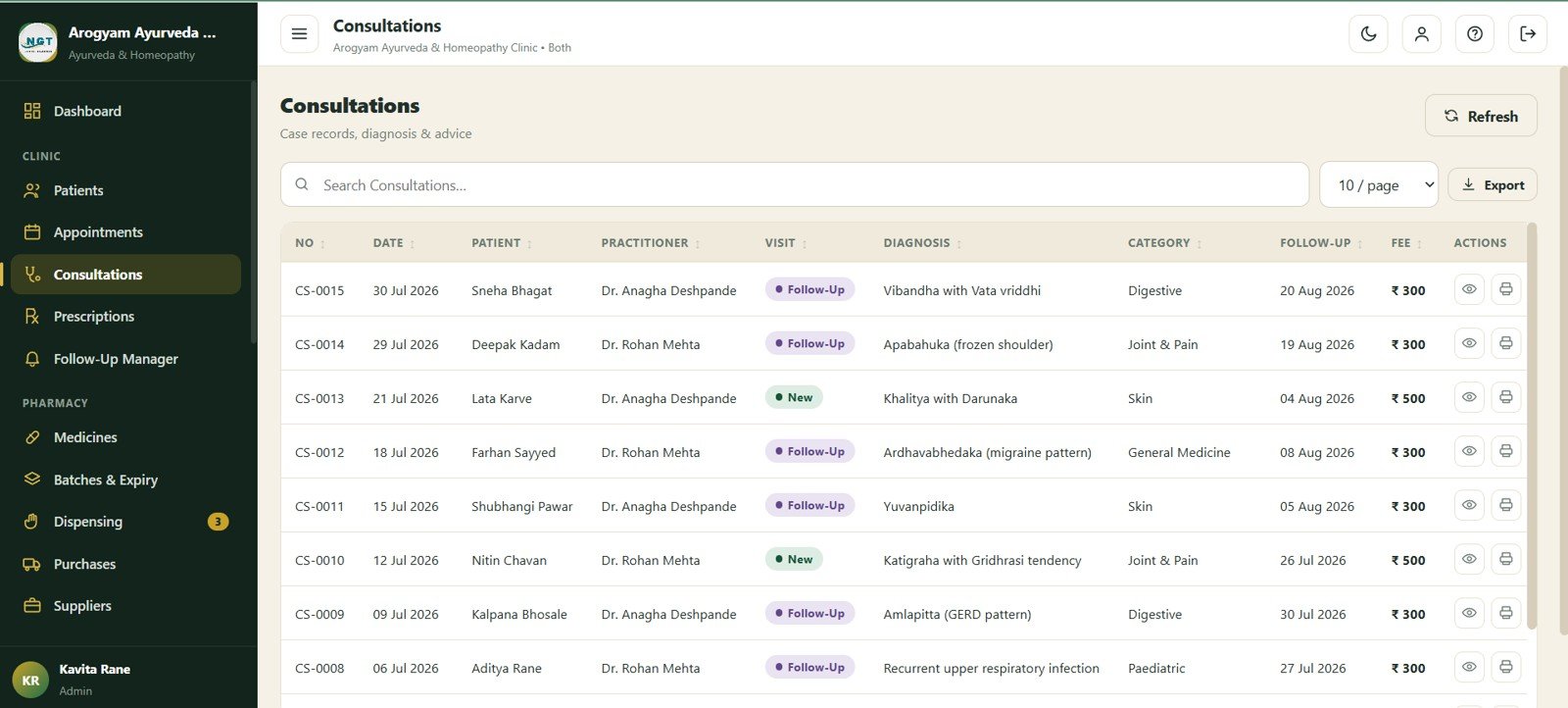
5. Consultations
The Consultations page records date, patient, practitioner, visit type, diagnosis, patient category, follow-up date, and fee for each clinic visit.
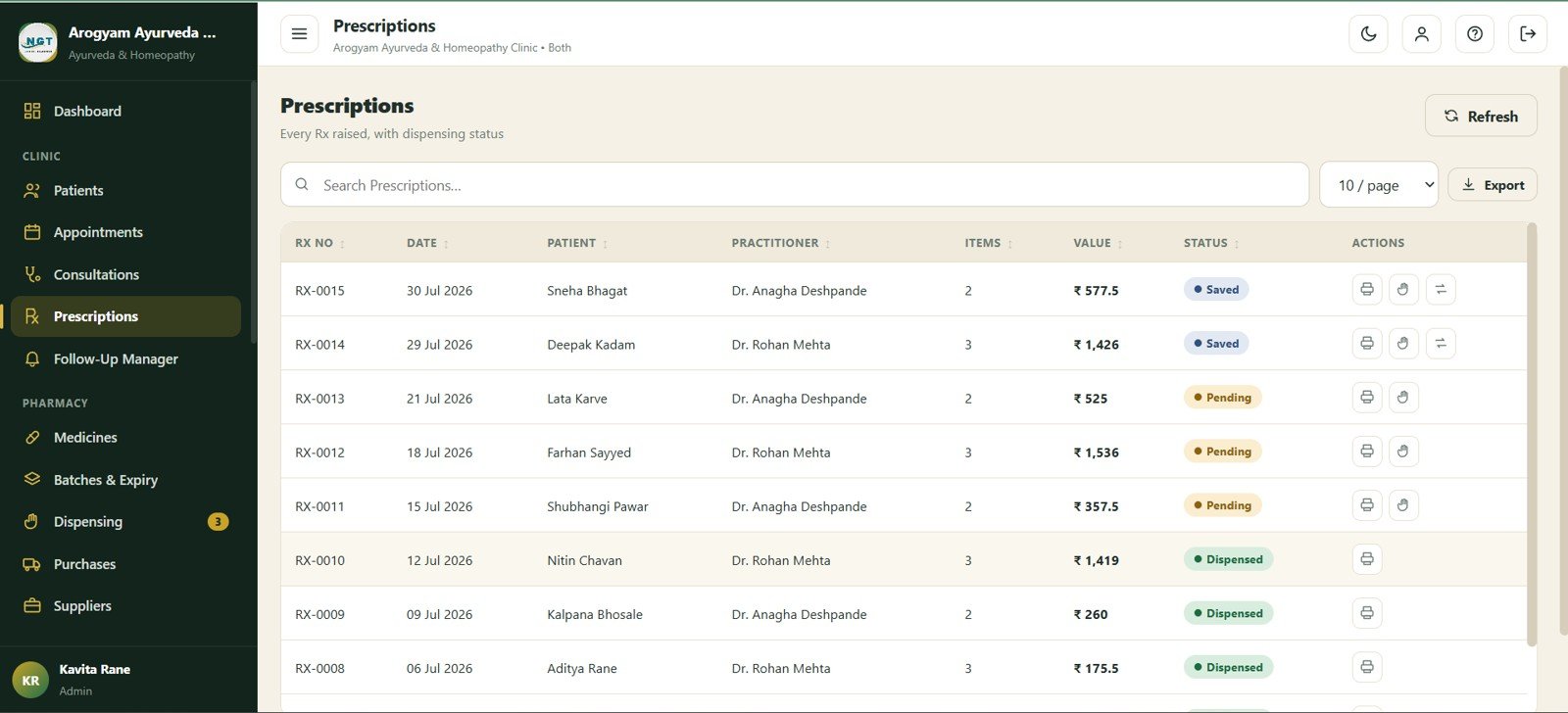
6. Prescriptions
The Prescriptions module shows date, patient, practitioner, items, value, status, and action so medicine preparation can be tracked after consultation.
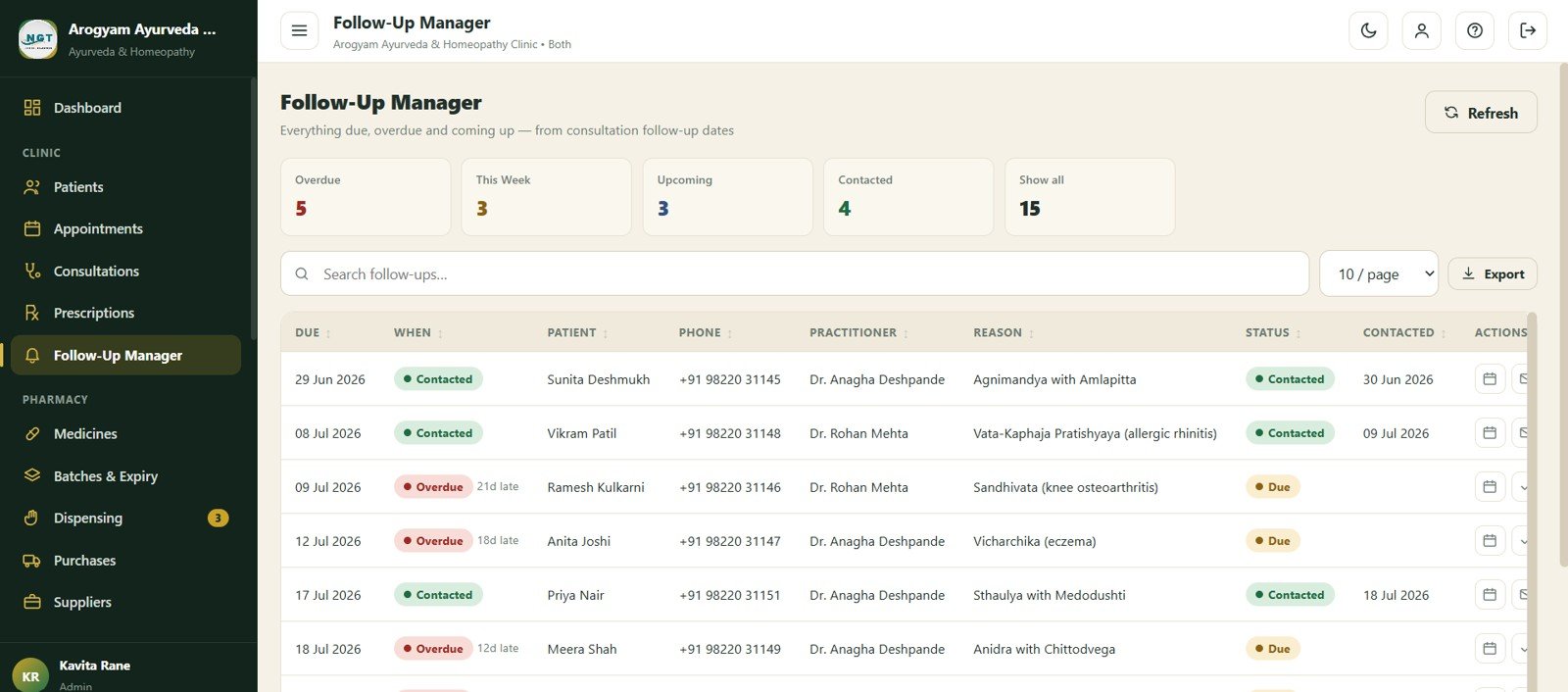
7. Follow-Up Manager
The Follow-Up Manager groups records by overdue, this week, upcoming, contacted, and all. Each row includes due date, alert status, patient, phone, practitioner, reason, and contacted date.
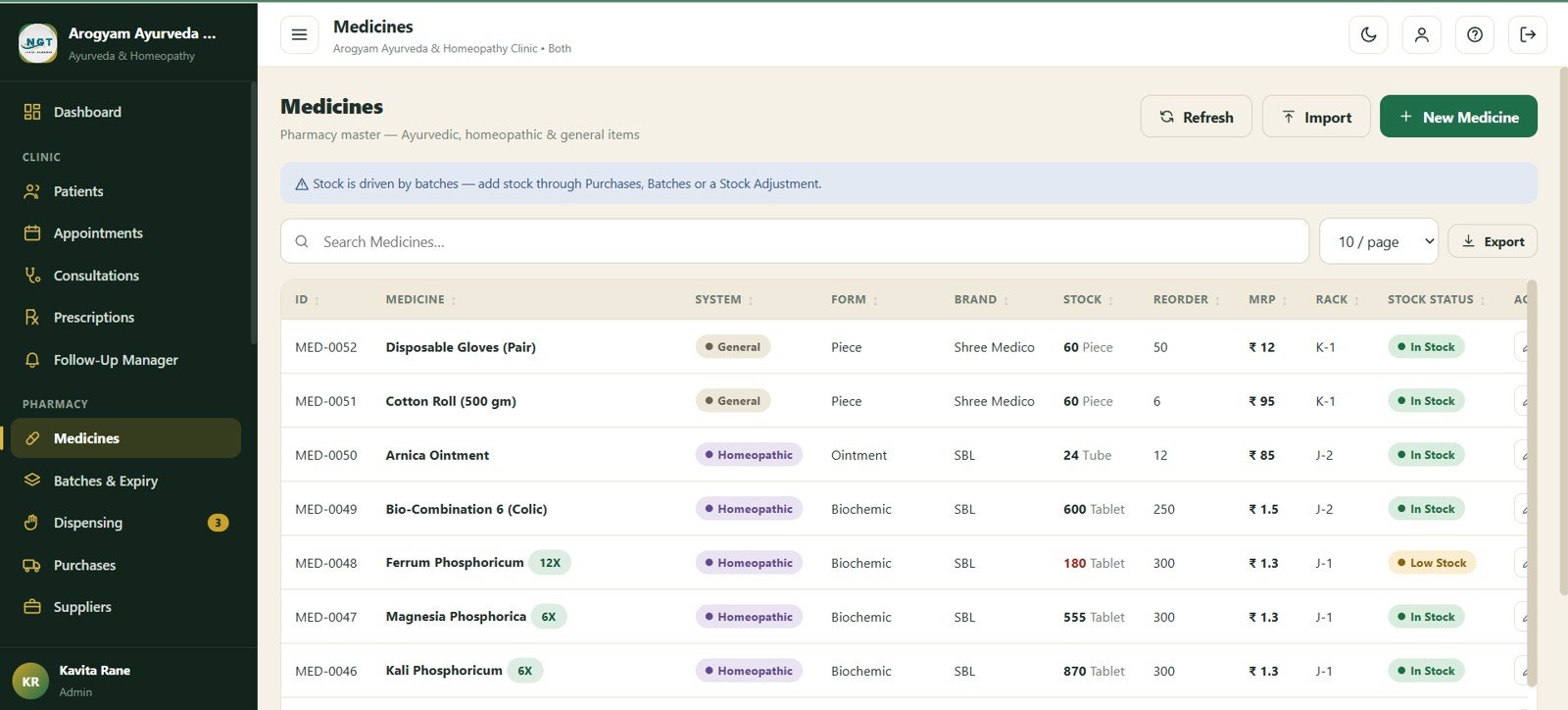
8. Medicines
The Medicines page maintains medicine ID, system, form, brand, stock, reorder level, MRP, rack, and stock status for clinic pharmacy control.
9. Batches and Expiry
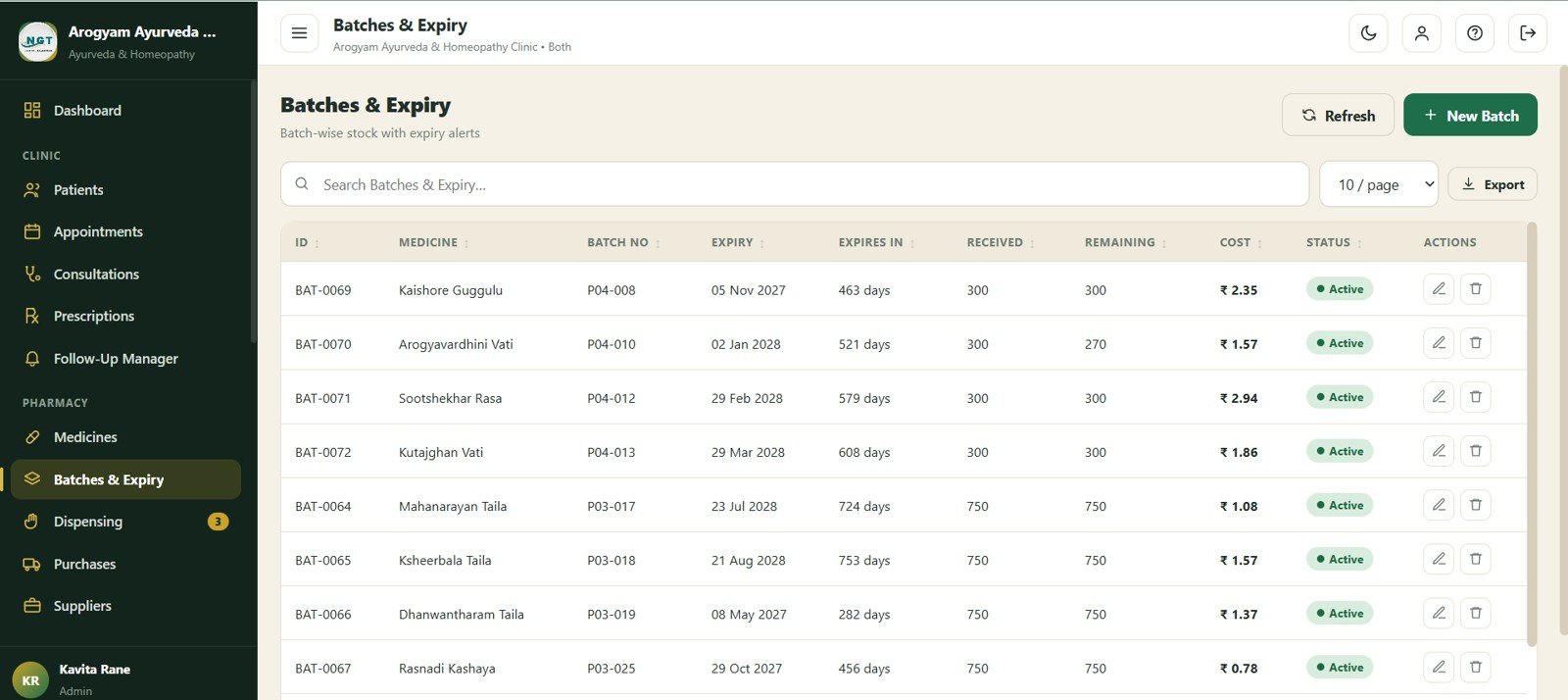
Batches and Expiry tracks medicine by batch, batch number, expiry date, expires-in calculation, received quantity, remaining quantity, cost, and status.
10. Dispensing
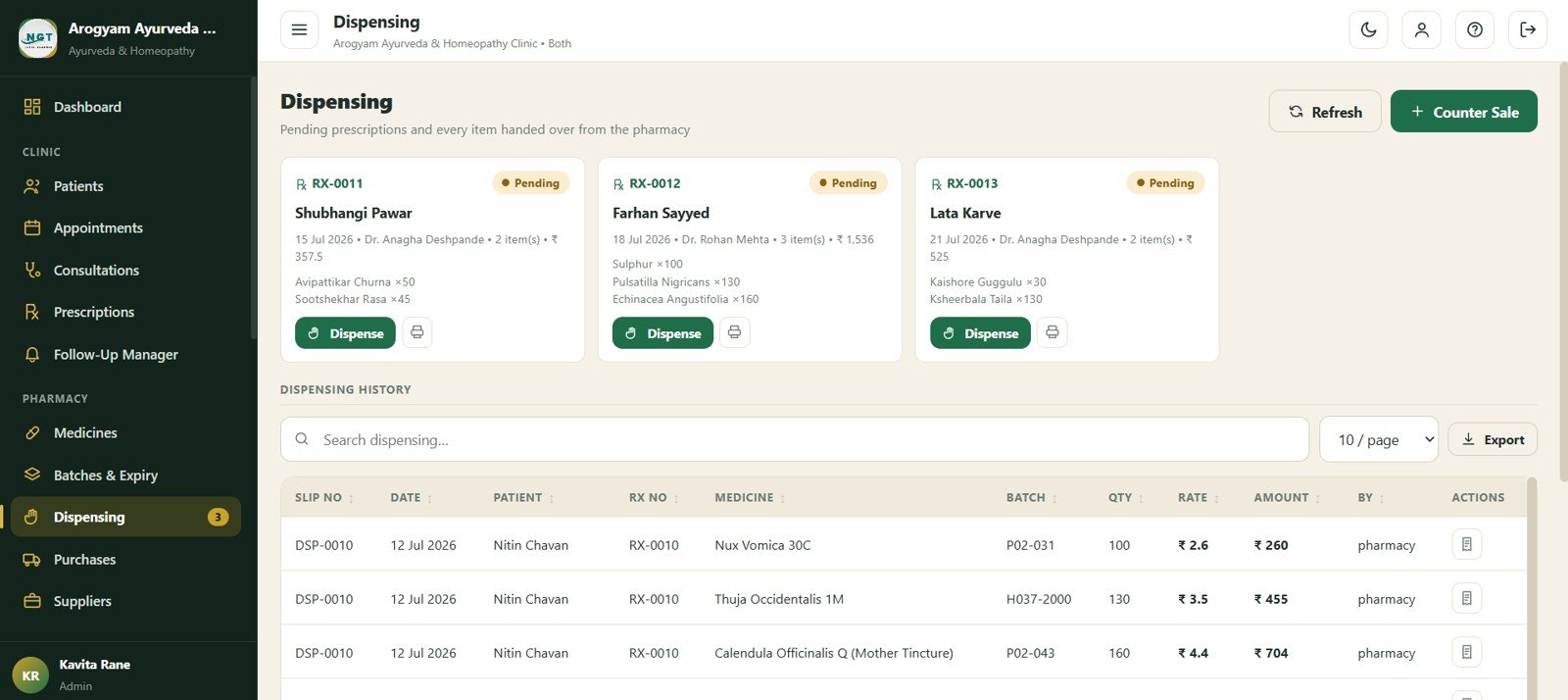
The Dispensing page shows pending prescriptions, patient name, prescription items, dispense action, medicine, batch, quantity, rate, amount, and dispensing user.
11. Purchases
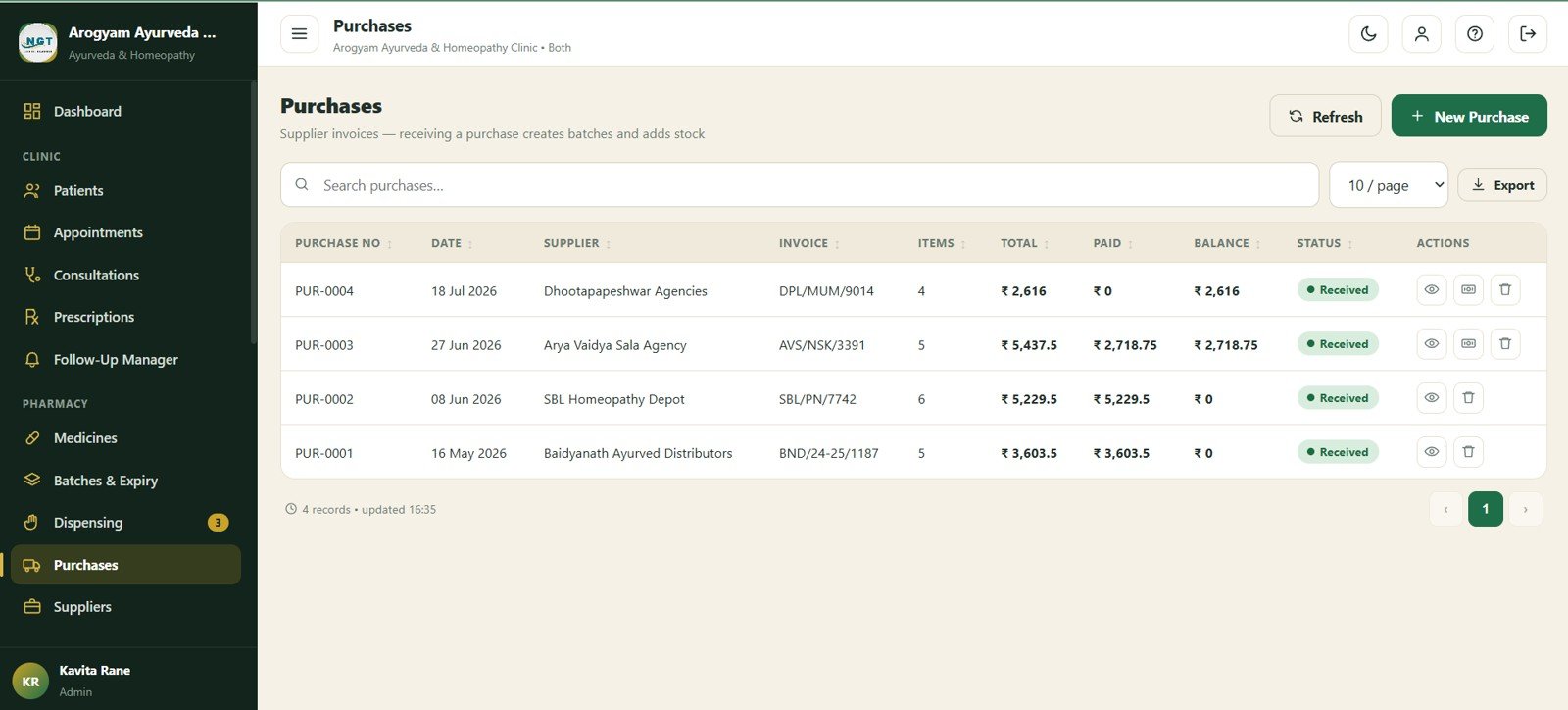
The Purchases page records purchase date, supplier, invoice, items, total, paid, balance, and purchase status for inventory procurement review.
12. Suppliers
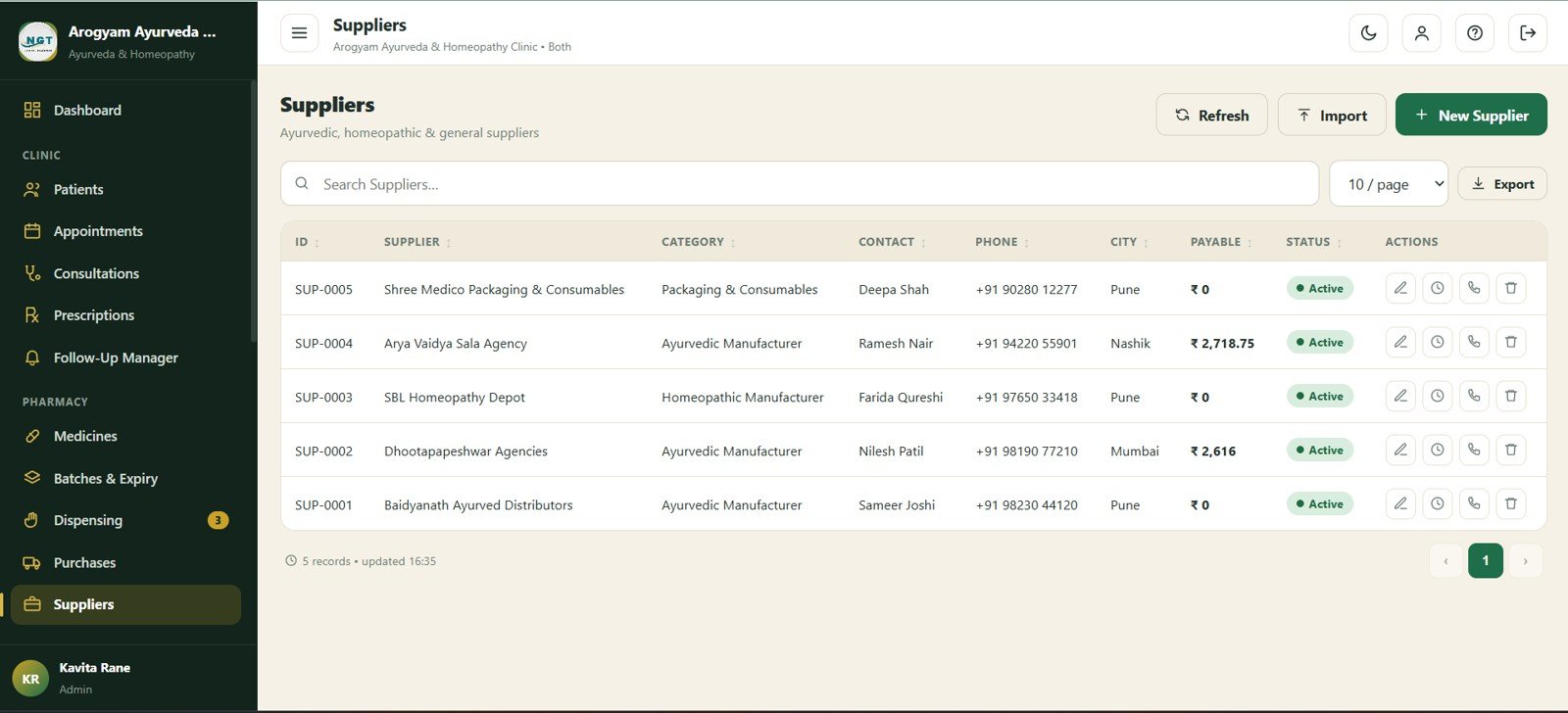
The Suppliers module stores supplier ID, category, contact, phone, city, payable amount, and status so purchasing relationships stay organized.
13. Billing
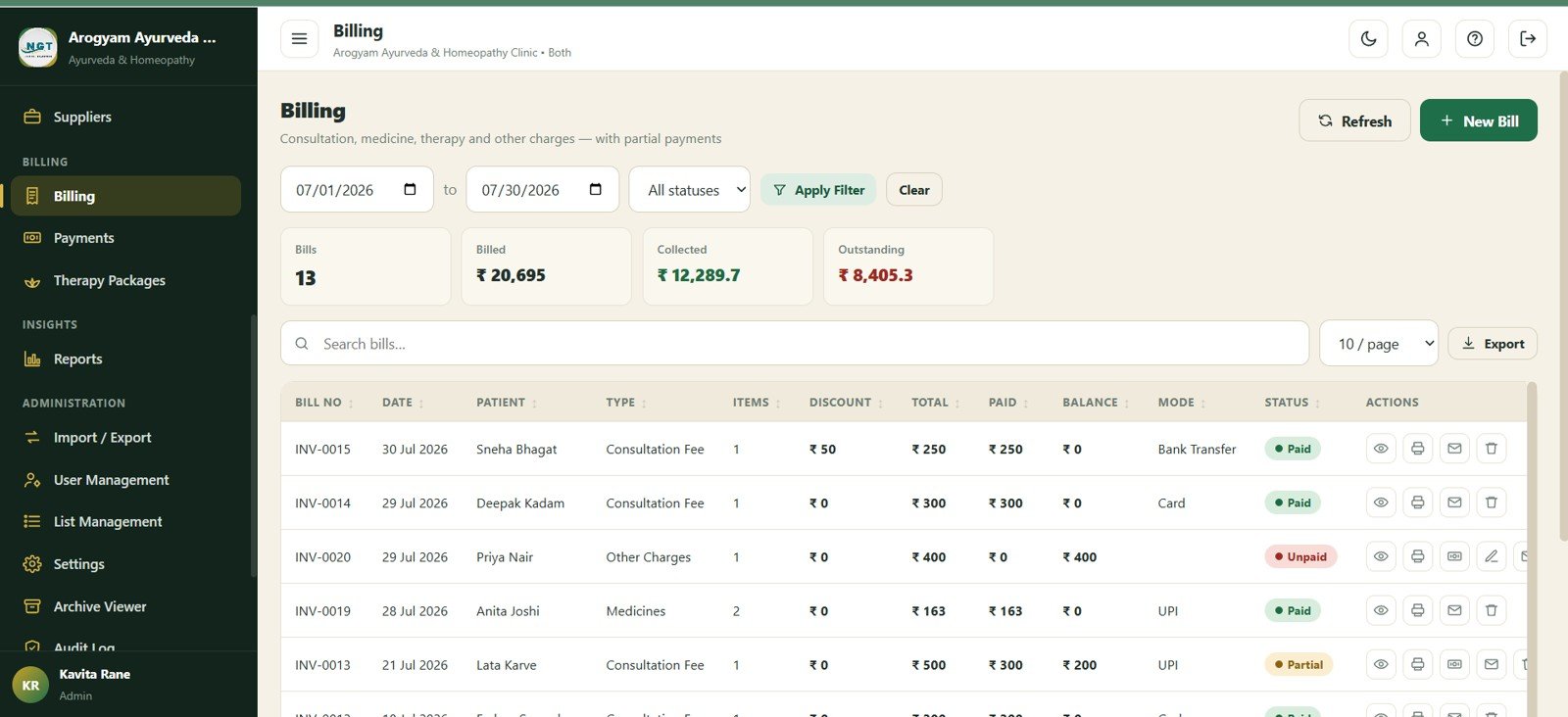
Billing summarizes bills, billed amount, collected amount, and outstanding amount, then lists bill date, patient, type, items, discount, total, paid, balance, payment mode, and status.
14. Payments
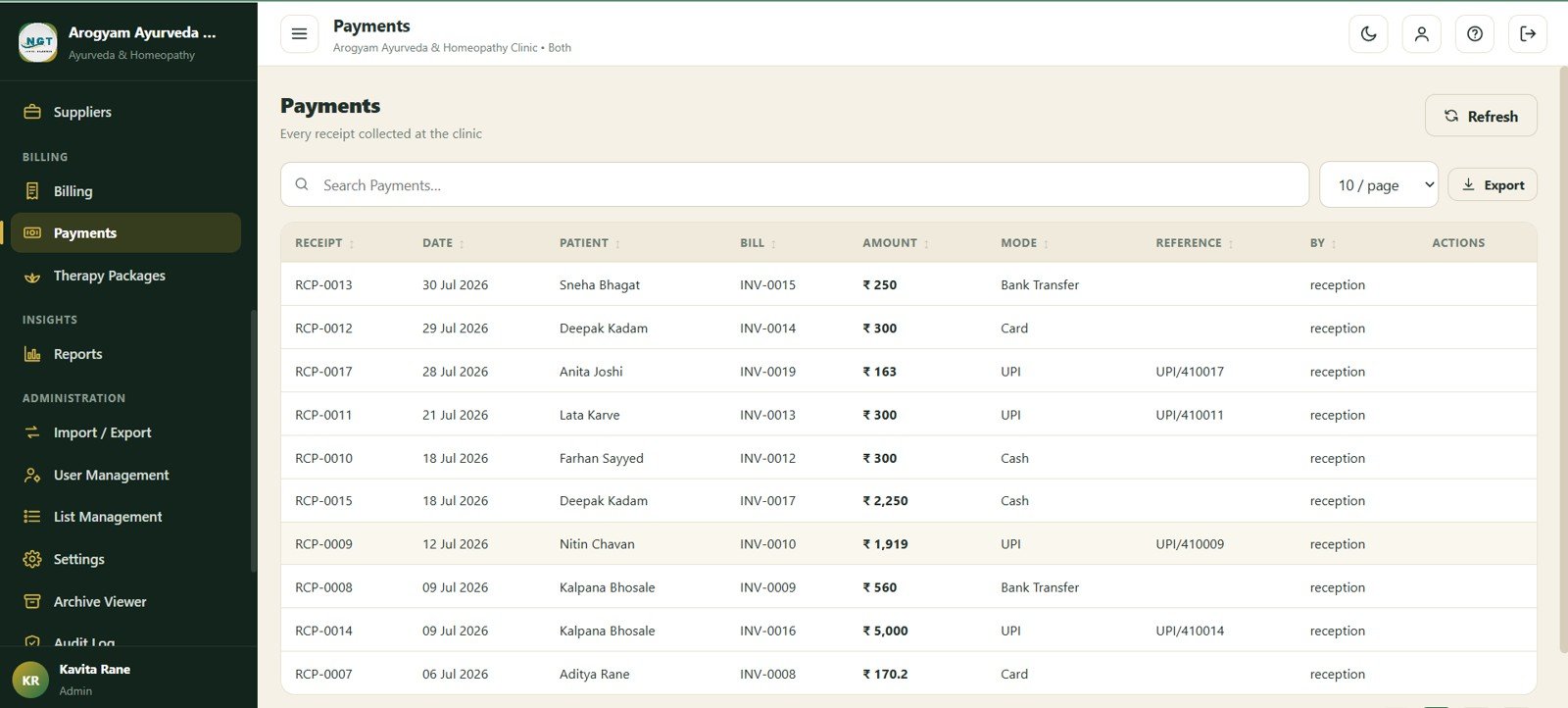
Payments tracks receipt, date, patient, bill, amount, mode, reference, and user for collection history and finance review.
15. Therapy Packages
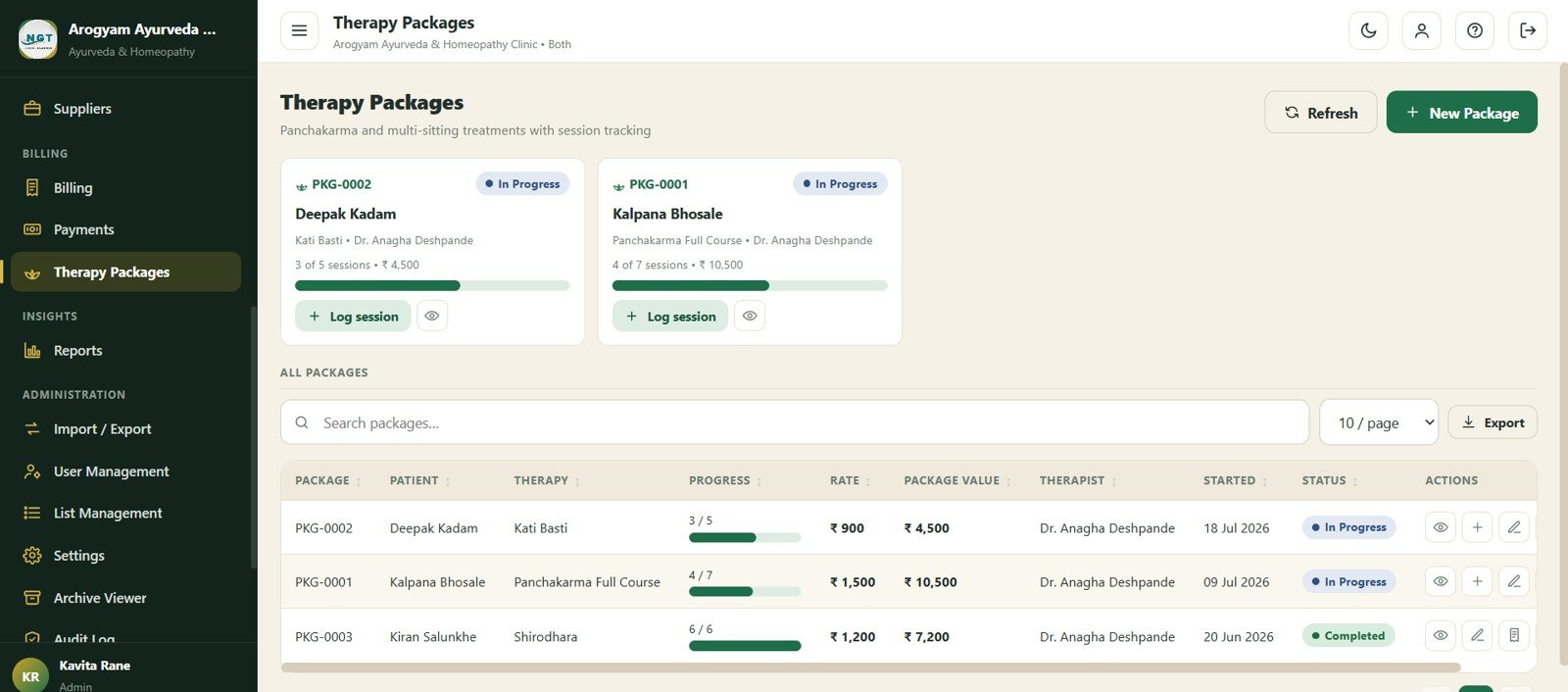
Therapy Packages supports package-in-progress cards, patient name, therapy name, session progress, log session action, rate, package value, therapist, started date, and status.
16. Reports
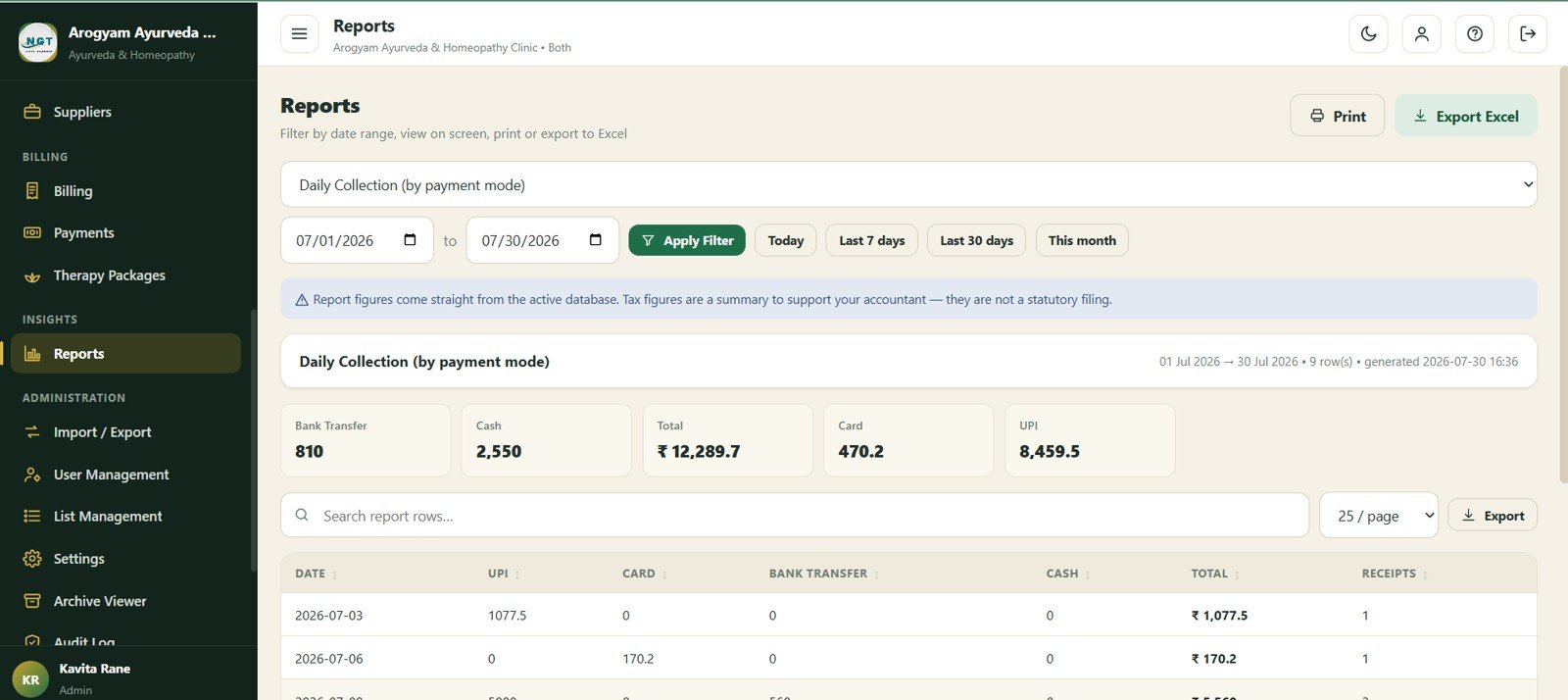
Reports visualizes bank transfer, cash, total, card, and UPI collections with daily collection by payment mode, payment trends by date, total collection, and receipt counts.
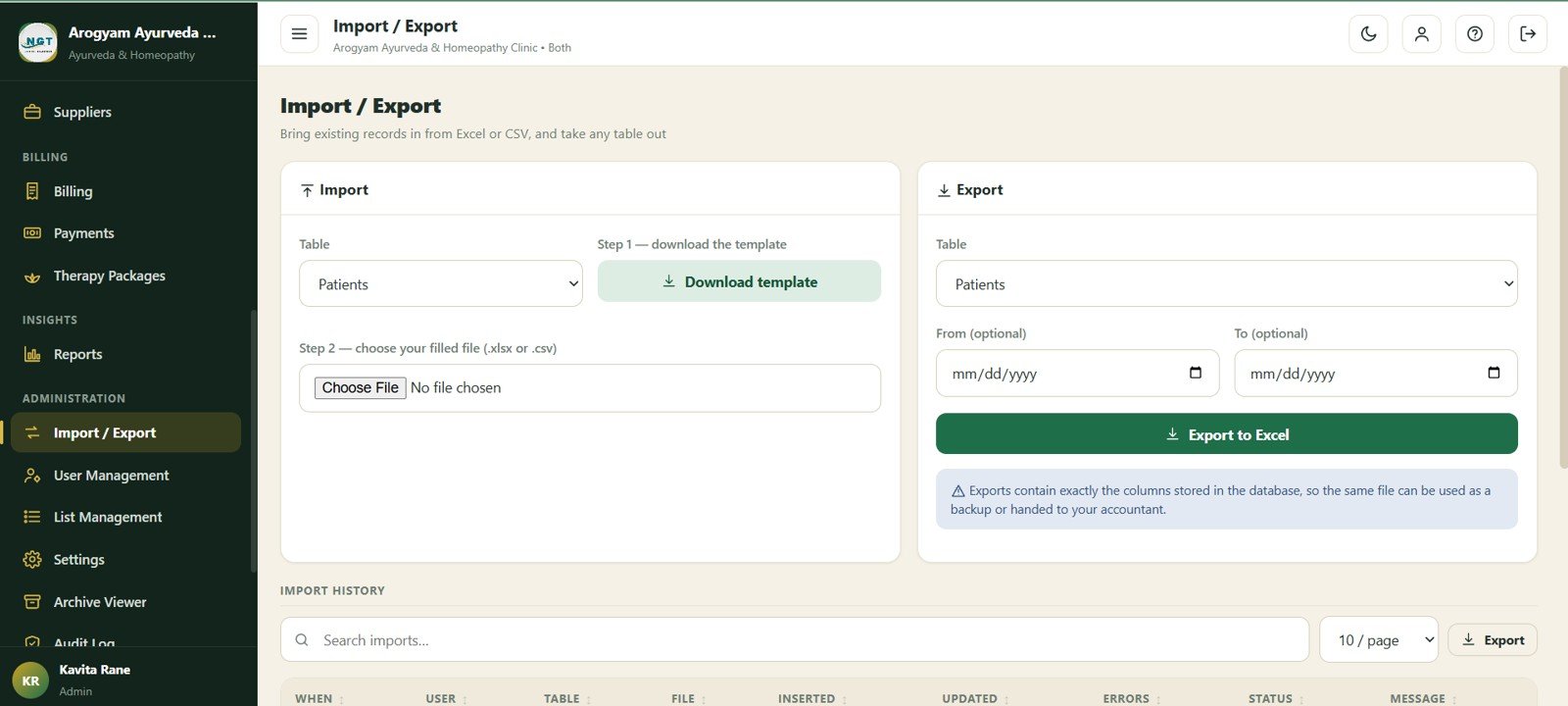
17. Import and Export
Import and Export provides module selection, downloaded templates, uploaded files, date filters, import history, inserted rows, updated rows, and error counts.
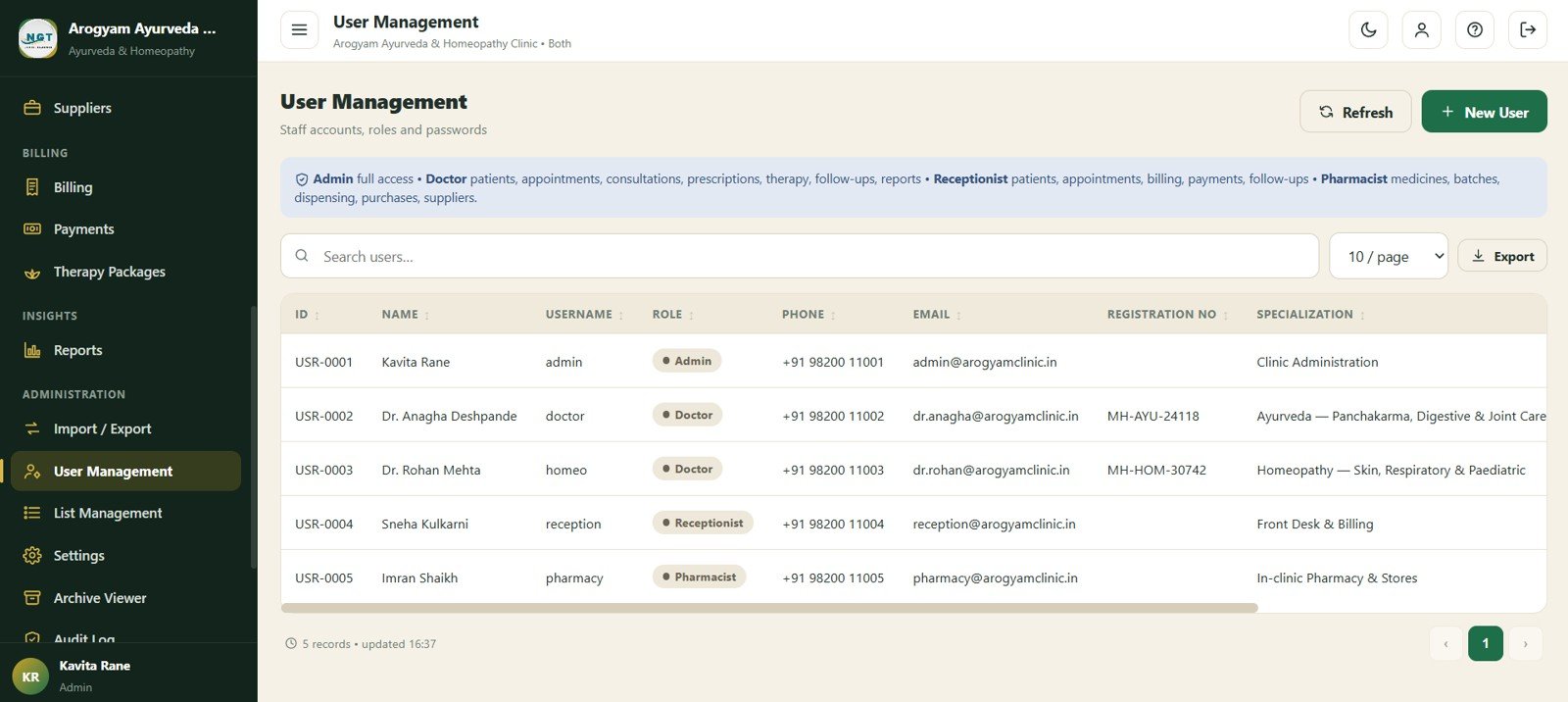
18. User Management
User Management controls staff permission by role, name, username, phone, email, practitioner registration number, and specialization.
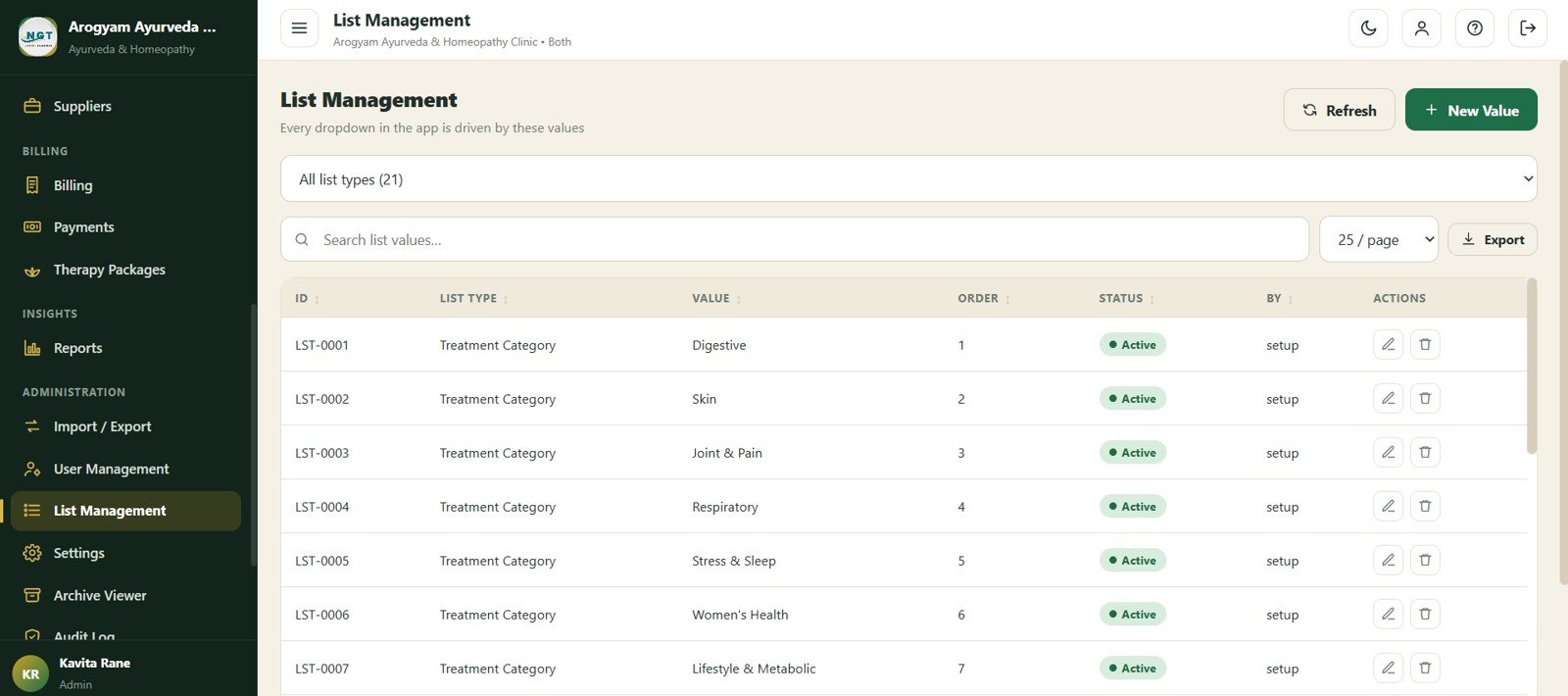
19. List Management
List Management maintains list values, display order, status, created-by details, treatment category values, and dropdown lists used across the app.
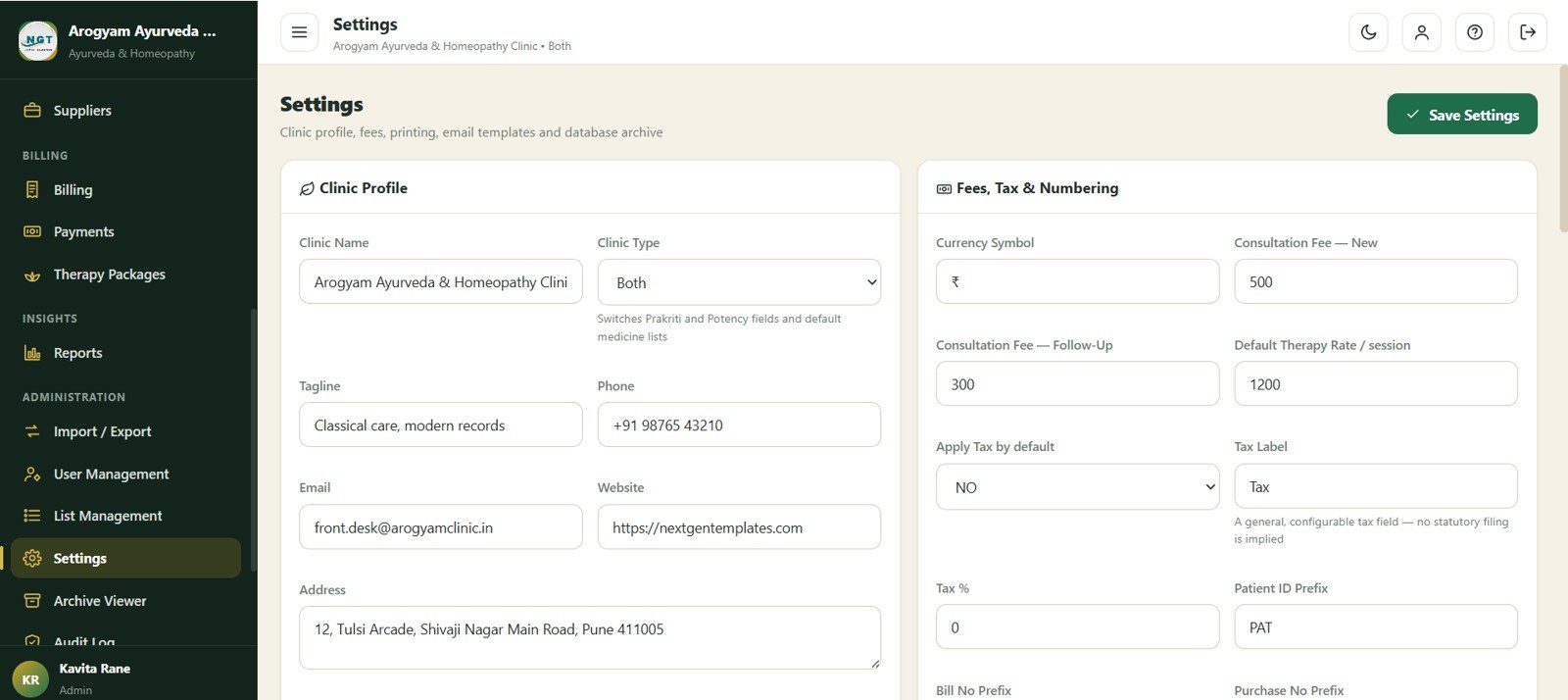
20. Settings
Settings stores clinic profile fields, clinic type, contact details, currency symbol, consultation fee by visit type, default therapy rate, tax label, and patient ID prefix.
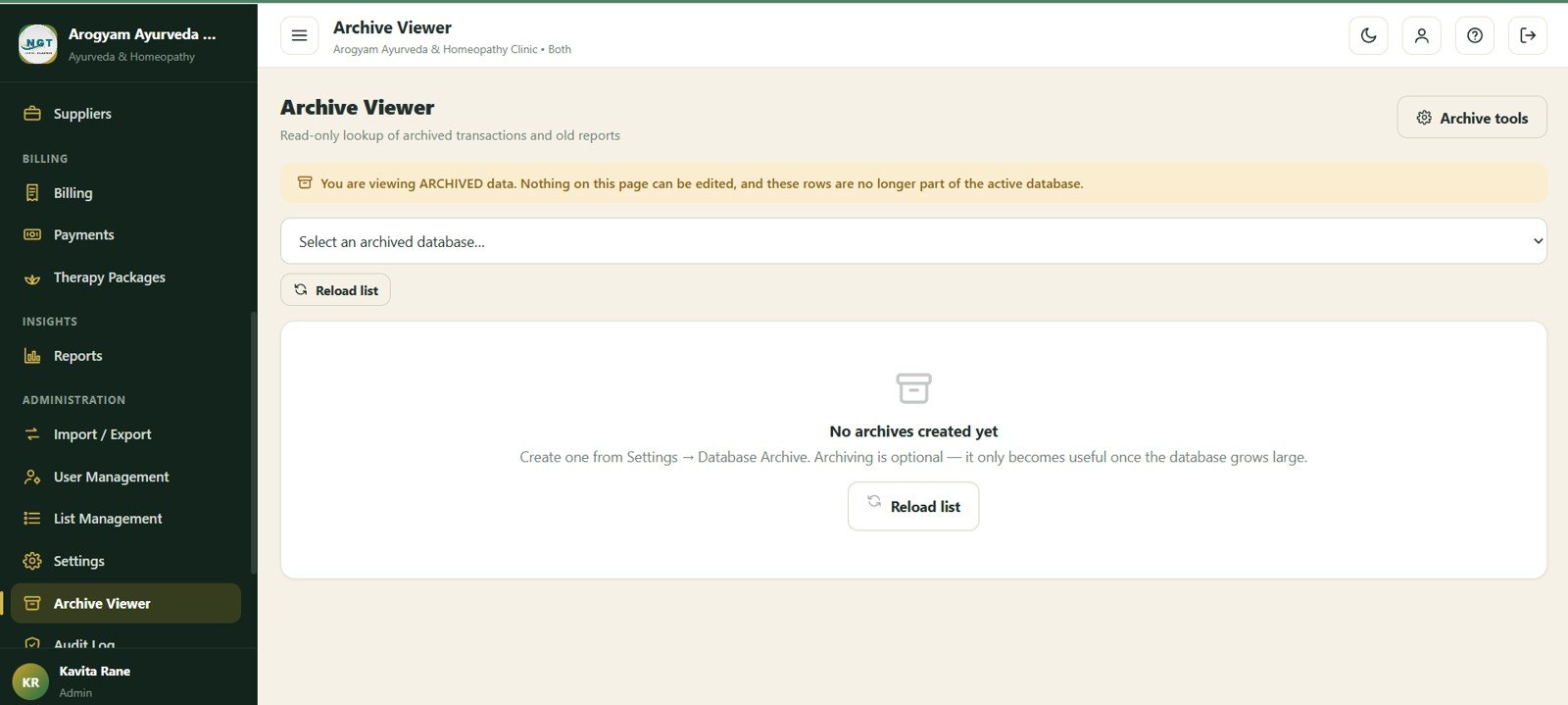
21. Archive Viewer
The Archive Viewer lets administrators choose an archived database, check archive status, reload lists, use archive tools, and view archived data in read-only mode.
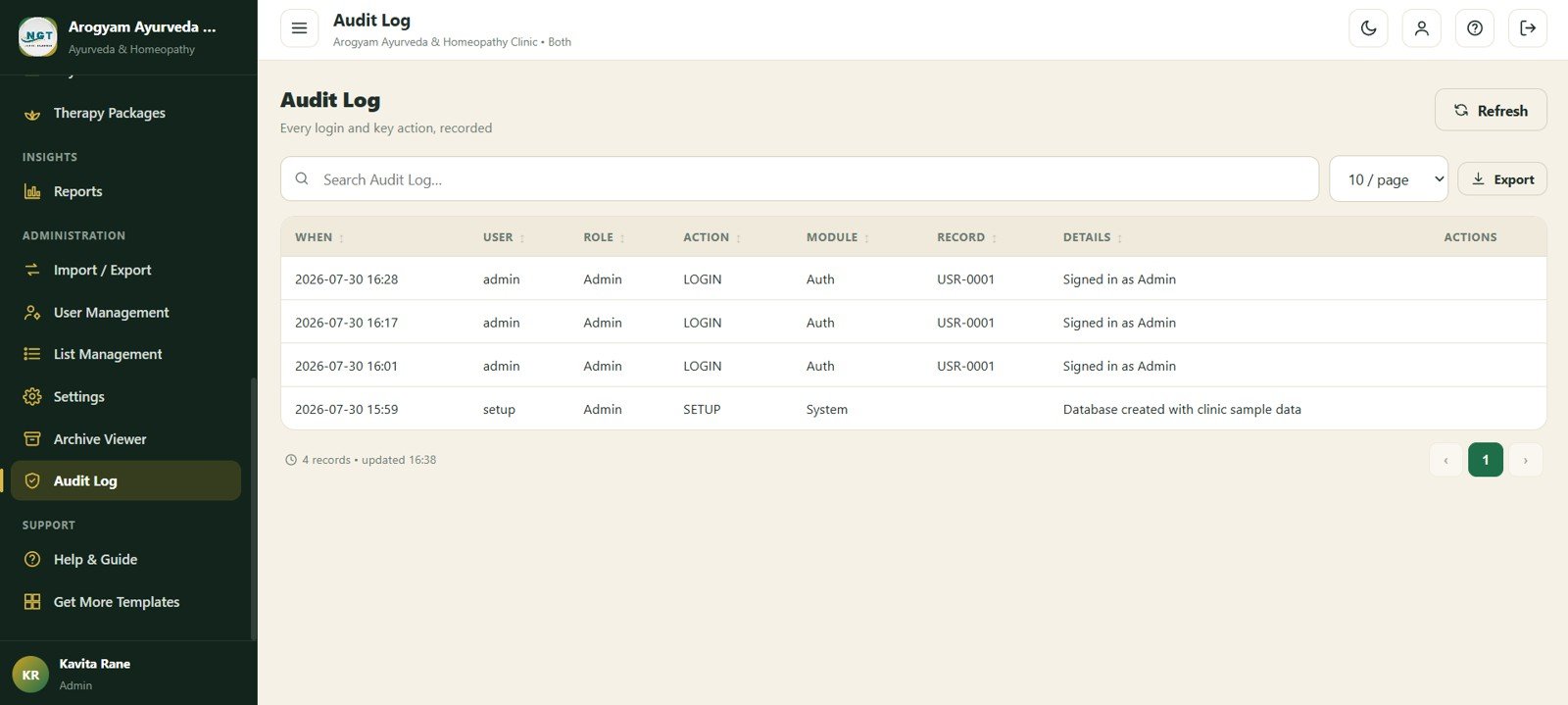
22. Audit Log
The Audit Log records timestamp, user, role, action, module, record, and details so the administrator can review important changes.
Ayurvedic Or Homeopathy Clinic Management System Web App vs. Google Sheets Tracker vs. Paid Clinic SaaS – Feature Comparison
| Feature | Ayurvedic Or Homeopathy Clinic Web App | Google Sheets tracker | Paid clinic SaaS |
|---|---|---|---|
| Cost | One-time template purchase | Low cost, but manual to build | Recurring subscription |
| Platform | Google Apps Script web app | Spreadsheet tabs | Vendor cloud platform |
| Setup time | Deploy source files and replace sample data | Build sheets, forms, formulas, and reports manually | Onboarding and configuration |
| Real-time team collaboration | Browser-based access after deployment | Shared sheet editing | Usually role-based |
| Mobile access | Works in browser depending on deployment and screen size | Google Sheets mobile app or browser | Usually included |
| Customizable fields | Editable source files, lists, settings, and database structure | Editable but easy to break | Often limited by plan |
| Prescription and pharmacy flow | Prescriptions, batches, expiry, dispensing, purchases, and suppliers | Manual tabs | Depends on vendor |
| Therapy package tracking | Package progress, sessions, rates, therapist, and status | Manual tracking | Often requires customization |
| Year-1 cost at 5 users | Template price plus Google account costs already in use | Build time plus maintenance | Often much higher with per-user pricing |
Who Should Use This Template
- Ayurveda clinics that need one workflow for patients, consultations, prescriptions, medicine stock, Panchakarma packages, and collections.
- Homeopathy clinics that want to record Miasm, follow-ups, prescriptions, billing, and payments in one private system.
- Small integrative medicine practices that currently use separate registers for front desk, pharmacy, and accounts.
- Clinic administrators who want import/export, user roles, list management, settings, archive, and audit history.
- Consultants building operational systems for small healthcare providers using Google Workspace.
Real-World Use Cases
Dr. Ananya owns an Ayurveda clinic with two practitioners. She checks the dashboard every morning to see appointments, pending follow-ups, expected revenue, low stock, and therapy package progress before the team starts consultations.
Vikram manages the pharmacy counter. He receives prescriptions from practitioners, selects the correct medicine batch, watches expiry alerts, records dispensing lines, and uses purchases and suppliers to prepare reorder lists.
Neha runs front desk and accounts. She registers patients, schedules appointments, records UPI and cash payments, monitors unpaid balances, and exports daily collection reports for the owner.
Advantages of Ayurvedic Or Homeopathy Clinic Management System Web App
- Full workflow coverage: The app covers front desk, practitioners, pharmacy, therapy, accounts, reporting, and admin controls.
- Own your system: You receive source files and can deploy your own copy instead of depending on a vendor account.
- Google-based workflow: The system uses the Apps Script and Google Sheets model many small teams already understand.
- Designed for clinic specifics: Prakriti or Miasm, prescriptions, therapy packages, stock, batches, expiry, and follow-ups are built into the visible workflow.
- One-time purchase: The template avoids monthly software fees and per-user pricing for teams that can manage their own deployment.
Opportunities for Improvement
- The template should be reviewed against local privacy, patient data, prescription, and pharmacy rules before live use.
- It does not replace a certified EHR, regulated clinical system, e-prescribing platform, or insurance claim platform.
- Mobile usability depends on the final deployment, browser, and device size; test your most common devices before rollout.
- Large clinics with very high transaction volume may eventually need a dedicated database backend instead of a spreadsheet-style data store.
Best Practices
- Change default passwords and review role permissions before inviting staff users.
- Clean sample data and validate clinic profile, tax label, consultation fees, currency symbol, and patient ID prefix before launch.
- Load medicines, batches, reorder levels, suppliers, and opening stock before using the dispensing workflow.
- Run test appointments, consultations, prescriptions, bills, payments, therapy sessions, imports, exports, archive, and audit log checks before live use.
- Back up the Google Sheet regularly and limit access to authorized clinic users only.
Explore Relevant Templates
Looking for more Google Apps Script Web App Templates? These related products pair well with this clinic system:
- Pharmacy POS Web App – a focused pharmacy billing, stock, suppliers, customers, and shift workflow.
- Ambulance Fleet and Dispatch Management System Web App – emergency requests, dispatch, fleet, trips, billing, and reports.
- Healthcare Administrator Toolkit – a bundle of healthcare management templates for administrators.
- Clinical Data Management Dashboard in Power BI – clinical operations and research reporting.
- Clinic Project Management in Excel – clinic project tracking, costs, risks, and departments.
If you are newer to spreadsheet-based systems, the NextGenTemplates Academy learning paths cover the Google Sheets and Excel basics behind tools like this, with practice files.
Get the Ayurvedic Or Homeopathy Clinic Management System Web App
Frequently Asked Questions
What is the Ayurvedic Or Homeopathy Clinic Management System Web App?
It is a Google Apps Script web app template for managing Ayurveda and homeopathy clinic appointments, patients, consultations, prescriptions, pharmacy, billing, follow-ups, therapy packages, reports, settings, archive, and audit history.
Is this a monthly software subscription?
No. It is sold as a one-time downloadable template. You deploy your own copy using the included source files and setup guide.
Does it include patient records and appointments?
Yes. The app includes Patients and Appointments screens with patient profile fields, visit information, appointment status, practitioner, visit type, reason, phone, and scheduling details.
Can it manage prescriptions and pharmacy stock?
Yes. It includes prescriptions, medicines, batches and expiry, dispensing, purchases, suppliers, reorder levels, stock status, and payment-linked billing flows.
Does it support follow-up management?
Yes. The Follow-Up Manager groups overdue, this week, upcoming, contacted, and all follow-ups with patient, phone, practitioner, reason, and contacted date fields.
Is it suitable for regulated clinical records?
Use it as an editable operational template, not as a certified EHR or regulated medical records platform. Validate privacy, clinical, prescription, pharmacy, and data protection requirements before live use.
About the Author
Built by PK – Microsoft Certified Professional with 15+ years of Excel, Google Sheets, and Power BI experience. Founder of NextGenTemplates, reaching 300K+ subscribers across YouTube channels. Every template is hand-built and tested before release.
Conclusion
The Ayurvedic Or Homeopathy Clinic Management System Web App gives traditional medicine clinics a structured way to run appointments, patients, consultations, prescriptions, pharmacy, billing, therapy, reports, and admin controls from one deployable Google Apps Script system. It is best for clinics that want control over their own source files and data workflow without starting from a blank spreadsheet or buying a recurring SaaS product.
Instant download. One-time payment. No monthly subscription.
Last updated: July 31, 2026.