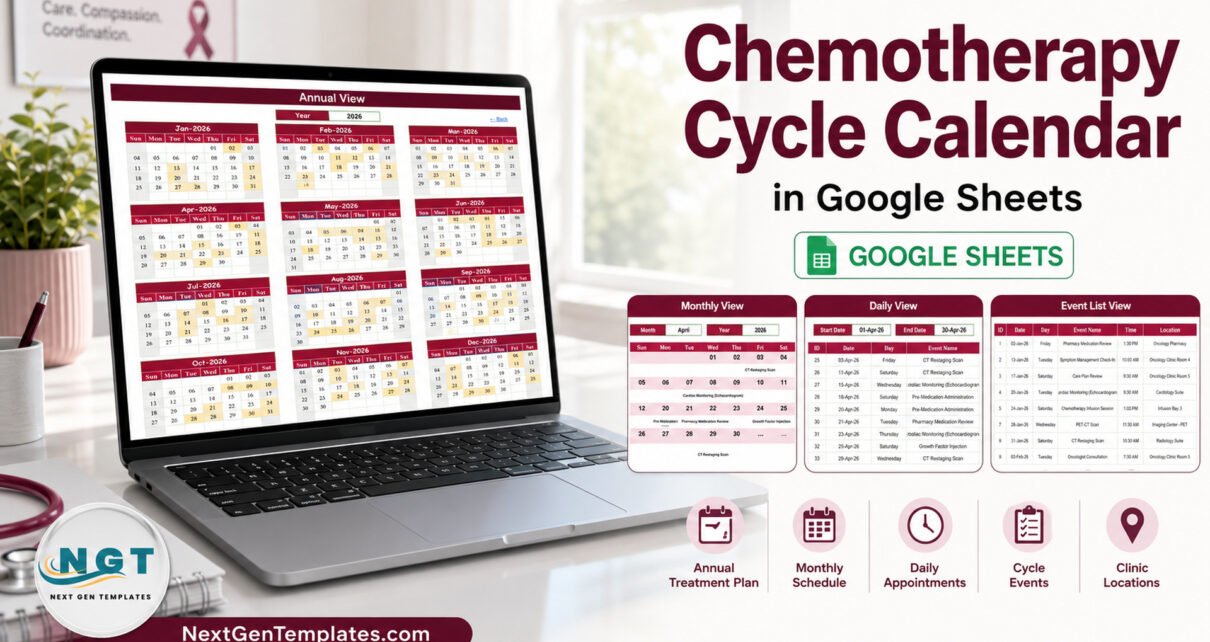
The Chemotherapy Cycle Calendar in Google Sheets is a scheduling spreadsheet built around one events table and three views that read from it. It ships with 5 working tabs, 100 sample appointment rows numbered 1 to 100 and dated 02 January to 30 December 2026, 18 event labels, 29 named clinic locations, 14 start times between 7:30 AM and 3:00 PM, and 250 live formulas spread across the Annual, Monthly and Daily views.
Treatment cycles are relentlessly administrative. A single course can mean an infusion, a blood draw the week before, a pharmacy review, an imaging scan between cycles, a cardiac check and a supportive-care appointment — each in a different room, each at a different time. Most units end up with a printed sheet on a wall and three people holding slightly different versions of it in their heads. The Chemotherapy Cycle Calendar exists to make that one shared, editable picture.
Get the Chemotherapy Cycle Calendar in Google Sheets
What the Chemotherapy Cycle Calendar Is Not
This has to come first, because the topic demands it.
No. The Chemotherapy Cycle Calendar in Google Sheets is not a treatment plan, not a dosing or protocol calculator, not a patient record, not an EHR or EMR, not an oncology information system, not a medical device and not clinical decision support. It calculates no cycle intervals, checks no drug interactions, sends no reminders and confers no HIPAA, GDPR or other compliance status on anyone who uses it.
No. It should not hold patient data. A Google Sheet shared by link is not appropriate storage for identifiable health information — anyone who receives the link can read the whole file. Names, identifiers, diagnoses and clinical notes belong in the systems your organisation has validated for them. This file is for the administrative layer only: what is booked, when, and in which room. Every clinical decision and every cycle date stays with the qualified team.
The template is honest about this in its own structure, which is the next section.
Key Features of the Chemotherapy Cycle Calendar in Google Sheets
- One table, four views. The Events tab is the only place anything is typed. Annual, Monthly and Daily all read from it live, so a corrected date propagates everywhere on the next recalculation.
- Seven deliberately administrative columns: ID, Date, Day, Event Name, Time, Location and Description. Nothing else.
- 250 formulas already in place — 112 on Annual View, 75 on Monthly View, 63 on Daily View — and they run down to row 999, so the file grows with you.
- A 36-year date range. A hidden List tab feeds the month and year dropdowns with a rolling range from 2021 to 2056, rebuilt from
YEAR(TODAY())-5. - No macros, no add-ons, no Apps Script. A free Google account runs it, on desktop or in the free mobile app.
Template Structure — Tab by Tab
Home
A navigation menu with four buttons: Annual View, Monthly View, Daily View and Events. Every other tab carries a “← Back” link that returns here.
Annual View
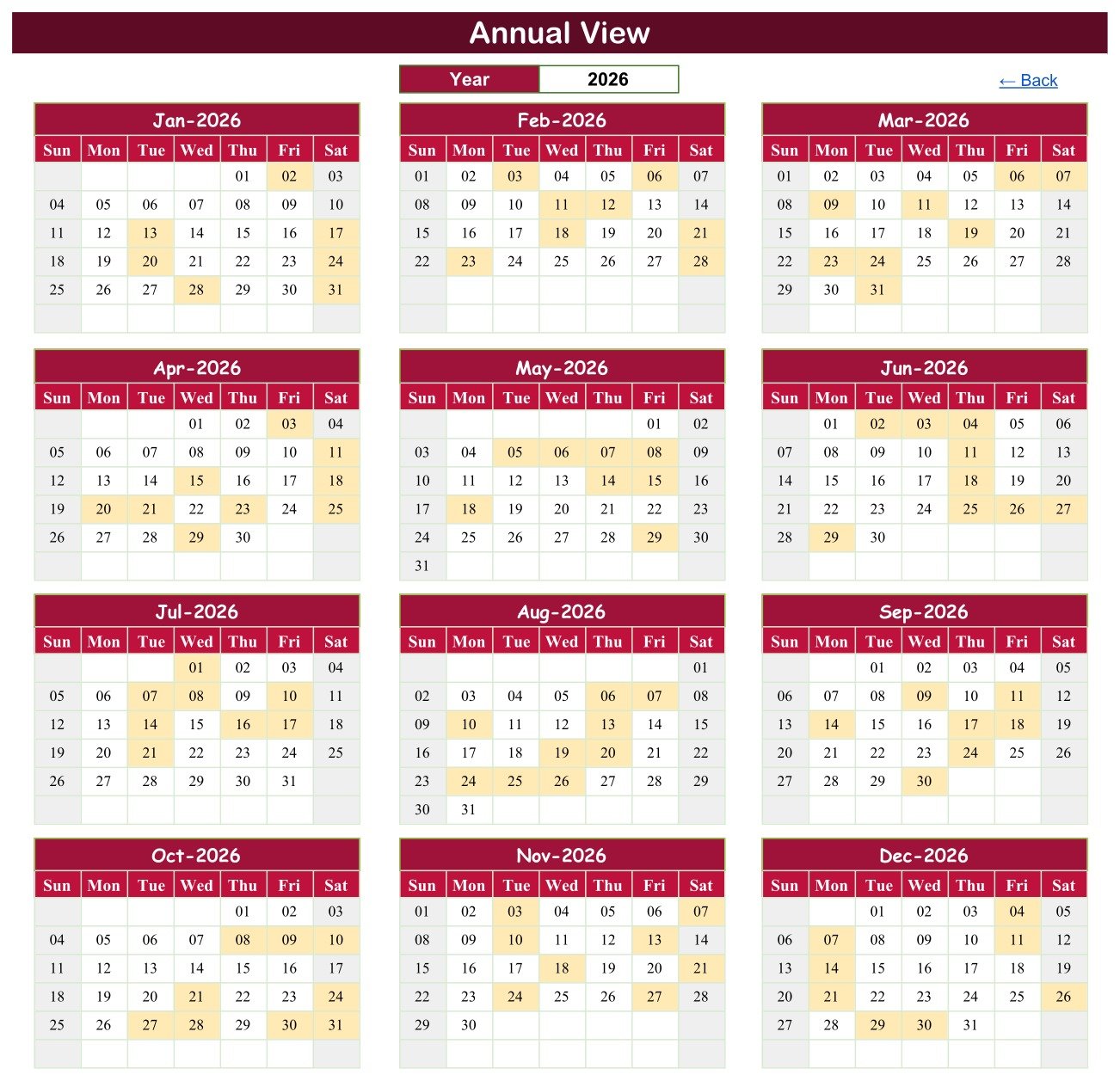
Twelve month grids for the chosen year, laid out three across and four down, with every booked date shaded. A single Year cell drives all twelve grids, so moving to the next year redraws and re-shades the whole sheet against your own rows.
Monthly View
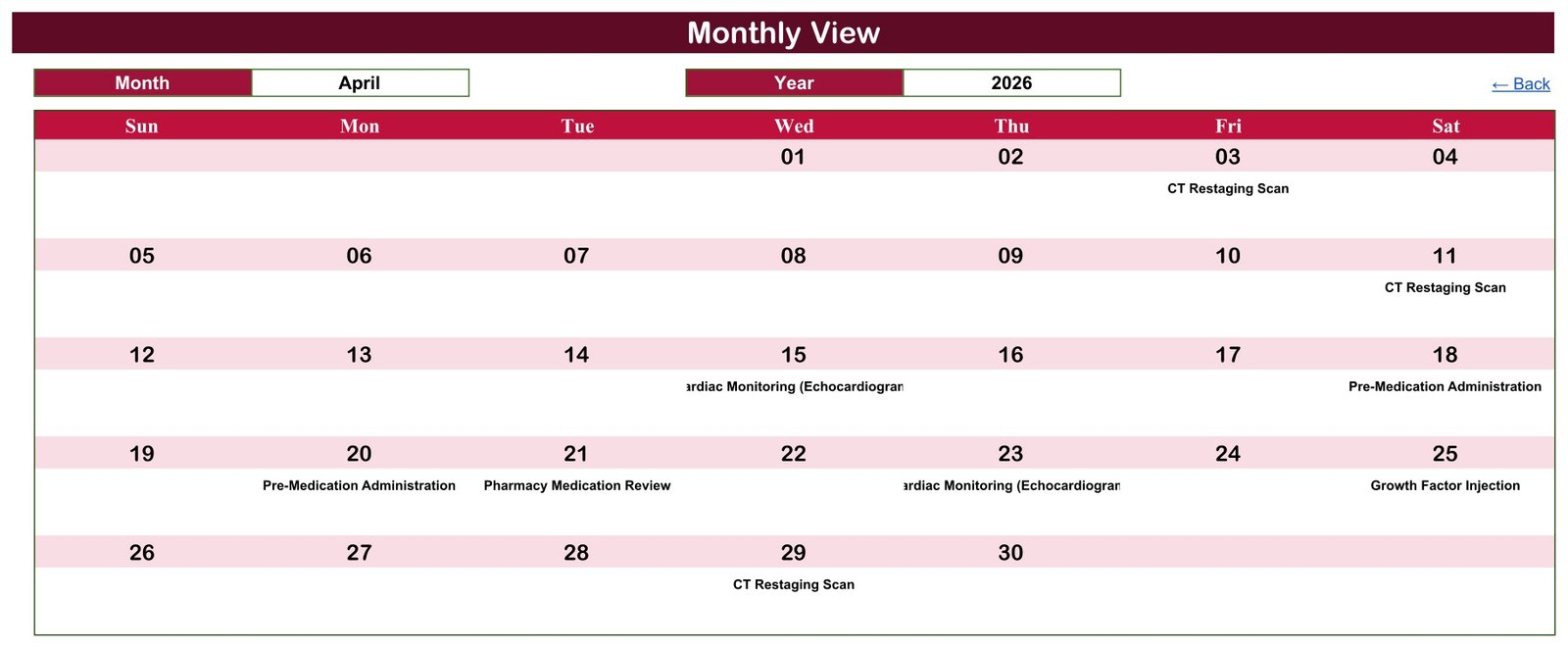
A full-width month grid driven by Month and Year dropdowns. Each day cell pulls its event from the Events table with a VLOOKUP, and a COUNTIF beneath prints a “1 more…” note when a date carries more than one entry.
Daily View
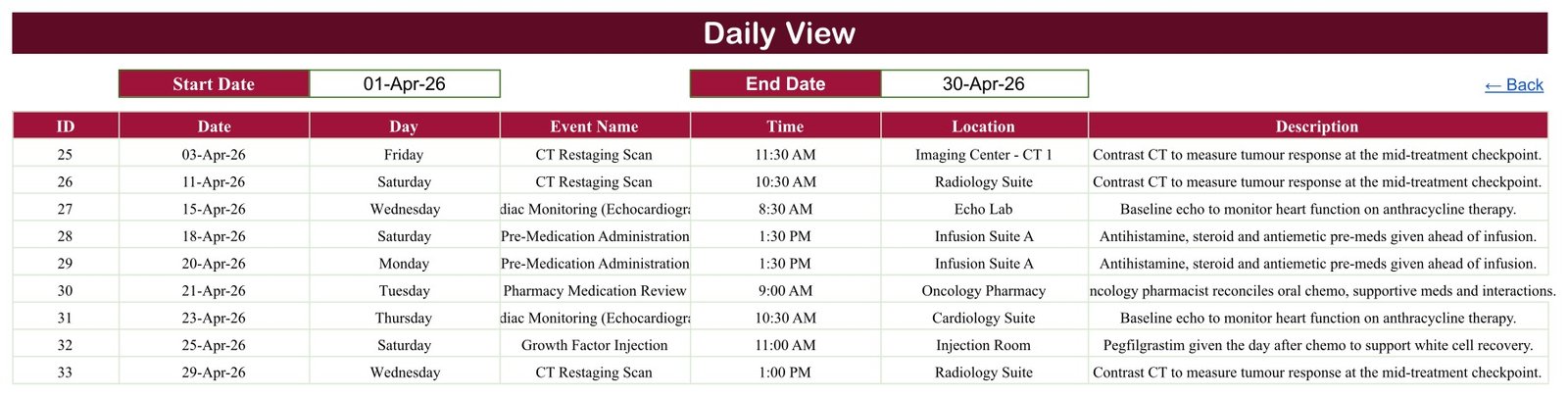
A Start Date and End Date pair filters the whole table into a list with every column visible. Set it to one day for a day sheet, or to a month to read a whole cycle in order. In the sample file, April 2026 returns nine rows, IDs 25 to 33.
Events
The source of truth. One hundred numbered rows spanning the full 2026 year, ready to be cleared and replaced with your own.
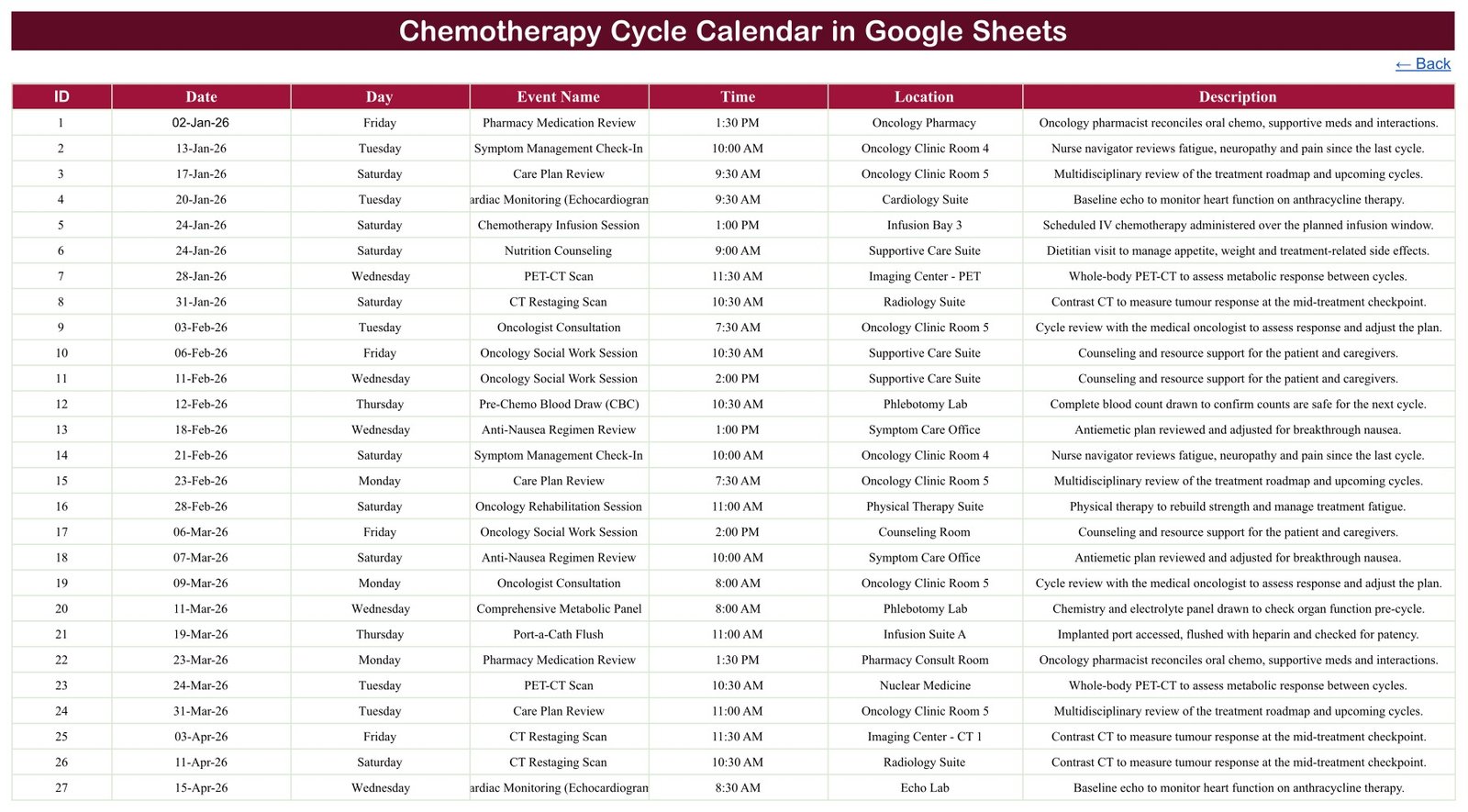
The Missing Patient Column Is the Point
Read the Events tab column by column and what stands out is what is absent. There is no patient name, no hospital or medical record number, no date of birth, no phone number, no email address, no diagnosis, no drug field, no dose field and no cost column — not in the header row and not anywhere across the 100 sample rows. All 29 locations are in-facility room names such as Infusion Bay 3, Echo Lab or Oncology Pharmacy. Not one is a street address.
That is a design decision worth understanding rather than working around. Put an internal code in the Description column if you need to tie a booking back to a person, keep the key that resolves that code in your clinical system, and share the sheet with named colleagues rather than “anyone with the link”. The calendar then carries nothing that would matter if the link leaked.
The same reasoning shows up across this family of templates — the Dialysis Session Calendar in Google Sheets handles recurring treatment sessions the same way, and the Patient Follow-Up Visit Calendar in Google Sheets takes the same approach to review appointments.
Chemotherapy Cycle Calendar vs. an Excel Calendar vs. Paid Clinic Scheduling SaaS
| Feature | Chemotherapy Cycle Calendar in Google Sheets | Microsoft Excel calendar | Paid clinic scheduling SaaS |
|---|---|---|---|
| Cost | $4.99 one-time ✅ | $5-30 one-time | $25-150 / user / month |
| Year-1 cost at 5 users | $4.99 ✅ | $5-30 | $1,500-9,000 |
| Setup time | Under 10 minutes ✅ | Under 10 minutes | Days to weeks, with onboarding |
| Real-time team collaboration | Native to Google Sheets ✅ | Only via OneDrive co-authoring | Yes |
| Mobile access | Free Google Sheets app ✅ | Excel mobile app | Yes |
| Editable columns and labels | All 7 columns ✅ | Yes | Usually vendor-fixed |
| Share with a link | Yes ✅ | Yes | Login required |
| Patient records / EHR integration | No — by design | No | Yes ✅ |
| Automated reminders and alerts | No | No | Yes ✅ |
| Double-booking prevention | No | No | Yes ✅ |
| Compliance-ready hosting for health data | No | No | Yes ✅ |
For a coordinator who needs a shared, readable view of what is booked — and who already has a clinical system for everything else — the Chemotherapy Cycle Calendar sits in the sweet spot. If you need records, reminders or compliance, buy the SaaS.
Who Should Use This Template
Perfect for:
- Oncology day-unit and infusion-suite coordinators who want one shared month view instead of a printed wall sheet
- Small clinic administrators who need a room- and time-level booking picture the whole team can open on a phone
- Practice managers building a lightweight administrative calendar alongside, never instead of, a clinical system
- Caregivers keeping a private, unshared record of appointment dates, times and departments
Not a fit if:
- You need to store patient names, identifiers, diagnoses or clinical notes — there is nowhere to put them and no protection for them
- You need automated reminders, SMS or email confirmations, or a waiting list
- You expect the file to work out cycle intervals, check interactions or flag an unsafe date
- You need an auditable, access-controlled, compliance-ready record
- You are looking for clinical guidance of any kind
Real-World Use Cases
Priya coordinates a 12-chair infusion unit. The Chemotherapy Cycle Calendar is the unit’s shared month view — which bays are committed, which mornings are heavy, where the imaging and lab slots fall. The authoritative bookings live in the hospital system; this is the picture the team looks at on the ward tablet.
Daniel runs the office side of a two-consultant private practice. He records an internal code in the Description column instead of a name, sets Daily View to next week every Friday, and prints the resulting list for the nurses. Nothing identifiable enters the sheet.
Aisha is a caregiver tracking appointments for one family member. The calendar lives privately in her own Drive, unshared, purely so nothing is missed between visits. Her relative’s care team owns everything clinical. She uses the Medication Reminder Calendar in Google Sheets alongside it for the day-to-day.
Advantages
The cost case is straightforward: $4.99 once against $25-150 per user per month for scheduling software, which is $1,500-9,000 in year one for a five-person team. But the real advantage is narrower and more useful — the file does one job, everyone can read it, and it needs no training. A new coordinator opens the Monthly View and understands it in ten seconds.
It also travels. Google Sheets is free, collaborative by default, and works on any phone. There is nothing to install and no licence to assign, which matters in a unit where bank and agency staff come and go. The wider Health Checkup Package Calendar in Google Sheets follows the same pattern for a different scheduling problem.
Opportunities for Improvement
Three honest limitations, all verified in the live file:
- Monthly View shows only the first entry on a busy day. The VLOOKUP behind each day cell returns the first matching row in the Events table and then prints a “1 more…” counter beneath it. In the sample data, 24 January and 18 September 2026 each carry two appointments, and only one of each is named in the grid. Daily View filters rather than looking up, so it shows every entry — use it whenever a day is busy.
- Nothing prevents a double booking. There is no data validation and no warning if two events land in the same room at the same time. The calendar records exactly what you type.
- The Day column is typed text, not a formula. All 100 sample weekdays are correct as shipped, but if you change a date the weekday beside it will not follow — a silent mismatch. Fix it once by putting
=IF($B4="","",TEXT($B4,"dddd"))in cell C4 and filling it down.
Best Practices
- Clear the 100 sample rows before you start, keeping the header row and the formulas beneath it.
- Use an internal code rather than a name, and keep the key elsewhere.
- Share with named people, not with “anyone with the link”. Google’s own sharing documentation explains the difference.
- Replace the Day column with the formula above before anyone edits a date.
- Keep Daily View as the printing surface and Monthly View as the reading surface.
- Treat the file as a copy of the schedule, never the system of record.
Explore Relevant Templates
On the store, the same shelf includes the Dialysis Session Calendar in Google Sheets, the Patient Follow-Up Visit Calendar in Google Sheets, the Doctor On-Call Calendar in Google Sheets and the Medical Equipment Calibration Calendar in Google Sheets. A Maternity Ward Duty Calendar in Google Sheets is joining them shortly. For analysis rather than scheduling, the Oncology Services Dashboard in Excel and the Oncology Services Dashboard in Power BI report on service volumes and performance.
Want to get comfortable with the spreadsheet skills behind calendars like this? The NextGenTemplates Academy learning paths take you through them step by step, with practice files.
Frequently Asked Questions
Is the Chemotherapy Cycle Calendar medical software?
No. The Chemotherapy Cycle Calendar in Google Sheets is a scheduling spreadsheet. It is not a treatment plan, a dosing calculator, a patient record, an EHR, an oncology information system, a medical device or clinical decision support, and it must not be used to make a clinical decision.
Does the Chemotherapy Cycle Calendar work out cycle dates?
No. It calculates no cycle intervals and checks no interactions. You enter the dates your oncology team has already set, and the Chemotherapy Cycle Calendar arranges those entries into an annual, monthly and daily view. The arithmetic of treatment is not its job.
Can I keep patient details in it?
No, and there is no column for them. The Events tab holds seven administrative fields with no name, identifier, date-of-birth, contact or diagnosis. A link-shared Google Sheet is not appropriate storage for health data, so keep identifiers in your clinical system and use a code here.
Does it send appointment reminders?
No. The Chemotherapy Cycle Calendar has no notifications, no SMS, no email and no alerts. It is a file you open and read. If reminders are what you need, a paid clinic scheduling platform is the right tool for the job.
How long does setup take?
Under 10 minutes. Open the PDF in your download, click the copy link, clear the 100 sample rows from the Events tab, and start entering your own. The three views need no configuration — all 250 formulas are already in place down to row 999.
How does it compare to paid scheduling software?
It costs $4.99 once against $25-150 per user per month, and it does considerably less. The Chemotherapy Cycle Calendar gives you a shared, editable view. Paid platforms give you records, reminders, access control and compliant hosting, none of which this template provides.
Do I need Excel or a paid subscription?
No. A free Google account is enough. The Chemotherapy Cycle Calendar in Google Sheets runs entirely in Google Sheets, works in the free mobile app, and contains no macros, add-ons or Apps Script to install or maintain.
About the Author
Built by PK — Microsoft Certified Professional with 15+ years of Excel, Google Sheets and Power BI experience. Founder of NextGenTemplates, reaching 300K+ subscribers across YouTube channels. Every template is hand-built and tested before release.
Conclusion
The Chemotherapy Cycle Calendar in Google Sheets does one narrow thing well: it turns a list of appointments into a year, a month and a day that a whole team can read. It carries no patient data, makes no clinical claim, and is deliberately smaller than the systems it sits beside. If that is the job you have, it is a $4.99 answer to it.
Get the Chemotherapy Cycle Calendar in Google Sheets
Instant download · One-time payment · No subscription
Last updated: September 2026