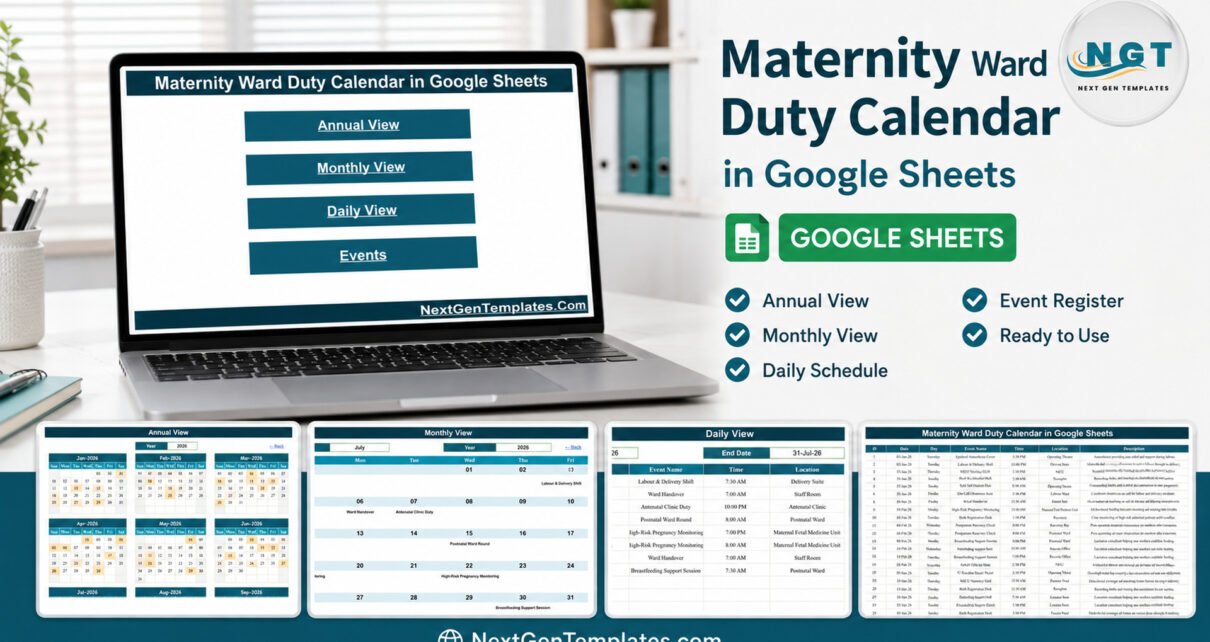
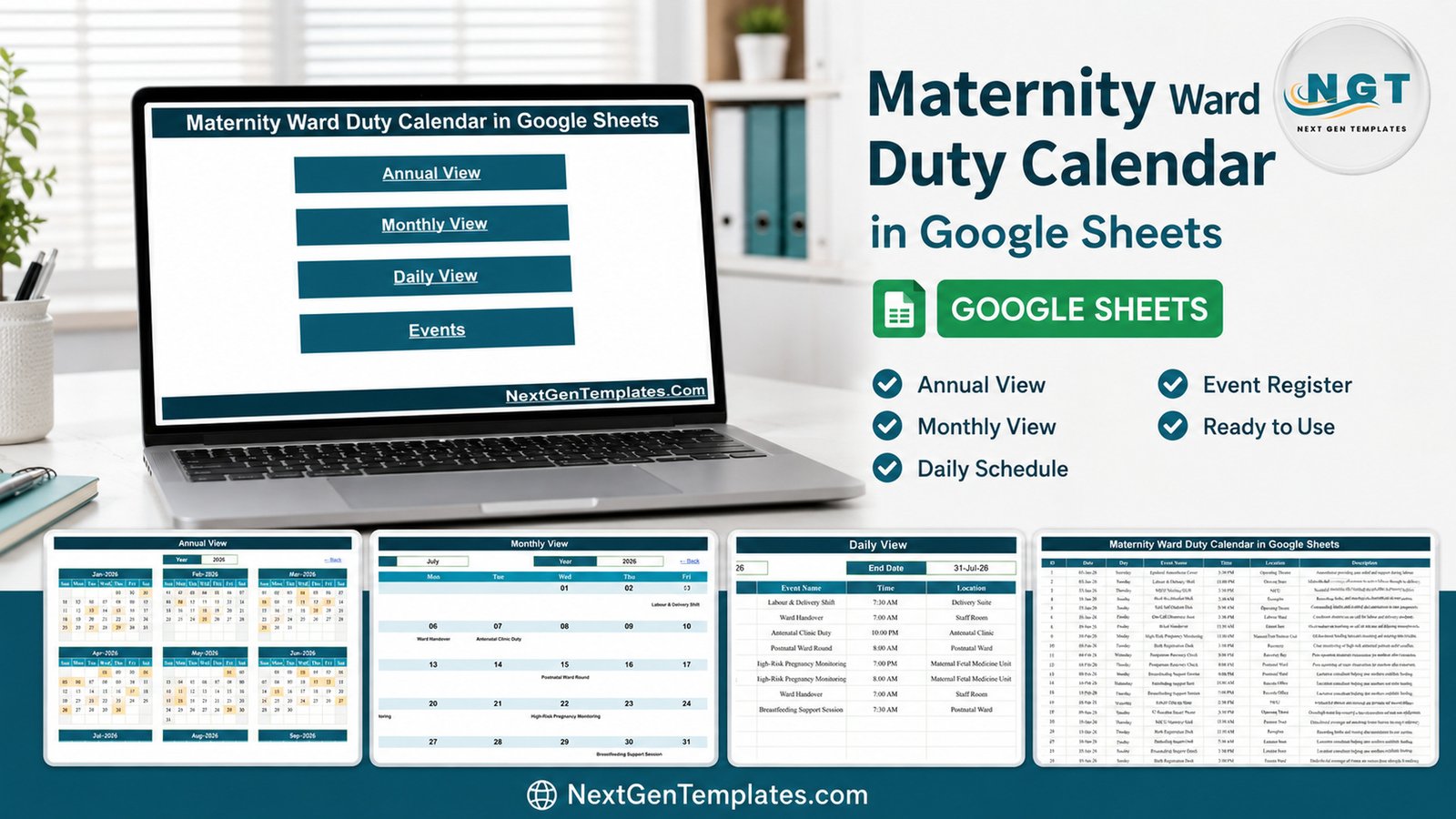
The Maternity Ward Duty Calendar in Google Sheets ships with 100 duty records covering 3 January to 27 December 2026, built from 16 maternity duty types placed across 15 named ward locations and 13 shift start times. It runs on six linked tabs, and every screen you look at is generated from a single register – you type a duty once, and the annual grid, the monthly grid and the date-range list all update.Maternity Ward Duty Calendar in Google Sheets
Most small maternity units still run their rota on a whiteboard, a printed sheet that goes out of date the moment somebody swaps, or a paid rota platform that charges per head for features a nine-person birth centre will never touch. This calendar sits between those: a shared, browser-based duty board that anyone can read from a link, costs nothing per user, and stores no personal data at all.Maternity Ward Duty Calendar in Google Sheets
Get the Maternity Ward Duty Calendar in Google Sheets
Key Features of the Maternity Ward Duty Calendar in Google Sheets
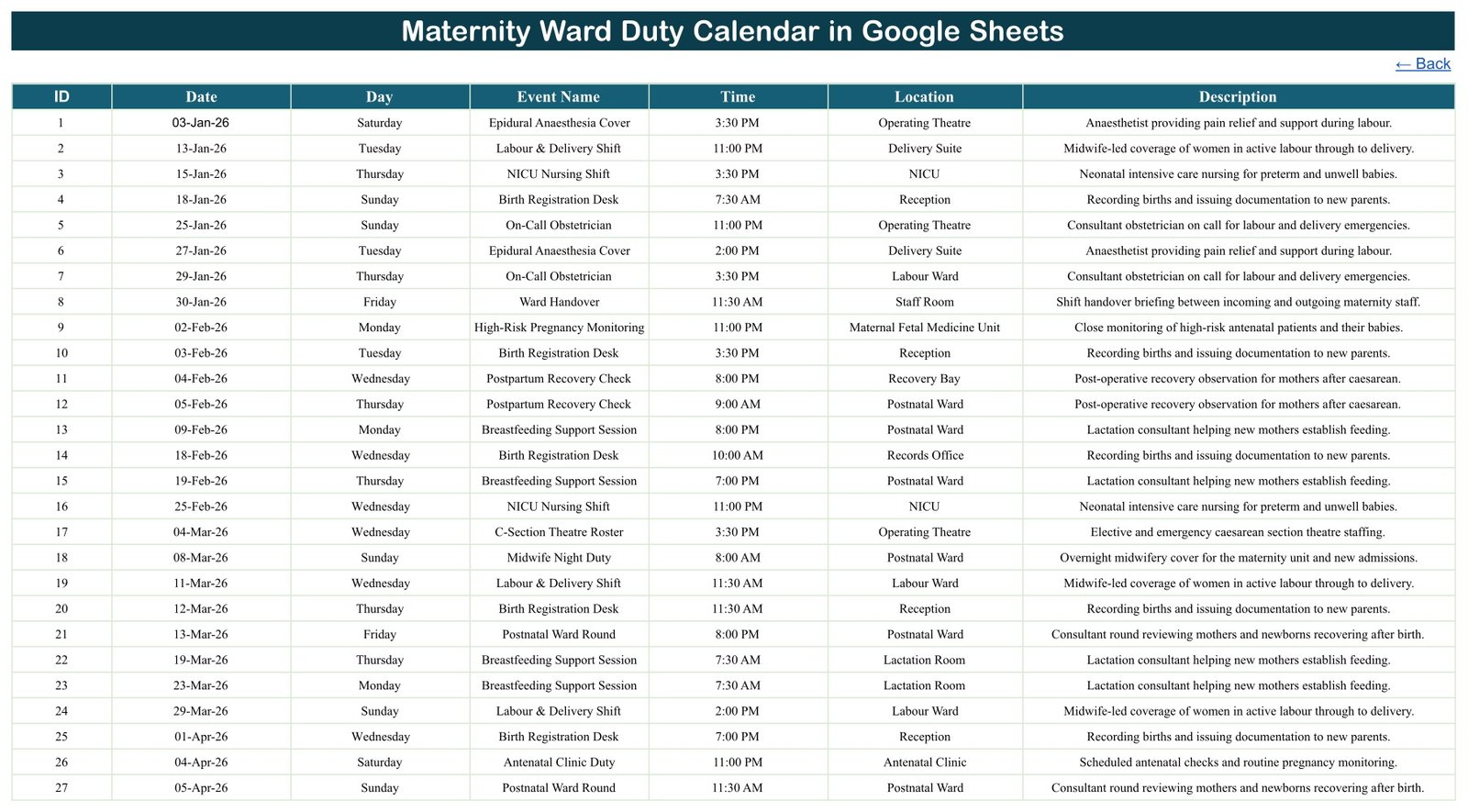
- One register, four views. The Events tab holds seven columns – ID, Date, Day, Event Name, Time, Location and Description – and is the only tab you type into. The Annual, Monthly and Daily screens all read from it.Maternity Ward Duty Calendar in Google Sheets
- A shaded twelve-month year. The Annual View prints all twelve month grids for a chosen year and highlights every date that carries a duty. The highlighting is driven by a live filter over the register, so a duty added now shows up immediately.Maternity Ward Duty Calendar in Google Sheets
- Dropdown-driven month grid. The Monthly View takes a month name and a year from two dropdowns and rebuilds the Sun-to-Sat layout itself – leading blanks, month length and all. No formula editing.Maternity Ward Duty Calendar in Google Sheets
- A printable handover list. The Daily View filters the register between a start date and an end date and returns every matching duty with its weekday, start time, ward location and description.
- 36 selectable rota years. The year list feeding both dropdowns runs 2021 to 2056, so the file does not expire at the end of the sample year.
- 16 real duty types. Labour & Delivery Shift, Midwife Night Duty, On-Call Obstetrician, C-Section Theatre Roster, Epidural Anaesthesia Cover, NICU Nursing Shift, Antenatal Clinic Duty, Postnatal Ward Round, High-Risk Pregnancy Monitoring, Fetal Monitoring (CTG) Duty, Postpartum Recovery Check, Breastfeeding Support Session, Newborn Screening Round, Birth Registration Desk, Maternity Triage Assessment and Ward Handover.
- 15 named ward locations. Labour Ward, Delivery Suite, Postnatal Ward, Antenatal Ward, Antenatal Clinic, NICU, Operating Theatre, Recovery Bay, Maternal Fetal Medicine Unit, Lactation Room, Triage Room, Maternity Triage, Staff Room, Reception and Records Office.
- No staff-name column at all. No name, employee number, phone or email field exists anywhere in the file.
Sheets Explanation – What Each Tab Does
Home
A plain landing page with four linked buttons – Annual View, Monthly View, Daily View and Events. Every other tab carries a Back link to return here, which matters when the file is being used on a ward tablet by someone who does not live in spreadsheets.
Annual View
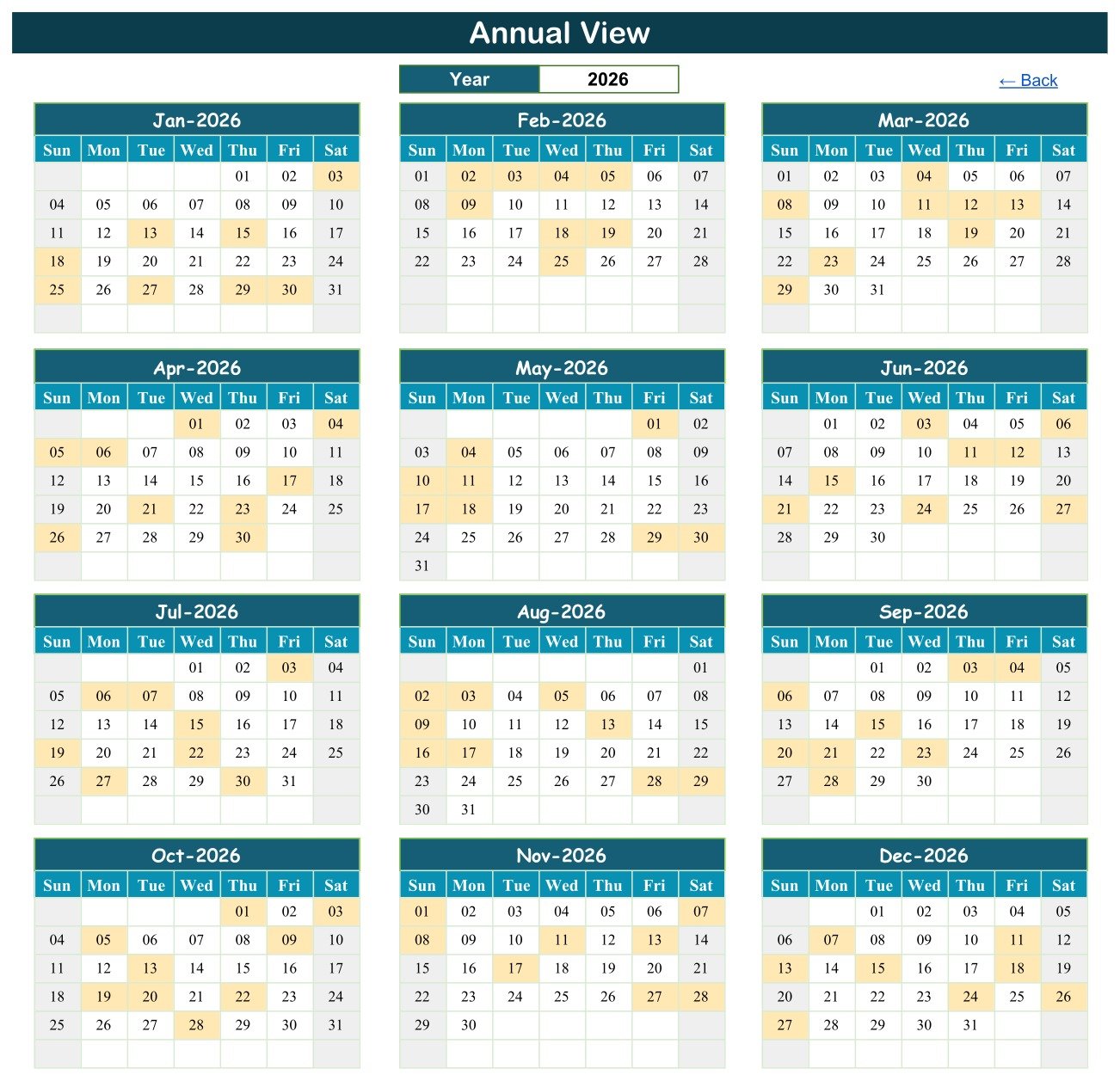
Twelve month grids for one selected year, with every duty date shaded. In the sample year the shading lands on exactly the dates in the register – 8 duties in January, 8 in February, 8 in March, 9 in April, 8 in May, 9 in June and so on, 100 duties in total across 99 distinct dates.
Monthly View
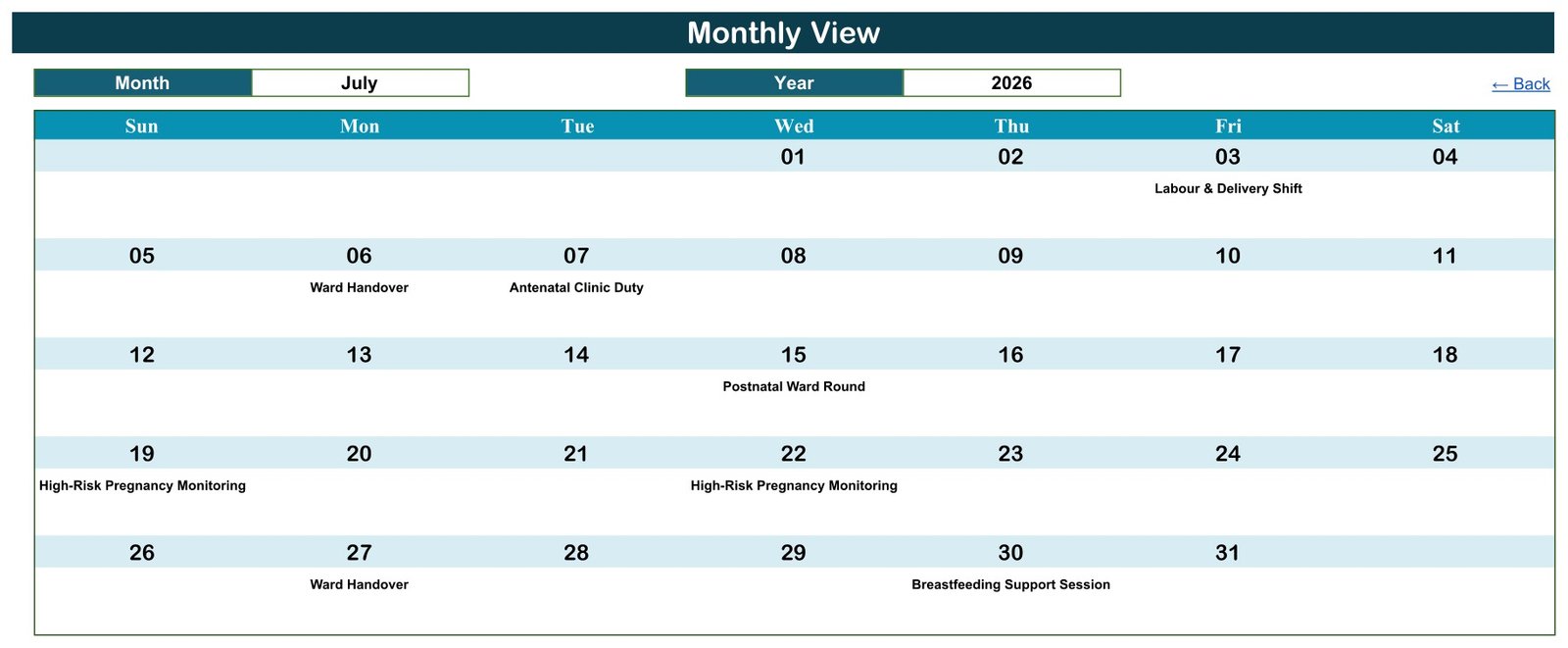
A Sun-to-Sat month grid with the duty name printed under each date. July 2026 in the sample shows Labour & Delivery Shift on the 3rd, Ward Handover on the 6th, Antenatal Clinic Duty on the 7th, Postnatal Ward Round on the 15th, High-Risk Pregnancy Monitoring on the 19th and 22nd, Ward Handover again on the 27th and Breastfeeding Support Session on the 30thMaternity Ward Duty Calendar in Google Sheets
Daily View
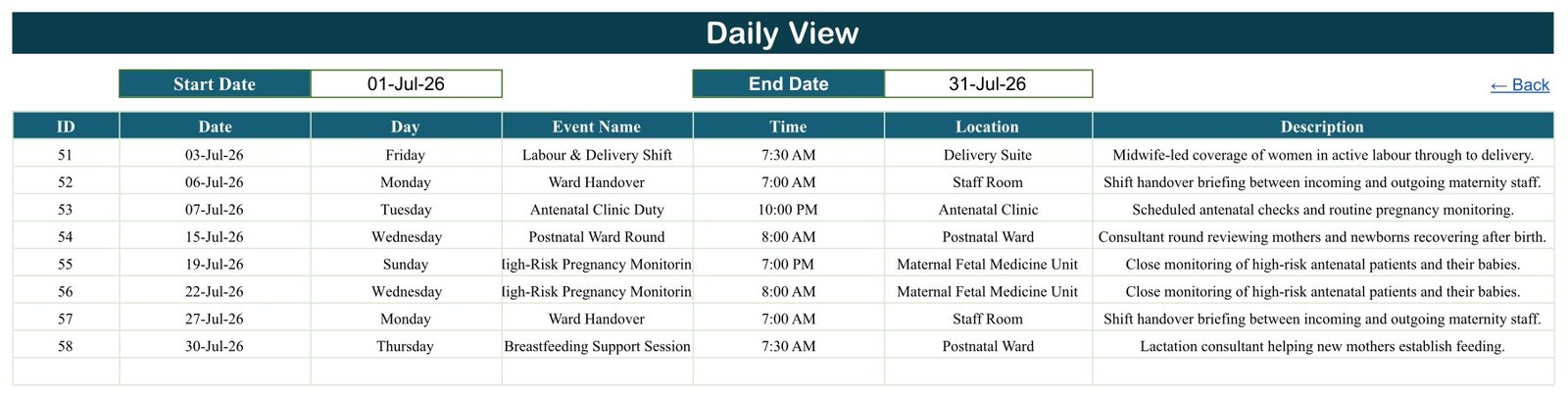
Two date cells and a filtered table. Set the range to 1-31 July 2026 and it returns those same eight duties as a seven-column list, each with weekday, start time, ward and a one-line description of the work. This is the view to print for a shift handover.
Events and List
Events is the register: 100 rows, seven columns, one row per duty. List is the small support tab holding the twelve month names and the 2021-2056 year sequence that both dropdowns read from. Leave List alone unless you want to change the year range.Maternity Ward Duty Calendar in Google Sheets
Maternity Ward Duty Calendar vs. an Excel Rota Workbook vs. Paid Rota SaaS – Feature Comparison
| Feature | Maternity Ward Duty Calendar (Google Sheets) | Excel duty roster workbook | Deputy / RotaCloud / UKG |
|---|---|---|---|
| Cost | $4.99 one-time | $0-30 one-time | $3-8 per user per month |
| Platform | Google Sheets, any browser | Desktop Excel | Web plus mobile app |
| Setup time | Under 10 minutes | Under 10 minutes | Days, plus staff onboarding |
| Real-time team collaboration | Yes, native sharing | Only via OneDrive co-authoring | Yes |
| Mobile access | Google Sheets mobile app | Limited | Yes, dedicated app |
| Customisable duty types and wards | Unlimited, just type them | Unlimited | Usually fixed by plan tier |
| Share with a link | Yes, view-only or edit | File attachment | Login required |
| Stores staff personal data | No name column at all | Usually yes | Yes, full HR profiles |
| Enforces staffing ratios and rest rules | No | No | Yes, on higher tiers |
| Year-1 cost at 5 users | $4.99 | $0-30 | $180-480 |
For a ward that wants a shared, printable duty board without a per-user subscription or a staff database, this calendar sits in the sweet spot – and if you genuinely need enforced ratios and rest-break checks, buy the rota platform instead.
Who Should Use This Template
Perfect for:
- Ward managers and midwifery coordinators running the rota for a single maternity unit
- Private maternity clinics and birth centres with 10-30 duties a month
- Practice managers replacing a whiteboard or a photographed paper rota
- Midwifery and nursing educators who need a realistic rota structure to teach from
Not a fit if:
- You need enforced nurse-to-patient or midwife-to-birth ratios, working-time limits or rest-break rules – this file checks none of them
- You need payroll, timesheets, clock-in or leave approval – it is not an HR or time-and-attendance system
- Your use touches patient records – there is no patient field and it is not an EHR or EMR
- You run a large trust with hundreds of staff and formal shift-swap workflows
Real-World Use Cases
Ayesha coordinates a 12-bed maternity unit at a private hospital. Next quarter’s Labour & Delivery Shifts, NICU Nursing Shifts and On-Call Obstetrician cover go into the Events tab once. She prints the Monthly View for the staff room wall every four weeks and shares the same view-only link with the two consultants who cover weekends, so nobody is reading a rota that is three swaps out of date.
Marcus runs a standalone birth centre with nine staff. Each Friday he sets the Daily View to the coming week, prints the short list and reads it out at handover. Because the file has no name column, he can leave it open on the shared reception screen without exposing anyone’s personal details.
Dr Rina teaches midwifery rostering to second-year students. She uses the 16 duty types and 15 locations as a worked example of how an antenatal clinic, a delivery suite and a NICU interlock across a week, then has students build a month of cover from an empty register.
Advantages of the Maternity Ward Duty Calendar in Google Sheets
It costs once. A five-person team on a $3-8 per-user rota platform spends $180-480 in the first year. This is a single $4.99 purchase with no seat count and no renewal.
It is readable by everyone. Google Sheets opens in any browser and on the mobile app, and a view-only share link means staff can check tomorrow’s cover without an account, a licence or the ability to break a formula. Google’s own guide to sharing files covers the exact permission settings to use.
It is private by omission. The decision not to include a staff-name column is the single most useful design choice in the file. A duty board with no names on it can be pinned up, screenshotted, emailed and left open on a shared screen with no data-protection conversation attached.
It prints. The Monthly View is a wall calendar and the Daily View is a handover sheet. Both are formatted to print without fighting the page setup.
Opportunities for Improvement
Three honest limitations, all verified in the shipped file:
The Monthly View shows only the first duty on a busy day. Where a date carries more than one duty, the grid names the first one and prints an “N more” note underneath rather than listing them all. In the sample data only 3 June 2026 has two duties, so you may not notice – but on a real rota with several duties a day, the month grid is a summary, not the record. Use the Daily View when you need the full picture.
Nothing prevents double-booking. There is no clash detection anywhere. You can enter two duties in the same ward at the same start time and the file will accept both without a warning. Scan the Daily View for the date before you publish a rota.
The Day column is typed text, not a formula. Each row’s weekday is stored as literal text rather than calculated from the date. Every one of the 100 sample rows is correct, but if you later change a date, the day name will not follow it – retype it, or replace the column with a formula that derives the weekday from the date. One more small thing: the shipped Annual View has its Year dropdown parked on 2035, so set it to your own rota year the first time you open it.
Best Practices
- Keep the Events tab as the only place anyone types. If a duty is wrong, fix it there and every view corrects itself.
- Share view-only with the ward and edit access with the one or two people who own the rota.
- Add your own staff column using initials or an internal code rather than full names, so the file keeps its privacy-by-omission advantage.
- Sort the register by date before you print, so the Daily View and the Monthly View read in the same order as your handover.
- Duplicate the whole file at the end of each rota year and clear the register, rather than deleting rows in the live copy.
Explore Relevant Templates
The closest relative on this blog is the Nurse Duty Roster Calendar in Google Sheets, which uses the same four-view structure for general nursing shifts and also ships without a staff-name column. For duty planning that follows a vehicle rather than a ward, see the Ambulance Duty Calendar in Google Sheets. Community midwifery teams working outside the unit usually want the Home Nursing Visit Calendar in Google Sheets, and if your bottleneck is beds rather than staff, the Hospital Bed Turnover Calendar in Google Sheets and the Dialysis Session Calendar in Google Sheets cover that ground.
On the store side, the matching products are the Doctor On-Call Calendar in Google Sheets for consultant cover and the Hospitals Dashboard in Google Sheets when you want the numbers rather than the rota. A Chemotherapy Cycle Calendar in the same family is in preparation.
Interested in the spreadsheet skills behind calendars like this? The NextGenTemplates Academy learning paths walk you through them with practice files.
Get the Maternity Ward Duty Calendar in Google Sheets
Frequently Asked Questions
Is the Maternity Ward Duty Calendar in Google Sheets an HR, payroll or time-and-attendance system?
No. It is a duty calendar. It records what duty happens on what date, at what time and in which ward location. It does not calculate hours, pay, overtime or leave balances, has no clock-in and clock-out, and is not a replacement for an HR system.
Is it a patient record system or an EHR?
No. There is no patient name, patient ID, diagnosis or clinical note anywhere in the file. The Maternity Ward Duty Calendar rosters staff duties only. Do not enter patient-identifiable information into it – your hospital’s own EHR or EMR is the place for that.
Is it HIPAA or GDPR certified?
No. It is a spreadsheet template and carries no healthcare compliance certification of any kind. Where you store your copy and who you share it with are governed by your organisation’s policies and your Google Workspace settings, not by this file.
Does it check safe-staffing ratios or working-time rules?
No. The calendar checks and enforces no staffing ratio, working-time regulation, rest-break rule, union agreement or safe-staffing standard. It will accept a rota that breaks every one of them. All clinical and legal staffing judgement stays with the person building the rota.
Will it warn me if I double-book a ward?
No. There is no clash detection. Two duties can sit in the same ward at the same start time with no warning, and the Monthly View will show only the first of them. Check the Daily View for that date before you commit the rota.
How does it compare to a paid rota platform like Deputy or RotaCloud?
A paid rota platform costs $3-8 per user per month and gives you shift swaps, mobile push notifications and rule enforcement. This calendar costs $4.99 once, gives you a shared duty board and printable views, and enforces nothing. For a unit under about 15 staff, the spreadsheet usually wins on cost and simplicity.
How long does setup take?
Under 10 minutes. Open the PDF in your download, click the Google Sheets copy link, clear the 100 sample rows from the Events tab and type your own duties. Every view is formula-driven, so the Annual, Monthly and Daily screens fill themselves as soon as the register has data.
About the Author
Built by PK – Microsoft Certified Professional with 15+ years of Excel, Google Sheets and Power BI experience. Founder of NextGenTemplates, reaching 300K+ subscribers across YouTube channels. Every template is hand-built and tested before release.
Conclusion
If your maternity unit’s rota currently lives on a whiteboard, this is a straight upgrade: one register, four views, a link anyone can read, and no personal data in the file. If it lives in a paid rota platform that you use for 10% of what it does, this is a cheaper answer that does that 10% well. It will not enforce a single staffing rule for you – that judgement is, and should be, yours.
Instant download · One-time payment · No subscription
Last updated: September 2026