Customer service directly shapes customer satisfaction, loyalty, and brand reputation. However, many organizations still track customer service performance using disconnected spreadsheets or static reports. As a result, managers struggle to see trends, identify issues early, and measure improvements accurately.
That is why a Customer Service KPI Scorecard in Google Sheets becomes a powerful and practical solution. It provides a structured, visual, and interactive way to monitor service performance using clearly defined KPIs.
In this detailed guide, you will learn what a Customer Service KPI Scorecard in Google Sheets is, why it matters, how it works, its structure, key features, advantages, best practices, and frequently asked questions. This article also explains how a ready-to-use scorecard helps customer service teams track performance with confidence.
What Is a Customer Service KPI Scorecard in Google Sheets?
Click to Buy Customer Service KPI Scorecard In Google Sheets
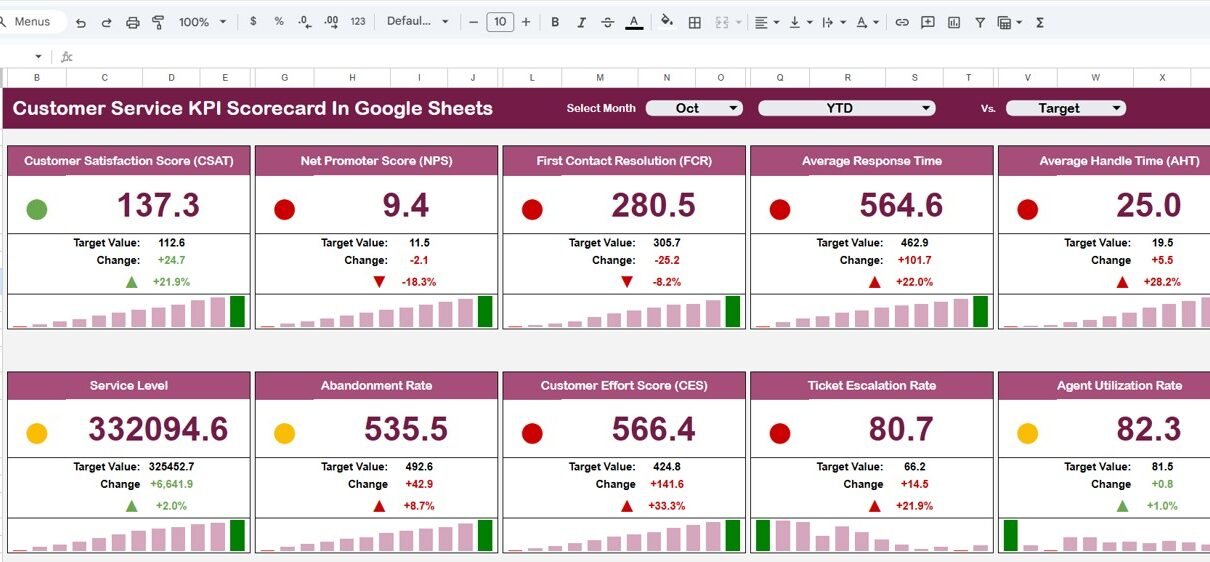
A Customer Service KPI Scorecard in Google Sheets is a performance tracking template designed to measure and evaluate customer service effectiveness using key metrics. Instead of reviewing raw data, managers view performance through KPIs, trend analysis, traffic lights, and percentage change indicators.
Moreover, this scorecard focuses on 10 essential customer service KPIs, displayed in a clean and easy-to-read format. Users can switch between MTD (Month-to-Date) and YTD (Year-to-Date) views, allowing both short-term monitoring and long-term evaluation.
Because it is built in Google Sheets, the scorecard remains collaborative, cloud-based, and easy to customize.
Why Do Customer Service Teams Need a KPI Scorecard?
Customer service operations generate large volumes of data every day. Without a structured KPI framework, teams face several challenges.
Here is why a KPI scorecard is essential:
- Performance data remains scattered across multiple sheets
- Managers cannot quickly identify service gaps
- Monthly and yearly comparisons become time-consuming
- Teams lack clarity on which KPIs need improvement
- Leadership does not get a clear performance summary
Therefore, a centralized KPI scorecard ensures visibility, accountability, and consistent performance tracking.
How the Customer Service KPI Scorecard in Google Sheets Works
This ready-to-use scorecard follows a simple and intuitive workflow.
- Enter actual customer service data in the data input sheet
- Define KPI targets and previous year values
- Select the month using the dropdown at the top
- Automatically view KPI performance for MTD or YTD
- Monitor traffic lights and percentage change arrows
As a result, managers can instantly understand performance without manual calculations.
Structure of the Customer Service KPI Scorecard in Google Sheets
Click to Buy Customer Service KPI Scorecard In Google Sheets
The scorecard is organized into multiple well-defined worksheet tabs for clarity and ease of use.
Main Scorecard (Dashboard View)
This is the primary performance view of the scorecard.
Key Features of the Scorecard:
-
Month dropdown to select any reporting period
-
Toggle between MTD and YTD performance
-
10 customer service KPIs displayed in a single view
-
Traffic light indicators (Green, Amber, Red)
-
Up and down arrows showing percentage change
Because of this structure, managers can quickly assess whether KPIs are improving or declining.

Click to Buy Customer Service KPI Scorecard In Google Sheets
Trend Sheet Tab
The Trend Sheet provides deeper KPI-level analysis.
What You See in the Trend Sheet:
-
KPI selection dropdown (Range C3)
-
KPI Group
-
Unit of measurement
-
KPI Type:
-
UTB (Upper the Better)
-
LTB (Lower the Better)
-
-
KPI formula
-
KPI definition
-
Performance trend over time
This sheet helps managers understand why a KPI is performing the way it is.

Click to Buy Customer Service KPI Scorecard In Google Sheets
KPI Definition Sheet Tab
The KPI Definition sheet acts as the control center of the scorecard.
Key Details Maintained Here:
-
KPI Name
-
KPI Group
-
Unit
-
Formula
-
KPI Definition
Because definitions are centralized, KPI interpretation remains consistent across teams and reporting periods.

Data Input Sheet Tab
This is where users enter actual performance numbers.
Data Entry Includes:
-
Monthly actual values
-
Targets
-
Previous year values
Once data is entered, the entire scorecard updates automatically. Therefore, no manual recalculation is required.

Click to Buy Customer Service KPI Scorecard In Google Sheets
Colour Settings Sheet
The Colour Settings tab controls the visual logic of the scorecard.
What It Controls:
-
Traffic light thresholds
-
Arrow direction logic
-
KPI status colors
This ensures consistent visual interpretation across all KPIs.

Key Advantages of a Customer Service KPI Scorecard in Google Sheets
Click to Buy Customer Service KPI Scorecard In Google Sheets
Using this scorecard delivers significant benefits to customer service teams.
1. Clear Performance Visibility
All KPIs appear in one structured view, making performance instantly understandable.
2. Faster Decision-Making
Traffic lights and arrows help managers act quickly on problem areas.
3. Consistent KPI Measurement
Defined formulas and KPI definitions eliminate confusion and inconsistency.
4. Flexible MTD and YTD Analysis
Teams can track short-term execution and long-term progress at the same time.
5. Easy Customization
Because it is built in Google Sheets, the scorecard is easy to modify and scale.
Who Should Use This Customer Service KPI Scorecard?
This scorecard is ideal for:
-
Customer Service Managers
-
Call Center Teams
-
Helpdesk Operations
-
Support Team Leads
-
Quality Assurance Teams
-
Service Excellence Teams
It works equally well for small teams and enterprise-level customer service operations.
Best Practices for Using a Customer Service KPI Scorecard
Click to Buy Customer Service KPI Scorecard In Google Sheets
To maximize the value of this scorecard, follow these best practices:
-
Define KPI targets clearly before tracking
-
Update data on a fixed schedule (weekly or monthly)
-
Review trend analysis regularly
-
Align KPIs with business and customer experience goals
-
Keep KPI definitions updated and standardized
By following these practices, the scorecard remains accurate and actionable.
Why Use Google Sheets for a Customer Service KPI Scorecard?
Google Sheets offers several advantages over traditional tools:
-
Cloud-based access from anywhere
-
Real-time collaboration
-
No additional software cost
-
Easy sharing with stakeholders
-
Quick customization without coding
As a result, teams can deploy this scorecard quickly and scale it easily.
Conclusion
Click to Buy Customer Service KPI Scorecard In Google Sheets
A Customer Service KPI Scorecard in Google Sheets is an essential performance management tool for modern support teams. It transforms raw service data into clear insights using KPIs, trends, traffic lights, and visual indicators.
With built-in MTD and YTD views, defined KPI logic, and automated calculations, this ready-to-use scorecard helps teams improve service quality, monitor progress, and make data-driven decisions.
If your organization wants better visibility and control over customer service performance, this scorecard is the right solution.
Frequently Asked Questions (FAQs)
Click to Buy Customer Service KPI Scorecard In Google Sheets
1. Can I add more KPIs to this scorecard?
Yes. You can easily add or modify KPIs in the KPI Definition and Data Input sheets.
2. Does the scorecard update automatically?
Yes. All KPIs, trends, traffic lights, and arrows update automatically when data changes.
3. Can I use this scorecard for multiple teams?
Yes. You can duplicate the file or add team-specific filters if required.
4. Is this suitable for call centers?
Absolutely. It works very well for call centers and customer support teams.
5. Do I need advanced Google Sheets skills?
No. The scorecard is user-friendly and designed for non-technical users.
Visit our YouTube channel to learn step-by-step video tutorials
Youtube.com/@NeotechNavigators
Watch the step-by-step video tutorial:
Click to Buy Customer Service KPI Scorecard In Google Sheets