Organizations today face a wide range of emergencies, including fire incidents, medical situations, cyber incidents, power outages, earthquakes, and severe weather events. Managing these situations requires accurate data, quick decisions, and clear visibility. However, when emergency data stays scattered across emails, registers, or disconnected spreadsheets, response quality drops.
That is exactly where an Enterprise Emergency Management Dashboard in Google Sheets becomes critical.
An Enterprise Emergency Management Dashboard in Google Sheets is a ready-to-use, interactive dashboard that helps organizations monitor emergency events, preparedness levels, budget utilization, risks, and outcomes in one centralized system. Moreover, it transforms raw emergency data into meaningful insights that support faster and smarter decision-making.
In this detailed article, you will learn what an Enterprise Emergency Management Dashboard in Google Sheets is, how it works, its key features, advantages, best practices, and how enterprises can use it effectively to strengthen emergency preparedness and response.
What Is an Enterprise Emergency Management Dashboard in Google Sheets?
Click to Buy Enterprise Emergency Management Dashboard in Google Sheets
An Enterprise Emergency Management Dashboard in Google Sheets is a structured and visual reporting solution designed to track emergency-related data across buildings, departments, vendors, and emergency types.
Instead of relying on manual reports, this dashboard consolidates all emergency information into interactive charts, KPI cards, and searchable tables. Because it is built in Google Sheets, teams can collaborate in real time, access data remotely, and update records easily.
Most importantly, this dashboard helps organizations move from reactive emergency handling to proactive emergency planning.
Why Do Enterprises Need an Emergency Management Dashboard?
Enterprises operate across multiple locations, departments, and workspaces. Therefore, emergency incidents often involve complex coordination and high risk.
Without a centralized dashboard:
- Emergency trends remain hidden
- Budget overruns go unnoticed
- High-risk areas stay unidentified
- Reporting takes too much time
However, with an Enterprise Emergency Management Dashboard in Google Sheets:
- Emergency performance becomes visible
- Risks get identified early
- Budgets stay under control
- Leadership gains real-time insights
As a result, organizations improve preparedness and reduce potential damage.
How Does the Enterprise Emergency Management Dashboard in Google Sheets Work?
Click to Buy Enterprise Emergency Management Dashboard in Google Sheets
The dashboard works by combining structured data tables with dynamic filters and automated calculations.
Here is how it works step by step:
- Emergency data gets entered in a structured data sheet
- Filters allow slicing data by building, department, city, or emergency type
- KPI cards calculate totals and financial metrics
- Charts update automatically based on selections
- Users analyze trends, risks, and outcomes visually
Because everything updates dynamically, users do not need to refresh or rebuild reports.
What Are the Key KPIs Tracked in This Dashboard?
This Enterprise Emergency Management Dashboard in Google Sheets tracks several critical KPIs, such as:
- Total emergency records
- Budget allocated vs budget spent
- Budget variance
- Damage cost
- Participants planned and attended
- Injury count
- Response and evacuation time
- Risk level and severity
- Training score and preparedness status
These KPIs help organizations evaluate both preparedness and response effectiveness.
What Are the Main Pages of the Enterprise Emergency Management Dashboard in Google Sheets?
Click to Buy Enterprise Emergency Management Dashboard in Google Sheets
This dashboard includes multiple analysis pages, each designed to answer specific emergency management questions.
Let’s explore them in detail.
How Does the Overview Page Support Executive Decision-Making?
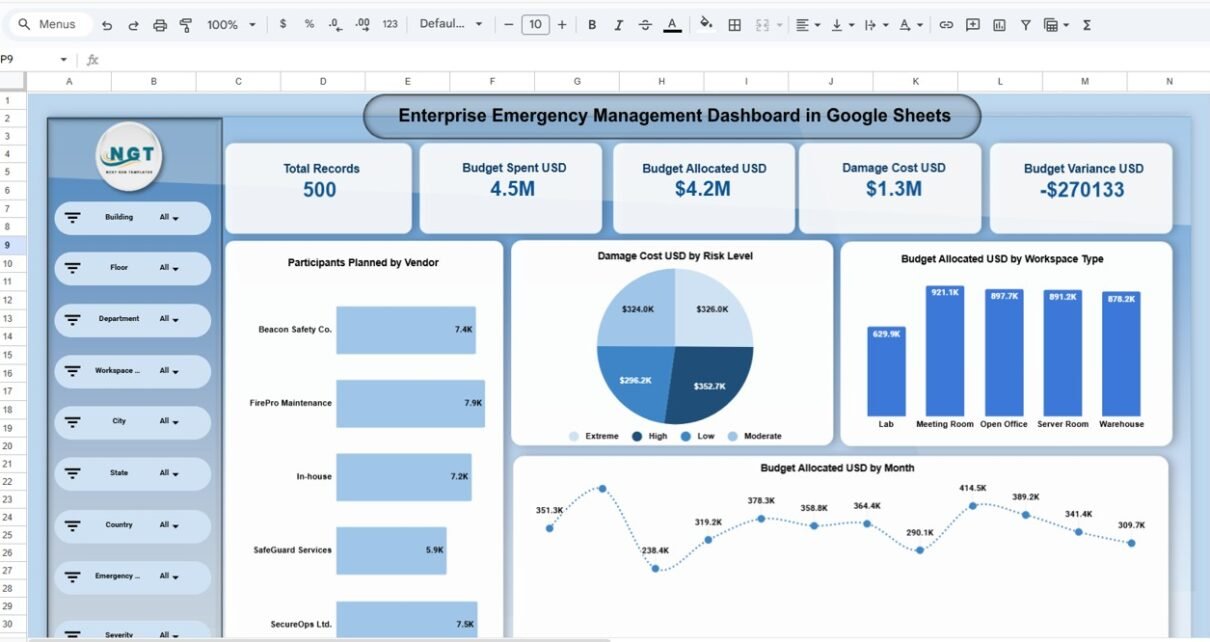
The Overview Page provides a high-level summary of emergency performance across the enterprise.
Key Insights Shown on the Overview Page:
- Total number of emergency records
- Budget spent and budget allocated
- Damage cost across incidents
- Budget variance at a glance
In addition, the page includes slicers for:
- Building
- Floor
- Department
- Workspace type
- City, state, and country
- Emergency type and severity
Because of these slicers, leadership can instantly focus on specific locations or risk categories.

Click to Buy Enterprise Emergency Management Dashboard in Google Sheets
Vendor Analysis
The Vendor Analysis page evaluates how internal and external vendors perform during emergency training and incidents.
Key Metrics in Vendor Analysis:
- Participants planned by vendor
- Participants attended by vendor
- Average training score by vendor
- Budget variance by vendor
This analysis helps organizations:
-
Identify high-performing vendors
-
Control vendor-related costs
-
Improve vendor accountability
As a result, emergency preparedness improves across partners.

Click to Buy Enterprise Emergency Management Dashboard in Google Sheets
Emergency Type
The Emergency Type Analysis page breaks down performance by emergency category.
Emergency Types Covered:
- Cyber Incident
- Earthquake
- Fire
- Medical
- Power Outage
- Severe Weather
Key Visuals on This Page:
- Participants planned by emergency type
- Budget allocated by emergency type
- Budget variance by emergency type
- Damage cost by emergency type
This view helps organizations understand which emergencies cause the highest financial and operational impact.

Click to Buy Enterprise Emergency Management Dashboard in Google Sheets
Department Analysis
The Department Analysis page highlights how different departments perform during emergencies.
Key Department-Level Insights:
- Participants planned by department
- Budget allocated by department
- Damage cost by department
- Budget variance by department
With this information, organizations can:
- Identify departments with higher risk exposure
- Improve department-specific preparedness
- Allocate budgets more effectively
Therefore, risk management becomes targeted and data-driven.

Click to Buy Enterprise Emergency Management Dashboard in Google Sheets
Monthly Analysis Reveal Emergency Trends?
The Monthly Analysis page focuses on time-based trends.
Key Monthly Metrics:
- Injury count by month
- Damage cost by month
- Budget variance by month
- Average impact by month
This analysis helps organizations:
- Identify seasonal risk patterns
- Detect recurring issues
- Plan preventive actions in advance
Because trends appear visually, teams act faster and smarter.

Click to Buy Enterprise Emergency Management Dashboard in Google Sheets
Search and Data Table Section?
The dashboard includes a search-enabled data table, which allows users to find specific records quickly.
Key Features of the Search Section:
- Search by column name
- Search by keyword
- Instant filtering of records
- Real-time record count
This feature becomes extremely useful during audits, reviews, and investigations.

Click to Buy Enterprise Emergency Management Dashboard in Google Sheets
Advantages of Enterprise Emergency Management Dashboard in Google Sheets
Using an Enterprise Emergency Management Dashboard in Google Sheets offers several strong advantages.
Key Advantages:
- Centralized emergency data
- Real-time analytics and visuals
- Better budget control
- Clear risk visibility
- Easy collaboration across teams
- Cloud-based access anywhere
- Fully customizable structure
Most importantly, it improves organizational readiness and resilience.
How Does This Dashboard Improve Emergency Preparedness?
Click to Buy Enterprise Emergency Management Dashboard in Google Sheets
Preparedness depends on planning, training, and monitoring.
This dashboard improves preparedness by:
- Tracking training participation
- Measuring training effectiveness
- Monitoring preparedness status
- Highlighting gaps early
As a result, organizations stay ready before emergencies occur.
How Does the Dashboard Support Financial Control?
Emergency response often involves significant costs.
The dashboard helps by:
- Tracking allocated vs spent budgets
- Highlighting budget variance instantly
- Linking costs to emergency types and departments
Therefore, finance teams maintain tighter control over emergency spending.
Who Should Use an Enterprise Emergency Management Dashboard in Google Sheets?
Click to Buy Enterprise Emergency Management Dashboard in Google Sheets
This dashboard suits a wide range of users, including:
- Emergency management teams
- Safety and compliance officers
- Facility managers
- Risk management teams
- Finance and leadership teams
Because it runs on Google Sheets, both technical and non-technical users can use it comfortably.
Best Practices for the Enterprise Emergency Management Dashboard in Google Sheets
To get maximum value, organizations should follow proven best practices.
Recommended Best Practices:
- Define emergency KPIs clearly
- Update data regularly and consistently
- Review trends monthly, not yearly
- Use department and vendor analysis together
- Align budget thresholds with policies
- Train users on data entry standards
- Maintain accurate historical records
Following these practices ensures long-term reliability and insight quality.
Conclusion: Why Choose an Enterprise Emergency Management Dashboard in Google Sheets?
Click to Buy Enterprise Emergency Management Dashboard in Google Sheets
An Enterprise Emergency Management Dashboard in Google Sheets provides a powerful yet simple solution for managing emergency data across large organizations. It brings clarity, control, and visibility to emergency preparedness, response, and financial impact.
Instead of relying on disconnected reports, organizations gain a centralized, interactive, and cloud-based system that supports smarter decisions and safer operations.
In short, this dashboard turns emergency management into a proactive and data-driven process.
Frequently Asked Questions (FAQs)
What is an Enterprise Emergency Management Dashboard in Google Sheets?
It is a Google Sheets-based dashboard used to track emergency incidents, preparedness, budgets, risks, and outcomes.
Can multiple users collaborate on this dashboard?
Yes, Google Sheets allows real-time collaboration and shared access.
Does the dashboard support different emergency types?
Yes, it supports multiple emergency types such as fire, medical, cyber incidents, and severe weather.
Can this dashboard track budget variance?
Yes, it tracks allocated budget, spent budget, and variance across multiple dimensions.
Is this dashboard suitable for large enterprises?
Yes, it is designed specifically for enterprise-level emergency management.
Visit our YouTube channel to learn step-by-step video tutorials
Youtube.com/@NeotechNavigators
Click to Buy Enterprise Emergency Management Dashboard in Google Sheets