Facilities Management Analysis Dashboard in Google Sheets is a comprehensive ready-to-use analytics template designed to help organizations monitor building operations, track work orders, analyze maintenance costs, and evaluate technician performance across multiple facilities. Built entirely in Google Sheets, this dashboard provides facilities managers with a centralized platform to visualize critical performance data through interactive charts, KPI cards, and advanced filtering capabilities.Facilities Management Analysis Dashboard in Google Sheets
Managing facilities operations effectively requires continuous monitoring of work orders, response times, maintenance costs, technician workloads, and budget compliance. Many organizations still rely on scattered spreadsheets and disconnected manual reports to track these metrics, which makes it extremely difficult to gain actionable insights. The Facilities Management Analysis Dashboard in Google Sheets solves this problem by consolidating all key facilities data into a single, visually interactive dashboard.
Because the template runs on Google Sheets, teams can collaborate in real time, access the dashboard from any device, and update operational data instantly. This makes it an ideal solution for facilities teams managing multiple buildings, campuses, or commercial properties.Facilities Management Analysis Dashboard in Google Sheets
Key Features of Facilities Management Analysis Dashboard in Google Sheets
The Facilities Management Analysis Dashboard in Google Sheets comes packed with powerful features that streamline facilities performance monitoring and decision-making.Facilities Management Analysis Dashboard in Google Sheets
- Interactive Analytics Dashboard – The template provides a centralized overview of all facilities KPIs through dynamic charts and indicator cards that update automatically when new data is entered.Facilities Management Analysis Dashboard in Google Sheets
- Advanced Multi-Level Filtering – Users can filter data by facility location, building, floor, category, sub-category, priority, and status to analyze specific operational areas.
- Comprehensive KPI Monitoring – The dashboard tracks critical metrics such as Total Work Orders, Open Orders, Avg Response Time, Total Maintenance Cost, Completion Rate, Critical Orders, Budget Variance, On-Time Completion %, and First-Time Fix Rate.
- Cost Analysis with Budget Tracking – Compare estimated vs actual costs by category and facility, monitor quarterly budget vs actual spending, and track cost efficiency to optimize budget allocation.Facilities Management Analysis Dashboard in Google Sheets
- Technician Performance Evaluation – Analyze technician workloads, completed orders, response times by category, and resolution times by priority to optimize workforce allocation.
- Cloud-Based Collaboration – Because the dashboard operates in Google Sheets, multiple users can access and update data simultaneously from any location.
- Automated Visual Updates – All charts, KPI cards, and analytical pages refresh automatically whenever new data is entered in the data sheet.
- Work Order Search and Lookup – A dedicated search page allows users to quickly find specific work orders by selecting the Work Order ID from a dropdown and viewing all related details instantly.
Dashboard Pages Explanation
Click to Buy Facilities Management Analysis Dashboard in Google Sheets
1 – Overview Page
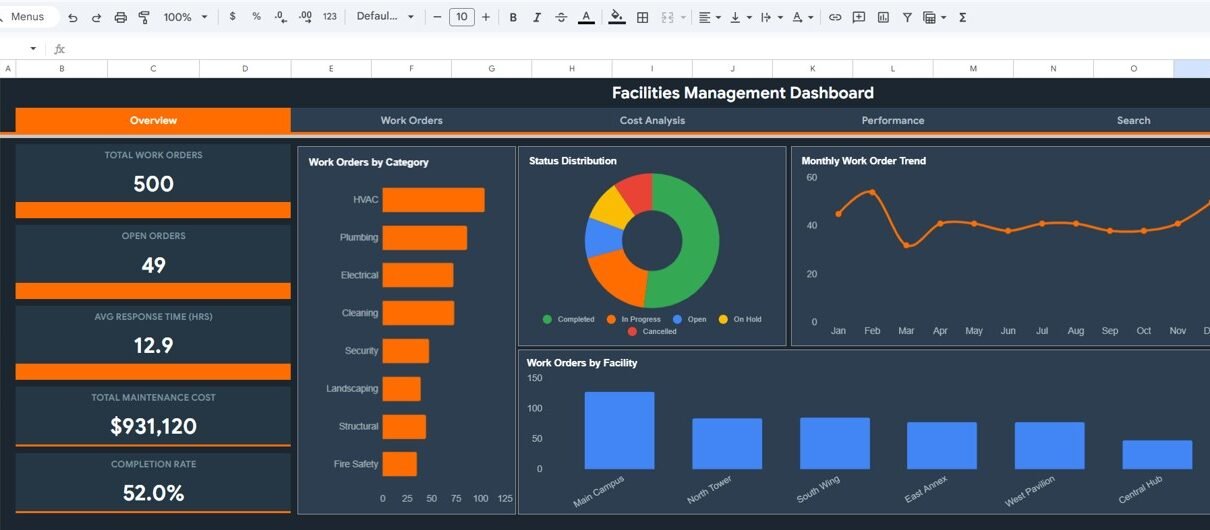
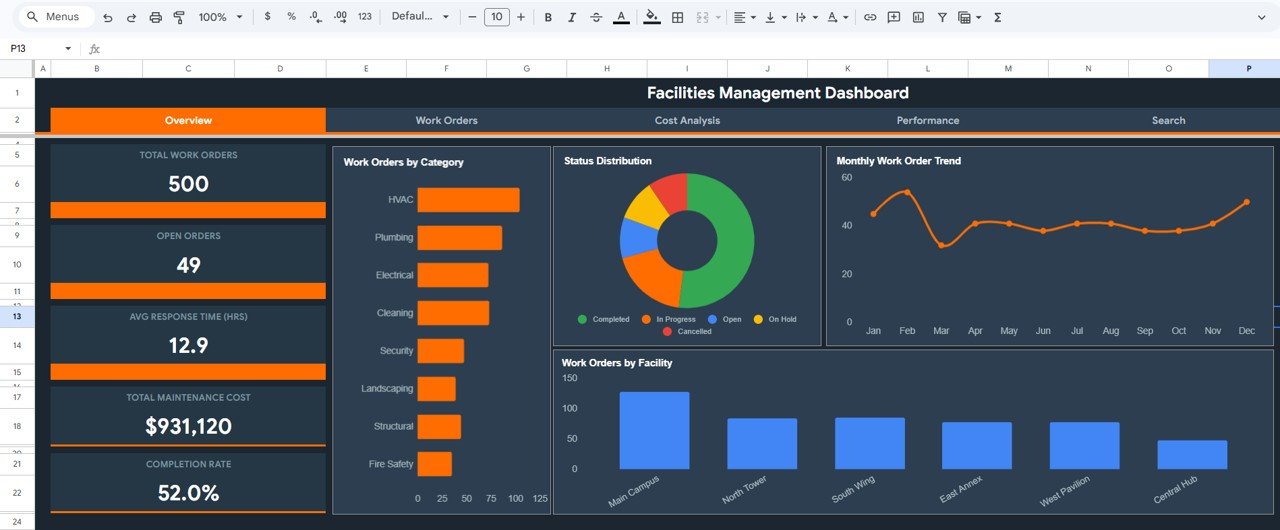
The Overview Page serves as the main dashboard interface, providing a high-level summary of all critical facilities management metrics. At the top, KPI indicator cards display key metrics including Total Work Orders, Open Orders, Avg Response Time (HRS), Total Maintenance Cost, and Completion Rate. These cards give managers an instant snapshot of overall facilities performance.
Below the KPI cards, interactive charts provide detailed visual analysis. The Work Orders by Category chart breaks down the distribution of work orders across different maintenance categories, helping managers understand which areas generate the most requests. The Status Distribution chart shows how work orders are split between open, in-progress, completed, and cancelled statuses. The Monthly Work Order Trend chart tracks how the volume of work orders changes over time, revealing seasonal patterns or emerging issues. The Work Orders by Facility chart compares workload across different facility locations. Multiple slicers are available to quickly filter and analyze the entire dashboard.
Facilities Management Analysis Dashboard in Google Sheets2 – Work Orders
The Work Orders page provides an in-depth analysis of work order operations across all managed facilities. At the top, KPI cards display Critical Orders count, High Priority count, Avg Resolution Time (HRS), and Cost Variance. These indicators help managers quickly identify urgent items that need immediate attention.
The analytical charts on this page include Priority Distribution, which shows how work orders are distributed across critical, high, medium, and low priorities. The Category by Priority Breakdown chart reveals which maintenance categories have the most high-priority or critical issues. The Technician Workload chart displays the distribution of work orders assigned to each technician, helping managers balance assignments and identify capacity constraints.
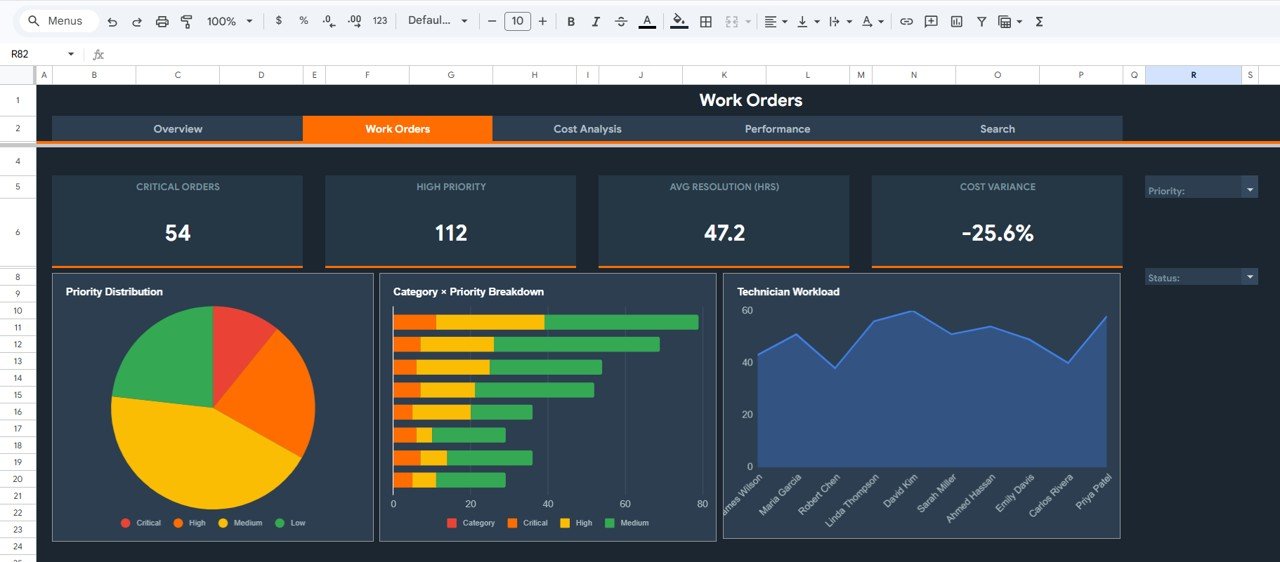 Work Orders Analysis Page
3 – Cost Analysis
The Cost Analysis page focuses on tracking and analyzing facilities operating costs with detailed budget comparisons. KPI cards at the top display Total Estimated Cost, Total Actual Cost, Budget Variance, Avg Cost Per Order, and Cost Efficiency percentage. These metrics provide an immediate understanding of financial performance.
The Estimated vs Actual Cost by Category chart compares planned versus actual spending across different maintenance categories, helping managers identify areas of cost overrun. The Cost by Facility (Est. vs Actual) chart provides the same comparison across different facility locations. The Quarterly Budget vs Actual chart tracks spending compliance over quarterly periods, enabling finance teams to identify trends and adjust budgets proactively.
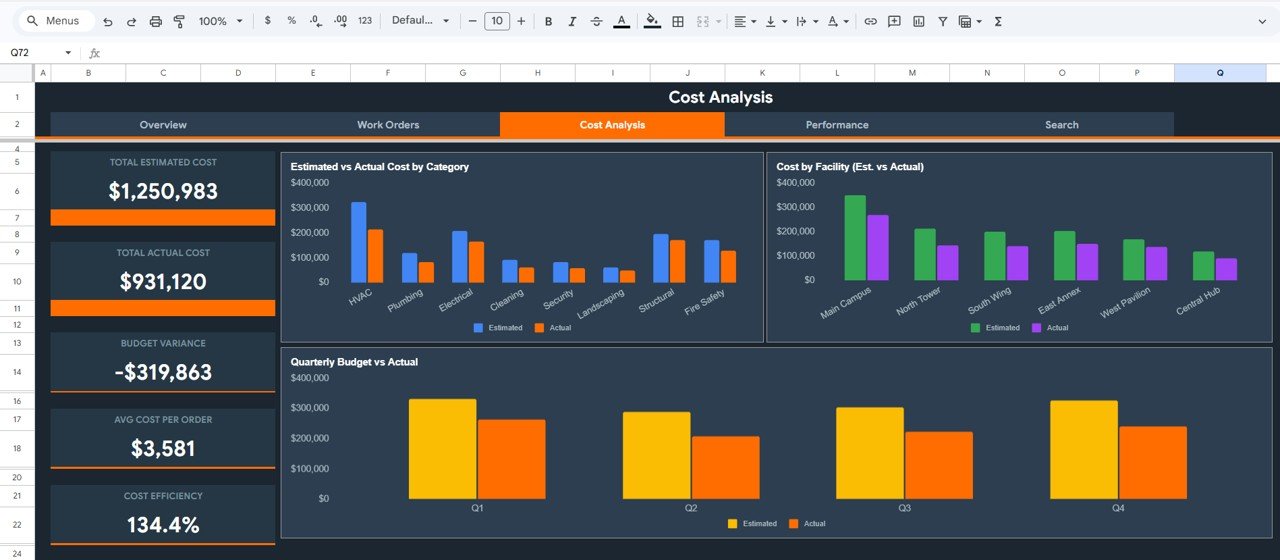 Cost Analysis Page
4 – Performance
The Performance page monitors workforce efficiency and service quality across all facilities. KPI cards display Avg Response Time (HRS), Avg Resolution Time (HRS), On-Time Completion %, First-Time Fix Rate, and Cancellation Rate. These indicators provide a comprehensive view of how effectively the maintenance team handles work orders.Facilities Management Analysis Dashboard in Google Sheets
Charts on this page include Avg Response Time by Category, which reveals which maintenance categories take longer to respond to. The Avg Resolution Time by Priority chart shows how quickly issues at different priority levels are resolved. The Monthly Avg Response Time Trend chart tracks whether response performance is improving or declining over time. The Technician Completed Orders chart evaluates individual technician productivity and helps managers recognize top performers.Facilities Management Analysis Dashboard in Google Sheets
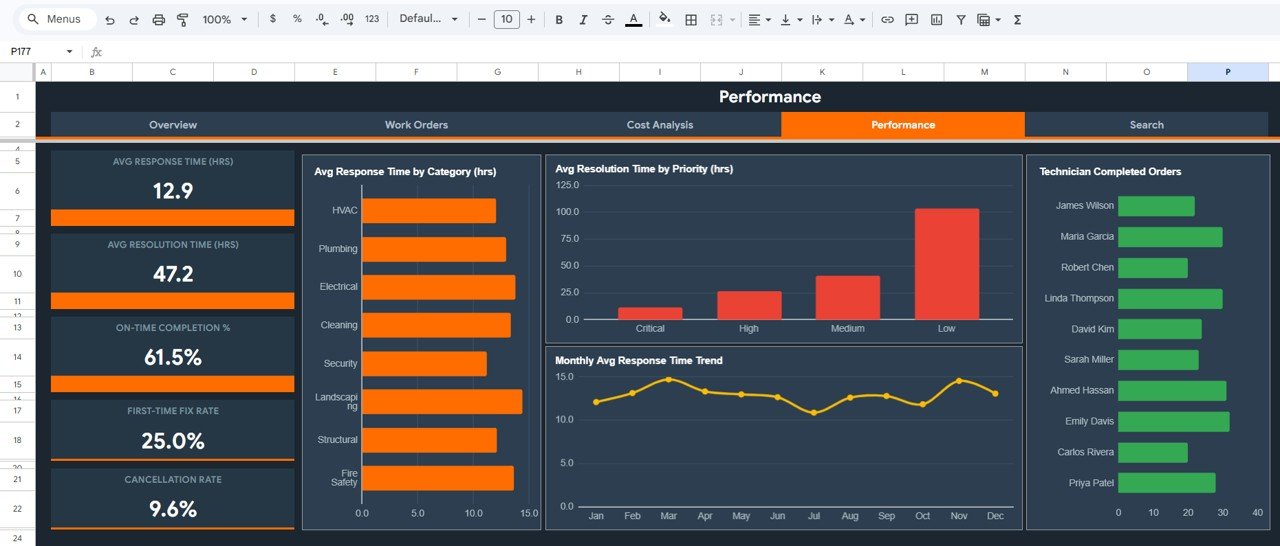 Performance Page
5 – Search
The Search page provides a dedicated lookup system where users can search for any specific work order by selecting the Work Order ID from a dropdown menu. Once a Work Order ID is selected, all the details related to that work order are displayed instantly, including Facility, Building, Floor, Category, Sub-Category, Priority, Status, Assigned Technician, Estimated Cost, Actual Cost, Response Time, Resolution Time, and Requestor Department. This feature is particularly useful during stakeholder meetings or when resolving specific maintenance queries.
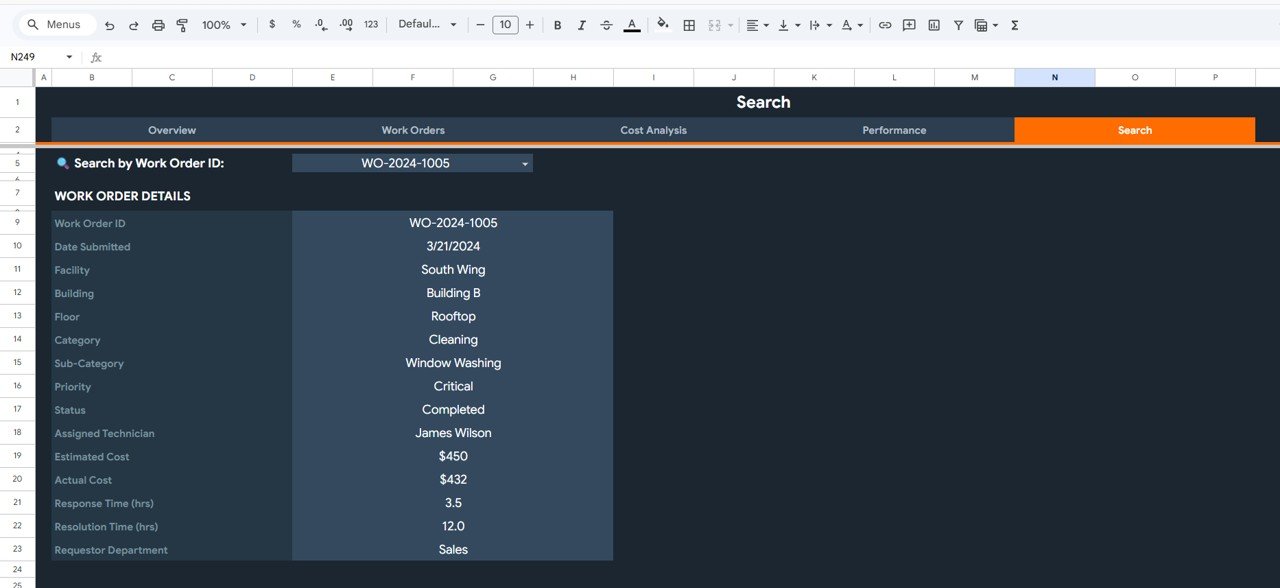 Search Sheet tab
6 – Data Sheet
The Data Sheet serves as the primary data input area where users enter all facilities management records. You need to add the data in the same structured format with columns for work order details, facility information, building and floor assignments, maintenance categories, priority levels, technician assignments, cost data, time metrics, and requestor departments. Once data is entered or updated in this sheet, the entire dashboard automatically refreshes to reflect the latest information.
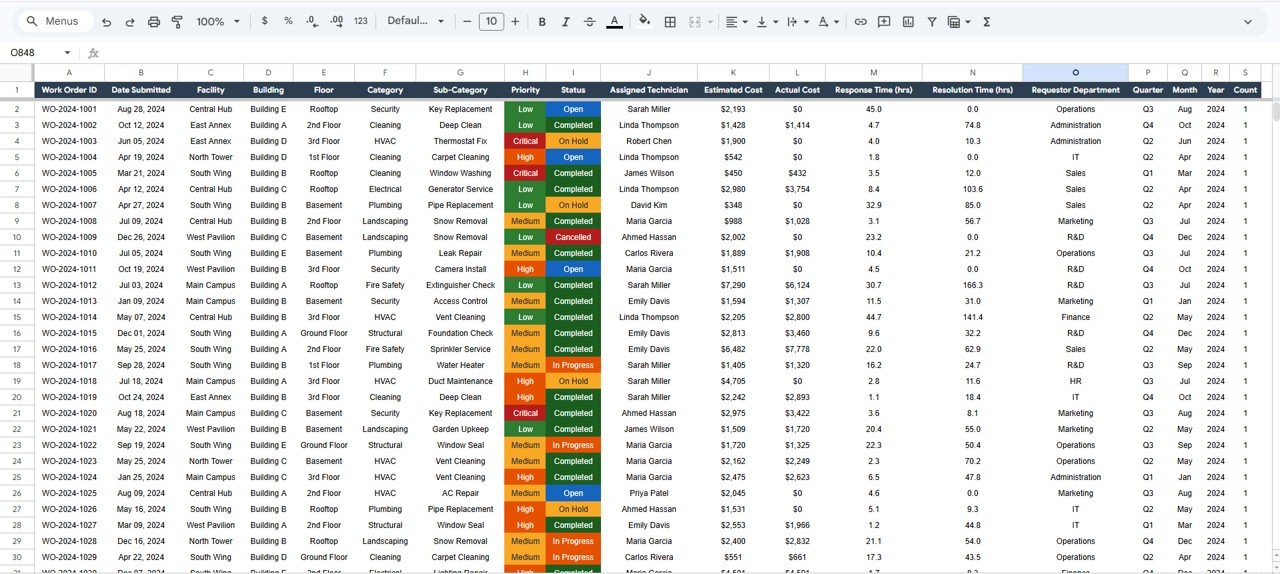 Data Sheet tab
Advantages of Facilities Management Analysis Dashboard in Google Sheets
- Centralized Performance Monitoring – All facilities data including work orders, costs, and performance metrics are consolidated into one interactive dashboard instead of being scattered across multiple files.
- Real-Time Collaboration – Multiple team members can work on the same dashboard simultaneously because it runs on Google Sheets with automatic syncing.
- Comprehensive Budget Oversight – The cost analysis page provides estimated vs actual comparisons at both category and facility levels, plus quarterly budget tracking.
- Workforce Optimization – Technician workload and performance charts help managers distribute assignments fairly and identify training needs.
- No Software Installation Required – The template operates entirely within Google Sheets, eliminating the need for additional software purchases or installations.
- Automated Analytics – Charts and KPIs update dynamically as new data is entered, saving significant time on manual reporting and chart creation.
Opportunities for Improvement
- Adding automated email notifications for overdue or critical work orders could further enhance maintenance team responsiveness.
- Integrating with IoT sensor data for real-time equipment monitoring would provide even deeper operational insights and enable predictive maintenance.Facilities Management Analysis Dashboard in Google Sheets
- Including a vendor scorecard page would help organizations evaluate and compare external maintenance vendor performance more effectively.Facilities Management Analysis Dashboard in Google Sheets
- Adding a preventive maintenance scheduling module could help reduce the number of critical and emergency work orders over time.Facilities Management Analysis Dashboard in Google Sheets
Best Practices
Click to Buy Facilities Management Analysis Dashboard in Google Sheets
- Update the data sheet regularly to ensure the dashboard always reflects the most current operational status of all facilities.
- Use the filtering capabilities on the Overview page to conduct focused analysis on specific facilities, categories, or priority levels during review meetings.
- Review the Cost Analysis page monthly to identify spending patterns and adjust budgets proactively before overruns become significant.
- Monitor the Performance page weekly to track response and resolution time trends and address any declining performance early.
- Leverage the Search page to quickly resolve queries about specific work orders during stakeholder discussions or audits.
Explore Relevant Templates
If you found this template useful, explore these related dashboard templates on NextGenTemplates:
- Smart Workplace Sustainability Dashboard in Google Sheets – Track workplace sustainability metrics including energy, water, and workspace efficiency.
- Office Parking Utilization Event Calendar in Excel – Manage office parking events with a dynamic Excel calendar template.
- Co-working Spaces KPI Dashboard in Excel – Monitor co-working space KPIs with automated charts and performance tracking.
- Airport Security Services Dashboard in Power BI – Analyze security operations using interactive Power BI analytics.
Click to Buy Facilities Management Analysis Dashboard in Google Sheets
FAQs
What is the Facilities Management Analysis Dashboard in Google Sheets?
It is a ready-to-use Google Sheets template that helps organizations monitor work orders, maintenance costs, technician performance, and facilities operations through interactive charts and KPI indicator cards across 6 dedicated worksheets.
What KPIs does the Overview page track?
The Overview page displays Total Work Orders, Open Orders, Avg Response Time (HRS), Total Maintenance Cost, and Completion Rate. It also includes charts for Work Orders by Category, Status Distribution, Monthly Work Order Trend, and Work Orders by Facility.
Can I compare estimated vs actual maintenance costs?
Yes. The Cost Analysis page provides detailed comparisons of Estimated vs Actual Cost by Category, Cost by Facility (Est. vs Actual), and Quarterly Budget vs Actual charts along with Budget Variance and Cost Efficiency KPIs.
How does the Search page work?
You select a Work Order ID from a dropdown menu, and the page instantly displays all related details including Facility, Building, Floor, Category, Sub-Category, Priority, Status, Assigned Technician, Estimated Cost, Actual Cost, Response Time, Resolution Time, and Requestor Department.
Can multiple team members use the dashboard simultaneously?
Yes. Because the template is built on Google Sheets, multiple users can view and edit the dashboard at the same time with real-time updates and automatic syncing.
Who is this dashboard designed for?
It is designed for facilities managers, property management companies, maintenance teams, operations directors, building owners, and industrial facility operators who need to monitor work orders, costs, and performance.
Conclusion
Click to Buy Facilities Management Analysis Dashboard in Google Sheets
The Facilities Management Analysis Dashboard in Google Sheets is a powerful and practical analytics solution for any organization that needs to monitor work orders, track maintenance costs, evaluate technician performance, and analyze budget compliance. With 6 dedicated pages covering Overview, Work Orders, Cost Analysis, Performance, Search, and Data input, this template transforms complex facilities data into actionable insights. Start optimizing your facilities management today with this ready-to-use Google Sheets dashboard.
Visit our YouTube channel to learn step-by-step video tutorials
👉 Youtube.com/@NeoTechNavigators
Click to Buy Facilities Management Analysis Dashboard in Google Sheets