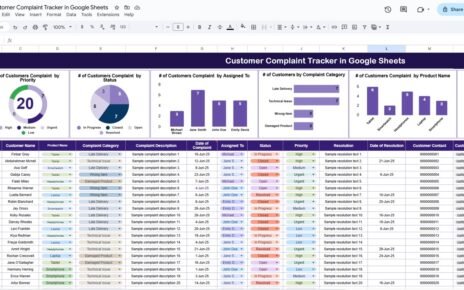
Managing IT support tickets efficiently is critical for every organization. When employees face system issues, software errors, network problems, or hardware failures, they expect fast and reliable support. However, many IT teams still struggle because they track tickets using emails, chats, or scattered Excel files. As a result, tickets get delayed, priorities get missed, and reporting becomes difficult.
This is where the IT Helpdesk Ticket Tracker in Google Sheets becomes a powerful solution. It is a ready-to-use tracker that helps IT teams log, track, analyze, and resolve support tickets from one centralized system. Moreover, it provides clear insights through interactive charts and a smart search feature.
In this article, we will explain how the tracker works, what charts it includes, how the search functionality helps, and why this tracker is essential for modern IT operations.
What Is an IT Helpdesk Ticket Tracker in Google Sheets?
An IT Helpdesk Ticket Tracker is a centralized system used to record and monitor all IT support requests. It tracks each ticket from the time it is raised until it is resolved.
Using Google Sheets makes this tracker even more powerful because:
- It works online and supports collaboration
- Multiple users can update tickets simultaneously
- Charts update automatically
- No special software or technical skills are required
This tracker is suitable for IT support teams, system administrators, operations managers, and service desks.
Tracker Sheet Tab – Central Ticket Management
Click to Buy IT Helpdesk Ticket Tracker in Google Sheets
The Tracker Sheet Tab is the foundation of the entire system. All ticket information is entered and maintained here.
Typical fields include:
- Ticket ID
- Ticket Date
- Employee Name
- Department
- Issue Category
- Priority Level
- Assigned To
- Ticket Status
- Resolution Date
- Comments or Notes
Once data is entered in this sheet, all charts and reports update automatically. This ensures real-time visibility into IT operations.
Charts Included in the IT Helpdesk Ticket Tracker
The tracker includes five powerful charts that help IT managers quickly understand workload, performance, and bottlenecks.
1. Tickets by Issue Category
This chart shows how many tickets fall under each issue type, such as:
- Hardware Issues
- Software Issues
- Network Problems
- Access & Login Issues
- Security Issues
Why this chart matters:
It helps identify recurring problems and areas that require long-term fixes or preventive maintenance.
2. Priority Distribution of Tickets
This chart displays tickets by priority level, such as:
- Low
- Medium
- High
- Critical
Why this chart matters:
It ensures that high-priority and critical issues receive immediate attention and resources.
3. Status Distribution of Tickets
This chart shows tickets by status, such as:
- Open
- In Progress
- On Hold
- Resolved
- Closed
Why this chart matters:
It gives instant visibility into pending work and helps IT managers identify delays or backlogs.
4. Tickets by Department
This chart highlights which departments generate the most IT tickets.
Why this chart matters:
It helps management understand department-wise IT dependency and identify training or infrastructure gaps.
5. Tickets by Assigned To
This chart shows how many tickets are assigned to each IT support staff member.
Why this chart matters:
It helps balance workload, identify top performers, and ensure fair ticket distribution.

Click to Buy IT Helpdesk Ticket Tracker in Google Sheets
Smart Search Functionality
One of the most powerful features of this tracker is the Search by Search Keyword and Field Name option.
How the search works:
You enter:
-
A Search Keyword (e.g., employee name, ticket ID, issue type)
-
A Field Name (e.g., Department, Assigned To, Status)
The tracker instantly filters and displays matching records.
Benefits of the search feature:
- Quickly locate specific tickets
- Respond faster to employee queries
- Simplify audits and reviews
- Reduce manual scrolling and filtering
- Improve daily productivity of IT teams

Click to Buy IT Helpdesk Ticket Tracker in Google Sheets
Why Use an IT Helpdesk Ticket Tracker in Google Sheets?
Organizations choose this tracker because it offers:
- Centralized ticket management
- Real-time reporting
- Easy collaboration
- Zero software cost
- Faster issue resolution
- Improved accountability
Instead of reacting to problems, IT teams become proactive and data-driven.
Advantages of the IT Helpdesk Ticket Tracker
Improved Response Time
Tickets are visible instantly, so teams act faster.
Better Prioritization
Critical issues stand out clearly.
Transparent Workload Tracking
Managers see who is handling what.
Data-Driven Decision Making
Charts reveal trends and recurring issues.
Easy to Use
Anyone with basic Google Sheets knowledge can manage it.
Scalable for Any Organization
Works for small teams and large enterprises.
Opportunities for Improvement
Click to Buy IT Helpdesk Ticket Tracker in Google Sheets
Although this tracker is powerful, organizations can enhance it further by adding:
-
SLA tracking (response and resolution time)
-
Automated email notifications
-
Escalation rules for overdue tickets
-
Root cause analysis fields
-
Integration with Google Forms for ticket submission
These enhancements can transform the tracker into a full ITSM solution.
Best Practices for Using the Tracker
-
Update ticket status daily
-
Define clear priority rules
-
Assign tickets immediately
-
Review charts weekly
-
Close tickets only after confirmation
-
Use search during support calls
Following these practices ensures maximum value from the tracker.
Conclusion
Click to Buy IT Helpdesk Ticket Tracker in Google Sheets
The IT Helpdesk Ticket Tracker in Google Sheets is a simple yet powerful tool for managing IT support operations. It brings structure, transparency, and efficiency to ticket handling. With dynamic charts and a smart search feature, IT teams gain full control over workloads and performance.
Because it is ready-to-use, cloud-based, and easy to customize, this tracker becomes an essential asset for any organization looking to improve IT service delivery.
Frequently Asked Questions (FAQs)
Click to Buy IT Helpdesk Ticket Tracker in Google Sheets
Q1. Who should use this IT Helpdesk Tracker?
IT support teams, service desk managers, and operations teams.
Q2. Can multiple users work on this tracker?
Yes, Google Sheets supports real-time collaboration.
Q3. Is this tracker suitable for large organizations?
Yes, it scales easily with structured data.
Q4. Can I customize issue categories and priorities?
Yes, the tracker is fully customizable.
Q5. Does it require technical skills?
No, basic spreadsheet knowledge is enough.
Visit our YouTube channel to learn step-by-step video tutorials
Youtube.com/@NeotechNavigators
Watch the step-by-step video tutorial: