Managing personal finances effectively has become more important than ever. People earn income from multiple sources and spend money on rent, utilities, groceries, transportation, entertainment, and other expenses. However, without a proper budgeting system, it becomes difficult to track where money goes every month.
Many individuals still manage their finances mentally or through scattered notes. As a result, overspending becomes common, savings decrease, and financial goals remain difficult to achieve.
Therefore, using a structured budgeting system is essential.
This is where the Monthly Budget Plan Template in Google Sheets becomes extremely helpful.
The Monthly Budget Plan Template in Google Sheets is a simple and powerful financial planning tool that helps individuals track income, manage expenses, and analyze spending patterns. This ready-to-use template allows users to compare planned budgets with actual spending and monitor financial performance in real time.
What is a Monthly Budget Plan Template in Google Sheets?
A Monthly Budget Plan Template in Google Sheets is a financial tracking tool designed to help individuals plan and monitor their monthly income and expenses.
The template organizes financial data into structured sheets that allow users to:
- Record income sources
- Set budget limits for expenses
- Track actual spending
- Compare budget vs actual performance
- Visualize spending trends using charts
Because Google Sheets works in the cloud, users can access their budget anytime and from any device.
Additionally, automated calculations and color-coded alerts help users identify overspending and manage finances effectively.
Why Do You Need a Monthly Budget Planner?
Click to Buy Monthly Budget Plan Template in Google Sheets
Many people struggle with financial management because they do not track their spending habits. Without clear records, it becomes difficult to understand how much money is being spent each month.
A budgeting system helps individuals gain better control over their finances.
Here are some common financial challenges people face without a budget:
- Overspending on non-essential items
- Difficulty saving money
- Unclear financial goals
- Poor expense management
A Monthly Budget Planner helps solve these problems by providing a clear financial overview.
With the Monthly Budget Plan Template in Google Sheets, users can easily monitor income, track expenses, and make informed financial decisions.
Key Features of the Monthly Budget Plan Template in Google Sheets
Click to Buy Monthly Budget Plan Template in Google Sheets
The template includes several organized sheets that help users plan, track, and analyze their monthly finances.
Each sheet serves a specific purpose in financial management.
1. Monthly Budget Planner – Assumptions Sheet
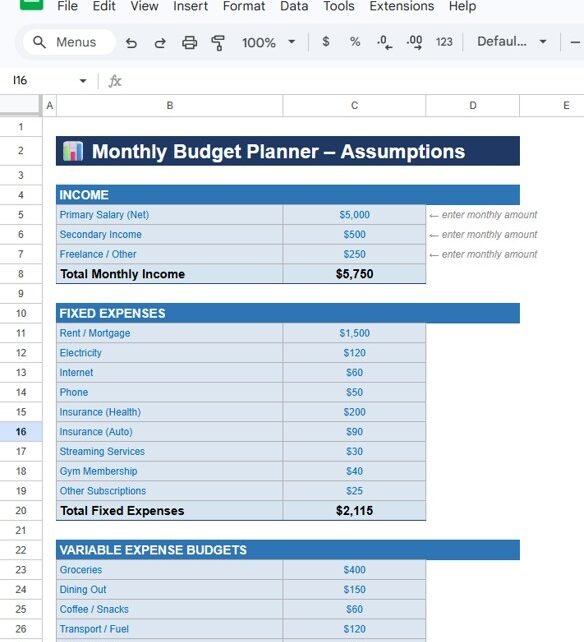
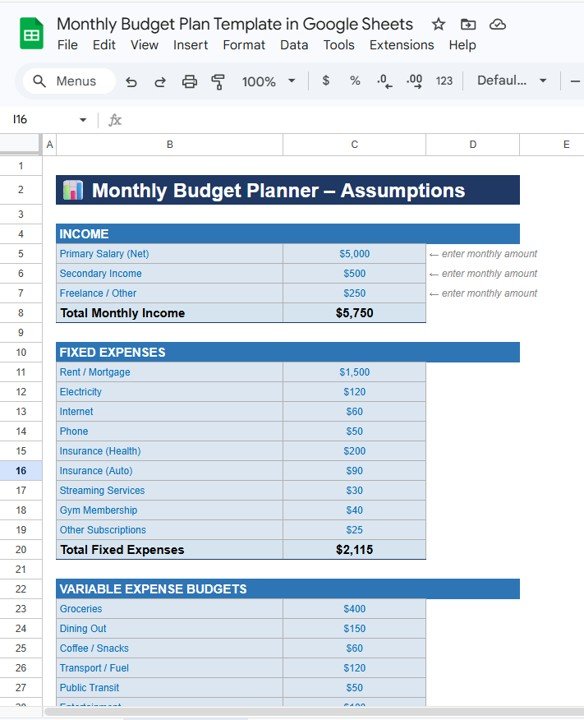
The Assumptions Sheet is where users enter their expected monthly income and planned expenses.
This sheet allows users to define their financial structure before tracking actual spending.
Income Section
Users can enter different sources of income such as:
- Primary Salary (Net)
- Secondary Income
- Freelance or Other Income
The template automatically calculates the Total Monthly Income.
For example:
- Primary Salary: $5,000
- Secondary Income: $500
- Freelance Income: $250
Total Monthly Income: $5,750
Fixed Expenses Section
Fixed expenses represent recurring costs that remain consistent every month.
Examples include:
- Rent or Mortgage
- Electricity
- Internet
- Phone
- Health Insurance
- Auto Insurance
- Streaming Services
- Gym Membership
- Other Subscriptions
The template automatically calculates the Total Fixed Expenses.
This helps users understand how much of their income goes toward essential costs.
Variable Expense Budget
Click to Buy Monthly Budget Plan Template in Google Sheets
Variable expenses change from month to month depending on lifestyle and spending habits.
Examples include:
- Groceries
- Dining Out
- Coffee and Snacks
- Transportation or Fuel
- Public Transit
- Entertainment
- Shopping
- Personal Care
- Health and Pharmacy
- Miscellaneous expenses
Users can set monthly spending limits for each category.
Click to Buy Monthly Budget Plan Template in Google Sheets
2. Monthly Budget Tracker Sheet
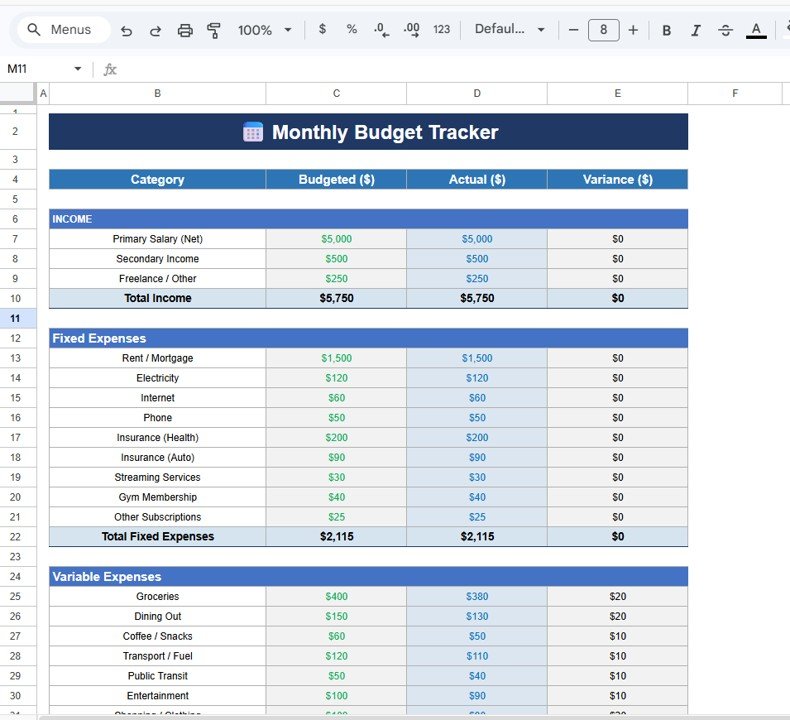
The Monthly Budget Tracker helps users compare planned budgets with actual spending.
This sheet contains four main columns:
- Category
- Budgeted Amount
- Actual Amount
- Variance
Budget vs Actual Comparison
Users enter their real expenses in the Actual column.
The template automatically calculates the variance, which shows whether spending is under or over budget.
For example:
Positive variance indicates savings, while negative variance shows overspending.
Click to Buy Monthly Budget Plan Template in Google Sheets
3. Budget vs Actual Chart Sheet
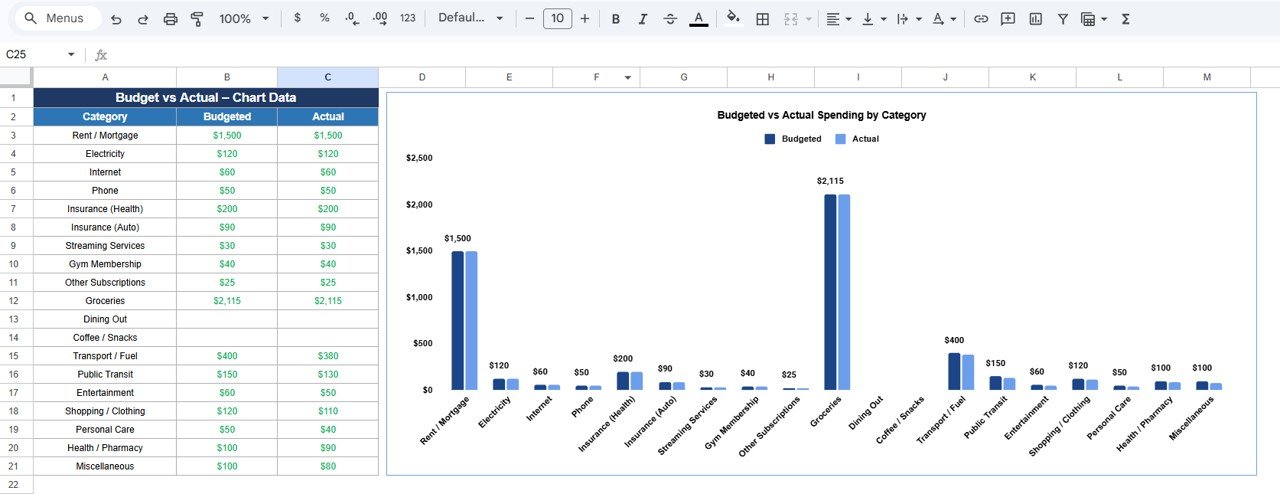
The Chart Sheet provides a visual comparison between planned budgets and actual spending.
The template generates a bar chart that displays:
-
Budgeted spending
-
Actual spending
for each expense category.
This visual analysis helps users quickly identify spending patterns and detect categories where they overspend.
Because the chart updates automatically, users can monitor financial performance in real time.
Click to Buy Monthly Budget Plan Template in Google Sheets
Advantages of the Monthly Budget Plan Template in Google Sheets
Using this budgeting template offers several benefits.
Clear Financial Visibility
The template provides a clear overview of income, expenses, and savings.
Better Spending Control
Users can quickly identify overspending and adjust their budgets.
Easy Financial Planning
Planning monthly expenses becomes simple with structured categories.
Automated Calculations
Formulas automatically calculate totals and variances.
Accessible Anywhere
Since the template runs in Google Sheets, users can access it from any device.
Best Practices for Using the Monthly Budget Plan Template
Click to Buy Monthly Budget Plan Template in Google Sheets
To get the best results from your budget planner, follow these best practices.
Record Expenses Regularly
Update your actual expenses regularly to maintain accurate tracking.
Set Realistic Budget Limits
Define budget limits based on your actual spending habits.
Monitor Overspending Alerts
Pay attention to red alerts that indicate overspending.
Review Your Budget Weekly
Regular reviews help you stay on track and avoid financial surprises.
Adjust Budgets When Needed
If spending patterns change, update your budget accordingly.
Conclusion
Click to Buy Monthly Budget Plan Template in Google Sheets
Financial planning is essential for achieving stability and long-term financial success. Without proper budgeting tools, individuals often struggle to manage their income and expenses effectively.
The Monthly Budget Plan Template in Google Sheets offers a simple yet powerful solution for tracking personal finances. With structured sheets, automated calculations, color-coded alerts, and visual charts, the template makes budgeting easy and practical.
By using this template regularly, individuals can monitor spending habits, control expenses, and improve their overall financial health.
Frequently Asked Questions (FAQs)
Click to Buy Monthly Budget Plan Template in Google Sheets
What is a Monthly Budget Plan Template?
A Monthly Budget Plan Template is a financial planning tool that helps individuals track income, manage expenses, and monitor monthly spending.
Why should I use Google Sheets for budgeting?
Google Sheets provides easy access, cloud storage, automatic calculations, and real-time collaboration.
Can beginners use this budget template?
Yes. The template is designed to be simple and beginner-friendly, making it easy for anyone to manage their finances.
What is the difference between budgeted and actual spending?
Budgeted spending represents planned expenses, while actual spending represents the real amount spent.
How often should I update my budget tracker?
You should update your budget tracker regularly, ideally every few days or weekly.
Visit our YouTube channel to learn step-by-step video tutorials
Youtube.com/@NeotechNavigators
Watch the step-by-step video tutorial: