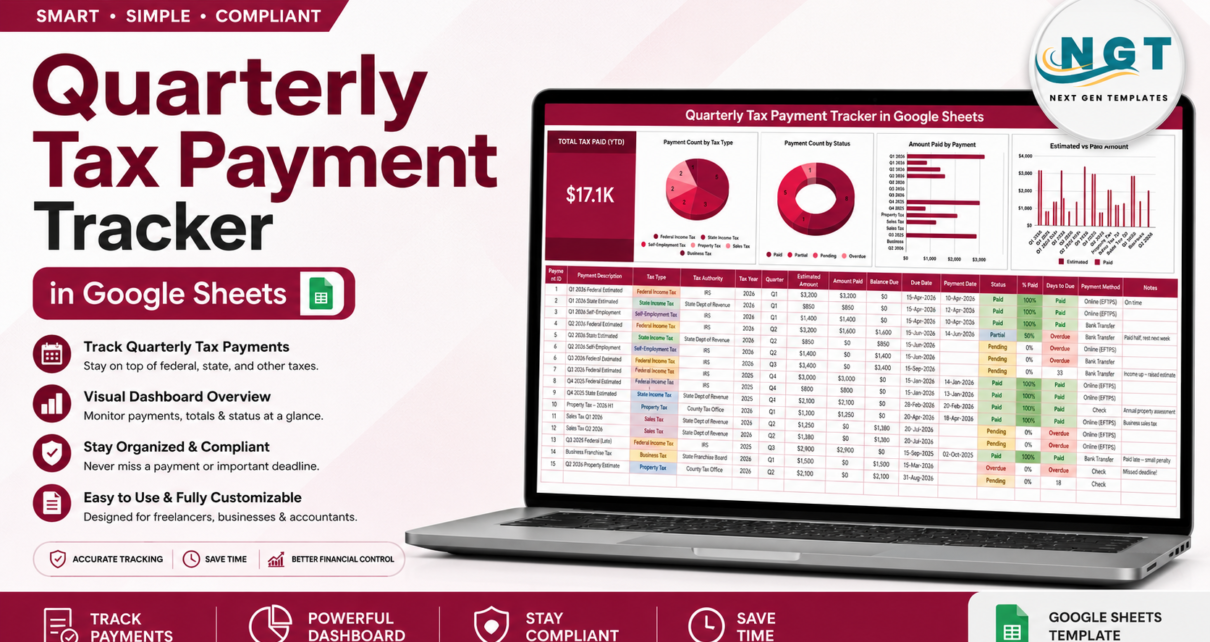
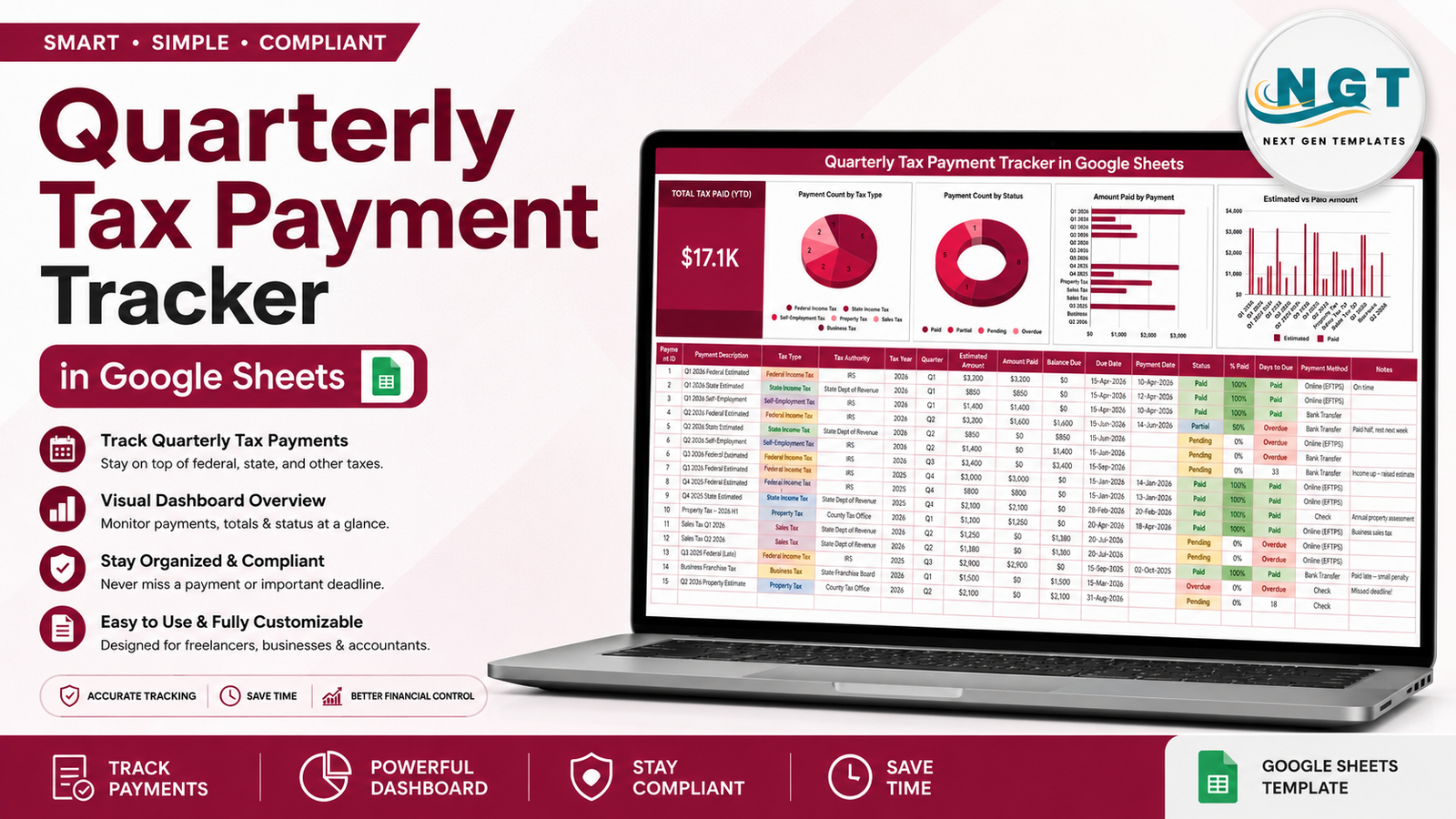
Estimated tax payments go wrong for a boring reason: they are spread across the year, they come from more than one authority, and nobody keeps a single list. The Quarterly Tax Payment Tracker in Google Sheets is that list. Six tax types, four payment statuses, a 16-column register with four columns that calculate themselves, one Total Tax Paid (YTD) card and four charts that redraw as you type. Fifteen worked sample rows ship with it so the logic is visible before you replace them.Quarterly Tax Payment Tracker in Google Sheets
Get the Quarterly Tax Payment Tracker in Google Sheets
One thing to be clear about up front: this is a record-keeping tool, not tax advice and not a calculator. It totals the figures and dates you type in. It does not work out what you owe and it does not know your filing obligations – confirm both with your tax professional or with the official source for your jurisdiction. This article walks through each page, what calculates and what you type, how it compares with a hand-built Excel file and with paid accounting software, and the habits that keep the sheet current. The template itself is available here.Quarterly Tax Payment Tracker in Google Sheets
Key Features of the Quarterly Tax Payment Tracker in Google Sheets
- Total Tax Paid (YTD) card. One large KPI on the left of the page summing the Amount Paid column, so the year-to-date figure is never something you have to add up in your head.Quarterly Tax Payment Tracker in Google Sheets
- Payment Count by Tax Type. A pie chart splitting your payments across Federal Income Tax, State Income Tax, Self-Employment Tax, Property Tax, Sales Tax and Business Tax.Quarterly Tax Payment Tracker in Google Sheets
- Payment Count by Status. A doughnut chart across Paid, Partial, Pending and Overdue – the first chart to look at before a filing period.
- Amount Paid by Payment. A horizontal bar chart ranking individual payments by size, which usually shows that two or three items carry most of the year.
- Estimated vs Paid Amount. Paired columns per payment putting the estimate beside what actually went out, so a shortfall is visible as a gap rather than buried in a total.
- Four automatic columns. Payment ID, Balance Due (estimated minus paid), % Paid and Days to Due are all formulas – you never type them.Quarterly Tax Payment Tracker in Google Sheets
- Overdue and Paid flags. Days to Due counts down to the date you entered, switches to Overdue in red once that date passes, and reads Paid once the estimate is fully covered.
- Partial payments treated as partial. Pay half an estimate and the row shows 50% with the remainder sitting in Balance Due, instead of forcing an all-or-nothing tick box.
- Auto-expanding dropdowns. Tax Type, Tax Authority, Quarter, Status and Payment Method all read from the List tab, so adding your own agency or payment method takes one line.
- Room for 985 payments. Formulas and chart ranges already run to row 1000.
Tracker Pages Explained
Page 1 – the Tracker
Everything you use lives here. The crimson banner runs across the top; underneath, the Total Tax Paid (YTD) card sits at the left with the four charts beside it on one row, so the whole summary fits on a single screen. Below that the register starts at row 16.
The columns are Payment ID, Payment Description, Tax Type, Tax Authority, Tax Year, Quarter, Estimated Amount, Amount Paid, Balance Due, Due Date, Payment Date, Status, % Paid, Days to Due, Payment Method and Notes. You fill eleven of those; the other four are formulas. Conditional formatting carries the meaning: Status shows Paid in green, Partial in blue, Pending in amber and Overdue in red, while Days to Due goes red the moment a due date has passed.
The fifteen sample rows are deliberately messy – a federal estimate paid on time, a state estimate still pending, a half-paid quarter with the note “Paid half, rest next week”, a late federal payment with “Paid late – small penalty”, and a business franchise tax marked Overdue with “Missed deadline!”. They exist so you can see how each status behaves before deleting them.
Page 2 – How to Use
A short setup page in plain language: which columns you fill, which calculate, how the dropdowns are wired, and the one-time ten-second trick that turns the validation dropdowns into the coloured chips you can see in the screenshots. Google does not let a script set that display style, so it is done by hand once – select the column, then Data, Data validation, click the rule, Advanced options, Display style: Chip. Google’s own guide to drop-down lists and data validation covers the same settings. The page also carries the disclaimer that the tracker is an organisational tool and that amounts and deadlines should be confirmed with a tax professional or the official schedule.
Page 3 – Explore More Templates
A recommendation page with a discount code and links to related NextGenTemplates products, plus category links for browsing the wider library.
The List tab
Tax Type, Tax Authority, Quarter, Status and Payment Method all read from here across roughly 500 rows. The shipped values are US-flavoured – IRS, State Dept of Revenue, County Tax Office, State Franchise Board, Online (EFTPS), Bank Transfer, Check – but they are just text. Replace them with HMRC, a GST department or anything else and the rest of the sheet behaves identically.
Quarterly Tax Payment Tracker vs. a Hand-Built Excel File vs. Paid Accounting Software – Feature Comparison
| This Google Sheets tracker | A hand-built Excel file | Paid accounting software | |
|---|---|---|---|
| Cost | Under $10 once | Free, plus your build time | Recurring, billed per user per month |
| Platform | Google Sheets, any browser | Excel on desktop | Web plus mobile app |
| Setup time | About 5 minutes | Several hours of design | Days, including chart of accounts |
| Real-time collaboration | Yes – you and your bookkeeper at once | Only via OneDrive co-authoring | Yes, usually an extra seat |
| Mobile access | Yes, free Sheets app | Limited | Yes |
| Customisable fields | Yes, via the List tab | Yes, if you rebuild the charts | Within the vendor’s model |
| Share with a link | Yes, one link to your accountant | Attachments and version confusion | Yes, recipient usually needs a seat |
| Year-1 cost at 5 users | Under $10 total | Existing licences plus a weekend | Typically hundreds to thousands |
| Six tax types in one register | Built in and colour-coded | You design it | Often split across modules |
| Bank feed / auto-import | No | No | Yes |
| Your data stays yours | Yes, in your own Drive | Yes | No, vendor-hosted |
Who Should Use This Template
It fits freelancers and sole traders who send estimated payments through the year and want one place to see what has actually gone out. It fits small-business owners dealing with more than one authority – income tax federally, sales tax at state level, a property or franchise bill somewhere else – because colour-coded tax types make one register readable where three folders are not. It fits bookkeepers who would rather keep one shared sheet per client than a thread of emails, and it fits anyone who has been running this on sticky notes and wants balances calculated instead of guessed.Quarterly Tax Payment Tracker in Google Sheets
It is not for you if you want software that works out your liability or files on your behalf; this sheet records, it does not compute obligations. If you need bank-feed reconciliation, invoicing or payroll, that belongs in accounting software. And if you are consolidating dozens of legal entities, a single sheet has stopped being the right container.
Real-World Use Cases
The freelancer who loses track between quarters. Maya designs interfaces and sends federal estimated payments plus self-employment tax four times a year. She logs each estimate the day her accountant gives it to her, then fills in Amount Paid when the transfer clears. The Estimated vs Paid chart shows at a glance which quarters are short – a question she previously answered by scrolling through her bank app.
The owner with three authorities to satisfy. Daniel runs a two-van cleaning company and deals with federal income tax, his state revenue department for sales tax, and the county for a property bill. Before, each lived in a different email folder. Now the Payment Count by Status doughnut tells him how many items are still Pending, and he calls his bookkeeper with a number rather than a worry.Quarterly Tax Payment Tracker in Google Sheets
The bookkeeper with fourteen clients. Priya keeps one copy of the tracker per client in a shared Drive folder and gives each client view access. Because it is a link rather than an attachment, the client always sees the current version, and the Notes column carries the running explanation of anything unusual – which is what she is really being paid for.
Advantages of the Quarterly Tax Payment Tracker
- Nothing to install. Native formulas, data validation, conditional formatting and charts. No add-on, no macro, no permission prompt.Quarterly Tax Payment Tracker in Google Sheets
- Charts that grow with you. All four read the data columns directly using the built-in Aggregate option across rows 16 to 1000, so new payments appear without anyone touching a chart range.
- Balance Due as a first-class column. Most tax spreadsheets record what was paid. Recording what is still outstanding, per row, is what makes the sheet worth opening.Quarterly Tax Payment Tracker in Google Sheets
- Partial is a real state. Paying part of an estimate is common and the sheet models it properly rather than rounding it to Paid or Pending.Quarterly Tax Payment Tracker in Google Sheets
- One link to your accountant. Simultaneous editing is the single biggest practical advantage over an emailed Excel file.Quarterly Tax Payment Tracker in Google Sheets
- Not locked to one country. Every authority and tax type is a text value on the List tab.Quarterly Tax Payment Tracker in Google Sheets
Opportunities for Improvement
Where it stops: there is no bank feed, so payments are typed in – the deliberate trade for owning your own file. It stores one row per payment rather than a dated transaction log, so if you want a month-by-month audit trail you will want a second sheet and a SUMIFS. The dropdown chip styling has to be applied once by hand because Google’s API does not expose it. Currency is formatted in dollars out of the box and needs a one-time Format then Number change for other currencies. And the sheet has no view of your income, so the estimate itself still comes from you or your accountant – pairing it with an income tracker closes that loop.Quarterly Tax Payment Tracker in Google Sheets
Best Practices
- Set the List tab up before entering anything. Authority names and payment methods are far easier to get right first than to re-label across 200 rows later.Quarterly Tax Payment Tracker in Google Sheets
- Log the estimate the day you learn it, not the day you pay. A Pending row with a due date is the whole point of the Days to Due column.Quarterly Tax Payment Tracker in Google Sheets
- Write the due date from the official schedule, not from memory or from the sample data. The sheet counts down to whatever you type, so the countdown is only as good as that date.Quarterly Tax Payment Tracker in Google Sheets
- Use Partial honestly. Splitting a payment is fine; recording it as Paid is what causes a surprise later.Quarterly Tax Payment Tracker in Google Sheets
- Sort by Days to Due before each filing period. It turns a fifteen-row table into a two-row to-do list.
- Keep the Notes column verbose. “Income up – raised estimate” or “Paid late – small penalty” is the context you will want twelve months from now.
- Share it with whoever prepares your return. A view link costs nothing and removes an entire email thread.
Explore Relevant Templates
- Quarterly Tax Payment Tracker in Google Sheets – the template covered in this article.
- Tax Deduction and Receipt Tracker in Google Sheets – keeps deductible costs and receipts separate as you go.
- Multiple Income Streams Tracker in Google Sheets – the income side that sizes the next estimate.
- Bank Account Balance Tracker in Google Sheets – make sure the cash is there on transfer day.
- Annual Family Budget Tracker in Google Sheets – fits the tax bill into the wider year.
- Utility Bills and Usage Tracker in Google Sheets – the same register-and-charts layout for recurring bills.
Interested in building registers like this one yourself? The NextGenTemplates Academy learning paths take you through the spreadsheet skills involved, with practice files.
Get the Quarterly Tax Payment Tracker in Google Sheets
Frequently Asked Questions
Does the tracker calculate how much tax I owe?
No. It records the estimated amounts you enter and totals what you have paid against them. Calculating the liability is your job or your accountant’s – this is the register, not the calculator, and nothing in it should be treated as tax advice.Quarterly Tax Payment Tracker in Google Sheets
Is it tied to the United States?
No. The sample data uses US terms because that is the most common request, but Tax Type and Tax Authority are ordinary dropdowns fed by the List tab. Swap in your own authorities and the sheet works the same way.Quarterly Tax Payment Tracker in Google Sheets
Do I need a paid Google account?
No. A free personal Google account is enough. The download is a PDF containing a Make a copy link that places an editable copy in your own Drive.Quarterly Tax Payment Tracker in Google Sheets
Do I need to know Google Sheets formulas?
No. Every formula is already written. You type into the white columns; Payment ID, Balance Due, % Paid and Days to Due look after themselves.Quarterly Tax Payment Tracker in Google Sheets
Can two people use it at once?
Yes. Share it like any other Google Sheet. Editors can log payments together and viewers – your accountant, for instance – can watch without changing anything.Quarterly Tax Payment Tracker in Google Sheets
Will the charts break when I add rows?
No. All four charts and the KPI card already cover rows 16 to 1000, so new payments appear automatically until you pass 985 rows.Quarterly Tax Payment Tracker in Google Sheets
Why do my dropdowns look like plain text?
The chip display style cannot be set by a script. Select the column, then Data, Data validation, click the rule, Advanced options, Display style: Chip. Ten seconds per column, one time, for columns C, D, F, L and O.Quarterly Tax Payment Tracker in Google Sheets
About the Author
Built by PK – Microsoft Certified Professional with 15+ years of Excel, Google Sheets, and Power BI experience. Founder of NextGenTemplates, reaching 300K+ subscribers across YouTube channels. Every template is hand-built and tested before release.Quarterly Tax Payment Tracker in Google Sheets
Conclusion
Quarterly tax payments are not hard to understand; they are just easy to lose track of. One register with six tax types, four statuses, a running Balance Due and a Days to Due countdown is enough structure to stop that happening, and it takes about five minutes to set up. Log the estimates you already know tonight, and let the sheet count down from there – then confirm the real dates with whoever prepares your return.Quarterly Tax Payment Tracker in Google Sheets
Get the template here: Quarterly Tax Payment Tracker in Google Sheets. For walkthroughs of this and other Google Sheets builds, subscribe to youtube.com/@NeoTechNavigators.