Most bathroom shelves are an archaeology site. There is the serum you loved and cannot remember the name of, the toner you bought twice by accident, the oil that was too heavy in July and might be fine in January, and somewhere at the back the sunscreen you opened last summer and are not sure is still good. None of it is written down. The one place the whole story exists is in your head, and it does not survive a house move.
The Skincare Routine & Product Tracker in Google Sheets puts all of it on one page. It is a single 16-column log of every product you own, with four of those columns calculated for you, one large Total Skincare Spend card and four charts that read the log directly. Nothing is recommended, nothing is diagnosed, and nothing leaves your own Google Drive.
Get the Skincare Routine & Product Tracker
Before anything else: what this template is, and what it is not
Skincare is a subject where a spreadsheet can very easily be mistaken for an authority. It is not one, so this goes first rather than in a footnote.
It is a personal record. It is a Google Sheet that stores exactly what you type into your own copy of it, arranges it by product, and draws four charts from it. That is the whole of it.
It is not skincare advice and not dermatological advice. It recommends no product, no ingredient and no routine. It does not know what is in anything you enter, because it never asks: there is no ingredient field, no INCI list, no allergen flag and no interaction check. Nothing in it has been validated against any standard, because it is a spreadsheet.
It makes no judgement about your skin. The Rating column holds your opinion, not an assessment. The Repurchase? column reads that opinion back to you and nothing more. There is no “suits your skin type” logic anywhere in the file, and there is no threshold that turns anything red on your behalf.
It does not know when a product goes off. The Days Left column counts the days between today and the Expiry Date you typed on that row. Take that date from the packaging, or from the period-after-opening symbol counted from the day you opened it. The sheet has no product database and no shelf-life knowledge of its own.
If you have a skin concern, or a reaction to something you have used, that belongs with a dermatologist or a pharmacist. Use this to remember what you own and what it cost; use a qualified professional to interpret anything about your skin.
Key Features of the Skincare Routine & Product Tracker in Google Sheets
- One page, no tab-hopping. The Total Skincare Spend card, all four charts and the full 16-column log live on a single sheet called Skincare Tracker. You scroll; you do not navigate.
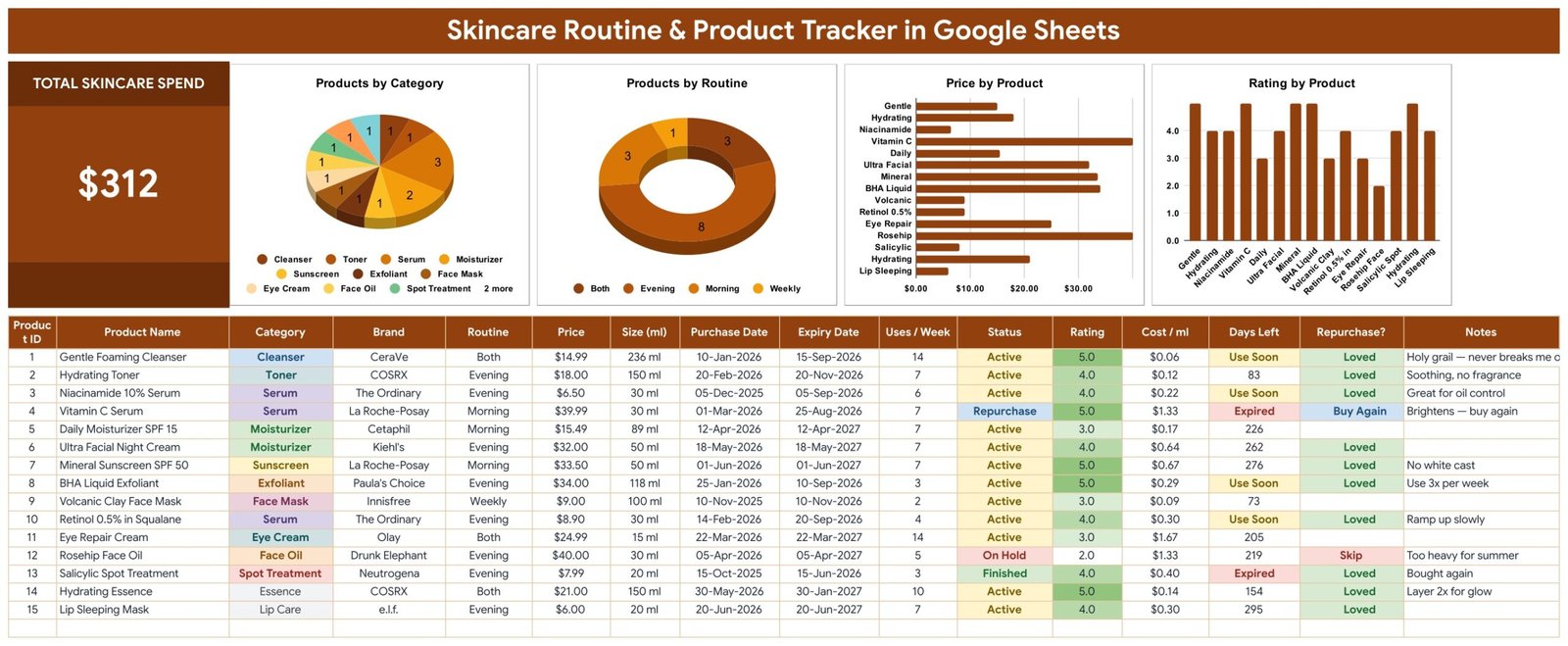
- Sixteen columns per product. Product ID, Product Name, Category, Brand, Routine, Price, Size (ml), Purchase Date, Expiry Date, Uses / Week, Status, Rating, Cost / ml, Days Left, Repurchase? and Notes.
- Four of those columns write themselves. Product ID, Cost / ml, Days Left and Repurchase? are formulas. You type twelve fields; the sheet fills the other four.
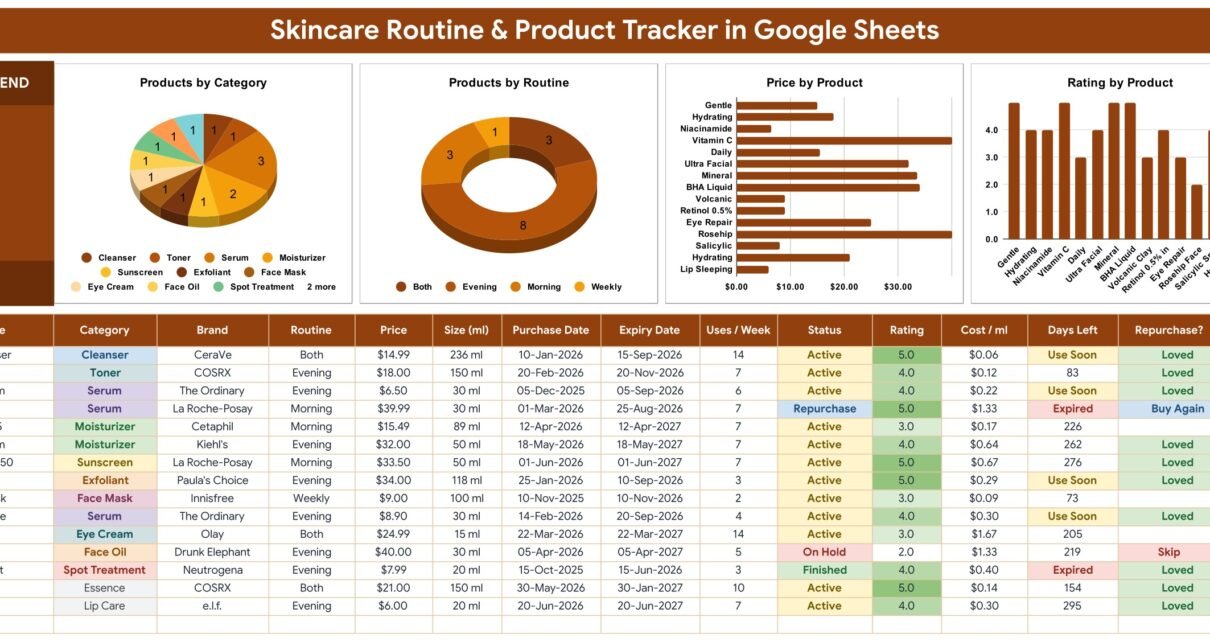
- A live spend card. Total Skincare Spend sums the Price column across every row. On the sample data it reads $312, which is the exact total of the fifteen sample products.
- Cost per millilitre, on every row. Price divided by Size (ml). It is the single most useful number on the sheet and the one nobody works out by hand.
- An expiry countdown with two flags. Days Left shows Expired once your date has passed, Use Soon at 30 days or fewer, and otherwise the plain day count.
- Four editable dropdown lists. Category, Brand, Routine and Status read rows 2 to 500 of the List tab. Add a value there and it appears in the dropdown immediately.
- Four charts, no helper tables. Every chart reads the log columns directly across rows 16 to 1000 with the built-in Aggregate option.
- Room for roughly 985 products. The formulas and chart ranges already run to row 1000. There is nothing to drag down.
- Fifteen sample products included. A worked example you type straight over, so the charts have something to draw before you start.
Template Structure – the four tabs explained
1. Skincare Tracker
The working page and the one you will live on. Row 1 carries the title. Rows 2 to 4 hold the Total Skincare Spend card on the left and the four charts across the rest of the width. Row 13 is the header row, and the log itself starts at row 16 with fifteen sample products in rows 16 to 30.
The twelve columns you type are Product Name, Category, Brand, Routine, Price, Size (ml), Purchase Date, Expiry Date, Uses / Week, Status, Rating and Notes. Category, Brand, Routine and Status are dropdowns; the rest are free text, numbers or dates.
The four you leave alone are:
- Product ID – numbers each filled row from 1, and stays blank on empty rows.
- Cost / ml – Price divided by Size (ml). A $39.99 30 ml serum comes out at $1.33 per ml; a $6.50 30 ml serum at $0.22; a $9.00 100 ml mask at $0.09.
- Days Left – counts today to your Expiry Date, then flags Expired, Use Soon (30 days or fewer) or prints the number of days. Leave the Expiry Date blank and the column stays blank.
- Repurchase? – Buy Again when Status is Repurchase, Loved when Rating is 4 or 5, Skip when Rating is 1 or 2, and deliberately blank at 3.
2. List
The settings sheet behind the four dropdowns. Four plain columns – Category, Brand, Routine, Status – seeded with 12 categories (Cleanser, Toner, Serum, Moisturizer, Sunscreen, Exfoliant, Face Mask, Eye Cream, Face Oil, Spot Treatment, Essence, Lip Care), 14 brands, 4 routine slots (Morning, Evening, Both, Weekly) and 4 statuses (Active, Finished, Repurchase, On Hold). A note on the tab reminds you that the dropdowns read rows 2 to 500 of each column, so anything you add underneath joins the list on its own. Nothing here is locked.
3. Instructions
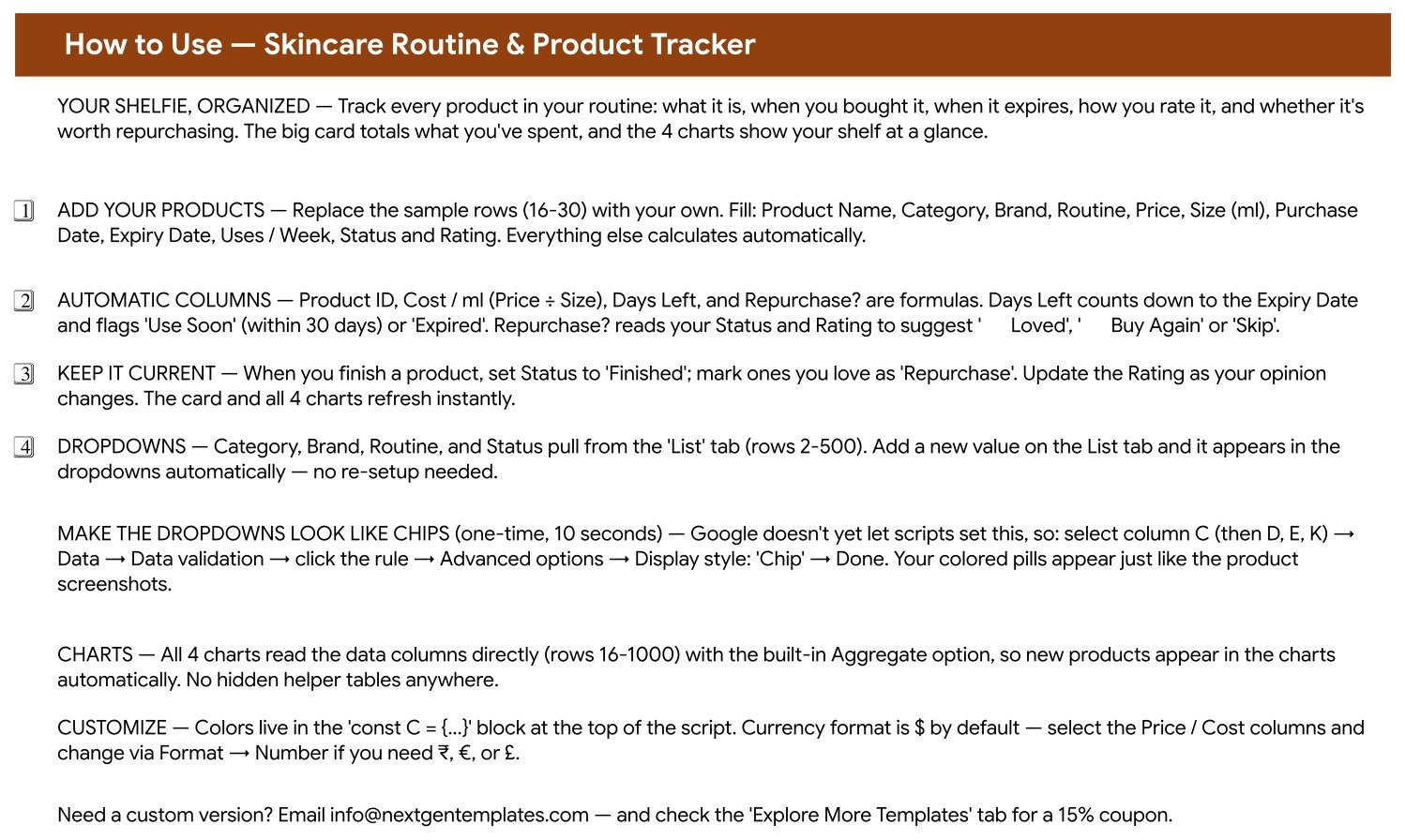
A written walkthrough that ships inside the file: what the tracker does, how to replace the sample rows, how each of the four automatic columns is calculated, how to extend the dropdown lists, the ten-second trick for turning the dropdowns into Google’s coloured “Chip” pills, how the charts read the data, and where to change the colours and the currency.
4. Explore More Templates
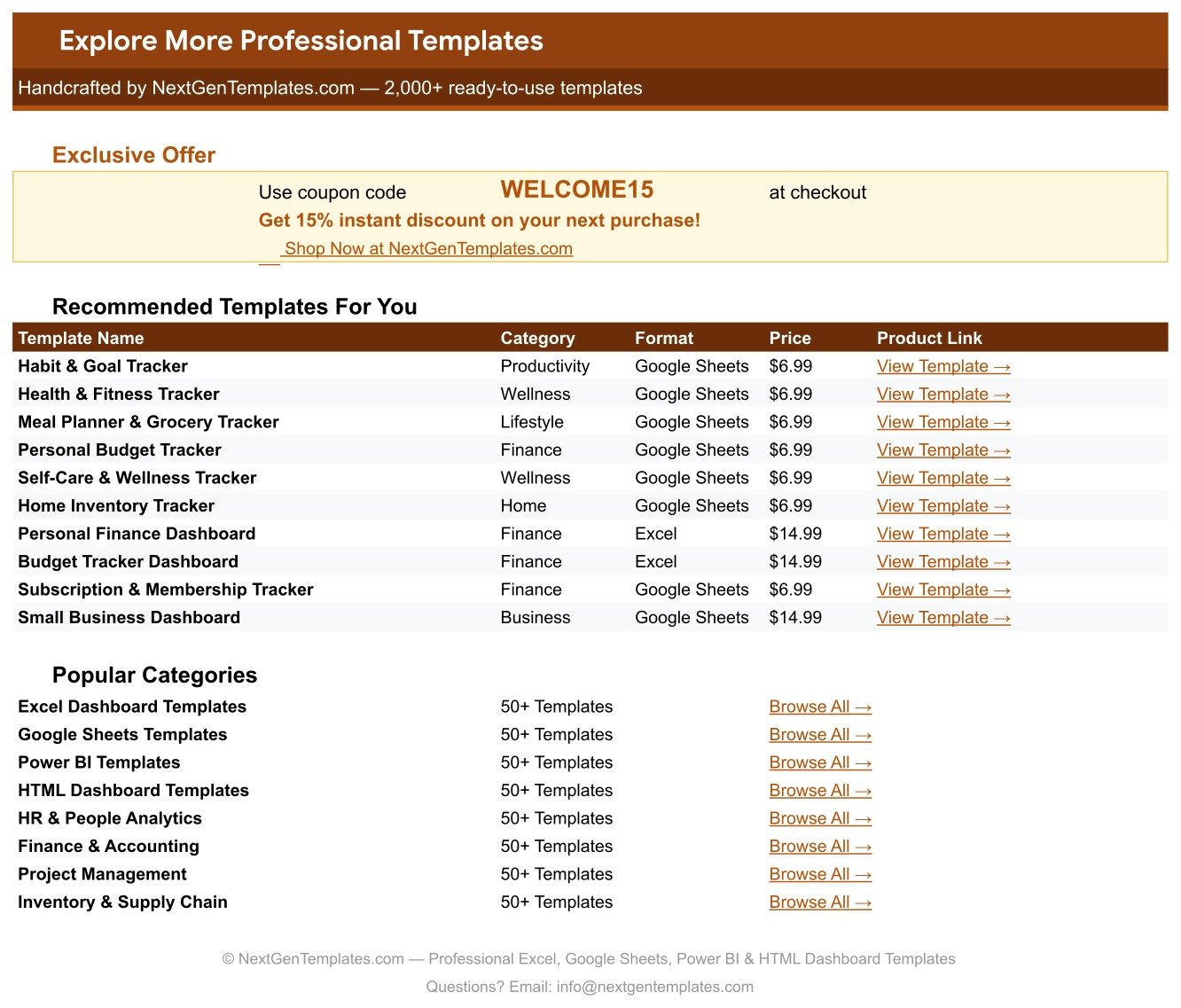
A bonus tab with a WELCOME15 coupon for 15% off your next purchase, a table of ten recommended companion templates with their prices and links, and shortcuts into the main NextGenTemplates category pages.
What the four charts actually show
All four sit in the band above the log and read the tracker columns directly. There are no hidden helper tables in the file, which is why a product you type on row 47 turns up in every chart the moment you finish the row.
- Products by Category – a pie counting how many products fall into each Category. On the sample data Serum leads with 3, Moisturizer has 2, and the other ten categories hold one product each.
- Products by Routine – a doughnut counting products per routine slot: Evening 8, Both 3, Morning 3, Weekly 1. It is the fastest way to see that a routine has quietly become lopsided.
- Price by Product – a horizontal bar of the Price column by product name. The two longest bars on the sample data are the Vitamin C Serum at $39.99 and the Rosehip Face Oil at $40.00.
- Rating by Product – a column chart of your own Rating per product, so the shelf sorts itself into what you actually like and what you are finishing out of obligation.
Note what is not charted: there is no chart of Cost / ml. That number lives in the log, one row at a time, and it rewards reading the column rather than glancing at a picture.
Skincare Routine & Product Tracker vs. a DIY Spreadsheet vs. a Skincare App – Feature Comparison
| Feature | Skincare Routine & Product Tracker in Google Sheets | A blank spreadsheet you build yourself | A paid skincare / beauty-shelf app |
|---|---|---|---|
| Cost | $6.99 once | Free, plus your evening | Typically $3-10 per month |
| Time to first useful view | Under 10 minutes | An hour or two, then maintenance | 15-30 minutes of onboarding |
| Cost per ml | Calculated on every row | You write the formula | Rarely offered |
| Cumulative spend | Live card at the top of the page | A SUM you add and remember to extend | Usually per-purchase, not cumulative |
| Expiry countdown | Days Left, with Use Soon and Expired | Only if you write the rule | Often included, with push alerts |
| Products the app has never heard of | Fine – every field is free text | Fine | Limited to their catalogue |
| Your own categories and brands | Type them into the List tab | Edit the validation range by hand | Usually fixed |
| Charts | Four, already wired to rows 16-1000 | You build and re-range them | Whatever the app decides to show |
| Sharing | Share the sheet link, no seat fee | Same, if it is a Google Sheet | Often a paid tier |
| Where the data lives | Your own Google Drive | Your own drive | The vendor’s servers |
| Year-1 cost | $6.99 total | $0 and your time | $36-120 |
The honest summary: an app will nag you and this file will not. In exchange you get a sheet that holds any product you can name, works out cost per millilitre, totals what you have spent, and stays in a Drive folder you control for one payment.
Who Should Use This Template
- Anyone with more than ten products open at once. Past that point the shelf stops being memorable and starts being inventory.
- Anyone who has bought the same thing twice. The Notes and Repurchase? columns exist precisely for that mistake.
- People who want an honest price comparison. Cost / ml is the column that reframes a “cheap” 15 ml eye cream at $1.67 per ml against a “expensive” 150 ml essence at $0.14.
- Anyone doing a cabinet clear-out. Fill in the expiry dates once and the Days Left column produces the to-throw list for you.
- People who track makeup, haircare or fragrance too. Nothing in the file is skincare-specific beyond the seeded Category list, and that list is editable.
- Spreadsheet beginners. Every formula is already written. You type text, numbers and dates.
It is a poor fit if you want push reminders, ingredient or allergen analysis, barcode scanning, or salon-scale stock control with suppliers and staff. It does none of those and does not pretend to.
Real-World Use Cases
The serum audit. Amara had eleven part-used serums and no idea what they had cost. Entering price and size for each one put them in order for the first time: two 30 ml bottles above $1 per ml, and a 150 ml essence at $0.14. The Total Skincare Spend card came back higher than she had guessed. She stopped rebuying the expensive two and now reads the card at the start of each month.
The cabinet clear-out. Ben opened a cupboard he had not touched in a year and typed each product’s expiry date in as he found it. Days Left immediately marked two products Expired and four more Use Soon. Instead of guessing, he had a list – and the ones his own ratings had flagged Loved went to the front of the shelf.
The shared shelf. Priya and her sister buy from the same handful of brands, so they keep one Google Sheets link between them, each with their own rows and their own Notes. When one writes “too heavy for summer” against an oil, the other reads it before ordering the same bottle.
The seasonal swap. A routine that works in winter often does not in August. Setting Status to On Hold rather than deleting the row keeps the product, the price and the notes in the file, and the Products by Routine doughnut shows what is actually running right now.
Advantages of the Skincare Routine & Product Tracker in Google Sheets
- The arithmetic that matters is done. Cost per millilitre and days to expiry are exactly the two numbers people never work out by hand, and both are automatic.
- No hidden machinery. No helper tabs, no pivot caches, no query ranges. Four visible tabs, four visible formula columns, and chart ranges you can read.
- Nothing is locked. Every dropdown list is a plain column you can extend, rename or replace.
- It scales without maintenance. Formulas and charts already reach row 1000, so the file grows from fifteen products to several hundred without a single edit.
- It is honest about opinion. Rating, Status and Notes are clearly yours. The sheet never dresses your own judgement up as an assessment.
- One payment. $6.99, no account, no subscription, and the file stays in your Drive whether or not you ever visit our site again.
Opportunities for Improvement
Every template has edges, and it is more useful to name them than to pretend otherwise.
- No reminders of any kind. Days Left is a flag you see when you open the sheet. If you want a nudge before a sunscreen expires, set your own calendar reminder to review the file monthly.
- Uses / Week is recorded but not used in a calculation. It is a useful field to have next to Cost / ml, but the sheet does not turn it into a cost-per-use or a run-out estimate. If you want that, it is a one-column formula you can add yourself.
- Size is in millilitres only. Products sold in grams – balms, some masks – need you to decide on a convention and stick to it, because Cost / ml divides by whatever number is in that column.
- Repurchase? ignores Status except for “Repurchase”. A product you marked Finished and rated 4 still reads Loved, which is accurate but is not the same as “buy it again”. Read the Status column alongside it.
- The dropdown “chip” styling is a manual step. Google does not let a script switch it on, so the coloured pills in the screenshots take ten seconds of your own clicking. The Instructions tab walks through it.
Best Practices
- Enter the expiry date on day one. Write the opening date on the bottle in marker, add the period-after-opening months, and type the result. Doing it later means guessing.
- Record price and size together, always. A blank Size column leaves Cost / ml empty, and that column is most of the value of the file.
- Use On Hold instead of deleting. A shelved product still has a price, a rating and notes worth keeping.
- Write the Notes while the reaction is fresh. “No white cast” and “too heavy for summer” are the sentences that stop a repeat mistake nine months later.
- Update the Rating when your mind changes. The Repurchase? column and the Rating by Product chart both follow it, so the file stays honest.
- Add your own brands to the List tab early. Two minutes at the start saves a dozen typed variants of the same brand name later.
- Read the card before you order. Total Skincare Spend and the Price by Product chart together answer “what has this cost me” and “which two products are most of it”.
Explore Relevant Templates
If you keep the rest of a personal routine in Google Sheets too, the closest companion is the Supplement & Vitamin Tracker in Google Sheets, which does for the supplement cupboard what this file does for the bathroom shelf – the same four-tab shape, with cost per month and reorder flags instead of cost per millilitre. The Meditation & Mindfulness Tracker in Google Sheets, the Yoga & Stretching Practice Tracker in Google Sheets and the Body Measurements Tracker in Google Sheets round out the self-care set, and all four sit at the same price.
Related Templates
If your interest in skincare is commercial rather than personal, the catalogue steps up rather than sideways. The Personal Care & Beauty Dashboard in Google Sheets is salon-scale reporting – revenue, services and branch performance – rather than a product log. For a cosmetics brand or retailer, the Cosmetics and Skincare Dashboard in Excel and the Cosmetics and Skincare Dashboard in Power BI take the same subject into full analytics. Browse the wider shelf in Google Sheets Trackers or across all Google Sheets Templates.
If you would like to get better at building your own trackers, the NextGenTemplates Academy learning paths teach the Google Sheets and Excel skills behind files like this one, using practice files.
Get the Skincare Routine & Product Tracker
Frequently Asked Questions
Is this skincare advice, or a dermatology tool?
Neither. It is a personal record-keeping template. It is not medical or dermatological advice, not a medical device and not a diagnostic or safety tool. It does not read ingredient lists, check for allergens or interactions, or make any claim about what a product will do to your skin. Take skin concerns and reactions to a dermatologist or pharmacist.
Does it tell me which products to buy or which suit my skin type?
No. It recommends nothing. Every judgement in the file is one you typed: the Rating, the Status and the Notes. The Repurchase? column simply reads those back to you.
How does Days Left know when a product expires?
It counts the days between today and the Expiry Date you entered on that row, then flags Use Soon at 30 days or fewer and Expired once the date has passed. It has no product database. If you leave the Expiry Date blank, the column stays blank.
Does it send reminders or notifications?
No – none at all. No emails, no push alerts, no pop-ups. Days Left and Repurchase? are flags you see when you open the sheet.
How many products can I log?
The formulas and chart ranges cover rows 16 to 1000, so roughly 985 products. The fifteen sample rows are there to be typed over.
Can I use it for makeup, haircare or fragrance?
Yes. Nothing in the file is skincare-specific except the seeded Category list, and that list is editable. Add Foundation, Shampoo or Fragrance on the List tab and those rows behave exactly like the rest.
Can I add my own categories, brands and statuses?
Yes. Each dropdown reads rows 2 to 500 of its column on the List tab, so anything you add there appears in the dropdown at once. Twelve categories, fourteen brands, four routine slots and four statuses ship seeded, and none of them are locked.
Can I track in ounces, or in grams?
Yes, as long as you are consistent. Cost / ml divides Price by whatever number is in the Size (ml) column – relabel the header and change the number format through Format, Number. The formula does not convert units, so pick one and stick to it.
Why don’t my dropdowns look like the coloured pills in the screenshots?
Google does not let a script switch that on. Select column C, then D, E and K, open Data, Data validation, click the rule, Advanced options, and set Display style to Chip. About ten seconds, once.
Is the sample data real?
No. The fifteen products, their prices, dates, ratings and notes are fictional demonstration data, there so the card and the charts have something to draw before you clear them. Brand names appear only as example text in an editable list – nothing in the file is an endorsement, a review or a claim about any real product.
Do I need Excel, or a paid Google account?
Neither. A free Google account is enough. The download is a PDF containing a “Make a copy” link; one click puts your own copy in your Drive. This is a Google Sheets template, not an Excel workbook and not a Power BI report.
About the Author
Built by PK – Microsoft Certified Professional with 15+ years of Excel, Google Sheets, and Power BI experience. Founder of NextGenTemplates, reaching 300K+ subscribers across YouTube channels. Every template is hand-built and tested before release.
Conclusion
The Skincare Routine & Product Tracker in Google Sheets does one thing properly: it holds the whole shelf on one page, in your own file, with the two calculations that matter already written and nothing invented. Sixteen columns, four of them automatic, four charts, four editable dropdown lists and 985 rows of room. No account, no subscription, no recommendations and no alerts – just a clear record of what you own, what it cost per millilitre, and what is about to run out.
Get the Skincare Routine & Product Tracker in Google Sheets for $6.99 (regular $12.99). Instant download, one payment, no subscription. The download is a PDF with a “Make a copy” link – one click and the template is in your own Drive, editable forever.
Note: this template is a personal record-keeping tool. It is not skincare, cosmetic or medical advice, not a medical device, and not a diagnostic or product-safety tool. It does not assess ingredients, allergens or interactions. Please consult a dermatologist, pharmacist or another qualified professional about your skin and about any product you are unsure of.