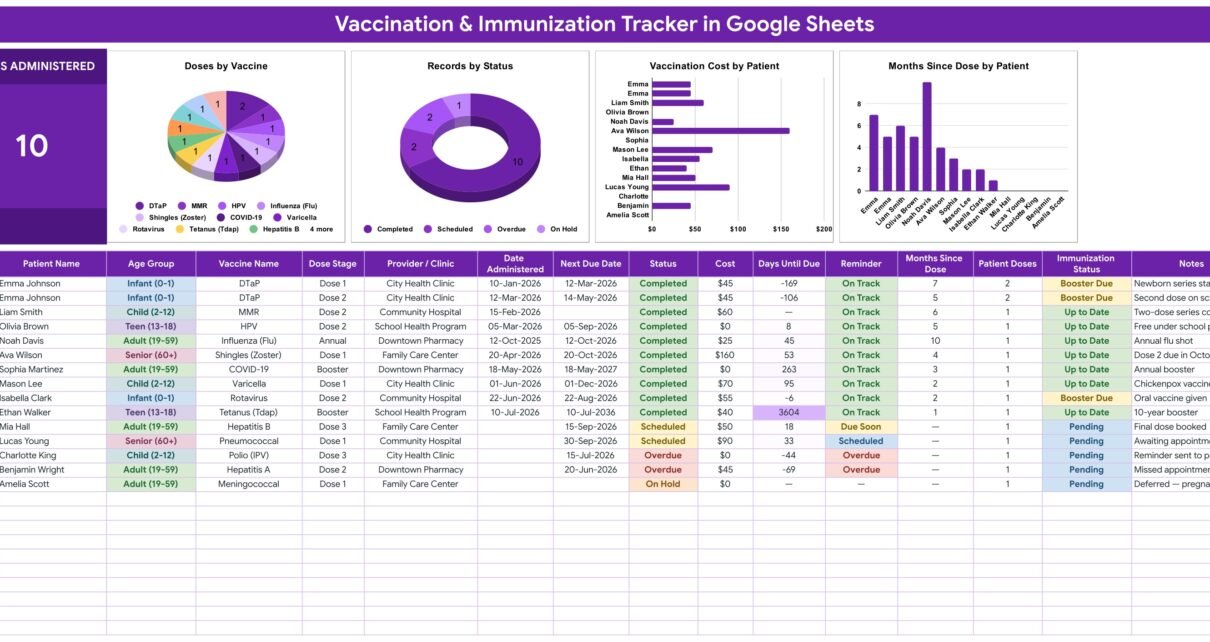
The Vaccination & Immunization Tracker in Google Sheets records 16 fields for every dose a household has had or has been given a date for, calculates one live KPI card, drives 4 charts and resolves 6 columns by formula. Its formulas and charts already cover rows 16 to 1000, so roughly 985 dose records fit without a single formula being dragged. The file ships with 15 sample rows filled in, and replacing them takes about two minutes.Vaccination & Immunization Tracker in Google Sheets
Most families keeping vaccination records have the same three problems. The paper card from the clinic goes missing exactly when a school, an employer or a border asks for it. Nobody can remember whether the second dose of a two-dose series actually happened. And the date written on the back of an appointment slip in March is invisible by September. A phone app fixes some of that for a monthly fee and keeps a health record on somebody else’s server. A spreadsheet fixes all of it for one payment and keeps the record in your own Google Drive — as long as somebody has already written the awkward date formulas. That is what this tracker is.Vaccination & Immunization Tracker in Google Sheets
Get the Vaccination & Immunization Tracker
An important boundary, stated up front: this is a record-keeping template, not medical advice. It contains no vaccination schedule, recommends no vaccine, and calculates no dose interval or age recommendation. Every date in it is a date you typed in from your own doctor, clinic or health authority. It is not a medical device, not a diagnostic tool and not a substitute for professional care — follow the schedule your own clinician gives you.Vaccination & Immunization Tracker in Google Sheets
Key Features of the Vaccination & Immunization Tracker in Google Sheets
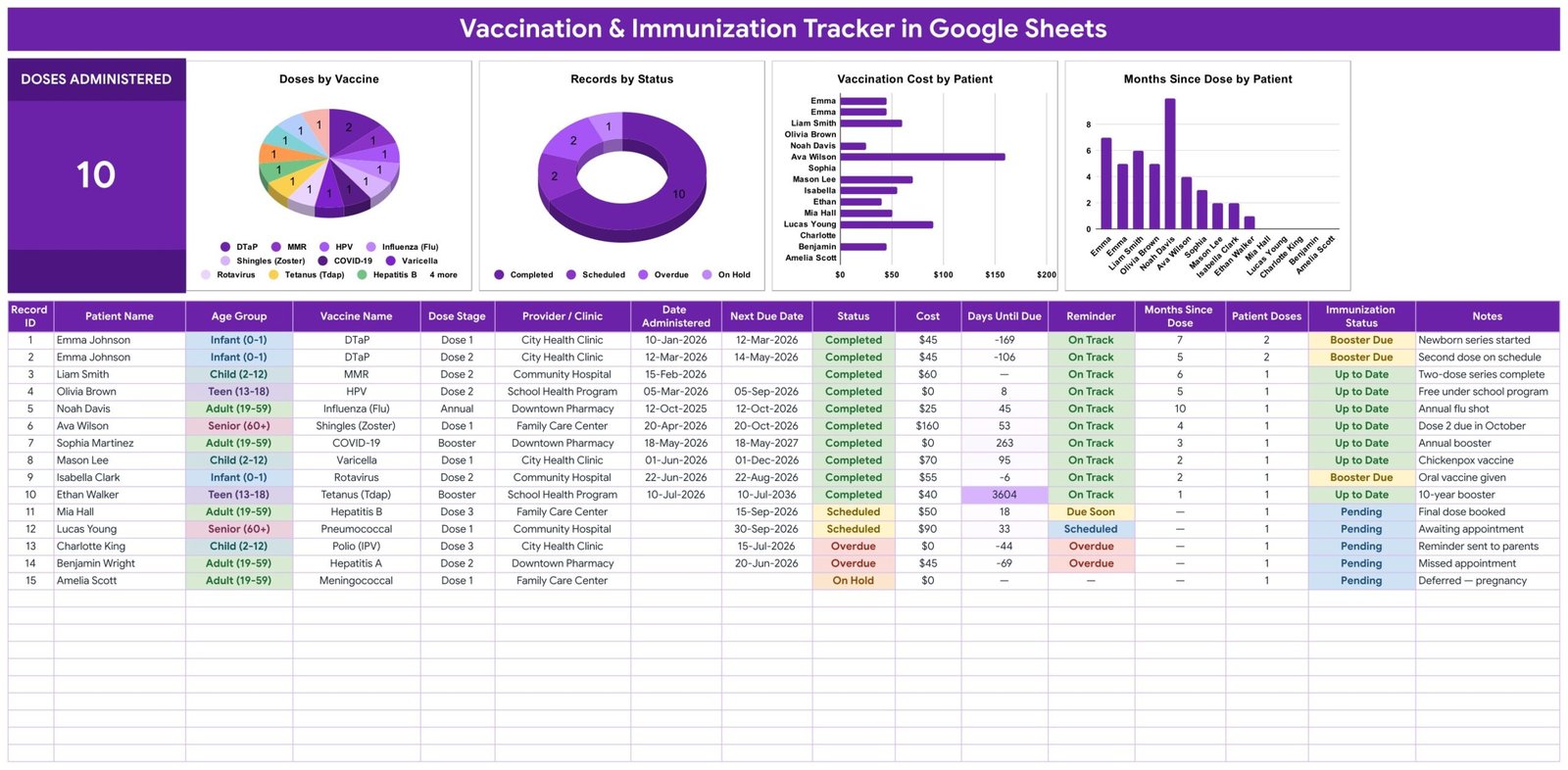
One row per dose, given or planned. The tracker tab holds Record ID, Patient Name, Age Group, Vaccine Name, Dose Stage, Provider / Clinic, Date Administered, Next Due Date, Status, Cost, Days Until Due, Reminder, Months Since Dose, Patient Doses, Immunization Status and Notes. You type ten of those; six are calculated.Vaccination & Immunization Tracker in Google Sheets
Six columns fill themselves in. Record ID numbers the row. Days Until Due measures the Next Due Date against today, so the number is different every morning without anybody touching the file. Months Since Dose does the same in reverse for the Date Administered. Patient Doses counts how many rows that person has. Reminder and Immunization Status then read those numbers.Vaccination & Immunization Tracker in Google Sheets
A Reminder column with three states. Every row shows Overdue, Due Soon or On Track. It is a straight comparison between a date you entered and the date it is now — no prediction, no recommendation, no clinical logic hidden anywhere in it.
An Immunization Status roll-up. Up to Date, Booster Due or Pending, derived per row from what has been logged for that person. In the sample data the two DTaP rows for the same infant both read Booster Due, while a completed two-dose MMR series reads Up to Date — which is exactly the distinction a paper card makes you work out by hand.
A Doses Administered card. One large KPI at the top left, reading 10 on the sample data. Paste in your own rows and it changes immediately.
Four charts wired straight to the data. Doses by Vaccine, Records by Status, Vaccination Cost by Patient and Months Since Dose by Patient all read the tracker columns directly across rows 16 to 1000. There are no hidden helper tables anywhere in the file, which is why a dose added on row 62 shows up in all four charts the moment it is typed.
Five dropdown columns fed by a List tab. Age Group, Vaccine Name, Dose Stage, Provider / Clinic and Status are data-validation dropdowns reading rows 2 to 500 of the List sheet. They ship with 5 age bands, 14 vaccine names, 5 dose stages, 6 providers and 5 statuses. Add a clinic on the List tab and it appears in the dropdown; there is no re-setup step. This is what stops “City Health Clinic” and “City health clinic” becoming two separate slices in the charts.
Cost tracking per dose. A plain currency column, $ by default, switchable under Format → Number. It is the column most people are surprised by: the sample sheet’s $160 shingles row is the kind of out-of-pocket number that never gets added up otherwise.
The Four Tabs Explained
Vaccination Tracker
The working page, and where you will spend all your time. The Doses Administered card sits beside the four charts, and under them runs the 16-column table with 15 sample rows spanning DTaP, MMR, HPV, influenza, shingles, COVID-19, varicella, rotavirus, Tdap, hepatitis A and B, pneumococcal, polio and meningococcal entries across five age bands and five providers. Age Group, Status, Reminder and Immunization Status are colour-coded, so a row that has slipped is visible from across the room. Those sample rows illustrate the shape of a record and nothing else — they are not a schedule and are meant to be deleted.
Instructions
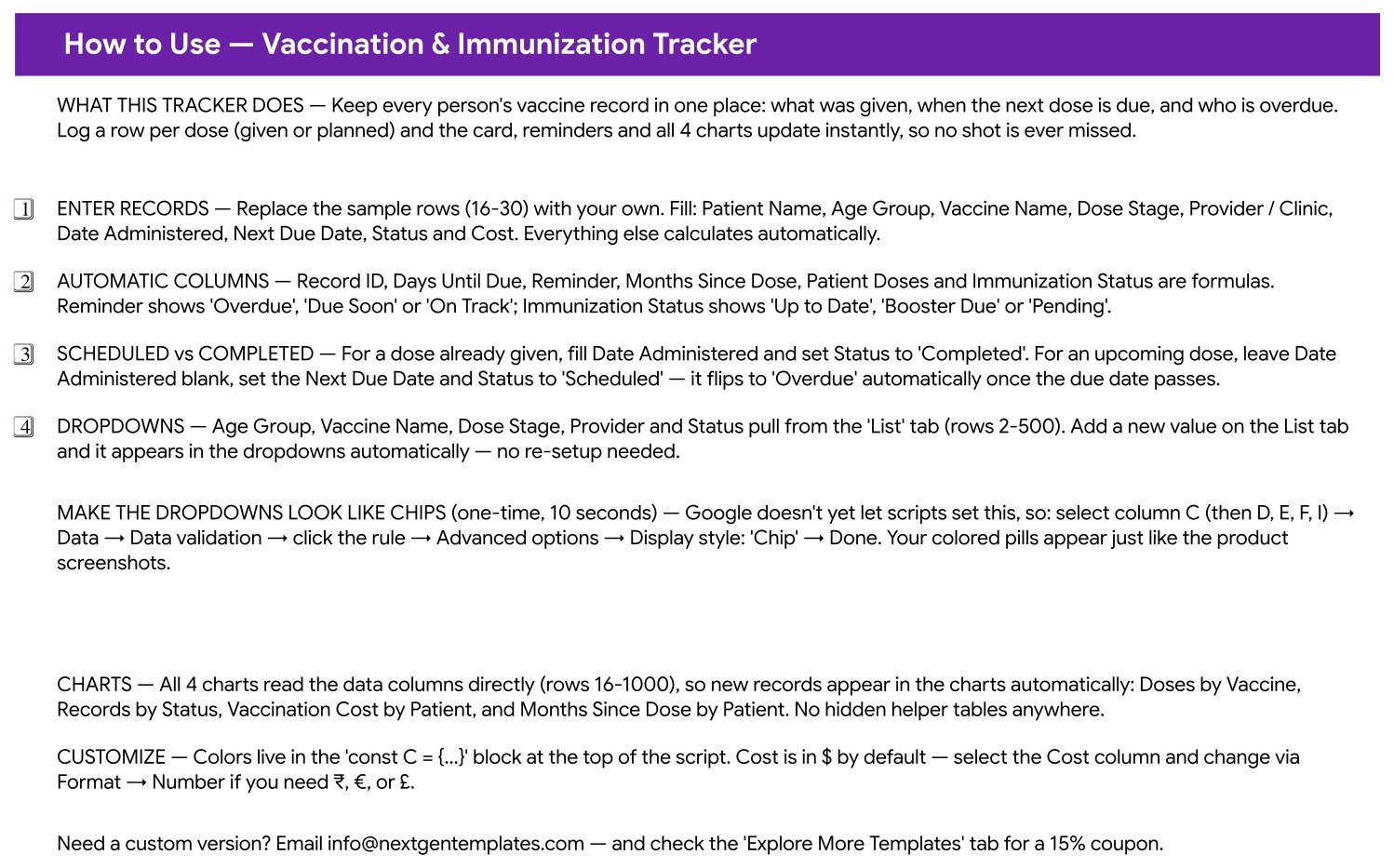
A single-screen guide covering what to enter, which columns are formulas, how a Scheduled row differs from a Completed one, how the dropdowns extend themselves, and the one-time ten-second step that turns the dropdowns into the coloured chips shown in the screenshots — Data → Data validation → the rule → Advanced options → Display style: Chip. Google Sheets does not yet let a script set that display style, which is why it is a manual step; the Google Sheets data validation documentation covers the same setting.
List
Five columns, one per validated field, read from rows 2 to 500. The only place vocabulary is maintained. The Status list carries a fifth value, Skipped, that does not appear in the sample rows but is there for a dose that was deliberately not given.
Explore More Templates
The NextGenTemplates catalogue page built into the file, including a WELCOME15 coupon for 15% off the next template.
Google Sheets vs. an Excel Vaccination Log vs. Paid Patient-Record SaaS — Feature Comparison
| This Google Sheets tracker | Excel vaccination log | Paid patient-record SaaS | |
|---|---|---|---|
| Cost | ✅ $6.99 once | $5-$15 once, plus an Office licence | $60-$150 per user per month |
| Platform | ✅ Any browser | Excel desktop | Vendor cloud |
| Setup time | ✅ About 2 minutes | 5-10 minutes | Days, with onboarding |
| Real-time collaboration | ✅ Native | OneDrive co-authoring only | Yes |
| Mobile access | ✅ Google Sheets app | Excel mobile, limited | Vendor app |
| Customisable fields | ✅ Add columns freely | Yes | Usually locked to the vendor’s schema |
| Share with a link | ✅ Yes | File send or OneDrive | Seat-based invitations |
| Year-1 cost at 5 users | ✅ $6.99 | About $15 plus licences | $3,600-$9,000 |
| Overdue flag against today’s date | ✅ Formula column | Only if you write it | Yes |
| Where the record lives | ✅ Your own Google Drive | Your own disk or OneDrive | The vendor’s servers |
| Regulated clinical record system | No — personal records only | No | Yes, that is what you pay for |
For a household that wants a shareable, printable record of what has been given and what is coming — without a monthly fee and without handing a health record to a third-party app — this tracker sits in the sweet spot. For a clinic that needs an auditable patient record system, the third column is the right answer and this is not.
Who Should Use This Template
A good fit for:
- Parents keeping two or three children’s dose history straight between paediatric visits
- Adults tracking their own boosters, seasonal flu shots and travel vaccines in one place
- Anyone managing an ageing parent’s records alongside their own, from another city if need be
- Small nurseries, playgroups and sports clubs keeping an administrative list from dates parents supply
- Anyone who wants a printable record ready before a school enrolment, a new job or a trip
- Spreadsheet beginners — every calculated column is already written; you type text, dates and numbers
Not a fit if:
- You want the file to tell you which vaccine to have or when — it contains no schedule and makes no recommendation
- You need email, SMS or push reminders — the Reminder column flags a row inside the sheet and sends nothing
- You need a regulated clinical record: no access log, no consent workflow, no HIPAA-grade controls
- You need barcode or batch-number lookup — every entry is typed by hand
- You want automatic import from a health portal — there is no integration
Real-World Use Cases
Aisha has two children and a drawer full of clinic cards. She logged one row per dose per child from the cards she still had. When the school asked for a record before enrolment she filtered to one child and printed a single page. The rows sitting at Booster Due became her list of questions for the next appointment rather than something she tried to remember in the room.
Tom, 61, keeps his own and his mother’s records in one sheet. Two names, one file, shared with his sister so nobody double-books anything. Months Since Dose tells him at a glance how long it has been since each entry he has logged, Patient Doses makes an unfinished two-dose series obvious, and Vaccination Cost by Patient shows what each of them has actually paid this year.
Ruth manages a 14-child nursery. One row per child per dose, entered from the dates parents give her. Records by Status is the Monday morning check: anything reading Overdue becomes a phone call to a parent — an administrative prompt to go and ask, never a clinical judgement made by the nursery.
Advantages of the Vaccination & Immunization Tracker
- The date arithmetic is already written. Days Until Due, Months Since Dose and the two status columns are the parts people get wrong when they build this themselves.
- Nothing is hidden. No helper tables, no pivot caches, no query sheet — the charts read the same columns you type into, so what you see is what is in the table.
- It scales to a household or a small group without any change: formulas and charts already reach row 1000.
- The vocabulary stays clean because five fields are dropdowns fed from one list.
- The record is portable. It is a Google Sheet: share a link, print a page, export a PDF, download it as Excel.
- One payment. No subscription, no per-user fee, no account with a health app.
Opportunities for Improvement
Honest limitations, so nobody buys the wrong thing:
- No notifications. The Reminder column is a flag you have to open the sheet to see. Adding a Google Apps Script time-driven trigger to email a weekly digest is a reasonable DIY extension, but it is not in the file.
- The chip styling is a manual one-time step on five columns, because Google does not expose that display setting to scripts.
- No batch or lot numbers. If you want them, add a column — the charts will ignore it happily.
- Cost is a single currency column. Mixed-currency records need a second column and a conversion of your own.
- No privacy layer beyond your Google account. Sharing is all-or-nothing per file; there is no per-row permission.
Best Practices
- Enter one row per dose, never one row per person. Everything else in the file assumes that shape.
- Type dates as dates, not as text, or Days Until Due cannot do its job.
- Log the appointment the day it is made — blank Date Administered, Next Due Date filled, Status Scheduled — so it flips to Overdue on its own if it is missed.
- Keep the vocabulary on the List tab rather than typing free text into the five governed columns.
- Use initials or a household reference in Patient Name if the records are not your own and the sheet may ever be shared.
- Check the record against the clinic’s own record before you rely on it for an enrolment or a trip. The sheet is only as accurate as what was typed into it.
- Keep the Notes column busy. “Deferred — pregnancy” or “free under school programme” is the context you will have forgotten in a year.
Explore Relevant Templates
The natural companion is the Supplement & Vitamin Tracker in Google Sheets, which uses the same four-tab build for daily intake. If you are keeping records for a whole practice rather than a household, the Clinics Dashboard in Google Sheets and the Hospitals Dashboard in Google Sheets operate at that scale, and the Lab Sample Collection Calendar in Google Sheets covers the sample-collection side of the same workflow.
Prefer to learn the spreadsheet skills behind trackers like this? The NextGenTemplates Academy learning paths take you through them one step at a time.
Get the Vaccination & Immunization Tracker
Frequently Asked Questions
Does the tracker tell me which vaccines are due and when?
No. It contains no schedule and makes no recommendation. It tracks the dates you enter from your own doctor, clinic or health authority, and flags a row once the date you typed has passed.
Is this medical advice or a medical device?
Neither. It is a spreadsheet for keeping personal records. Every decision about vaccines belongs with your own clinician.
Can I track a whole family in one file?
Yes. Enter one row per person per dose; Patient Doses and Immunization Status roll up per person, and both patient charts break the data out by name.
Will it send me a reminder?
No. The Reminder column shows Overdue, Due Soon or On Track inside the sheet. Nothing is emailed or texted anywhere.Vaccination & Immunization Tracker in Google Sheets
Do I need Excel or an add-on?
No. It runs in Google Sheets in any browser on the Google account you already have — no install, no macro, no add-on.Vaccination & Immunization Tracker in Google Sheets
Where is my data stored?
In your own Google Drive, under your own account, visible only to whoever you share it with. It is a personal file rather than a regulated clinical system, so use initials rather than full identifying details if the records are not your own.Vaccination & Immunization Tracker in Google Sheets
What do I actually download?
A PDF carrying the “Make a copy” link to the live Google Sheet, plus the setup notes. One click and the tracker is in your Drive.Vaccination & Immunization Tracker in Google Sheets
About the Author
Built by PK — Microsoft Certified Professional with 15+ years of Excel, Google Sheets, and Power BI experience. Founder of NextGenTemplates, reaching 300K+ subscribers across YouTube channels. Every template is hand-built and tested before release.Vaccination & Immunization Tracker in Google Sheets
Conclusion
A vaccination record is one of those things nobody thinks about until somebody asks for it, and then it matters within the hour. The Vaccination & Immunization Tracker in Google Sheets turns a drawer of clinic cards into one table that adds up: 16 columns, 6 of them calculated, 4 charts, a live count, and a Reminder column that reads today’s date so an entry that has slipped past its date cannot hide. It records; your clinician decides.Vaccination & Immunization Tracker in Google Sheets
👉 Get the Vaccination & Immunization Tracker in Google Sheets — $6.99 today (regular $12.99). Instant download, one-time payment, no subscription, lifetime access.Vaccination & Immunization Tracker in Google Sheets