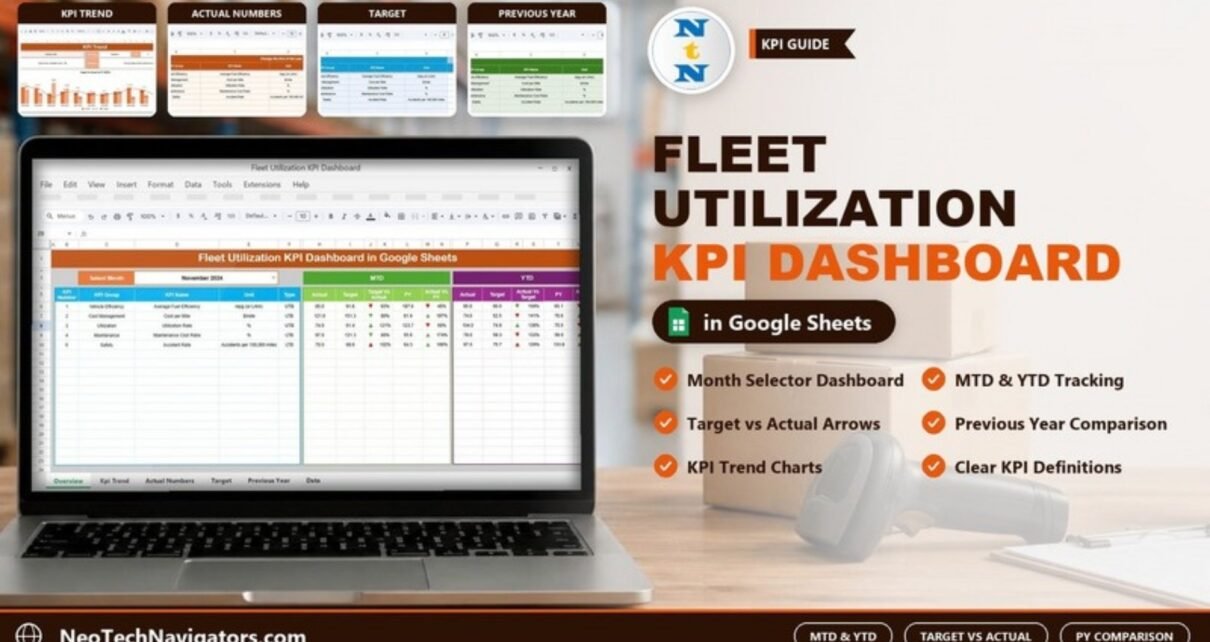
The Fleet Utilization KPI Dashboard in Google Sheets helps fleet and transport managers see, month by month, whether vehicles are earning their keep. You pick a month and the dashboard shows each KPI’s Month-to-Date (MTD) and Year-to-Date (YTD) actual against target and against the previous year (PY), with up and down arrows that make the direction of each result obvious at a glance.
This fleet utilization KPI dashboard is built for logistics companies, delivery operators, rental fleets and construction or service fleets. It ships with five KPIs: Average Fuel Efficiency, Cost per Mile, Utilization Rate, Maintenance Cost Ratio and Accident Rate. Below you will find what each of the six sheets does, how those KPIs are defined, how to load your own numbers, and where a spreadsheet dashboard stops being the right tool.
🎥 Watch the Video Tutorial
Get the Fleet Utilization KPI Dashboard
Why Track Fleet Utilization With KPIs?
A vehicle that sits in the yard still costs money: finance or lease payments, insurance, depreciation and a driver who may be idle. At the same time, fuel prices move, maintenance bills grow as vehicles age, and customers expect tighter delivery windows. Without a monthly KPI view, managers find out about an underused truck or a rising cost per mile only when the quarterly accounts arrive.
A KPI dashboard brings those signals forward. Comparing actual results with a target tells you whether the operation is on plan; comparing them with last year tells you whether it is improving. Doing both for MTD and YTD separates a bad month from a bad trend.
The Five Fleet KPIs in the Template
The template’s KPI Definition sheet holds each KPI’s group, name, unit, formula, definition and type (UTB = upper the better, LTB = lower the better). These are the five KPIs it ships with, exactly as defined in that sheet:
| KPI Group | KPI Name | Unit | Formula | Definition | Type |
|---|---|---|---|---|---|
| Vehicle Efficiency | Average Fuel Efficiency | mpg (or L/km) | Total miles / Total gallons | Measures how efficiently vehicles are using fuel | UTB (higher is better) |
| Cost Management | Cost per Mile | $/mile | Total cost / Total miles | Indicates the cost incurred per mile traveled | LTB (lower is better) |
| Utilization | Utilization Rate | % | (Active hours / Available hours) × 100 | The percentage of time vehicles are in use | UTB (higher is better) |
| Maintenance | Maintenance Cost Ratio | % | Maintenance cost / Total cost | The proportion of costs that are maintenance-related | LTB (lower is better) |
| Safety | Accident Rate | Accidents per 100,000 miles | (Number of accidents / Total miles) × 100,000 | Frequency of accidents per distance traveled | LTB (lower is better) |
Worked Example: Reading One Row of the Dashboard
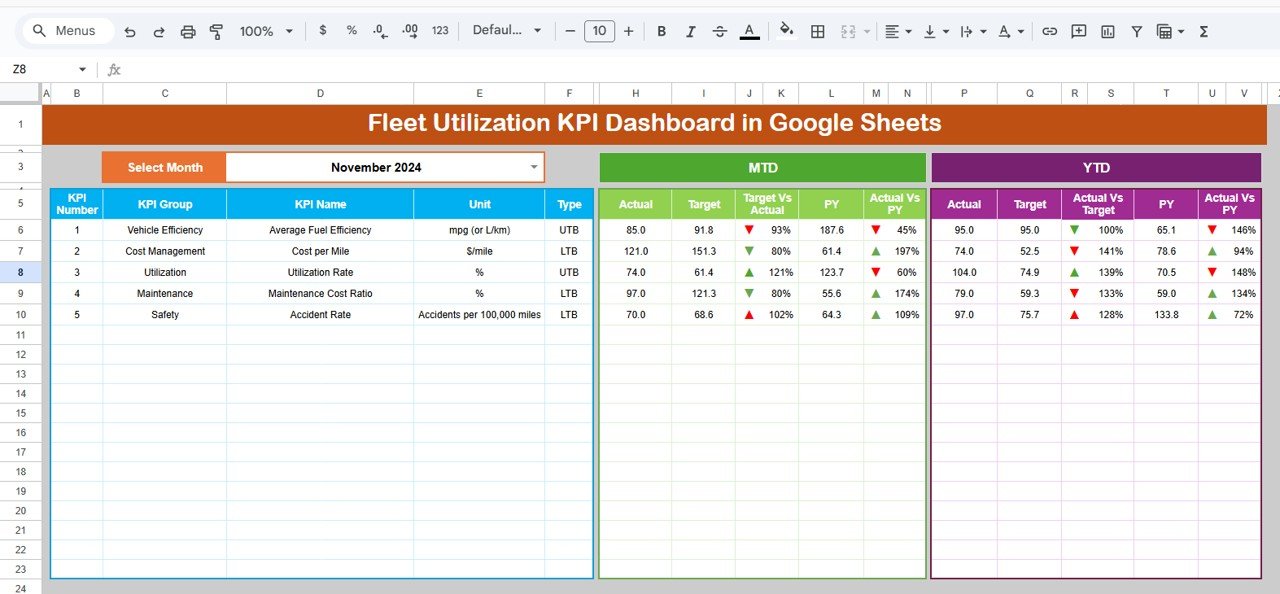
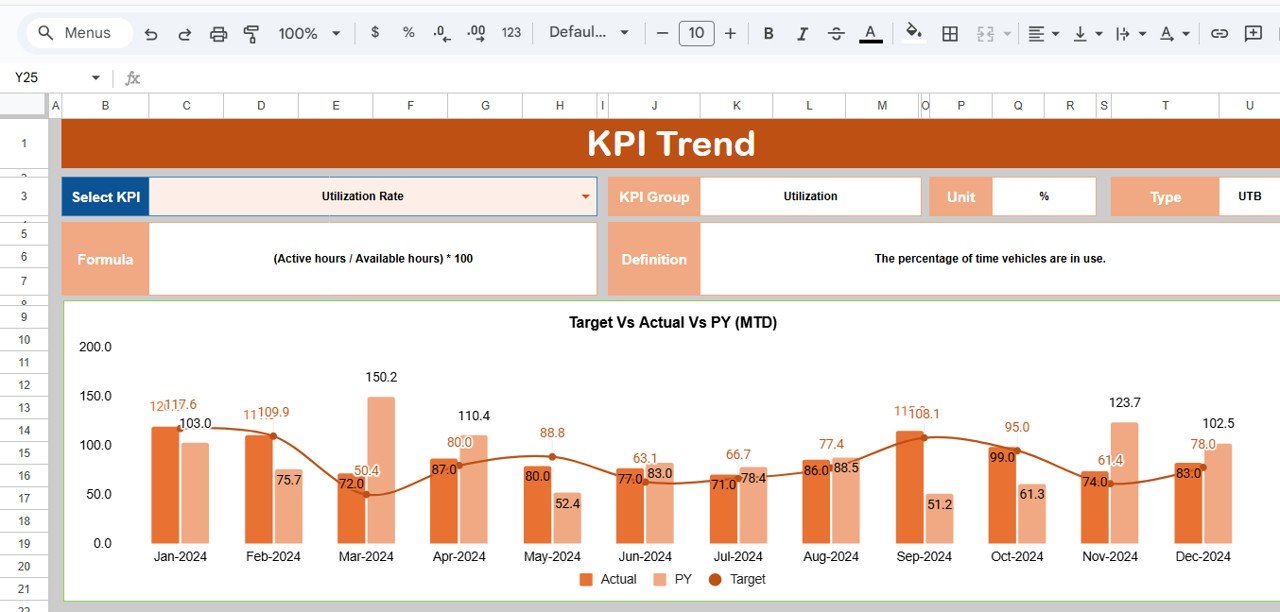
Take Utilization Rate for November 2024 in the sample data. The MTD Actual is 74.0, the MTD Target is 61.4 and the MTD PY value is 123.7. The two comparison columns are simple ratios of actual to the benchmark:
Target Vs Actual = 74.0 / 61.4  = 1.205  →  121%
Actual Vs PY     = 74.0 / 123.7 = 0.598  →  60%
So Utilization Rate beat its target for the month but fell well short of the same month last year. For the actual value itself, the formula from the KPI Definition sheet applies: if your vehicles were active for 370 of 500 available hours, the Utilization Rate is (370 / 500) × 100 = 74%. Because Cost per Mile, Maintenance Cost Ratio and Accident Rate are LTB, a result below 100% against target is good news for those three, while for Average Fuel Efficiency and Utilization Rate you want to be above 100%.
Inside the Fleet Utilization KPI Dashboard: Six Sheets
1. Dashboard
The main page. Choose the month in the Select Month drop-down in cell D3 (November 2024 in the screenshot). Each KPI row shows its KPI Number, KPI Group, KPI Name, Unit and Type, followed by an MTD block (Actual, Target, Target Vs Actual, PY, Actual Vs PY) and a YTD block (Actual, Target, Actual Vs Target, PY, Actual Vs PY). Conditional formatting places an up or down arrow beside each comparison percentage, so the KPIs that moved most stand out immediately.
2. KPI Trend
Select a KPI from the drop-down in cell C3 to see its KPI Group, Unit, Type, Formula and Definition, together with a Target Vs Actual Vs PY (MTD) chart that plots Actual and PY as columns and Target as a line for every month from Jan-2024 to Dec-2024. This is the page to open when one KPI looks wrong and you want to see whether it is a one-off or a pattern.
3. Actual Number
Enter the actual MTD and YTD value for each KPI and month here, in a grid with one MTD and one YTD column per month. Cell E1 (marked “Change the first of the year”) sets the first month of your year, so financial years that start in April (or any other month) line up correctly.

4. Target
Enter the MTD and YTD targets for each KPI and month in the same layout. Targets can be flat across the year or seasonal, for example higher utilization targets in peak delivery months.

5. Previous Year Number
Enter last year’s monthly MTD and YTD values here (2023 in the sample) to power the Actual Vs PY comparison on the dashboard.

6. KPI Definition
The master list, with columns #, KPI Group, KPI Name, Unit, Formula, Definition and Type (a UTB/LTB drop-down). Everything else reads from this sheet, so it is where you add, rename or remove KPIs.

Other Fleet KPIs Worth Tracking
The template does not include the KPIs below, but they are common in fleet reporting and you can add them as extra rows in the KPI Definition sheet if your data supports them:
- Downtime – off-road hours for repairs or breakdowns, or downtime as a % of available hours (lower is better).
- Revenue per Vehicle – total revenue ÷ number of active vehicles (higher is better).
- On-Time Delivery % – deliveries within the promised window ÷ total deliveries × 100 (higher is better).
How to Use It With Your Own Data
- Make your own copy in Google Drive after purchase with File > Make a copy.
- Review the KPI Definition sheet. Keep the KPIs that matter to your fleet, edit formulas and definitions, and set each KPI’s Type (UTB or LTB) correctly.
- Set the first month of your year in cell E1 of the Actual Number sheet.
- Enter targets for the year in the Target sheet and last year’s figures in the Previous Year Number sheet.
- Each month, calculate the actuals from your telematics, fuel card and maintenance records and enter them in the Actual Number sheet.
- Select the month in D3 on the Dashboard and review the arrows; open KPI Trend for anything that moved the wrong way.
Real-World Use Cases
- Last-mile delivery company: tracks Utilization Rate and Cost per Mile to decide whether to add vehicles before the festive peak or extend shifts on existing ones.
- Equipment and vehicle rental business: watches Utilization Rate month by month to spot periods when too much of the fleet sits idle.
- Construction contractor: monitors Maintenance Cost Ratio and Accident Rate for tippers and site vehicles to plan servicing and safety briefings between projects.
Best Practices
- Update on a fixed date each month so MTD and YTD figures are always complete.
- Agree definitions first. “Available hours” and “active hours” must mean the same thing every month or utilization will drift.
- Watch the lower-the-better KPIs closely. Cost per Mile, Maintenance Cost Ratio and Accident Rate tend to creep up slowly.
- Set realistic targets based on last year plus a planned improvement, not on a wish.
- Review trends quarterly using the KPI Trend sheet, not only the current month.
Limitations and Who Should Not Use It
This dashboard reports monthly KPI values that you enter; it does not pull data from GPS or telematics systems and it does not track individual vehicles trip by trip. If you need live vehicle locations, driver behaviour scoring or automatic maintenance alerts, use fleet management software and treat this sheet as the monthly management summary. For small and mid-sized fleets that want a clear MTD/YTD scorecard without new software, it is a practical fit.
Related Templates and Guides
For a broader view of your vehicles, see the Fleet Management KPI Dashboard and the Fleet Management Dashboard in Google Sheets. To collect the inputs behind these KPIs, the Fleet Fuel and Mileage Tracker and Fleet Maintenance Calendar help, and the Transportation KPI Dashboard covers wider logistics metrics.
Prefer another tool? The same dashboard is available as the Fleet Utilization KPI Dashboard in Excel and in Power BI.
If you want to learn how to build KPI dashboards like this from scratch, the Excel Pivot Tables & Dashboards course on NextGenTemplates Academy teaches the structure, formulas and charts step by step.
Frequently Asked Questions
How do you calculate fleet utilization?
The template uses (Active hours / Available hours) × 100. For example, 370 active hours out of 500 available is 74% utilization. Some fleets measure in days or distance instead; whichever you choose, stay consistent.
What is a good fleet utilization rate?
It depends on the operation. Many delivery and rental fleets aim for roughly 80 to 90 percent, but seasonal businesses and emergency fleets plan for lower figures. Use last year’s numbers and your own targets as the benchmark.
Which KPIs does the template include?
Five: Average Fuel Efficiency, Cost per Mile, Utilization Rate, Maintenance Cost Ratio and Accident Rate (per 100,000 miles). You can add more rows in the KPI Definition sheet, including their unit, formula and UTB/LTB type, then enter their targets and actuals.
Does the dashboard update automatically?
Yes. When you enter values in the Actual Number, Target or Previous Year Number sheets and select a month, the dashboard and arrows recalculate.
Can several people work on it at once?
Yes. It runs in Google Sheets, so team members can enter data and view the dashboard at the same time with normal sharing permissions.
How often should I update it?
Monthly is the natural rhythm for MTD and YTD tracking. Some fleets update weekly during peak seasons to catch problems earlier.
Wrapping Up
The Fleet Utilization KPI Dashboard in Google Sheets gives you a disciplined monthly view of how well your vehicles are used and what they cost to run. Review the five KPI definitions, set honest targets, enter actuals on the same day each month, and let the arrows tell you where to look first.
Get the Fleet Utilization KPI Dashboard
📅 Last updated: October 2026