The CRM and Sales Pipeline Management System Web App packs 17 connected modules, a 6-KPI live dashboard and an 8-filter reporting layer into a single Google Sheets web application. Built entirely on Google Sheets and Google Apps Script, it stores every lead, deal and customer record inside your own Google Drive — no third-party server, no per-seat subscription. Most teams are up and running in under 15 minutes.
If your sales process currently lives across scattered spreadsheets, sticky notes and inbox threads, this Google Sheets CRM web app gives you one shared workspace with secure multi-user login. This guide walks through every module, compares the system against Excel CRMs and paid SaaS tools like HubSpot and Pipedrive, and explains who should (and shouldn’t) use it.
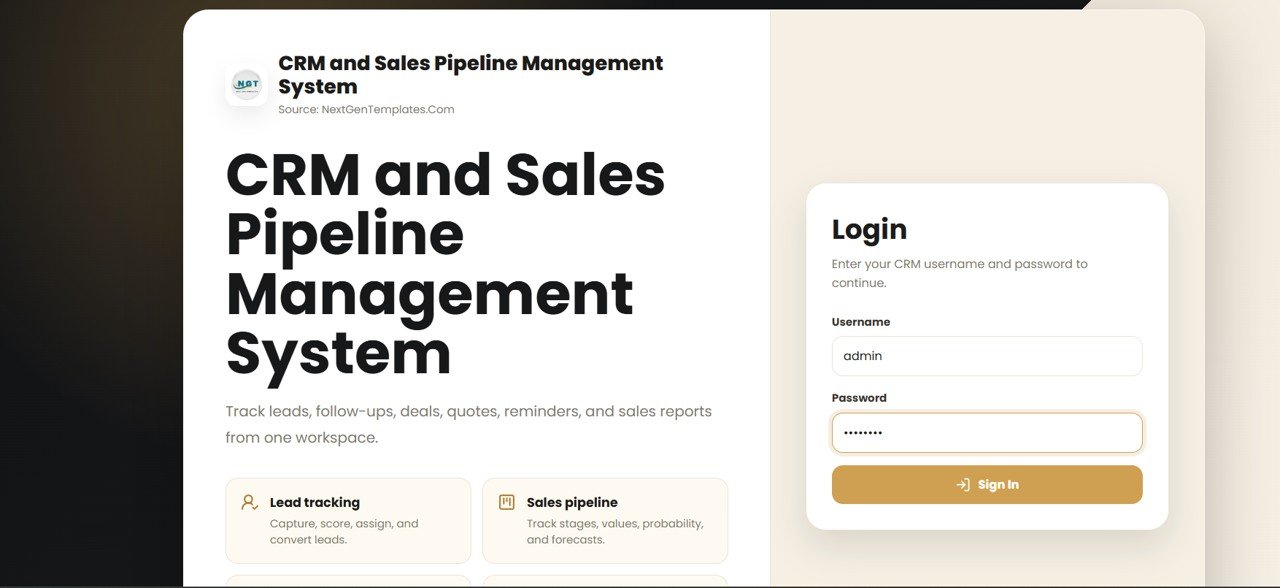
🚀 Try the Live Demo Before You Buy
We have deployed this web app in our own Google account so you can test every page, every role — with real sample data — before purchasing. No signup, no email required.
🔑 Test Login Credentials
Sign in as admin to manage all users, lists, settings, CRM modules, reports, and import/export, or as any sales user to work assigned leads, contacts, deals, activities, and follow-ups.
💡 What you get after purchase: The full source code (Code.gs + Index.html) plus a step-by-step deployment guide so you can deploy your own private instance in your own Google account in under 15 minutes.
Key Features of the CRM and Sales Pipeline Management System Web App
Click here to purchase the CRM and Sales Pipeline Management System Web App.
This is a full multi-user CRM rather than a single tracker. A secure login screen sits in front of the system, and two access levels — Admin and User — control who can view and edit each record. The Admin also manages every dropdown value used across the forms from a dedicated Lists page.
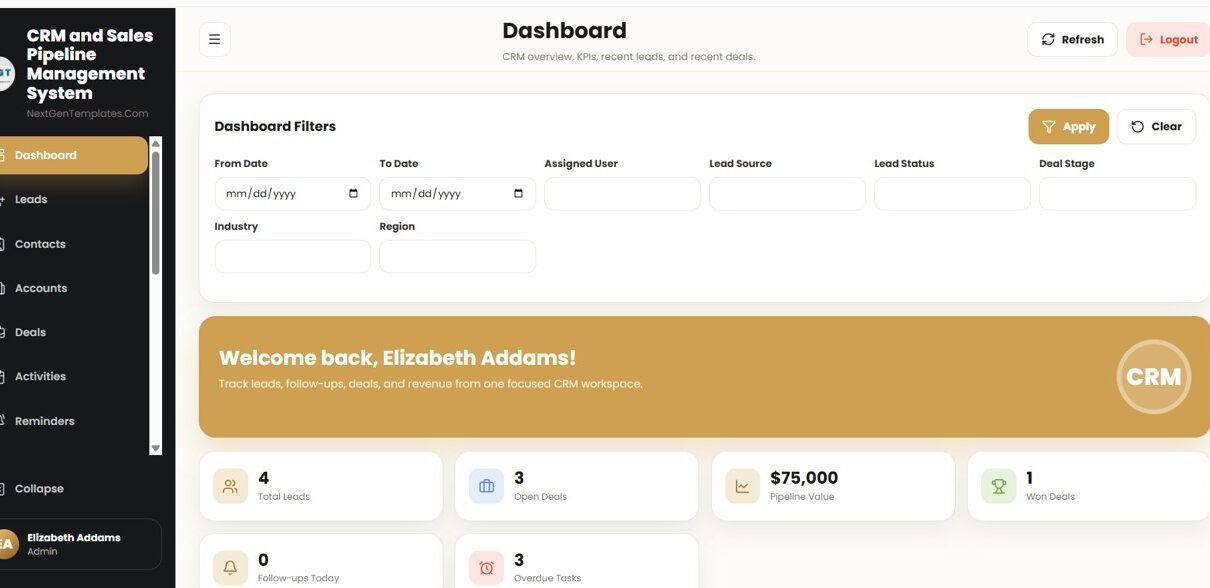
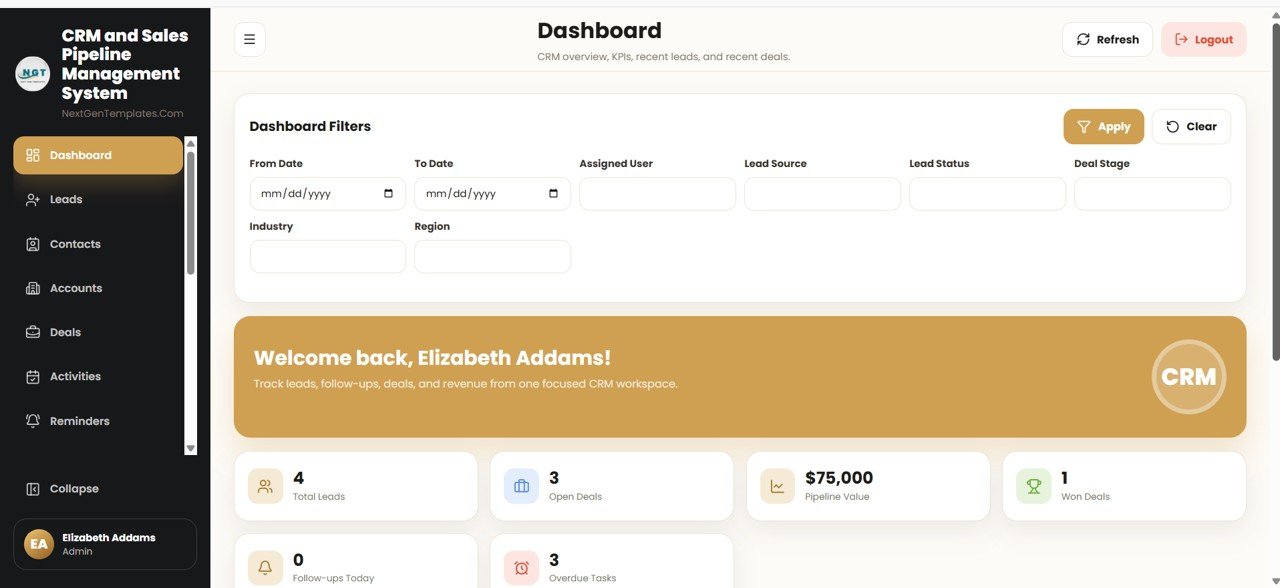
The CRM and Sales Pipeline Management System Web App covers 17 modules: Leads, Contacts, Accounts, Deals, Activities, Reminders, Notes, Interactions, Quotes, Products, Targets, Attachments, Reports, Users and Lists. The Deals module is a true visual pipeline — every opportunity carries a pipeline stage, deal value, probability % and expected close date, so forecasting is built in. The Dashboard tracks 6 KPIs (Total Leads, Open Deals, Pipeline Value, Won Deals, Follow-ups Today and Overdue Tasks) and offers 8 filters for slicing the data by date, user, source, status, stage, industry and region.
Modules Explanation
Dashboard
The command centre. Filters at the top narrow the view, six KPI cards surface the headline numbers, and recent leads and recent deals are listed below so you always see what needs attention today.
Leads
Click here to purchase the CRM and Sales Pipeline Management System Web App.
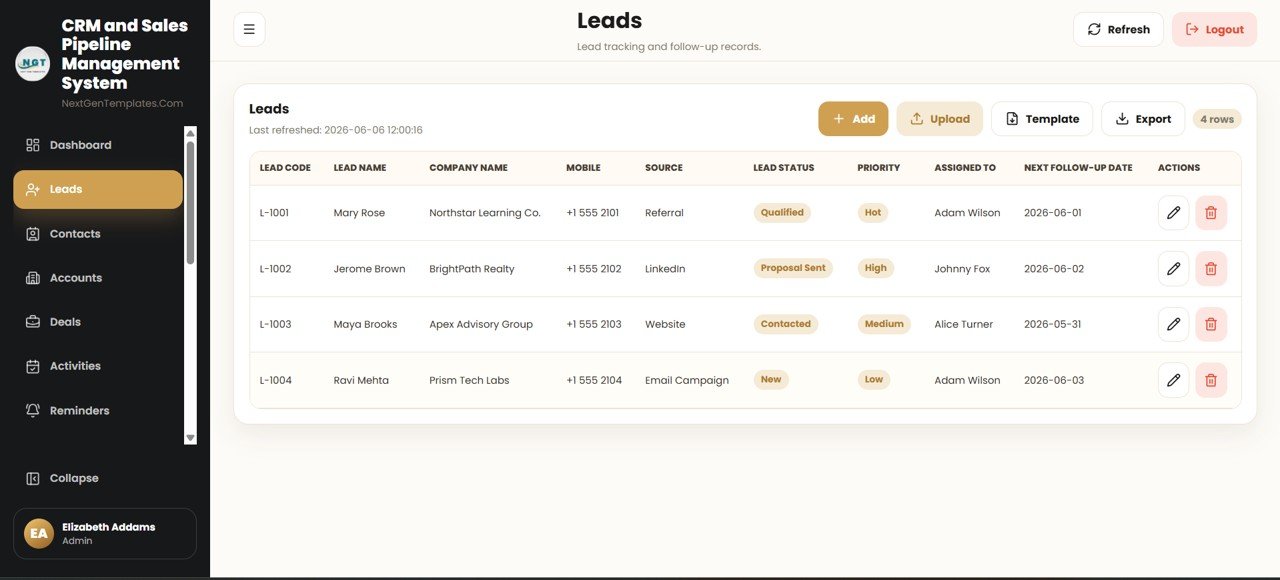
Captures every potential customer with Lead Code, Lead Name, Company Name, Mobile, Source, Lead Status, Priority, Assigned To and Next Follow-up Date — so no enquiry slips through the cracks.
Deals
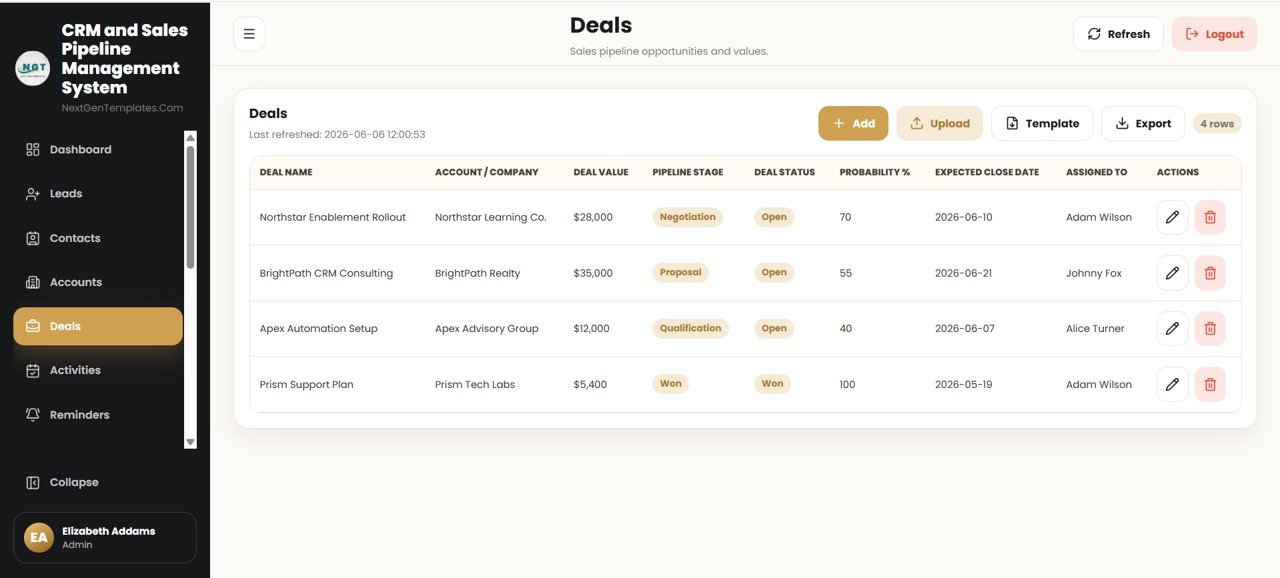
The sales pipeline view. Each deal records Deal Name, Account / Company, Deal Value, Pipeline Stage, Deal Status, Probability %, Expected Close Date and Assigned To, giving you a weighted forecast at a glance.
Contacts, Accounts, Activities, Reminders, Notes and Interactions
Click here to purchase the CRM and Sales Pipeline Management System Web App.
Contacts stores relationship details (name, company, mobile, email, designation), while Accounts keeps company-level records (industry, phone, city, account owner, status). Activities logs calls, emails, meetings, demos and tasks; Reminders handles follow-up, meeting, proposal and renewal alerts; and Notes plus Interactions capture context and the next step for every customer touchpoint.
Quotes, Products and Targets
Quotes holds proposal records with quote number, total amount, status and validity date. Products is your service master list with code, category, standard price and unit. Targets lets managers set monthly lead, deal and revenue goals per user, so performance can be measured against plan.
Reports
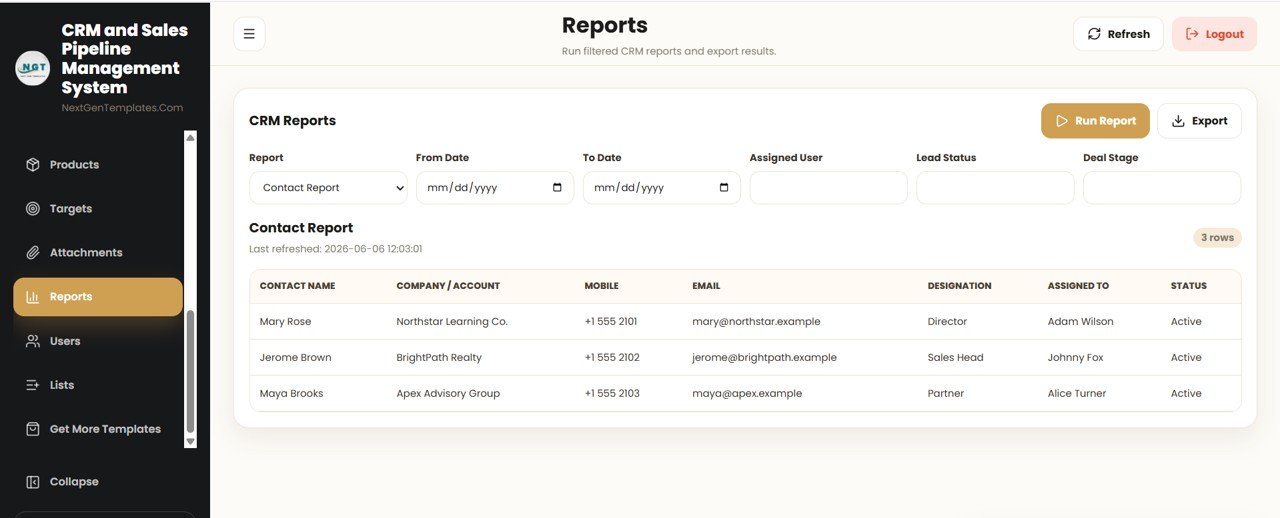
Run filtered CRM reports and export the results. Choose a report, set a date range, then filter by Assigned User, Lead Status and Deal Stage to produce the exact view you need for a review meeting.
Users, Attachments and Lists
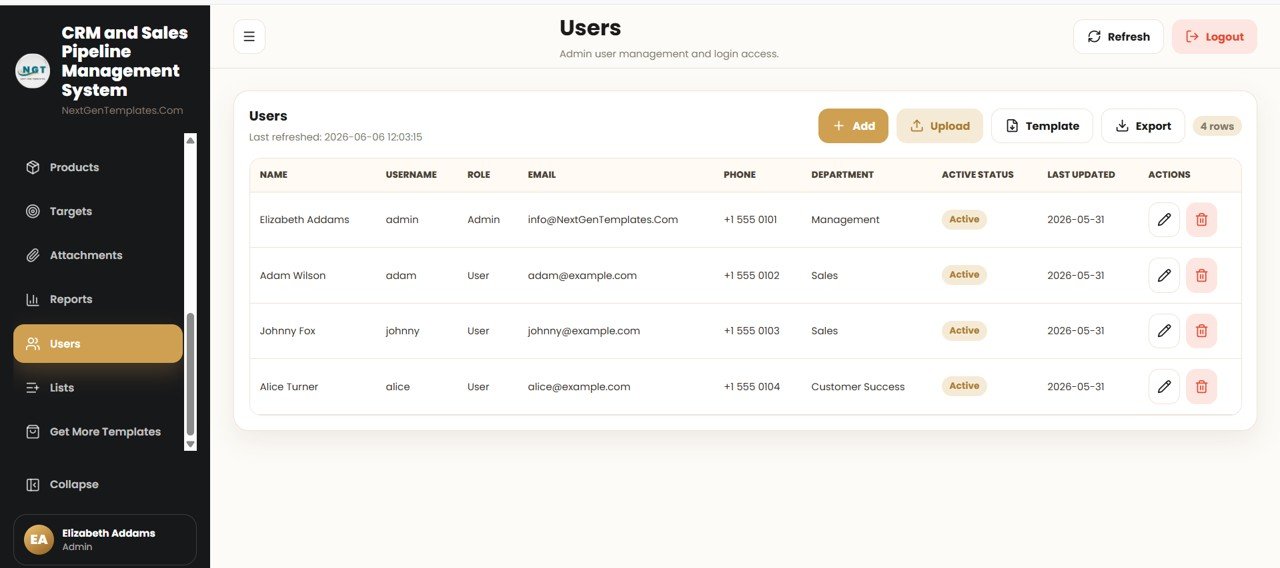
The Users page is where the Admin manages login access and roles. Attachments indexes customer and proposal files, and the Lists page centralises every dropdown value (lead sources, stages, statuses) used across the CRM forms.
CRM Web App vs. Excel CRM vs. Paid CRM SaaS — Feature Comparison
Click here to purchase the CRM and Sales Pipeline Management System Web App.
| Feature | CRM & Sales Pipeline Web App | Excel CRM / VBA Tool | HubSpot / Pipedrive / Salesforce |
|---|---|---|---|
| Cost | $39.99 one-time | $15–40 one-time | $25–150 / user / month |
| Platform | Google Sheets + Apps Script (browser) | Microsoft Excel (desktop) | Cloud SaaS |
| Setup time | Under 15 minutes | 5–10 minutes | Hours to days |
| Real-time team collaboration | ✅ Shared Sheet backend | ❌ Limited (file passing) | ✅ Yes |
| Mobile access | ✅ Any browser | ❌ Clunky | ✅ Native apps |
| Multi-user login & roles | ✅ Admin / User built-in | ❌ Rare | ✅ Yes |
| Your data ownership | ✅ Stays in your Google Drive | ✅ Local file | ❌ Vendor servers |
| Year-1 cost at 5 users | ✅ $39.99 total | ~$40 total | $1,500–9,000 / year |
For teams that want a real CRM with multi-user login and a live pipeline without paying $25–150 per user every month, the CRM and Sales Pipeline Management System Web App sits in the sweet spot.
Who Should Use This Template
Perfect for:
- Small and mid-sized sales teams (1–50 reps) that have outgrown spreadsheets but don’t want a per-seat SaaS bill
- Founders, consultants and agencies who want to own their customer data inside their own Google Drive
- Sales managers who need a shared pipeline, follow-up reminders and monthly targets in one place
Not a fit if:
- You need SOC 2, SSO/SAML and a dedicated account manager
- Your organisation cannot use Google Workspace or Google Drive
- You require native telephony, automated email sequences or marketing automation out of the box
Real-World Use Cases
Marco runs a 6-person B2B agency. He uses the CRM and Sales Pipeline Management System Web App to capture inbound leads, move them through deal stages with a probability % on each, and check the Pipeline Value KPI every Monday — without paying for five Pipedrive seats.
Aisha is a solo consultant. She logs every call and meeting in Activities, sets renewal Reminders, and stores signed proposals in Attachments, so nothing slips through the cracks between client engagements.
The Verma family business uses the Targets and Reports pages to set monthly revenue goals per salesperson and run filtered reports by Assigned User and Deal Stage at month end.
Advantages of the CRM and Sales Pipeline Management System Web App
The biggest advantage is cost predictability: a single $39.99 payment replaces recurring per-user CRM fees that can reach $1,500–9,000 per year for a five-person team. Because it runs on Google Apps Script, it works in any browser on desktop or mobile, and your data never leaves your Google account. The 17 connected modules mean leads, deals, activities and reports all reference the same records, removing the copy-paste errors that plague multi-spreadsheet setups.
Opportunities for Improvement
Click here to purchase the CRM and Sales Pipeline Management System Web App.
Being built on Google Sheets, the system is best suited to small and mid-sized teams; very large datasets (hundreds of thousands of rows) are better served by a dedicated database. It also focuses on core CRM workflow rather than bundled marketing automation or built-in telephony — those would need separate tools. Finally, the initial deployment requires a one-time Apps Script authorisation, which is straightforward but unfamiliar to first-time users.
Best Practices
Set up your dropdown values on the Lists page first — consistent lead sources and deal stages make the dashboard filters far more useful. Use the Reminders and Activities modules religiously so follow-ups never lapse, and review the Targets vs. actuals in Reports at the end of each month. For deeper technical detail on how the web app runs, see the official Google Apps Script documentation.
Explore Relevant Templates
If you are building out a suite of internal tools, these related web apps from NeoTechNavigators pair well with this CRM:
- Restaurant Management System Web App Template
- Gym and Fitness Center Membership Management System Web App
- School Management System Web App
- Production Tracking and Dispatch Management System
Frequently Asked Questions
Click here to purchase the CRM and Sales Pipeline Management System Web App.
What is the CRM and Sales Pipeline Management System Web App?
It is a multi-user CRM web application built on Google Sheets and Google Apps Script. The CRM and Sales Pipeline Management System Web App covers 17 modules — from Leads and Deals to Quotes, Targets and Reports — behind a secure login, all running in your browser.
Do I need to pay a monthly fee?
No. The CRM and Sales Pipeline Management System Web App is a one-time purchase of $39.99 with lifetime access and free updates. There are no per-user seats or recurring subscription charges.
Where is my customer data stored?
Your data lives in a Google Sheet inside your own Google Drive, so you keep full ownership and control of every record while still collaborating with your team in real time.
Can multiple users log in at the same time?
Yes. The system includes a Users page with Admin and User roles, so several team members can log in concurrently and the Admin controls access and the dropdown lists used across the CRM.
How long does setup take?
Most people are running in under 15 minutes: make a copy of the file, deploy it as a web app from the Apps Script editor, and log in with the admin account included in the guide.
How does this compare to HubSpot or Pipedrive?
HubSpot and Pipedrive charge $25–150 per user every month. The CRM and Sales Pipeline Management System Web App delivers leads, contacts, accounts, deals, a visual pipeline and reports for a single one-time payment, while keeping your data in your own Drive.
About the Author
Built by PK — Microsoft Certified Professional with 15+ years of Excel, Google Sheets, and Power BI experience. Founder of NextGenTemplates, reaching 300K+ subscribers across YouTube channels. Every template is hand-built and tested before release.
Conclusion
The CRM and Sales Pipeline Management System Web App gives small and mid-sized teams a real, multi-user CRM — leads, deals, a visual pipeline, reminders and reports — without a recurring SaaS bill and without handing your data to a vendor. Click here to purchase the CRM and Sales Pipeline Management System Web App.
Instant download · One-time payment · No subscription.
🎥 For step-by-step video tutorials, visit YouTube.com/@NeoTechNavigators.
Last updated: June 2026