The Construction Project Management System Web App packs 36 connected screens, an 18-card dashboard, 7 management charts, and role-based logins into one browser-based system built on Google Sheets and Google Apps Script. Instead of juggling separate spreadsheets for projects, materials, purchase orders, labor, and billing, your whole team signs in to one shared system and works from the same live data, for a one-time price rather than a monthly per-user subscription.
Construction teams lose time and margin when site updates, procurement, and finance live in disconnected files. This Google Sheets construction management system closes that gap: site engineers file daily progress reports from their phones, the purchase desk converts site requests into purchase orders, and management watches budget-vs-actual cost and cash position update automatically. Below is a full walkthrough of how the web app is built and who it is for. The product page on NextGenTemplates has the full screen gallery.
Get the Construction Project Management System
🎥 Watch the Video Tutorial
🚀 Try the Live Demo Before You Buy
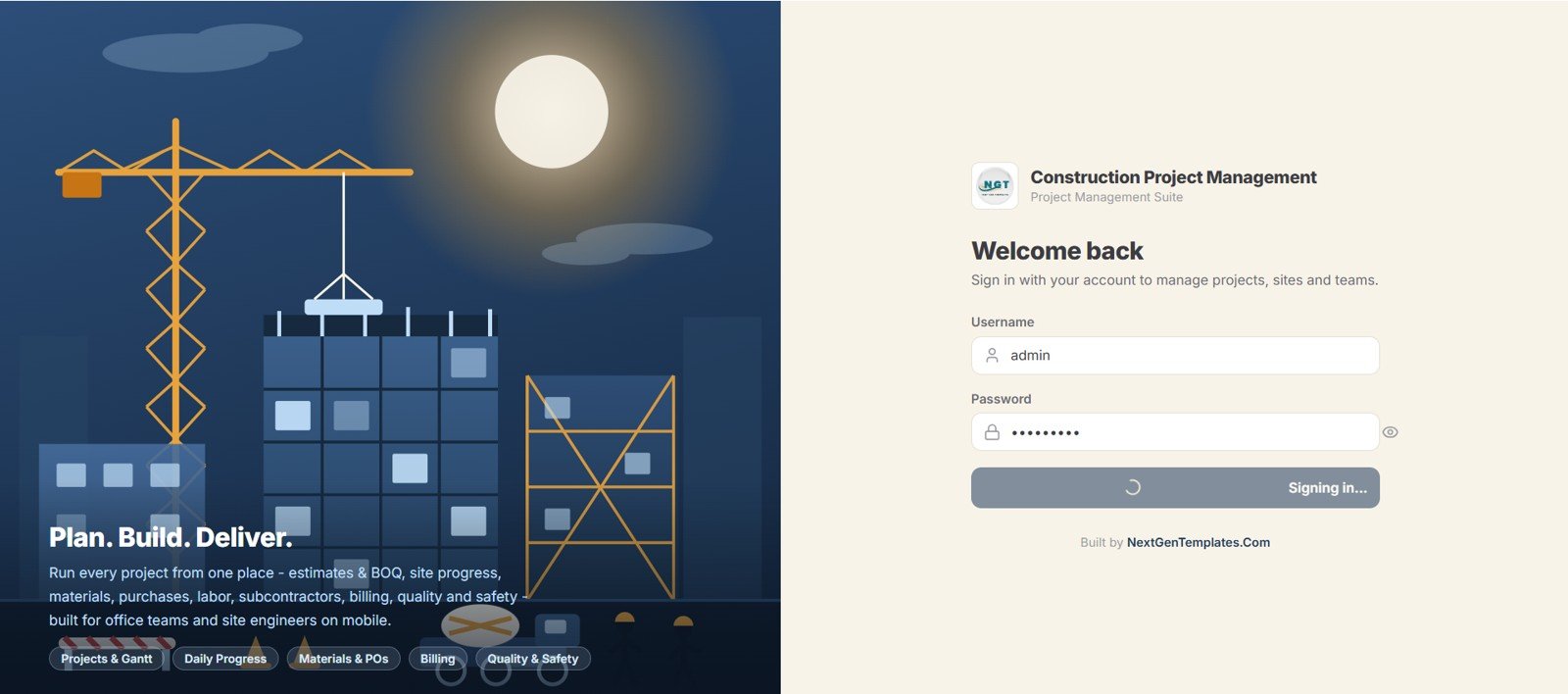
We have deployed this web app in our own Google account so you can test every page and every role with sample data before purchasing. No signup or email is needed.
🔑 Demo Login Details
Sign in as admin for full control of every module, or explore the role-based permissions by logging in as a Project Manager, Site Engineer, Purchase User, Accounts User, Storekeeper, Subcontractor, or read-only Viewer. Each role sees only the pages it is allowed to.
| Role | Username | Password | Access Summary |
|---|---|---|---|
| Admin | admin | admin@123 | Full access: all modules, settings, users, lists, imports/exports, audit log |
| Project Manager | manager | manager@123 | Projects, schedule, budget, tasks, DPR approvals, BOQ, procurement, billing, reports |
| Site Engineer | engineer | engineer@123 | Daily progress (DPR), tasks, material usage, labor and attendance, equipment, QC, safety, RFI, documents |
| Purchase User | purchase | purchase@123 | Purchase requests, purchase orders, vendors, material inward, supplier payments |
| Accounts User | accounts | accounts@123 | Client invoices, payments, expenses, vendor and subcontractor dues, reports |
| Storekeeper | store | store@123 | Materials, stock ledger, inward/outward, transfers, purchase requests, stock view |
| Subcontractor | subcon | subcon@123 | Own work orders (progress updates), assigned tasks, permitted document uploads (PowerGrid Electricals / SUB-0002) |
| Viewer | viewer | viewer@123 | Read-only dashboard and reports |
💡 What you get after purchase: the full source code (Code.gs + Index.html) plus a step-by-step deployment guide, so you can deploy your own private instance in your own Google account in under 15 minutes.
Key Features of the Construction Project Management System Web App
This is a true multi-user application, not a shared spreadsheet. Google Sheets acts as the database and Google Apps Script as the application layer, so you deploy it once from your own Google Drive and the whole team accesses it through a browser on desktop or mobile, with no installation and no per-seat fees.
- Secure role-based login for 7 user roles (Project Manager, Site Engineer, Purchase User, Accounts, Storekeeper, Subcontractor User, and Viewer) plus an Admin account.
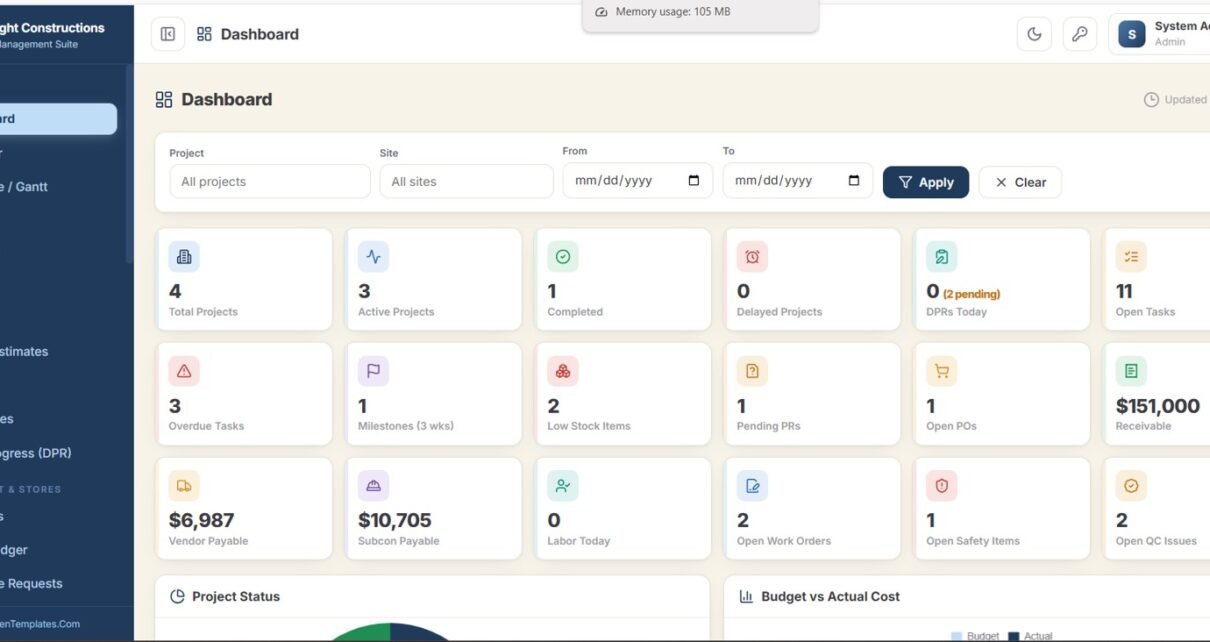
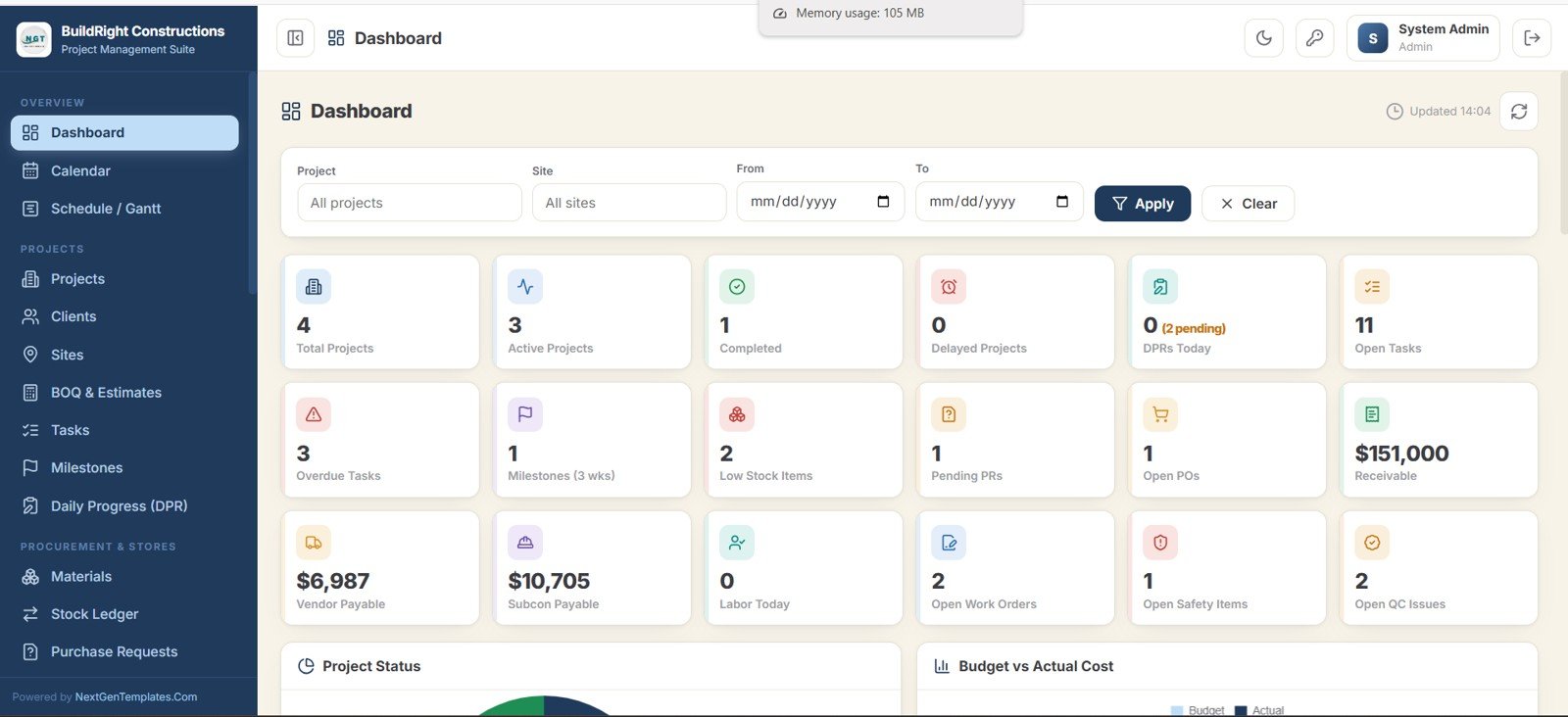
- 18 live dashboard KPIs: Total, Active, Completed, and Delayed Projects, DPRs Today, Open and Overdue Tasks, Milestones due in 3 weeks, Low Stock Items, Pending Purchase Requests, Open POs, Receivable, Vendor Payable, Subcontractor Payable, Labor Today, Open Work Orders, Open Safety Items, and Open QC Issues.
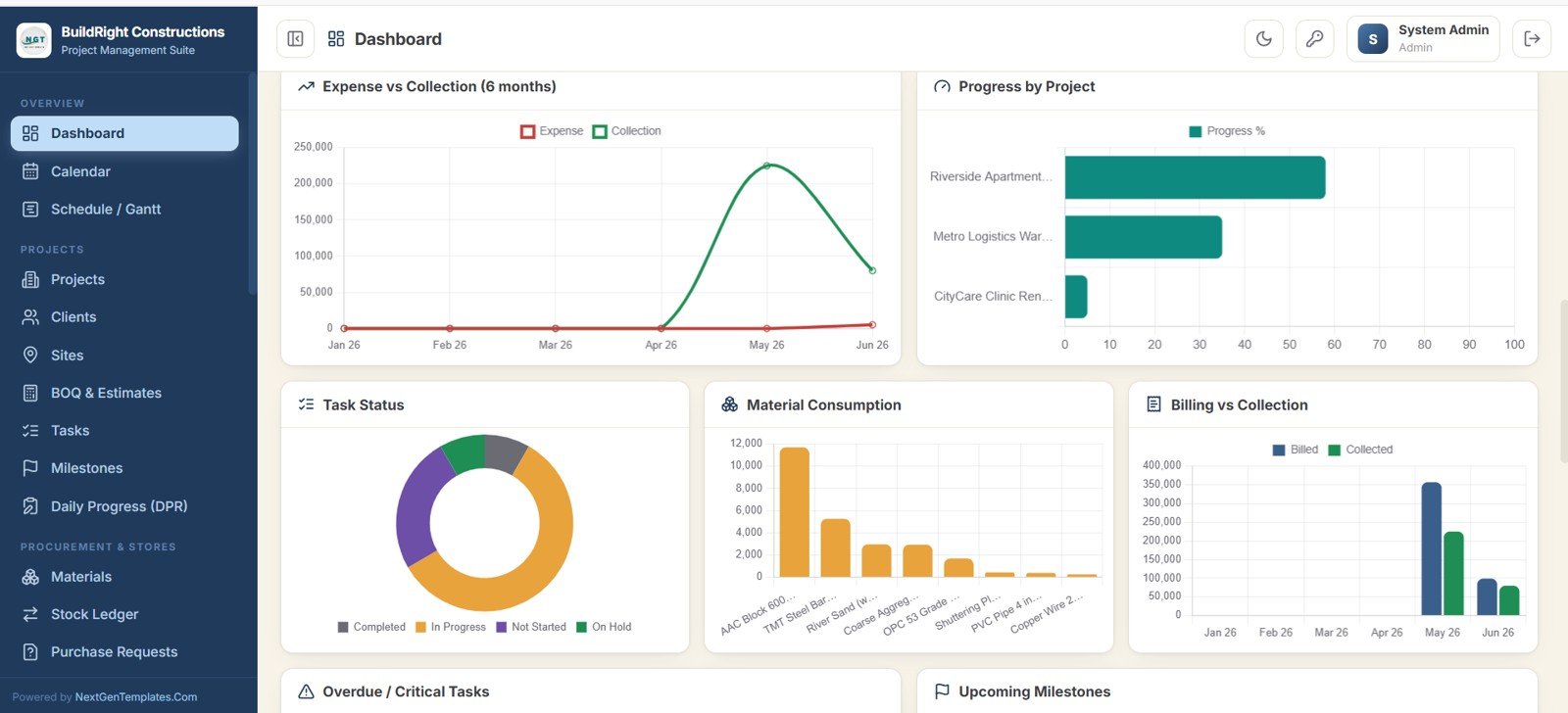
- 7 management charts: Project Status, Budget vs Actual Cost, Expense vs Collection, Progress by Project, Task Status, Material Consumption, and Billing vs Collection.
- Full procurement and stores: materials master, stock ledger, purchase requests, purchase orders, and vendors.
- Finance built in: BOQ and estimates, client invoices, expenses, and payments in and out.
- Compliance modules: quality checks, safety, RFI and issues, change orders, and a versioned drawings and documents library.
- Nearly 20 ready reports, each filterable and exportable to Excel, CSV, or print.
System Screens Explanation
The web app is organised into clear module groups. Here are the key screens that run a construction business day to day.
Dashboard and Charts
The dashboard opens with 18 summary cards and Project, Site, and date-range filters, so management sees the whole portfolio at a glance. Seven charts then turn those entries into a cost, progress, and cash story; Budget vs Actual Cost and Expense vs Collection are usually the first stops in a review meeting.
Calendar, Schedule and Gantt
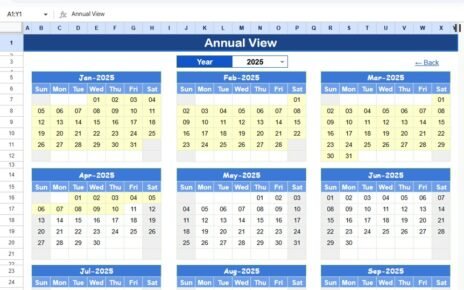
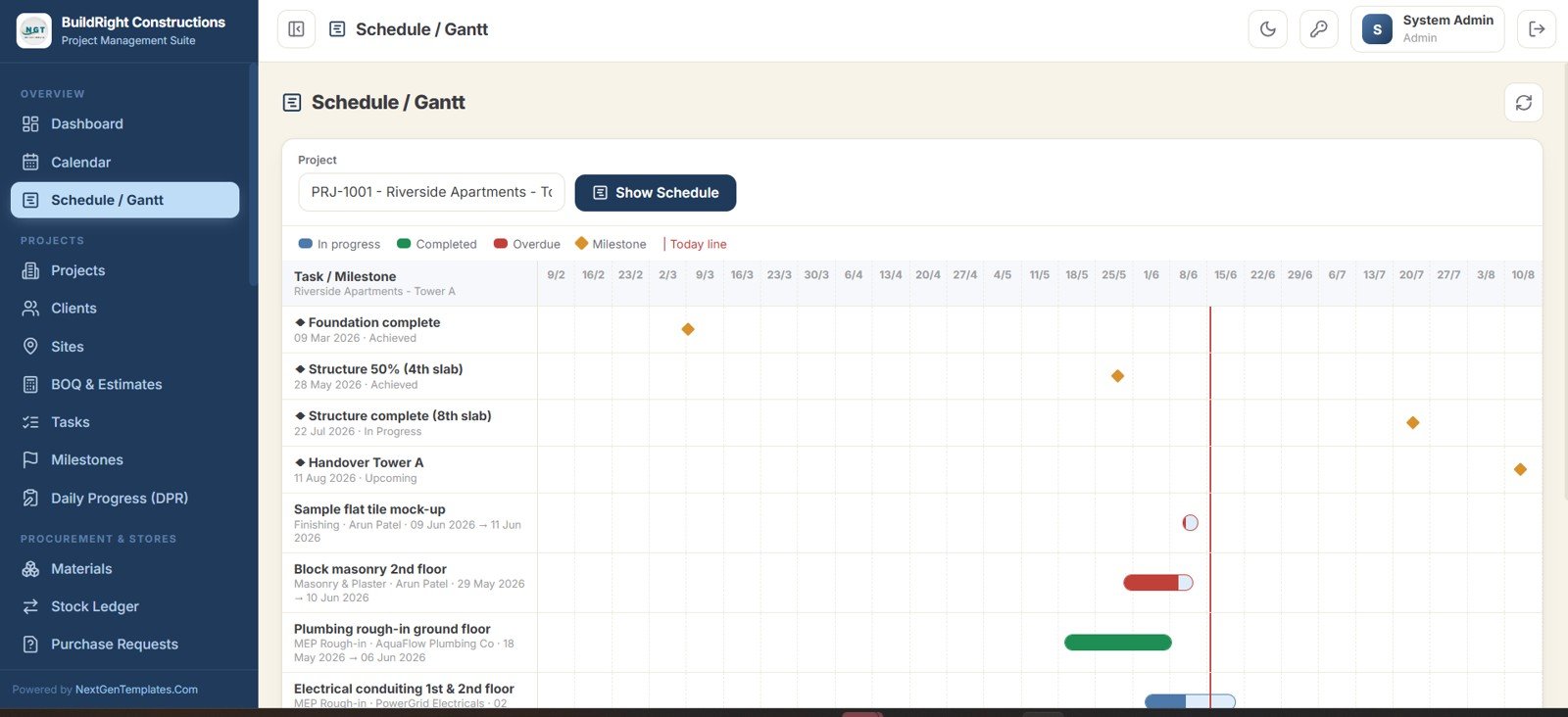
A colour-coded calendar pulls inspections, tasks, deliveries, milestones, DPRs, and RFI due dates into one view, while the Schedule / Gantt screen plots every task and milestone for a chosen project with In progress, Completed, and Overdue bars and a today line, so slipping deadlines are obvious.
Projects, Clients, Sites and BOQ
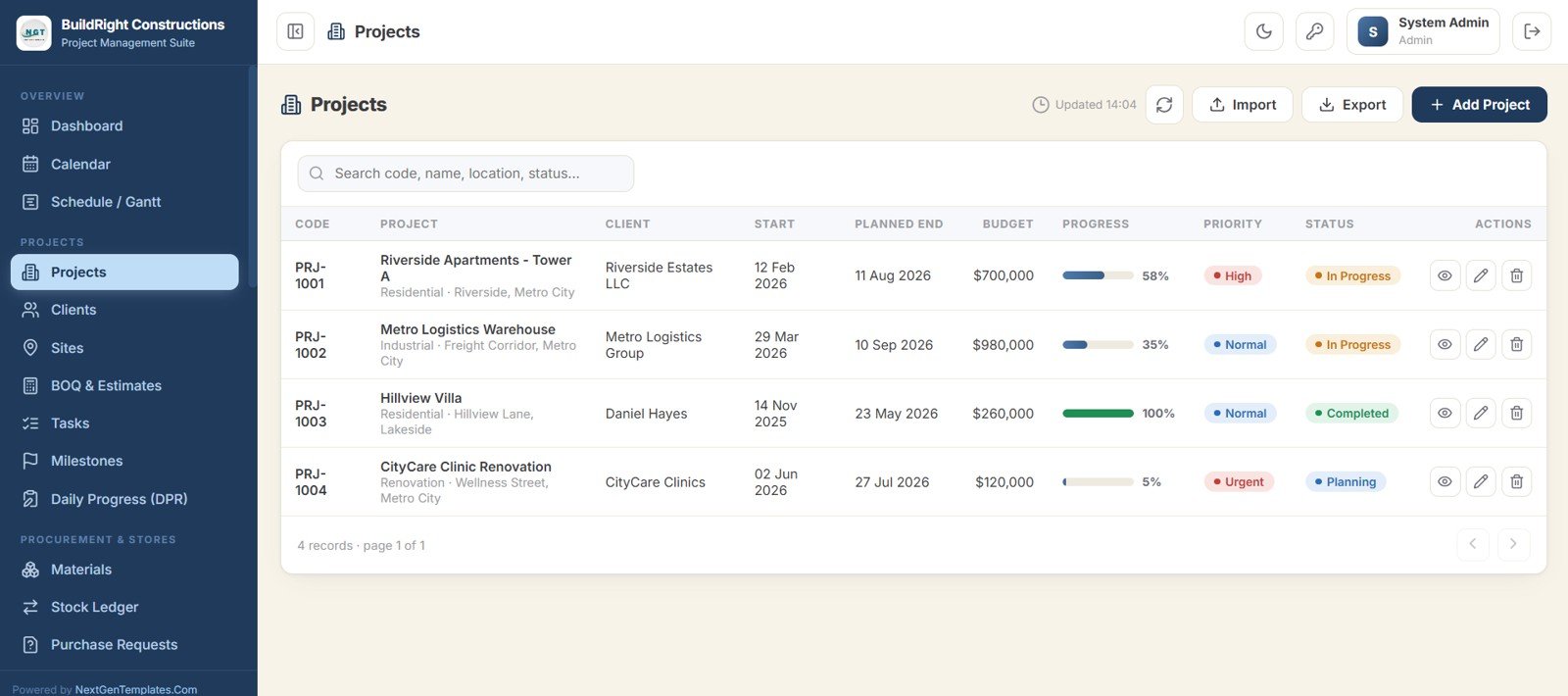
The Projects screen is the master list (code, client, start and planned end dates, budget, progress, priority, and status), backed by Clients and Sites directories and a detailed BOQ and Estimates module with line-item rates, tax, and approval status.
Tasks, Milestones and Daily Progress Reports
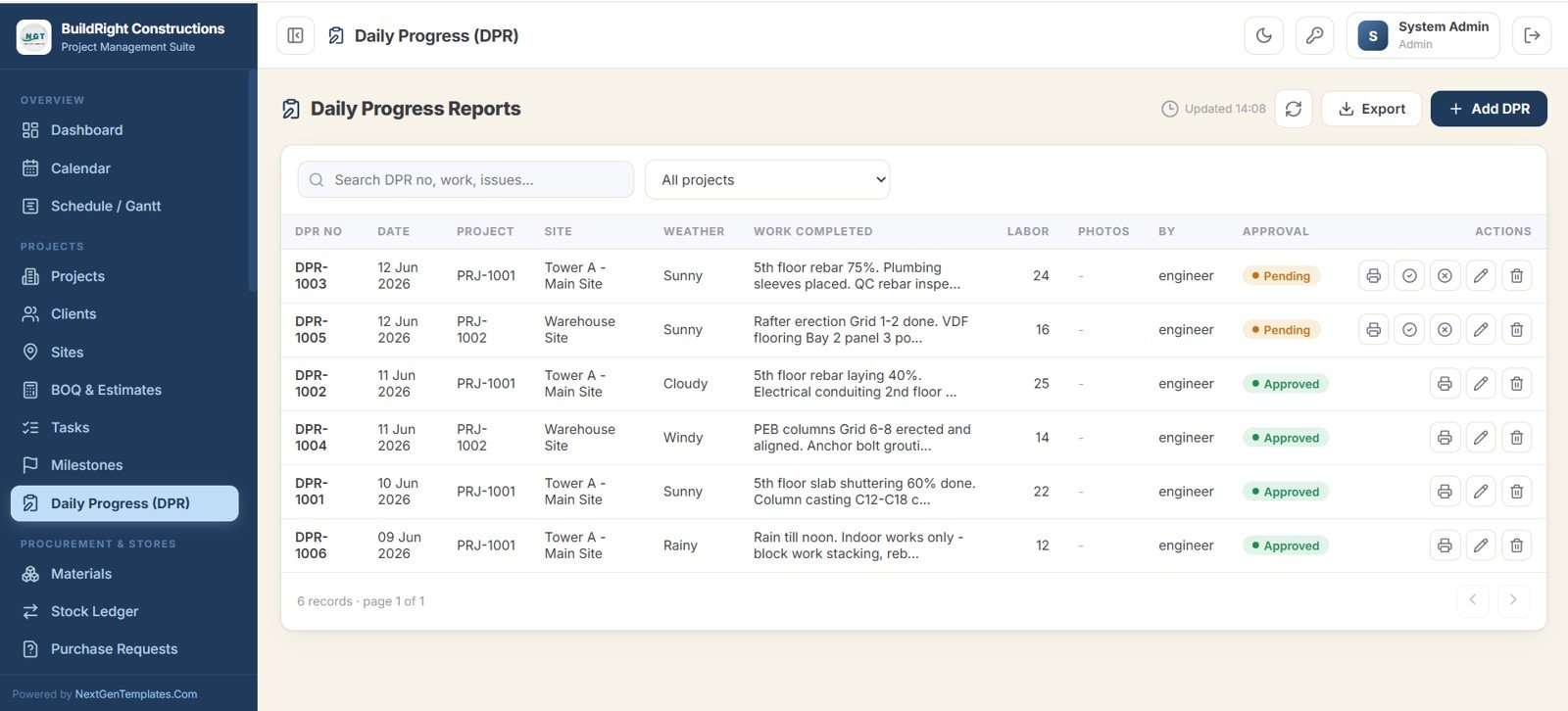
Tasks run in both list and board views with overdue items highlighted, Milestones auto-calculate delay in days, and Daily Progress Reports capture weather, work completed, labor count, photos, and an approval workflow from the site.
Procurement and Stores
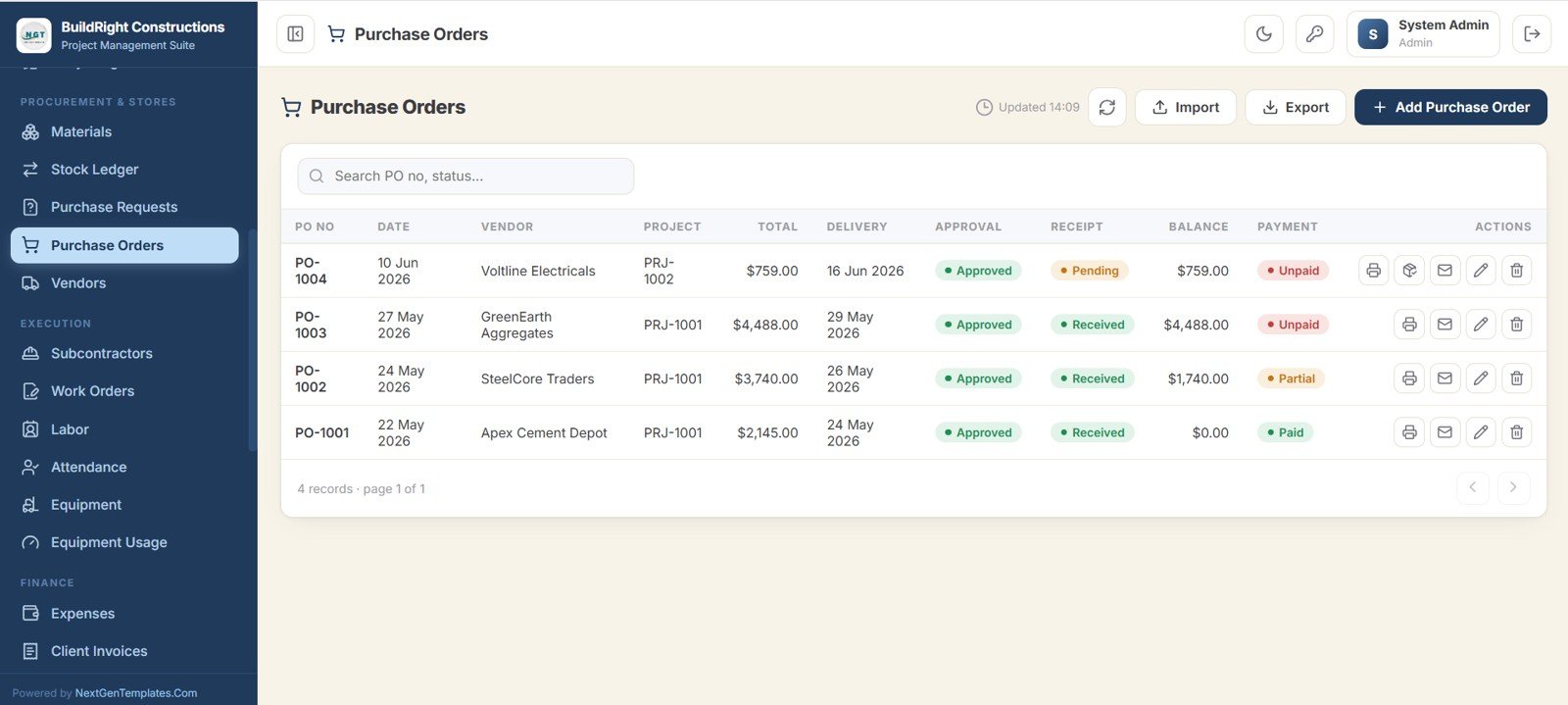
Materials, Stock Ledger, Purchase Requests, Purchase Orders, and Vendors form a complete procurement chain. Site requests can be approved and converted into purchase orders, each PO tracks approval, receipt, balance, and payment status, and items below their reorder level are flagged automatically.
Workforce, Equipment and Finance
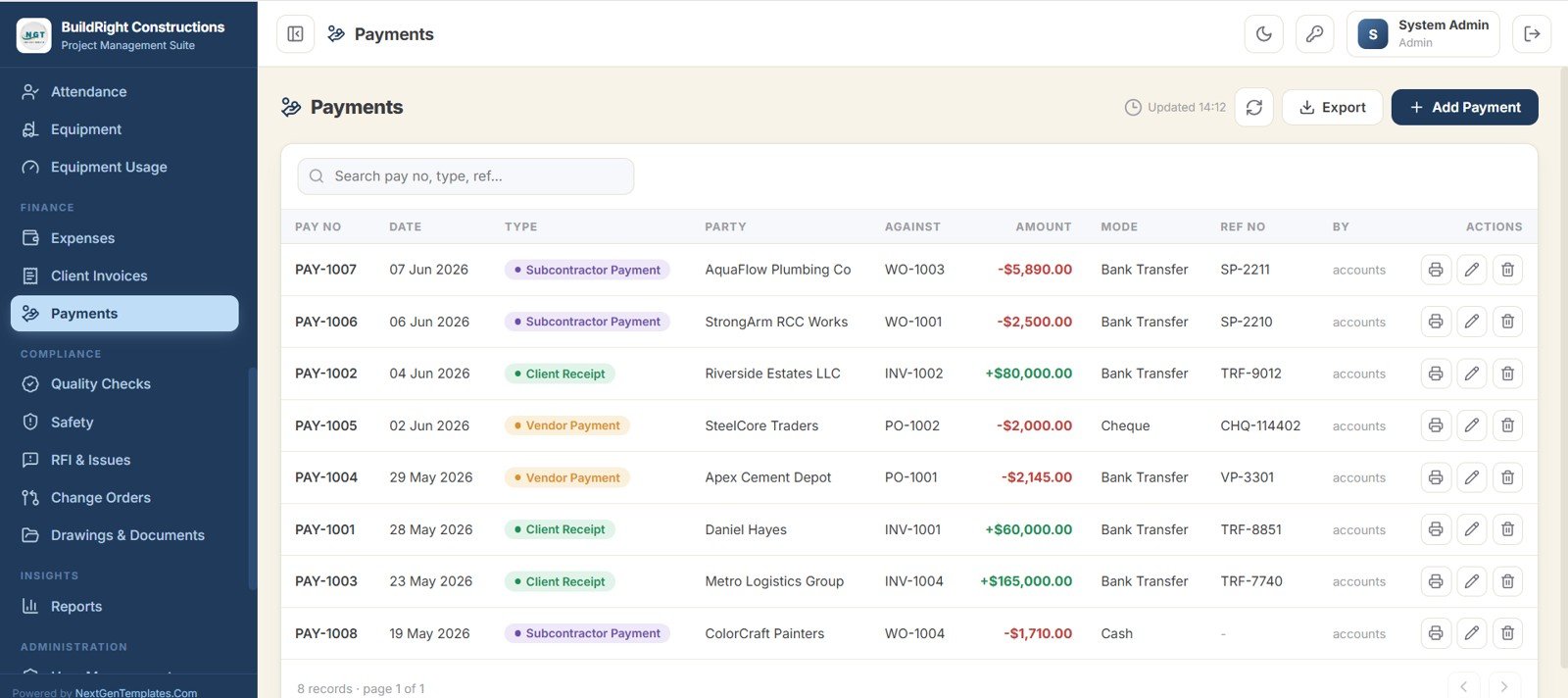
Labor rosters, daily Attendance, Equipment register and usage logs, Expenses, Client Invoices, and Payments keep workforce cost, plant cost, and cash flow tied back to each project and site. The Payments screen records client receipts, vendor payments, and subcontractor payments against invoices, POs, and work orders.
Compliance, Reports and Administration
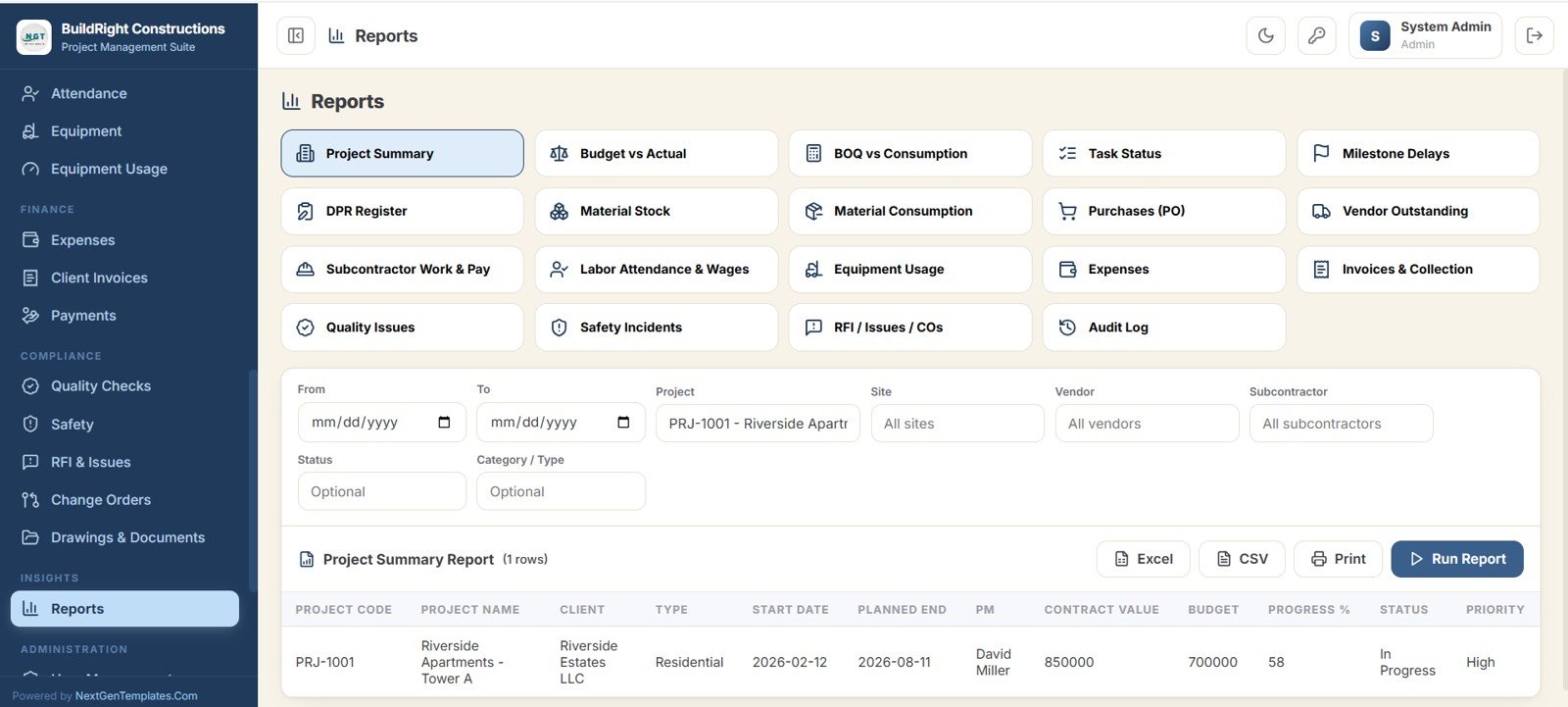
Quality Checks, Safety, RFI and Issues, Change Orders, and a versioned Drawings and Documents library cover compliance. The Reports center offers 19 report buttons, from Project Summary and Budget vs Actual to Safety Incidents and Audit Log, each with filters and Excel, CSV, and Print export. User Management, List Management, Audit Log, and Settings give administrators control over roles, dropdowns, and branding.
Construction Project Management System Web App vs. Excel/VBA Tool vs. Procore / Buildertrend: Feature Comparison
| Feature | Construction Project Management System Web App | Excel / VBA Construction Tool | Procore / Buildertrend (Paid SaaS) |
|---|---|---|---|
| Cost | One-time purchase | One-time template price | Ongoing subscription |
| Platform | Google Sheets + Apps Script (browser) | Desktop Excel with macros | Vendor cloud platform |
| Multi-user with login | Yes, role-based browser login | No real login | Yes |
| Setup time | Copy to Drive and deploy | Open file, enable macros | Weeks of onboarding |
| Mobile access | Any browser | Limited on mobile | Dedicated app |
| Customizable fields | Fully editable sheets and code | Editable workbook | Plan-dependent |
| You own the data | Yes, in your Google Drive | Yes, your file | No, vendor cloud |
| BIM, 3D takeoff, accounting integrations | No | No | Yes, depending on plan |
For builders who want multi-user, browser-based project control without a monthly subscription, the Construction Project Management System Web App sits in the sweet spot.
Who Should Use This Template
Perfect for:
- Small and mid-size construction firms, contractors, and builders running several active projects.
- Project managers and site engineers who need DPRs, tasks, milestones, and a Gantt that the office and site both see live.
- Purchase and stores teams managing materials, requests, purchase orders, vendors, and a stock ledger.
- Owners who want procurement, finance, labor, equipment, quality, and safety in one system they fully own.
Not a fit if:
- You need SOC 2, SSO, and audited enterprise compliance; a platform like Procore fits better.
- You require BIM coordination, 3D takeoff, or automated accounting integrations out of the box.
- You prefer a fully hosted SaaS and are happy paying a monthly per-user fee.
Real-World Use Cases
Rohan runs a 12-project residential contracting firm. His site engineers file Daily Progress Reports with photos from their phones, the purchase desk converts site requests into purchase orders, and Rohan tracks Budget vs Actual Cost and Receivable on the dashboard without buying a SaaS seat for every engineer.
Meera is a project manager at a commercial fit-out company. She uses the Gantt schedule and Milestones to track delays in days, the RFI and Issues screen to chase design queries, and Change Orders to keep variation cost and time impact visible to her client.
Imran handles accounts and stores for a small infrastructure builder. He reconciles vendor payable, subcontractor payable, and client invoices in the finance module, while the stock ledger and low-stock alerts keep cement and steel from running out mid-pour.
Advantages of the Construction Project Management System Web App
The biggest advantage is consolidation: 36 screens that would otherwise be a dozen disconnected spreadsheets now share one dataset, so a purchase order, a stock movement, and a payment all roll up into the same dashboard. Because it runs on Google Apps Script, the cost is a one-time purchase instead of a recurring per-user bill, and your data stays inside your own Google Drive rather than a vendor cloud. Role-based access keeps subcontractors and viewers out of finance while still letting them log the work they are responsible for.
Opportunities for Improvement
The system is built for small and mid-size firms, so teams needing BIM model coordination, 3D quantity takeoff, or native integration with accounting suites will still need dedicated tools alongside it. Google Apps Script also has execution quotas, so very large organisations running thousands of daily transactions should test against their volume. For most contractors running up to a few dozen active projects, these limits are rarely reached.
Best Practices
Set up your company branding, users, and dropdown lists first so every later entry is consistent. Make DPRs a daily habit on site; that single discipline keeps the dashboard, schedule, and reports accurate. Use Purchase Requests to drive all buying so the stock ledger and vendor payable stay reliable, and review the Reports center weekly to catch budget overruns and overdue tasks early. The system deploys as a standard Google Apps Script web app; Google’s Apps Script web app guide explains how deployment and access settings work.
Explore Relevant Templates
For a lighter scheduling-only companion, see the Construction Project Timeline in Google Sheets, and for reporting without logins, the Construction Project Management Dashboard in Google Sheets. Other multi-user Apps Script systems in the same family:
- Vehicle Movement Register Management System Web App, useful for tracking site vehicles and plant.
- Hardware Store POS Web App, for building-supply counters.
- Jewelry Management System Web App, showing how the framework adapts to another trade.
If you compare vendor quotes before raising purchase orders, the Daily RFQ and Quote Comparison Management System Web App pairs well with this system.
Want to build spreadsheet skills like this step by step? The NextGenTemplates Academy learning paths walk you through trackers and management systems with practice files.
Frequently Asked Questions
Is the Construction Project Management System Web App really multi-user?
Yes. It uses a secure login with 7 user roles (Project Manager, Site Engineer, Purchase User, Accounts, Storekeeper, Subcontractor User, and Viewer) plus an Admin, so multiple people work in the same system at once with role-based access.
What technology does it run on?
It is built on Google Sheets as the database and Google Apps Script as the application. You deploy it from your own Google Drive and open it in any browser, so there is nothing to install and no hosting to buy.
How many screens are included?
It includes 36 screens spanning the dashboard, charts, calendar, Gantt schedule, projects, procurement, finance, quality, safety, documents, reports, and administration.
How does it compare to Procore or Buildertrend?
Procore and Buildertrend are subscription platforms with features such as BIM and accounting integrations. The Construction Project Management System Web App is a one-time purchase you own and customize yourself, which suits small and mid-size builders who want core project control without a subscription.
Can I customize the fields, roles, and branding?
Yes. The sheets and Apps Script code are fully editable. You change branding in Settings, manage users and roles in User Management, and adjust dropdown lists in List Management.
How long does setup take?
Most teams are running within an hour: copy the file to Google Drive, deploy the web app using the included guide, set branding, add users, and start entering projects.
About the Author
Built by PK, Microsoft Certified Professional with 15+ years of Excel, Google Sheets, and Power BI experience. Founder of NextGenTemplates. Every template is hand-built and tested before release.
Wrapping Up
The Construction Project Management System Web App gives builders one shared, browser-based system for projects, procurement, finance, compliance, and reporting, owned in your own Google Drive for a one-time price. Try the live demo with two or three roles first; when it fits your workflow, deploy your own copy and start running your sites from one place.
Get the Construction Project Management System
Instant download. One-time payment. No subscription.
📅 Last updated: October 2026