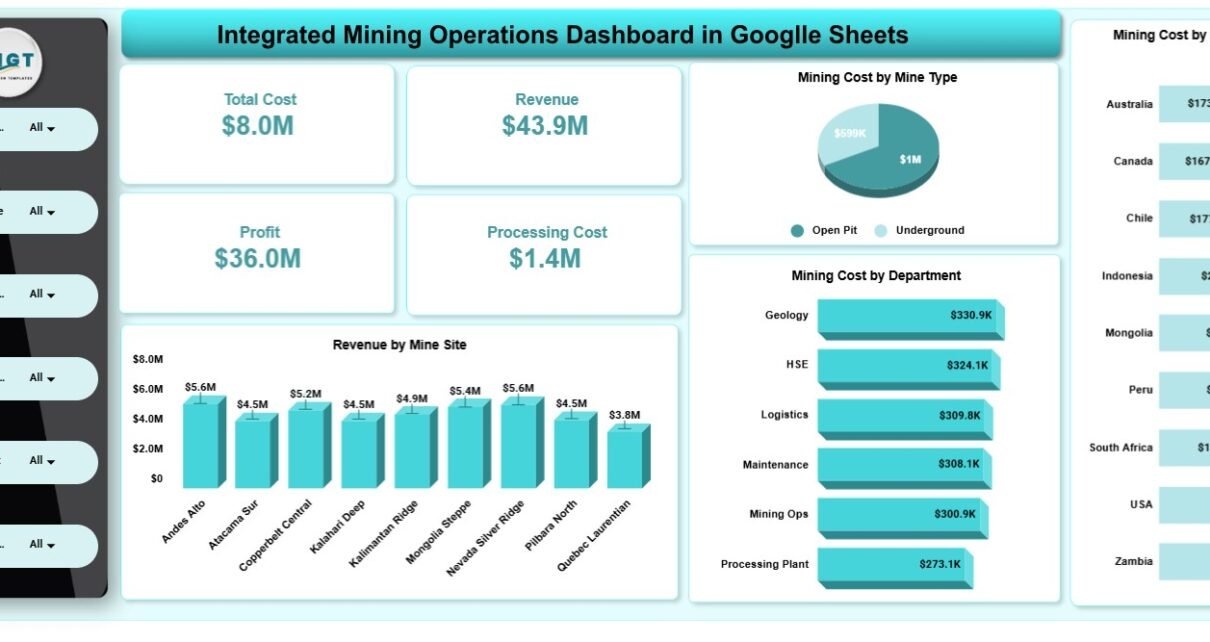
The Integrated Mining Operations Dashboard in Google Sheets pulls 4 financial KPI cards, 20 charts and 5 interactive analysis pages into one connected file covering production, downtime, safety, ESG and profitability. A slicer panel on every page filters the cards and charts by mine, state, department, country, shift and supervisor.
Most mining teams stitch this picture together across several spreadsheets or a paid BI tool. This dashboard is a one-time $9.99 file that runs natively in the browser, needs no add-ons and can be shared with the whole team through a Google Drive link. Below, each page is explained with its real charts, plus setup steps, use cases and honest limitations.
🎥 Watch the Video Tutorial
Get the Integrated Mining Operations Dashboard
Key Features of the Integrated Mining Operations Dashboard in Google Sheets
- Tracks 4 headline KPIs — Total Cost, Revenue, Profit and Processing Cost — on the Overview page.
- Delivers 20 pre-built charts across 5 connected analysis pages (4 charts per page).
- A slicer panel on every page filters by mine, State, Department, Country, Shift and Supervisor.
- Runs natively in Google Sheets — no add-ons, no macros, works in any browser.
- A dedicated Safety & ESG page reports CO2e (t), safety incidents and waste by company, mine site and equipment type.
- Replace the rows on the Data sheet and every card, chart and slicer recalculates.
Dashboard Pages Explained
Page 1: Overview
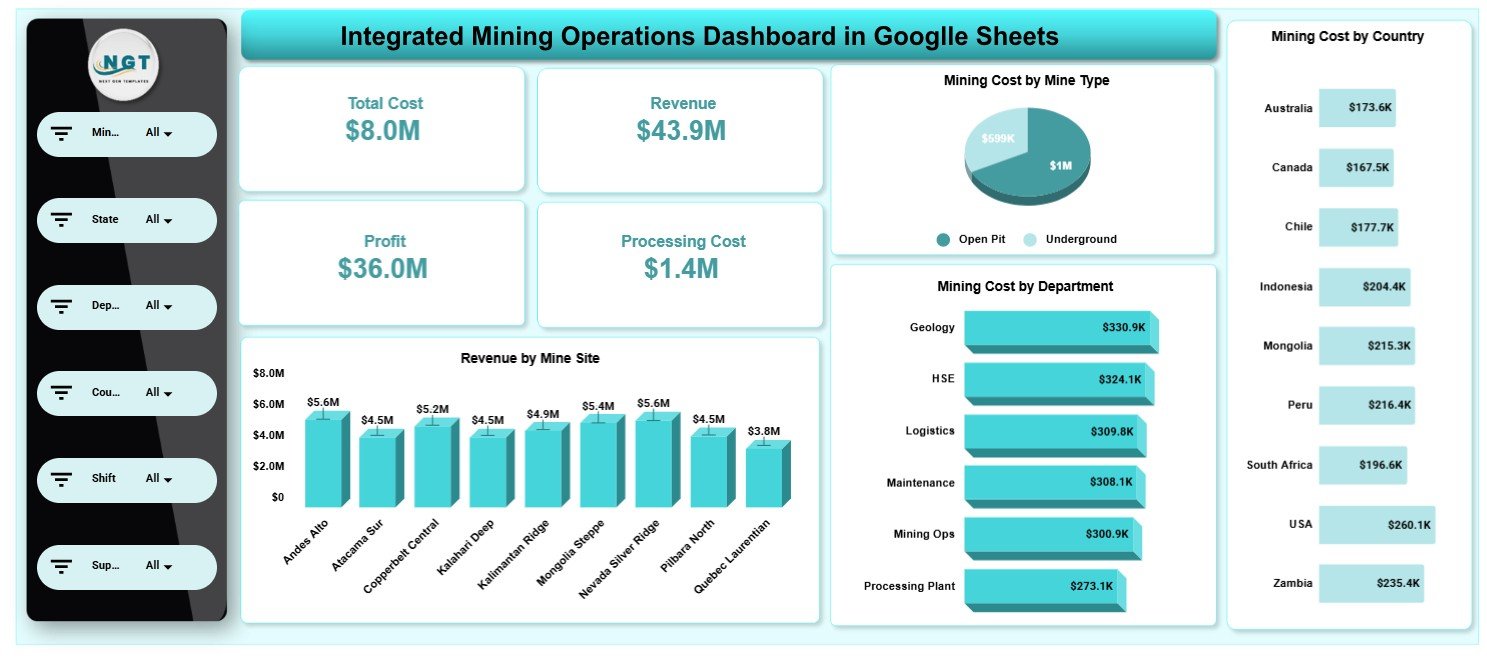
The Overview page leads with four KPI cards — Total Cost, Revenue, Profit and Processing Cost — then charts Mining Cost by Mine Type (Open Pit vs Underground), Mining Cost by Department, Mining Cost by Country and Revenue by Mine Site.
Page 2: Production Analysis
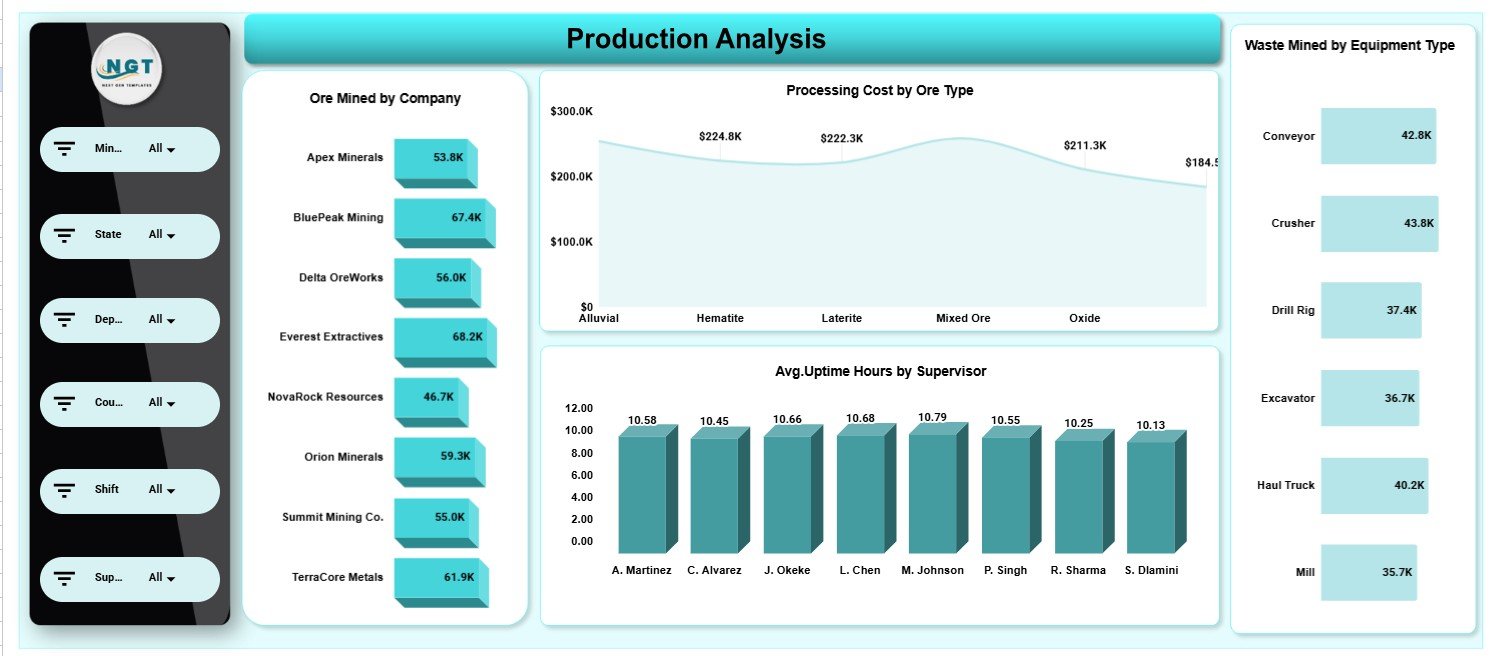
Production Analysis shows Ore Mined by Company, Processing Cost by Ore Type, Avg. Uptime Hours by Supervisor and Waste Mined by Equipment Type, so you can compare which crews and machines deliver the most usable ore.
Page 3: Downtime Analysis
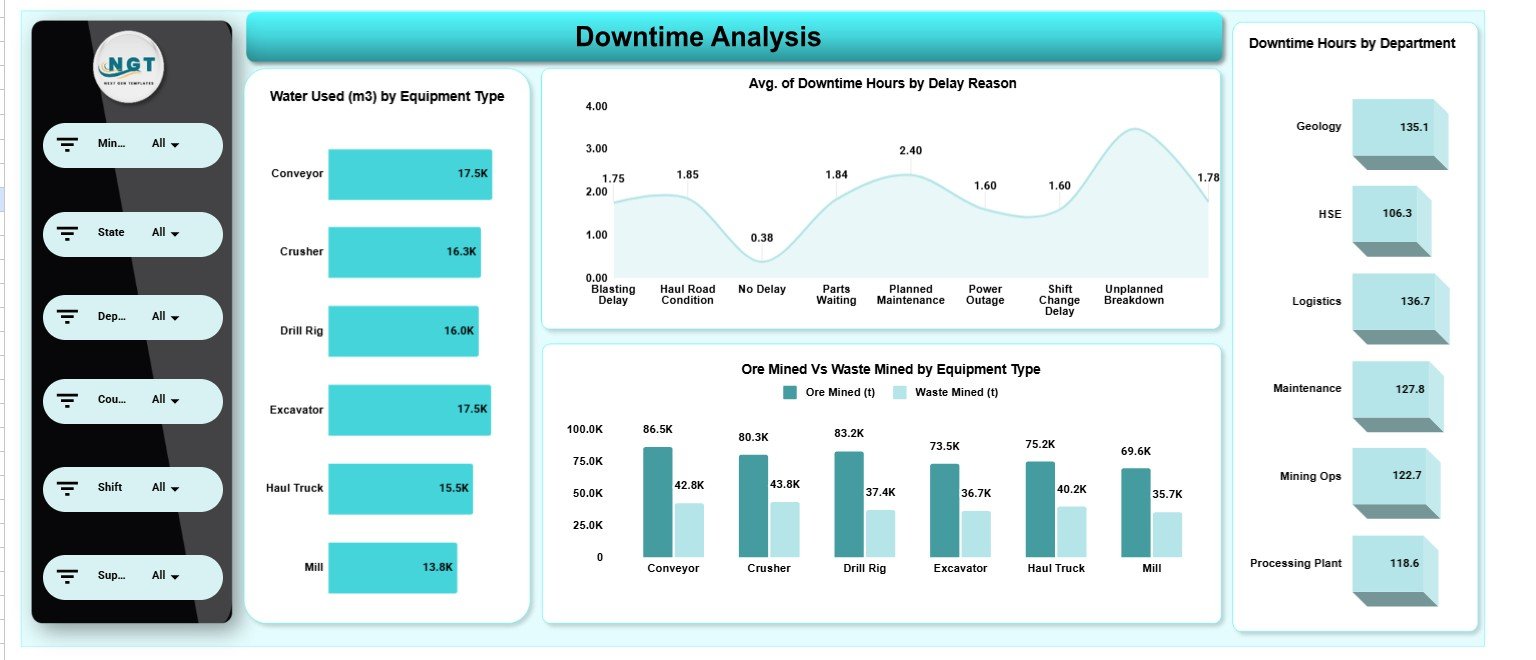
Downtime Analysis tracks Water Used (m3) by Equipment Type, Avg. of Downtime Hours by Delay Reason (for example Blasting Delay, Parts Waiting, Power Outage and Unplanned Breakdown), Ore Mined vs Waste Mined by Equipment Type and Downtime Hours by Department.
Page 4: Safety & ESG Performance
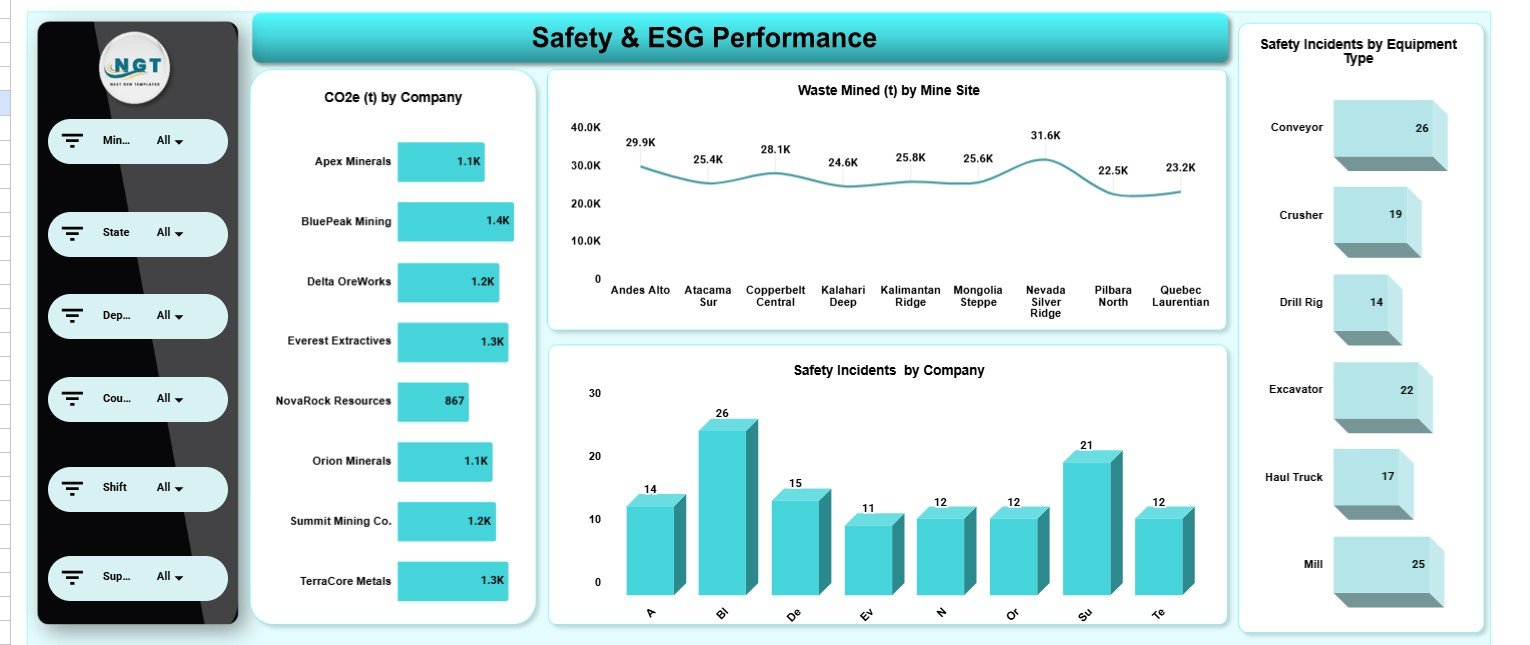
This page reports CO2e (t) by Company, Waste Mined (t) by Mine Site, Safety Incidents by Company and Safety Incidents by Equipment Type — the core numbers for mining ESG and safety reviews.
Page 5: Profitability Analysis
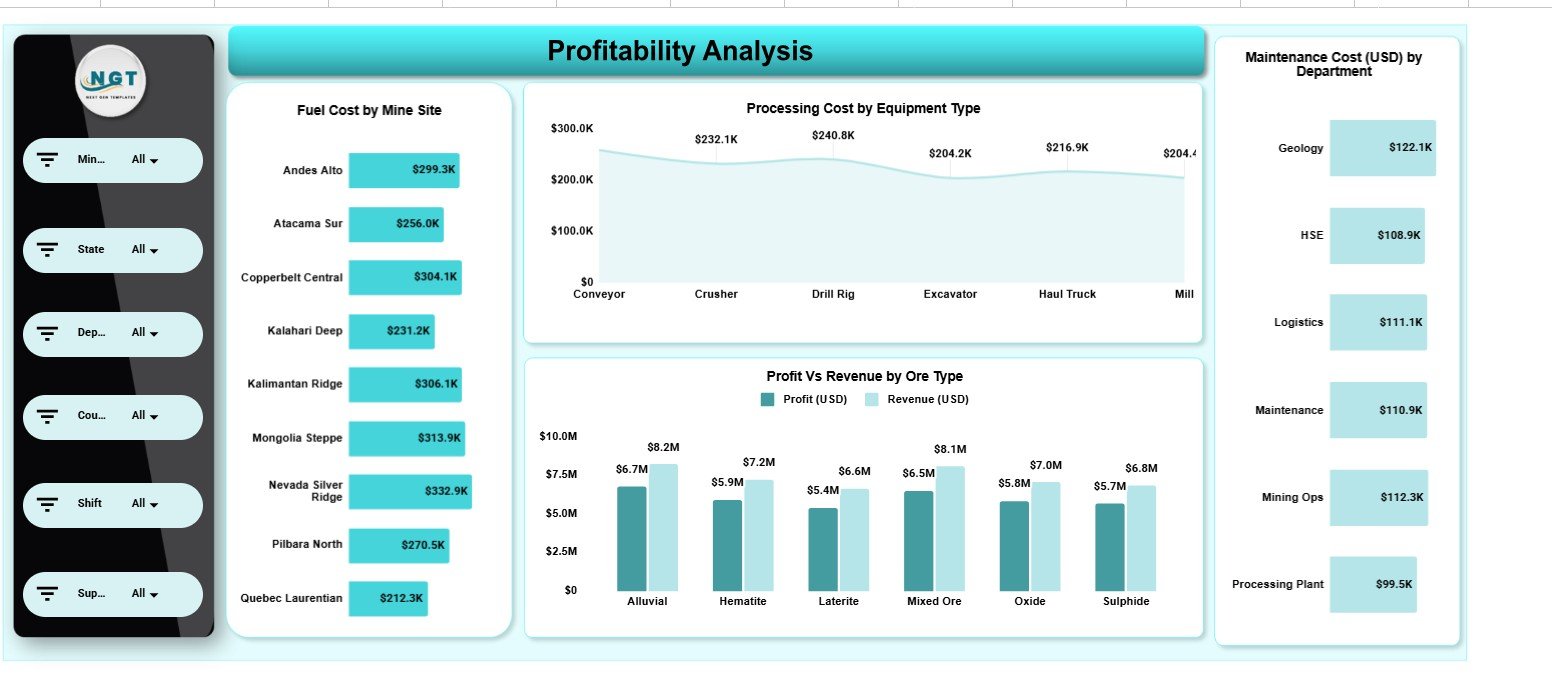
Profitability Analysis links cost to return with Fuel Cost by Mine Site, Processing Cost by Equipment Type, Profit vs Revenue by Ore Type and Maintenance Cost (USD) by Department, showing which sites and ore types drive margin.
Data Sheet
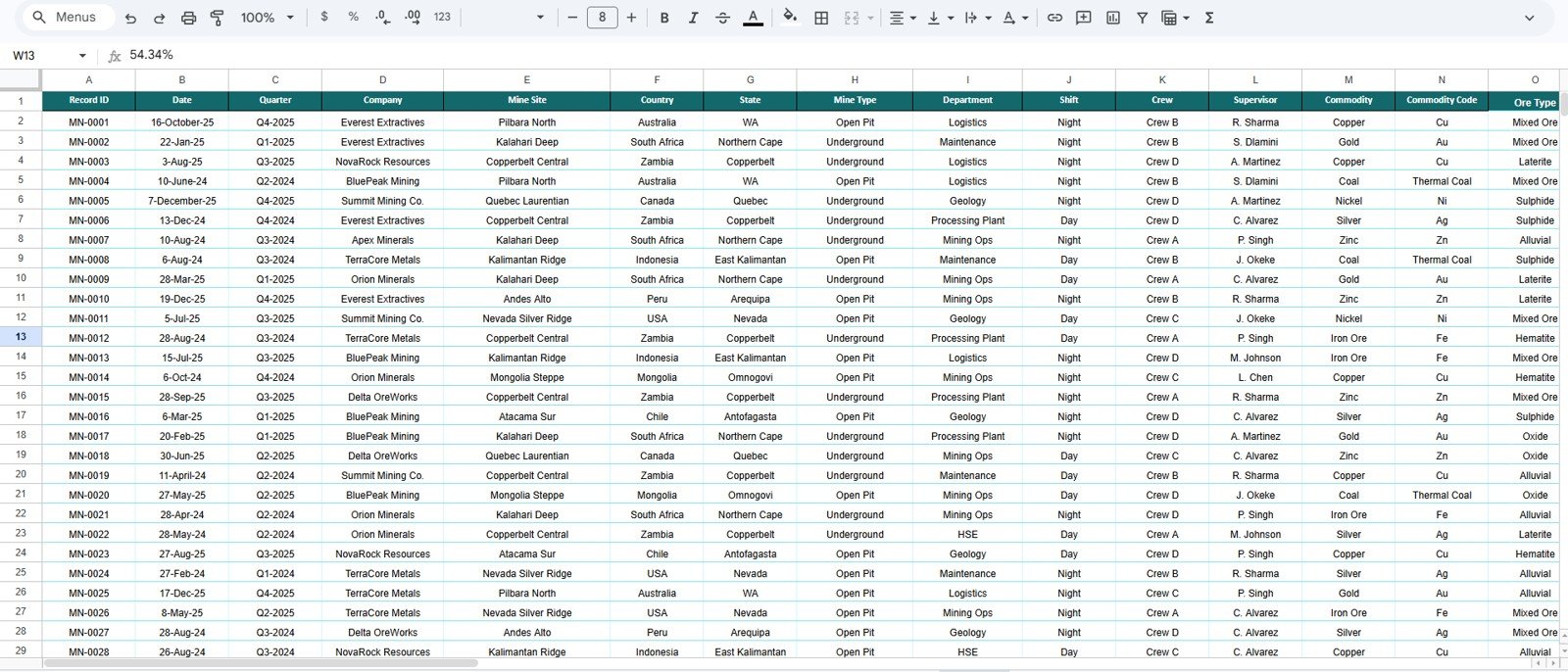
The Data sheet stores every record in one structured table with columns such as Record ID, Date, Quarter, Company, Mine Site, Country, State, Mine Type, Department, Shift, Crew, Supervisor, Commodity, Commodity Code and Ore Type, followed by the production, cost and ESG fields. Paste your own data in the same column order and all five pages refresh.
Google Sheets Dashboard vs Excel vs Paid BI Tools
| Feature | Integrated Mining Operations Dashboard (Google Sheets) | Excel dashboard | Paid BI platform |
|---|---|---|---|
| Cost | $9.99 one-time | Template cost + Office licence | Recurring per-user licences |
| Platform | Google Sheets in any browser | Desktop Excel | Cloud BI service |
| Setup time | Under 10 minutes | Minutes | Days to weeks |
| Real-time collaboration | Built in | Via OneDrive/SharePoint | Yes |
| Slicer filtering | On every page | Yes | Yes |
| Share with a link | Google Drive link | Needs cloud storage | Seat-based |
| Live sensor/SCADA feed | No — manual data | No | Possible with connectors |
How to Use It With Your Own Data
- Make your own copy of the file in Google Drive.
- Open the Data sheet and note the column order of the sample records.
- Paste your mining records in the same columns, keeping headers unchanged.
- Return to the Overview page and check the four KPI cards.
- Use the slicer panel to filter by mine, state, department, country, shift or supervisor.
Who Should Use This Template
A good fit for:
- Mine managers and operations leads tracking cost, output and uptime across sites.
- HSE and ESG officers reporting CO2e, safety incidents and waste.
- Cost controllers analysing profit, fuel and maintenance by site and ore type.
- Small and mid-size mining and quarrying operators who want analytics without a BI subscription.
Not a fit if:
- You need a live IoT/SCADA sensor feed streaming into the dashboard.
- You require row-level security, SSO and audit logging across many users.
- Your organisation cannot use Google Workspace.
Real-World Use Cases
Multi-site operations lead. Each month compares Mining Cost by Mine Type and Revenue by Mine Site on the Overview page, then checks Downtime Hours by Department to decide where an extra maintenance shift should go.
HSE lead. Filters the Safety & ESG page to present CO2e (t) and Safety Incidents by Equipment Type in a board review from one shareable file.
Cost controller. Reads Profit vs Revenue by Ore Type and Maintenance Cost by Department on the Profitability page to see which ore types erode margin.
Advantages and Limitations
The main advantages are cost (a single $9.99 purchase instead of per-user BI fees), zero installation, real-time collaboration and full ownership of your data in your own Drive. If you want to build dashboards like this yourself, the Pivot Tables & Dashboards course on NextGenTemplates Academy walks through the same techniques step by step.
Limitations: the dashboard reads from a manually updated Data sheet, so someone has to paste in fresh records. Google Sheets slows down with very large datasets, so high-volume operations may want to summarise data first. Access control is limited to standard Google Drive sharing.
Best Practices
- Keep the Data sheet column order intact — charts and slicers reference those columns.
- Update records on a fixed cadence (daily or weekly) so trends stay comparable.
- Keep a copy per reporting period if you want a historical archive.
- Learn how slicers and filters work in Google Sheets to get the most from each page.
Related Mining Dashboards
- Mining Operations Dashboard in Google Sheets — another operations-focused mining view.
- Mining Dashboard in Google Sheets — a lighter mining analytics view.
- Mining KPI Scorecard in Google Sheets — actual-vs-target scorecard for mining KPIs.
- Mining Safety KPI Dashboard in Google Sheets — a deeper safety-focused view.
- Precious Metals KPI Dashboard in Google Sheets — metals-specific KPI tracking.
Frequently Asked Questions
What KPIs does the Integrated Mining Operations Dashboard in Google Sheets track?
Four headline KPIs — Total Cost, Revenue, Profit and Processing Cost — plus 20 charts covering production, downtime, fuel, maintenance, safety incidents, CO2e and waste across companies, sites, departments and equipment.
Do I need Excel or any add-ons?
No. It runs natively in Google Sheets with no add-ons or macros. You only need a Google account and a modern browser.
Which filters are available?
Each page has a slicer panel for mine, State, Department, Country, Shift and Supervisor. Changing a slicer updates the cards and charts on that page.
How long does setup take?
Under 10 minutes: make a copy, paste your records into the Data sheet in the same format, and every card and chart recalculates.
Can my whole team use it at once?
Yes. Because it lives in Google Drive, several people can view and edit it together, and you can share it with a single link.
Can I add my own mine sites and ore types?
Yes. Add new mine sites, companies, ore types or equipment to the Data sheet and the charts and slicers pick them up.
About the Author
Built by PK — Microsoft Certified Professional with 15+ years of Excel, Google Sheets and Power BI experience, and founder of NextGenTemplates. Every template is hand-built and tested before release.
Wrapping Up
If you manage a pit, plant or multi-site operation and want production, downtime, safety, ESG and profitability in one connected view, the Integrated Mining Operations Dashboard in Google Sheets gives you that without a per-user BI bill. Make a copy, load your data and start with the Overview page.
Get the Integrated Mining Operations Dashboard
📅 Last updated: October 2026