Payroll is one of the largest and most sensitive operating costs in any organization. The U.S. Bureau of Labor Statistics reported that wages and salaries accounted for 69.9% of private-industry compensation costs in March 2026, which is why even a small payroll error can affect cash flow, employee trust, and monthly reporting. The Monthly Payroll Manager and Dashboard in Google Sheets gives HR and finance teams a structured way to calculate payroll, review deductions, compare net pay, and analyze employee hours from one shared workbook.Monthly Payroll Manager and Dashboard in Google Sheets
Because it is built in Google Sheets, teams can use familiar spreadsheet controls while still collaborating through Google Drive. Google highlights Sheets as an online spreadsheet product for creating and collaborating from any device, and that makes it a practical home for a lightweight payroll dashboard when a full HR SaaS rollout is more than the team needs. View the Monthly Payroll Manager and Dashboard in Google Sheets on NextGenTemplates.
Key Features of Monthly Payroll Manager and Dashboard in Google Sheets
- Payroll calculation dashboard: Track payroll month, number of employees, total gross pay, total net pay, total tax amount, and total other deductions.
- Employee-level salary charts: Compare gross salary, overtime pay, tax, deductions, and net salary by employee.
- Employee salary information: Store employment type, position, hourly rate, overtime rate, monthly salary, tax deductions, and other deductions.
- Monthly hours analysis: Review hours worked, overtime hours, and hours logged by payroll month.Monthly Payroll Manager and Dashboard in Google Sheets
- Payroll analytics page: Analyze net pay, headcount, payroll components, employee type totals, and average net pay.Monthly Payroll Manager and Dashboard in Google Sheets
- Setup tab: Maintain position and month dropdown lists that support consistent data entry across the workbook.Monthly Payroll Manager and Dashboard in Google Sheets
- Interactive slicers: Filter dashboard views quickly by available payroll dimensions during monthly review.Monthly Payroll Manager and Dashboard in Google Sheets
Dashboard Pages Explanation
1. Payroll Calculation Page
The Payroll Calculation Page is the main payroll review area. At the top, it shows six high-level cards: Payroll for the Month of, Number of Employees, Total Gross Pay, Total Net Pay, Total Tax Amount, and Total Other Deductions.
Gross Salary by Employee: This chart compares gross salary across employees before deductions are applied. It helps managers spot high-cost employees, salary outliers, and month-to-month changes that need explanation.Monthly Payroll Manager and Dashboard in Google Sheets
Overtime Pay by Employee: This view isolates overtime pay so finance can see who is driving extra labor cost. It is useful when a department’s payroll rises because of overtime rather than base salary.Monthly Payroll Manager and Dashboard in Google Sheets
Tax Amount by Employee: This chart shows tax deductions employee by employee. It helps reviewers confirm whether tax amounts look proportionate to salary levels and deduction rules.
Other Deductions by Employee: This view separates non-tax deductions such as benefits, advances, or other payroll deductions. It makes unusual deduction amounts easier to identify before payroll is finalized.
Net Salary by Employee: This chart shows the final payable amount after taxes and other deductions. It is the fastest way to validate what each employee should receive for the selected payroll month.Monthly Payroll Manager and Dashboard in Google Sheets
Payroll Summary by Employee Type: This analysis groups payroll by employee type so teams can compare salaried, hourly, contract, or other worker classes. It is helpful for understanding which workforce segment drives the largest payroll cost.Monthly Payroll Manager and Dashboard in Google Sheets
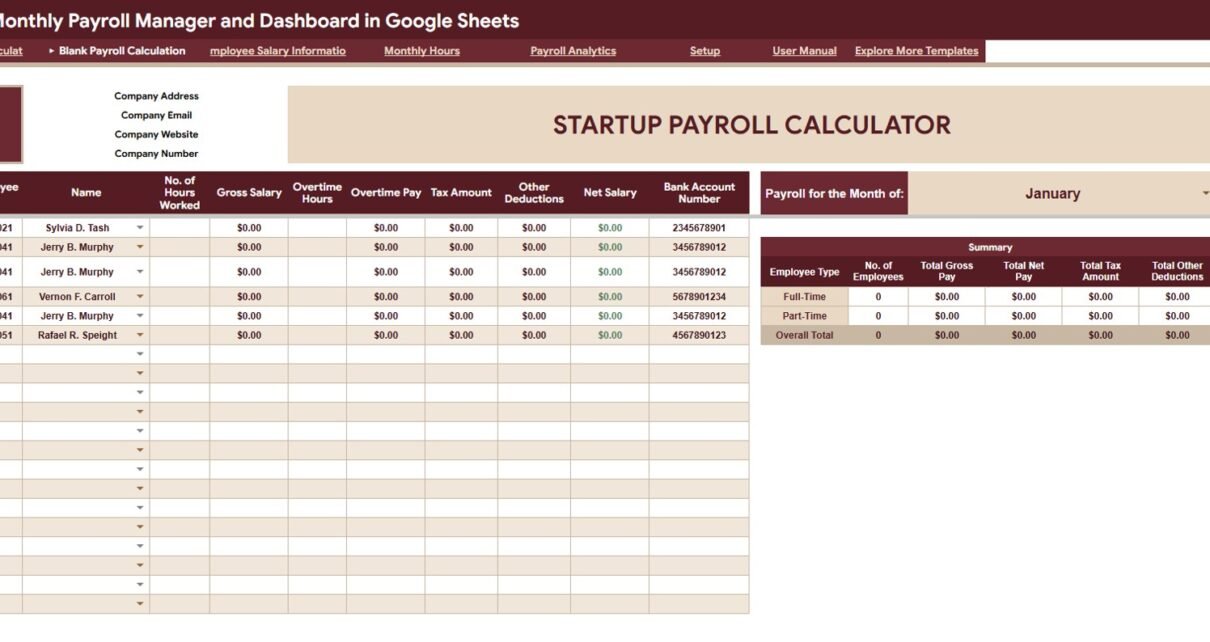
2. Blank Payroll Calculation
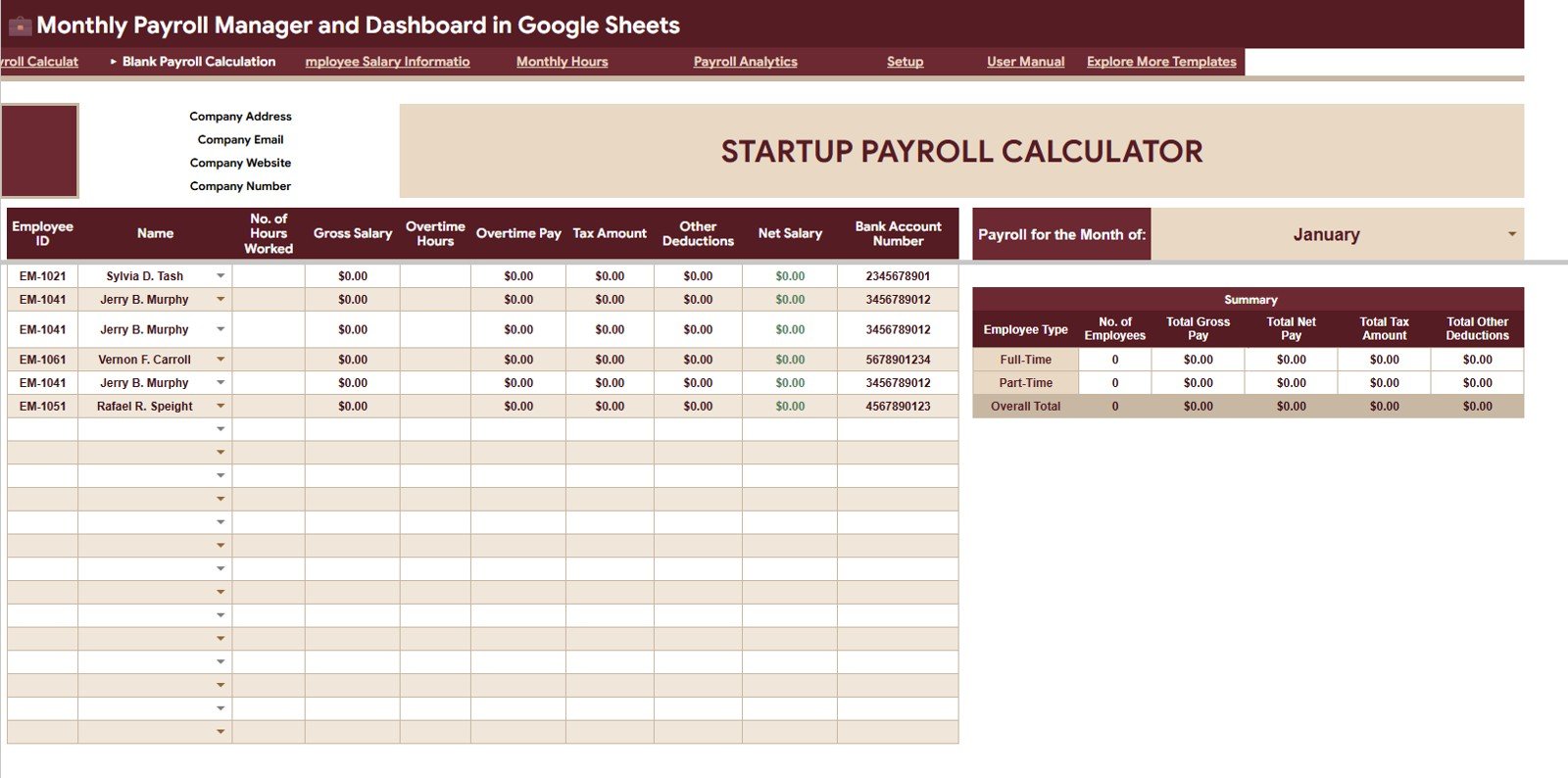
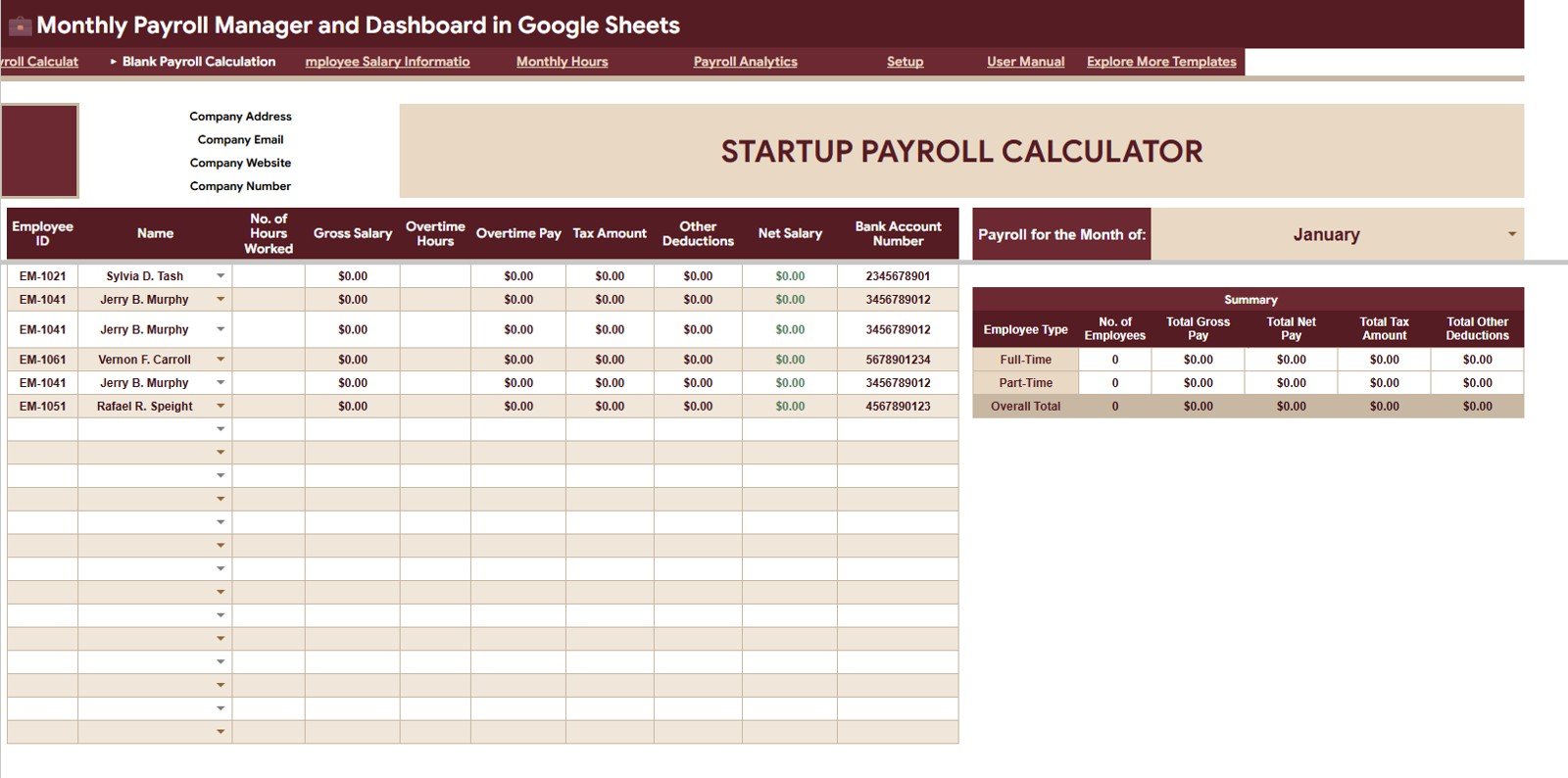
The Blank Payroll Calculation sheet gives users a clean calculation and analysis view for their own payroll month. It is useful when setting up a fresh monthly payroll cycle or replacing sample records with live data.
Hours Worked by Employee: This chart compares regular hours across employees. It helps payroll teams confirm that recorded hours support the pay calculation.Monthly Payroll Manager and Dashboard in Google Sheets
Gross Salary by Employee: This view checks gross salary totals before deductions. It helps users validate salary input and payroll formula results.Monthly Payroll Manager and Dashboard in Google Sheets
Overtime Pay by Employee: This chart shows overtime value by person. It helps leadership identify whether overtime is concentrated with a few employees or spread across the team.
Tax Amount by Employee: This chart compares employee-level tax amounts. It helps reviewers catch missing or unusually high tax deductions before payroll approval.
Net Salary by Employee: This chart displays take-home pay by employee. It is useful for quick payroll reconciliation against payment files or finance summaries.
Payroll Summary by Employee Type: This view groups payroll by employee type. It supports workforce cost review between hourly, salaried, or contract groups.Monthly Payroll Manager and Dashboard in Google Sheets
3. Employee Salary Information
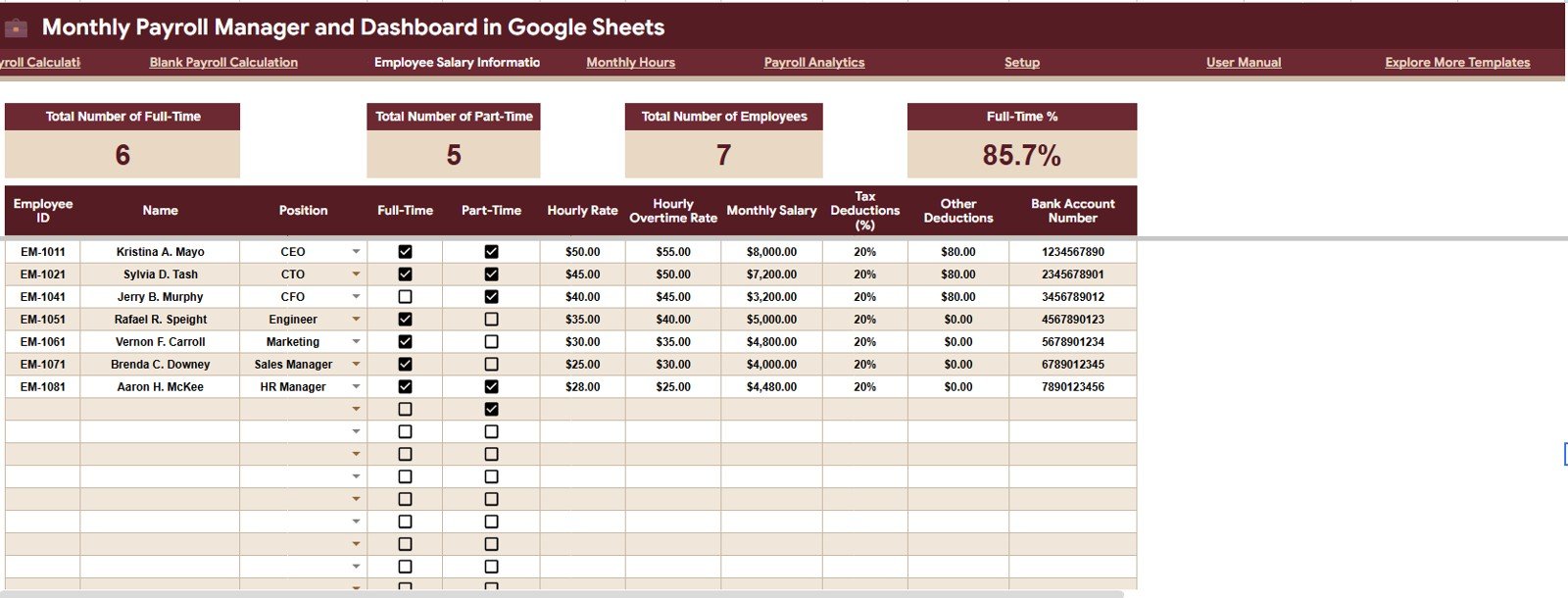
The Employee Salary Information tab is the salary master area. It supports the payroll calculations by organizing employee type, position, hourly rates, overtime rates, salary values, and deduction assumptions.
Employee Count by Employment Type: This chart shows the distribution of employees by employment type. It helps HR understand the current workforce mix before reviewing payroll totals.
Position by Employee: This view connects each employee to their position. It helps managers check whether role information is complete and aligned with payroll assumptions.
Hourly Rate by Employee: This chart compares hourly rates across employees. It is useful for checking whether hourly pay inputs are accurate before hours are multiplied into salary values.
Hourly Overtime Rate by Employee: This chart focuses on overtime rate assumptions. It helps ensure overtime calculations use the correct rate for each employee.
Monthly Salary by Employee: This view compares monthly salary values by employee. It supports salary review and helps identify unusual values that may need correction.Monthly Payroll Manager and Dashboard in Google Sheets
Tax Deductions by Employee: This chart shows employee-level tax deduction assumptions. It helps payroll admins verify tax data before running the month.Monthly Payroll Manager and Dashboard in Google Sheets
Other Deductions by Employee: This view lists other deduction assumptions by employee. It helps catch missing deductions or one-off deductions before net salary is calculated.
4. Monthly Hours
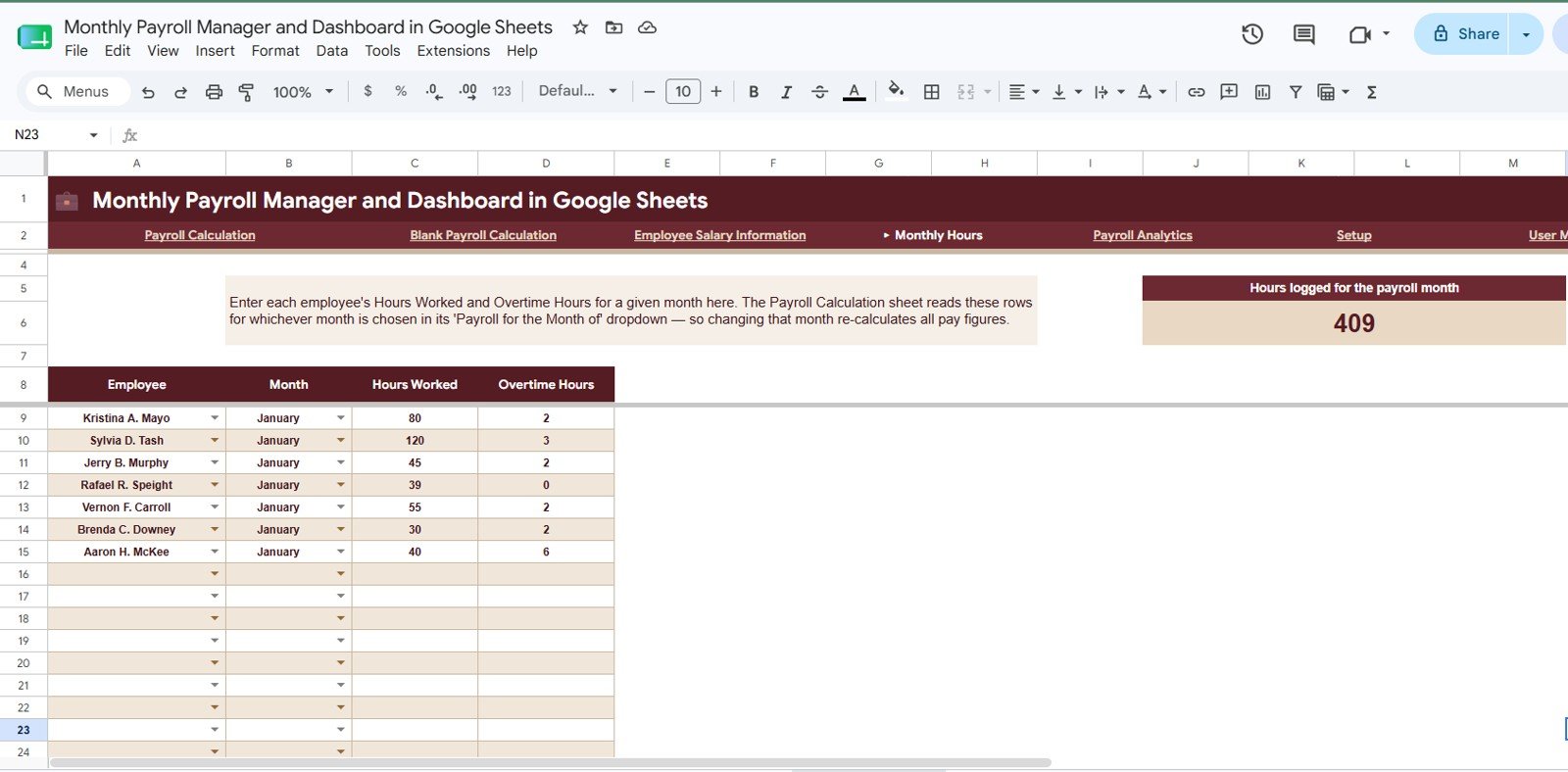
The Monthly Hours sheet focuses on the time inputs that drive hourly pay and overtime pay. It is especially useful for teams with a mix of fixed salary, hourly, and overtime-based employees.
Hours Worked by Employee: This chart compares total hours worked by employee. It helps payroll teams confirm whether hours line up with expected schedules.
Overtime Hours by Employee: This chart isolates overtime hours by person. It helps managers understand who is working extra hours and whether overtime needs operational review.
Hours Worked by Month: This trend shows regular hours across payroll months. It helps identify seasonal workload changes or unusual drops in recorded hours.
Overtime Hours by Month: This chart tracks overtime movement month by month. It is useful for monitoring whether overtime is becoming a recurring cost issue.
Hours Logged by Payroll Month: This view summarizes total logged hours for each payroll month. It helps finance compare payroll cost against total labor input.
5. Payroll Analytics
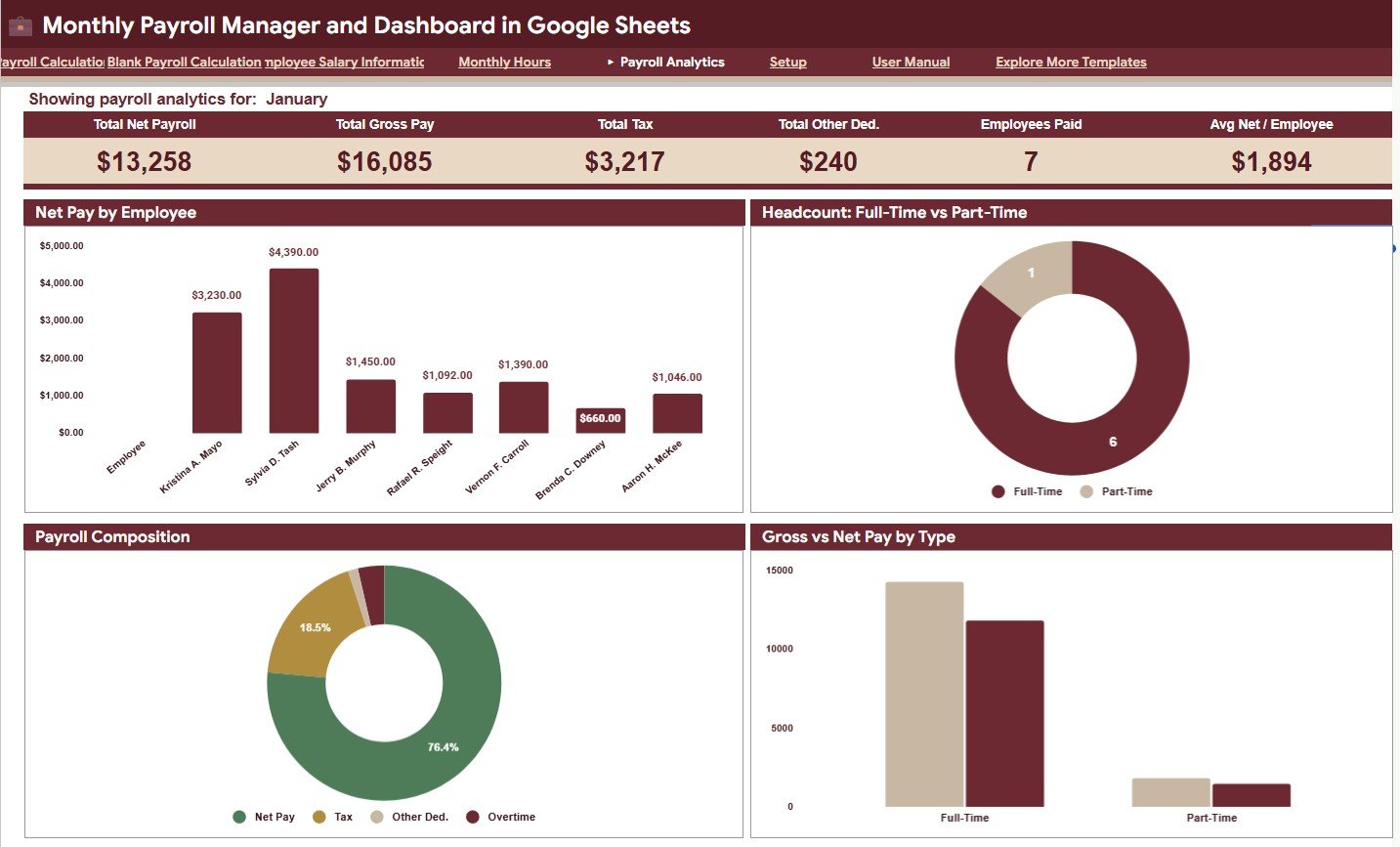
The Payroll Analytics tab turns payroll records into management-level analysis. It is designed for review meetings where leaders need to understand payroll cost by employee, employee type, and component.
Net Pay by Employee: This chart shows final net pay by employee. It helps confirm payment amounts and identify employees with unusual net pay values.
Headcount by Employee Type: This view summarizes employee count by type. It helps leadership connect payroll cost to the structure of the workforce.
Payroll Amount by Payroll Component: This chart breaks payroll into components such as gross pay, tax, deductions, and net pay. It helps teams see which components are driving the total payroll amount.Monthly Payroll Manager and Dashboard in Google Sheets
Gross Pay and Net Pay by Employee Type: This comparison shows how gross and net pay differ across employee groups. It is useful for understanding deduction impact by employee type.Monthly Payroll Manager and Dashboard in Google Sheets
Average Net Pay by Employee: This chart shows average take-home pay by employee. It supports payroll benchmarking inside the team and highlights possible exceptions.
6. Setup Sheet Tab
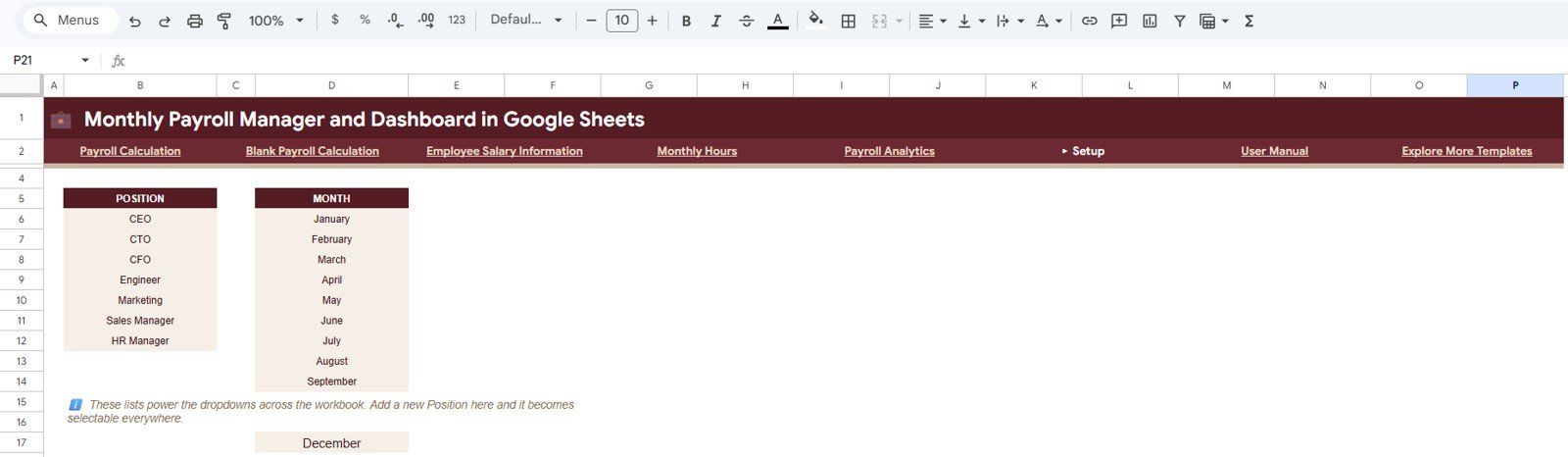
The Setup sheet is where users update the dropdown source lists used across the workbook. It includes the Position Dropdown List, Month Dropdown List, and Dropdown Source Lists by Workbook Area, all kept in the same format for easy maintenance.
Monthly Payroll Manager and Dashboard in Google Sheets vs. Excel Dashboard vs. Paid HR SaaS – Feature Comparison
| Feature | This Google Sheets Template | Excel Dashboard Alternative | Paid HR SaaS |
|---|---|---|---|
| Cost | $9.99 sale price, one-time | One-time template cost | Monthly subscription or per-employee pricing |
| Platform | Google Sheets in browser | Microsoft Excel desktop or Microsoft 365 | Vendor cloud application |
| Setup time | Copy the template and update setup lists | Download file and configure workbook | Longer onboarding and account setup |
| Real-time team collaboration | Built into Google Drive sharing | Best through OneDrive or SharePoint | Usually included |
| Mobile access | Google Sheets app or browser | Excel mobile with some limits | Usually included |
| Customizable fields | Editable sheets, lists, formulas, and charts | Editable workbook | Limited by subscription and permissions |
| Share with link | Yes, with access controls | Possible through Microsoft sharing | Usually account-based |
| Year-1 cost at 5 users | $9.99 template cost | Template cost plus Excel access | Often hundreds of dollars per year |
| Payroll analytics | Built-in employee, employee type, component, and hours views | Depends on workbook design | Depends on payroll module |
Who Should Use This Template
This template is a strong fit for small businesses, HR managers, founders, payroll assistants, accountants, schools, clinics, retail teams, agencies, consultants, and operations managers who want payroll calculation and review inside Google Sheets. It is especially useful when payroll data needs to be shared with finance or leadership without buying a full payroll SaaS plan.
Real-World Use Cases
Small business HR review: A 25-person service business uses the dashboard to review gross pay, deductions, taxes, overtime, and net salary before monthly payment approval.
Hourly and salaried payroll: A clinic tracks fixed-salary staff and hourly employees in the same file, using the Monthly Hours page to keep overtime visible.
Payroll consulting: A consultant creates one copy per client, updates dropdown lists for each business, and uses Payroll Analytics during monthly review calls.
Advantages of Monthly Payroll Manager and Dashboard in Google Sheets
- It keeps payroll calculation, employee salary assumptions, hours, and analytics in one workbook.
- It gives HR and finance a shared review layer without recurring software cost.
- It makes deductions and overtime easier to review before net pay is finalized.
- It supports quick filtering with slicers, which is useful in monthly review meetings.
- It is easier to customize than many SaaS payroll screens because the formulas and sheet structure are editable.
Opportunities for Improvement
This is a payroll dashboard template, not a complete payroll compliance platform. Teams may still want to add country-specific statutory rules, direct bank payment exports, approval workflows, payslip generation, employee self-service, or automated email notifications. Large organizations should also review access controls, audit trails, and data-retention requirements before using any spreadsheet as part of payroll operations.
Best Practices
- Keep one protected master copy and one working copy for each payroll month.
- Update the Setup sheet before importing employee or hours data.
- Restrict edit access to payroll owners and share view-only copies with managers.
- Reconcile total gross pay, tax amount, other deductions, and net pay before payment approval.
- Review overtime charts each month so extra labor cost is not hidden inside gross pay.
- Use Google Drive permissions carefully. Google’s own file sharing documentation is a helpful reference for controlling access.
Explore Relevant Templates
- Monthly Payroll Manager and Dashboard in Google Sheets
- Employee Attendance Payroll Management System – HR Web App Template
- Payroll Calculator and Payslip Generator in Excel
- Attendance Tracker in Google Sheets
- Employee Onboarding Tracker in Google Sheets
- Browse Google Sheets HR and Payroll templates
Frequently Asked Questions
What is the Monthly Payroll Manager and Dashboard in Google Sheets?
It is a Google Sheets template for monthly payroll calculation, employee salary information, hours tracking, deductions, net pay, and payroll analytics.
Does it support overtime analysis?
Yes. The workbook includes overtime pay by employee, overtime hours by employee, and overtime hours by month.
Can I track tax and other deductions?
Yes. The dashboard includes Total Tax Amount and Total Other Deductions cards, plus employee-level tax and deduction charts.
Can I customize dropdown lists?
Yes. The Setup sheet includes position and month dropdown lists and source lists by workbook area.
Is this a replacement for payroll compliance software?
No. It is a calculation and dashboard workbook. Use it for internal review, then confirm compliance and filing rules with a payroll professional.
Can my team collaborate on it?
Yes. Since it is built in Google Sheets, collaboration is handled through Google Drive sharing permissions.
About the Author
Built by PK – Microsoft Certified Professional with 15+ years of Excel, Google Sheets, and Power BI experience. Founder of NextGenTemplates, reaching 300K+ subscribers across YouTube channels. Every template is hand-built and tested before release.
Conclusion
The Monthly Payroll Manager and Dashboard in Google Sheets gives HR and finance teams a practical payroll review system without the cost or complexity of a full HR SaaS platform. It brings payroll month cards, employee salary details, hours analysis, deduction checks, net pay review, payroll analytics, and setup lists into one editable workbook.
Click here to purchase the Monthly Payroll Manager and Dashboard in Google Sheets.
For step-by-step spreadsheet and dashboard tutorials, visit YouTube.com/@NeoTechNavigators.
Last updated: July 22, 2026